1
Connect Cables
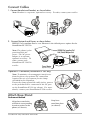
1. Connect handset and headset, as shown below.
Note: Headset is a separate, optional accessory. To order, contact your reseller.
2. Connect Network and Power, as shown below.
IEEE802.3af compliant Power over Ethernet is the default power option for the
SoundPoint IP 330/320.
Note: The phone is also
provisioned for AC
power. The AC power
adapter is a separate,
optional accessory. To
order, contact your
SoundPoint IP 330/320
reseller.
IEEE802.3af compliant PoE
Hub/Switch/Midspan Unit
Power Adapter
(Optional Accessory)
Optional PC Connection (SoundPoint IP 330 only)
Note: To minimize electromagnetic interference
from the phone, the optional PC connection
requires the use of a separate ferrite clamp
(included in this shipment).
Fasten the clamp around the cable jacket, nearest
to the jack that will be connected to the PC port
on the SoundPoint IP 330 (as shown). For more
details, contact your SoundPoint IP 330 reseller.
Attach Base Stand
Deskmount Method
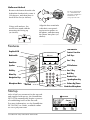
Align base stand tabs
with their corresponding
insertion points on the
phone (as shown).
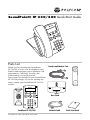
SoundPoint IP 330/320 Quick Start Guide
Snap base
stand into place
(as shown).