1
VMware View Installation Guide
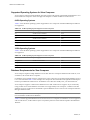
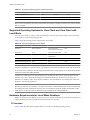
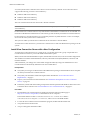
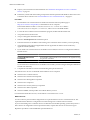
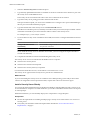
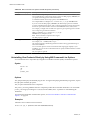
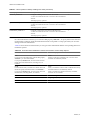
Table 2-1. View Agent Operating System Support (Continued)
Guest Operating System
Version
Edition
Service Pack
Windows 2003 R2 Terminal Server
32-bit
Standard
SP2
Windows 2003 Terminal Server
32-bit
Standard
SP2
IMPORTANT If you use Windows 7 in a virtual machine, the virtual machine must be hosted on an ESX 4.0 or
ESX 4.1 server. For ESX 4.0, the version must be ESX 4.0 Update 2 or higher. For ESX 4.1, the version must be
ESX 4.1 or higher.
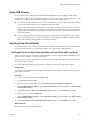
Supported Operating Systems for View Client and View Client with
Local Mode
Users run View Client to connect to their View desktops. You must install View Client or View Client with
Local Mode on a supported operating system.
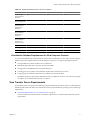
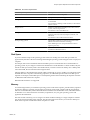
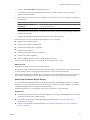
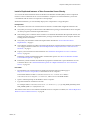
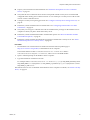
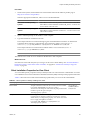
Table 2-2 lists the operating systems supported for View Client.
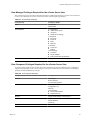
Table 2-2. View Client Operating System Support
Operating System
Version
Edition
Service Pack
Windows 7
32-bit and 64-bit
Home, Enterprise,
Professional, and Ultimate
N/A
Windows XP
32-bit
Home and Professional
SP3
Windows Vista
32-bit
Home, Business, Enterprise,
and Ultimate
SP1 and SP2
Mac OS X Leopard 10.5
N/A
N/A
N/A
Mac OS X Snow Leopard 10.6
N/A
N/A
N/A
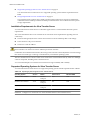
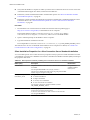
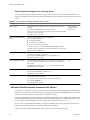
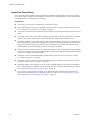
IMPORTANT View Client with Local Mode is supported only on Windows systems and only on physical
computers. In addition, to use this feature, your VMware license must include View Client with Local Mode.
View Client with Local Mode is the fully supported feature that in earlier releases was an experimental feature
called View Client with Offline Desktop.
A Windows 7 or Windows Vista View desktop that is created on an ESX 3.5 host cannot produce 3D and
Windows Aero effects. This limitation applies even when the desktop is checked out for local use on a
Windows 7 or Windows Vista client computer. Windows Aero and 3D effects are available only if the View
desktop is created using vSphere 4.x.
NOTE VMware partners offer thin client devices for VMware View deployments. The features and Linux
operating systems that are available for each thin client device are determined by the vendor and model and
the configuration that an enterprise chooses to use. For information about the vendors and models for thin
client devices, see the Thin Client Compatibility Guide, available on the VMware Web site.
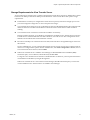
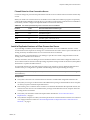
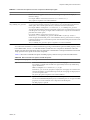
Hardware Requirements for Local Mode Desktops
When you check out a View desktop to run on your local computer, the hardware on the client computer must
support both the local system and the virtual machine that now runs on it.
PC Hardware
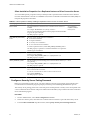
Table 2-3 describes the hardware requirements for various View desktop operating systems.
16
VMware, Inc.