1
Device of this mark is
a trademark of Sharp
Corporation.
Plasmacluster is a
registered trademark
or a trademark of
Sharp Corporation.
*1
Ǡᘣ
*&2%+ ᎘ずᩆ
˫⏲㚰
ᓮגาᔹᦰࠀݔঅژຍם֫ءΖ
IG-ETC1A_hk.indd 1
䈒ᶬ IG-ETC1A
+2!ݾءᑑقऱᑇڗਢലݼပᖲ࣋ᆜڇ၀२ᛥᕻऱۯ
ᆜΔ່ڇՕଅၦሎ᠏ழΔڇᔞ૿شᗨࢪၴۯᆜॵ२
) ၏ᠦ ૿چ2/3 * ۏΔၦ৫ ޢנ2 ֱمᵏ़ۏխࢬ
ܶᠦऱՕપᑇၦΖ
2012/09/24 16:24:34
IG-ETC1A_hk.indd 2
2012/09/24 16:24:35
Ǡᘣ
IG-ETC1A
▆㵺
㱢㖘ҧș䃼 ................................................................................ P-2
• ᤞ ܫ............................................................................................... P-2
• ᖙࣹ܂რࠃႈ ................................................................................ P-3
ۄ㮋ԟۍ⡴ .................................................................................... P-4
• ᖙ ࣨ૿܂0 ᧩ ق0 ൳ᕴ .............................................................. P-4
• ᖲ 0 ॵٙ .................................................................................... P-5
ḅϤཊˈ ........................................................................................ P-6
Ǫᩆᕱˈ ........................................................................................ P-8
̺䆻⻚ᶕẫ .................................................................................. P-13
ᖲ ............................................................................................. P-13
መៀጻ ......................................................................................... P-13
ଅሐփຝ ...................................................................................... P-14
IE ᠦขسᕴ.............................................................................. P-16
*& 㿲ഐ⏬⏩࣐┦ᒙ ................................................................ P-17
Ǡᘣ
୪ˁᒙ *& 㿲ഐ⏬⏩࣐ ........................................................... P-18
䈒ᶬ •
•
•
•
㖦ᢃ .............................................................................................. P-18
ᗥ㾬ᛆ┦㗩᱃ᙑᲑ...................................................................... P-19
• ឈྥ JH.FUD2B ౨ജװࡉࠫލೈᣬ௬ऱఐۆהࠡ֗אढΔ܀լ౨ݙ٤ᛜທ
ԫଡྤပऱᛩቼΖᜢᣪֆኙᇠขַპسढტऱ౨Ժլ༼ࠎঅᢞΖ
• ࡳᤩנᖺ৫ऱᠦᜀ )QDJ*ΔᏁࡳཚޓངڜᇘ࣍ JH.FUD2B փຝऱ IE
ᠦขسᕴ +Ζ
+! ڇ35 ՛ழຑᥛሎ۩ऱൣउՀΔՕપ ޢ3 ڣΰ28-611 ՛ழαᏁၞ۩ԫޓڻངΙI E ᠦขسᕴല
ڇՕપ 3 ڣ3 ଡִΰ2:-111 ՛ழα৵ೖַሎ۩Ζ
ტ൞၇ᜢᣪֆسขऱ IE!QDJ ݼပᖲΖ
شࠌڇIE!QDJ ݼပᖲছᓮᇡาᔹᦰם֫ءΖ
ᔹᦰ৵ᓮݔঅם֫ءژΔֲঁא৵ᔹΖ
ᣂ࣍ם֫ءխ༼ࠎऱᇷಛΔױڶ౨ྤຏवۖ᧢ޏऱൣ㤝Ζ
P-1
IG-ETC1A_hk.indd Sec1:1
2012/09/27 16:44:27
㱢㖘ҧș䃼
شࠌڇሽᕴขழΔؘႊᙅښഗڜء٤ቃൻਜΔץਔאՀ૿ֱٺΚ
㝨 ܅ῳᶘල㗾䀇ŬᾴῂጝڛϺ⥔ٛ㾺䜛
Θ!ءشࠌڇᖲছᇡาᔹᦰࢬڶऱࣹრࠃႈΖ
Θ!֊֎ჾᡏٌੌሽ᠏൷ᕴΔࢨኙࠡၞ۩ףՠΖՈլࠌشჾᡏԱऱٌੌሽ᠏൷ᕴΖ) ࠹ჾຝ։ױ౨ᄎᖄી
ሁΔሽᄭᒵױ౨ᄎዹ֏Δ֧ದထ־Ζ*
Θ!ੌٌ࣠ڕሽ᠏൷ᕴ࠹ჾΔࢨፖᛥՂ༺ஆऱຑ൷լߜΔঞլࠌءشขΖ) ܡঞױ౨ᄎᖄીᤛሽࡉ־
߀Ζ*
Θ!֊֎شᛘ֫ฝೈٌੌሽ᠏൷ᕴΖ) ܡঞױ౨ᄎᖄીᤛሽࡉ࠹႞Ζ*
Θ!ᓮ֎ڇதထຌᒵऱणኪՀࠌشΖ) ܡঞױ౨ᄎᖄી߀־Ζ*
Θ! شࠌױ331W ऱሽᄭ༺ஆΖ
Θ!ࠌشറ॰ءขۖૠऱٌੌሽ᠏൷ᕴΔٌੌሽ᠏൷ᕴᏁ֊ኔ༺چԵሽᄭ༺ஆ۟ࢍຝΖ) ܡঞױ౨ᄎ
ᖄી߀־ΕᤛሽࡉჾᡏΖ*
Θ!ࡳཚ堚ೈٌੌሽ᠏൷ᕴՂऱۊቺΖ) ܡঞױ౨ᄎᖄી߀־Ζ*
Θ!ڇሼॸ֚Δೖַሎ۩ໂΔࠀലٌੌሽ᠏൷ᕴൕ༺ஆխࢸנΖ) ܡঞױ౨ᄎᖄી߀־ΕᤛሽࡉჾᡏΖ*
Θ!֊֎ኙءขၞ۩ףՠΖٵᑌΔॺᛧᦞऱፂଥԳΔլኙءขၞ۩ࣈೈࢨଥΖ) ᤉᥛࠌشழΔ
ױڶ౨ᄎᖄી߀־Εᤛሽࢨ࠹႞Ζ* ᜤ၇ऱᆖᔭࢨᜢᣪࣚ೭խ֨Ζ
Θ!ᓮ֎௦ֽΕැֽࢨृٻᖲऴ൷ֽࣹΖ) ᖲփຝၞֽΔױڶ౨ᄎᖄી߀־Εᤛሽࢨ࠹႞Ζ*
Θ!נ࣠ڕਚᎽ ) ᗈྡྷ࠺Ε࿇ᑷΕ᧢ۥΕ᧢ݮ *Δೖַሎ۩ໂࠀࢸੌٌנሽ᠏൷ᕴΖ) ᤉᥛࠌشழΔ
ױڶ౨ᄎᖄી߀־Εᤛሽࢨ࠹႞Ζ* ᜤ၇ऱᆖᔭࢨᜢᣪࣚ೭խ֨Ζ
Θ!অ塄ࡉ堚ᑥ৵ਊڶणኪิᇘΖ) ܡঞױ౨ᄎᖄી࠹႞ࢨჾᡏΖ*
Θ!ڜᇘࢨ堚ᑥᖲழΔലٌੌሽ᠏൷ᕴൕ༺ஆխࢸנΖ) ܡঞױ౨ᄎᖄી߀־Εᤛሽࢨ࠹႞Ζ*
Θ!ࠌءشขழᓮᠦࠝ࿙Ζ) ܡঞױ౨ᄎᖄી߀־Εᤛሽࢨ࠹႞Ζ*
Θ!ءໂլࠎߪ᧯ΕཕԺࢨტࡴ౨ԺլߩհԳΰץਔࠝ࿙αࢨᆖ᧭ࡉवᢝऱԳࠌشΔೈॺהଚբ
ࠩԫۯኙהଚࠌشໂऱڜ٤ຂऱԳՓऱᅮࢨਐقՀࠌشΖ!
Θ!ᚨ՛֨ጥࠝ࿙ΔᒔঅהଚլᄎނनءໂΖ
P-2
IG-ETC1A_hk.indd Sec1:2
2012/09/24 16:24:36
IG-ETC1A
Ǡᘣ
Θ!ലٌੌሽ᠏൷ᕴൕ༺ஆՂࢸנழ֊֎ࢸൾሽᄭᒵΖ) ܡঞױ౨ᄎᖄીࢨ߀־ᤛሽΖ*
Θ!լࠌشழΔᓮലٌੌሽ᠏൷ᕴൕ༺ஆխࢸנΖ) ܡঞᒴױ֏۔٭౨ᄎᖄીᤛሽΕዥሽࢨ߀־Ζ*
Θ!֊֎אڇՀࢬࠌءشขΚ) ܡঞױ౨ᄎᖄીᤛሽࢨ߀־Ζ*
!Θ!ᅁ્־ᤛᅸऱࢬΕࢤ־֧ڶ᧯ऱࢬΖ!
!Θ!ॸֽࢨֽक़ዠࠩऱࢬΕᄵࢨᑪᛘऱࢬΖ!
!Θ!ڶई 0 ۊቺ 0 ८᥆ృऱࢬΖ!
Θ!ᓮ֎९ழၴᨃଅኙထߪ᧯ऴ൷ܬΖ) ܡঞױ౨ᄎᖄીߪ᧯լᔞΕڶჾൈΖ*
Θ!լᨃ֫ਐࢨՕᙰಾΕ८᥆ฆढ༺ԵሽᄭᙁԵึጤΕ़נܬՑࡉ़ܮԵՑΖ) ܡঞױ౨ᄎᖄી
ᤛሽΕ࠹႞ࢨॺإൄሎ۩Ζ*
Θ!ᓮ֎ڇլؓऱࢬࢨॴᡶढॵ२ࠌشΖ) ܡঞױ౨ᄎᖄીჾᡏΕ࠹႞ࢨॺإൄሎ۩Ζ*
Θ!ᓮ֎९ழၴࢨऴ൷൷ᤛٌੌሽ᠏൷ᕴΖ) ܡঞױ౨ᄎᖄી܅ᄵᗈ႞Ζ*
Θ!ᓮ֎૿چڇՂࣆࢮขΖ) ܡঞױ౨ᄎᖄીขჾᡏࢨࠪक़ࣨچΖ*
Θ!ᓮ֎ءڇขॵ२ࠌྤشᒵᕴඳΰᄐ塒ྤᒵሽຏॾΕଡԳྤᒵຏॾαΖ) ܡঞױ౨ᄎᖄીਚᎽΖ*
Θ!ᓮ֎ڇขՂ࣋ᆜढΖ) ܡঞױ౨ᄎᖄીਚᎽΖ*
Θ!ၞՑ؆።ᇙॵڶᥳΔڼڂᓮ֎ല࠹ᥳᐙऱढΔڕΕ֫ᙎ൷२ၞՑΖ
Θ!ᅝᖲ࿇سฆൄ೯ழΔᓮೖַࠌشΖ!) ܡঞױ౨ᄎᖄી࠹႞ࢨॺإൄሎ۩Ζ*
Θ!ሎಬழലข࣋ၞᒣᇙ٦ၞ۩ሎಬΖ) ܡঞױ౨ᄎᖄીჾᡏΖ*
Θ!ᓮ֎ലॵऱٌੌሽ᠏൷ᕴء࣍شขא؆ऱढΖ) ܡঞױ౨ᄎᖄીਚᎽΖ*
Θ!ᓮ֎شԺᚘࢨᔐᔏ᧯ຑ൷شऱ༺ᙰΖ) ܡঞױ౨ᄎᖄીਚᎽΖ*
Θ!ᓮലᖲፖگଃᖲΕሽီᖲࡉگଃᖲᕕᤪ։ၲ࣋ᆜΖܡঞױ౨ᄎፖᖲऱሽंઌյեឫΔᖄી᧩قऱ
ฆൄΖ
Θ! ڇIE ᠦขسᕴॵ२Δ֊֎ࠌشੇڶףᖫࢨशᓄऱ֏݉ढ )+*Ζ!
! ܡঞੇᖫΕ⊕ᓄױ౨ᄎॵထڇᖲփຝΔᖄીྤऄขسᠦᜀΖ!
! ڼழΔᏁװೈ IE ᠦขسᕴփሽᄕຝ։ࡉሽᄕࡌऱۊቺΖ) ߠ Q.27*
+!ᥨᕓขΰᕓණঅᥨΕᕓᓄΕᙰᕓଥᥨขα
Ε֏݉ΕۀލᕪΕᙩሽַᕪΕֽᏴᣆᕪΕ٠ॽᕪΕ
ੲᑿ堚ᑥᕪΕ֏ᖂࢳؒΕفᥣΖ
䈒ᶬ ᕱˈᲤረș䃼䜛
P-3
IG-ETC1A_hk.indd Sec1:3
2012/09/25 16:58:57
ۄ㮋ԟۍ⡴
ᕱˈ䁨 䅡➑ 㬉ᑰ࣐
ᕱˈ䁨
*& 㿲ഐ⏬⏩࣐
ᒙᏫ➑⃝ ⫑⽁ ᶕẫ㫾Ὃ⭯Ꮻ➑⃝
ᩀ⽁ FILTER
CLEAN
UNIT
(Press 3sec.)
ཋڷᖚᏭ㲦
Ҍሸᶩ࣐ڛҌ
㮋ʹ
SWING
NjnjᖚᏭ㲦
Ԡᒙ䅧㱤Ꮽ㲦
䅧㱤Ꮻ➑⃝ ㈪⽁ POWER
LOW
䅧㱤ჵ㛁Ꮽ㲦
AIR
HIGH
൚ᛆ㼲ᩆ
Ꮻ➑⃝
┟⽁ ൚ᛆ㻡ᩆ
Ꮻ➑⃝
⫑⽁ ൚ᛆᏫ➑⃝
┟⽁ !
""
TIMER
㬉ᑰ࣐
ᑮᗖ㮋ʹ
AIR VOLUME
㫻㩑Ꮽ㲦
FINE
ADJUSTMENT
TIMER
൚ᛆᏭ㲦
VO L U M E
㿲ഐᨑၞᏫ➑⃝ ┟⽁ 㫾Ὃ⭯㱢㘳Ꮽ㲦
RESET
ཋڷᖚ㗘
Ꮻ➑⃝ ┟⽁ 䅡➑
RHYTHM WIND
ION MODE
䅧㱤ᘔഗ䅡➑ ㈪⽁ ⦰ⷴ䃲გ䅧Ꮽ㲦
㿲ഐᨑၞᏭ㲦
Ζ
• ᖙ܂ຝۯਢᤛტྒྷᕴڤऱਊၨΖᓮݙ٤൷ᤛਊၨຝۯΰტྒྷᕴຝۯα
! ࣠ڕ൷ᤛ૿መ՛Δขױ౨ᄎᣄאტᚨΖ
㬉ᑰ࣐
㫻㩑Ꮽ㲦
┞㪽㮋ʹ
ඳ㬉ᑰ࣐ᗖ㫢Ǫ䌑ᛆ
㿲ഐᨑၞᏭ㲦
• ᓮല൳ᕴگၞ᧯હ૿ऱ
൳ᕴ༺ԵՑխΖ
POWER ION MODE
Ԡᒙ䅧㱤Ꮽ㲦
AIR
L VOLUME
H
䅧㱤ჵ㛁Ꮽ㲦
ཋڷᖚᏭ㲦
FINE
ADJUSTMENT
SWING
NjnjᖚᏭ㲦
TIMER RHYTHM WIND
൚ᛆᏭ㲦
⦰ⷴ䃲გ䅧Ꮽ㲦
൳ᕴ༺ԵՑ
P-4
IG-ETC1A_hk.indd Sec1:4
2012/09/24 16:24:36
IG-ETC1A
Ǫᩆ
՝䁨
ⷉ䁨
䅧㬃ଇㅀ
㿲ഐ⧮Ꮻ➑⃝
┟⽁ ᎋፒ
Ǫ䌑ଇㅀ
⢯ᯬ۴ԓڧ
㬉ᑰ࣐
ᒐҤڧ
䅧ۑ
䅧㬃
*& 㿲ഐ⏬⏩࣐
ᶕẫՌ
䀇᷿㩀Ҥ
⤈ڧ
Ǡᘣ
⢯ᯬ۳Ҥڧ
ଇㅀ
䈒ᶬ ᎋፒ
⢯ᯬ۳Ҥڧ
⬋ɯᗏ᠓
䅧ፎଇㅀ
㫾Ὃ⭯
㽞ɯ
•Ȳ᳷䀇㩑ᑮ࣐
ᖲຑ൷༺شᙰ
•㬉ᑰ࣐
ሽᄭ༺ᙰ
•ᶕẫՌ
ΰྤᒵα
) ڜᇘ᧯ڇփຝ *
•### Ȍ䀇ᰩ
&%8䜍 䄸
POWER ION MODE
AIR
L VOLUME
H
FINE
ADJUSTMENT
SWING
TIMER RHYTHM WIND
ᓮ֎ല堚ᑥࠧ࣍ش堚ᑥ
IE ᠦขسᕴא؆ऱ
ढΖ
ٌੌሽ᠏൷ᕴ᧯
•˫⏲㚰
P-5
IG-ETC1A_hk.indd Sec1:5
2012/09/24 16:24:39
ḅϤཊˈ
ඳ䀇ᰩ㓹㫢㬉ᑰ࣐㓽 ᒙ䀇ᰩ 1
Ꮈ㻡㬉ᑰ࣐ⷉ䁨┦ㅀŭ
።
2
Ꮽ䀇ᰩ┦ ᬰ✕㓹䀇ᰩŭ
)BBB ሽ ۃED2/6WΔ3 ឍ *
3
㓹㬉ᑰ࣐ⷉ䁨┦ㅀŭ
㬉ᑰ࣐┦ᕱˈ
ᑮڛ㮋ʹ
⫐ O ɤҦ
• ᓮല൳ᕴऱ࿇ಬຝ᧯ٻ૿ۯऱ൷࠹ຝۯ৵ၞ۩ᖙ܂Ζ
• ٻ૿࣠ڕ൷گຝאۯ؆ऱֱࢨٻ൳ᕴऱ࿇ಬຝ᧯ࡉۯऱ൷
گຝۯၴڶᎽᡶढΔױ౨լᄎሎ܂Ζ
• ᓮ֎ᨃ൳ᕴൾՀΕ࠹ෳ௺ᐳᚰࢨֽऀ
ᛘΖ
Ფረ •
•
•
•
•
•
•
ᙟထሽۃΔࠌش൳ᕴᖙ܂ऱᒤᄎ᧢ాΖ
᧢ڇᚘᕴڤऱᅃࣔᗉࠠՀࢨ֜ڶၺऴ୴ऱࢬᇙΔ൳ᕴऱ൷گᨋඕ৫ױ౨ᄎ૾܅Δࢨᑉೖሎ܂Ζ
࣠ڕሽۃऱࠌֱشऄᙑᎄΔױ౨ᄎᖄીሽۃዥۖፍ፱ขࢨሽۃჾᡏΖ
ᓮ֎ၞ۩ךሽΕࠌࠡሁΕ։ᇞࡉףᑷΖ
ޓངழᏁٵழࠌ ش3 ឍઌٵᣊীऱሽۃΖ
९ழၴլࠌشழΔᏁ࠷נሽۃΰַڂዥ֧ۖದਚᎽα
Ζ
ሽۃऱᄫၞԵณᅪΕऀࠩؼᓅࢨ۪ࣚழΔᓮشܛم堚ֽޱੑΖ
P-6
IG-ETC1A_hk.indd Sec1:6
2012/09/25 16:58:58
IG-ETC1A
Ფረș䃼
㛍דᄌⱿᙔ⢞൚┦ፇŭ
• ᓮ೭ؘലءข࣋ᆜࡖؓڇऱࣨچՂΖլڇோՂࠌشΖ
• ֊֎ങ۰ၞ़ܬԵՑࡉ़נܬՑΖ
• ڼ࣠ڕIE ᠦขسᕴኙᐖᐾࢨሽီ൷ګݮگեឫΔאױቫᇢආ࠷אՀԫጟࢨڍጟൻਜೈեឫΚ
• ᓳᖞࢨૹᄅڜᆜ൷֚گᒵΖ
• ᏺءףขፖᐖᐾ 0 ሽီ൷گᕴऱ၏ᠦΖ
• ലໂሽᄭᒵຑ൷ࠩ൷گᕴࢬຑ൷ࠩऱլٵሽሁ༺ஆՂΖ
• ᘬᇬᆖᔭࢨڶᆖ᧭ऱᐖᐾ 0 ሽီݾԳΔᛧറᄐԳऱᚥܗΖ
Ფረ ५یǁፇ㻍ម˫⏲䜍ⷴڳ㫘Ǫᩆܔक़┦⅓ૃŬॳŬॳ᮸⥔䌏ᰪŭ
• ৬ᤜլழฝ೯ᖲऱ࣋ᆜࢬΔࢨृࡳཚ堚ᑥࡌ֗ᖲऱ࣋ᆜ૿Ζ
! ) ᣂ࣍૿چऱᧂۆംᠲΔڇڕᖲՀᔮቾढΔ࠷ױࣔ᧩ய࣠Ζ*
Ȳ᳷䀇㩑ᑮ࣐┦㫛ᑮ
ല᧯ຑ൷شऱ༺ᙰ֊ኔ༺ၞ᧯ऱሽᄭᙁԵጤՑΖ
Ǡᘣ
ሽᄭᙁԵጤՑ
䈒ᶬ ലٌੌሽ᠏൷ᕴ᧯ऱ༺ᙰ֊ኔ༺༺ڇஆՂΖ
2
ٌੌሽ᠏൷ᕴ
᧯
1
ᖲຑ൷༺شᙰ
⡂ᛆ┦Ფረș䃼
• ᓮ೭֫ނؘਐ࣋ၞ֫ނᇙΔࠀࣉ֫شದ৵ฝ೯Ζ
• ᓮ೭شؘᠨ֫ࣉದΖ
• ฝ೯ழΔᓮ೭ؘೖַขሎ᠏Ζ
֫ނ
P-7
IG-ETC1A_hk.indd Sec1:7
2012/09/24 16:24:42
Ǫᩆᕱˈ
㻡பᕱˈ
1
Ǫᩆ
㬉ᑰ࣐
Ꮽnj㫻㩑Ꮽ㲦ŭ
ቷ
ᕱˈ䁨
POWER
POWER
POWER
LOW
AIR
VO L U M E
HIGH
䅡➑
2
POWER
AIR
VO L U M E
AIR
L VOLUME
H
HIGH
• ଶ༺Եٌੌሽ᠏൷ᕴ৵Δࠌشଅ
ၦ⫦ᑇ 2ΰპᓳ⫦ᑇ 5αሎ᠏Ζ!
) ߠ Q.21*
• ଅၦਐقᗉࡉଅၦᑇق᧩ڗৠॽ
ᗉΖ
• ᠦᑓڤਐقᗉΰළଅᠦαॽ
ದΖ
㬨ᕫፇ䀌┦䅧㱤ŭ
ቷ
LOW
Ფረ • ຏመ֊ངଅၦਊၨΔױൕଅၦ 2 ࠩ 9 ऱ ⫦ ᑇխၞ
۩ࡳΖ
• ᖕଅၦ ⫦ ᑇΔଅၦਐقᗉॽᗉΔଅၦᑇق᧩ڗ
ৠᄎ!
᧢
! ֏Ζ) ߠ Q.21*
㛁ᘐཋڷᖚ┦㗘
1
Ǫᩆ
㬉ᑰ࣐
ᏭnjཋڷᖚᏭ㲦ŭ
• ޢਊԫՀؐ׳ឭ೯ਊၨΔឭ೯ऱߡ৫ᄎ᧢֏Ζ
• ؐ׳ឭ೯ߡ৫ਐقᗉዽᗉΔឭ೯ܛᄎೖַΖ
ቷ
FILTER
CLEAN
UNIT
ቷ
ቷ
ቷ
ቷ
ቷ
RESET
(Press 3sec.)
SWING
ዽᗉ
POWER
ឭ೯ೖַ
LOW
A IR
V O L U ME
HIGH
FINE
ADJUSTMENT
TIMER
ؐ
RHYTHM WIND
ION MODE
׳
60°
• ٻֱ׳ؐٻឭ೯Ζ
90°
120°
Ფረ • ᓮ೭ؘຏመࢨ᧯൳ᕴऱឭ೯ਊၨၞ۩ᓳᖞΖ
• ᓮ֎׳ؐ֫شឭ೯Ζ
P-8
IG-ETC1A_hk.indd Sec1:8
2012/09/24 16:24:42
IG-ETC1A
䅧ۑ㫻ˈ
1
Ǫᩆ
䅧ۑΧᬯᛆ䜍ᏭnjNjnjᖚᏭ㲦ŭ
㬉ᑰ࣐
• ޢਊԫՀՂՀឭ೯ਊၨΔଅࣨٻሎ܂ᄎ֊ང
ϘၲϙࢨϘᣂϙ
Ζ
ቷ
2
Χᬯ䅧ۑŭ
ቷ
ቷ
Ფረ • ᓮ֎֫شឭ೯ଅࣨٻΖ
• ᓮ֎൷ᤛڇإឭ೯ऱଅࣨٻΖ
Ǫᩆ
Ǡᘣ
1
Ꮽnj㫻㩑Ꮽ㲦ŭ
㬉ᑰ࣐
䈒ᶬ Χᬯᕱˈ
• ٤ຝऱਐقᗉዽᄰΔଅࣨٻങ۰נܬՑ৵Δሎ
᠏ೖַΖ
ቷ
POWER
POWER
㼲ᙔ⺽㘞ዊ֩ⷴ
୪᠇㫒㫾Ǫ䌑ጝ㬉ᑰ࣐┦㫻㩑Ꮽ㲦Χᬯ㫻㩑䜍⏬ݨ⺽㘞ዊᵌ䅧㿲ഐᨑၞܸሸᶩ࣐ᨑၞ┦㫻㩑⇉
ቤŭ
• ࡳழࡳࡉփ堚ᑥᑓڤΕ۪ढೈ౬ᑓڤऱࡳྤऄঅژΖ
• ೖሽࢨࢸൾٌੌሽ᠏൷ᕴ৵Δբঅژऱփ୲ᄎ堚ೈΖ) ೈԱբࡳሎ᠏۞೯༚פ౨ऱൣउ *!
) ߠ Q.23*
Ფረ • ءขྤऄ֫شᓳᖞؐ ׳0 ՂՀឭ೯ߡ৫Εଅࣨٻऱߡ৫Ζᓮ೭ؘຏመࢨ᧯൳ᕴၞ۩ᓳᖞΖ
• ڇឭ೯Εଅࣨٻሎ܂መ࿓խΔᅝሎ܂ᒤ᧢່ՕழΔױ౨ᄎᑉழೖַሎ܂ΔຍࠀॺਚᎽΖ
• ലՂՀΕؐ׳ឭ೯ PO ৵ΔࠌܛৱԱ 3 ։ᤪאՂΔឭ೯ΕଅࣨٻՈڶሎ܂ழΔᓮܛمൕ༺ஆ
խࢸൾٌੌሽ᠏൷ᕴΔࠀٻ൞၇ءขऱᔭഇࢋᘬᇬΖ
P-9
IG-ETC1A_hk.indd Sec1:9
2012/09/24 16:24:44
Ǫᩆᕱˈ
ඹ䅧㱤㫢㑶ჵ㛁
1
Ǫᩆ
Ꮽnj䅧㱤ჵ㛁Ꮽ㲦ŭ
㬉ᑰ࣐
ቷ
• אױຏመଅၦპᓳਊၨၞ۩ 43 ⫦ऱპ೯Ζ
᧢
! ֏Ζ
• ᖕპᓳ⫦ᑇΔଅၦᑇق᧩ڗৠᄎ!
FINE
ADJUSTMENT
FINE
ADJUSTMENT
ࢨ
ࢨ
䅧㱤ᘔഗ䅡➑
ଅၦᑇق᧩ڗৠ᧩ق৵Δપ 21 ઞ৵ዽᗉΖ
䅧㱤ῳ ⫦ᛆ⺽ۄҶϤ ⫦┦ჵⷴ֩ŭ
䜉Ұ ⫦䜊
1
1-4
䅧㱤⫦ᘔ
ჵ⫦ⷴ֩ᘔ
2
5-8
3
4
5
6
7
8
9 - 12 13 - 16 17 - 20 21 - 24 25 - 28 29 - 32
• ९ਊଅၦპ೯ਊၨאױၞ۩ݶຒᓳᖞΖ
ϙਊၨΔࢨڇპᓳ ⫦ᑇ 2 ழਊՀϘ
• ڇპᓳ 43 ⫦ழਊՀϘ
լᄎ᧢֏Ζ
ϙਊၨΔᄎದϘቷቷϙᜢΔଅၦ
⦰ⷴ䃲გ䅧
1
Ǫᩆ
㬉ᑰ࣐
RHYTHM WIND
Ꮽnj⦰ⷴ䃲გ䅧Ꮽ㲦ŭ
• ᆏ౨ᣉ৳ଅڕՀቹࢬقऱၜཚΔଅၦऱൎஇ։ 4
⫦Ζ
ቷ
RHYTHM WIND
˷䜛䅧㱤ῳ ⫦ᛆ ೂᡩ
ଅၦ⫦ᑇ 4
ଅၦ⫦ᑇ 3
ଅၦ⫦ᑇ m!
POWER
LOW
AIR
VO L U M E
• ᅝছଅၦ్ᑇऱਐقᗉᄎೂᡩΖ
2
Ǫᩆ
RHYTHM WIND
58 ઞࡌཚ
HIGH
㬉ᑰ࣐
ቷ
ቷ
• ଅၦ ⫦ ᑇ 2 ழΔ ڇ3 ଡ ⫦ ᑇၞ۩ሎ᠏ ) ଅၦ ⫦ ᑇ 2
ፖᣂᖲ⫦ᑇ *Ζ
• ٺشࠌאױଡპᓳ⫦ᑇࡳᆏ౨ᣉ৳ଅΖ
⦰ⷴ䃲გ䅧㊩ᙔ㫻㩑㫾⡎Ǡ䜍Ꮽnj⦰ⷴ䃲გ䅧
Ꮽ㲦ŭ
˷䜛䅧㱤ῳ ⫦ᛆ RHYTHM WIND
• ᅝছऱଅၦ ⫦ ᑇਐقᗉൕ
ೂᡩ༚۟ॽᗉΖ
ॽᗉ
POWER
LOW
AIR
VO L U M E
HIGH
P-10
IG-ETC1A_hk.indd Sec1:10
2012/09/24 16:24:45
IG-ETC1A
൚ᛆ㫻㩑
൚ᛆ㻡ᩆܸ൚ᛆ㼲ᩆ⁊Ბیᛆ㘳൚ŭ
=൚ᛆ㼲ᩆ?) ࠩԱቃ٣ࡳऱழၴΔܛᄎ۞೯ೖַሎ᠏ *
1
Ǫᩆ
㬨ᕫፇ䀌┦൚ᛆᛆ㻩ŭ
㬉ᑰ࣐
TIMER
• ࡳழਐقᗉࡉࡳழᣂᖲਐقᗉ ) ॽ * ۥػದΖ
• ᙟထழၴመװΔࡳழਐقᗉലᄎ֊ངΔ᧩ໍق塒ऱ
ழၴΖ
• ࠩԱࡳழࡳऱழၴ৵ΔࢬڶਐقᗉലዽᄰΔࠀ۞
೯ೖַሎ᠏Ζ
ቷ
TIMER
=൚ᛆ㻡ᩆ?) ࠩԱቃ٣ࡳऱழၴΔܛᄎ۞೯ၲࡨሎ᠏ *
㬨ᕫፇ䀌┦൚ᛆᛆ㻩ŭ
㬉ᑰ࣐
TIMER
• ࡳழਐقᗉࡉࡳழၲᖲਐقᗉ ) દॽ * ۥದΖ
• ࡳࡳړழၲᖲऱ 6 ઞ৵ΔೈԱࡳழਐقᗉࡉࡳழ
ၲᖲਐقᗉא؆ΔࠡהਐقᗉലዽᄰΖ
• ᙟထழၴመװΔࡳழਐقᗉലᄎ֊ངΔ᧩ໍق塒ऱ
ழၴΖ
• ࠩԱࡳழࡳऱழၴ৵Δࡳழၲᖲਐقᗉࡉࡳழਐ
قᗉലዽᄰΔࠀ۞೯ၲࡨሎ᠏Ζ
ቷ
TIMER
2
㬨ᕫፇ䀌┦䅧㱤ŭ
ቷ
AIR
L VOLUME
H
POWER
LOW
AIR
VO L U M E
Ǡᘣ
Ǫᩆ
• ྤऄࡳՂՀΕؐ׳ឭ೯ࡉᆏ౨ᣉ৳ଅΖ
䈒ᶬ 1
HIGH
ᮘᏭǁᏭ㲦䜍൚ᛆᛆ㻩ඳ୪njԠᒙŭ
ቷ
ቷ
ቷ
ቷ
ቷ
ቷ
) ՛ழ *
ዽᗉ
࠷ࡳழࡳ
• ᏁᇞೈࡳழࡳழΔᓮਊՀࡳழਊၨΔᣂຨࡳழਐقᗉΖ
Ფረ • ലٌੌሽ᠏൷ᕴ༺Ե༺ஆխၲࡨሎ᠏ছΔ࣠ڕբࡳࡳழၲᖲΔലਊᠦᑓڤΕଅၦ 2 ⫦ΕྤՂՀΕ
ؐ׳ឭ೯ऱᑓڤࡳࡳழΖ
• ࡳࡳழၲᖲ৵ਊՀሎ᠏ਊၨΔܛᄎᇞೈࡳழၲᖲΔࠀਊᅃࡳࡳழၲᖲছऱሎ᠏ᑓڤΰළଅᠦ
ࢨტྒྷᕴᑓڤαၲࡨሎ᠏Ζ
• ࡳࡳழၲᖲழࢸ࣠ڕՀԱٌੌሽ᠏൷ᕴΔঞᄎᇞೈࡳழၲᖲΖ
• ڇփ堚ᑥᑓڤΕ۪ढೈ౬ᑓڤՀΔྤऄቃ٣ࡳࡳழΖ
P-11
IG-ETC1A_hk.indd Sec1:11
2012/09/24 16:24:47
Ǫᩆᕱˈ
㿲ഐᨑၞᕱˈ
Ǫᩆ
1
ION MODE
㫻㩑Ǡ䜍㬨ᕫፇ䀌┦㿲ഐᨑၞŭ
㬉ᑰ࣐
ቷ
• ڕڶՀ 5 ଡᑓڤΖ
ION MODE
ቷ
ቷ
ቷ
ቷ
ቷ
ᵌ䅧㿲ഐᨑၞ
• ຏൄᓮڇළଅᠦᑓڤՀࠌشΖ
ൟҦᶕẫᨑၞ
• ڶאױய֏փ़ΖྤװೈۊቺΕक़ృऱפ౨Ζ
• אଅၦϘ8ϙ⫦ऱᆏ౨ᣉ৳ଅΕؐ׳ឭ೯ߡ৫ :1 ৫ΕՂՀឭ೯ PO ऱᑓڤሎ᠏Δ2 ՛ழ৵ೖᖲΖ
㒍ⅶ㽹⻀ᨑၞ
• ݼشပᖲऴܬΔᠦᜀऱய࣠אױലփབ᧔۪ढཋ࿇ऱອ࠺૾ࠩ܅լࣔ᧩ऱֽؓ +Ζ!
)+;!ΰತαֲءౄ៣ᛀ࠰ᄎ *
• אଅၦϘ9ϙ⫦ऱຑᥛଅΕؐ׳ឭ೯ߡ৫ 71 ৫ΕՂՀឭ೯ PO ऱᑓڤሎ᠏Δ3 ՛ழ৵ೖᖲΖ
!
ሸᶩ࣐ᨑၞ
• ᖕփऱᄵ৫Εᛘ৫Δ۞೯ലଅၦᓳΔᓳ ܅2 ⫦Ζ
• փ᧢ᄆழΔ۞೯ലଅၦ૾ ܅2 ⫦ΔᠦᜀਐقᗉዽᄰΔଅၦਐقᗉ᧢ᄆΖ
Ფረ • ᓮڇሎ᠏ছᆜ᧯ړΔࠌࠡऴ۪ܬढࢨृڶฆ࠺ऱࢬΖ
! ࣠ڕᆜழലኙွढإኙ᧯Δঞאױயೈ౬Ζ
• ڇփ堚ᑥᑓڤΕ۪ढೈ౬ᑓڤՀሎ᠏ऱመ࿓խΔ᧢ޏאױଅၦΕଅၦპᓳᖞΕᆏ౨ᣉ৳ଅΕࡳழΕ
ឭ೯ߡ৫Δ܀ਢല֊ངළଅᠦᑓڤΖ
㼲ᙔ㫻㩑⺽㱢㘳֩ⷴ
ሎ᠏መ࿓խΔ࣠ڕ࿇ੌٌسሽ᠏൷ᕴๅᆵΕឰሁᕴሂሴࢨृೖሽΔૹᄅ൷ຏሽᄭΔױܛਊᅃհছऱ
ሎ᠏ᑓૹڤᄅၲࡨሎ᠏Ζ
㘳ⱿᙑᲑ
4 ઞᤪΖ
ڇೖַሎ᠏ऱणኪՀΔٵழਊՀᖲऱଅၦპ೯ਊၨ
Ш!ᇎᏓᕴ࿇נϘቷϙऱᜢଃΔࡳ࣍ POΖࢬڶਐقᗉॽᗉ 21 ઞᤪΖ
ښᴩᙑᲑ
ڇೖַሎ᠏ऱणኪՀΔٵழਊՀᖲऱଅၦპ೯ਊၨ
4 ઞᤪΖ
ᇎᏓᕴ࿇נϘቷቷϙऱᜢଃΔࡳ࣍ PGGΖ
Ფረ • נᐗழΔሎ᠏۞೯ૹפ౨ࡳ PGGΖ
P-12
IG-ETC1A_hk.indd Sec1:12
2012/09/24 16:24:48
IG-ETC1A
̺䆻⻚ᶕẫ
Ǫᩆ
ᮘខǁ
) ࢨᏁழޓ᙮യچ堚ᑥ *
⏲Ȍⴝᠭ㧧┦ཨᘱ㫢㑶ᖆᏑŭ ඹᙔ㿳㊩⋭┦ᰪẍ
ࠌࡉֽشਫࡉऱ堚ᑥᕪΖྥ৵شᛘؒၞ۩ᚴΖ
ᚨᒔঅࢳᖲߪ।૿Ζ
㫾Ὃ⭯
ᮘខǁ
) ࢨᏁழޓ᙮യچ堚ᑥ *
ῳȔ̺Ꮵ㿲ഐἔ䜍㫾Ὃ⭯䀌㖘㚓△̺䆻ŭ
ᢀᕾǎ⎇⏲˫┦یઋ䜍㫾Ὃ⭯┦䌏ᰪ⡎ȉគፇǎی䜍ٝ˫ᶕẫ㫾Ὃ⭯Ꮻ➑⃝ឣȼ⃝䜍ȉ㛍
ᮘ㫡㫢㑶ǁཋ̺┦ڷ䆻䜍ጝ㫾Ὃ⭯㓑੦დ䜍ඹ㫾Ὃ⭯㫢㑶̺䆻ŭ
़ܮԵՑ؆።
2
• ኙ࣍ᣄऱۆዤΔֽش堚
ੑΔװೈֽٝ৵࣋ڇહອچ
ֱབΖ
Ǡᘣ
ଅ؆።
ܮشቺᕴ࠷ܮመៀጻऱ
ۊቺΖ
መៀጻ
䈒ᶬ ࢮದመៀጻΔൕଅ؆።Ղ
ࣈՀΖ
ࣈՀ़ܮԵՑ؆።Ζ
1
ലመៀጻਊᚘڇଅ؆።ՂΖ
1
ൕՂٻՀᄶ೯ࠀڜᇘړΖ
2
ലመៀጻऱራ֊ኔڇଅ؆።Ղࠀڜᇘ
ړΖ
መៀጻऱራ
)3 *
3
ڜᇘ़ܮԵՑ؆።Ζ
ຑ൷ٌੌሽ᠏൷ᕴΔ
!ലመៀ
ጻૹਊၨਊՀ 4 ઞᤪאՂΖ
FILTER
CLEAN
ቷ
RESET
অ塄ޔ৵Δലመៀጻૹ
ਊၨਊՀ 4 ઞᤪאՂΔऴ۟
堚ᑥመៀጻਐقᗉዽᄰΖ
ࠌܛ堚ᑥመៀጻਐقᗉॽآ
ᗉΔঅ塄ޔ৵ΔՈᓮലመ
ៀጻૹਊၨਊՀ 4 ઞᤪא
ՂΖ
(Press 3sec.)
Ფረ • ڇ֚ޢ35 ՛ழሎ᠏ऱൣउՀΔࠌشՕપ 2 ଡִΰપ 831 ՛ழαհ৵Δ堚ᑥመៀጻਐقᗉലᄎॽದΖ
P-13
IG-ETC1A_hk.indd Sec1:13
2012/09/24 16:24:49
̺䆻⻚ᶕẫ
䅧㬃Ҧ㮋
1
ᮘ ͚ខǁ
) ࢨᏁழޓ᙮യچ堚ᑥ *
ࣈՀ़ܮԵՑ؆።Ζ
ࠌش࿏ኞࣈՀ᧯؆።ऱ࿏ኞᝅΰ3 α
Ζ
࿏ኞᝅ
Ფረ • ᓮᝩ܍ᝅه؈Ζ
़ܮԵՑ؆።
2
ࣈՀ᧯؆።ؐՀֱऱራΰ2 αΖ
ਊထ᧯؆።ऱՂֱΔࢮ
֫ނנΔࣈՀ᧯؆።Ζ
᧯؆።
֫ނ
3
ࠌش࿏ኞࣈՀଅሐ؆።ऱ࿏ኞᝅ
ΰ5 αΖ
ࣈՀଅሐ؆።Ζ
ଅሐ؆።
Ფረ • ᓮᝩ܍ᝅه؈Ζ
P-14
IG-ETC1A_hk.indd Sec1:14
2012/09/24 16:24:53
IG-ETC1A
4
ࠌܮشቺᕴ࠷ܮଅሐխॵထऱۊቺΖ
• ᣄא堚ೈৃۆழΔᓮࠌشᛟऱຌؒᚴΖ
Ǡᘣ
ڜᇘଅሐ؆።Δڜᇘଅሐ؆።ऱ࿏ኞᝅΰ5 αΖ
䈒ᶬ 5
Ფረ • ᓮᝩ܍ᝅه؈Ζ
6
ڜᇘ᧯؆።Δਊ۰ࡌΔല؆።֊ኔ༊Ե৵Δ
ڜᇘ᧯؆።ऱ࿏ኞᝅΰ3 αΖ
ڜᇘ़ܮԵՑ؆።Ζ
P-15
IG-ETC1A_hk.indd Sec1:15
2012/09/24 16:24:54
̺䆻⻚ᶕẫ
*& 㿲ഐ⏬⏩࣐ 䀇㮋ԟ ᮘ ͚ខǁ
) ࢨᏁழޓ᙮യچ堚ᑥ *
) ֚ޢ35 ՛ழሎ۩ழ *
˫⏲㽞ྖ┦ᶕẫՌጝⴖཧ䁨Nj㴲┦ᣬ⩄䜍ᶕ㽹 *& 㿲ഐ⏬⏩࣐䀇㮋ʹNj㽞ヒ┦ŭ
ࣈՀ़ܮԵՑ؆።Ζ
1
ތ۰ՂՀऱራΔؚၲิ֭ٙਮΖ
ራ
ิ֭ٙਮ
़ܮԵՑ؆።
2
堚ᑥሽᄕຝ։Ζ
• ᓮڜڇᇘ࣍ิ֭ٙਮऱणኪՀၞ۩堚ᑥΖ
ሽᄕ
堚ᑥࠧ
ሽᄕຝ
ຑᒵึጤ
ሽᄕຝ։ )5 *
3
=ᶕẫ՝?
ᣂຨิ֭ٙਮΖ
=ᶕẫდ?
ڜᇘ़ܮԵՑ؆።Ζ
Ფረ •
•
•
•
•
ิ֭ٙਮ౨ؚၲ۟ 56 ৫Ζ࣠ڕൎ۩ؚၲΔױ౨ᄎᖄીధჾΖ
֊֎ᅸᤛሽᄕຝۯΖΰܡঞױ౨ᄎᖄી࠹႞Ζ
α
ሽᄕຝݮ᧢ྤۯΖ
ΰܡঞױ౨ᄎᖄીข࠹ჾΖα
֊֎ᅸᤛຑ൷ึጤΖΰܡঞױ౨ᄎᖄીข࠹ჾΖ
α
ৃۆ࣠ڕլ࣐堚ೈΔᓮ᧘ڇᙰຝ࿑პऀរֽΖ
P-16
IG-ETC1A_hk.indd Sec1:16
2012/09/24 16:24:56
IG-ETC1A
*& 㿲ഐ⏬⏩࣐┦ᒙ
୪᠇⯫ˈᛆ㻩㢨㫾⫐ රᛆ ୪᠇⏬ݨᮘଚ˫⏲ᛆ㻩ῳ රᛆ䜍㭓䗵ଘ⫐ῳ ࿌ 䜍
*& 㿲ഐ⏬⏩࣐ᒙᏫ➑⃝㻙™ɤᒎ➑ᇑᒙ㘳Ϥ┦ᛆ㻩ՅȔŭ
• 產生器ऱޓངழၴፖࠌشऱଅၦྤᣂΖ
˫⏲ᛆ㻩
䅡➑
㠲㘐
ၲࡨࠌش
Օપ 2:-111 ՛ழ
) ֚ޢ35 ՛ழሎ۩ழΔ
Օપ 3 ڣ3 ଡִ৵ *
UNIT
IE ᠦขسᕴޓང
ਐقᗉೂᡩΰદۥα
• ৬ᤜޓང IE ᠦขس
ᕴΖ
UNIT
• IEᠦขسᕴೖַሎ۩Ζ!
• ޓང IE ᠦขسᕴΖ
UNIT
• אױᖙ܂Ζ
IE ᠦขسᕴ
ޓངਐقᗉݶޓຒ
چೂᡩΰદۥα
ޓང IE ᠦขسᕴ৵
Ǡᘣ
IE ᠦขسᕴ
ޓངਐقᗉլរॽ
䈒ᶬ Օપ 28-611 ՛ழ
) ֚ޢ35 ՛ழሎ۩ழΔ
Օપ 3 ڣ৵ *
ᒙ *& 㿲ഐ⏬⏩࣐
ေᣧ㊩Ɀ
ᓮᣤᙅ༛ᅝچऄ৳ऱઌᣂࡳኙ؈யऱ IE ᠦขسᕴၞ
۩ᐒඵᆜΖ
ΫޗறΫ
Θ!؆ླྀΚ!ፋԬ෮
Θ!ցٙΚ!ፋኙԲظᎨԬԲ⢪ΰQCUαΔሽᕴሿٙ
IE ᠦขسᕴ
ীᇆ ;
IZ-C75SE
P-17
IG-ETC1A_hk.indd Sec1:17
2012/09/27 16:44:27
୪ˁᒙ *& 㿲ഐ⏬⏩࣐
ࣈՀ़ܮԵՑ؆።Ζ
1
ތ۰ՂՀऱራΔؚၲิٙ
֭ਮΖ
ิࡳࡐ֫ش֭ٙਮ৵Δࢸנ
IE ᠦขسᕴΖ
ራ
़ܮԵՑ؆።
IE ᠦขسᕴ
ิ֭ٙਮ
ᓮإᒔ༺Ե IE ᠦข
سᕴΖ
2
3
ᣂຨิ֭ٙਮΖ
ڜᇘ़ܮԵՑ؆።Ζ
༺Եٌੌሽ᠏൷ᕴ৵ΔਊՀሎ᠏ਊၨΖ
ᒔᎁ IE ᠦขسᕴޓངਐقᗉዽᄰΖ
Ფረ • ิ֭ٙਮ౨ؚၲ۟ 56 ৫Ζ࣠ڕൎ۩ؚၲΔױ౨ᄎᖄીధჾΖ
㖦ᢃ
ীᇆ
ሽᄭ
ሽᄭᙁԵ
ሽᄭᙁנ
ᔞ૿شᗨ!+!!!!!!!!!!!!) ֱؓ* ۏ
ଅၦპᓳ⫦ᑇ!!!!!!!!!!!!) ⫦ᑇ *
ᠰࡳפ!!!!!!!!!!!!!!!!) * ر
ሎ۩ᕳଃֽؓ!!!!!!!!!!!!) ։ߦ 0eCB*
؆֡ݮ՚!!!!!!!!!!!!!!!!) ශ* ۏ
ૹၦ!!!!!!!!!!!!!!!!!!!!) ֆְ *
ຑ൷ᒵ९৫!!!!!!!!!!!!!!) * ۏ
JH.FUD2B
ٌੌሽ᠏൷ᕴ
BD!331W-!1/:B-!61I{
ED!23W-!3/6B
2:/94
2) ່֟ *
43) ່Օ *
3/1
35/1
28
56
351) ᐈ *!y!351) *!y!981) *!
પ 5/1
પ 2/9
+!૿૿چᗨհەᑑᄷΚലءขᔾᛥ࣋ᆜΔ່אՕଅၦሎ᠏ΰڶՂՀΕؐ׳ឭ೯αழΔࢪၴխ؇
ॵ२ΰᠦ چ2/3 ۏαۯᆜྒྷאױ़ٻܬխऱᠦଡᑇ 36-111 ଡ 0dn4Ζ
P-18
IG-ETC1A_hk.indd Sec1:18
2012/09/27 9:08:38
IG-ETC1A
ᗥ㾬ᛆ┦㗩᱃ᙑᲑ
५㖘ᰋ́⋭ǵ՝䜍㛍᩼ᠾnj⑶⇉ŭवῳគȩߚ䄾ⷴڳǎᚹឥᩆᗥ㾬ⴝၤ⻇┦ŭ
⑶⇉
㊩⋭ᙑᲑ
=Ǫᩆ?
ǪᩆΧᬯᕱˈ
Θ!ٌੌሽ᠏൷ᕴਢݙܡ٤ຑ൷ړΛᓮإᒔၞ۩ຑ൷Ζ
Θ!ല༺ᙰ༺Ե༺ஆ৵ၞ۩ຏሽΔપᏁ 3 ઞᤪΖ
*& 㿲ഐ⏬⏩࣐ᒙ
Ꮻ➑⃝㻙™ ⫑⽁ Θ!၌נԱ IE ᠦขسᕴऱޓངழૻΖᓮޓངԫଡᄅऱ IE ᠦ
ขسᕴΖ) ߠ Q.28*
Θ!࣠ ڕ၌ נIE ᠦขسᕴऱޓངழૻΔIE ᠦขسᕴٌངਐ
قᗉΰદۥαΔܛᄎ᧢ݶຒೂᡩΔᖲೖַሎ᠏Ζ) ߠ
Q.28*
UNIT
ೂᡩ ) દ* ۥ
ᶕẫ㫾Ὃ⭯Ꮻ➑⃝ȼヒ
ᩀ⽁ រॽ ) ᖨ* ۥ
FILTER
CLEAN
Θ!堚ੑመៀጻΖ) ߠ Q.:*!
Θ!ਊՀመៀጻૹਊၨ 4 ઞᤪאՂΖ) ߠ Q.:*
RESET
㱠ᗞԓ┦⢯ᯬគܟ
Θ!ءᖲᄎᤩ࣋נऱპၦ౬Δױ౨ᄎขسฆ࠺Ζڼ܀ฆ࠺ኙ
ൈࠀྤᐙΖ
ⶁՅ࣒䃪
㫻㑶ᛆ䜍ឥᩆ┞ԓ°߽ࣈ±ጝ
°ṕ⥟±
ᯬ᳷ᶘႀ
Θ!ข۞س೯ೈပᠦऱᜢଃΖ) ᜢଃऱၴሶױ౨ᄎ᧢ޏΖ*
!ᖕࠌشᛩቼࢨሎ᠏ᑓڤऱլٵΔױ౨ᄎტᤚᜢ᧢ՕΔࢨ
ृტᤚᜢᑓᒫլ堚Δຍࠀլᐙ۞೯ೈပᠦऱய࣠Ζ
Ǡᘣ
Θ!ሎ ᠏ழਊՀࡳழਊၨΰ ᧯0 ൳ᕴα
ΔܛᄎࡳϘࡳழ
ᣂᖲϙ
Ζ
!ሎ᠏ೖַழਊՀࡳழਊၨΰ ᧯0 ൳ᕴαΔܛᄎࡳϘࡳ
ழၲᖲϙ
Ζ
Θ!ࡳழၲᖲࡉࡳழᣂᖲྤऄٵழࡳΖ
䈒ᶬ (Press 3sec.)
㯰Ɀគ൚ᛆ㻡ᩆܸ൚ᛆ㼲ᩆ֩ⷴࡆ䜠
Θ!መៀጻ᧢ᧂΖᓮ堚ੑመៀጻΖ) ߠ Q.24*
!堚ᑥመៀጻ৵Δ
!ਊՀመៀጻૹਊၨ 4 ઞᤪאՂΖ
P-19
IG-ETC1A_hk.indd Sec1:19
2012/09/24 16:25:00
ᗥ㾬ᛆ┦㗩᱃ᙑᲑ
५㖘ᰋ́⋭ǵ՝䜍㛍᩼ᠾnj⑶⇉ŭवῳគȩߚ䄾ⷴڳǎᚹឥᩆᗥ㾬ⴝၤ⻇┦ŭ
⑶⇉
㊩⋭ᙑᲑ
=㶥㚪䅡➑?
Θ!آ౨ᤩ࣋נᠦᜀΖ
!堚ᑥ IE ᠦขسᕴऱሽᄕຝۯΖ) ߠ Q.27*
Θ!IE ᠦขسᕴਢإܡᒔ༺ԵΛ!
!ࣈՀ IE ᠦขسᕴΔ
! ٦ૹᓤ༺ԵΔྥ৵ਊՀሎ᠏ਊၨΖ)
ߠ Q.27*
Θ!़ܮԵՑ؆።ਢإܡᒔ༺ԵΛ
!ᓮإᒔ༺Ե़ܮԵՑ؆።৵ΔਊՀሎ᠏ਊၨΖ
!) ߠ Q.24-26*
Θ!ᓮࢸՀٌੌሽ᠏൷ᕴΔመ 2 ։ᤪؐ׳৵٦༺ڻԵΔࠀၞ۩ሎ
᠏ᖙ܂Ζ
Θ!֘᧩נقᙑழΔᓮᜤ၇ऱᆖᔭࢨᜢᣪࣚ೭խ֨Ζ
P-20
IG-ETC1A_hk.indd Sec1:20
2012/09/24 16:25:00
Device of this mark is a
trademark of Sharp
Corporation.
Plasmacluster is a
registered trademark or
a trademark of Sharp
Corporation.
*1
ENGLISH
Plasmacluster Ion Generator
OPERATION MANUAL
Read and keep this manual carefully.
IG-ETC1E_en.indd 1
Kong/
(Hong
ASEAN )
IG-ETC1A
IG-ETC1E
*1 "High-Density 25000" is the approximate amount of ions
that a Plasmacluser Ion Generator equipped with a PCI
Ion Generating Unit generates per cubic centimeter; and
the Þgure is measured by setting the unit near the wall,
detecting in the middle of the room which is restricted in
size (e.g. 1.2 meters above the ßoor), and air volume is
set at Maximum (without vertical and hoirizontal swing).
2012/09/24 16:33:34
IG-ETC1E_en.indd 2
2012/09/24 16:33:34
ENGLISH
IG-ETC1A/E
CONTENTS
IMPORTANT SAFETY INSTRUCTIONS ............................... E-2
• WARNING ..................................................................................... E-2
• CAUTIONS CONCERNING OPERATION .................................... E-3
PARTS NAME.............................................................................. E-4
• Control panel / Display / Remote control ...................................... E-4
• Main unit / Accessories ................................................................. E-5
PREPARATION ........................................................................... E-6
OPERATION ................................................................................ E-8
CARE AND CLEANING .......................................................... E-13
Main unit ..................................................................................... E-13
Filter ............................................................................................ E-13
Inside of Air trunk ........................................................................ E-14
Plasmacluster Ion Generating Unit ............................................. E-16
PLASMACLUSTER ION GENERATING UNIT REPLACEMENT ... E-17
•
•
•
•
ENGLISH
SPECIFICATIONS .................................................................... E-18
TROUBLESHOOTING ............................................................. E-19
Kong/
(Hong
ASEAN )
HOW TO REPLACE THE PLASMACLUSTER ION GENERATING UNIT ... E-18
• While IG-ETC1A/IG-ETC1E can remove suspended viruses and other
contaminants, it cannot create a completely sterile environment. SHARP
does not guarantee its ability to prevent microbial infection.
• To enable stable emission of high-density Plasmacluster ions, the
Plasmacluster Ion Generating Unit mounted in IG-ETC1A/IG-ETC1E will
need to be replaced periodically*.
* Replacement is required approximately every 2 years (17,500 hours) when operated 24
hours a day. Plasmacluster Ion Generating Unit will stop operating after about 26 months
(19,000 hours).
Thank you for purchasing this SHARP Plasmacluster Ion Generator.
Please read this manual carefully before using Plasmacluster Ion Generator.
After reading, keep the manual in a convenient location for future reference.
The information provided in this manual is subject to change without notice.
E-1
IG-ETC1E_en.indd Sec1:1
2012/09/27 16:45:52
IMPORTANT SAFETY INSTRUCTIONS
Please read instructions carefully before using this product.
When using electrical appliances, basic safety precautions should be followed, including the following:
WARNING - To reduce the risk of electric shock, Þre or injury :
• Do not damage or modify the AC adapter or cord. Also, do not use the AC adapter or cord if it is
damaged. (The damaged section could cause short-circuiting and the cord could melt, leading to Þre.)
• Do not use the product if the AC adapter is damaged, or the connection to the wall outlet is loose. (Doing
so could cause electric shock and Þre.)
• Do not remove the AC adapter or cord when your hands are wet. (Doing so could cause electric
shock and injury.)
• Do not connect other appliances to the same socket using an extension cord, and do not bundle the
cord. (Doing so could cause Þre.)
• Use only a 220V outlet for IG-ETC1A, 220-240V outlet for IG-ETC1E.
• Use the AC adapter designed exclusively for this product, and insert the AC adapter securely all the
way into the power socket until it stops. (Doing so could cause Þre, electric shock and damage.)
• Periodically remove dust from the AC adapter. (Doing so could cause Þre.)
• During thunder storm, stop the operation and pull out the AC adapter from the outlet. (Doing so could
cause Þre, electric shock and damage.)
• Do not modify the product. Also, no one other than an authorized repairman should take apart
or repair the product. (Doing so could cause fire, electric shock or injury.) Contact the store you
purchased the appliance from.
• Do not splash or pour water directly on the product. (Doing so could cause injury, electric shock or
short circuit.)
• If a defect is generated (burning smell, heat generation, discoloration, deformation etc.), stop the
operation and pull out the AC adapter. (Continuing operation could cause fire or electric shock.)
Contact the store you purchased this appliance from.
• Assemble the product the way it is after maintenance or cleaning. (If not, it could cause injury or
malfunction.)
• When cleaning or reassembling the product, stop the operation and pull out the AC adapter from the
outlet.
• Do not use the product within the reach of young children.
• This appliance is not intended for use by persons (including children) with reduced physical, sensory
or mental capabilities, or lack of experience and knowledge, unless they have been given supervision
and instruction concerning use of the appliance by a person responsible for their safety.
• Children should be supervised to ensure that they do not play with the appliance.
E-2
IG-ETC1E_en.indd Sec1:2
2012/09/24 16:33:34
IG-ETC1A/E
ENGLISH
• Do not pull on the cord when unplugging the AC adapter. (Doing so could lead to fire or electric
shock.)
• Pull out the AC adapter from an outlet when the product is not in use. (To avoid possibility of electric
shock, short circuit or Þre by insulation deterioration.)
• Do not use the product at the following places. (Doing so could cause electric shock or Þre.)
• Humid or dusty place
• Place exposed to oil, smoke or steam
• Place with combustible materials, gas or large amounts of powdered metal
• Do not expose your body directly to the wind from the product for a long time. (Doing so could cause
physical defects or negatively impact general health.)
• Do not insert Þngers or foreign objects such as a pin or wire into the outlet port. (Doing so could cause
electric shock, injury or malfunction.)
• Do not use the product in an unstable place nor a place near obstacles. (Doing so could cause
damage, injury or abnormal operation.)
• Do not touch the AC adapter directly for a long time. (Doing so could cause low temperature burn.)
• Do not drag the product. (Otherwise, the product or the ßoor may be damaged.)
• Do not use wireless applications (amateur CB radio / personal radio etc.) near this product. (Doing so
could cause malfunction.)
• Do not place any items on the product. (Doing so could cause malfunction.)
• Keep the product away from any items affected by magnet such as a magnetic card or watch as a
magnet is attached to the air suction port cover.
• Do not use the product when an abnormal vibration occurs. (Doing so could cause injury or
malfunction.)
• When transporting the product, store it in its original packing case. (Doing so could cause damage.)
• Do not use the AC adapter, which came with this product, for any appliances other than this product.
(Doing so could cause malfunction.)
• Do not apply hard shock or step on the plug of the main unit. (Doing so could cause malfunction.)
• Keep the product away from radios, TVs and clock radios to avoid unnecessary interference with their
reception or the accuracy of their displays.
• Do not use items containing silicone* near the product.
The fluororesin or silicone could get stuck inside the product, preventing it from producing
Plasmacluster ions.
If this happens, remove the dust from the electrode section of the Plasmacluster Ion Generating Unit.
(See E-16)
* Hair care products (split end coatings, hair mousses, hair treatments, etc.), cosmetics, antiperspirants,
antistatic agents, waterprooÞng sprays, polishes, glass cleaners, chemical impregnated clothes, wax, etc.
Kong/
(Hong
ASEAN )
CAUTIONS CONCERNING OPERATION:
E-3
IG-ETC1E_en.indd Sec1:3
2012/09/25 17:00:50
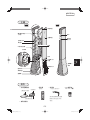
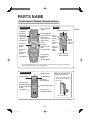
PARTS NAME
Control panel / Display / Remote control
Control panel
Unit Replacing
Light (red)
FILTER
CLEAN
UNIT
Horizontal
Swing Angle
Light (white)
SWING
Air Volume
Selector
Button
Air Volume
Fine
Adjustment
Button
Timer Button
AIR
VO L U M E
Lighting intensity
sensor light
receiving section
Timer
Off Light
(white)
Vertical Swing
Button
Timer
On Light
(red)
Air Volume
Indication Light
(blue)
POWER
LOW
HIGH
Operation Button
FINE
ADJUSTMENT
TIMER
Ion Mode Light (white)
Filter Reset Button
RESET
(Press 3sec.)
Horizontal
Swing Button
Display
Filter Clean Light
(orange)
!
""
TIMER
AIR VOLUME
Remote
control
receiving
section
Timer
Indication
Light
(white)
RHYTHM WIND
ION MODE
Energy-saving
Rhythm Wind
Button
Digital display of
Air volume (blue)
Ion Mode Button
• The control panel is the touch sensor type button. Touch the button part (sensor part) surely.
If the touched area is small, it may hardly respond.
Remote control
Sending section
Ion Mode Button
Operation Button
POWER ION MODE
AIR
L VOLUME
H
Air Volume Fine
Adjustment Button
Horizontal Swing
Button
Timer Button
Air Volume
Selector Button
When you store the remote
control in the main unit
• Store it in the remote control
slot on the rear surface of
the product.
FINE
ADJUSTMENT
SWING
Vertical Swing Button
TIMER RHYTHM WIND
Energy-saving
Rhythm Wind Button
Remote control slot
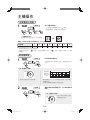
E-4
IG-ETC1E_en.indd Sec1:4
2012/09/24 16:33:35
IG-ETC1A/E
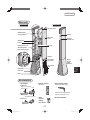
Main unit
Front side
Back side
Air trunk cover
Plasmacluster
ion sign (white)
Handle
Main unit
cover
Remote
control slot
Outlet port
Louver
Air trunk
Plasmacluster Ion
Generating Unit
Unit cleaning brush
Handle
Air suction
port cover
Unit holder
ENGLISH
Air suction
port
Fan cover
Kong/
(Hong
ASEAN )
Power
supply
input
terminal
Filter
Accessories
• AC adapter
< IG-ETC1A >
Plug for connecting
Plug
the main unit
• Remote control
(Wirelessly)
• Unit cleaning brush
(Installed inside the body)
POWER ION MODE
AIR
L VOLUME
H
FINE
ADJUSTMENT
SWING
TIMER RHYTHM WIND
Use the unit cleaning brush
only for cleaning the unit.
AC adapter main unit
< IG-ETC1E >
• AAA
dry-cell
battery
DC1.5V x2
• Operation Manual
E-5
IG-ETC1E_en.indd Sec1:5
2012/09/24 16:33:36
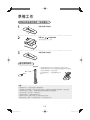
PREPARATION
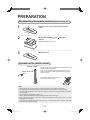
Set batteries in the remote control (Replacement of batteries)
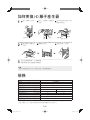
1
Remove a cover on the rear side of the remote
control.
Cover
2
Set batteries following
properly.
and
indications
(AAA dry-cell battery DC1.5V x2)
3
Attach the cover.
Operation of the remote control
Receiver window
Approx. 3m or less
• Point the remote control towards the receiver window and press
the desired button for operation.
• It may not be controlled if the pointing direction is out of
range, or something is blocking the distance to the signal
receiver window.
• Do not drop or throw the remote control.
Do not wet the remote control.
Note:
• When batteries are low, the operation range of the remote control may become narrow.
• The signal may be interfered with when under certain ßuorescent lamps or in direct sunlight.
• Incorrect usage of batteries could cause the product to corrode with a liquid leakage or explosion
of the batteries.
• Do not recharge, disassemble or heat it up.
• When replacing the batteries, always change both and use the same type.
• If the product is not used for a long time, remove the batteries from the remote control. (to avoid
damage by liquid leakage)
• If the liquid in a battery leaks and enters your eye, or contacts your skin or clothes, wash with
sufÞcient clean water immediately.
E-6
IG-ETC1E_en.indd Sec1:6
2012/09/24 16:33:38
IG-ETC1A/E
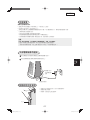
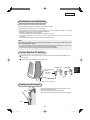
Precautions on installation
Be sure to place the product at the stable place.
• Be sure to place the product on a ßat ßoor. Do not use on a table.
• Do not block the air suction port and the outlet port.
• If this Plasmacluster Ion Generator cause interference to radio or television reception, try to correct
the interference by one or more of the following measures:
• Reorient or relocate the receiving antenna.
• Increase the distance between the product and radio/TV receiver.
• Connect the equipment into an outlet on a circuit different from that to which the receiver is
connected.
• Consult the dealer or an experienced radio/TV technician for help.
Note:
If you use the product for a long time at the same place, the wall, ßow, or carpet around the
main unit may become tainted.
• It is recommended to move the installation location of the main unit sometimes or clean up the
periphery or the surface on which the main unit is installed periodically.
(For the taint on the ß oor, laying the mat under the main unit is effective.)
Connecting the AC adapter
Insert the plug for connecting the main unit to the end of power input terminal of the main
unit securely.
ENGLISH
< IG-ETC1A >
Power supply input
terminal
< IG-ETC1E >
2
AC adapter
main unit
Kong/
(Hong
ASEAN )
Insert the plug of AC adapter main unit securely.
1
Plug for connecting the main unit
Caution on movement
• Be sure to insert Þngers in the handle section and move it by
holding the product with hands.
• Be sure to hold the product with both hands.
• When you move the product, be sure to stop the operation.
Handle
E-7
IG-ETC1E_en.indd Sec1:7
2012/09/24 16:33:39
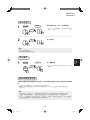
OPERATION
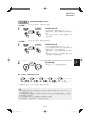
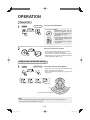
Power ON
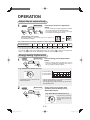
1
Main unit
Remote control
Beep
POWER
POWER
Press the Operation Button.
Control panel Note:
• Immediately after the AC
adapter is plugged in, the unit
wil operate at air volume level 1
(Þne adjustment level 4).
(See E-10)
Display
• The Air Volume Indication Light
and the Digital display of Air
volume light up.
• The Ion Mode Light (Cool Wind
Ion) lights up.
POWER
LOW
2
LOW
AIR
VO L U M E
AIR
L VOLUME
H
HIGH
VO L U M E
HIGH
Select your favorite air volume.
Beep
POWER
AIR
• The Air Volume Selector Button can set 8 levels;
air volume level 1 to air volume level 8.
• The Air Volume Indication Light lights up and the
Digital display of Air volume changes according to
the air volume level. (See E-10)
Adjust the horizontal swing
1
Main unit
Remote control
Press the Horizontal Swing Button.
• Every time when you press the Horizontal Swing
Button, the angle can be changed.
• If the Horizontal Swing Angle Light goes out, the
swing stops.
Beep
FILTER
CLEAN
UNIT
Beep
Beep
Beep
Beep
Beep
RESET
(Press 3sec.)
SWING
Lights off
Swing stops.
POWER
LOW
A IR
V O L U ME
HIGH
FINE
ADJUSTMENT
TIMER
RHYTHM WIND
ION MODE
Left
Right
60°
• The wind swings horizontally.
90°
120°
Note:
• Be sure to adjust the swing with the Swing Button on the main unit or the remote control.
• Do not turn the swing head with your hands.
E-8
IG-ETC1E_en.indd Sec1:8
2012/09/24 16:33:39
IG-ETC1A/E
Adjust the vertical swing angle
(When the vertical swing operation OFF)
1
Main unit
Press the Vertical Swing Button.
Remote control
• Every time when you press the Vertical Swing
Button, the louver operation switches to "ON"
or "OFF".
• The vertical swing starts at 40 degrees upward.
Beep
2
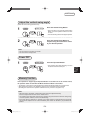
Press the Vertical Swing Button to
stop the swing when the louver comes
to your favorite position.
Beep
Beep
Note:
• Do not move the louver with your hands.
• Do not touch the moving louver.
Power OFF
Press the Operation Button.
Remote control
• The operation stops after all lights go out and
the louver blocks the outlet port.
Beep
POWER
POWER
ENGLISH
Main unit
Kong/
(Hong
ASEAN )
1
Memory function
If the operation is stopped by the Operation Button on the main unit or the remote control,
the operation status of Cool Wind Ion Mode and Sensor Mode is memorized.
• The settings of Timer, Room Cleaning Mode and Clothes Deodorizing Mode are not memorized.
• After electric power failure or AC adapter is pulled out, the memorized content is deleted.
(Excluding the case when the operation automatic recovery function is set) (See E-12)
Note:
• With this product, horizontal / vertical swing angle cannot be adjusted manually.
Be sure to adjust them with main unit or remote control.
• The operation may temporarily stop when the operation range becomes the maximum during swing
or louver operation, however, it is not a troubleshooting.
• If the swing does not operate in 2 seconds or more after vertical or horizontal swing is turned ON,
pull out the AC adapter from an outlet immediately and contact the distributor you purchased the
product.
E-9
IG-ETC1E_en.indd Sec1:9
2012/09/24 16:33:40
OPERATION
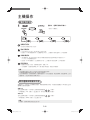
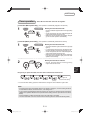
Adjust the air volume Þnely
1
Main unit
Remote control
Beep
FINE
ADJUSTMENT
FINE
ADJUSTMENT
or
or
Press the Air Volume Fine Adjustment
Button.
• The air volume can be Þnely adjusted to 32 levels
with the Air Volume Fine Adjustment Button.
• The Digital display of Air volume changes
according to the Þne adjustment level.
< Digital display of Air volume >
The Digital display of Air volume goes out in approx. 10
seconds after the display.
8 air volume levels can be Þnely adjusted to 4 levels separately (total 32 levels).
Air volume levels
Fine adjustment levels
1
1-4
2
5-8
3
4
5
6
7
8
9 - 12 13 - 16 17 - 20 21 - 24 25 - 28 29 - 32
• If you press the Air Volume Fine Adjustment Button long, the adjustment can be fast-fed.
" when the Þne adjustment level is 32 or press "
" when the Þne adjustment
• If you press "
level is 1, the product just sounds "Beep Beep" and the air volume does not change.
Energy-saving rhythm wind
1
Main unit
Remote control
RHYTHM WIND
Beep
RHYTHM WIND
Press the Energy-saving Rhythm Wind
Button.
• With the energy-saving rhythm wind, the air
volume is increased or decreased at 3 levels in
the cycle shown in the Þgure below.
(e.g.: when the air volume level is 3)
Blink
Air volume level 3
Air volume level 2
Air volume level 1
POWER
LOW
AIR
VO L U M E
47-second cycle
HIGH
• The indication lamp of the current air
volume level blinks.
2
Main unit
Remote control
RHYTHM WIND
Beep
Beep
• If the air volume level is 1, the product is operated at
2 levels; air volume level 1 and OFF.
• The energy-saving rhythm wind can be set at each
Þne adjustment level.
During energy-saving rhythm wind
operation, press the Energy-saving
Rhythm Wind Button.
(e.g.: when the air volume level is 3)
RHYTHM WIND
• The blinking indication
lamp of the current air
volume level returns to
lighting.
Lighting
POWER
LOW
AIR
VO L U M E
HIGH
E-10
IG-ETC1E_en.indd Sec1:10
2012/09/24 16:33:41
IG-ETC1A/E
Timer operation
Timer ON and Timer OFF cannot be set together.
[ Timer OFF (When power ON) ] (The operation is automatically stopped at the set time)
1
Main unit
TIMER
Remote control
Select your favorite timer time.
• The Timer Indication Light and OFF Timer Light (white)
light up.
• As the time passes, the Timer Indication lights will
change and indicate remaining time.
• When the set time duration has passed, all lights
go out and start operation automatically.
Beep
TIMER
[ Timer ON (When power OFF) ] (The operation is automatically started at the set time)
TIMER
Remote control
• The Timer Indication Light and ON Timer Light (red)
light up.
• In 5 seconds after ON Timer is set, the lights other than
the Timer Indication Light and ON Timer Light go out.
• As the time passes, the Timer Indication lights will
change and indicate remaining time.
• When the set time duration has passed, ON Timer
Light and Timer Indication Light go out and start
operation automatically.
Beep
TIMER
2
Select your favorite air volume.
Beep
AIR
L VOLUME
H
POWER
LOW
AIR
VO L U M E
Select your favorite timer time.
• Vertical, horizontal swings, and energy-saving
rhythm wind cannot be set.
HIGH
Every time you press the button, the timer time is switched as shown below.
Beep
Beep
Beep
ENGLISH
Main unit
Kong/
(Hong
ASEAN )
1
Beep
Beep
Beep
(Hours)
Lights off
Cancel the timer setting.
• To cancel the timer setting, press the Timer Button to change the Timer Indication Light to OFF.
Note:
• If pressing Timer button immediately after the AC adapter is plugged in, the timer setting will be set
at "Cool Wind Ion Mode","air volume level 1", and "swing OFF"
• If you press the Operation Button after ON Timer is set, ON Timer is cancelled and the operation is
started in the Operation Mode that was operated before setting ON Timer (Cool Wind Ion or Sensor
Mode).
• If the AC adapter is pulled out when ON Timer is set, ON Timer is cancelled.
• The timer reservation cannot be ensured in Room Cleaning Mode or Clothes Deodorizing Mode.
E-11
IG-ETC1E_en.indd Sec1:11
2012/09/24 16:33:42
OPERATION
Ion mode operation
1
Main unit
ION MODE
Remote control
Beep
During operation, select your favorite
Ion mode.
• There are 4 modes shown below.
ION MODE
Beep
Beep
Beep
Beep
Beep
Cool Wind Ion Mode
• Usually, use the product in the Cool Wind Ion Mode.
Room Cleaning Mode
• The disquieting air in the room can be effectively puriÞed. The product is not equipped with a function
that removes dust or pollen.
• The product is operated with energy-saving rhythm wind, horizontal swing angle 90 degrees, and
vertical swing ON at air volume level "7" and the operation is stopped 1 hour later.
Clothes Deodorizing Mode
• By applying the wind, the odor of half-dried clothes, which are dried in the room is deodorized to the
level enough to be ignored by the effect of Plasmacluster*. (*: Boken Quality Evaluation Institute, Japan)
• The product is operated with continuous wind, horizontal swing angle 60 degrees, and vertical swing
ON at air volume level "8" and the operation is stopped 2 hours later.
Sensor Mode
• The air volume level is automatically increased or decreased by 1 level according to temperature or
humidity in the room.
• If the room becomes dark, the air volume level is automatically decreased by 1 level and the
Plasmacluster Ion Sign goes out, and then the Air Volume Indication Light becomes dark.
Note:
• Please set the main unit before operation, in order to let the wind blow directly to the clothes and
even the place which contains bad odor. If you set the main unit in front of the target object, the
deodorizing function can be carried out effectively.
• Air volume, Air volume Þne adjustment, Energy-saving rhythm wind, Timer, and Swing angle can
be changed during the operation in Room Cleaning Mode or Clothes Deodorizing Mode, however,
the mode would be changed to the Cool Wind Ion Mode automatically.
Note on Auto Restart function
During operation, if the AC adapter is pulled out or circuit breaker trips, or power failure, the ion
generator will resume operation in precious mode.
To set
Press the Air Volume Fine Adjustment Buttons
on the main unit at the same time for 3 seconds
while the operation is stopped.
The buzzer sounds "Beep" and the setting is turned ON. All lamps light up for 10 seconds.
To cancel
on the main unit at the same time for 3 seconds
Press the Air Volume Fine Adjustment Buttons
while the operation is stopped.
The buzzer sounds "Beep Beep" and the setting is turned OFF.
Note:
• The Auto Restart function is preset to OFF when the product is shipping out from the factory.
E-12
IG-ETC1E_en.indd Sec1:12
2012/09/25 17:00:50
IG-ETC1A/E
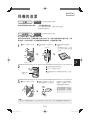
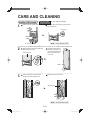
CARE AND CLEANING
Main unit
Every month (Or more often if necessary)
Wipe with a dry soft cloth.
<For Stubborn Dirt>
Use water and a mild detergent. And then, wipe with a wet
cloth. Make sure to dry out the main unit.
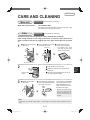
Filter
Every month
(Or more often if necessary)
The Þlter must be cleaned regularly in order to maintain the ion density.
Filter soiling depends on the usage environment, so clean the filter about once a
week or whenever the Þlter is clogged, even if the Filter Clean Light has not turned
on.
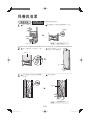
Remove the air suction
port cover.
Pull up the Þlter and remove
it from the fan cover.
Fan cover
Air suction port cover
2
Gently remove dust by
using a vacuum cleaner.
• For stubborn dirt, wash
with water, remove water,
and dry it in the shade.
Filter
Attach it by sliding it from upper side to
lower side.
2
Hook the nail of the Þlter to the fan cover
securely to attach the Þlter.
Nail of the Þlter
(2 part)
3
Attach the air suction
port cover.
ENGLISH
Push the Þlter to the fan cover.
1
Connect the AC adapter and
press the Filter Reset Button
for at least 3 seconds.
FILTER
CLEAN
Beep
RESET
(Press 3sec.)
Kong/
(Hong
ASEAN )
1
Once cleaning is completed,
then press and hold in the
Filter Reset Button for at
least 3 seconds to turn off
the Filter Clean Light.
Even if the Filter Clean
Light is off, press and hold
the Filter Reset Button for
at least 3 seconds after
cleaning.
Note:
• Filter Clean Light will be lit after approx. 1 month (approx. 720 hours), when operated 24 hours a
day.
E-13
IG-ETC1E_en.indd Sec1:13
2012/09/24 16:33:43
CARE AND CLEANING
Inside of Air trunk
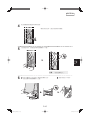
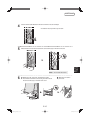
1
Every 6 months
Remove the air suction port cover.
(Or more often if necessary)
Unscrew the coin screws (x2) on the main
unit using a coin.
Coin screw
Note: • Do not lose the screws.
Air suction port cover
2
Disconnect the nail (x1) at lower left
of the main unit cover.
Press the upper part of
the main unit cover and
pull out the handle, and
then remove the main
unit cover.
Main unit cover
Handle
3
Unscrew the coin screws (x2) on
the air trunk cover using a coin.
Remove the air trunk cover.
Air trunk cover
Note: • Do not lose the screws.
E-14
IG-ETC1E_en.indd Sec1:14
2012/09/24 16:33:46
IG-ETC1A/E
4
Vacuum off the dust attached to the air trunk with a vacuum sweeper.
5
Attach the air trunk cover and secure the coin screws (x2) on the air trunk cover.
6
Attach the main unit cover and press the whole
circumference to Þt the cover surely, and then secure
the coin screws (x2) on the main unit cover.
ENGLISH
Note: • Do not lose the screws.
Kong/
(Hong
ASEAN )
• For stubborn dirt, wipe with a dry soft cloth.
Attach the air suction
port cover.
E-15
IG-ETC1E_en.indd Sec1:15
2012/09/24 16:33:47
CARE AND CLEANING
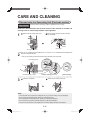
Plasmacluster Ion Generating Unit (Electrode section)
Every 6 months
(Or more often if necessary) (When operated 24 hours a day)
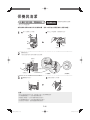
Remove the dust attached to the electrode section of the unit with an included unit
cleaning brush or commercially-available cotton applicator.
Remove the air suction port cover.
1
Clip the upper and lower hooks and open
the unit holder.
Hooks
Unit holder
Air suction port cover
2
Clean the electrode section.
• Carry out the cleaning with the electrode section attached to the unit holder.
Unit cleaning brush
Electrode
Root of the
electrode
Connection
terminals
Electrode section (4 part)
3
[ Before cleaning ]
Close the unit holder.
[ After cleaning ]
Attach the air suction port cover.
Note:
•
•
•
•
•
The unit holder can be opened by 45 degrees only. If you open it forcibly, it may be damaged.
Do not touch the electrode section. (Doing so could lead to injury.)
Do not transform the electrode section. (Doing so could lead to damage.)
Do not touch the connection terminals. (Doing so could lead to damage.)
If the taint is hard, soak the cotton applicator in the water slightly and wipe off the product.
E-16
IG-ETC1E_en.indd Sec1:16
2012/09/24 16:33:48
IG-ETC1A/E
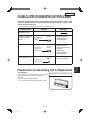
PLASMACLUSTER ION GENERATING UNIT REPLACEMENT
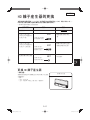
If the total operating time passes approximately 17,500 hours (approx. 2 years if the
product is operated 24 hours a day), Unit Replacing Light ßashes to notify you of the
replacement time of the unit.
• The unit replacement period is not affected by the used air volume.
Elapsed Time
Display
Message
Beginning to use
Approx. 17,500 hours
to approx.19,000
hours
UNIT
Unit Replacing
Light (red) is
ßashing.
Approx.19,000 hours
UNIT
Unit Replacing
Light (red) is
ßashing faster.
After replacing unit
UNIT
• Suggest replacing
Plasmacluster Ion
Generating Unit.
• Plasmacluster Ion
Generating Unit stops
operation.
• Replace the
Plasmacluster Ion
Generating Unit.
• It can be operated.
<For Disposal>
Please dispose the used Plasmacluster Ion Generating
Unit according to any local laws and regulations.
-materials• Case : Acrylonitrile Butadiene (ABS)
• Unit : Polystyrene Terephthalate (PBT), Electric parts.
ENGLISH
Plasmacluster Ion Generating Unit for Replacement
Kong/
(Hong
ASEAN )
Unit Replacing
Light (red) is off.
Plasmacluster Ion Generating Unit
Model : IZ-C75SE
E-17
IG-ETC1E_en.indd Sec1:17
2012/09/27 16:45:52
HOW TO REPLACE THE PLASMACLUSTER ION GENERATING UNIT
Remove the air suction
port cover.
1
Clip the upper and lower
hooks and open the unit
holder.
Fix the unit holder with
a hand and pull out
the Plasmacluster Ion
Generating Unit.
Hook
Air suction port cover
Plasmacluster Ion
Generating Unit
Unit holder
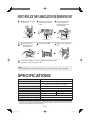
Fully insert a new
Plasmacluster Ion
Generating Unit.
2
3
Close the unit holder.
Attach the air suction port
cover.
Insert the AC Adapter in an outlet and press the Operation Button.
Check the Unit Replacing Light is OFF.
Note:
• The unit holder can be opened by 45 degrees only. If you open if forcibly, it may be damaged.
SPECIFICATIONS
Model
Power source system
IG-ETC1A/IG-ETC1E
AC Adapter
IG-ETC1A: AC 220V, 0.9A, 50Hz
IG-ETC1E: AC 220-240V, 0.9A, 50/60Hz
DC 12V, 2.5A
Power input
Power output
Applicable ßoor area *
Air volume Þne adjustment
Power Consumption
Operating noise level
Dimensions
Weight
Cord length
(m2)
(level)
(W)
(dBA)
(mm)
(kg)
(m)
19.83
1 (Min.)
32 (Max.)
2.0
24.0
17
45
240 (W) x 240 (D) x 870 (H)
Approx. 4.0
Approx. 1.8
* The target ßoor area where 25,000 ions/cm3 blasted out in the room can be measured near the center
of room (1.2m in height from ßoor) by placing this product against a wall when the wind volume is the
maximum (without vertical or horizontal swing).
E-18
IG-ETC1E_en.indd Sec1:18
2012/09/27 9:17:52
IG-ETC1A/E
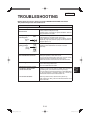
TROUBLESHOOTING
Before calling for service, please review the TROUBLESHOOTING chart below.
The problem may not be unit malfunctions.
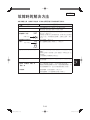
Problem
WHAT TO DO
[ For Main unit ]
The Plasmacluster Ion Generator
does not work.
• Is a AC Adapter inserted properly?
Please insert AC Adapter correctly.
• It takes approx. 2 seconds for power distribution after the
plug is inserted in the outlet.
Unit Replacing Light
is ßashing (red).
• It is over the usage period of main unit. Replace with new
Plasmacluster Ion Generating Unit. (See E-17)
• If the replacement period of the unit is passed, the Unit
Replacing Light (red) flashes rapidly and the operation is
stopped. (See E-17)
UNIT
Flashing
(red)
Filter Clean Light is
lighting (orange).
FILTER
CLEAN
Lighting
(orange)
• Clean the Þlter. (See E-9)
• Press the Filter Reset Button for at least 3 seconds.
(See E-9)
RESET
• If you press the Timer Button (main unit / remote control)
during the operation, "OFF Timer" is set.
If you press the Timer Button (main unit / remote control)
while the operation is stopped, "ON Timer" is set.
• ON Timer and OFF Timer cannot be set at the same time.
The discharged air has odor.
• The Plasmacluster Ion Generator releases a small trace of
ozone which may produce odor.
This is not detrimental to health.
A discontinuous noise is heard.
A clicking or ticking sound
comes from the unit.
The air ßow decreases.
• Clicking or ticking sound may be audible when the unit is
generating ions. (The interval of sound may change.)
You may feel the sound becomes large or small depending
on use environment or operation mode, but it will not be
affected the effectiveness of Plasmacluster ion.
ENGLISH
Is this product equipped with OFF
timer and ON timer functions?
Kong/
(Hong
ASEAN )
(Press 3sec.)
• Dust may block the Þlter, clean the Þlter. (See E-13)
After cleaning the Þlter, press the Filter Reset Button for at
least 3 seconds.
E-19
IG-ETC1E_en.indd Sec1:19
2012/09/24 16:33:51
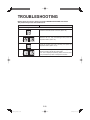
TROUBLESHOOTING
Before calling for service, please review the TROUBLESHOOTING chart below.
The problem may not be unit malfunctions.
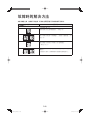
Problem
WHAT TO DO
[ Error indication ]
• Plasmacluster Ions are not released.
Clean the electrode section of the unit. (See E-16)
• Is the Plasmacluster Ion Generating Unit installed correctly?
Remove the unit, fully inserted again and press the
Operation Button. (See E-16)
• Is an air suction port cover inserted properly?
Insert air suction port cover correctly, and press the
Operation Button. (See E-13,15)
• Pull out the AC adapter and insert it again in approx. 1
minute, and then operate the product again.
• If an error is displayed repeatedly, please contact the store
you purchased the product or Sharp Service Centre.
E-20
IG-ETC1E_en.indd Sec1:20
2012/09/24 16:33:51