1
A
B
C
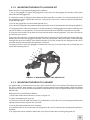
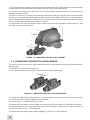
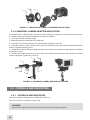
Figure 3-7. MOUNTING A CAMERA/ CAMCORDER TO THE Sirius
3.1.9 UNIVERSAL CAMERA ADAPTER APPLICATION
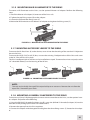
To mount the Sirius (affixed with a camera or video recorder) to a tripod, you will need a universal camera adapter. Mount the connected devices to a tripod as follows:
1. Screw the adapter onto the tripod.
2. Remove the eyecup from the Sirius eyepiece.
3. Install the Sirius on the adapter rail (A) and tighten the fixing screw (B).
4. Install the camera on the adapter rail (C) and insert the fixing screw (D) into the tripod socket of the
camera. Tighten the fixing screw.
5. Loosen the screws one by one. Align the optical axis of the Sirius with the camera objective. Tighten
the screws (E and F).
6. To focus the image, loosen the screw (G) and adjust the distance between the monocular and the
camera’s eyepiece. Tighten the screw (G).
C
D
A
F
B
G
E
Figure 3-8. Universal camera adapter Application
3.2 Controls and Indicators
3.2.1 Controls and Indicators
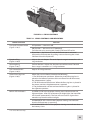
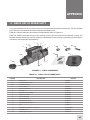
The Sirius controls and indicators are defined in Table 3-1.
The Sirius controls are shown in Figure 3-10.
CAUTION:
DO NOT over-adjust the controls by forcing them past their stopping points.
22