1
ADCON
T E L E M E T R Y
addIT A723 Series 4
User Guide
SMART WIRELESS SOLUTIONS
ADCON
T E L E M E T R Y
ADCON TELEMETRY GMBH
INKUSTRASSE
24
A-3400 KLOSTERNEUBURG
A
U
S
T
R
I
A
TEL: +43 (2243) 38 280-0
FAX: +43 (2243) 38 280-6
h t t p : / / w w w. a d c o n . a t
ADCON INTERNATIONAL INC
2050 LYNDELL TERRACE
SUITE
C A
#120,
DAVIS
9 5 6 1 6
U S A
TEL: +1 (530) 753-1458
FAX: +1 (530) 753-1054
h t t p : / / w w w. a d c o n . a t
Proprietary Notice:
The Adcon logo, addIT™, addWAVE™, addVANTAGE™, addVANTAGE Professional™ and AgroExpert™ are trademarks or registered trademarks of Adcon Telemetry GmbH.
All other registered names used throughout this publication are trademarks of their respective
owners.
Neither the whole nor any part of the information contained in this publication may be reproduced in any material form except with the prior written permission of Adcon Telemetry GmbH.
This publication is intended only to assist the reader in the use of the product. Adcon Telemetry
GmbH shall not be liable for any loss or damage arising from the use of any information in this
publication, or any error or omission in such information, or any incorrect use of the product.
Document Release 1.0, May 2008
Copyright ©2003-2008 by Adcon Telemetry GmbH.
CHAPTER
Chapter 1. Introduction ________________________________ 5
What are addIT devices? _________________________________5
Installation issues________________________________________6
Conventions ____________________________________________7
Chapter 2. Using the RTU ______________________________ 9
Opening the packages ___________________________________9
Installing the RTU _____________________________________ 10
More about the LED tool ____________________________ 12
Configuring an addIT RTU in the A840/A850 Configurator 13
Maintaining and servicing the RTU_______________________ 13
The RTU battery ____________________________________ 13
Changing the battery _______________________________ 14
Chapter 3. Performing Advanced Functions_____________ 17
Device series _________________________________________ 18
Understanding connectors______________________________ 18
The RTU connectors ________________________________ 18
Configuring the devices ________________________________ 19
Serial communication protocol __________________________ 20
General format of a command _______________________ 20
General format of an answer _________________________ 21
Using terminal commands ______________________________ 21
Notifications __________________________________________ 42
Returned errors list ____________________________________
Command line interpreter ___________________________
Device descriptors and storage handler _______________
Real time clock _____________________________________
Radio interface _____________________________________
Notifications _______________________________________
42
42
43
43
43
43
Specifications ________________________________________ 45
Credits and Colophon _________________________________ 51
3
4
CHAPTER
5
Chapter 1. Introduction
This manual explains the hardware aspects of Adcon’s addIT™
A723 Series 4, including installation issues and certain parameter
configurations. The manual is divided into these chapters:
•
"Introduction," which gives some general information and
document conventions.
•
"Using the Base Station," which details the installation and
use of the receiving unit.
•
"Using the RTU," which details the installation and use of the
remote telemetry unit.
•
"Performing Advanced Functions," which discusses technical
information for the advanced user.
What are addIT devices?
Adcon’s addIT devices (A723 and A723 Series 4) are uniquely
suited to your remote measuring needs. The A723 Series 4 device
is a remote telemetry unit (RTU) that can be used with Adcon and
other compatible sensors to track those parameters important to
you.
6
CHAPTER 1
Introduction
The addIT A723 Series 4 RTU can be used in one of the following
way:
•
Installed in the vicinity of an Adcon remote measuring station
(A72x, A73x, A74x), the addIT RTU can use the A73x and
A74x stations to relay its data to a base station (A840 or
A850). If the base station is close enough to the addIT RTU,
the RTU can communicate directly with the base station.
Installation issues
The following restrictions apply:
•
In general, the maximum “line-of sight” distance an addIT
RTU can communicate is 800 m (approximately half a mile).
This is valid if the partner device is mounted on a 3 m mast (9
ft.) and the RTU is mounted on a 30 cm mast (1 ft.); the results
may vary under different conditions.
•
As with all wireless communication devices, the higher the
transmitter is, the better the communication will be.
Mountainous or hilly terrain makes for poor communication.
•
When using the addIT RTU with an A73x or A74x system,
Adcon strongly recommends limiting the number of RTUs to
under 6 per A73x or A74x station in order to avoid exhausting
the station’s battery, especially during the winter. However,
you can have as many RTUs as you want if they are directly
connected to the base station. The maximum number of
stations is limited by your A840/A850 Gateway license.
Note: Your local conditions may vary. If you are located closer to
the Equator, the maximum obtainable energy is greater than
that at the Poles and it may be possible to “hang” more
addIT devices per station.
•
addIT RTUs cannot route data.
•
All addIT devices accept the standard Adcon sensors.
Waterproof connectors are used to provide IP65 class
protection. All sensors will be delivered with this connector. A
special adapter will be supplied to connect new sensors to RJ12 ports of the A730MD stations.
Note: For technical reasons, Adcon cannot provide adapters for
the RJ-12 connector to the addIT devices.
CHAPTER 1
Conventions
Conventions
Certain conventions apply in this documentation.
Italics
Indicate the text is variable and must be substituted for
something specific, as indicated in the explanation.
Italics can also be used to emphasize words as words
or letters as letters.
Bold
Indicates special emphasis of the text. Also indicates
menu names and items in a window.
fixed font
Indicates characters you must type or system messages.
File
Indicates menu selection. For example, select the File
menu, then the Save option.
Save
Note
Indicates information of interest. Notes appear after
the information they apply to.
CAUTION
Indicates that you may get unexpected results if you
don’t follow the instructions. The graphic symbol
appears next to the paragraph the Caution applies to,
and the Caution text follows the paragraph.
WARNING
Indicates danger to yourself or damage to the device if
you don’t follow the instructions. The graphic symbol
appears next to the paragraph the Warning applies
to, and the Warning text follows the paragraph.
7
8
CHAPTER 1
Introduction
9
Chapter 2. Using the RTU
Remember that the addIT A723 Series 3 remote telemetry unit
(RTU) can be used either with the A73x and A74x system or as a
standalone system with the A440 Radio Modem and the A840 or
A850 base station.
Opening the packages
You get several boxes when you purchase an addIT RTU. When
you open them, you’ll see they contain:
•
The A723 Series 4 RTU and ring clamp
•
The solar panel, ring clamp, and connecting cable
•
The aluminum rod and its cap
•
A sensor and cable, one box for each sensor, with a fastening
tie in each sensor box
•
An LED tool (optional)
Make sure you’ve received all the equipment and read through the
instructions that follow. When you’re sure you understand them,
you’re ready to install your RTU.
10
CHAPTER 2
Using the RTU
Figure 1 shows an addIT RTU.
PROTECTIV E CAP
TO
SOLAR
PANEL
SERIAL
NUMBER
TO
SENSORS
Figure 1. addIT RTU
Installing the RTU
Installing addIT RTUs in the field is a fairly simple process. You’ll
perform a connectivity check with an LED tool which is available
from your Adcon Telemetry Distributor.
Note: The LED tool is a blind plug to be plugged in the POWER
connector.
Follow these steps to install an addIT RTU in the field:
1.
Review the installation area and choose the best site.
2.
Perform a connectivity check using the LED tool:
3.
a.
Insert the LED tool in the POWER connector and wait up
to 10 seconds. If the unit connects to at least one station
(or a base station), it will light up the LED for about 4
seconds.
b.
Keep observing the LED tool and, after another several
seconds, the LED will blink one or more times (the
number of blinks indicates the number of stations it has
contacted).
Using a hammer, drive the supplied aluminum rod into the
ground. How far you drive the rod into the ground depends
CHAPTER 2
Installing the RTU
on your application. Put a plastic cap on top of the rod to
protect it.
4.
Using a ring clamp, fasten the solar panel onto the aluminum
rod. Ensure that the panel is facing south (north if you are
located in the southern hemisphere) and out of the way of the
addIT RTU.
Note: The solar panel can be mounted under or behind the addIT
RTU, but be sure that the RTU does not shadow the panel.
5.
Fasten the addIT RTU to the top of the rod using another ring
clamp. Adcon recommends that you perform another
connectivity test, if you can, to check the positioning of the
device.
6.
Attach the sensors to the I/O connectors and the solar panel
to the POWER connector by turning the plugs’ fastening screws
clockwise until secure.
WARNING If you turn the fastening screws too tightly, you could
damage the plugs.
7.
Secure the extra length of the sensor cables to the rod with
ties.
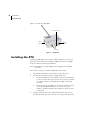
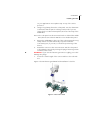
Figure 2 shows what a typical RTU field installation looks like.
Figure 2. RTU in the Field
11
12
CHAPTER 2
Using the RTU
This completes the installation of your addIT RTU. If one of the I/O
connectors is left unused, use the cap specially provided to protect
it against moisture and dust. Be sure to make a note of the following information because you’ll need it when you configure the
device in the software:
•
Serial number for each RTU
•
Type of sensors connected to each RTU
More about the LED tool
The LED tool allows you to rapidly check the status of an addIT
RTU. After you insert the LED tool into the POWER connector, the
unit waits up to two seconds and then sends a broadcast frame. If a
nearby listening station or receiver decodes the frame, it will
answer back—this may take up to 10 seconds. When an answer is
received, the LED tool lights up for about 4 seconds. After another
few seconds, the LED lights up one or more times, depending on
the number of stations/receivers that answered to its broadcast
frame.
Note: addIT RTUs do not respond to a broadcast frame, only
remote stations (A73x or A74x) and base stations (A440 with
A840 or A850).
In addition, the LED always blinks briefly at 0.5 second intervals to
indicate that the unit is alive and the internal battery has enough
energy to operate. If the blinking interval lengthens to 2 seconds,
the battery has become undercharged (that is, under 5.6 volts but
over 5.2 volts)—this is called the misery state. In this state, an
addIT RTU reduces its activities to a minimum. The radio unit is
switched off, the sensor sampling ceases, and no data is stored in
the internal memory. Only the internal real-time clock is maintained
and the power management functions are performed.
If the battery level drops below 5.2 volts, the system switches completely off, effectively decoupling itself from the battery in order to
protect it. In this case the LED tool stays permanently off. An addIT
RTU in such a situation will restart only after connecting it to an
external power supply (even a solar panel under low light conditions).
Note: New addIT RTUs are delivered with their internal batteries
unformatted, meaning they are completely discharged, and
you should install them only on sunny days. The battery will
CHAPTER 2
Maintaining and servicing the RTU
be fully charged after two consecutive sunny days, but you
should get an LED light-up after several minutes of charging
in the sunlight.
Configuring an addIT RTU in the A840/A850 Configurator
If you’re using an addIT RTU with an A73x or A74x system, you can
configure the RTU by following the steps described in the A840/
A850 Base Station User Guide.
Maintaining and servicing the RTU
The A723 Series 4 unit needs virtually no maintenance. It is waterproof and designed to withstand harsh environmental conditions (30 to +70 °C, or -22 to 158 °F), high RH values, water, and other
noncorrosive liquids. It conforms to the European protection class
IP65. This applies also to the connectors, as long as they are
mated. Don’t let unmated connectors on either the addIT RTU or
the sensors be exposed to the environment for extended periods
of time.
The RTU battery
The internal battery supplies 6.2 volts and consists of a NiMH
pack. The internal electronics manage the battery charging/discharging process, ensuring it a long life. This approach, coupled
with a remarkably low average consumption (some mere 6 mW),
allows an addIT RTU to operate at least one month on a fully
charged battery, with the following conditions:
•
The channel has moderate radio activity, with requests every
15 minutes.
•
Total consumption of attached sensors is no more than 50
mA.
•
The sensors are sampled once every 5 minutes and an
averaged slot is stored in the internal memory every 15
minutes.
13
14
CHAPTER 2
Using the RTU
Table 1 shows the addIT devices’ expected operation time on a
fully charged battery with 50 mA total consumption for the sensors,
as described above.
Table 1. addIT Device Operation Time
Radio
Activity
Sensor Sampling
(samples/15 min)
Average
Consumption
(µA)
Estimated
Operation
(days)
No
No sensors
450
92
Yes
No sensors
540
77
Yes
1
750
55
Yes
3 (default)
1080
38
Yes
5
1450
28
Yes
15
3100
13
Note: Radio activity refers to the fact that one base station and
between one and three A73x/A74x or addIT remote stations
are active on the same operating frequency as the addIT
remote station under test.
However, if for some reason (wear-out or accident) the battery
loses its capacity (noted in the software with repeated “Battery
low” messages), it must be replaced. Make sure, though, that the
problem is really due to the battery and not to a defective or dirty
solar panel.
Adcon highly recommends that you check the solar panels’ state
and clean them often. The rain droplets can splash thin layers of
soil on the panels, greatly reducing their power output. The surrounding vegetation can also lower the panels’ efficiency.
Changing the battery
If you have verified that the battery needs to be replaced, follow
these steps to do so:
1.
Open the lid by unscrewing the four screws in the corner of
the addIT RTU.
2.
Gently remove the lid (the battery is fixed on the lid and is
connected to the electronics board by means of a connector).
3.
Remove the battery’s plug from the PCB connector.
CHAPTER 2
Maintaining and servicing the RTU
4.
Remove the battery pack from the lid (it is taped to the lid)
and replace it with a new one (obtainable from Adcon).
5.
Insert the battery plug into the PCB connector.
6.
Mount the lid back, taking care that the rubber gasket sealing
the box is not out of place.
WARNING Be sure to mount the rubber gasket properly, so that
the unit’s IP65 environmental protection is not affected.
7.
Screw the four screws back in, applying a moderate force.
15
16
CHAPTER 2
Using the RTU
17
Chapter 3. Performing Advanced
Functions
With the appropriate knowledge, you can configure the addIT
devices in the field by using a hyperterminal window. To configure
the RTU, you will need a special serial cable adapter (not supplied,
available from Adcon).
CAUTION Do not try to configure your addIT devices if you are
not sure what to do—the unit may not communicate with the
remote measuring station or function with the addVANTAGE
software.
WARNING Tampering with parameters for the addIT devices may
void your warranty or damage the device. In general, the
commands described in this chapter are intended for technical
support staff and users with a great deal of highly technical
hardware and software experience.
In the system architecture, the base station and RTU are both considered to be nodes. The base station is called the master node, or
master, while the RTU is called the slave node, or slave.
18
CHAPTER 3
Performing Advanced Functions
Device series
Currently, two A723 device versions are in use: Series 3 and
Series 4. You can determine which series a device is in any of these
ways:
•
The TYPE command. When the device is connected, you can
type this command to the series. With a Series 3 device, the
command returns TYPE A723 , while with a Series 4 device,
the return is TYPE A723 Series 4. This is the most reliable
method of determining which series you have.
•
The logo on the front of the device. Series 4 devices include
such wording on the logo. However, if you returned a Series 3
device for repair, it is possible that it was replaced with a
Series 4 motherboard. In such a case, you would have a
Series 4 device in Series 3 housing.
Understanding connectors
The addIT devices have cable attachments called connectors. The
connector type determines how the device communicates with the
sensors or the computer.
The RTU connectors
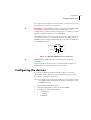
The addIT RTU uses standard 7-pin sensor I/O A and I/O B connectors (model Binder 702 and 712 series or equivalent) that are identical. Each connector contains three analog inputs (0 to 2.5 volt or
if configured 0-225mV) and two digital input/outputs, one of which
you can use as a pulse counter (for example, a rain gauge). Alternatively, the I/O A digital input/output can be configured as a SDI-12
interface. Figure 3 illustrates the individual pins of an I/O connector.
Switched Battery
Digital I/O
6
5
7
Cabling 1
Cabling 2
(Analog In)
(Analog In)
Cabling 3
(Analog In)
1
2
4 3
Pulse Counter
Ground
Figure 3. Pins on an I/O Connector (Top View)
CHAPTER 3
Configuring the devices
If you have a special passive extender cable, you can use it to plug
more than one sensor to one connector.
CAUTION To avoid cabling conflicts, first verify in the A840/A850
Configurator software that the sensor combination in the
configuration you want is allowed. If there are no conflicts, you can
physically attach the sensors to the addIT RTU.
addIT RTUs can also be used to control actuators and to switch on
or off pumps, valves, or other similar devices. The RTU also has a
POWER connector. Figure 4 illustrates the connections available at
the POWER connector.
Ext Power
5
4
3
1
2
Battery
RxD
TxD
Ground
Figure 4. addIT RTU POWER Connector (Top View)
WARNING The RxD and TxD connections are not RS-232
compatible.
This configuration allows the use of external power supplies or
extra batteries (contact Adcon for further details).
Configuring the devices
You can use a Windows Hyperterminal window to connect to
either addIT device. After you have installed the system, follow
these steps to configure the device:
Note: To configure the A723 Series 4 RTU, you must have the special adapter cable (available from Adcon) and plug it into the
POWER connector.
1.
Open a Hyperterminal window.
2.
Select the appropriate serial port and click OK.
3.
Configure your terminal as follows:
•
19200 baud
•
1 stop bit
•
8 data bits
19
20
CHAPTER 3
Performing Advanced Functions
•
No parity
•
No flow control
•
Send LF after CR
4.
Select OK to open the terminal window.
5.
Press Enter to generate a response in the window.
Serial communication protocol
This protocol is based on a master sending commands and a node
answering; the whole communication is conducted in plain ASCII,
as strings. When exchanging numbers, they are represented in
decimal format. All commands are terminated with a CR/LF combination. All responses (answers) are terminated with the # character.
General format of a command
The commands have the following format:
ID Command Param1 Param2 ... ParamN
•
ID is the destination device. If you include an ID as part of a
command, the node checks whether ID=ownID. If it does, the
node executes the command on itself. If the ID is not the
node’s ID, the node executes the command on a remote
device, if such an ID exists. If the ID is missing, this implies
that the command is addressed locally.
Note: Not all the commands can be relayed remotely.
•
Command is the command proper, which can be composed of
a variable string of characters (for example, SLOT). Each node
can implement a set of commands depending on the
functionality of the node itself. However, as a minimum
requirement, a node recognizes the CMDS command, which
returns a list with the commands recognized by the node.
•
Param1 Param2 ... ParamN represent the parameters,
which are command dependent. If you type no parameters
when you issue a command, it is the equivalent of querying
for information (the GET version of a command). If you type
parameters, you are issuing the SET version of a command
and are setting the command to the parameters you typed.
CHAPTER 3
Using terminal commands
General format of an answer
The answers have the following format:
ID Command Result1 Result2 ... ResultN ErrResult #
•
ID is the answering device. If a command was further routed,
it is the ID of the end device. The answer must always contain
the ID on return.
•
Command is the string representing the original command. It
is supplied so that a master can distinguish between the
answers it is waiting for, and out-of-band notifications (which
may come, for example, over the radio port of a node). As
with the ID, the command name must be always supplied.
•
Result1 Result2 ... ResultN are the result values
returned by the remote node. If the ErrResult is not zero,
all other possible characters and/or strings until the end of
the line may be ignored.
•
ErrResult shows whether the command was successfully
executed. If this value is 0, the command was successfully
executed. If this value is other than 0, the command failed.
The number may further indicate the error type. (See also
“Returned errors list” on page 42.)
The answer string may contain any number of spaces or CR/LF
characters between its components; however, after the terminator
(#) no other characters are allowed.
Using terminal commands
Following is a list of available commands and an explanation of
their use.
Note: You can type uppercase or lowercase characters because
the commands are not case sensitive.
Note: Typing the command by itself is a GET command, while typing the command with parameters or variables is a SET
command.
COMMAND
CMDS
DESCRIPTION
Returns a list of supported commands.
PARAMETERS
None.
21
22
CHAPTER 3
Performing Advanced Functions
REMARKS
GET only.
RETURNS
A list of strings separated by spaces.
REMOTE
No.
EXAMPLE
CMDS
38193 ANLG ANRT B BLST CALC DATA DATASDI DPE FDEV
FREQ ID INFO LVA MSTR PMP PORT RGE ROUTE RSSI SBAT
SDI SLOT SST TEDS TIME TYPE VER VERB WPEAK WVECT
XCONF XDATA XIMME 0
#
COMMAND
TIME
DESCRIPTION
Sets/returns the real time clock.
PARAMETERS
The actual time, or none in the GET version.
RETURNS
The actual time as dd/mm/yyyy hh:mm:ss.
REMARKS
GET/SET.
REMOTE
No.
EXAMPLES
TIME 12/12/1998 22:10:10
38193 TIME 0
#
TIME
38193 TIME 12/12/1998 22:10:10 0
#
COMMAND
FREQ
CAUTION Do not change the frequency of your device without
reason. Apart from the fact that it may not communicate with the
network anymore, you may also violate the applicable radiocommunications laws in your country. Depending on the
destination country, some models may also return an error
message when trying to use this command.
DESCRIPTION
Sets/returns the operating frequency.
PARAMETERS
The operating frequency and step (Hz), or none in the GET version.
RETURNS
The actual frequency and step, in Hz.
CHAPTER 3
Using terminal commands
REMARKS
GET/SET.
REMOTE
Yes, SET only.
EXAMPLE
FREQ 433925000 25000
38193 FREQ 0
#
FREQ
38193 FREQ 433925000 25000 0
#
COMMAND
RSSI
DESCRIPTION
Sets/returns the Relative Signal Strength Indicator threshold at
which an RF receiver must wake up.
PARAMETERS
The threshold value. For the A723 Series 4, it can take values from
0 to 255; it is typically factory set to 101.
RETURNS
The instant RSSI value and the programmed threshold.
REMARKS
The factory default is set to 101units. The RSSI threshold is used to
detect if any radio activity is on the channel. The value set must be
approximately 30% higher than the actual measured value when
no signal is present on the channel. To measure the actual value,
use the command RSSI with no variables or parameters.
REMOTE
No.
EXAMPLE
RSSI 58
38193 RSSI 0
#
RSSI
38193 RSSI 44 58 0
#
COMMAND
ID
DESCRIPTION
Sets/returns the node’s ID.
PARAMETERS
The node ID.
RETURNS
The node ID.
REMARKS
GET/SET.
23
24
CHAPTER 3
Performing Advanced Functions
REMOTE
Yes, SET only.
EXAMPLE
ID 4557
38193 ID 0
#
ID
4557 ID 4557 0
#
6556 ID 7557
6556 ID 0
#
Note: The last example shows a case where a remote node was
instructed to change its own ID from 6556 to 7557. Even if it
changed its ID, it answers with the old ID in order to correctly finish the transaction.
COMMAND
SLOT
CAUTION Changing these parameters may adversely affect the
ability of the device to operate for extended periods under low
solar radiation conditions.
DESCRIPTION
Sets/returns the sampling interval and rate.
PARAMETERS
The interval (1-43200), rate (0-255) and optional the connector (06). If the connector is not specified, the setting applies to all connectors except SDI.
interval represents the time (in seconds) elapsed between two slots
stored in the internal memory, while rate represents the numbers of
samples used to build the average that will be stored. The possible
connectors are listed in Table 2.
Table 2. Connectors
0
INTERNAL
1-4
IOA-IOD, only IOA and IOB
available on A723 Series 4
5
VALVES, not available on A723 Series 4
6
SDI
CHAPTER 3
Using terminal commands
RETURNS
The interval and rate for all 7 connectors.
REMARKS
The default interval is 900 (15 minutes) and rate is 3 (3 samples per
quarter of an hour).
REMOTE
Yes, SET only.
EXAMPLE
SLOT 900 3
38193 SLOT 0
#
SLOT
SST
DESCRIPTION
Sets/returns the sensor's settling time and measuring mode
PARAMETERS
The settling time in seconds (0-255) and the measuring mode
(0=parallel, 1=sequential). If the connector is not specified, the
setting applies to all connectors except SDI.
If the settling time is set to zero, the sensor supply voltage for that
connector is turned off, if the settling time is equal or longer than
the sampling interval (SLOT rate divided by SLOT interval), the
sensor supply voltage is always turned on.
For the SDI connector, the SST is the sum of the measurement
times of the SDI sensors and specifies when the RTU begins to
query SDI sensors for measurement values.
RETURNS
The interval and rate for all 7 connectors. See Table 2 for connector assignment.
REMARKS
GET/SET.
REMOTE
Yes, SET only.
EXAMPLE
SST
38193 SST 2 0 2 0 2 0 0 0 0 0 0 0 0 0 0
#
SST 5 1 2
38193 SST 0
#
SST
38193 SST 2 0 2 0 5 1 0 0 0 0 0 0 0 0 0 0
#
25
26
CHAPTER 3
Performing Advanced Functions
COMMAND
PMP
DESCRIPTION
Sets/returns the node’s Power Management Parameters (switches
on/off the battery charge).
PARAMETERS
The lower (switch on) and the higher limit (switch off), both in volts
x 10. Standard Values are 65 (for 6.5 Volts) for switch on and 72 (for
7.2 Volts) for switch off.
RETURNS
The lower (switch off) and the higher limit (switch on), both in volts
x 10.
REMARKS
GET/SET.
REMOTE
Yes, SET only.
EXAMPLE
PMP 65 72
193 PMP 0
#
PMP
193 PMP 65 72 0
#
COMMAND
CALC
DESCRIPTION
Enables additional minimum (first parameter) and maximum (second parameter) calculations for the analog values.
PARAMETERS
Each parameter is a bitmask, the channel numbers have the same
meaning as with ANLG.
The format for the bitmask is:
bit 0: 1=enable calc. for ANLG channel 0
bit 1: 1=enable calc. for ANLG channel 1
bit 2: 1=enable calc. for ANLG channel 2
bit 3: 1=enable calc. for ANLG channel 3
and so on...
CHAPTER 3
Using terminal commands
RETURNS
The current setting.
REMARKS
GET/SET.
REMOTE
Yes, via XCONF only.
EXAMPLE
CALC
38193 CALC 3 7 0
#
CAlC 0x0FFF 3
38193 CALC 0
#
COMMAND
DATA
DESCRIPTION
Returns data stored for a certain device.
PARAMETER
The ID of the device for which the data is requested and the date/
time (in the standard format) the data was stored. If missing, then it
refers to the data of the local device.
RETURNS
A data block.
REMARKS
GET only. If you don’t include the date/time parameter, the latest
data is returned. If you include the date/time parameter, the date
and time closest to, but later than, the given date/time is returned.
The DATA command can only be used with A73x and A72x nonSeries 4 RTUs. For A740, A73x Series4 and A72x Series 4 RTUs use
the XDATA command instead.
A complete description of the XDATA command can be found in
the A740 User Guide.
REMOTE
Yes.
EXAMPLE
DATA 5666 10/10/2008 12:34:56
38193 DATA b1 b2 b3 ... bn 0
#
The data block returned will typically contain a number of data
frames (telegrams). The structure of a block is as follows:
dd mm yyyy hh mm ss si ft d1 d2 ... dn dd mm yyyy
... dn cs
27
28
CHAPTER 3
Performing Advanced Functions
where:
•
dd mm yyyy is the date
•
hh mm ss is the time
•
si is the size of the frame
•
ft is the frame type (38 for addIT devices)
•
d1 d2 ... dn are the data values (the frame content)
•
cs is a 16-bit checksum obtained by summing the bytes and
discarding the carries over 0xFFFF
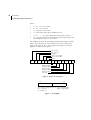
The addIT (<Series4) devices always respond with a type 38 data
frame. The composition of the data block of such a frame (the
bytes marked as d1, d2... dn) is depicted in Figure 5, while the
digibyte is depicted in Figure 6.
RF incoming
RF outgoing
Digibyte
Pulse Counter I/O B
Pulse Counter I/O A
Battery
D1
D2
D3
D4
D5
D6
D7
D8
D9
D10 D11 D12 D13
Cabling 1 I/O B
Cabling 2 I/O B
Cabling 3 I/O B
Cabling 1 I/O A
Cabling 2 I/O A
Cabling 3 I/O A
Reserved
Figure 5. Frame 38 description
b7
SC
b0
Res
U
U
Res
Res Dig A Dig B
SC — Battery charge (0–off, 1–on) Dig A —þDigital I/O A
Res — Reserved
Dig B — Digital I/O B
U — Undefined
Figure 6. The Digibyte
CHAPTER 3
Using terminal commands
The remote version is limited to a single frame. An example of
such a command is given below:
6367
6367
30 4
20 0
3185
#
DATA 6367 30/4/1999 14:50:00
DATA
1999 14 54 55 14 38 255 255 77 0 0 89 156 126
0 0 0
0
Notice that if you need to get data that is not the last (newest) slot
remotely from a device, the ID must be supplied twice. If you need
to get the last slot stored, you can ignore the ID and the date/time
parameters:
8300
8300
13 5
15 0
3138
DATA
DATA
1999 19 26 36 14 38 255 255 79 0 0 87 148 149
0 0 0
0
COMMAND
FDEV
DESCRIPTION
Displays info about internal memory or formats the internal memory (destroys all the data)
PARAMETERS
None (to query the current format) or the new EEPROM type and
optional the number of index entries. To format the EEPROM with
the currently set type, specify type 0.
In GET mode, the following information is printed:
current EEPROM type, the sizes of the two EEPROM chips, the
range for index size, the total/used index entries, the total/used
number of bytes for measurement data.
Table 3. EEPROM Types
Type
Memory [kB]
Min index entries
Default index entries
May index entries
1
16
64
256
1024
2
16+16
128
512
2048
3
32
128
512
2048
4
16+32
192
768
3072
29
30
CHAPTER 3
Performing Advanced Functions
Table 3. EEPROM Types
Type
Memory [kB]
Min index entries
Default index entries
May index entries
5
32+16
192
768
3072
6
64
256
1024
4096
7
32+32
256
1024
4096
8
16+64
320
1280
5120
9
64+16
320
1280
5120
10
32+64
384
1536
6144
11
64+32
384
1536
6144
12
64+64
512
2048
8192
RETURNS
The current setting.
REMARKS
Do not play with this settings, the correct setup depends on the
memory components on the pcb and is a factory setup. Contact
Adcon Telemetry for optimal index size setting.
REMOTE
Yes, SET only.
EXAMPLE
FDEV
38193 FDEV 1 16+0 64..1024 256/255 10240/10200 0
#
FDEV 0
38193 FDEV 0
#
Note: Depending on the device’s memory size, this command may
take several seconds to complete.
COMMAND
INFO
DESCRIPTION
Returns various status information.
PARAMETERS
None.
CHAPTER 3
Using terminal commands
RETURNS
A list of a device’s internal variables:
ID INFO rf_in rf_out date time ver clk stack cop
batt temp days_uptime min:sec_uptime rssi pmp_low
pmp_high type slot samples err_level
#
The formats for the above parameters are as follows:
•
rf_in and rf_out as a decimal
•
date as dd/mm/yyyy
•
time as hh:mm:ss
•
ver as x.x
•
clk, stack, and cop as decimal; they represent internal
housekeeping parameters and are implementation
dependent.
•
batt as battery level using the standard voltage conversion
equation (0 is 0 volts, 255 is 20 volts)
•
temp as internal temperature in the A720 housing, which is
device dependent. The precision of the sensing element is
very low (±4°C), but it is sufficient for battery power
management (charge/discharge). To compute the actual value
(in °C), the following equation must be used:
1087
Temp = internalTemp • ------------ – 275
256
•
days_uptime in days; together with min:sec_uptime, it
represents the amount of time the device is up without a reset
or watchdog
•
min:sec_uptime in minutes:seconds format
•
rssi as decimal; it is the programmed value with the RSSI
command
•
pmp_low and pmp_high are the programmed values with
the PMP command
•
type is used to represent the device type; following types are
assigned currently:
— 0 for A730MD
— 1 for A720
— 2 for A730SD
— 3 for A720B
— 4 for A733
31
32
CHAPTER 3
Performing Advanced Functions
— 5 for A723
— 6 for A440
— 7 for A733GSM
— 8 for A731
— 9 for A732
— 10 for A740
— 11 for A740GSM
— 12 for A724
— 13 for A725
— 14 for Foreign RTU
— 15 for A723_S4
— 16 for A724_S4
— 17 for A725_S4
— 18 for A731_S4
— 19 for A732_S4
— 20 for A733_S4
— 21 for A733GSM_S4
•
slot and samples are the actual values programmed by
means of the SLOT command. The slot interval shown, is the
shortest one that is nonzero. If all connectors are turned off
(i.e. all slot intervals are zero), the returned value is zero;
sample will always read zero for A/23 Series 4 RTUs.
•
err_level is the error value; 0 means no error
REMARKS
GET only.
REMOTE
Yes, GET only.
EXAMPLE
INFO
38193 INFO 255 0 10/10/2008 12:34:56 1.0 0 0 0 91
72 40 1:46 58 65 72 3 900 0 0
#
COMMAND
LVA
DESCRIPTION
En-/DIsables the low-voltage amplifier for the given ANLG channels. The bitmask format is the same as for CALC. Note that on
current device types, LVA is only supported on IOB (i.e. channels 35)
PARAMETERS
A bitmask. See CALC command syntax.
RETURNS
The current setting.
REMARKS
GET/SET.
CHAPTER 3
Using terminal commands
REMOTE
Yes, via XCONF only.
EXAMPLE
LVA 0x18
38193 LVA 0
#
LVA
38193 LVA 24 0
#
COMMAND
DPE
DESCRIPTION
Enables storing digital pin states on changes. If this mode is
enabled, the digital pin states are sampled every second and
stored if either the pin state changed or the specified maximum
timeout (in seconds) is over.
Note: this event-dependent data is stored in special sensor values
that do *NOT* correspond with the standard sensor values for digital pins. If you need both type of data, you must connect two different sensors on the A840/A850 gateway.
PARAMETERS
Channel bitmask and timeout (in seconds, max. 65535). If timeout
is nonzero, the pin state is stored after timeout, regardless of the
pin has changed or not. If timeout is zero, the pin state is stored on
changes only.
The format of the bitmask is:
bit 0: 1=enable DPE for channel 0
bit 1: 1=enable DPE for channel 1
bit 2: 1=enable DPE for channel 2
RETURNS
The current setting.
REMARKS
GET/SET.
REMOTE
Yes, via XCONF only.
EXAMPLE
DPE 0x03 60
38193 DPE 0
#
33
34
CHAPTER 3
Performing Advanced Functions
DPE
38193 DPE 3 60 0
#
COMMAND
PORT
APPLIES TO
A720B, but see comments in “Remote” on page 36.
DESCRIPTION
A complex command acting upon the I/O ports of a device.
PARAMETERS
A control byte specifying the command, the bit of the port the
command is acting on, and two 16-bit parameters, depending on
the control byte; for some commands, one or both of them may be
missing. However, if they are needed for a certain command but
not given, null values are implied.
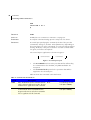
The control byte’s significance is shown in Figure 7.
Command Code
Port Number
Figure 7. Control Byte Layout
•
The Port Number selects a the port that will be affected by
the command. For the A723S4, only 0000 and 0001 are
accepted.
•
The Command Code specifies the operation that will be
applied to the selected port.
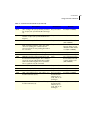
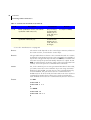
Table 4 shows the command codes definitions.
Table 4. Command Code Definitions
Code
Description
Parameters
Returns
0000
RDP – Read Data Port. This command reads the
whole 16-bit port and returns its value; the Port
Number has no significance for this command.
None
A 16-bit integer and the
result (OK or ERROR).
0001
RDDR – Read Data Direction Register. This command reads the whole 16-bit Data Direction
Register and returns its value; the Port Number
has no significance for this command.
None
A 16-bit integer and the
result (OK or ERROR).
CHAPTER 3
Using terminal commands
Table 4. Command Code Definitions (Continued)
Code
Description
Parameters
Returns
0010
CAI – Configure the port specified by Port Num- The port number.
ber as input (acts upon the Data Direction Register).
Result (OK or ERROR).
0011
CAO – Configure the port specified by Port
Number as output (acts upon the Data Direction
Register).
The port number.
Result (OK or ERROR).
0100
RBV – Read the specified bit.
The port number.
Bit value and the result
(OK or ERROR).
0101
RNS – Read the notificationa status. If no notifi- The port number.
cation was pending, this command should
return an error. If one was pending, the notification is cleared.
Returns the time of the
last port change in standard time format and the
result (OK or ERROR).
0110
DNOPC – Disable Notify On Port Change.
The port number.
Result (OK or ERROR).
0111
ENOPC – Enable Notify On Port Change.
The port number.
Result (OK or ERROR).
1000
RPNNER – Read the Pending Notifications and
the Notification Enable Register. This command
returns the 16-bit Pending Notifications and the
Notification Enable Registers; the Port Number
has no significance for this command.
None.
Two 16-bit integers (first
the PN and then the NE
register) and the result
(OK or ERROR).
1001
CB – Clear the specified bit.
The port number.
Result (OK or ERROR).
1010
SB – Set the specified bit.
The port number.
Result (OK or ERROR).
1011
XB – Exclusive Or the specified bit.
The port number.
Result (OK or ERROR).
1100
MFR – Monostable function, start with the specified bit in OFF state (reset).
The port number,
the OFF and the
ON times (in seconds), both as 16bit integers.
Result (OK or ERROR)
1101
MFS – Monostable function, start with the specified bit in ON state (set).
The port number,
the OFF and the
ON times (in seconds), both as 16bit integers.
Result (OK or ERROR).
35
36
CHAPTER 3
Performing Advanced Functions
Table 4. Command Code Definitions (Continued)
Code
Description
Parameters
Returns
1110
MVFR – Multivibrator function, start with the
specified bit in OFF state (reset).
The port number,
the OFF and the
ON times (in seconds), both as 16bit integers.
Result (OK or ERROR).
1111
MVFS – Multivibrator function, start with the
specified bit in ON state (set).
The port number,
the OFF and the
ON times (in seconds), both as 16bit integers.
Result (OK or ERROR).
a. See also “Notifications” on page 42.
RETURNS
The return result depends on the control byte. However, whatever
the return result is, it includes the control byte.
REMARKS
The general behavior is that a PORT command issued on a certain
port bit will override any previous PORT commands. For example, if
a port was configured as input and then an MFR (monostable function) was issued, the port automatically switches to output. A new
MFR or similar function clears the status of the port and starts from
scratch, even if the previous command was not finished.
REMOTE
Yes, for the A720. If you are using a terminal window for the A720,
you cannot issue the PORT command. If you are using a terminal
window for the A720B, you can issue a PORT command remotely
for an A720 RTU, but you cannot issue the command for the
A720B receiver. In other words, the base station can issue a remote
command for an RTU, but it cannot issue such a command for
itself. An RTU cannot issue the command at all, but can execute it.
EXAMPLE
For RDP:
6789 PORT 0
6789 PORT 0 1 0
#
For RDDR:
6789 PORT 16
6789 PORT 16 0 0
#
CHAPTER 3
Using terminal commands
For ENOPC:
6789 PORT 112
6789 PORT 112 0
#
For RPNNER:
6789 PORT 128
6789 PORT 128 0 1 0
#
For RNS:
6789 PORT 80
6789 PORT 7/5/1999 18:34:22 0
#
COMMAND
REBOOT
DESCRIPTION
This command reboots the RTU and is only available at the console interface (i.e. not remote).
PARAMETERS
The RTU ID
RETURNS
Nothing.
REMARKS
The system stops, and starts the bootloader after a few seconds. A
new firmware can be uploaded with y-modem protocol using a terminal program. Please follow the instructions on the terminal
screen. To see a list of commands, enter the help command.
REMOTE
No.
EXAMPLE
REBOOT 38193
A723_S4 Bootloader V1.0
Copyright (C) Adcon Telemetry GmbH 2008
Press <ESC> within 5 seconds to start the commandline interface...
>
COMMAND
XIMME
37
38
CHAPTER 3
Performing Advanced Functions
DESCRIPTION
Substitution for the former IMME command. Please see A740 User
Guide for details.
PARAMETERS
Please see A740 USer Guide.
RETURNS
Please see A740 USer Guide.
REMARKS
Only mode 2 is supported (there are no LCs or PCs for A7x3 Series
4). The ADC number is the same as the connector number, the
range parameter is ignored. If no connector number is given, data
for all connectors is returned.
Data format:
INTERNAL:
•
digibyte (SOLARCELL as bit 8)
•
battery voltage (0..255 = 0..20V)
•
temperature (0..255 = -68..332°C)
•
relative humidity (0..255 = 0..100%)
•
external voltage (0..255 = 0..20V)
IOA..IOD:
•
digibyte, with IO pin states *ONLY* for the given connector
(for IOD, the expansion port is included); bit numbers are the
same as with PORT RDP (PORT 0)
•
analog values for cabling 1..3 (0..65535 = 0..2,5V for standard
channels, 0..250mV for channels with low voltage amplifier
activated)
•
counter value
VALVES:
- digibyte, with IO pin states *ONLY* for the valves; bit numbers
are the same as with PORT RDP (PORT 0)
REMOTE
Yes.
EXAMPLE
XIMME 2 0
38193 XIMME
0 128 79 59 0 0
1 0 42240 13392 80 0
2 128 16400 32784 49072 24328
CHAPTER 3
Using terminal commands
0
#
TX 1
38193 TX 0
#
TX 5
38193 TX 0
#
COMMAND
SDI
DESCRIPTION
Command to query and configure the SDI-12 subsystem.
PARAMETERS
The command has a multitude of options. If issued without parameters, the GET variant is implied, i.e. the status of the SDI-12 subsystem will be returned (see also below). The full extent of the
commands is not given here as the the SDI-12 subsystem is configured via the wireless link by using the GUI configurator in the
A840/A850 Telemetry Gateway. Additional information can be
obtained from Adcon Telemetry upon request.
RETURNS
The first group of characters specify whether SDI is enabled
(uppercase) or disabled (lowercase) for the corresponding IOx port
(note: current devices only support SDI on port IOA).
The second group of characters specify whether SDI powersave
mode is enabled (uppercase) or disabled (lowercase) for the corresponding IOx port. If powersave is enabled, the sensor power supply is only turned on while the RTU sends commands to the sensor
or waits for an answer (or measurement data).
The remaining character specify flags:
x/X = SDI direct command in progress (X)
m/M = Measurement in progress (M)
d/D = Discovery in progress (D)
v/V = Values for storage available (V)
In the sensor list, there are additional measurement methods supported. The methods now available are:
M - Normal measurement
39
40
CHAPTER 3
Performing Advanced Functions
R - Continuous measurement
C - Concurrent measurement (treated like M by RTU)
V - Verify (to get internal sensor status info)
REMOTE
Yes.
EXAMPLE
SDI
38193 SDI abcd abcd xmdv 0 0 0
#
COMMAND
RX
DESCRIPTION
Switches the unit to permanent receive mode (for tuning purposes).
PARAMETERS
None.
RETURNS
Nothing.
REMARKS
The system stops, and exits the command only when you press a
key. This command returns no message.
REMOTE
No.
EXAMPLE
RX
38193 RX 0
#
COMMAND
TX
DESCRIPTION
Switches the unit to transmit mode (for tuning purposes).
PARAMETERS
None (sends an unmodulated carrier), 1 (sends a 1 kHz modulated
carrier), 0 (sends a 2 kHz modulated carrier) or 5 (sends a mixed 1
+ 2 kHz modulated carrier) or 9 (send a PN9 test sequence).
RETURNS
Nothing.
REMARKS
The system stops, and exits the command only when you press a
key. This command returns no message.
REMOTE
No.
CHAPTER 3
Using terminal commands
EXAMPLE
TX
38193 TX 0
#
TX 1
38193 TX 0
#
TX 5
38193 TX 0
#
COMMAND
B
DESCRIPTION
Sends a broadcast frame.
PARAMETERS
None.
RETURNS
A data block.
REMARKS
After the device sends the broadcast frame, it will listen for
answers. All valid answers will be listed with their IDs.
REMOTE
No.
EXAMPLE
B
38193 B 0
#12234 BA 0
#17851 BA 0
COMMAND
VER
DESCRIPTION
Requests the firmware version of the device.
PARAMETERS
None.
RETURNS
The current version.
REMARKS
GET only.
REMOTE
No.
EXAMPLE
VER
38183 VER 1.0 0
#
41
42
CHAPTER 3
Performing Advanced Functions
Notifications
Notifications are frames sent asynchronously by devices that are
otherwise slaves. The notifications are received by a device closest
to the host and then sent to the host. If the host is not available,
the receiving device will store the notification and wait until it is
questioned by the host. At this point, it will inform the host that it
has a notification. It is then the task of the host to issue a command
to read the respective notification.
Before a device can issue a notification, the notification must first
be enabled. Special frames are used to this end, depending on the
notification type. If an end device is not able to send a notification
due to radio propagation or other kind of communication problems, it will store the date/time when the notification took place.
As soon as the communication is re-established, the device will try
to send the notification again.
Note: To avoid collisions, the device will wait a random time (up to
10 seconds) before sending the notification frame.
When the device closest to the host receives a notification from a
remote, it must inform the host about it by sending a break character on the serial line. The host must then issue the command DEV
in order to see which device has a notification pending. If the host
is not available, the device closest to the host will wait until first
time requested by the host and after answering to the host request
will re-send a break. This sequence will go on as described until the
host issues the DEV command.
The following notification is currently defined for the A723 Series 4
device:
•
NOPC—Notification On Port Change (see “PORT” on
page 34).
Returned errors list
Following are error messages you might get.
Command line interpreter
•
1 — nonexistent command
•
2 — command line buffer overflow (input line too long)
•
3 — internal error
CHAPTER 3
Returned errors list
•
4 — reserved
•
5 — missing or false parameters in command
•
6 — operation not implemented
Device descriptors and storage handler
•
10 — device not found (attempt to perform a command on a
nonexistent device)
•
11 — device already exists
•
12 — reserved
•
13 — no more space for descriptors (too many devices)
•
14 — no more records for the specified device
•
15 — temporary communication break, no more data (the last
request was not successful)
•
16 — time-out (the handler blocked or is busy)
•
17 — internal error
•
18 — attempt to insert a reserved device ID number (0 or
65535)
•
20 — incorrect time supplied (conversion to time_t was not
possible)
•
30 — error at receive (CRC, etc.)
•
31 — unexpected frame received
•
32 — wrong length
•
33 — reserved
•
34 — reserved
•
35 — time-out (remote device not responding)
•
36 — receiver busy (for example, just making the request
round)
•
40 — request to read a notification when no notification is
pending
Real time clock
Radio interface
Notifications
43
44
CHAPTER 3
Performing Advanced Functions
45
Appendix. Specifications
The A723 Series 4 was intended to fulfill the specification of the
EN 300 220 and other national norms similar to this (for example,
the CFR 47, Part 90, Subpart J). Table 5 shows the main operational parameters of the A723 Series 4.
Table 5. Operational Parameters
Parameter
Min
Typ
Max
Unit
Common
Supply
5.0
Operating Temperature
Relative Humidity
10.0
V
-30
+70
°C
10
99
%
2000
bps
470
MHz
±1.2
kHz
Class Protection
6.2
IP65
Data Rate (using the onboard software modem)
1000
Operating Frequency (low band version)b
432
Frequency Stability (-30 to +70 °C)
1500a
Receiver
Sensitivity (10 dB S/N)
-101
dBm
46
Table 5. Operational Parameters (Continued)
Parameter
Image Frequency Attenuation (@ 25°C)
Min
Typ
45
2
Adjacent Channel Attenuation
Unit
dB
Local Oscillator Leakage
RSSI Range
Max
30
-120
nW
dB
-47
dBm
35
mA
+12
dBm
Spurious Radiation (0 to 862 MHz)
2
nW
Spurious Radiation (862 MHz to 3.5 GHz)
200
nW
Operating Current (incl. onboard microcontroller)c
Transmitter (all measurements made on a 50 Ohm resistive load)
Output Power
-20
Adjacent Channel Power (12.5 kHz version)
-50
dBm
Adjacent Channel Power (25 kHz version)
-50
dBm
Occupied Bandwidth (12.5 kHz version)
8.5
kHz
Occupied Bandwidth (25 kHz version)
15
kHz
Operating Current (incl. onboard microcontroller)
40
mA
Datalogger
Analog Inputs
0
2.5
V
Analog Input, Low Voltage Amplifier enabled
0
100
mV
0.5
V
Digital Inputs Vil
Digital Inputs Vih
2.4
V
Pulse Counter Input Frequencyd
10
Hz
Digital Outputs Sink/Source
1
mA
Digital Outputs Vol
0.3
V
Digital Outputs Voh
2.4
V
a. Data rate is content dependent.
b. This parameter represents the tuning range; the switching range may be limited in
the software to a narrower space (even to the extent of a single channel).
c. Continuous duty.
d. Electrical levels are the same as for the Digital Inputs.
CHAPTER
A
A720 description, 5
about the LED, 12
answer format, 21
B
B
series 2, 41
battery
changing, 14
description, 13
operation, 14
C
changing the battery, 14
CMDS, 21
command
B
series 2, 41
CMDS, 21
DATA, 27
FDEV, 29
format, 20
FREQ
series 2, 22
ID, 23
INFO, 30
PMP
series 2, 26
PORT, 34
RSSI
series 2, 23
RX
series 2, 40
SLOT
series 2, 24
TIME, 22
TX, 40
VER
series 2, 41
command line interpreter errors, 42
47
48
CHAPTER
configuring
addIT RTU in addVANTAGE software, 13
devices, 19
connectivity check, 10
connector
definition, 18
RTU, 18
conventions, document, 7
D
DATA, 27
device
configuration, 19
descriptors and storage handler errors, 43
determining version, 18
operation time, 14
document conventions, 7
E
errors
command line interpreter, 42
device descriptors and storage handler, 43
radio interface, 43
real time clock, 43
F
FDEV, 29
field installation, RTU, 11
formats, 20
FREQ
series 2, 22
I
ID, 23
INFO, 30
install
RTU, 10
installation issues, 6
internal battery, 13
introduction, 5
CHAPTER
L
LED
definition, 10
usage, 12
M
maintaining the RTU, 13
N
NOPC, 42
notification
definition, 42
NOPC, 42
O
overview, 5
P
packaging
RTU, 9
performing a connectivity check, 10
PMP
series 2, 26
PORT, 34
R
radio interface errors, 43
real time clock errors, 43
remote transmission unit. See RTU
restrictions for installation, 6
RSSI
series 2, 23
RTU
connector, 18
field installation, 11
graphic, 10
installing, 10
mainenance, 13
packaging, 9
use, 9
49
50
CHAPTER
RX
series 2, 40
S
series, determining, 18
SLOT
series 2, 24
software configuration, 13
T
TIME, 22
TX, 40
U
using
LED for connectivity check, 10
RTU, 9
V
VER
series 2, 41
51
Credits and Colophon
Credits
Development
Gerhard Chvatal, Robert Ernst, Bernd Friedl.
Documentation and artwork
Gerhard Chvatal.
Quality control and testing
Martin Hackl, Steve Grove, Thomas Breitenbrunner.
Colophon
This manual was written and produced with Adobe FrameMaker .
The illustrations were done or prepared in Adobe Illustrator,
Adobe Photoshop and The Gimp 2.2. Some illustrations were
done in Corel Draw! on Microsoft Windows. The electronic version
was created with ps2pdf on a Fedora Core 3 system.
52