1
2. Set Temperature*
Heat function On or press the Purifire™ On/Off button
to turn the Purifire™ function ON.
1.
2.
3.
4.
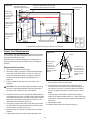
Frequency Interference
If the fireplace does not respond properly to the remote
control, the remote operating frequency may have to be
reset. The remote control can send another frequency code
to the circuit board to eliminate
interference.
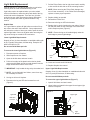
1. Simultaneously press the “Slow Start” button and the
“Purifire™ Low Speed” button on the remote control.
2. “CODE” will appear.
3. Release the “Slow Start” button and the “Purifire™ Low
Speed” button.
4. Press and hold the initialization button on the unit.
! * NOTE: The set temperature buttons are not operational on the DF3215NH model fireplaces.
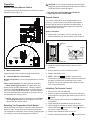
3. Light Dimmer
Your remote will now have a different frequency
communicating with the fireplace.
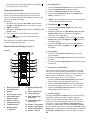
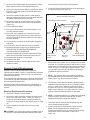
Remote Control Functions (Figure 3)
Figure 3
9
11
3
4
5
6
17
1.
2.
3.
4.
5.
6.
7.
8.
9.
Room Temperature
Set Temperature*
Dimmer
Flame Speed Control
Slow Start/Fading
Embers Control
Purifier™ Speed
Temperature Down*
Temperature Up*
Dimmer Down/
Firelight Off
1. Press the 17. Flame/Heat On/Off button to turn the
Flame/Heat On.
2. Press the 12. Flame Speed Up to increase the speed of
the flame.
3. Press the 11. Flame Speed Down to decrease the speed
of the flame.
8
10
12
13
15
4. Flame Speed
1
7
5. Slow Start / Fading Embers
14
The slow start function simulates a starting fire. The slow
start function is automatically programmed for 30 seconds.
The slow start timer setting cannot be changed. The fading
embers function simulates a fire going out. The fading
embers timer can be set to 1, 5 or 10 minutes.
1. Press the 14. Slow Start Fading Embers On button to
turn the Slow Start/Fading Embers function on.
2. Press the 14. Fading Embers On button repeatedly to
set the fading embers timer time to 1, 5 or 10 minutes.
3. Press the 13. Fading Embers Off button to turn the
Fading Embers timer function off.
16
18
10.
11.
12.
13.
14.
15.
16.
17.
18.
Firelight
1. Press the 17. Flame/Heat On/Off button to turn the
Flame/Heat On.
2. Repeatedly press the 10. Light Dimmer Up or 9. Light
Dimmer Down button to decrease or increase the
brightness of the upper lights.
3. To activate the “Firelight”, continue pressing 10. Light
Dimmer Up until the “Firelight On” icon
is shown on
the display screen.
4. To shut the “Firelight” off, turn the 9. Light Dimmer
Down button until the “Firelight” icon off is shown on
the display.
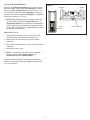
5. Press the button on the remote and release the
initialization button.
2
Press 17. Flame Heat On/Off button to turn fireplace on.
Press 8. Temperature Up to raise thermostat.
Press 7. Temperature Down to lower thermostat.
Press both 8. Temperature Up and 7. Temperature
Down to change °F to °C.
Dimmer Up/Firelight
On
Flame Speed Down
Flame Speed Up
Slow Start/Fading
Embers Off
Fading Embers On/
Timer Cycle
Purifier™ Low Speed
Purifier™ High Speed
Flame & Heat On/Off
Purifier™ On/Off
6. Purifier™ Speed
Press the 18. Purifire™ On/Off button to turn the Purifire™
function On. When the Purifire™ function is On the
Purifire™ Speed symbol will flash. When off the symbol
will be solid. The default setting for the Purifire™ is set at
low speed. Press the 16. Purifier™ High Speed button
to switch to the high speed level and the Purifier™ Speed
symbol will flash more quickly. Press the 15. Purifier™ Low
Speed button to switch back to the lower speed, or Press the
18. Purifire™ On/Off button to turn the Purifire™ function
Off.
4