1
IPsec User Guide
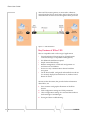
other end. The remote gateway is connected to a Remote network and the VPN is connected to the Local network. The communication of data is secure through the IPSec protocols.
Figure 1-1: IPSec Architecture
Key Features of IPSec VPN
IPsec is compatible with a wide range of applications: •
Provides enhanced data security for all applications connected through a compatible Airlink gateway
•
No additional installation required •
Simple wizard‐based setup •
Remote management, control and configuration via AceWare tools and utilities
•
Secure two‐way communication channel with data encryption
•
Can be downloaded, configured and installed over‐the‐air for currently deployed AirLink Raven X, PinPoint X and Raven XT device
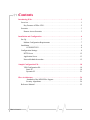
Sections in this document, that provide further information about IPSec, are: 2
1.
User scenarios with graphic illustration of the IPSec feature. 2.
VPN configuration settings and VPN parameters. 3.
IPsec configuration settings. It is assumed that audience has knowledge of AceManager. 4.
Testing and basic troubleshooting.
2120028