1
4. Timer
Timer functions are different by each remote controller.
For details on how to operate the remote controller, refer to the appropriate operation manual included with each remote controller.
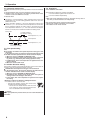
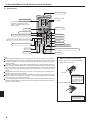
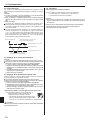
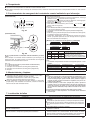
5. Emergency Operation for IR wireless remote controller
Starting operation
• To operate the cooling mode, press the
seconds.
• To operate the heating mode, press the
seconds.
(For PCA-A·KA4)
Stopping operation
• To stop operation, press the
than 2 seconds.
button for more than 2
button for more than 2
button or the
button for more
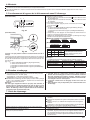
[Fig. 5-2] DEFROST/STAND BY lamp (Orange)
Operation lamp (Green)
Emergency operation switch (cooling/heating)
Receiver
• Each press of the emergency operation switch will toggle the operation
mode.
• Check “COOL/HEAT” with the operation monitor display. (The orange
lamp follows this monitor display for 5 seconds after pressing the
emergency operation switch.)
Fig. 5-1
(For PKA-A·HA4)
E.O.
SW
[Cooling only type]
[Heat pump type]
Cooling
Heating
Stop
Cooling
Stop
Operation Monitor Display
Fig. 5-2
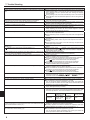
When the IR wireless remote controller cannot be used
When the batteries of the IR wireless remote controller run out or the IR
wireless remote controller malfunctions, the emergency operation can be
done using the emergency buttons.
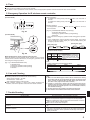
[Fig. 5-1] DEFROST/STAND BY lamp
Operation lamp
Emergency operation switch (heating)
Emergency operation switch (cooling)
Receiver
GREEN ORANGE
STOP
COOL
HEAT
○
●
●
: Turning off
○
○
●
The orange lamp follows the
switch operation as indicated
at the left for 5 seconds, and
then it will return to the normal
display.
: Lighting
Note:
• Details of emergency mode are as shown below.
Operation mode
Set temperature
Fan speed
Airflow direction
COOL
24°C, 75°F
High
Horizontal
HEAT
24°C, 75°F
High
Downward 4 (5)
6. Care and Cleaning
N Following indication shows that the filter needs cleaning.
• Wired remote controller : “FILTER”
• RF thermostat : “Clean Filter”
• ASK authorized pepole to clean the filter.
N When resetting “FILTER” or “Clean Filter” display. Resetting the
indication, refer to the operation manual of each remote controller.
Note:
L When 2 or more different types of indoor unit are controlled, the cleaning
period differs with the type of filter. When the master unit cleaning period
arrives, “FILTER” is displayed. When the filter display goes off, the cumulative time is reset. (only for wired remote controller)
L “FILTER” or “Clean Filter” indicates the cleaning period when the air
conditioner was used under general indoor air conditions by criteria time.
Since the degree of dirtiness depends on the environmental conditions,
clean the filter accordingly.
L The filter cleaning period cumulative time differs with the model.
L This indication is not available for IR wireless remote controller.
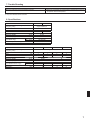
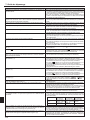
7. Trouble Shooting
Having trouble?
Air conditioner does not heat or cool well.
When heating operation starts, warm air does not blow from the indoor
unit soon.
During heating mode, the air conditioner stops before the set room temperature is reached.
Here is the solution. (Unit is operating normally.)
N Clean the filter. (Airflow is reduced when the filter is dirty or clogged.)
N Check the temperature adjustment and adjust the set temperature.
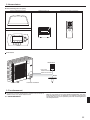
N Make sure that there is plenty of space around the outdoor unit. Is the
indoor unit air intake or outlet blocked?
N Has a door or window been left open?
N Warm air does not blow until the indoor unit has sufficiently warmed
up.
N When the outdoor temperature is low and the humidity is high, frost
may form on the outdoor unit. If this occurs, the outdoor unit performs
a defrosting operation. Normal operation should begin after approximately 10 minutes.
5