1
USAGE AND SAFETY PRECAUTIONS
USAGE AND SAFETY PRECAUTIONS
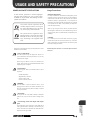
In this manual, symbols are used to highlight
warnings and cautions for you to read so that
accidents can be prevented. The meanings of these
symbols are as follows:
!
Warning
!
Caution
This symbol indicates explanations about
extremely dangerous matters. If users ignore
this symbol and handle the device the wrong
way, serious injury or death could result.
This symbol indicates explanations about
dangerous matters. If users ignore this symbol
and handle the device the wrong way, bodily
injury and damage to the equipment could
result.
Please observe the following safety tips and precautions to ensure
hazard-free use of the 3000.
!
Warning
Usage Precautions
• Electrical interference
For safety considerations, the 3000 has been designed to provide
maximum protection against the emission of electromagnetic
radiation from inside the device, and protection from external
interference. However, equipment that is very susceptible to
interference or that emits powerful electromagnetic waves should
not be placed near the 3000, as the possibility of interference
cannot be ruled out entirely.
With any type of digital control device, the 3000 included,
electromagnetic interference can cause malfunctioning and can
corrupt or destroy data. Care should be taken to minimize the risk
of damage.
• Cleaning
Use a soft, dry cloth to clean the 3000. If necessary, slightly
moisten the cloth. Do not use abrasive cleanser, wax, or solvents
(such as paint thinner or cleaning alcohol), since these may dull
the finish or damage the surface.
Please keep this manual in a convenient place for future
reference.
• Power requirements
The 3000 is powered by the supplied AC adapter. To
prevent malfunction and safety hazards, do not use any
other kind of AC adapter.
When using the 3000 in an area with a different line
voltage, please consult your local ZOOM distributor about
acquiring a proper AC adapter.
!
Caution
• Environment
Avoid using your 3000 in environments where it will be
exposed to:
• Extreme temperature
• High humidity or moisture
• Excessive dust or sand
• Excessive vibration or shock
!
Caution
!
Caution
!
Caution
• Handling
Since the 3000 is a precision electronic device, avoid
applying excessive force to the switches and buttons. Also
take care not to drop the unit, and do not subject it to shock
or excessive pressure.
• Alterations
Never open the case of the 3000 or attempt to modify the
product in any way since this can result in damage to the
unit.
• Connecting cables and input and output
jacks
ADVANCED GUITAR EFFECTS PROCESSOR
49 ●
USAGE AND SAFETY
PRECAUTIONS
You should always turn off the power to the 3000 and all
other equipment before connecting or disconnecting any
cables. Also make sure to disconnect all cables and the AC
adapter before moving the 3000.