1
km0216-0432.book Page 41 Wednesday, April 14, 2010 3:17 PM
Chapter 3. OSD Operation
(Continued from previous page.)
Setting
Function
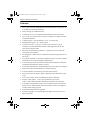
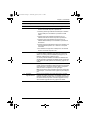
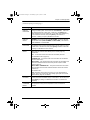
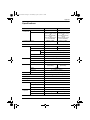
PORT ID
DISPLAY
DURATION
Determines how long a Port ID displays on the monitor after a port
change has taken place. The choices are: User Defined – which lets
you select the amount of time (from 1–255 sec.); and Always On –
which displays the Port ID at all times. If you select User Defined, key
in the number of seconds, then press [Enter]. The default is 3
Seconds. A setting of 0 (zero) disables this function.
PORT ID
DISPLAY
MODE
Selects how the Port ID is displayed: the Port Number alone (PORT
NUMBER); the Port Name alone (PORT NAME); or the Port Number
plus the Port Name (PORT NUMBER + PORT NAME). The default is
PORT NUMBER + PORT NAME.
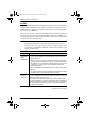
SCAN
DURATION
Determines how long the focus dwells on each port as it cycles through
the selected ports in Auto Scan Mode (see F7 SCAN, page 47). Key in
a value from 1–255 seconds, then press [Enter]. Default is 5 seconds;
a setting of 0 disables the Scan function.
SCAN/SKIP
MODE
Selects which computers will be accessed under Skip Mode (see F5
SKP, page 46), and Auto Scan Mode (see F7 SCAN, page 47).
Choices are:
ALL – All the Ports which have been set Accessible (see SET
ACCESSIBLE PORTS, page 44);
POWERED ON – Only those Ports which have been set Accessible
and are Powered On;
QUICK VIEW – Only those Ports which have been set Accessible and
have been selected as Quick View Ports (see SET QUICK VIEW
PORTS, page 44);
QUICK VIEW + POWERED ON – Only those Ports which have been
set Accessible and have been selected as Quick View Ports and are
Powered On.
The default is ALL.
Note: The Quick View choices only show up on an Administrator's
screen, since only he has Quick View setting rights (see SET QUICK
VIEW PORTS, page 44, for details).
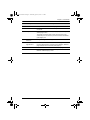
SCREEN
BLANKER
If there is no input from the console for the amount of time set with this
function, the screen is blanked. Key in a value from 1–30 minutes, then
press [Enter]. A setting of 0 disables this function. The default is 0
(disabled).
HOTKEY
COMMAND
MODE
Enables / Disables the Hotkey Command function in case a conflict
with programs running on the computers occurs. The default is
enabled.
41