1
PA-8T-V.35 Synchronous Serial Port
Adapter Installation and Configuration
Product Numbers: PA-8T-V35(=)
Platforms Supported: Catalyst 5000 Family Switches with RSM/VIP2,
Catalyst 6000 Family Switches with FlexWAN Module, Cisco 7100 Series,
Cisco 7200 Series, Cisco uBR7200 Series, Cisco 7301 Routers, Cisco 7304 PCI
Port Adapter Carrier Card in the Cisco 7304 Router, Cisco 7401ASR Routers,
and VIP in the Cisco 7000 and Cisco 7500 Series
Corporate Headquarters
Cisco Systems, Inc.
170 West Tasman Drive
San Jose, CA 95134-1706
USA
http://www.cisco.com
Tel: 408 526-4000
800 553-NETS (6387)
Fax: 408 526-4100
Text Part Number: OL-3563-03
THE SPECIFICATIONS AND INFORMATION REGARDING THE PRODUCTS IN THIS MANUAL ARE SUBJECT TO CHANGE WITHOUT NOTICE. ALL
STATEMENTS, INFORMATION, AND RECOMMENDATIONS IN THIS MANUAL ARE BELIEVED TO BE ACCURATE BUT ARE PRESENTED WITHOUT
WARRANTY OF ANY KIND, EXPRESS OR IMPLIED. USERS MUST TAKE FULL RESPONSIBILITY FOR THEIR APPLICATION OF ANY PRODUCTS.
THE SOFTWARE LICENSE AND LIMITED WARRANTY FOR THE ACCOMPANYING PRODUCT ARE SET FORTH IN THE INFORMATION PACKET THAT
SHIPPED WITH THE PRODUCT AND ARE INCORPORATED HEREIN BY THIS REFERENCE. IF YOU ARE UNABLE TO LOCATE THE SOFTWARE LICENSE
OR LIMITED WARRANTY, CONTACT YOUR CISCO REPRESENTATIVE FOR A COPY.
The following information is for FCC compliance of Class A devices: This equipment has been tested and found to comply with the limits for a Class A digital device, pursuant
to part 15 of the FCC rules. These limits are designed to provide reasonable protection against harmful interference when the equipment is operated in a commercial
environment. This equipment generates, uses, and can radiate radio-frequency energy and, if not installed and used in accordance with the instruction manual, may cause
harmful interference to radio communications. Operation of this equipment in a residential area is likely to cause harmful interference, in which case users will be required
to correct the interference at their own expense.
The following information is for FCC compliance of Class B devices: The equipment described in this manual generates and may radiate radio-frequency energy. If it is not
installed in accordance with Cisco’s installation instructions, it may cause interference with radio and television reception. This equipment has been tested and found to
comply with the limits for a Class B digital device in accordance with the specifications in part 15 of the FCC rules. These specifications are designed to provide reasonable
protection against such interference in a residential installation. However, there is no guarantee that interference will not occur in a particular installation.
Modifying the equipment without Cisco’s written authorization may result in the equipment no longer complying with FCC requirements for Class A or Class B digital
devices. In that event, your right to use the equipment may be limited by FCC regulations, and you may be required to correct any interference to radio or television
communications at your own expense.
You can determine whether your equipment is causing interference by turning it off. If the interference stops, it was probably caused by the Cisco equipment or one of its
peripheral devices. If the equipment causes interference to radio or television reception, try to correct the interference by using one or more of the following measures:
• Turn the television or radio antenna until the interference stops.
• Move the equipment to one side or the other of the television or radio.
• Move the equipment farther away from the television or radio.
• Plug the equipment into an outlet that is on a different circuit from the television or radio. (That is, make certain the equipment and the television or radio are on circuits
controlled by different circuit breakers or fuses.)
Modifications to this product not authorized by Cisco Systems, Inc. could void the FCC approval and negate your authority to operate the product.
The Cisco implementation of TCP header compression is an adaptation of a program developed by the University of California, Berkeley (UCB) as part of UCB’s public
domain version of the UNIX operating system. All rights reserved. Copyright © 1981, Regents of the University of California.
NOTWITHSTANDING ANY OTHER WARRANTY HEREIN, ALL DOCUMENT FILES AND SOFTWARE OF THESE SUPPLIERS ARE PROVIDED “AS IS” WITH
ALL FAULTS. CISCO AND THE ABOVE-NAMED SUPPLIERS DISCLAIM ALL WARRANTIES, EXPRESSED OR IMPLIED, INCLUDING, WITHOUT
LIMITATION, THOSE OF MERCHANTABILITY, FITNESS FOR A PARTICULAR PURPOSE AND NONINFRINGEMENT OR ARISING FROM A COURSE OF
DEALING, USAGE, OR TRADE PRACTICE.
IN NO EVENT SHALL CISCO OR ITS SUPPLIERS BE LIABLE FOR ANY INDIRECT, SPECIAL, CONSEQUENTIAL, OR INCIDENTAL DAMAGES, INCLUDING,
WITHOUT LIMITATION, LOST PROFITS OR LOSS OR DAMAGE TO DATA ARISING OUT OF THE USE OR INABILITY TO USE THIS MANUAL, EVEN IF CISCO
OR ITS SUPPLIERS HAVE BEEN ADVISED OF THE POSSIBILITY OF SUCH DAMAGES.
CCIP, CCSP, the Cisco Arrow logo, the Cisco Powered Network mark, Cisco Unity, Follow Me Browsing, FormShare, and StackWise are trademarks of Cisco Systems, Inc.;
Changing the Way We Work, Live, Play, and Learn, and iQuick Study are service marks of Cisco Systems, Inc.; and Aironet, ASIST, BPX, Catalyst, CCDA, CCDP, CCIE, CCNA,
CCNP, Cisco, the Cisco Certified Internetwork Expert logo, Cisco IOS, the Cisco IOS logo, Cisco Press, Cisco Systems, Cisco Systems Capital, the Cisco Systems logo,
Empowering the Internet Generation, Enterprise/Solver, EtherChannel, EtherSwitch, Fast Step, GigaStack, Internet Quotient, IOS, IP/TV, iQ Expertise, the iQ logo, iQ Net
Readiness Scorecard, LightStream, MGX, MICA, the Networkers logo, Networking Academy, Network Registrar, Packet, PIX, Post-Routing, Pre-Routing, RateMUX, Registrar,
ScriptShare, SlideCast, SMARTnet, StrataView Plus, Stratm, SwitchProbe, TeleRouter, The Fastest Way to Increase Your Internet Quotient, TransPath, and VCO are registered
trademarks of Cisco Systems, Inc. and/or its affiliates in the U.S. and certain other countries.
All other trademarks mentioned in this document or Web site are the property of their respective owners. The use of the word partner does not imply a partnership relationship
between Cisco and any other company. (0304R)
PA-8T-V.35 Synchronous Serial Port Adapter Installation and Configuration
Copyright © 1996–2003, Cisco Systems, Inc.
All rights reserved.
C O N T E N T S
Preface
vii
Objectives
Organization
vii
viii
Related Documentation
viii
Obtaining Documentation x
Cisco.com x
Documentation CD-ROM x
Ordering Documentation x
Documentation Feedback xi
Obtaining Technical Assistance xi
Cisco.com xi
Technical Assistance Center xii
Cisco TAC Website xii
Cisco TAC Escalation Center xii
Obtaining Additional Publications and Information
CHAPTER
1
Overview
1-1
Port Adapter Overview
1-1
Serial Interface Specifications
LEDs
xiii
1-2
1-3
Cables and Pinouts
1-4
Port Adapter Slot Locations on the Supported Platforms 1-14
Catalyst RSM/VIP2 Slot Numbering 1-15
Catalyst 6000 Family FlexWAN Module Slot Numbering 1-15
Cisco 7100 Series Routers Slot Numbering 1-16
Cisco 7200 Series and Cisco uBR7200 Series Routers Slot Numbering
Cisco 7301 Router Slot Numbering 1-18
Cisco 7304 PCI Port Adapter Carrier Card Slot Numbering 1-18
Cisco 7401ASR Router Slot Numbering 1-19
VIP Slot Numbering 1-20
Identifying Interface Addresses 1-21
Catalyst RSM/VIP2 Interface Addresses 1-22
Catalyst 6000 Family FlexWAN Module Interface Addresses
Cisco 7100 Series Routers Interface Addresses 1-23
1-17
1-22
PA-8T-V.35 Synchronous Serial Port Adapter Installation and Configuration
OL-3563-03
iii
Contents
Cisco 7200 Series and Cisco uBR7200 Series Routers Interface Addresses
Cisco 7301 Router Interface Addresses 1-23
Cisco 7304 PCI Port Adapter Carrier Card Interface Addresses 1-24
Cisco 7401ASR Router Interface Addresses 1-24
VIP Interface Addresses 1-24
CHAPTER
2
Preparing for Installation
2-1
Required Tools and Equipment
2-1
Software and Hardware Requirements
3
2-2
Checking Hardware and Software Compatibility
2-3
Safety Guidelines 2-3
Safety Warnings 2-3
Electrical Equipment Guidelines 2-8
Telephone Wiring Guidelines 2-8
Preventing Electrostatic Discharge Damage
2-9
FCC Class A Compliance
CHAPTER
2-9
Removing and Installing Port Adapters
Handling Port Adapters
3-1
3-1
Online Insertion and Removal
Warnings and Cautions
1-23
3-2
3-3
Port Adapter Removal and Installation 3-4
Catalyst RSM/VIP2—Removing and Installing a Port Adapter 3-5
Catalyst 6000 Family FlexWAN Module—Removing and Installing a Port Adapter 3-6
Cisco 7100 Series—Removing and Installing a Port Adapter 3-7
Cisco 7200 Series—Removing and Installing a Port Adapter 3-8
Cisco uBR7200 Series—Removing a Port Adapter 3-9
Cisco uBR7200 Series—Installing a Port Adapter 3-10
Cisco 7301 Router—Removing and Installing a Port Adapter 3-11
Cisco 7304 PCI Port Adapter Carrier Card—Removing and Installing a Port Adapter 3-12
Cisco 7401ASR Router—Removing and Installing a Port Adapter 3-14
VIP—Removing and Installing a Port Adapter 3-15
CHAPTER
4
Attaching the PA-8T-V.35 Interface Cables
4-1
Connecting a PA-8T-V.35 Compact Serial Cable
Determining the Port Mode
4-1
4-3
PA-8T-V.35 Synchronous Serial Port Adapter Installation and Configuration
iv
OL-3563-03
Contents
CHAPTER
5
Configuring the PA-8T-V.35 Interfaces
5-1
Using the EXEC Command Interpreter
5-1
Configuring the Interface 5-2
Shutting Down an Interface 5-2
Performing a Basic Configuration 5-8
Configuring Timing (Clock) Signals 5-10
Setting the Clock Rate 5-11
Inverting the Clock Signal 5-12
Inverting the Data Signal 5-12
Configuring NRZI Format 5-13
Configuring Cyclic Redundancy Checks 5-14
Configuring Half-Duplex and Binary Synchronous Communications
5-15
Checking the Configuration 5-17
Using show Commands to Verify the New Interface Status 5-17
Using the show version or show hardware Commands 5-19
Using the show diag Commands 5-23
Using the show interfaces Commands 5-25
Using the ping Command to Verify Network Connectivity 5-29
Using loopback Commands 5-29
PA-8T-V.35 Synchronous Serial Port Adapter Installation and Configuration
OL-3563-03
v
Contents
PA-8T-V.35 Synchronous Serial Port Adapter Installation and Configuration
vi
OL-3563-03
Preface
This preface describes the objectives and organization of this document and explains how to find
additional information on related products and services. This preface contains the following sections:
•
Objectives, page vii
•
Organization, page viii
•
Related Documentation, page viii
•
Obtaining Documentation, page x
•
Obtaining Technical Assistance, page xi
•
Obtaining Additional Publications and Information, page xiii
Objectives
This document describes how to install and configure the EIA/TIA-V.35 synchronous serial port adapter
(PA-8T-V35[=]), hereafter referred to as the PA-8T-V.35, which is used in the following platforms:
•
Catalyst 5000 family switches with the Route Switch Module (RSM)/second-generation Versatile
Interface Processor (VIP2)
•
Catalyst 6000 family switches with the Catalyst 6000 family FlexWAN module
•
Cisco 7100 series routers—which consist of the Cisco 7120 series and Cisco 7140 series
•
Cisco 7200 series routers—which consist of the two-slot Cisco 7202, four-slot Cisco 7204 and
Cisco 7204VXR, and the six-slot Cisco 7206 and the Cisco 7206VXR
•
Cisco uBR7200 series universal broadband routers—which consist of the six-slot Cisco uBR7246
and the three-slot Cisco uBR7223
•
Cisco 7301 router
•
Cisco 7304 PCI Port Adapter Carrier Card in the Cisco 7304 router
•
Cisco 7401ASR router
•
VIP in Cisco 7500 series and Cisco 7000 series routers with the 7000 series Route Switch Processor
(RSP7000) and 7000 series Chassis Interface (RSP7000CI)
PA-8T-V.35 Synchronous Serial Port Adapter Installation and Configuration
OL-3563-03
vii
Preface
Organization
Organization
This document is organized into the following chapters:
Section
Title
Description
Chapter 1
Overview
Describes the PA-8T-V.35 and its LED displays,
cables, and receptacles.
Chapter 2
Preparing for Installation
Describes safety considerations, tools required,
and procedures you should perform before the
actual installation.
Chapter 3
Removing and Installing Port
Adapters
Describes the procedures for installing and
removing PA-8T-V.35 port adapters in the
supported platforms.
Chapter 4
Attaching the PA-8T-V.35 Interface
Cables
Provides instructions for installing port adapter
cables on the supported platforms.
Chapter 5
Configuring the PA-8T-V.35
Interfaces
Provides instructions for configuring your port
adapter on the supported platforms. The
instructions given in this chapter apply to all
supported platforms described in this document.
Related Documentation
Your router or switch and the Cisco IOS software running on it contain extensive features and
functionality, which are documented in the following resources:
•
Cisco IOS software:
For configuration information and support, refer to the modular configuration and modular
command reference publications in the Cisco IOS software configuration documentation set that
corresponds to the software release installed on your Cisco hardware.
Note
•
You can access Cisco IOS software configuration and hardware installation and
maintenance documentation on the World Wide Web at http://www.cisco.com,
http://www-china.cisco.com, or http://www-europe.cisco.com.
Catalyst RSM/VIP2:
For hardware installation and maintenance information, refer to the following publications:
– Route Switch Module Catalyst VIP2-15 and VIP2-40 Installation and Configuration Note
– Catalyst 5000 Series Route Switch Module Installation and Configuration Note
– The installation and configuration guide that shipped with your Catalyst 5000 family switch
•
Catalyst 6000 family FlexWAN module:
For hardware installation and maintenance information, refer to the following publications:
– Catalyst 6000 Family FlexWAN Module Installation and Configuration Note
– The installation and configuration guide that shipped with your Catalyst 6000 family switch
PA-8T-V.35 Synchronous Serial Port Adapter Installation and Configuration
viii
OL-3563-03
Preface
Related Documentation
•
Cisco 7100 series routers:
– For hardware installation and maintenance information, refer to the Cisco 7100 Series VPN
Router Installation and Configuration Guide that shipped with your Cisco 7100 series router.
– For information on setting up a Virtual Private Network, refer to the Cisco 7100 Series VPN
Configuration Guide.
•
Cisco 7200 series routers:
– For port adapter hardware and memory configuration guidelines, refer to the Cisco 7200 Series
Port Adapter Hardware Configuration Guidelines.
– For hardware installation and maintenance information (including the Cisco 7206 or
Cisco 7206VXR as a router shelf in a Cisco AS5800 Universal Access Server), refer to the
installation and configuration guide that shipped with your Cisco 7200 series router.
•
Cisco 7200 VXR routers:
For hardware installation and maintenance information, refer to the Cisco 7200 VXR Installation
and Configuration Guide that shipped with your Cisco 7200 VXR router.
•
Cisco uBR7200 series routers:
•
For hardware installation and maintenance information, refer to the Cisco uBR7200 Series
Hardware Installation Guide.
•
Cisco 7301 router:
For hardware installation and maintenance information, refer to the Cisco 7301 Installation and
Configuration Guide or the Cisco 7301 Router Quick Start Guide.
•
Cisco 7304 PCI Port Adapter Carrier Card in Cisco 7304 routers:
For hardware installation and maintenance information, refer to the Cisco 7304 PCI Port Adapter
Carrier Card Installation and Configuration Guide.
•
Cisco 7401ASR routers:
For hardware installation and maintenance information, refer to the Cisco 7401ASR Installation and
Configuration Guide or the Cisco 7401ASR Quick Start Guide.
•
Cisco 7500 series routers:
For hardware installation and maintenance information, refer to the following publications:
– Cisco 7500 Installation and Configuration or the quick start guide that shipped with your router
– Second-Generation Versatile Interface Processor (VIP2) Installation and Configuration
– Fourth-Generation Versatile Interface Processor (VIP4) Installation and Configuration
– Versatile Interface Processor (VIP6-80) Installation and Configuration
•
For international agency compliance, safety, and statutory information for WAN interfaces:
– Site Preparation and Safety Guide
– Regulatory Compliance and Safety Information for the Cisco 7000 Series Routers
– Regulatory Compliance and Safety Information for Cisco 7100 Series VPN Routers
– Regulatory Compliance and Safety Information for the Cisco 7200 Series Routers
– Regulatory Compliance and Safety Information for the Cisco uBR7200 Series Universal
Broadband Router
– Regulatory Compliance and Safety Information for the Cisco 7300 Series Routers
PA-8T-V.35 Synchronous Serial Port Adapter Installation and Configuration
OL-3563-03
ix
Preface
Obtaining Documentation
– Regulatory Compliance and Safety Information for the Cisco 7401 Series Routers
– Regulatory Compliance and Safety Information for the Cisco 7500 Series Routers
•
To view Cisco documentation or obtain general information about the documentation, refer to the
following sources:
– “Obtaining Documentation” section on page x.
– “Obtaining Technical Assistance” section on page xi.
– Customer service at 800 553-6387 or 408 526-7208. Customer service hours are 5:00 a.m. to
6:00 p.m. Pacific time, Monday through Friday (excluding Cisco-observed holidays).
– Cisco Information Packet that shipped with your router or switch.
Obtaining Documentation
Cisco provides several ways to obtain documentation, technical assistance, and other technical
resources. These sections explain how to obtain technical information from Cisco Systems.
Cisco.com
You can access the most current Cisco documentation on the World Wide Web at this URL:
http://www.cisco.com/univercd/home/home.htm
You can access the Cisco website at this URL:
http://www.cisco.com
International Cisco websites can be accessed from this URL:
http://www.cisco.com/public/countries_languages.shtml
Documentation CD-ROM
Cisco documentation and additional literature are available in a Cisco Documentation CD-ROM
package, which may have shipped with your product. The Documentation CD-ROM is updated regularly
and may be more current than printed documentation. The CD-ROM package is available as a single unit
or through an annual or quarterly subscription.
Registered Cisco.com users can order a single Documentation CD-ROM (product number
DOC-CONDOCCD=) through the Cisco Ordering tool:
http://www.cisco.com/en/US/partner/ordering/ordering_place_order_ordering_tool_launch.html
All users can order monthly or quarterly subscriptions through the online Subscription Store:
http://www.cisco.com/go/subscription
Ordering Documentation
You can find instructions for ordering documentation at this URL:
http://www.cisco.com/univercd/cc/td/doc/es_inpck/pdi.htm
PA-8T-V.35 Synchronous Serial Port Adapter Installation and Configuration
x
OL-3563-03
Preface
Obtaining Technical Assistance
You can order Cisco documentation in these ways:
•
Registered Cisco.com users (Cisco direct customers) can order Cisco product documentation from
the Networking Products MarketPlace:
http://www.cisco.com/en/US/partner/ordering/index.shtml
•
Nonregistered Cisco.com users can order documentation through a local account representative by
calling Cisco Systems Corporate Headquarters (California, U.S.A.) at 408 526-7208 or, elsewhere
in North America, by calling 800 553-NETS (6387).
Documentation Feedback
You can submit comments electronically on Cisco.com. On the Cisco Documentation home page, click
Feedback at the top of the page.
You can e-mail your comments to [email protected].
You can submit comments by using the response card (if present) behind the front cover of your
document or by writing to the following address:
Cisco Systems
Attn: Customer Document Ordering
170 West Tasman Drive
San Jose, CA 95134-9883
We appreciate your comments.
Obtaining Technical Assistance
Cisco provides Cisco.com, which includes the Cisco Technical Assistance Center (TAC) website, as a
starting point for all technical assistance. Customers and partners can obtain online documentation,
troubleshooting tips, and sample configurations from the Cisco TAC website. Cisco.com registered users
have complete access to the technical support resources on the Cisco TAC website, including TAC tools
and utilities.
Cisco.com
Cisco.com offers a suite of interactive, networked services that let you access Cisco information,
networking solutions, services, programs, and resources at any time, from anywhere in the world.
Cisco.com provides a broad range of features and services to help you with these tasks:
•
Streamline business processes and improve productivity
•
Resolve technical issues with online support
•
Download and test software packages
•
Order Cisco learning materials and merchandise
•
Register for online skill assessment, training, and certification programs
To obtain customized information and service, you can self-register on Cisco.com at this URL:
http://tools.cisco.com/RPF/register/register.do
PA-8T-V.35 Synchronous Serial Port Adapter Installation and Configuration
OL-3563-03
xi
Preface
Obtaining Technical Assistance
Technical Assistance Center
The Cisco TAC is available to all customers who need technical assistance with a Cisco product,
technology, or solution. Two types of support are available: the Cisco TAC website and the Cisco TAC
Escalation Center. The type of support that you choose depends on the priority of the problem and the
conditions stated in service contracts, when applicable.
We categorize Cisco TAC inquiries according to urgency:
•
Priority level 4 (P4)—You need information or assistance concerning Cisco product capabilities,
product installation, or basic product configuration. There is little or no impact to your business
operations.
•
Priority level 3 (P3)—Operational performance of the network is impaired, but most business
operations remain functional. You and Cisco are willing to commit resources during normal business
hours to restore service to satisfactory levels.
•
Priority level 2 (P2)—Operation of an existing network is severely degraded, or significant aspects
of your business operations are negatively impacted by inadequate performance of Cisco products.
You and Cisco will commit full-time resources during normal business hours to resolve the situation.
•
Priority level 1 (P1)—An existing network is “down,” or there is a critical impact to your business
operations. You and Cisco will commit all necessary resources around the clock to resolve the
situation.
Cisco TAC Website
The Cisco TAC website provides online documents and tools to help troubleshoot and resolve technical
issues with Cisco products and technologies. To access the Cisco TAC website, go to this URL:
http://www.cisco.com/tac
All customers, partners, and resellers who have a valid Cisco service contract have complete access to
the technical support resources on the Cisco TAC website. Some services on the Cisco TAC website
require a Cisco.com login ID and password. If you have a valid service contract but do not have a login
ID or password, go to this URL to register:
http://tools.cisco.com/RPF/register/register.do
If you are a Cisco.com registered user, and you cannot resolve your technical issues by using the Cisco
TAC website, you can open a case online at this URL:
http://www.cisco.com/tac/caseopen
If you have Internet access, we recommend that you open P3 and P4 cases online so that you can fully
describe the situation and attach any necessary files.
If you have Internet access, we recommend that you open P3 and P4 cases through the Cisco TAC
website so that you can describe the situation in your own words and attach any necessary files.
Cisco TAC Escalation Center
The Cisco TAC website provides online documents and tools to help troubleshoot and resolve technical
issues with Cisco products and technologies. To access the Cisco TAC website, go to this URL:
http://www.cisco.com/tac
PA-8T-V.35 Synchronous Serial Port Adapter Installation and Configuration
xii
OL-3563-03
Preface
Obtaining Additional Publications and Information
All customers, partners, and resellers who have a valid Cisco service contract have complete access to
the technical support resources on the Cisco TAC website. Some services on the Cisco TAC website
require a Cisco.com login ID and password. If you have a valid service contract but do not have a login
ID or password, go to this URL to register:
http://tools.cisco.com/RPF/register/register.do
If you are a Cisco.com registered user, and you cannot resolve your technical issues by using the Cisco
TAC website, you can open a case online at this URL:
http://www.cisco.com/tac/caseopen
If you have Internet access, we recommend that you open P3 and P4 cases online so that you can fully
describe the situation and attach any necessary files.
Obtaining Additional Publications and Information
Information about Cisco products, technologies, and network solutions is available from various online
and printed sources.
•
The Cisco Product Catalog describes the networking products offered by Cisco Systems, as well as
ordering and customer support services. Access the Cisco Product Catalog at this URL:
http://www.cisco.com/en/US/products/products_catalog_links_launch.html
•
Cisco Press publishes a wide range of networking publications. Cisco suggests these titles for new
and experienced users: Internetworking Terms and Acronyms Dictionary, Internetworking
Technology Handbook, Internetworking Troubleshooting Guide, and the Internetworking Design
Guide. For current Cisco Press titles and other information, go to Cisco Press online at this URL:
http://www.ciscopress.com
•
Packet magazine is the Cisco quarterly publication that provides the latest networking trends,
technology breakthroughs, and Cisco products and solutions to help industry professionals get the
most from their networking investment. Included are networking deployment and troubleshooting
tips, configuration examples, customer case studies, tutorials and training, certification information,
and links to numerous in-depth online resources. You can access Packet magazine at this URL:
http://www.cisco.com/go/packet
•
iQ Magazine is the Cisco bimonthly publication that delivers the latest information about Internet
business strategies for executives. You can access iQ Magazine at this URL:
http://www.cisco.com/go/iqmagazine
•
Internet Protocol Journal is a quarterly journal published by Cisco Systems for engineering
professionals involved in designing, developing, and operating public and private internets and
intranets. You can access the Internet Protocol Journal at this URL:
http://www.cisco.com/en/US/about/ac123/ac147/about_cisco_the_internet_protocol_journal.html
•
Training—Cisco offers world-class networking training. Current offerings in network training are
listed at this URL:
http://www.cisco.com/en/US/learning/le31/learning_recommended_training_list.html
PA-8T-V.35 Synchronous Serial Port Adapter Installation and Configuration
OL-3563-03
xiii
Preface
Obtaining Additional Publications and Information
PA-8T-V.35 Synchronous Serial Port Adapter Installation and Configuration
xiv
OL-3563-03
C H A P T E R
1
Overview
This chapter describes the V.35 synchronous serial port adapter (PA-8T-V35[=]) and contains the
following sections:
•
Port Adapter Overview, page 1-1
•
Serial Interface Specifications, page 1-2
•
LEDs, page 1-3
•
Cables and Pinouts, page 1-4
•
Port Adapter Slot Locations on the Supported Platforms, page 1-14
•
Identifying Interface Addresses, page 1-21
Port Adapter Overview
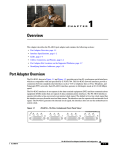
The Cisco PA-8T-V.35, shown in Figure 1-1 on page 1-2, provides up to eight synchronous serial
interfaces for the chassis. The PA-8T-V.35 network interfaces provide a direct connection between the
high-speed bus in the router and external networks. Each PA-8T-V.35 interface provides full-duplex
(FDX) operation at T1 (1.544 Mbps) and E1 (2.048 Mbps) speeds. The V.35 interface is most commonly
used in the United States and throughout Europe.
All eight PA-8T-V.35 interfaces connect to external networks through a single port that has a 200-pin,
D-shell receptacle. You must use a V.35 compact serial cable to connect PA-8T-V.35 interfaces to an
external data service unit (DSU) or channel service unit (CSU). The compact serial cable attached to the
single receptacle determines the mode (DCE or DTE) for all eight interfaces.
Note
Although the Cisco 7304 PCI Port Adapter Carrier Card in the Cisco 7304 router, Catalyst RSM/VIP2,
the Catalyst 6000 family FlexWAN module, and the VIP support online insertion and removal (OIR),
individual port adapters do not. To replace port adapters, you must first remove the Cisco 7304 PCI Port
Adapter Carrier Card in the Cisco 7304 router, the Catalyst RSM/VIP2, the Catalyst 6000 family
FlexWAN module, or the VIP from the chassis, and then replace port adapters as required.
Cisco 7100 series, Cisco 7200 series, Cisco uBR7200 series, Cisco 7301 routers, and Cisco 7401ASR
routers support OIR of all port adapter types.
PA-8T-V.35 Synchronous Serial Port Adapter Installation and Configuration
OL-3563-03
1-1
Chapter 1
Overview
Serial Interface Specifications
PA-8T-V.35 Port Adapter—Faceplate View
SERIAL-V.35
H7376
7
6
5
4
3
2
1
0
EN
Figure 1-1
All PA-8T-V.35 serial interfaces support non return to zero (NRZ) and non return to zero inverted (NRZI)
format, and both 16-bit and 32-bit cyclic redundancy checks (CRCs). The default configuration is for
NRZ format and 16-bit CRC. You can change the default settings with software commands.
There is no default mode or clock rate set on the PA-8T-V.35 serial ports, although an internal clock
signal is present on all ports for data communications equipment (DCE) support. The internal clock
allows you to perform local loopback tests without having to terminate the port or connect a cable. To
use the port as a DCE interface, you must set the clock rate and connect a DCE compact serial cable. To
use the port as a DTE interface, you need only connect a data terminal equipment (DTE) compact serial
cable to the port. Because the serial adapter cables determine the mode and interface type, the
PA-8T-V.35 interface becomes a DTE when a DTE cable is connected to it.
If a DTE cable is connected to a port with a clock rate set, the DTE ignores the clock rate and uses the
external clock signal that is sent from the remote DCE. For a brief description of the clock rate
command, see the “Configuring Timing (Clock) Signals” section on page 5-10. For complete command
descriptions and instructions, refer to the publications listed in the “Related Documentation” section on
page viii.
Serial Interface Specifications
Serial signals can travel a limited distance at any given bit rate; generally, the slower the bit rate, the
greater the distance. All serial signals are subject to distance limits beyond which a signal degrades
significantly or is completely lost. Table 1-1 lists recommended transmission speeds and distances for
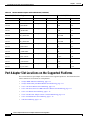
V.35 serial interfaces. The recommended maximum rate for V.35 is 2.048 Mbps.
Table 1-1
Recommended Transmission Speed Versus Distance
V.35 Distances
Rate (bps)
Feet
Meters
2400
4,100
1,250
4800
2,050
625
9600
1,025
312
19200
513
156
38400
256
78
56000
102
31
2048000
25
8
PA-8T-V.35 Synchronous Serial Port Adapter Installation and Configuration
1-2
OL-3563-03
Chapter 1
Overview
LEDs
Note
V.35 supports 2.048-Mbps rates without any problems; we do not recommend exceeding the above
specifications for transmission speed versus distance. Do so at your own risk. The total aggregate
bandwidth for the PA-8T-V.35 is 16 Mbps, which can be divided into 8 Mbps on two ports; 4 Mbps on
four ports; or 2 Mbps on eight ports.
LEDs
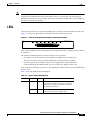
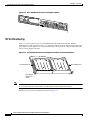
The PA-8T-V.35 has one row of eight status LEDs (one for each port) and one enabled (EN) LED. (See
Figure 1-2.) The green- and amber-colored LED for each port indicates port status.
Figure 1-2
LEDs on the PA-8T-V.35 Port Adapter—Horizontal Orientation
H7376
7
6
5
4
3
2
1
0
EN
SERIAL-V.35
After system initialization, the enabled LED goes on to indicate that the port adapter has been enabled
for operation.
The following conditions must be met before the PA-8T-V.35 is enabled:
•
Port adapter is correctly connected to the backplane or midplane and receiving power.
•
Valid system software image for the port adapter has been downloaded successfully.
•
System recognizes the port adapter or PA-8T-V.35-equipped VIP, Catalyst RSM/VIP2,
Catalyst 6000 family FlexWAN module, or Cisco 7304 PCI Port Adapter Carrier Card.
If any of the above conditions are not met, or if the initialization fails for other reasons, the enabled LED
does not go on.
Table 1-2 lists port LED colors and indications.
Table 1-2
LED Label
PA-8T-V.35 Port LED Indications
Color
0 through 7 Green
Green
State
Function
On
Port is initialized by the system (the software
recognizes the hardware), and a V.35 compact
serial cable is properly connected at the router
end and the network end.
Flashing Port is sending and receiving data in half-duplex
mode (Cisco 7200 series routers only).
PA-8T-V.35 Synchronous Serial Port Adapter Installation and Configuration
OL-3563-03
1-3
Chapter 1
Overview
Cables and Pinouts
Table 1-2
PA-8T-V.35 Port LED Indications (continued)
Amber
Amber
On
Off
One of these conditions applies:
•
Port is in loopback mode
•
Compact serial is not properly connected at
the router or network end
•
Hardware problem at the network end of the
compact serial cable
Port is administratively down.
Cables and Pinouts
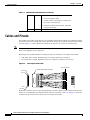
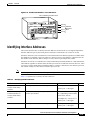
The compact serial cable for the PA-8T-V.35 is available in DTE or DCE mode with a 200-pin, D-shell
receptacle at the router end and eight, 34-pin Winchester block-type receptacles or plugs at the network
end. (See Figure 1-3.) The compact serial cable for the PA-8T-V.35 is 6 feet (1.8 meters) long.
Note
The V.35 compact serial cable attached to the single PA-8T-V.35 port determines the mode (DTE or
DCE) of the eight PA-8T-V.35 interfaces.
Following are the product numbers, according to mode, for the PA-8T-V.35 compact serial cable:
•
DTE mode with a 34-pin, Winchester-type V.35 plug (CAB-OCT-V.35-MT[=])
•
DCE mode with a 34-pin, Winchester-type V.35 receptacle (CAB-OCT-V.35-FC[=])
Figure 1-3
V.35 Compact Serial Cable
V.35 connectors
Molex LFH 200-pin connector
Pin 151
Pin 1
H7379
Pin 50
Pin 200
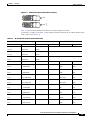
Because the PA-8T-V.35 uses a special, high-density port that requires special compact serial interface
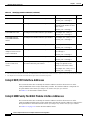
cables, we recommend that you obtain the cables from Cisco Systems. Figure 1-4 on page 1-5 shows the
connectors at the network end of the PA-8T-V.35 compact serial cable.
PA-8T-V.35 Synchronous Serial Port Adapter Installation and Configuration
1-4
OL-3563-03
Chapter 1
Overview
Cables and Pinouts
Figure 1-4
PA-8T-V.35 Compact Serial Cable Connectors
DCE
H1616a
DTE
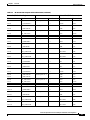
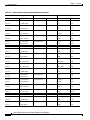
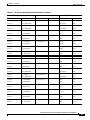
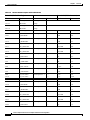
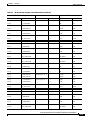
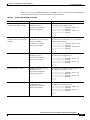
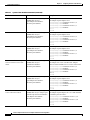
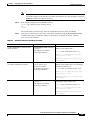
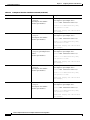
Table 1-3 lists connector pinouts for the PA-8T-V.35 DTE compact serial cable
(CAB-OCT-V.35-MT[=]), and Table 1-4 lists connector pinouts for the PA-8T-V.35 DCE compact serial
cable (CAB-OCT-V.35-FC[=]).
Table 1-3
PA-8T-V.35 DTE Compact Serial Cable Pinouts
Router End (200-Position Plug)
Network End (34-Pin Connector)
Pin
Signal
Note
Direction
J8-126
MODE_1
Shorting
–
J8-125
GROUND
Group
J8-175
MODE_0
Shorting
J8-176
GROUND
Group
J8-26
MODE_DCE
Shorting
J8-25
GROUND
Group
SHIELD_GROUND
Braid
J8-16
O_RTS/CTS+
Twisted pair no. 7
J8-14
O_DTR/DSR+
J8-23
I_CTS/RTS+
J8-21
I_DSR/DTR+
J8-12
IO_DCD/DCD+
J8-11
SIG_GROUND
J8-19
O_LL/NIL+
J8-18
SIG_GROUND
J8-1
O_TXD/RXD+
J8-2
O_TXD/RXD–
J8-5
I_RXD/TXD+
J8-6
I_RXD/TXD–
J8-3
O_TXCE/RXC+
J8-4
O_TXCE/RXC–
J8-7
I_RXC/TXCE+
J8-8
I_RXC/TXCE–
Twisted pair no. 8
Twisted pair no. 6
Twisted pair no. 9
Twisted pair no. 1
Twisted pair no. 3
Twisted pair no. 2
Twisted pair no. 4
Signal
Pin
SHIELD GND
J0-A
—>
RTS
J0-C
—>
DTR
J0-H
<—
CTS
J0-D
<—
DSR
J0-E
<—
RLSD
J0-F
SIG GND
J0-B
LT
J0-K
SIG GND
J0-B
—>
SD+
J0-P
—>
SD–
J0-S
<—
RD+
J0-R
<—
RD–
J0-T
—>
SCTE+
J0-U
—>
SCTE-
J0-W
<—
SCR+
J0-V
<—
SCR–
J0-X
–
–
—>
PA-8T-V.35 Synchronous Serial Port Adapter Installation and Configuration
OL-3563-03
1-5
Chapter 1
Overview
Cables and Pinouts
Table 1-3
PA-8T-V.35 DTE Compact Serial Cable Pinouts (continued)
Router End (200-Position Plug)
Network End (34-Pin Connector)
Pin
Signal
Note
Direction
Signal
Pin
J8-9
IO_TXC/TXC+
Twisted pair no. 5
<—
SCT+
J0-Y
J8-10
IO_TXC/TXC–
<—
SCT–
J0-AA
SHIELD GND
J1-A
—>
RTS
J1-C
—>
DTR
J1-H
<—
CTS
J1-D
<—
DSR
J1-E
<—
RLSD
J1-F
SIG GND
J1-B
LT
J1-K
SIG GND
J1-B
—>
SD+
J1-P
—>
SD–
J1-S
<—
RD+
J1-R
<—
RD–
J1-T
—>
SCTE+
J1-U
—>
SCTE–
J1-W
<—
SCR+
J1-V
<—
SCR–
J1-X
<—
SCT+
J1-Y
<—
SCT–
J1-AA
SHIELD GND
J2-A
—>
RTS
J2-C
—>
DTR
J2-H
<—
CTS
J2-D
<—
DSR
J2-E
<—
RLSD
J2-F
SIG GND
J2-B
LT
J2-K
SIG GND
J2-B
—>
SD+
J2-P
—>
SD–
J2-S
<—
RD+
J2-R
<—
RD–
J2-T
SHIELD_GROUND
Braid
J8-35
O_RTS/CTS+
Twisted pair no. 7
J8-37
O_DTR/DSR+
J8-28
I_CTS/RTS+
J8-30
I_DSR/DTR+
J8-39
IO_DCD/DCD+
J8-40
SIG_GROUND
J8-32
O_LL/NIL+
J8-33
SIG_GROUND
J8-50
O_TXD/RXD+
J8-49
O_TXD/RXD–
J8-46
I_RXD/TXD+
J8-45
I_RXD/TXD–
J8-48
O_TXCE/RXC+
J8-47
O_TXCE/RXC–
J8-44
I_RXC/TXCE+
J8-43
I_RXC/TXCE–
J8-42
IO_TXC/TXC+
J8-41
IO_TXC/TXC–
Twisted pair no. 8
Twisted pair no. 6
Twisted pair no. 9
Twisted pair no. 1
Twisted pair no. 3
Twisted pair no. 2
Twisted pair no. 4
Twisted pair no. 5
SHIELD_GROUND
Braid
J8-66
O_RTS/CTS+
Twisted pair no. 7
J8-64
O_DTR/DSR+
J8-73
I_CTS/RTS+
J8-71
I_DSR/DTR+
J8-62
IO_DCD/DCD+
J8-61
SIG_GROUND
J8-69
O_LL/NIL+
J8-68
SIG_GROUND
J8-51
O_TXD/RXD+
J8-52
O_TXD/RXD–
J8-55
I_RXD/TXD+
J8-56
I_RXD/TXD–
Twisted pair no. 8
Twisted pair no. 6
Twisted pair no. 9
Twisted pair no. 1
Twisted pair no. 3
—>
—>
PA-8T-V.35 Synchronous Serial Port Adapter Installation and Configuration
1-6
OL-3563-03
Chapter 1
Overview
Cables and Pinouts
Table 1-3
PA-8T-V.35 DTE Compact Serial Cable Pinouts (continued)
Router End (200-Position Plug)
Network End (34-Pin Connector)
Pin
Signal
Note
Direction
Signal
Pin
J8-53
O_TXCE/RXC+
Twisted pair no. 2
—>
SCTE+
J2-U
J8-54
O_TXCE/RXC–
—>
SCTE–
J2-W
J8-57
I_RXC/TXCE+
<—
SCR+
J2-V
J8-58
I_RXC/TXCE–
<—
SCR–
J2-X
J8-59
IO_TXC/TXC+
<—
SCT+
J2-Y
J8-60
IO_TXC/TXC–
<—
SCT–
J2-AA
SHIELD GND
J3-A
—>
RTS
J3-C
—>
DTR
J3-H
<—
CTS
J3-D
<—
DSR
J3-E
<—
RLSD
J3-F
SIG GND
J3-B
LT
J3-K
SIG GND
J3-B
—>
SD+
J3-P
—>
SD–
J3-S
<—
RD+
J3-R
<—
RD–
J3-T
—>
SCTE+
J3-U
—>
SCTE–
J3-W
<—
SCR+
J3-V
<—
SCR–
J3-X
<—
SCT+
J3-Y
<—
SCT–
J3-AA
SHIELD GND
J4-A
—>
RTS
J4-C
—>
DTR
J4-H
<—
CTS
J4-D
<—
DSR
J4-E
<—
RLSD
J4-F
SIG GND
J4-B
LT
J4-K
SIG GND
J4-B
Twisted pair no. 4
Twisted pair no. 5
SHIELD_GROUND
Braid
J8-85
O_RTS/CTS+
Twisted pair no. 7
J8-87
O_DTR/DSR+
J8-78
I_CTS/RTS+
J8-80
I_DSR/DTR+
J8-89
IO_DCD/DCD+
J8-90
SIG_GROUND
J8-82
O_LL/NIL+
J8-83
SIG_GROUND
J8-100
O_TXD/RXD+
J8-99
O_TXD/RXD-
J8-96
I_RXD/TXD+
J8-95
I_RXD/TXD–
J8-98
O_TXCE/RXC+
J8-97
O_TXCE/RXC–
J8-94
I_RXC/TXCE+
J8-93
I_RXC/TXCE–
J8-92
IO_TXC/TXC+
J8-91
IO_TXC/TXC–
Twisted pair no. 8
Twisted pair no. 6
Twisted pair no. 9
Twisted pair no. 1
Twisted pair no. 3
Twisted pair no. 2
Twisted pair no. 4
Twisted pair no. 5
SHIELD_GROUND
Braid
J8-116
O_RTS/CTS+
Twisted pair no. 7
J8-114
O_DTR/DSR+
J8-123
I_CTS/RTS+
J8-121
I_DSR/DTR+
J8-112
IO_DCD/DCD+
J8-111
SIG_GROUND
J8-119
O_LL/NIL+
J8-118
SIG_GROUND
Twisted pair no. 8
Twisted pair no. 6
Twisted pair no. 9
—>
—>
PA-8T-V.35 Synchronous Serial Port Adapter Installation and Configuration
OL-3563-03
1-7
Chapter 1
Overview
Cables and Pinouts
Table 1-3
PA-8T-V.35 DTE Compact Serial Cable Pinouts (continued)
Router End (200-Position Plug)
Network End (34-Pin Connector)
Pin
Signal
Note
Direction
Signal
Pin
J8-101
O_TXD/RXD+
Twisted pair no. 1
—>
SD+
J4-P
J8-102
O_TXD/RXD–
—>
SD–
J4-S
J8-105
I_RXD/TXD+
<—
RD+
J4-R
J8-106
I_RXD/TXD–
<—
RD–
J4-T
J8-103
O_TXCE/RXC+
—>
SCTE+
J4-U
J8-104
O_TXCE/RXC–
—>
SCTE–
J4-W
J8-107
I_RXC/TXCE+
<—
SCR+
J4-V
J8-108
I_RXC/TXCE–
<—
SCR–
J4-X
J8-109
IO_TXC/TXC+
<—
SCT+
J4-Y
J8-110
IO_TXC/TXC–
<—
SCT–
J4-AA
SHIELD GND
J5-A
—>
RTS
J5-C
—>
DTR
J5-H
<—
CTS
J5-D
<—
DSR
J5-E
<—
RLSD
J5-F
SIG GND
J5-B
LT
J5-K
SIG GND
J5-B
—>
SD+
J5-P
—>
SD–
J5-S
<—
RD+
J5-R
<—
RD–
J5-T
—>
SCTE+
J5-U
—>
SCTE–
J5-W
<—
SCR+
J5-V
<—
SCR–
J5-X
<—
SCT+
J5-Y
<—
SCT–
J5-AA
SHIELD GND
J6-A
—>
RTS
J6-C
—>
DTR
J6-H
<—
CTS
J6-D
<—
DSR
J6-E
Twisted pair no. 3
Twisted pair no. 2
Twisted pair no. 4
Twisted pair no. 5
SHIELD_GROUND
Braid
J8-135
O_RTS/CTS+
Twisted pair no. 7
J8-137
O_DTR/DSR+
J8-128
I_CTS/RTS+
J8-130
I_DSR/DTR+
J8-139
IO_DCD/DCD+
J8-140
SIG_GROUND
J8-132
O_LL/NIL+
J8-133
SIG_GROUND
J8-150
O_TXD/RXD+
J8-149
O_TXD/RXD–
J8-146
I_RXD/TXD+
J8-145
I_RXD/TXD–
J8-148
O_TXCE/RXC+
J8-147
O_TXCE/RXC–
J8-144
I_RXC/TXCE+
J8-143
I_RXC/TXCE–
J8-142
IO_TXC/TXC+
J8-141
IO_TXC/TXC–
Twisted pair no. 8
Twisted pair no. 6
Twisted pair no. 9
Twisted pair no. 1
Twisted pair no. 3
Twisted pair no. 2
Twisted pair no. 4
Twisted pair no. 5
SHIELD_GROUND
Braid
J8-166
O_RTS/CTS+
Twisted pair no. 7
J8-164
O_DTR/DSR+
J8-173
I_CTS/RTS+
J8-171
I_DSR/DTR+
Twisted pair no. 8
—>
PA-8T-V.35 Synchronous Serial Port Adapter Installation and Configuration
1-8
OL-3563-03
Chapter 1
Overview
Cables and Pinouts
Table 1-3
PA-8T-V.35 DTE Compact Serial Cable Pinouts (continued)
Router End (200-Position Plug)
Network End (34-Pin Connector)
Pin
Signal
Note
Direction
Signal
Pin
J8-162
IO_DCD/DCD+
Twisted pair no. 6
<—
RLSD
J6-F
J8-161
SIG_GROUND
SIG GND
J6-B
J8-169
O_LL/NIL+
LT
J6-K
J8-168
SIG_GROUND
SIG GND
J6-B
J8-151
O_TXD/RXD+
—>
SD+
J6-P
J8-152
O_TXD/RXD–
—>
SD–
J6-S
J8-155
I_RXD/TXD+
<—
RD+
J6-R
J8-156
I_RXD/TXD–
<—
RD–
J6-T
J8-153
O_TXCE/RXC+
—>
SCTE+
J6-U
J8-154
O_TXCE/RXC–
—>
SCTE–
J6-W
J8-157
I_RXC/TXCE+
<—
SCR+
J6-V
J8-158
I_RXC/TXCE–
<—
SCR–
J6-X
J8-159
IO_TXC/TXC+
<—
SCT+
J6-Y
J8-160
IO_TXC/TXC–
<—
SCT–
J6-AA
SHIELD GND
J7-A
—>
RTS
J7-C
—>
DTR
J7-H
<—
CTS
J7-D
<—
DSR
J7-E
<—
RLSD
J7-F
SIG GND
J7-B
LT
J7-K
SIG GND
J7-B
—>
SD+
J7-P
—>
SD–
J7-S
<—
RD+
J7-R
<—
RD–
J7-T
—>
SCTE+
J7-U
—>
SCTE–
J7-W
<—
SCR+
J7-V
<—
SCR–
J7-X
<—
SCT+
J7-Y
<—
SCT–
J7-AA
Twisted pair no. 9
Twisted pair no. 1
Twisted pair no. 3
Twisted pair no. 2
Twisted pair no. 4
Twisted pair no. 5
SHIELD_GROUND
Braid
J8-185
O_RTS/CTS+
Twisted pair no. 7
J8-187
O_DTR/DSR+
J8-178
I_CTS/RTS+
J8-180
I_DSR/DTR+
J8-189
IO_DCD/DCD+
J8-190
SIG_GROUND
J8-182
O_LL/NIL+
J8-183
SIG_GROUND
J8-200
O_TXD/RXD+
J8-199
O_TXD/RXD–
J8-196
I_RXD/TXD+
J8-195
I_RXD/TXD–
J8-198
O_TXCE/RXC+
J8-197
O_TXCE/RXC–
J8-194
I_RXC/TXCE+
J8-193
I_RXC/TXCE–
J8-192
IO_TXC/TXC+
J8-191
IO_TXC/TXC–
Twisted pair no. 8
Twisted pair no. 6
Twisted pair no. 9
Twisted pair no. 1
Twisted pair no. 3
Twisted pair no. 2
Twisted pair no. 4
Twisted pair no. 5
—>
—>
PA-8T-V.35 Synchronous Serial Port Adapter Installation and Configuration
OL-3563-03
1-9
Chapter 1
Overview
Cables and Pinouts
Table 1-4
PA-8T-V.35 DCE Compact Serial Cable Pinouts
Router End (200-Position Plug)
Network End (34-Pin Connector)
Pin
Signal
Note
Direction
J8-126
MODE_1
Shorting
–
J8-125
GROUND
Group
J8-175
MODE_0
Shorting
J8-176
GROUND
Group
SHIELD_GROUND
Braid
J8-23
I_CTS/RTS+
Twisted pair no. 8
J8-21
I_DSR/DTR+
J8-16
O_RTS/CTS+
J8-14
O_DTR/DSR+
J8-12
IO_DCD/DCD+
J8-11
SIG_GROUND
J8-20
I_NIL/LL+
J8-18
SIG_GROUND
J8-5
I_RXD/TXD+
J8-6
I_RXD/TXD–
J8-1
O_TXD/RXD+
J8-2
O_TXD/RXD–
J8-7
I_RXC/TXCE+
J8-8
I_RXC/TXCE–
J8-3
O_TXCE/RXC+
J8-4
O_TXCE/RXC–
J8-9
IO_TXC/TXC+
J8-10
IO_TXC/TXC–
Twisted pair no. 7
Twisted pair no. 6
Twisted pair no. 9
Twisted pair no. 3
Twisted pair no. 1
Twisted pair no. 4
Twisted pair no. 2
Twisted pair no. 5
SHIELD_GROUND
Braid
J8-28
I_CTS/RTS+
Twisted pair no. 8
J8-30
I_DSR/DTR+
J8-35
O_RTS/CTS+
J8-37
O_DTR/DSR+
J8-39
IO_DCD/DCD+
J8-40
SIG_GROUND
J8-31
I_NIL/LL+
J8-33
SIG_GROUND
J8-46
I_RXD/TXD+
J8-45
I_RXD/TXD–
Twisted pair no. 7
Twisted pair no. 6
Twisted pair no. 9
Twisted pair no. 3
Signal
Pin
SHIELD GND
J0-A
<—
RTS
J0-C
<—
DSR
J0-H
—>
CTS
J0-D
—>
DTR
J0-E
—>
RLSD
J0-F
SIG GND
J0-B
LT
J0-K
SIG GND
J0-B
<—
SD+
J0-P
<—
SD–
J0-S
—>
RD+
J0-R
—>
RD–
J0-T
<—
SCTE+
J0-U
<—
SCTE–
J0-W
—>
SCR+
J0-V
—>
SCR–
J0-X
—>
SCT+
J0-Y
—>
SCT–
J0-AA
SHIELD GND
J1-A
<—
RTS
J1-C
<—
DSR
J1-H
—>
CTS
J1-D
—>
DTR
J1-E
—>
RLSD
J1-F
SIG GND
J1-B
LT
J1-K
SIG GND
J1-B
<—
SD+
J1-P
<—
SD–
J1-S
–
<—
<—
PA-8T-V.35 Synchronous Serial Port Adapter Installation and Configuration
1-10
OL-3563-03
Chapter 1
Overview
Cables and Pinouts
Table 1-4
PA-8T-V.35 DCE Compact Serial Cable Pinouts (continued)
Router End (200-Position Plug)
Network End (34-Pin Connector)
Pin
Signal
Note
Direction
Signal
Pin
J8-50
O_TXD/RXD+
Twisted pair no. 1
—>
RD+
J1-R
J8-49
O_TXD/RXD–
—>
RD–
J1-T
J8-44
I_RXC/TXCE+
<—
SCTE+
J1-U
J8-43
I_RXC/TXCE–
<—
SCTE–
J1-W
J8-48
O_TXCE/RXC+
—>
SCR+
J1-V
J8-47
O_TXCE/RXC–
—>
SCR–
J1-X
J8-42
IO_TXC/TXC+
—>
SCT+
J1-Y
J8-41
IO_TXC/TXC–
—>
SCT–
J1-AA
SHIELD GND
J2-A
<—
RTS
J2-C
<—
DSR
J2-H
—>
CTS
J2-D
—>
DTR
J2-E
—>
RLSD
J2-F
SIG GND
J2-B
LT
J2-K
SIG GND
J2-B
<—
SD+
J2-P
<—
SD–
J2-S
—>
RD+
J2-R
—>
RD–
J2-T
<—
SCTE+
J2-U
<—
SCTE–
J2-W
—>
SCR+
J2-V
—>
SCR–
J2-X
—>
SCT+
J2-Y
—>
SCT–
J2-AA
SHIELD GND
J3-A
<—
RTS
J3-C
<—
DSR
J3-H
—>
CTS
J3-D
—>
DTR
J3-E
—>
RLSD
J3-F
SIG GND
J3-B
Twisted pair no. 4
Twisted pair no. 2
Twisted pair no. 5
SHIELD_GROUND
Braid
J8-73
I_CTS/RTS+
Twisted pair no. 8
J8-71
I_DSR/DTR+
J8-66
O_RTS/CTS+
J8-64
O_DTR/DSR+
J8-62
IO_DCD/DCD+
J8-61
SIG_GROUND
J8-70
I_NIL/LL+
J8-68
SIG_GROUND
J8-55
I_RXD/TXD+
J8-56
I_RXD/TXD–
J8-51
O_TXD/RXD+
J8-52
O_TXD/RXD–
J8-57
I_RXC/TXCE+
J8-58
I_RXC/TXCE–
J8-53
O_TXCE/RXC+
J8-54
O_TXCE/RXC–
J8-59
IO_TXC/TXC+
J8-60
IO_TXC/TXC–
Twisted pair no. 7
Twisted pair no. 6
Twisted pair no. 9
Twisted pair no. 3
Twisted pair no. 1
Twisted pair no. 4
Twisted pair no. 2
Twisted pair no. 5
SHIELD_GROUND
Braid
J8-78
I_CTS/RTS+
Twisted pair no. 8
J8-80
I_DSR/DTR+
J8-85
O_RTS/CTS+
J8-87
O_DTR/DSR+
J8-89
IO_DCD/DCD+
J8-90
SIG_GROUND
Twisted pair no. 7
Twisted pair no. 6
<—
PA-8T-V.35 Synchronous Serial Port Adapter Installation and Configuration
OL-3563-03
1-11
Chapter 1
Overview
Cables and Pinouts
Table 1-4
PA-8T-V.35 DCE Compact Serial Cable Pinouts (continued)
Router End (200-Position Plug)
Network End (34-Pin Connector)
Pin
Signal
Note
Direction
Signal
Pin
J8-81
I_NIL/LL+
Twisted pair no. 9
<—
LT
J3-K
J8-83
SIG_GROUND
SIG GND
J3-B
J8-96
I_RXD/TXD+
<—
SD+
J3-P
J8-95
I_RXD/TXD–
<—
SD–
J3-S
J8-100
O_TXD/RXD+
—>
RD+
J3-R
J8-99
O_TXD/RXD–
—>
RD–
J3-T
J8-94
I_RXC/TXCE+
<—
SCTE+
J3-U
J8-93
I_RXC/TXCE–
<—
SCTE–
J3-W
J8-98
O_TXCE/RXC+
—>
SCR+
J3-V
J8-97
O_TXCE/RXC–
—>
SCR–
J3-X
J8-92
IO_TXC/TXC+
—>
SCT+
J3-Y
J8-91
IO_TXC/TXC–
—>
SCT–
J3-AA
SHIELD GND
J4-A
<—
RTS
J4-C
<—
DSR
J4-H
—>
CTS
J4-D
—>
DTR
J4-E
—>
RLSD
J4-F
SIG GND
J4-B
LT
J4-K
SIG GND
J4-B
<—
SD+
J4-P
<—
SD–
J4-S
—>
RD+
J4-R
—>
RD–
J4-T
<—
SCTE+
J4-U
<—
SCTE–
J4-W
—>
SCR+
J4-V
—>
SCR–
J4-X
—>
SCT+
J4-Y
—>
SCT–
J4-AA
SHIELD GND
J5-A
<—
RTS
J5-C
<—
DSR
J5-H
Twisted pair no. 3
Twisted pair no. 1
Twisted pair no. 4
Twisted pair no. 2
Twisted pair no. 5
SHIELD_GROUND
Braid
J8-123
I_CTS/RTS+
Twisted pair no. 8
J8-121
I_DSR/DTR+
J8-116
O_RTS/CTS+
J8-114
O_DTR/DSR+
J8-112
IO_DCD/DCD+
J8-111
SIG_GROUND
J8-120
I_NIL/LL+
J8-118
SIG_GROUND
J8-105
I_RXD/TXD+
J8-106
I_RXD/TXD–
J8-101
O_TXD/RXD+
J8-102
O_TXD/RXD–
J8-107
I_RXC/TXCE+
J8-108
I_RXC/TXCE–
J8-103
O_TXCE/RXC+
J8-104
O_TXCE/RXC–
J8-109
IO_TXC/TXC+
J8-110
IO_TXC/TXC–
Twisted pair no. 7
Twisted pair no. 6
Twisted pair no. 9
Twisted pair no. 3
Twisted pair no. 1
Twisted pair no. 4
Twisted pair no. 2
Twisted pair no. 5
SHIELD_GROUND
Braid
J8-128
I_CTS/RTS+
Twisted pair no. 8
J8-130
I_DSR/DTR+
<—
PA-8T-V.35 Synchronous Serial Port Adapter Installation and Configuration
1-12
OL-3563-03
Chapter 1
Overview
Cables and Pinouts
Table 1-4
PA-8T-V.35 DCE Compact Serial Cable Pinouts (continued)
Router End (200-Position Plug)
Network End (34-Pin Connector)
Pin
Signal
Note
Direction
Signal
Pin
J8-135
O_RTS/CTS+
Twisted pair no. 7
—>
CTS
J5-D
J8-137
O_DTR/DSR+
—>
DTR
J5-E
J8-139
IO_DCD/DCD+
—>
RLSD
J5-F
J8-140
SIG_GROUND
SIG GND
J5-B
J8-131
I_NIL/LL+
LT
J5-K
J8-133
SIG_GROUND
SIG GND
J5-B
J8-146
I_RXD/TXD+
<—
SD+
J5-P
J8-145
I_RXD/TXD–
<—
SD–
J5-S
J8-150
O_TXD/RXD+
—>
RD+
J5-R
J8-149
O_TXD/RXD–
—>
RD–
J5-T
J8-144
I_RXC/TXCE+
<—
SCTE+
J5-U
J8-143
I_RXC/TXCE–
<—
SCTE–
J5-W
J8-148
O_TXCE/RXC+
—>
SCR+
J5-V
J8-147
O_TXCE/RXC–
—>
SCR–
J5-X
J8-142
IO_TXC/TXC+
—>
SCT+
J5-Y
J8-141
IO_TXC/TXC–
—>
SCT–
J5-AA
SHIELD GND
J6-A
<—
RTS
J6-C
<—
DSR
J6-H
—>
CTS
J6-D
—>
DTR
J6-E
—>
RLSD
J6-F
SIG GND
J6-B
LT
J6-K
SIG GND
J6-B
<—
SD+
J6-P
<—
SD–
J6-S
—>
RD+
J6-R
—>
RD–
J6-T
<—
SCTE+
J6-U
<—
SCTE–
J6-W
—>
SCR+
J6-V
—>
SCR–
J6-X
—>
SCT+
J6-Y
—>
SCT–
J6-AA
Twisted pair no. 6
Twisted pair no. 9
Twisted pair no. 3
Twisted pair no. 1
Twisted pair no. 4
Twisted pair no. 2
Twisted pair no. 5
SHIELD_GROUND
Braid
J8-173
I_CTS/RTS+
Twisted pair no. 8
J8-171
I_DSR/DTR+
J8-166
O_RTS/CTS+
J8-164
O_DTR/DSR+
J8-162
IO_DCD/DCD+
J8-161
SIG_GROUND
J8-170
I_NIL/LL+
J8-168
SIG_GROUND
J8-155
I_RXD/TXD+
J8-156
I_RXD/TXD–
J8-151
O_TXD/RXD+
J8-152
O_TXD/RXD–
J8-157
I_RXC/TXCE+
J8-158
I_RXC/TXCE–
J8-153
O_TXCE/RXC+
J8-154
O_TXCE/RXC–
J8-159
IO_TXC/TXC+
J8-160
IO_TXC/TXC–
Twisted pair no. 7
Twisted pair no. 6
Twisted pair no. 9
Twisted pair no. 3
Twisted pair no. 1
Twisted pair no. 4
Twisted pair no. 2
Twisted pair no. 5
<—
<—
PA-8T-V.35 Synchronous Serial Port Adapter Installation and Configuration
OL-3563-03
1-13
Chapter 1
Overview
Port Adapter Slot Locations on the Supported Platforms
Table 1-4
PA-8T-V.35 DCE Compact Serial Cable Pinouts (continued)
Router End (200-Position Plug)
Pin
Network End (34-Pin Connector)
Signal
Note
SHIELD_GROUND
Braid
J8-178
I_CTS/RTS+
Twisted pair no. 8
J8-180
I_DSR/DTR+
J8-185
O_RTS/CTS+
J8-187
O_DTR/DSR+
J8-189
IO_DCD/DCD+
J8-190
SIG_GROUND
J8-181
I_NIL/LL+
J8-183
SIG_GROUND
J8-196
I_RXD/TXD+
J8-195
I_RXD/TXD–
J8-200
O_TXD/RXD+
J8-199
O_TXD/RXD–
J8-194
I_RXC/TXCE+
J8-193
I_RXC/TXCE–
J8-198
O_TXCE/RXC+
J8-197
O_TXCE/RXC–
J8-192
IO_TXC/TXC+
J8-191
IO_TXC/TXC–
Twisted pair no. 7
Twisted pair no. 6
Twisted pair no. 9
Twisted pair no. 3
Twisted pair no. 1
Twisted pair no. 4
Twisted pair no. 2
Twisted pair no. 5
Direction
Signal
Pin
SHIELD GND
J7-A
<—
RTS
J7-C
<—
DSR
J7-H
—>
CTS
J7-D
—>
DTR
J7-E
—>
RLSD
J7-F
SIG GND
J7-B
LT
J7-K
SIG GND
J7-B
<—
SD+
J7-P
<—
SD–
J7-S
—>
RD+
J7-R
—>
RD–
J7-T
<—
SCTE+
J7-U
<—
SCTE–
J7-W
—>
SCR+
J7-V
—>
SCR–
J7-X
—>
SCT+
J7-Y
—>
SCT–
J7-AA
<—
Port Adapter Slot Locations on the Supported Platforms
This section discusses port adapter slot locations on the supported platforms. The Illustrations that
follow summarize slot locations on each platform:
•
Catalyst RSM/VIP2 Slot Numbering, page 1-15
•
Catalyst 6000 Family FlexWAN Module Slot Numbering, page 1-15
•
Cisco 7100 Series Routers Slot Numbering, page 1-16
•
Cisco 7200 Series and Cisco uBR7200 Series Routers Slot Numbering, page 1-17
•
Cisco 7301 Router Slot Numbering, page 1-18
•
Cisco 7304 PCI Port Adapter Carrier Card Slot Numbering, page 1-18
•
Cisco 7401ASR Router Slot Numbering, page 1-19
•
VIP Slot Numbering, page 1-20
PA-8T-V.35 Synchronous Serial Port Adapter Installation and Configuration
1-14
OL-3563-03
Chapter 1
Overview
Port Adapter Slot Locations on the Supported Platforms
Catalyst RSM/VIP2 Slot Numbering
The Catalyst RSM/VIP2 can be installed in any slot except the top slots, which contain the supervisor
engine. The Catalyst RSM/VIP2 in a Catalyst 5000 family switch does not use interface processor slot
numbering; therefore, slots are not numbered in Figure 1-5. The PA-8T-V.35 can be installed into either
port adapter slot 0 or slot 1 on a Catalyst RSM/VIP2. Figure 1-5 shows a Catalyst RSM/VIP2 with two
port adapters installed.
Note
The Catalyst 5500 switch has 13 slots. Slot 1 is reserved for the supervisor engine. If a redundant
supervisor engine is used, it would go in slot 2; otherwise, slot 2 can be used for other modules. Slot 13
is a dedicated slot, reserved for the ATM switch processor (ASP) module. Refer to the Catalyst 5000
Series Route Switch Module Installation and Configuration Note for any additional slot restrictions for
the Catalyst RSM/VIP2.
Catalyst 5000 Family Switch with Port Adapters Installed on Catalyst RSM/VIP2
27924
Figure 1-5
STA
TU
S
LT
HA
U D
CP LE
AB
PC
EN
UTP
ROUTE SWITCH MODULE
A
IC
M
PC
VIP2
T
EC
EJ
M
CIA
1
T
SLO 0
T
SLO
RE
SE
T
CH
AN
NE
L
0
TX
RX
CH
AN
NE
L
1
AU
X
TX
CO
NS
O
LE
RX
Route Switch Module
Catalyst 6000 Family FlexWAN Module Slot Numbering
The Catalyst 6000 family FlexWAN module can be installed in any slot except slot 1, which is reserved
for the supervisor engine. The PA-8T-V.35 can be installed into either port adapter bay 0 or bay 1 on a
FlexWAN module. Figure 1-6 shows a FlexWAN module with two blank port adapters installed.
Note
Slot 1 is reserved for the supervisor engine. If a redundant supervisor engine is used, it would go in slot
2; otherwise, slot 2 can be used for other modules.
PA-8T-V.35 Synchronous Serial Port Adapter Installation and Configuration
OL-3563-03
1-15
Chapter 1
Overview
Port Adapter Slot Locations on the Supported Platforms
Figure 1-6
Catalyst 6000 Family Switch with Blank Port Adapters Installed on FlexWAN Module
WS-X6K-SUP1
Supervisor engine
ST
1
AT
US
SY
ST
EM
TI
VE
AC
R
M
G
M
Switch
100%
T
RES
PW
Load
DTE/
DCE
ET
PORT 1
CONSOLE
SUPERVISOR I
1%
PCMCIA
PORT 2
NK
EJECT
LI
EJECT
NK
LI
LI
NK
WS-X6K-SUP1
edundant supervisor
engine
Switch
100%
T
M
G
US
EM
M
VE
ET
AT
R
ST
TI
ST
SY
AC
PW
RES
2
Load
DTE/
DCE
PORT 1
CONSOLE
SUPERVISOR I
1%
PCMCIA
PORT 2
NK
LI
WS-X6408
2
AT
US
1
3
4
5
6
7
LI
NK
LI
NK
LI
NK
LI
NK
LI
NK
LI
NK
8
LI
NK
8 PORT GIGABIT ETHERNET
LI
NK
ST
3
1
2
3
4
5
6
7
8
US
WS-X6408
LI
NK
LI
NK
LI
NK
LI
NK
LI
NK
LI
NK
LI
NK
8 PORT GIGABIT ETHERNET
LI
NK
ST
AT
4
1
2
3
4
5
6
7
8
FlexWAN
module
ST
AT
US
6
WS-X6224
7
ST
AT
US
1
2
NK
24 PORT 100FX
3
NK
LI
LI
4
NK
5
NK
LI
6
NK
LI
7
NK
LI
8
NK
LI
9
NK
LI
10
NK
LI
11
NK
LI
LI
12
NK
13
NK
LI
14
NK
LI
LI
15
NK
LI
16
NK
LI
17
NK
18
NK
LI
19
NK
LI
8
ST
AT
US
1
NK
LI
24 PORT 100FX
FAN
LED
2
3
NK
LI
4
NK
LI
5
NK
LI
6
NK
LI
7
NK
LI
8
NK
LI
9
NK
LI
10
NK
LI
11
NK
LI
12
NK
LI
13
NK
LI
14
NK
LI
15
NK
LI
16
NK
LI
17
NK
LI
NK
LI
WS-X6224
9
ST
AT
US
1
24 PORT 100FX
2
NK
LI
3
NK
LI
4
NK
LI
5
NK
LI
6
NK
LI
7
NK
LI
8
NK
LI
9
NK
LI
10
NK
LI
11
NK
LI
12
NK
LI
13
NK
LI
14
NK
LI
15
NK
LI
16
NK
LI
18
17
NK
LI
NK
LI
NK
LI
NK
LI
NK
LI
NK
LI
24
NK
LI
23
NK
LI
NK
LI
LI
23
22
NK
LI
24
NK
LI
22
21
NK
LI
23
NK
LI
21
20
NK
LI
22
NK
LI
20
19
NK
LI
21
NK
LI
19
18
NK
LI
20
NK
LI
WS-X6224
Fan LED
LI
NK
LI
NK
LI
NK
LI
NK
LI
NK
LI
NK
8 PORT GIGABIT ETHERNET
LI
NK
ST
5
LI
NK
AT
US
WS-X6408
NK
LI
24
NK
LI
NK
LI
o
FAN
OK
29844
o
INPUT
OK
OUTPUT
FAIL
INPUT
OK
FAN
OK
OUTPUT
FAIL
Power supply 2
Power supply 1
Cisco 7100 Series Routers Slot Numbering
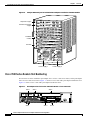
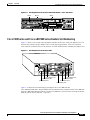
The PA-8T-V.35 can be installed in port adapter slot 3 in Cisco 7120 series routers, and in port adapter
slot 4 in Cisco 7140 series routers. Figure 1-7 shows a Cisco 7120 with a port adapter installed in slot 3.
Figure 1-8 shows a Cisco 7140 with a port adapter installed in slot 4.
Figure 1-7
Port Adapter Slots in the Cisco 7100 Series Router—Cisco 7120 Series
Slot 5
Slot 3
Slot 4
SLOT 0
SLOT 1
PWR
ACT ACT
0
FE 0 / 0
I
E3
EN
TX
FE
0/1
LNK LNK
0
1
CONS
AUX
SYS
RDY
RX
RX
2
CEL CAR ALM
7120 - AE3
Slot 1
Slot 0
18498
5
Slot 2
PA-8T-V.35 Synchronous Serial Port Adapter Installation and Configuration
1-16
OL-3563-03
Chapter 1
Overview
Port Adapter Slot Locations on the Supported Platforms
Figure 1-8
Port Adapter Slots in the Cisco 7100 Series Router—Cisco 7140 Series
Slot 5
Slot 3
Slot 4
AC OK
DC OK
OTF
RESET
PWR
ACT ACT
EN
5
0
FE 0 / 0
I
SLOT 1
EN
RX
RX
155 - MM
FE 0 / 1
TX
LNK LNK
0
1
RX
EN
CEL CAR ALM
AC OK
SYS
RDY
DC OK
OTF
2
CEL CAR ALM
7140 - 2MM3
Slot 0
Slot 1
AUX
CONS
155 - MM
RX
TX
18499
SM-ISM
SLOT 0
BOOT
ERROR
Slot 2
Cisco 7200 Series and Cisco uBR7200 Series Routers Slot Numbering
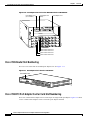
Figure 1-9 shows a Cisco 7206 with port adapters installed. In the Cisco 7206, port adapter slot 1 is in
the lower left position, and port adapter slot 6 is in the upper right position. (The Cisco 7202 and
Cisco 7204 are not shown; however, the PA-8T-V.35 can be installed in any available port adapter slot.)
Figure 1-9
Port Adapter Slots in the Cisco 7206
3
2
1
0
6
TOKEN RING
5
4
K
LIN
0
MII
RJ4
5
FAST ETHERNET
EN
AB
LE
D
3
3
2
2
1
LINK
1
0
3
EN
AB
LE
0
D
ETHERNET 10BT
2
TX
RX
4
TX
RX
3
TX
RX
M
FE
0
0
T
O
SL
EC
EJ
IA
C
M
PC
T
D
LE
AB
EN
II
M N
E
Port adapter slot 5
Port adapter slot 3
Port adapter slot 1
5
J-4
R EN
R
5
PW
J-4
R INK O K
1 O
L
28329
5
J-4
R
II
T
O
SL
2
FAST ETHERNET INPUT/OUTPUT CONTROLLER
1
Cisco 7200
Series
TX
RX
1
TX
RX
1
0
7
6
5
4
3
2
1
0
EN
EN
ETHERNET-10BFL
SERIAL-V.35
Port adapter slot 6
Port adapter slot 4
Port adapter slot 2
Port adapter slot 0
Figure 1-10 shows the slot numbering of port adapters in a Cisco uBR7246 and
Cisco uBR7246VXR router. The port adapter slots are numbered slot 1 and slot 2 for the Cisco uBR7246
and Cisco uBR7246VXR router and slot 1 for the Cisco uBR7223. (Slot 0 is always reserved for the Fast
Ethernet port on the I/O controller—if present.)
PA-8T-V.35 Synchronous Serial Port Adapter Installation and Configuration
OL-3563-03
1-17
Chapter 1
Overview
Port Adapter Slot Locations on the Supported Platforms
Figure 1-10 Port Adapter Slots in the Cisco uBR7246 and Cisco uBR7246VXR
5
uBR - MCI6
5
uBR - MCI6
5
uBR - MCI6
5
uBR - MCI6
D
S
4
Port adapter slot 2
U
S
3
U
S
2
U
S
1
U
S
0
U
S
D
LE
AB
Port adapter slot 1
(blank)
D
S
2
U
S
1
U
S
U
S
D
LE
AB
0
D
S
2
U
S
1
U
S
U
S
D
LE
AB
0
H11323
D
S
2
U
S
1
U
S
U
S
D
LE
AB
0
EN
U
S
EN
U
S
EN
U
S
EN
U
S
Port adapter slot 0
(I/O controller)
Cable modem card slot 3
Cable modem card slot 4
Cable modem card slot 5
Cable modem card slot 6
Cisco 7301 Router Slot Numbering
The Cisco 7301 router has one standard port adapter slot. See Figure 1-11.
Figure 1-11 Port Adapter Slot in the Cisco 7301 Router
Port adapter slot
D
R
LE LS RIE M
AB EL AR AR
EN RX C RX C X AL
R
ATM
GIGABIT ETHER
NET
RJ45 EN
CISCO 7400
CISCO 7411SERIES
0/0
LINK
TX GBIC
GIGABIT ETHER
NET
RX
RJ45 EN
0/1
LINK
TX GBIC
GIGABIT ETHER
NET
RX
RJ45 EN
0/2
LINK
TX GBIC
AUX
RX
CONSOLE
ALARM
COMPACT
FLASH
100-24 0V,
2A, 50/60
Hz
24V=9 A,
48 - 60V=5
A
STATUS
84988
SLOT 1
Cisco 7304 PCI Port Adapter Carrier Card Slot Numbering
The Cisco 7304 PCI Port Adapter Carrier Card accepts one single-width port adapter. Figure 1-12 shows
a Cisco 7304 PCI Port Adapter Carrier Card with a port adapter installed.
PA-8T-V.35 Synchronous Serial Port Adapter Installation and Configuration
1-18
OL-3563-03
Chapter 1
Overview
Port Adapter Slot Locations on the Supported Platforms
Figure 1-12 Cisco 7304 PCI Port Adapter Carrier Card—Port Adapter Installed
7300-C
C-PA
84653
D
R
LE LS RIE M
AB EL AR AR
EN RX C RX C X AL
R
OIR
STATUS
7300 PA
ATM
CARRIE
R
The Cisco 7304 PCI Port Adapter Carrier Card installs in Cisco 7304 router module slots 2 through 5.
See Figure 1-13 for module slot numbering on a Cisco 7304 router.
Figure 1-13 Module Slots on the Cisco 7304 Router
Slot 4
7300-2
OC3AT
M-MM
TX
OIR
0
Slot 5
RX
STATUS
2-PORT
OC3 ATM
TX
1
RX
MM
CARRIER
ALARM/
9K-10C
48
ACTIVE/
LOOPBAC
K
CARRIER
ALARM/
ACTIVE/
LOOPBAC
K
TX
OIR
RX
STATUS
1-PORT
OC48 POS
9K-40C
3/POS
-MM
w/ SMS
R
OIR
STATUS
4-POR
T OC3
0
1
POS w/
2
3
MM
CARRIER
ALARM/
70550
ACTIVE/
LOOPBA
CK
Slot 0
Slot 2
Slot 3
Slot 1
Cisco 7401ASR Router Slot Numbering
Figure 1-14 shows the front view of a Cisco 7401ASR router with a port adapter installed. There is only
one port adapter slot in a Cisco 7401ASR router.
PA-8T-V.35 Synchronous Serial Port Adapter Installation and Configuration
OL-3563-03
1-19
Chapter 1
Overview
Port Adapter Slot Locations on the Supported Platforms
Figure 1-14 Cisco 7401ASR Router with a Port Adapter Installed
AB
LE
D
S IER
LL R R M
C E C A R LA
RX RX RX A
TX
RX
ENHANCED
ATM
57680
EN
VIP Slot Numbering
Figure 1-15 shows a partial view of a VIP motherboard with installed port adapters. With the
motherboard oriented as shown in Figure 1-15, the left port adapter is in port adapter slot 0, and the right
port adapter is in port adapter slot 1. The slot numbering is the same for the Catalyst RSM/VIP2. The
slots are always numbered 0 and 1.
Figure 1-15 VIP Motherboard with Two Port Adapters Installed—Horizontal Orientation
Port adapter slot 1
29328
Port adapter slot 0
Port adapter
handles not
shown
Note
In the Cisco 7000, Cisco 7507, and Cisco 7513 chassis, the VIP motherboard is installed vertically. In
the Cisco 7010 and Cisco 7505 chassis, the VIP motherboard is installed horizontally.
Interface processor slots are numbered as shown in Figure 1-16.
PA-8T-V.35 Synchronous Serial Port Adapter Installation and Configuration
1-20
OL-3563-03
Chapter 1
Overview
Identifying Interface Addresses
Figure 1-16 Interface Slot Numbers—Cisco 7505 shown
CO
NS
OL
E
HA
LT
ROUTE SWITCH PROCESSOR
RE
SE
T
CP
U
EJ
EC
T
SL SLO
OT T
0 1
NO
RM
AL
VIP in interface processor slot 3
Slot 3
Slot 2 Interface
processor
Slot 1 slots
29619
Slot 0
Identifying Interface Addresses
This section describes how to identify interface addresses for the PA-8T-V.35 in supported platforms.
Interface addresses specify the actual physical location of each interface on a router or switch.
Interfaces on the PA-8T-V.35 installed in a router maintain the same address regardless of whether other
port adapters are installed or removed. However, when you move a port adapter to a different slot, the
first number in the interface address changes to reflect the new port adapter slot number.
Interfaces on a PA-8T-V.35 installed in a Catalyst 6000 family FlexWAN module or a VIP maintain the
same address regardless of whether other interface processors are installed or removed. However, when
you move a Catalyst 6000 family FlexWAN module or a VIP to a different slot, the interface processor
slot number changes to reflect the new interface processor slot.
Note
Interface ports are numbered from left to right starting with 0.
Table 1-5 explains how to identify interface addresses.
Table 1-5
Identifying Interface Addresses
Platform
Interface Address Format
Numbers
Syntax
Catalyst RSM/VIP2 in
Catalyst 5000 family
switches
Port-adapter-slot-number/interface-port-number
Port adapter slot—always 0 or 1
0/1
Catalyst 6000 family
FlexWAN module in
Catalyst 6000 family
switches
Module-slot-number/port-adapter-bay-number/
interface-port-number
Interface port—0 through 7
Module slot number—21 through
6 or 9 (depending on the number
of slots in the switch)
3/0/0
Port adapter bay—always 0 or 1
Interface port—0 through 7
Cisco 7120 series routers
Port-adapter-slot-number/interface-port-number
Port adapter slot—always 3
3/1
Interface port—0 through 7
PA-8T-V.35 Synchronous Serial Port Adapter Installation and Configuration
OL-3563-03
1-21
Chapter 1
Overview
Identifying Interface Addresses
Table 1-5
Identifying Interface Addresses (continued)
Platform
Interface Address Format
Numbers
Syntax
Cisco 7140 series routers
Port-adapter-slot-number/interface-port-number
Port adapter slot—always 4
4/0
Interface port—0 through 7
Cisco 7200 series routers
Port-adapter-slot-number/interface-port-number
Port adapter slot—0 through 6
(depends on the number of slots
in the router)2
1/0
Interface port—0 through 7
Cisco uBR7223 router
Port-adapter-slot-number/interface-port-number
Port adapter slot—always 1 2
1/0
Interface port—0 through 7
Cisco uBR7246 and
Cisco uBR7246VXR
routers
Port-adapter-slot-number/interface-port-number
Cisco 7301 routers
Port-adapter-slot-number/interface-port-number
Port adapter slot—always 1 or 2 2
1/2
Interface port—0 through 7
Port adapter slot—always 1
1/0
Interface port—0 through 7
Cisco 7304 PCI Port
Adapter Carrier Card in
Cisco 7304 routers
Port-adapter-slot-number/interface-port-number
Cisco 7401ASR routers
Port-adapter-slot-number/interface-port-number
Port adapter slot—router module
slot 2 through 5
3/0
Interface port—0 through 7
Port adapter slot—always 1
1/0
Interface port—0 through 7
VIP in Cisco 7000 series
or Cisco 7500 series
routers
Interface-processor-slot-number/port-adapterslot-number/interface-port-number
Interface processor slot—0
through 12 (depends on the
number of slots in the router)
3/1/0
Port adapter slot—always 0 or 1
Interface port—0 through 7
1. Slot 1 is reserved for the supervisor engine. If a redundant supervisor engine is used, it must go in slot 2; otherwise, slot 2 can be used for other modules.
2. Port adapter slot 0 is reserved for the Fast Ethernet port on the I/O controller (if present).
Catalyst RSM/VIP2 Interface Addresses
This section describes how to identify the interface addresses used for the PA-8T-V.35 on the
Catalyst RSM/VIP2 in the Catalyst 5000 family switches. The interface address is composed of a
two-part number in the format port-adapter-slot number/interface-port number.
See Table 1-5 for the interface address format.
Catalyst 6000 Family FlexWAN Module Interface Addresses
This section describes how to identify the interface addresses used for the PA-8T-V.35 on the
Catalyst FlexWAN module in the Catalyst 6000 family switches.The interface address is composed of a
three-part number in the format module-number/port-adapter-bay-number/interface-port-number.
See Table 1-5 on page 1-21 for the interface address format.
PA-8T-V.35 Synchronous Serial Port Adapter Installation and Configuration
1-22
OL-3563-03
Chapter 1
Overview
Identifying Interface Addresses
If the FlexWAN module is inserted in module slot 3, then the interface addresses of the PA-8T-V.35 are
3/0/0 through 3/0/7 (module slot 3, port adapter bay 0, and interfaces 0 through 7). If the port adapter
was in port adapter bay 1 on the FlexWAN module, these same interface addresses would be numbered
3/1/0 through 3/1/7.
Note
If you remove the FlexWAN module with the PA-8T-V.35 from module slot 3 and install it in module
slot 6, the interface addresses become 6/0/0 through 6/0/7.
Note
The FlexWAN module physical port address uses a zero- (0-) based port address, which differs from the
conventional Catalyst 6000 family one- (1-) based port address.
Cisco 7100 Series Routers Interface Addresses
This section describes how to identify the interface addresses used for the PA-8T-V.35 in Cisco 7100
series routers. The interface address is composed of a two-part number in the format
port-adapter-slot-number/interface-port-number. See Table 1-5 for the interface address format.
Cisco 7200 Series and Cisco uBR7200 Series Routers Interface Addresses
This section describes how to identify the interface addresses used for the PA-8T-V.35 in Cisco 7200
series routers or Cisco uBR7200 series routers. The interface address is composed of a two-part number
in the format port-adapter-slot-number/interface-port-number. See Table 1-5 for the interface address
format.
In Cisco 7200 series routers, port adapter slots are numbered from the lower left to the upper right,
beginning with port adapter slot 1 and continuing through port adapter slot 2 for the Cisco 7202, slot 4
for the Cisco 7204 and Cisco 7204VXR, and slot 6 for the Cisco 7206 and Cisco 7206VXR. (Port
adapter slot 0 is reserved for the optional Fast Ethernet port on the I/O controller—if present.)
The interface addresses of the interfaces on the PA-8T-V.35 in port adapter slot 1 are 1/0 through 1/7
(port adapter slot 1 and interfaces 0 through 7). If the PA-8T-V.35 was in port adapter slot 4, these same
interfaces would be numbered 4/0 through 4/7 (port adapter slot 4 and interfaces 0 through 7).
In Cisco uBR7200 series routers, port adapter slots are numbered slot 1 and slot 2 for the
Cisco uBR7246 and Cisco uBR7246VXR and slot 1 for the Cisco uBR7223. (Slot 0 is always reserved
for the Fast Ethernet port on the I/O controller—if present.) The individual interfaces always begin with
0. The number of additional interfaces depends on the number of interface ports on a port adapter.
The interface addresses of the interfaces on a PA-8T-V.35 in port adapter slot 2 are 2/0 and 2/1
(port adapter slot 2 and interfaces 0 and 1). If the PA-8T-V.35 was in port adapter slot 1, these same
interfaces would be numbered 1/0 and 1/1 (port adapter slot 1 and interfaces 0 and 1).
Cisco 7301 Router Interface Addresses
This section describes how to identify the interface addresses used for the Cisco PA-8T-V.35 port adapter
in Cisco 7301 router. The interface address is composed of a two-part number in the format
port-adapter-slot-number/interface-port-number. See Table 1-5 on page 1-21 for the interface address
format.
PA-8T-V.35 Synchronous Serial Port Adapter Installation and Configuration
OL-3563-03
1-23
Chapter 1
Overview
Identifying Interface Addresses
Cisco 7304 PCI Port Adapter Carrier Card Interface Addresses
This section describes how to identify the interface addresses used for the PA-8T-V.35 in the Cisco 7304
PCI Port Adapter Carrier Card in Cisco 7304 routers. The interface address is made of a two-part number
in the format port-adapter-slot-number/interface-port-number.
The Cisco 7304 PCI Port Adapter Carrier Card installs into Cisco 7304 router module slots 2 through 5
(See Figure 1-13.) The port-adapter-slot-number is the Cisco 7304 router module slot number. For
example, the interface address of port 0 on a PA-8T-V.35, in which the Cisco 7304 PCI Port Adapter
Carrier Card is installed in Cisco 7304 router module slot 3, would be numbered 3/0.
Cisco 7401ASR Router Interface Addresses
This section describes how to identify the interface addresses used for the PA-8T-V.35 in the
Cisco 7401ASR router. In the Cisco 7401ASR router, slot 1 is the port adapter slot you use for the
PA-8T-V.35. The interface address is composed of a two-part number in the format
port-adpater-slot-number/interface-port-number. See Table 1-5 on page 1-21 for the interface address
format.
VIP Interface Addresses
This section describes how to identify the interface addresses used for the PA-8T-V.35 on a VIP in
Cisco 7000 series and Cisco 7500 series routers.
Note
Although the processor slots in the 7-slot Cisco 7000 and Cisco 7507 and the 13-slot Cisco 7513 and
Cisco 7576 are vertically oriented and those in the 5-slot Cisco 7010 and Cisco 7505 are horizontally
oriented, all Cisco 7000 series and Cisco 7500 series routers use the same method for slot and port
numbering.
See Table 1-5 for the interface address format. The interface address is composed of a three-part number
in the format interface-processor-slot-number/port-adapter-slot-number/
interface-port-number.
If the VIP is inserted in interface processor slot 3, then the interface addresses of the PA-8T-V.35 are
3/1/0 through 3/1/7 (interface processor slot 3, port adapter slot 1, and interfaces 0 through 7). If the
port adapter was in port adapter slot 0 on the VIP, these same interface addresses would be numbered
3/0/0 through 3/0/7.
Note
If you remove the VIP with the PA-8T-V.35 (shown in Figure 1-16 on page 1-21) from interface
processor slot 3 and install it in interface processor slot 2, the interface addresses become 2/1/0 through
2/1/7.
PA-8T-V.35 Synchronous Serial Port Adapter Installation and Configuration
1-24
OL-3563-03
C H A P T E R
2
Preparing for Installation
This chapter describes the general equipment, safety, and site preparation requirements for installing the
Cisco PA-8T-V.35 port adapter. This chapter contains the following sections:
•
Required Tools and Equipment, page 2-1
•
Software and Hardware Requirements, page 2-2
•
Checking Hardware and Software Compatibility, page 2-3
•
Safety Guidelines, page 2-3
•
FCC Class A Compliance, page 2-9
Required Tools and Equipment
You need the following tools and parts to install a port adapter. If you need additional equipment, contact
a service representative for ordering information.
•
PA-8T-V.35(=) port adapter.
•
Catalyst RSM/VIP2 (for installation in the Catalyst 5000 family switches). For information about
the specific VIP2 models that support the PA-8T-V.35, see the “Software and Hardware
Requirements” section on page 2-2.
•
Catalyst 6000 family FlexWAN module (for installation in the Catalyst 6000 family switches).
•
VIP (for installation in Cisco 7000 series or Cisco 7500 series chassis only). For information about
the specific VIP models that support the PA-8T-V.35, see the “Software and Hardware
Requirements” section on page 2-2.
•
Cisco 7304 PCI Port Adapter Carrier Card (for installation in a Cisco 7304 router).
•
PA-8T-V.35 compact serial cable (PA-8T-V.35 compact serial cables are available only from
Cisco Systems; they are not available from outside commercial cable vendors).
•
Number 1 Phillips and a 3/16-inch flat-blade screwdriver (for VIP installation only).
•
Number 2 Phillips screwdriver.
•
Your own electrostatic discharge (ESD)-prevention equipment or the disposable grounding wrist
strap included with all upgrade kits, field-replaceable units (FRUs), and spares.
•
Antistatic mat.
•
Antistatic container.
PA-8T-V.35 Synchronous Serial Port Adapter Installation and Configuration
OL-3563-03
2-1
Chapter 2
Preparing for Installation
Software and Hardware Requirements
Software and Hardware Requirements
Table 2-1 lists the recommended minimum Cisco IOS software release required to use the PA-8T-V.35
in supported router or switch platforms.
Table 2-1
PA-8T-V.35 Software Requirements
Platform
Recommended Minimum Cisco IOS Release
Catalyst 5000 family switches with Catalyst RSM/VIP21
•
With Catalyst RSM/VIP2-15(=)
or Catalyst RSM/VIP2-40(=)
Cisco IOS Release 11.2(9)P or a later release of Cisco IOS Release 11.2 P
Catalyst 6000 family switches with Catalyst 6000 family FlexWAN module
•
Catalyst 6000 family MSFC2
Cisco IOS Release 12.1(1)EX or later
•
Supervisor engine software
Catalyst 6000 family supervisor engine software release 5.4(1) or later
Cisco 7100 series
•
Cisco 7120 series and
Cisco 7140 series
Cisco 7200 series3
Cisco IOS Release 12.0(4)XE or a later release of Cisco IOS Release 12.0 XE
Cisco IOS Release 12.0(5)T or a later release of Cisco IOS Release 12.0 T
Cisco IOS Release 12.0(3)T or a later release of Cisco IOS Release 12.0 T
Cisco IOS Release 12.0(2)XE2 or a later release of Cisco IOS Release 12.0 XE
Cisco IOS Release 12.2(4)B or a later release of Cisco IOS Release 12.2 B
•
Cisco 7204VXR and
Cisco 7206VXR
•
Cisco 7204 and Cisco 7206
Cisco IOS Release 11.1(6)CA or a later release of Cisco IOS Release 11.1 CA
Cisco IOS Release 12.2(4)B or a later release of Cisco IOS Release 12.2 B
•
Cisco 72024
Cisco IOS Release 11.1(19)CC1 or a later release of Cisco IOS Release 11.1 CC
Cisco IOS Release 11.3(4)AA or a later release of Cisco IOS Release 11.3 AA
Cisco IOS Release 12.2(4)B or a later release of Cisco IOS Release 12.2 B
Cisco uBR7200 series
•
Cisco uBR7246VXR and
Cisco uBR7223
•
Cisco uBR7246VXR
Cisco IOS Release 11.3(7)NA or a later release of Cisco IOS Release 11.3 NA
Cisco IOS Release 12.0(3)T or a later release of Cisco IOS Release 12.0 T
Cisco IOS Release 12.0(7)SC or a later release of Cisco IOS Release 12.0 SC
Cisco IOS Release 12.0(7)XR or a later release of Cisco IOS Release 12.0 XR
Cisco 7301 router
Cisco IOS Release 12.2(11)YZ or a later release of Cisco IOS Release 12.2
Cisco 7304 routers
Cisco IOS Release 12.2(14)SZ or a later release of Cisco IOS Release 12.2SZ
With Cisco 7304 PCI Port Adapter
Carrier Card
Cisco 7401ASR router
Cisco IOS Release 12.2(1)DX or a later release of Cisco IOS Release 12.2 DX
Cisco IOS Release 12.2(4)B or a later release of Cisco IOS Release 12.2 B
VIP2 in the Cisco 7000 series and
Cisco 7500 series5
Cisco IOS Release 11.1(7)CA or a later release of Cisco IOS Release 11.1 CA
1. The specific Catalyst RSM/VIP2 model recommended for the PA-8T-V.35 is the VIP2-40, which has 2 MB of SRAM and 32 MB of DRAM. The
PA-8T-V.35 is also supported by the VIP2-15 with 1 MB of SRAM and 16 MB of DRAM, but we do not recommend its use with this model.
2. MSFC = Multilayer Switch Feature Card
3. Cisco IOS Release 11.2(7a)P or a later release of 11.2 P supports half-duplex and binary synchronous communications (Bisync) operation on
PA-8T-V.35 port adapters in Cisco 7200 series routers.
4. For configuration guidelines on port adapters in the Cisco 7200 series, refer to the Cisco 7200 Series Port Adapter Hardware Configuration
Guidelines.
PA-8T-V.35 Synchronous Serial Port Adapter Installation and Configuration
2-2
OL-3563-03
Chapter 2
Preparing for Installation
Checking Hardware and Software Compatibility
5. There are no restrictions on the number of installed PA-8T-V.35 port adapters when Cisco 7000 or Cisco 7500 series routers are running Cisco IOS
Release 11.1(7) or a later release of 11.1. The PA-8T-V.35 can be installed in either port adapter slot 0 or slot 1 on the VIP.
For configuration guidelines on port adapters in the Cisco 7200 series, refer to the Cisco 7200 Series
Port Adapter Hardware Configuration Guidelines.
Checking Hardware and Software Compatibility
To check the minimum software requirements of Cisco IOS software with the hardware installed on your
router, Cisco maintains the Software Advisor tool on Cisco.com. This tool does not verify whether
modules within a system are compatible, but it does provide the minimum IOS requirements for
individual hardware modules or components.
Note
Access to this tool is limited to users with Cisco.com login accounts.
To access Software Advisor, click Login at Cisco.com and go to Technical Support Help—Cisco TAC:
Tool Index: Software Advisor. You can also access the tool by pointing your browser directly to
http://www.cisco.com/cgi-bin/support/CompNav/Index.pl.
Choose a product family or enter a specific product number to search for the minimum supported
software release needed for your hardware.
Safety Guidelines
This section provides safety guidelines that you should follow when working with any equipment that
connects to electrical power or telephone wiring.
Safety Warnings
Safety warnings appear throughout this publication in procedures that, if performed incorrectly, might
harm you. A warning symbol precedes each warning statement.
IMPORTANT SAFETY INSTRUCTIONS
Warning
This warning symbol means danger. You are in a situation that could cause bodily injury. Before you
work on any equipment, be aware of the hazards involved with electrical circuitry and be familiar
with standard practices for preventing accidents. To see translations of the warnings that appear in
this publication, refer to the translated safety warnings that accompanied this device.
Note: SAVE THESE INSTRUCTIONS
Note: This documentation is to be used in conjunction with the specific product installation guide
that shipped with the product. Please refer to the Installation Guide, Configuration Guide, or other
enclosed additional documentation for further details.
PA-8T-V.35 Synchronous Serial Port Adapter Installation and Configuration
OL-3563-03
2-3
Chapter 2
Preparing for Installation
Safety Guidelines
Waarschuwing
BELANGRIJKE VEILIGHEIDSINSTRUCTIES
Dit waarschuwingssymbool betekent gevaar. U verkeert in een situatie die lichamelijk letsel kan
veroorzaken. Voordat u aan enige apparatuur gaat werken, dient u zich bewust te zijn van de bij
elektrische schakelingen betrokken risico's en dient u op de hoogte te zijn van de standaard
praktijken om ongelukken te voorkomen. Voor een vertaling van de waarschuwingen die in deze
publicatie verschijnen, dient u de vertaalde veiligheidswaarschuwingen te raadplegen die bij dit
apparaat worden geleverd.
Opmerking BEWAAR DEZE INSTRUCTIES.
Opmerking Deze documentatie dient gebruikt te worden in combinatie met de
installatiehandleiding voor het specifieke product die bij het product wordt geleverd. Raadpleeg de
installatiehandleiding, configuratiehandleiding of andere verdere ingesloten documentatie voor
meer informatie.
Varoitus
TÄRKEITÄ TURVALLISUUTEEN LIITTYVIÄ OHJEITA
Tämä varoitusmerkki merkitsee vaaraa. Olet tilanteessa, joka voi johtaa ruumiinvammaan. Ennen
kuin työskentelet minkään laitteiston parissa, ota selvää sähkökytkentöihin liittyvistä vaaroista ja
tavanomaisista onnettomuuksien ehkäisykeinoista. Tässä asiakirjassa esitettyjen varoitusten
käännökset löydät laitteen mukana toimitetuista ohjeista.
Huomautus SÄILYTÄ NÄMÄ OHJEET
Huomautus Tämä asiakirja on tarkoitettu käytettäväksi yhdessä tuotteen mukana tulleen
asennusoppaan kanssa. Katso lisätietoja asennusoppaasta, kokoonpano-oppaasta ja muista
mukana toimitetuista asiakirjoista.
Attention
IMPORTANTES INFORMATIONS DE SÉCURITÉ
Ce symbole d'avertissement indique un danger. Vous vous trouvez dans une situation pouvant causer
des blessures ou des dommages corporels. Avant de travailler sur un équipement, soyez conscient
des dangers posés par les circuits électriques et familiarisez-vous avec les procédures couramment
utilisées pour éviter les accidents. Pour prendre connaissance des traductions d'avertissements
figurant dans cette publication, consultez les consignes de sécurité traduites qui accompagnent cet
appareil.
Remarque CONSERVEZ CES INFORMATIONS
Remarque Cette documentation doit être utilisée avec le guide spécifique d'installation du produit
qui accompagne ce dernier. Veuillez vous reporter au Guide d'installation, au Guide de
configuration, ou à toute autre documentation jointe pour de plus amples renseignements.
PA-8T-V.35 Synchronous Serial Port Adapter Installation and Configuration
2-4
OL-3563-03
Chapter 2
Preparing for Installation
Safety Guidelines
Warnung
WICHTIGE SICHERHEITSANWEISUNGEN
Dieses Warnsymbol bedeutet Gefahr. Sie befinden sich in einer Situation, die zu einer
Körperverletzung führen könnte. Bevor Sie mit der Arbeit an irgendeinem Gerät beginnen, seien Sie
sich der mit elektrischen Stromkreisen verbundenen Gefahren und der Standardpraktiken zur
Vermeidung von Unfällen bewusst. Übersetzungen der in dieser Veröffentlichung enthaltenen
Warnhinweise sind im Lieferumfang des Geräts enthalten.
Hinweis BEWAHREN SIE DIESE SICHERHEITSANWEISUNGEN AUF
Hinweis Dieses Handbuch ist zum Gebrauch in Verbindung mit dem Installationshandbuch für Ihr
Gerät bestimmt, das dem Gerät beiliegt. Entnehmen Sie bitte alle weiteren Informationen dem
Handbuch (Installations- oder Konfigurationshandbuch o. Ä.) für Ihr spezifisches Gerät.
Figyelem!
FONTOS BIZTONSÁGI ELÕÍRÁSOK
Ez a figyelmezetõ jel veszélyre utal. Sérülésveszélyt rejtõ helyzetben van. Mielõtt bármely
berendezésen munkát végezte, legyen figyelemmel az elektromos áramkörök okozta kockázatokra,
és ismerkedjen meg a szokásos balesetvédelmi eljárásokkal. A kiadványban szereplõ
figyelmeztetések fordítása a készülékhez mellékelt biztonsági figyelmeztetések között található.
Megjegyzés ÕRIZZE MEG EZEKET AZ UTASÍTÁSOKAT!
Megjegyzés Ezt a dokumentációt a készülékhez mellékelt üzembe helyezési útmutatóval együtt kell
használni. További tudnivalók a mellékelt Üzembe helyezési útmutatóban (Installation Guide),
Konfigurációs útmutatóban (Configuration Guide) vagy más dokumentumban találhatók.
Avvertenza
IMPORTANTI ISTRUZIONI SULLA SICUREZZA
Questo simbolo di avvertenza indica un pericolo. La situazione potrebbe causare infortuni alle
persone. Prima di intervenire su qualsiasi apparecchiatura, occorre essere al corrente dei pericoli
relativi ai circuiti elettrici e conoscere le procedure standard per la prevenzione di incidenti. Per le
traduzioni delle avvertenze riportate in questo documento, vedere le avvertenze di sicurezza che
accompagnano questo dispositivo.
Nota CONSERVARE QUESTE ISTRUZIONI
Nota La presente documentazione va usata congiuntamente alla guida di installazione specifica
spedita con il prodotto. Per maggiori informazioni, consultare la Guida all'installazione, la Guida
alla configurazione o altra documentazione acclusa.
Advarsel
VIKTIGE SIKKERHETSINSTRUKSJONER
Dette varselssymbolet betyr fare. Du befinner deg i en situasjon som kan forårsake personskade.
Før du utfører arbeid med utstyret, bør du være oppmerksom på farene som er forbundet med
elektriske kretssystemer, og du bør være kjent med vanlig praksis for å unngå ulykker. For å se
oversettelser av advarslene i denne publikasjonen, se de oversatte sikkerhetsvarslene som følger
med denne enheten.
Merk TA VARE PÅ DISSE INSTRUKSJONENE
Merk Denne dokumentasjonen skal brukes i forbindelse med den spesifikke
installasjonsveiledningen som fulgte med produktet. Vennligst se installasjonsveiledningen,
konfigureringsveiledningen eller annen vedlagt tilleggsdokumentasjon for detaljer.
PA-8T-V.35 Synchronous Serial Port Adapter Installation and Configuration
OL-3563-03
2-5
Chapter 2
Preparing for Installation
Safety Guidelines
Aviso
INSTRUÇÕES IMPORTANTES DE SEGURANÇA
Este símbolo de aviso significa perigo. O utilizador encontra-se numa situação que poderá ser
causadora de lesões corporais. Antes de iniciar a utilização de qualquer equipamento, tenha em
atenção os perigos envolvidos no manuseamento de circuitos eléctricos e familiarize-se com as
práticas habituais de prevenção de acidentes. Para ver traduções dos avisos incluídos nesta
publicação, consulte os avisos de segurança traduzidos que acompanham este dispositivo.
Nota GUARDE ESTAS INSTRUÇÕES
Nota Esta documentação destina-se a ser utilizada em conjunto com o manual de instalação
incluído com o produto específico. Consulte o manual de instalação, o manual de configuração ou
outra documentação adicional inclusa, para obter mais informações.
¡Advertencia!
INSTRUCCIONES IMPORTANTES DE SEGURIDAD
Este símbolo de aviso indica peligro. Existe riesgo para su integridad física. Antes de manipular
cualquier equipo, considere los riesgos de la corriente eléctrica y familiarícese con los
procedimientos estándar de prevención de accidentes. Vea las traducciones de las advertencias
que acompañan a este dispositivo.
Nota GUARDE ESTAS INSTRUCCIONES
Nota Esta documentación está pensada para ser utilizada con la guía de instalación del producto
que lo acompaña. Si necesita más detalles, consulte la Guía de instalación, la Guía de
configuración o cualquier documentación adicional adjunta.
Varning!
VIKTIGA SÄKERHETSANVISNINGAR
Denna varningssignal signalerar fara. Du befinner dig i en situation som kan leda till personskada.
Innan du utför arbete på någon utrustning måste du vara medveten om farorna med elkretsar och
känna till vanliga förfaranden för att förebygga olyckor. Se översättningarna av de
varningsmeddelanden som finns i denna publikation, och se de översatta säkerhetsvarningarna som
medföljer denna anordning.
OBS! SPARA DESSA ANVISNINGAR
OBS! Denna dokumentation ska användas i samband med den specifika
produktinstallationshandbok som medföljde produkten. Se installationshandboken,
konfigurationshandboken eller annan bifogad ytterligare dokumentation för närmare detaljer.
PA-8T-V.35 Synchronous Serial Port Adapter Installation and Configuration
2-6
OL-3563-03
Chapter 2
Preparing for Installation
Safety Guidelines
PA-8T-V.35 Synchronous Serial Port Adapter Installation and Configuration
OL-3563-03
2-7
Chapter 2
Preparing for Installation
Safety Guidelines
Electrical Equipment Guidelines
Follow these basic guidelines when working with any electrical equipment:
•
Before beginning any procedures requiring access to the chassis interior, locate the emergency
power-off switch for the room in which you are working.
•
Disconnect all power and external cables before moving a chassis; do not work alone when
potentially hazardous conditions exist.
•
Never assume that power has been disconnected from a circuit; always check.
•
Do not perform any action that creates a potential hazard to people or makes the equipment unsafe;
carefully examine your work area for possible hazards such as moist floors, ungrounded power
extension cables, and missing safety grounds.
Telephone Wiring Guidelines
Use the following guidelines when working with any equipment that is connected to telephone wiring or
to other network cabling:
•
Never install telephone wiring during a lightning storm.
•
Never install telephone jacks in wet locations unless the jack is specifically designed for wet
locations.
•
Never touch uninsulated telephone wires or terminals unless the telephone line has been
disconnected at the network interface.
•
Use caution when installing or modifying telephone lines.
PA-8T-V.35 Synchronous Serial Port Adapter Installation and Configuration
2-8
OL-3563-03
Chapter 2
Preparing for Installation
FCC Class A Compliance
Preventing Electrostatic Discharge Damage
Electrostatic discharge (ESD) damage, which can occur when electronic cards or components are
improperly handled, results in complete or intermittent failures. Port adapters and processor modules
comprise printed circuit boards that are fixed in metal carriers. Electromagnetic interference (EMI)
shielding and connectors are integral components of the carrier. Although the metal carrier helps to
protect the board from ESD, use a preventive antistatic strap during handling.
Following are guidelines for preventing ESD damage:
Caution
•
Always use an ESD wrist or ankle strap and ensure that it makes good skin contact.
•
Connect the equipment end of the strap to an unfinished chassis surface.
•
When installing a component, use any available ejector levers or captive installation screws to
properly seat the bus connectors in the backplane or midplane. These devices prevent accidental
removal, provide proper grounding for the system, and help to ensure that bus connectors are
properly seated.
•
When removing a component, use any available ejector levers or captive installation screws to
release the bus connectors from the backplane or midplane.
•
Handle carriers by available handles or edges only; avoid touching the printed circuit boards or
connectors.
•
Place a removed board component-side-up on an antistatic surface or in a static shielding container.
If you plan to return the component to the factory, immediately place it in a static shielding
container.
•
Avoid contact between the printed circuit boards and clothing. The wrist strap only protects
components from ESD voltages on the body; ESD voltages on clothing can still cause damage.
•
Never attempt to remove the printed circuit board from the metal carrier.
For safety, periodically check the resistance value of the antistatic strap. The measurement should be
between 1 and 10 megohms (Mohm).
FCC Class A Compliance
This equipment has been tested and found to comply with the limits for a Class A digital device, pursuant
to part 15 of the FCC rules. These limits are designed to provide reasonable protection against harmful
interference when the equipment is operated in a commercial environment. This equipment generates,
uses, and can radiate radio-frequency energy and, if not installed and used in accordance with the
instruction manual, may cause harmful interference to radio communications. Operation of this
equipment in a residential area is likely to cause harmful interference, in which case users will be
required to correct the interference at their own expense.
You can determine whether your equipment is causing interference by turning it off. If the interference
stops, it was probably caused by the Cisco equipment or one of its peripheral devices. If the equipment
causes interference to radio or television reception, try to correct the interference by using one or more
of the following measures:
•
Turn the television or radio antenna until the interference stops.
•
Move the equipment to one side or the other of the television or radio.
•
Move the equipment farther away from the television or radio.
PA-8T-V.35 Synchronous Serial Port Adapter Installation and Configuration
OL-3563-03
2-9
Chapter 2
Preparing for Installation
FCC Class A Compliance
•
Note
Plug the equipment into an outlet that is on a different circuit from the television or radio. (That is,
make certain the equipment and the television or radio are on circuits controlled by different circuit
breakers or fuses.)
The PA-8T-V.35 port adapter has been designed to meet these requirements. Modifications to this
product that are not authorized by Cisco Systems, Inc., could void the various approvals and negate your
authority to operate the product.
PA-8T-V.35 Synchronous Serial Port Adapter Installation and Configuration
2-10
OL-3563-03
C H A P T E R
3
Removing and Installing Port Adapters
This chapter describes how to remove the Cisco PA-8T-V.35 port adapter from supported platforms and
also how to install a new or replacement port adapter. This chapter contains the following sections:
•
Handling Port Adapters, page 3-1
•
Online Insertion and Removal, page 3-2
•
Warnings and Cautions, page 3-3
•
Port Adapter Removal and Installation, page 3-4
Each port adapter circuit board is mounted to a metal carrier and is sensitive to electrostatic discharge
(ESD) damage.
Note
Caution
When a port adapter slot is not in use, a blank port adapter must fill the empty slot to allow the router or
switch to conform to electromagnetic interference (EMI) emissions requirements and to allow proper
airflow across the port adapters. If you plan to install a new port adapter in a slot that is not in use, you
must first remove the blank port adapter.
When powering off the router, wait a minimum of 30 seconds before powering it on again.
Handling Port Adapters
Caution
Always handle the port adapter by the carrier edges and handle; never touch the port adapter’s
components or connector pins. (See Figure 3-1 on page 3-2.)
PA-8T-V.35 Synchronous Serial Port Adapter Installation and Configuration
OL-3563-03
3-1
Chapter 3
Removing and Installing Port Adapters
Online Insertion and Removal
Figure 3-1
Handling a Port Adapter
Metal carrier
H6420
Printed circuit board
Online Insertion and Removal
Several platforms support online insertion and removal (OIR) of port adapters; therefore, you do not
have to power down routers when removing and replacing a PA-8T-V.35 on Cisco 7100 series routers,
Cisco 7200 series routers, Cisco uBR7200 series, Cisco 7301 routers, or Cisco 7401ASR routers.
Although the Cisco 7304 PCI Port Adapter Carrier Card, the Catalyst RSM/VIP2, the Catalyst 6000
family FlexWAN module, and the VIP support online insertion and removal, individual port adapters do
not. To replace port adapters, you must first remove the Cisco 7304 PCI Port Adapter Carrier Card, VIP,
Catalyst RSM/VIP2, or Catalyst 6000 family FlexWAN module from the chassis and then install or
replace port adapters as required. If a blank port adapter is installed on the Cisco 7304 PCI Port Adapter
Carrier Card, the Catalyst RSM/VIP2, the Catalyst 6000 family FlexWAN module, or the VIP on which
you want to install a new port adapter, you must first remove the Cisco 7304 PCI Port Adapter Carrier
Card, the Catalyst RSM/VIP2, the Catalyst 6000 family FlexWAN module, or the VIP from the chassis
and then remove the blank port adapter.
Caution
To prevent system problems, do not remove port adapters from the Cisco 7304 PCI Port Adapter Carrier
Card, the Catalyst RSM/VIP2, the Catalyst 6000 family FlexWAN module, or the VIP, or attempt to
install other port adapters on the motherboard when the system is operating. To install or replace port
adapters, first remove the Cisco 7304 PCI Port Adapter Carrier Card, the Catalyst RSM/VIP2, the
Catalyst 6000 family FlexWAN module, or the VIP from its interface processor slot.
It is wise to gracefully shut down the system before removing a port adapter that has active traffic moving
through it. Removing a module while traffic is flowing through the ports can cause system disruption.
Once the module is inserted, the ports can be brought back up.
Note
As you disengage the module from the router or switch, online insertion and removal (OIR)
administratively shuts down all active interfaces in the module.
OIR allows you to install and replace modules while the router is operating; you do not need to notify
the software or shut down the system power, although you should not run traffic through the module you
are removing while it is being removed. OIR is a method that is seamless to end users on the network,
maintains all routing information, and preserves sessions.
The following is a functional description of OIR for background information only; for specific
procedures for installing and replacing a module in a supported platform, refer to the “Port Adapter
Removal and Installation” section on page 3-4.
PA-8T-V.35 Synchronous Serial Port Adapter Installation and Configuration
3-2
OL-3563-03
Chapter 3
Removing and Installing Port Adapters
Warnings and Cautions
Each module has a bus connector that connects it to the router. The connector has a set of tiered pins in
three lengths that send specific signals to the system as they make contact with the module.
The system assesses the signals it receives and the order in which it receives them to determine if a
module is being removed from or introduced to the system. From these signals, the system determines
whether to reinitialize a new interface or to shut down a disconnected interface.
Specifically, when you insert a module, the longest pins make contact with the module first, and the
shortest pins make contact last. The system recognizes the signals and the sequence in which it receives
them.
When you remove or insert a module, the pins send signals to notify the system of changes. The router
then performs the following procedure:
Note
1.
Rapidly scans the system for configuration changes.
2.
Initializes newly inserted port adapters or administratively shuts down any vacant interfaces.
3.
Brings all previously configured interfaces on the module back to their previously installed state.
Any newly inserted interface is put in the administratively shutdown state, as if it was present (but
not configured) at boot time. If a similar module type is reinserted into a slot, its ports are configured
and brought online up to the port count of the originally installed module of that type.
Before you begin installation, read Chapter 2, “Preparing for Installation” for a list of parts and tools
required for installation.
Warnings and Cautions
Observe the following warnings and cautions when installing or removing port adapters.
Caution
Do not slide a port adapter all the way into the slot until you have connected all required cables. Trying
to do so will disrupt normal operation of the router or switch.
Note
If a port adapter lever or other retaining mechanism does not move to the locked position, the port
adapter is not completely seated in the midplane. Carefully pull the port adapter halfway out of the slot,
reinsert it, and move the port adapter lever to the locked position.
Caution
To prevent jamming the carrier between the upper and the lower edges of the port adapter slot, and to
ensure that the edge connector at the rear of the port adapter mates with the connection at the rear of the
port adapter slot, make certain that the carrier is positioned correctly, as shown in the cutaway in the
following illustrations.
Caution
When performing the following procedures, wear a grounding wrist strap to avoid ESD damage to the
card. Some platforms have an ESD connector for attaching the wrist strap.
PA-8T-V.35 Synchronous Serial Port Adapter Installation and Configuration
OL-3563-03
3-3
Chapter 3
Removing and Installing Port Adapters
Port Adapter Removal and Installation
Warning
Hazardous voltage or energy is present on the backplane when the system is operating. Use caution
when servicing.
Port Adapter Removal and Installation
In this section, the illustrations that follow give step-by-step instruction on how to remove and install
port adapters. This section contains the following illustrations:
•
Catalyst RSM/VIP2—Removing and Installing a Port Adapter, page 3-5
•
Catalyst 6000 Family FlexWAN Module—Removing and Installing a Port Adapter, page 3-6
•
Cisco 7100 Series—Removing and Installing a Port Adapter, page 3-7
•
Cisco 7200 Series—Removing and Installing a Port Adapter, page 3-8
•
Cisco uBR7200 Series—Removing a Port Adapter, page 3-9
•
Cisco uBR7200 Series—Installing a Port Adapter, page 3-10
•
Cisco 7301 Router—Removing and Installing a Port Adapter, page 3-11
•
Cisco 7304 PCI Port Adapter Carrier Card—Removing and Installing a Port Adapter, page 3-12
•
Cisco 7401ASR Router—Removing and Installing a Port Adapter, page 3-14
•
VIP—Removing and Installing a Port Adapter, page 3-15
PA-8T-V.35 Synchronous Serial Port Adapter Installation and Configuration
3-4
OL-3563-03
Chapter 3
Removing and Installing Port Adapters
Port Adapter Removal and Installation
Catalyst RSM/VIP2—Removing and Installing a Port Adapter
Note: You must first remove the
Catalyst RSM/VIP2 from the chassis
before removing a port adapter from
the Catalyst RSM/VIP2.
Step 1
To remove the port adapter,
remove the screw that secures
the port adapter (or blank
port adapter). (See A.)
A
Screw
Step 2
With the screw removed, grasp the
handle on the front of the
port adapter (or blank port adapter)
and carefully pull it out of its slot,
away from the edge connector at
the rear of the slot. (See A.)
Step 3
To install the port adapter, carefully
align the port adapter carrier
between the upper and the lower
edges of the port adapter slot.
(See B.)
B
Carrier
Step 4
Upper edge
Lower edge
Install the screw in the rear of the
port adapter slot. Do not overtighten
the screw. (See A.)
Slot
guide
Step 5
26521
Carefully slide the new
port adapter into the port adapter
slot until the connector on the
port adapter is completely seated in
the connector at the rear of the
port adapter slot. (See B.)
Step 6
Reinstall the Catalyst RSM/VIP2
motherboard in the chassis and
tighten the captive installation
screw on each side of the Catalyst
RSM/VIP2 faceplate. (See C.)
US
AT
ST
UTP
LT
HA
U D
CP LE
AB
EN
ROUTE SWITCH MODULE
A
CI
M
PC
A
IC
M
PC
T
EC
EJ
1
T
O
SL 0
T
O
SL
RE
T
SE
NE
AN
CH
L
0
TX
RX
NE
AN
CH
L
1
X
AU
TX
LE
O
NS
CO
RX
C
PA-8T-V.35 Synchronous Serial Port Adapter Installation and Configuration
OL-3563-03
3-5
Chapter 3
Removing and Installing Port Adapters
Port Adapter Removal and Installation
Catalyst 6000 Family FlexWAN Module—Removing and Installing a
Port Adapter
Note: You must first remove the
Catalyst 6000 FlexWAN module
from the chassis before removing a
port adapter from the Catalyst 6000
FlexWAN module.
Screw
Step 1
To remove the port adapter,
remove the screw that
secures the port adapter (or
blank port adapter). (See A.)
A
Step 2
With the screw removed, grasp the
handle on the front of the
port adapter (or blank port adapter)
and carefully pull it out of its bay,
away from the edge connector at
the rear of the bay. (See A.)
Step 3
To install the port adapter, carefully
align the port adapter carrier
between the upper and the lower
edges of the port adapter bay.
(See B.)
Slot
guide
B
Step 4
Carefully slide the new
port adapter into the port adapter
bay until the connector on the
port adapter is completely seated in
the connector at the rear of the
port adapter slot. (See B.)
T
GM
US
EM
M
T
VE
AT
R
ST
TI
SE
ST
SY
AC
PW
RE
CONSOLE
SUPERVISOR I
1%
PCMCIA
NK
LI
EJECT
NK
LI
WS-X6K-SUP1
Switch
100%
T
GM
US
EM
M
T
VE
AT
R
ST
TI
SE
ST
SY
AC
PW
RE
2
Load
DTE/
DCE
PORT 1
PORT 2
CONSOLE
SUPERVISOR I
Step 5
1%
PCMCIA
NK
LI
EJECT
NK
LI
WS-X6408
2
3
4
5
6
7
LI
NK
LI
NK
LI
NK
LI
NK
LI
NK
LI
NK
8
LI
NK
ST
AT
US
1
8 PORT GIGABIT ETHERNET
LI
NK
3
Install the screw in the rear of the
port adapter bay. Do not overtighten
the screw. (See A.)
1
2
3
4
5
6
7
8
LI
NK
LI
NK
LI
NK
LI
NK
LI
NK
LI
NK
8 PORT GIGABIT ETHERNET
LI
NK
ST
AT
US
4
LI
NK
WS-X6408
1
2
3
4
5
6
7
8
LI
NK
LI
NK
LI
NK
LI
NK
LI
NK
LI
NK
8 PORT GIGABIT ETHERNET
LI
NK
ST
AT
US
5
LI
NK
WS-X6408
WS-X6224
7
ST
AT
US
1
2
NK
LI
24 PORT 100FX
3
NK
LI
4
NK
LI
5
NK
LI
6
NK
LI
7
NK
LI
8
NK
LI
9
NK
LI
10
NK
LI
11
NK
LI
12
NK
LI
13
NK
LI
14
NK
LI
15
NK
LI
16
NK
LI
17
NK
LI
18
NK
LI
19
NK
LI
8
ST
AT
US
1
NK
LI
24 PORT 100FX
FAN
LED
2
3
NK
LI
4
NK
LI
5
NK
LI
6
NK
LI
7
NK
LI
8
NK
LI
9
NK
LI
10
NK
LI
11
NK
LI
12
NK
LI
13
NK
LI
14
NK
LI
15
NK
LI
16
NK
LI
17
NK
LI
NK
LI
WS-X6224
9
C
ST
24 PORT 100FX
AT
US
1
2
NK
LI
3
NK
LI
4
NK
LI
5
NK
LI
6
NK
LI
7
NK
LI
8
NK
LI
9
NK
LI
10
NK
LI
11
NK
LI
12
NK
LI
13
NK
LI
14
NK
LI
15
NK
LI
16
NK
LI
18
17
NK
LI
19
NK
LI
18
NK
LI
20
NK
LI
WS-X6224
20
NK
LI
19
NK
LI
21
NK
LI
21
NK
LI
20
NK
LI
22
NK
LI
22
NK
LI
21
NK
LI
23
NK
LI
23
NK
LI
22
NK
LI
24
NK
LI
NK
LI
23
NK
LI
NK
LI
24
NK
LI
24
NK
LI
33113
Step 6
Reinstall the Catalyst 6000 FlexWAN
module in the chassis, and tighten
the captive installation screw on
each side of the Catalyst 6000
FlexWAN module faceplate. (See C.)
ST
AT
US
6
NK
LI
PA-8T-V.35 Synchronous Serial Port Adapter Installation and Configuration
3-6
OL-3563-03
Chapter 3
Removing and Installing Port Adapters
Port Adapter Removal and Installation
Cisco 7100 Series—Removing and Installing a Port Adapter
Step 1
To remove the port adapter, use a number 2 Phillips screwdriver
to loosen the screws on the locking tab. Then slide the tab down
to the unlocked position.
Locked
Unlocked
ESD plug
Slot 3
SLOT 0
SLOT 1
PWR
ACT ACT
0
5
FE 0 / 0
I
E3
EN
TX
FE
LNK LNK
1
0/1 0
CONS
AUX
SYS
RDY
RX
RX
2
CEL CAR ALM
7120 - AE3
Step 2
Grasp the handle of the port adapter and pull the port adapter
from the router, about halfway out of its slot. If you are removing
a blank port adapter, pull the blank port adapter completely out
of the chassis slot.
Step 3
With the port adapter halfway out of the slot, disconnect all
cables from the port adapter.
Step 4
After disconnecting the cables, pull the port adapter from its
chassis slot.
Step 5
To insert the port adapter, carefully align the port adapter carrier
between the upper and the lower edges of the port adapter slot.
Guides
Step 6
With the port adapter halfway into the slot,
connect all required cables to the port adapter.
5
I
RCVR
EN
XMTR
RCLK FERF RL
FE 0 /
AIS OOF LL
Step 7
After connecting all required cables, carefully slide the port
adapter all the way into the slot until the port adapter is seated in
the router midplane.
After the port adapter is properly seated, lock the port adapter
retaining mechanism.
26522
Step 8
PA-8T-V.35 Synchronous Serial Port Adapter Installation and Configuration
OL-3563-03
3-7
Chapter 3
Removing and Installing Port Adapters
Port Adapter Removal and Installation
Cisco 7200 Series—Removing and Installing a Port Adapter
Step 1
Port adapter lever
(locked position)
To remove the port adapter, place
the port adapter lever in the
unlocked position. (See A.) The
port adapter lever remains in the
unlocked position.
Step 2
3
2
1
0
6
TOKEN RING
5
4
45
NK
0
LI
RJ
EN
AB
LE
D
3
3
2
2
1
0
LIN
K
1
0
3
EN
AB
LE
D
ETHERNET 10BT
A
MII
Grasp the handle of the port adapter
and pull the port adapter from the
router, about halfway out of its slot.
If you are removing a blank port
adapter, pull the blank port adapter
completely out of the chassis slot.
FAST ETHERNET
2
CD
LB
RC
RD
TC
TD
CD
LB
RC
RD
TC
TD
CD
LB
RC
RD
TC
TD
CD
LB
RC
RD
TC
TD
EN
FAST SERIAL
1
FAST ETHERNET INPUT/OUTPUT CONTROLLER
RE
U
Note: This adapter
removal applies to any
port or service adapter.
Step 3
With the port adapter halfway out of
the slot, disconnect all cables from
the port adapter. After disconnecting
the cables, pull the port adapter
from its chassis slot.
PW
O
K R
1O
R
LI J4
N 5
K
R
EN J4
5
M
EN II
0
SLO
T
PC
M
C
IA
EJE
C
T
EN
AB
LE
D
0
RJ
FE
-4
CP
5
M
II
SLO
T
1
SE
T
Cisco 7200
Series
Port adapter lever
(unlocked position)
Step 4
To insert the port adapter, carefully
align the port adapter carrier
between the upper and the lower
edges of the port adapter slot.
(See B.)
2
6
4
45
RJ
LI
2
0
MII
EN
AB
LE
D
3
2
3
2
1
0
LIN
K
1
0
3
EN
AB
LE
D
NK
FAST ETHERNET
ETHERNET 10BT
Carefully slide the new port adapter
halfway into the port adapter slot.
(See B.)
SE
RE
CP
5
-4
RJ
U
M
FE
FAST ETHERNET INPUT/OUTPUT CONTROLLER
27996
PW
O
K R
1O
R
LI J4
N 5
K
5
R
EN J4
T
SLO
M
EN II
0
T
C
EJE
PC
M
C
IA
EN
AB
LE
D
SLO
T
II
1
T
1
Cisco 7200
Series
B
Step 6
1
0
5
Step 5
3
TOKEN RING
Slot
guide
With the port adapter halfway into
the slot, connect all required cables
to the port adapter. After connecting
all required cables, carefully slide
the port adapter all the way into the
slot until the port adapter is seated
in the router midplane.
Step 7
After the port adapter is properly
seated, lock the port adapter lever.
(See A.)
PA-8T-V.35 Synchronous Serial Port Adapter Installation and Configuration
3-8
OL-3563-03
Chapter 3
Removing and Installing Port Adapters
Port Adapter Removal and Installation
Cisco uBR7200 Series—Removing a Port Adapter
Step 1
To remove the port adapter,
unlock the port adapter
retaining mechanism. The port
adapter lever remains in the
unlocked position.
Port adapters
Port adapter lever
(locked position)
A
Place the port adapter lever
(Cisco uBR7223, see A), or
the port adapter retention clip
(Cisco uBR7246 and Cisco
uBR7246 VXR, see B) in the
unlocked position. Either
mechanism remains in the
unlocked position.
Note: This adapter
removal applies to any
port or service adapter.
Port adapter lever
(unlocked position)
Port adapter
retention clip
(locked position)
Step 2
Grasp the handle of the port
adapter and pull the port
adapter from the router, about
halfway out of its slot.
If you are removing a blank
port adapter, pull the blank
port adapter completely out of
the chassis slot.
Port adapters
With the port adapter halfway
out of the slot, disconnect all
cables from the port adapter.
After disconnecting the cables,
pull the port adapter from its
chassis slot.
26523
Step 3
Port adapter
retention clip
(unlocked position)
B
PA-8T-V.35 Synchronous Serial Port Adapter Installation and Configuration
OL-3563-03
3-9
Chapter 3
Removing and Installing Port Adapters
Port Adapter Removal and Installation
Cisco uBR7200 Series—Installing a Port Adapter
Step 1
To insert the port adapter, carefully
align the port adapter carrier
between the upper and the lower
edges of the port adapter slot.
Metal carrier
PC board
26524
Inside
slot guide
Step 2
Carefully slide the new port adapter
halfway into the port adapter slot.
Step 3
With the port adapter halfway into
the slot, connect all required cables
to the port adapter. After connecting
all required cables, carefully slide
the port adapter all the way into the
slot until the port adapter is seated in
the router midplane.
Step 4
After the port adapter is properly
seated, lock the port adapter lever or
retention clip, depending on your
system. (See illustration on
preceding page.)
PA-8T-V.35 Synchronous Serial Port Adapter Installation and Configuration
3-10
OL-3563-03
Chapter 3
Removing and Installing Port Adapters
Port Adapter Removal and Installation
Cisco 7301 Router—Removing and Installing a Port Adapter
Step 1
Use an ESD wrist strap to ground yourself to the router.
Step 2
To remove a port adapter, use a Phillips screwdriver to turn the screw holding the port adapter latch. The screw
should be loose enough to allow the latch to rotate to an unlocked position. (See A.) The latch can rotate 360˚.
Step 3
Grasp the handle and pull the port adapter from the router, about halfway out of its slot. (See B.) If you are
removing a blank port adapter, pull the blank port adapter completely out of the chassis slot.
Step 4
With the port adapter halfway out of the slot, diconnect all cables from the port adapter. After disconnecting
the cables, pull the port adapter from its chassis slot.
Caution
The port adapter must slide into the slot guides close to the chassis lid. (See C.) Do not allow the port
adapter components to come in contact with the system board or the port adapter could be damaged.
GIGABIT ETHERNE
T 0/0
RJ45 EN
R
ATM
GIGABIT ETHERNE
T 0/1
RX
RJ45 EN
LINK
TX GBIC
GIGABIT ETHERNE
T 0/2
RX
RJ45 EN
LINK
TX GBIC
AUX
RX
CONSOLE
ALARM
COMPACT
FLASH
100-240V
, 2A, 50/60
Hz
24V=9A ,
48 - 60V=5A
STATUS
A
B
CISCO 7411
LINK
TX GBIC
84129
SLOT 1
D
R
LE LS RIE M
AB EL AR AR
EN RX C RX C X AL
A
B
C
Step 5
To insert the port adapter, carefully align the port adapter carrier in the slot guides. (See C.) Slide the new
port adapter halfway into the chassis.
Step 6
Connect all required cables to the port adapter. After connecting all required cables, carefully slide the port
adapter all the way into the slot until the port adapter is seated in the midplane.
Step 7
After the port adapter is properly seated, turn and secure the port adapter latch in the upright, locked
position. (See A.) Tighten the screw to ensure the port adapter remains firmly in place.
PA-8T-V.35 Synchronous Serial Port Adapter Installation and Configuration
OL-3563-03
3-11
Chapter 3
Removing and Installing Port Adapters
Port Adapter Removal and Installation
Cisco 7304 PCI Port Adapter Carrier Card—Removing and Installing a Port
Adapter
You can install one single-width port adapter in a Cisco 7304 PCI Port Adapter Carrier Card. This
section provides step-by-step instructions for removing and installing a port adapter in a Cisco 7304 PCI
Port Adapter Carrier Card.
Warning
When performing the following procedures, wear a grounding wrist strap to avoid ESD damage to the
Cisco 7304 PCI Port Adapter Carrier Card. Some platforms have an ESD connector for attaching the wrist
strap. Do not directly touch the midplane or backplane with your hand or any metal tool, or you could
shock yourself.
To remove and install a port adapter in a Cisco 7304 PCI Port Adapter Carrier Card, refer to Figure 3-2
and do the following:
Step 1
If the Cisco 7304 PCI Port Adapter Carrier Card is still in the router, you must remove the Cisco 7304
PCI Port Adapter Carrier Card before removing a port adapter.
Step 2
To remove the port adapter from the Cisco 7304 PCI Port Adapter Carrier Card, turn the port adapter
lock from its locked and horizontal position shown in A of Figure 3-2 to its unlocked and vertical
position shown in B of Figure 3-2.
Step 3
Grasp the handle of the port adapter and pull the port adapter from the Cisco 7304 PCI Port Adapter
Carrier Card. (You have already disconnected the cables from the port adapter when removing the
Cisco 7304 PCI Port Adapter Carrier Card).
Step 4
To insert the port adapter in the Cisco 7304 PCI Port Adapter Carrier Card, locate the guide rails inside
the Cisco 7304 PCI Port Adapter Carrier Card that hold the port adapter in place. They are at the top
left and top right of the port adapter slot and are recessed about an inch, as shown in C of Figure 3-2.
Step 5
Carefully slide the port adapter in theCisco 7304 PCI Port Adapter Carrier Card until the port adapter
makes contact with the port adapter interface connector. When fully seated, the port adapter front panel
should be flush with the face of the Cisco 7304 PCI Port Adapter Carrier Card.
Step 6
After the port adapter is properly seated, turn the port adapter lock to its locked and horizontal position,
as shown in A of Figure 3-2.
PA-8T-V.35 Synchronous Serial Port Adapter Installation and Configuration
3-12
OL-3563-03
Chapter 3
Removing and Installing Port Adapters
Port Adapter Removal and Installation
Figure 3-2 illustrates how to remove and install a port adapter in a Cisco 7304 PCI Port Adapter Carrier
Card.
Figure 3-2
Cisco 7304 PCI Port Adapter Carrier Card—Port Adapter Removal and Installation
A
730 0-C
B
C-P A
EN
AB
LE
D
S IER
LL RR RM
CE CA LA
RX RX RX A
OIR
STATUS
7300 PA
CARRIE
ATM
R
C
C -P A
7300-C
C-PA
84657
7 3 0 0 -C
OIR
STATUS
7300 PA
CARRIER
D
R
LE LS RIE M
AB EL AR AR
EN X C X C AL
R R RX
ATM
PA-8T-V.35 Synchronous Serial Port Adapter Installation and Configuration
OL-3563-03
3-13
Chapter 3
Removing and Installing Port Adapters
Port Adapter Removal and Installation
Cisco 7401ASR Router—Removing and Installing a Port Adapter
Step 1
To remove the port adapter, use a number 2 Phillips screwdriver to loosen the screw on the port adapter
latch. Rotate the port adapter latch until it clears the faceplate of the port adapter. (See A.) The latch can
rotate 360˚.
Unlocked
Locked
D
R
LE S RIE M
AB ELL AR R
EN RX C RX C X ALA
A
R
TX
RX
ENHANCED
ATM
Step 2
Pull the port adapter from the router, about halfway out of its slot. (If you remove a blank port adapter, keep
the blank port adapter for use in the router if you should ever remove the port adapter. The port adapter slot
must always be filled.)
Step 3
With the port adapter halfway out of the slot, disconnect all cables from the port adapter. After
disconnecting the cables, pull the port adapter completely out of the chassis slot.
Step 4
To insert the port adapter, locate the port adapter slot guides inside the Cisco 7401ASR router. They are
near the top, and are recessed about 1/2 inch. (See B.)
Caution
The port adapter must slide into the slot guides under the chassis lid. Do not allow the port adapter
components to come in contact with the system board, or the port adapter could be damaged.
B
AB
LE
D
R
LS RIE M
CEL CAR AR
RX RX RX AL
TX
RX
ENHANCED
ATM
57643
EN
Step 5
Insert the port adapter in the slot guides halfway, and then reconnect the port adapter cables.
Step 6
After the cables are connected, carefully slide the port adpater all the way into the slot until the port adapter
is seated in the router midplane. When installed, the port adapter input/output panel should be flush with the
face of the router.
Step 7
After the port adapter is properly seated, rotate the port adapter latch to the upright locked position and use
a number 2 Phillips screwdriver to tighten the latch screw. If needed, loosen the latch screw to rotate the
latch over the port adapter. Finish the installation by tightening the latch screw.
PA-8T-V.35 Synchronous Serial Port Adapter Installation and Configuration
3-14
OL-3563-03
Chapter 3
Removing and Installing Port Adapters
Port Adapter Removal and Installation
VIP—Removing and Installing a Port Adapter
Note: You must first remove the VIP
from the chassis before removing a port
adapter from the VIP.
Step 1
To remove the port adapter, remove
the screw that secures the port
adapter (or blank port adapter).
(See A.)
A
Step 2
Screw
With the screw removed, grasp the
handle on the front of the port adapter
(or blank port adapter) and carefully pull
it out of its slot, away from the edge
connector at the rear of the slot. (See A.)
Step 3
To insert the port adapter, carefully align
the port adapter carrier between the
upper and the lower edges of the port
adapter slot. (See B.)
B
Step 4
Carrier
Carefully slide the new port adapter into
the port adapter slot until the connector
on the port adapter is completely seated
in the connector at the rear of the port
adapter slot. (See B.)
T
NS
26520
CO
AU
X.
OL
E
SE
U
HA
LT
ROUTE SWITCH PROCESSOR
RE
CP
EJE
CT
C
SL SLO
OT T
0 1
AL
Step 6
Carefully slide the VIP motherboard into
the interface processor slot until the
connectors at the rear of the VIP are
completely seated in the connectors at
the rear of the interface processor slot.
Use the ejector levers to seat the VIP in
the interface processor slot. Tighten the
captive installation screws on the VIP.
(See C.)
Captive
installation
screw
RM
Install the screw in the rear of the port
adapter slot on the VIP. Do not
overtighten the screw. (See A.)
NO
Step 5
Upper edge
Lower edge
PA-8T-V.35 Synchronous Serial Port Adapter Installation and Configuration
OL-3563-03
3-15
Chapter 3
Removing and Installing Port Adapters
Port Adapter Removal and Installation
PA-8T-V.35 Synchronous Serial Port Adapter Installation and Configuration
3-16
OL-3563-03
C H A P T E R
4
Attaching the PA-8T-V.35 Interface Cables
To continue your Cisco PA-8T-V.35 port adapter installation, you must install the port adapter cables.
The instructions that follow apply to all supported platforms. This chapter contains the following
sections:
•
Connecting a PA-8T-V.35 Compact Serial Cable, page 4-1
•
Determining the Port Mode, page 4-3
Connecting a PA-8T-V.35 Compact Serial Cable
On a single PA-8T-V.35, you can use only one compact serial cable. PA-8T-V.35 compact serial cables
are available only from Cisco Systems.
Caution
You can attach only an EIA/TIA-V.35 compact serial cable to the PA-8T-V.35 installed in your router.
Attaching a compact serial cable of another interface type to the port adapter could damage your router
or the hardware at the network end of the cable.
Use the following procedure to connect a compact serial cable to a PA-8T-V.35:
Step 1
Attach the compact serial cable directly to the receptacle on the PA-8T-V.35 and tighten the strain-relief
screws. (See Figure 4-1.)
Note
Port adapters have a handle attached, but this handle is not shown to allow a full detailed view
of each port adapter’s faceplate.
When attaching the cable receptacle on the PA-8T-V.35, use the cable-management bracket that
shipped with your router for extra strain relief.
PA-8T-V.35 Synchronous Serial Port Adapter Installation and Configuration
OL-3563-03
4-1
Chapter 4
Attaching the PA-8T-V.35 Interface Cables
Connecting a PA-8T-V.35 Compact Serial Cable
Figure 4-1
Connecting a PA-8T-V.35 Compact Serial Cable—Front View (Shown Without Handle)
H7385
7
6
5
4
3
2
1
0
EN
SERIAL-V.35
Strain-relief
screw
To CSU, DSU, or external
synchronous serial equipment
Caution
You must attach compact serial cables correctly or damage to the cable plug will result. Attempting to
force a cable plug on the 200-pin receptacle can damage the plug. (See Figure 4-2.)
Figure 4-2
Connecting the Compact Serial Cable
Correct
Router port
PA-8T-232 port adapter
interface cable
Router port
Step 2
PA-8T-232 port adapter
interface cable
H7388
Incorrect, cable upside down
Attach the network end of your serial cable to your data service unit (DSU), channel service unit (CSU),
data terminal equipment (DTE), or other external synchronous-serial equipment and tighten the
strain-relief screws.
This completes the procedure for attaching a PA-8T-V.35 compact serial cable to the PA-8T-V.35. If you
need to replace an PA-8T-V.35 compact serial cable, proceed to the “Determining the Port Mode” section
on page 4-3; otherwise, proceed to Chapter 5, “Configuring the PA-8T-V.35 Interfaces.”
PA-8T-V.35 Synchronous Serial Port Adapter Installation and Configuration
4-2
OL-3563-03
Chapter 4
Attaching the PA-8T-V.35 Interface Cables
Determining the Port Mode
Determining the Port Mode
The compact serial cable connected to each port determines the mode of the ports (the electrical interface
type is always V.35). The default mode of the ports is data communications equipment (DCE), which
allows you to perform a loopback test on any port without having to attach a port adapter cable. For
information related to the loopback command, see the “Using the ping Command to Verify Network
Connectivity” section on page 5-29. Although DCE is the default, there is no default clock rate set on
the interfaces. On the Cisco 7100 series, Cisco 7200 series, Cisco uBR7200 series, Cisco 7301 routers,
or the Cisco 7401ASR router when there is no cable attached to a port, the software actually identifies
the port as cable type: None present rather than either a DTE or a DCE interface. On a Cisco 7304 PCI
Port Adapter Carrier Card, Catalyst RSM/VIP, Catalyst 6000 family FlexWAN module, and VIP, when
there is no cable attached to a port, the software actually identifies the port as Universal (cable
unattached) rather than either a DTE or a DCE interface.
Caution
You can attach only an EIA/TIA-V.35 compact serial cable to the PA-8T-V.35 installed in your router.
Attaching a compact serial cable of another interface type to the port adapter could damage your router
or the hardware at the network end of the cable.
Following is an example of the show controllers serial command that shows a Cisco 7100 series router,
a Cisco 7200 series router, a Cisco uBR7200 series, Cisco 7301 router, or a Cisco 7401ASR router
interface port (1/0) that has a V.35 DTE cable attached:
Router# show controllers serial 1/0
M8T-V.35: show controller:
PAS unit 0, subunit 0, f/w version 1-19, Rev id 0x2800001, version 2
idb = 0x60942688, ds = 0x608A6570, ssb=0x608C6CF0
Clock mux=0x0, ucmd_ctrl=0x1C, port_status=0xC
maxdgram=1524, bufpool=32Kb, 64 particles
DCD=up DSR=up DTR=down RTS=down CTS=up
line state: down
cable type : V.35 DCE cable, received clockrate 123984
[display text omitted]
Following is an example of the show controllers cbus command that shows a VIP2 interface port (2/1/0)
that has a V.35 DTE cable attached:
Router# show controllers cbus
slot2: VIP2, hw 2.2, sw 21.40, ccb 5800FFA0, cmdq 480000C0, vps 8192
software loaded from flash slot0:muck/amcrae/vip2_21-40.mxt
FLASH ROM version 255.255
Mueslix Serial(8), HW Revision 0x1, FW Revision 1.20
Serial2/1/0, applique is V.35 DTE
gfreeq 48000140, lfreeq 480001B0 (1536 bytes), throttled 0
rxlo 4, rxhi 90, rxcurr 0, maxrxcurr 0
txq 48001A80, txacc 48001A82 (value 58), txlimit 58
[display text omitted]
Following is an example of the show controllers cbus command that shows a Catalyst RSM/VIP
interface port (1/0) that has a V.35 DTE cable attached:
Note
The slot values displayed by some commands (such as show diag and show controllers cbus) are not
relevant to any physical connection; disregard these slot values.
PA-8T-V.35 Synchronous Serial Port Adapter Installation and Configuration
OL-3563-03
4-3
Chapter 4
Attaching the PA-8T-V.35 Interface Cables
Determining the Port Mode
Router# show controllers cbus
slot9: VIP2, hw 2.0, sw 22.20, ccb 5800FFB0, cmdq 480000C8, vps 8192
software loaded from system
IOS (tm) VIP Software (SVIP-DW-M), Version 11.2(0.201), BETA TEST SOFTWARE
ROM Monitor version 17.0
Serial1/0, applique is V.35 DTE
gfreeq 48000140, lfreeq 480001B0 (1536 bytes), throttled 0
rxlo 4, rxhi 90, rxcurr 0, maxrxcurr 0
txq 48001A80, txacc 48001A82 (value 58), txlimit 58
[display text omitted]
To change the mode of a port online, use software commands to shut down the interface, replace the
compact serial cable, restart the interface, and (if necessary) reconfigure the port for the new interface.
At system startup or restart, the system polls the interfaces and determines the electrical interface type
of each port (according to the type of compact serial cable attached). However, the system does not
necessarily repoll an interface when you change the adapter cable online. To ensure that the system
recognizes the new interface type, shut down and reenable the interface after changing the cable.
If you are replacing a cable with a cable that has the same mode, these steps are not necessary (simply
replace the cable without interrupting operation).
Step 1
Enter configuration mode. At the privileged level of the EXEC, specify the port address and shut down
the interface. (See the “Using the EXEC Command Interpreter” section on page 5-1 for an explanation
of the privileged level of the EXEC.) Add additional configuration commands, if needed, before you exit
from configuration mode (before you press Ctrl-Z or enter end).
For a Cisco 7200 series, a Cisco 7100 series, a Cisco uBR7200 series, Cisco 7301 router, a
Cisco 7401ASR router, or a Catalyst RSM/VIP2, use the following example:
Router> enable
Password:
Router# configure terminal
Enter configuration commands, one per line.
Router(config)# interface serial 1/0
Router(config-if)# shutdown
Ctrl-Z
Router#
End with CNTL/Z.
For a VIP, use the following example:
Router> enable
Password:
Router# configure terminal
Enter configuration commands, one per line.
Router(config)# interface serial 3/1/0
Router(config-if)# shutdown
Ctrl-Z
Router#
End with CNTL/Z.
Step 2
Locate and remove the adapter cable to be replaced.
Step 3
Connect the new cable between the PA-8T-V.35 and the network connection. Tighten the thumbscrews
at both ends of the cable to secure it in the ports.
Step 4
Enter configuration mode again, bring the port back up, and save the running configuration to NVRAM.
For a Cisco 7100 series2, Cisco 7200 series, a Cisco uBR7200 series router, Cisco 7301 router, a
Cisco 7401ASR router, or a Catalyst RSM/VIP, use the following example:
Router# configure terminal
Enter configuration commands, one per line.
Router(config)# interface serial 1/0
End with CNTL/Z.
PA-8T-V.35 Synchronous Serial Port Adapter Installation and Configuration
4-4
OL-3563-03
Chapter 4
Attaching the PA-8T-V.35 Interface Cables
Determining the Port Mode
Router(config-if)# no shutdown
Ctrl-Z
Router#
Router# copy running-config startup-config
These steps prompt the system to poll the interface and recognize the new interface immediately.
When you configure a port for a DCE interface for the first time, or when you set up a loopback test, you
must set the clock rate for the port. When you connect a DCE cable to a port, the interface remains down
and does not function until you set a clock rate (regardless of the DCE mode default).
If you are changing the mode of the interface from DCE to DTE, you do not need to change the clock
rate for the port. After you replace the DCE cable with a DTE cable, and the system recognizes the
interface as a DTE, it uses the external clock signal from the remote DCE device and ignores the internal
clock signal that the DCE interface normally uses. Therefore, when you configure the clock rate on a
port for either a DCE interface or loopback, you can leave the clock rate configured and still use that port
as a DTE interface.
This completes the procedure for replacing a PA-8T-V.35 compact serial cable on the PA-8T-V.35.
Proceed to Chapter 5, “Configuring the PA-8T-V.35 Interfaces.”
PA-8T-V.35 Synchronous Serial Port Adapter Installation and Configuration
OL-3563-03
4-5
Chapter 4
Attaching the PA-8T-V.35 Interface Cables
Determining the Port Mode
PA-8T-V.35 Synchronous Serial Port Adapter Installation and Configuration
4-6
OL-3563-03
C H A P T E R
5
Configuring the PA-8T-V.35 Interfaces
To continue your Cisco PA-8T-V.35 port adapter installation, you must configure the PA-8T-V.35
interfaces. The instructions that follow apply to all supported platforms. Minor differences between the
platforms are noted. This chapter contains the following sections:
•
Using the EXEC Command Interpreter, page 5-1
•
Configuring Half-Duplex and Binary Synchronous Communications, page 5-15
•
Checking the Configuration, page 5-17
Using the EXEC Command Interpreter
You modify the configuration of your router through the software command interpreter called the EXEC.
You must enter the privileged level of the EXEC command interpreter (also called enable mode) with
the enable command before you can use the configure command to configure a new interface or to
change the existing configuration of an interface. The system prompts you for a password if one has been
set.
The system prompt for the privileged level ends with a pound sign (#) instead of an angle bracket (>).
At the console terminal, use the following procedure to enter the privileged level:
Step 1
At the user-level EXEC prompt, enter the enable command. The EXEC prompts you for a
privileged-level password as follows:
Router> enable
Password:
Step 2
Enter the password (the password is case-sensitive). For security purposes, the password is not
displayed.
When you enter the correct password, the system displays the privileged-level system prompt (#):
Router#
PA-8T-V.35 Synchronous Serial Port Adapter Installation and Configuration
OL-3563-03
5-1
Chapter 5
Configuring the PA-8T-V.35 Interfaces
Configuring the Interface
Configuring the Interface
After you verify that the new PA-8T-V.35 is installed correctly (the enabled LED goes on), use the
privileged-level configure command to configure the new interfaces. Have the following information
available:
•
Protocols you plan to route on each new interface
•
IP addresses if you will configure the interfaces for IP routing
•
Bridging protocols you plan to use
•
Timing source for each new interface and clock speeds for external timing
If you installed a new PA-8T-V.35 or if you want to change the configuration of an existing interface,
you must enter configuration mode to configure the new interfaces. If you replaced a PA-8T-V.35 that
was previously configured, the system recognizes the new PA-8T-V.35 interfaces and brings each of
them up in their existing configuration.
For a summary of the configuration options available and instructions for configuring interfaces on a
PA-8T-V.35, refer to the publications listed in the “Related Documentation” section on page viii.
You execute configuration commands from the privileged level of the EXEC command interpreter, which
usually requires password access. Contact your system administrator, if necessary, to obtain password
access. (See the “Using the EXEC Command Interpreter” section on page 5-1 for an explanation of the
privileged level of the EXEC.)
This section contains the following subsections:
•
Shutting Down an Interface, page 5-2
•
Performing a Basic Configuration, page 5-8
•
Configuring Timing (Clock) Signals, page 5-10
•
Configuring NRZI Format, page 5-13
•
Configuring Cyclic Redundancy Checks, page 5-14
Shutting Down an Interface
Before you remove an interface that you will not replace, replace a compact serial cable, or replace port
adapters, use the shutdown command to shut down (disable) the interfaces to prevent anomalies when
you reinstall the new or reconfigured interface processor. When you shut down an interface, it is
designated administratively down in the show command displays.
Follow these steps to shut down an interface:
Step 1
Enter the privileged level of the EXEC command interpreter (also called enable mode). (See the “Using
the EXEC Command Interpreter” section on page 5-1 for instructions.)
Step 2
At the privileged-level prompt, enter configuration mode and specify that the console terminal is the
source of the configuration subcommands, as follows:
Router# configure terminal
Enter configuration commands, one per line.
Router(config)#
Step 3
End with Crtl-Z.
Shut down interfaces by entering the interface serial subcommand (followed by the interface address of
the interface) and then enter the shutdown command. Table 5-1 shows the command syntax.
PA-8T-V.35 Synchronous Serial Port Adapter Installation and Configuration
5-2
OL-3563-03
Chapter 5
Configuring the PA-8T-V.35 Interfaces
Configuring the Interface
When you are done, press Ctrl-Z (hold down the Control key while you press Z) or enter end or exit to
exit configuration mode and return to the EXEC command interpreter.
Table 5-1
Syntax of the shutdown Command
Platform
Command
Example
Catalyst RSM/VIP2 in
Catalyst 5000 family switches
interface, followed by the type
(serial) and slot/port
(port-adapter-slot-number/
interface-port-number)
The example is for interface 0 and interface 1 on a
port adapter in port adapter slot 1.
interface, followed by the type
(serial) and mod_num/bay/port
(module-slot-number/
port-adapter-bay-number/
interface-port-number)
The example is for interface 0 and interface 1 on a
port adapter in port adapter bay 0 of a FlexWAN
module installed in slot 3.
interface, followed by the type
(serial) and slot/port
(port-adapter-slot-number/
interface-port-number)
The example is for interface 0 and interface 1 on a
port adapter in port adapter slot 3.
interface, followed by the type
(serial) and slot/port
(port-adapter-slot-number/
interface-port-number)
The example is for interface 0 and interface 1 on a
port adapter in port adapter slot 4.
interface, followed by the type
(serial) and slot/port
(port-adapter-slot-number/
interface-port-number)
The example is for interface 0 and interface 1 on a
port adapter in port adapter slot 6.
Catalyst 6000 family FlexWAN
module in Catalyst 6000 family
switches
Cisco 7120 series routers
Cisco 7140 series routers
Cisco 7200 series routers
Router(config-if)#
Router(config-if)#
Router(config-if)#
Router(config-if)#
Ctrl-Z
Router#
Router(config-if)#
Router(config-if)#
Router(config-if)#
Router(config-if)#
Ctrl-Z
Router#
Router(config-if)#
Router(config-if)#
Router(config-if)#
Router(config-if)#
Ctrl-Z
Router#
Router(config-if)#
Router(config-if)#
Router(config-if)#
Router(config-if)#
Ctrl-Z
Router#
Router(config-if)#
Router(config-if)#
Router(config-if)#
Router(config-if)#
Ctrl-Z
Router#
interface serial 1/0
shutdown
interface serial 1/1
shutdown
interface serial 3/0/0
shutdown
interface serial 3/0/1
shutdown
interface serial 3/0
shutdown
interface serial 3/1
shutdown
interface serial 4/0
shutdown
interface serial 4/1
shutdown
interface serial 6/0
shutdown
interface serial 6/1
shutdown
PA-8T-V.35 Synchronous Serial Port Adapter Installation and Configuration
OL-3563-03
5-3
Chapter 5
Configuring the PA-8T-V.35 Interfaces
Configuring the Interface
Table 5-1
Syntax of the shutdown Command (continued)
Platform
Command
Example
Cisco uBR7223 router
interface, followed by the type
(serial) and slot/port
(port-adapter-slot-number/
interface-port-number)
The example is for interface 0 and interface 1 on a
port adapter in port adapter slot 1.
interface, followed by the type
(serial) and slot/port
(port-adapter-slot-number/
interface-port-number)
The example is for interface 0 and interface 1 on a
port adapter in port adapter slot 2.
interface, followed by the type
(serial) and slot/port
(port-adapter-slot-number/
interface-port-number)
The example is for interface 0 and interface 1 on a
port adapter in port adapter slot 1.
interface, followed by the type
(serial) and slot/port
(module-slot-number/
interface-port-number)
The example is for interface 0 and interface 1 on a
port adapter in a Cisco 7304 PCI Port Adapter
Carrier Card in module slot 3 of a Cisco 7304 router.
interface, followed by the type
(serial) and slot/port
(port-adapter-slot-number/
interface-port-number)
The example is for interface 0 and interface 1 on a
port adapter in port adapter slot 1.
Cisco uBR7246 router
Cisco 7301 router
Cisco 7304 PCI Port Adapter
Carrier Card in a Cisco 7304
router
Cisco 7401ASR router
VIP in Cisco 7000 series or
Cisco 7500 series routers
Router(config-if)#
Router(config-if)#
Router(config-if)#
Router(config-if)#
Ctrl-Z
Router#
Router(config-if)#
Router(config-if)#
Router(config-if)#
Router(config-if)#
Ctrl-Z
Router#
Router(config-if)#
Router(config-if)#
Router(config-if)#
Router(config-if)#
Ctrl-Z
Router#
Router(config-if)#
Router(config-if)#
Router(config-if)#
Router(config-if)#
Ctrl-Z
Router#
Router(config-if)#
Router(config-if)#
Router(config-if)#
Router(config-if)#
Ctrl-Z
Router#
interface serial 1/0
shutdown
interface serial 1/1
shutdown
interface serial 2/0
shutdown
interface serial 2/1
shutdown
interface serial 1/0
shutdown
interface serial 1/1
shutdown
interface serial 3/0
shutdown
interface serial 3/1
shutdown
interface serial 1/0
shutdown
interface serial 1/1
shutdown
The example is for interface 1 and interface 0 on a
interface, followed by the type
(serial) and slot/port adapter/port port adapter in port adapter slot 1 of a VIP installed
(interface-processor-slot-number/ in interface processor slot 1.
port-adapter-slot-number/
Router(config-if)# interface serial 1/1/1
interface-port-number)
Router(config-if)# shutdown
Router(config-if)# interface serial 1/1/0
Router(config-if)# shutdown
Ctrl-Z
Router#
PA-8T-V.35 Synchronous Serial Port Adapter Installation and Configuration
5-4
OL-3563-03
Chapter 5
Configuring the PA-8T-V.35 Interfaces
Configuring the Interface
Note
Step 4
If you need to shut down additional interfaces, enter the interface serial command (followed by
the interface address of the interface) for each of the interfaces on your port adapter. Use the no
shutdown command to enable the interface.
Write the new configuration to NVRAM as follows:
Router# copy running-config startup-config
[OK]
Router#
The system displays an OK message when the configuration has been stored in NVRAM.
Step 5
Table 5-2
Verify that new interfaces are now in the correct state (shutdown) using the show interfaces serial
command (followed by the interface address of the interface) to display the specific interface.
Table 5-2 provides examples.
Examples of the show interfaces Command
Platform
Command
Example
Catalyst RSM/VIP2 in Catalyst 5000
family switches
show interfaces serial, followed
by slot/port
(port-adapter-slot-number/
interface-port-number)
The example is for interface 0 on a port
adapter in port adapter slot 1.
Router# show interfaces serial 1/0
Serial 1/0 is administratively down,
line protocol is down
[Additional display text omitted from
this example]
Catalyst 6000 family FlexWAN module show interfaces serial, followed
in Catalyst 6000 family switches
by mod_num/bay/port
(module-slot-number/
port-adapter-bay-number/
interface-port-number)
The example is for interface 0 on a port
adapter in port adapter bay 0 of a FlexWAN
module in module slot 3.
Router# show interfaces serial 3/0/0
Serial 3/0/0 is administratively down,
line protocol is down
[Additional display text omitted from
this example]
Cisco 7120 series routers
show interfaces serial, followed
by slot/port
(port-adapter-slot-number/
interface-port-number)
The example is for interface 0 on a
port adapter in port adapter slot 3.
Router# show interfaces serial 3/0
Serial 3/0 is administratively down,
line protocol is down
[Additional display text omitted from
this example]
PA-8T-V.35 Synchronous Serial Port Adapter Installation and Configuration
OL-3563-03
5-5
Chapter 5
Configuring the PA-8T-V.35 Interfaces
Configuring the Interface
Table 5-2
Examples of the show interfaces Command (continued)
Platform
Command
Example
Cisco 7140 series routers
show interfaces serial, followed
by slot/port
(port-adapter-slot-number/
interface-port-number)
The example is for interface 0 on a
port adapter in port adapter slot 4.
Router# show interfaces serial 4/0
Serial 4/0 is administratively down,
line protocol is down
[Additional display text omitted from
this example]
Cisco 7200 series routers
show interfaces serial, followed
by slot/port
(port-adapter-slot-number/
interface-port-number)
The example is for interface 0 on a
port adapter in port adapter slot 6.
Router# show interfaces serial 6/0
Serial 6/0 is administratively down,
line protocol is down
[Additional display text omitted from
this example]
Cisco uBR7223 router
show interfaces serial, followed
by slot/port (port-adapter-slotnumber/
interface-port-number)
The example is for interface 0 on a
port adapter in port adapter slot 1.
Router# show interfaces serial 1/0
Serial 1/0 is administratively down,
line protocol is down
[Additional display text omitted from
this example]
Cisco uBR7246 router
show interfaces serial, followed
by slot/port
(port-adapter-slot-number/
interface-port-number)
The example is for interface 0 on a
port adapter in port adapter slot 2.
Router# show interfaces serial 2/0
Serial 2/0 is administratively down,
line protocol is down
[Additional display text omitted from
this example]
Cisco 7301routers
show interfaces serial, followed
by slot/port
(port-adapter-slot-number/
interface-port-number)
The example is for interface 0 on a
port adapter in port adapter slot 1.
Router# show interfaces serial 1/0
Serial 1/0 is administratively down,
line protocol is down
[Additional display text omitted from
this example]
PA-8T-V.35 Synchronous Serial Port Adapter Installation and Configuration
5-6
OL-3563-03
Chapter 5
Configuring the PA-8T-V.35 Interfaces
Configuring the Interface
Table 5-2
Examples of the show interfaces Command (continued)
Platform
Command
Example
Cisco 7304 PCI Port Adapter Carrier
Card in a Cisco 7304 router
show interfaces serial, followed
by slot/port (module-slot-number/
interface-port-number)
The example is for interface 0 on a port
adapter in a Cisco 7304 PCI Port Adapter
Carrier Card in module slot 3 of a Cisco 7304
router.
Router# show interfaces serial 3/0
Serial 3/0 is administratively down,
line protocol is down
[Additional display text omitted from
this example]
Cisco 7401ASR routers
show interfaces serial, followed
by slot/port
(port-adapter-slot-number/
interface-port-number)
The example is for interface 0 on a
port adapter in port adapter slot 1.
Router# show interfaces serial 1/0
Serial 1/0 is administratively down,
line protocol is down
[Additional display text omitted from
this example]
VIP in Cisco 7000 series or Cisco 7500 show interfaces serial, followed
series routers
by slot/port adapter/port
(interface-processor-slot-number/
port-adapter-slot-number/
interface-port-number)
The example is for interface 0 on a port
adapter in port adapter slot 1 of a VIP in
interface processor slot 1.
Router# show interfaces serial 1/1/0
Serial 1/1/0 is administratively down,
line protocol is down
[Additional display text omitted from
this example]
Step 6
Re enable interfaces by doing the following:
a.
Repeat Step 3 to re enable an interface. Substitute the no shutdown command for the shutdown
command.
b.
Repeat Step 4 to write the new configuration to memory. Use the copy running-config
startup-config command.
c.
Repeat Step 5 to verify that the interfaces are in the correct state. Use the show interfaces serial
command followed by the interface address of the interface.
For complete descriptions of software configuration commands, refer to the publications listed in the
“Related Documentation” section on page viii.
PA-8T-V.35 Synchronous Serial Port Adapter Installation and Configuration
OL-3563-03
5-7
Chapter 5
Configuring the PA-8T-V.35 Interfaces
Configuring the Interface
Performing a Basic Configuration
Following are instructions for a basic configuration: enabling an interface, specifying IP routing, and
setting up external timing on a DCE interface. You might also need to enter other configuration
subcommands, depending on the requirements for your system configuration and the protocols you plan
to route on the interface. For complete descriptions of configuration subcommands and the configuration
options available for serial interfaces, refer to the appropriate software documentation.
In the following procedure, press the Return key after each step unless otherwise noted. At any time you
can exit the privileged level and return to the user level by entering disable at the prompt as follows:
Router# disable
Router>
Step 1
At the privileged-level prompt, enter configuration mode and specify that the console terminal is the
source of the configuration subcommands as follows:
Router# configure terminal
Enter configuration commands, one per line.
Router(config)#
Step 2
Table 5-3
End with Crtl-Z.
Specify the first interface to configure by entering the interface serial subcommand, followed by the
interface address of the interface you plan to configure. Table 5-3 provides examples.
Examples of the interface serial Subcommand
Platform
Command
Example
Catalyst RSM/VIP2 in Catalyst 5000
family switches
interface serial, followed by
slot/port
(port-adapter-slot-number/
interface-port-number)
The example is for interface 0 of a
port adapter in port adapter slot 0.
Router(config)# interface serial 0/0
Router(config-if)#
Catalyst 6000 family FlexWAN module interface serial, followed by
in Catalyst 6000 family switches
mod_num/bay/port
(module-slot-number/
port-adapter-bay-number/
interface-port-number)
The example is for interface 0 of a
port adapter in port adapter bay 0 of a
FlexWAN module in module slot 3.
Cisco 7120 series routers
interface serial, followed by
slot/port
(port-adapter-slot-number/
interface-port-number)
The example is for interface 0 of a
port adapter in port adapter slot 3.
interface serial, followed by
slot/port
(port-adapter-slot-number/
interface-port-number)
The example is for interface 0 of a
port adapter in port adapter slot 4.
interface serial, followed by
slot/port
(port-adapter-slot-number/
interface-port-number)
The example is for interface 0 of a
port adapter in port adapter slot 6.
Cisco 7140 series routers
Cisco 7200 series routers
Router(config)# interface serial 3/0/0
Router(config-if)#
Router(config)# interface serial 3/0
Router(config-if)#
Router(config)# interface serial 4/0
Router(config-if)#
Router(config)# interface serial 6/0
Router(config-if)#
PA-8T-V.35 Synchronous Serial Port Adapter Installation and Configuration
5-8
OL-3563-03
Chapter 5
Configuring the PA-8T-V.35 Interfaces
Configuring the Interface
Table 5-3
Examples of the interface serial Subcommand (continued)
Platform
Command
Example
Cisco uBR7223 router
interface serial, followed by
slot/port
(port-adapter-slot-number/
interface-port-number)
The example is for interface 0 of a
port adapter in port adapter slot 1.
interface serial, followed by
slot/port
(port-adapter-slot-number/
interface-port-number)
The example is for interface 0 of a
port adapter in port adapter slot 2.
interface serial, followed by
slot/port
(port-adapter-slot-number/
interface-port-number)
The example is for interface 0 of a
port adapter in port adapter slot 1.
interface serial, followed by
slot/port (module-slot-number/
interface-port-number)
The example is for interface 0 on a port
adapter in a Cisco 7304 PCI Port Adapter
Carrier Card in module slot 3 of a Cisco 7304
router.
Cisco uBR7246 router
Cisco 7301 routers
Cisco 7304 PCI Port Adapter Carrier
Card in a Cisco 7304 router
Router(config)# interface serial 1/0
Router(config-if)#
Router(config)# interface serial 2/0
Router(config-if)#
Router(config)# interface serial 1/0
Router(config-if)#
Router(config)# interface serial 3/0
Router(config-if)#
Cisco 7401ASR routers
interface serial, followed by
slot/port
(port-adapter-slot-number/
interface-port-number)
VIP in Cisco 7000 series or Cisco 7500 interface serial, followed by
series routers
slot/port adapter/port
(interface-processor-slot-number/
port-adapter-slot-number/
interface-port-number)
Step 3
The example is for interface 0 of a
port adapter in port adapter slot 1.
Router(config)# interface serial 1/0
Router(config-if)#
The example is for interface 0 of a
port adapter in port adapter slot 1 of a VIP in
interface processor slot 1.
Router(config)# interface serial 1/1/0
Router(config-if)#
Assign an IP address and subnet mask to the interface (if IP routing is enabled on the system) by using
the ip address configuration subcommand, as in the following example:
Router(config-if)# ip address 10.10.10.10 255.255.255.255
Step 4
Add any additional configuration subcommands required to enable routing protocols and set the
interface characteristics.
Note
Step 5
If you are configuring a DTE interface, proceed to Step 6. If you are configuring a DCE
interface, you need to configure the external clock signal, which is described in Step 5.
Set the clock rate with the clock rate command. (See the “Configuring Timing (Clock) Signals” section
on page 5-10.)
Router(config-if)# clock rate 64000
Step 6
Re enable the interfaces by using the no shutdown command. (See the “Shutting Down an Interface”
section on page 5-2 for no shutdown command examples.)
Step 7
Configure additional interfaces as required.
PA-8T-V.35 Synchronous Serial Port Adapter Installation and Configuration
OL-3563-03
5-9
Chapter 5
Configuring the PA-8T-V.35 Interfaces
Configuring the Interface
Step 8
When you have included all of the configuration subcommands to complete the configuration, press
Ctrl-Z (hold down the Control key while you press Z) or enter end to exit configuration mode and
return to the EXEC command interpreter prompt.
Step 9
Write the new configuration to NVRAM as follows:
Router# copy running-config startup-config
[OK]
Router#
This completes the procedure for creating a basic configuration. Proceed to the next section,
“Configuring Timing (Clock) Signals.”
Configuring Timing (Clock) Signals
All PA-8T-V.35 interfaces support both DTE and DCE mode, depending on the mode of the interface
cable attached to the port. To use a port as a DTE interface, you need only connect a DTE compact serial
cable to the port. When the system detects the DTE mode cable, it automatically uses the external timing
signal. To use a port in DCE mode, you must connect a DCE interface cable and set the clock speed with
the clock rate configuration command. You must also set the clock rate to perform a loopback test. This
section describes how to set the clock rate on a DCE port and, if necessary, how to invert the clock to
correct a phase shift between the data and clock signals. Table 5-4 on page 5-10 summarizes some of the
commands used to configure the clock rate. See the specific sections that follow for further details.
Table 5-4
Clock Rate Configuration Commands
Purpose
Command
Example
Additional Information
Set standard clock rate.
clock rate
The example is for a serial interface with a “Setting the Clock Rate”
standard clock rate of 72 kbps.
Router(config)# interface serial 3/0
Router(config-if)# clock rate 7200
Set nonstandard clock
rate.
clock rate
The example is for a serial interface with a “Setting the Clock Rate”
nonstandard clock rate of 1234567 kbps.
Router(config)# interface serial 3/0
Router(config-if)# clock rate 1234567
Remove a clock rate that
has been set.
no clock rate
The example is for a serial interface and
removes a standard clock rate of 72 kbps.
“Setting the Clock Rate”
Router(config)# interface serial 3/0
Router(config-if)# clock rate 7200
Router(config-if)# no clock rate
Invert the transmit clock
signal.
invert-txc
The example inverts the transmit clock
signal for a serial interface.
“Inverting the Clock Signal”
Router(config)# interface serial 3/0
Router(config-if)# invert-txc
PA-8T-V.35 Synchronous Serial Port Adapter Installation and Configuration
5-10
OL-3563-03
Chapter 5
Configuring the PA-8T-V.35 Interfaces
Configuring the Interface
Table 5-4
Clock Rate Configuration Commands (continued)
Purpose
Command
Change the clock signal
no invert-txc
back to its original phase.
Example
Additional Information
The example sets the transmit clock signal
for a serial interface back to its original
phase.
“Inverting the Clock Signal”
Router(config)# interface serial 3/0
Router(config-if)# no invert-txc
Invert the data signal.
invert data
The example inverts the data stream for
both transmit and receive for a serial
interface:
“Inverting the Clock Signal”
Router(config)# interface serial 3/0
Router(config-if)# invert-txc
Setting the Clock Rate
The default operation on a PA-8T-V.35 DCE interface is for the DCE device to generate its own clock
signal (TxC) and send it to the remote DTE. The remote DTE device returns the clock signal to the DCE
(PA-8T-V.35). Set the clock rate of an interface using the clock rate subcommand, which specifies the
clock rate as a bits-per-second value. This subcommand functions in the same way on all supported
platforms.
Before you can assign a clock rate, you must use the interface serial command (followed by the
interface address of the interface) to select the interface to which you want to assign the clock rate value.
In the following example, the clock rate is specified as 72 kbps:
Router(config-if)# clock rate 72000
The preceding command example applies to all systems in which the PA-8T-V.35 is supported. Use the
no clock rate command to remove the clock rate.
Following are the standard clock rates:
1200, 2400, 4800, 9600, 19200 38400, 56000, 64000,
72000, 125000 148000, 250000, 500000, 800000, 1000000,
1300000, 2000000, 4000000, 8000000
When you have finished, press Ctrl-Z—hold down the Control key while you press Z—or enter end or
exit to exit configuration mode and return to the EXEC command interpreter prompt. Then write the new
configuration to NVRAM using the copy running-config startup-config command.
Note
Cisco IOS Release 11.2(7a)P or later or 11.1(10)CA or later supports nonstandard clock rates (any value
from 1200 to 8000000) on PA-8T-V.35 interfaces installed in Cisco 7204 and Cisco 7206 routers, and
Cisco 7000 series or Cisco 7500 series routers with a VIP.
Cisco IOS Release 11.1(19)CC1 or later or 11.3(4)AA or later supports nonstandard clock rates on
PA-8T-V.35 interfaces installed in Cisco 7202 routers.
Cisco IOS Release 12.0(3)T or later or 12.0(2)XE or later supports nonstandard clock rates on
PA-8T-V.35 interfaces installed in Cisco 7204VXR and Cisco 7206VXR routers.
PA-8T-V.35 Synchronous Serial Port Adapter Installation and Configuration
OL-3563-03
5-11
Chapter 5
Configuring the PA-8T-V.35 Interfaces
Configuring the Interface
Cisco IOS Release 12.0(3)T or later or Cisco IOS Release 11.3(7)NA or later supports nonstandard clock
rates on PA-8T-V.35 interfaces installed in Cisco uBR7200 series routers.
Nonstandard clock rates are rounded (if necessary) to the nearest clock rate that the hardware can
support.
Set a nonstandard clock rate for an interface using the clock rate subcommand. Before you can assign
a nonstandard clock rate, you must use the interface serial command (followed by the interface address
of the interface) to select the interface to which you want to assign the nonstandard clock rate value.
In the following example, a nonstandard clock rate of 1234567 bps is specified:
Router(config-if)# clock rate 1234567
The preceding command example applies to all systems in which the PA-8T-V.35 is supported. Use the
no clock rate command to remove the clock rate.
When you have finished, press Ctrl-Z—hold down the Control key while you press Z—or enter end or
exit to exit configuration mode and return to the EXEC command interpreter prompt. Then write the new
configuration to NVRAM using the copy running-config startup-config command.
The following example shows how to use the show running-config command to determine the exact
clock rate to which the nonstandard clock rate was rounded:
Router# show running-config
Building configuration...
...
!
interface Serial1/0 (interface Serial3/1/0 on a VIP or FlexWAN module)
no ip address
clockrate 1151526
!
...
In the preceding example, only the relevant output from the show running-config command is shown;
other information is omitted.
Inverting the Clock Signal
Systems that use long cables or cables that are not transmitting the TxC (clock) signal might experience
high error rates when operating at the higher transmission speeds. If a PA-8T-V.35 DCE port is reporting
a high number of error packets, a phase shift might be the problem. Inverting the clock might correct this
phase shift.
When the PA-8T-V.35 interface is a DTE, the invert-txc command inverts the TxC signal the interface
receives from the remote DCE. When the PA-8T-V.35 interface is a DCE, this command inverts the clock
signal to the remote DTE port. Use the no invert-txc command to change the clock signal back to its
original phase.
Inverting the Data Signal
If the interface on the PA-8T-V.35 is used to drive a dedicated T1 line that does not have B8ZS encoding
(a method to avoid 15 zeros), you must invert the data stream (both TXD and RXD) either in the
connecting CSU or DSU or the interface. To invert the data stream coming out of the PA-8T-V.35, use
the invert data command. By inverting the High-Level Data Link Control (HDLC) data stream, the
HDLC zero insertion algorithm becomes a ones insertion algorithm that satisfies the T1 requirements.
PA-8T-V.35 Synchronous Serial Port Adapter Installation and Configuration
5-12
OL-3563-03
Chapter 5
Configuring the PA-8T-V.35 Interfaces
Configuring the Interface
Note
Invert data only on the PA-8T-V.35 interface or on the CSU/DSU; inverting both cancels out both data
inversions.
Configuring NRZI Format
Table 5-5 summarizes NRZI format commands. For more information, see the remainder of this section.
Table 5-5
NRZI Format Commands
Purpose
Command
Example
Further Information
Enable NRZI
encoding.
nrzi-encoding
[mark]1
The example is for a serial interface with NRZI “Configuring NRZI Format”
mark encoding specified:
Router(config)# interface serial 3/0
Router(config-if)# nrzi-encoding mark
The example is for a serial interface with NRZI
space encoding specified:
Router(config)# interface serial 3/0
Router(config-if)# nrzi-encoding
Disable NRZI
encoding.
no nrzi-encoding
The example disables NRZI encoding on a serial “Configuring NRZI Format”
interface:
Router(config)# interface serial 3/0
Router(config-if)# no nrzi-encoding
1. Mark is an optional argument. When mark is used, it means there is no signal transition; there is data (a mark) at the beginning of a bit interval. When
mark is not used, it means there is a signal transition; there is no data (a space) at the beginning of a bit interval.
All PA-8T-V.35 interfaces support non return-to-zero (NRZ) and non return-to-zero inverted (NRZI)
formats. Both formats use two different voltage levels for transmission. NRZ signals maintain constant
voltage levels with no signal transitions (no return to a zero voltage level) during a bit interval and are
decoded using absolute values (0 and 1). NRZI uses the same constant signal levels but interprets the
absence of data (a space) at the beginning of a bit interval as a signal transition and the presence of data
(a mark) as no transition. NRZI uses relational encoding to decode signals rather than determining
absolute values.
NRZ format, the factory default on all interfaces, is more common. NRZI format, which is configured
with a software command, is commonly used with EIA/TIA-V.35 connections in IBM environments.
Enable NRZI encoding on any interface using the nrzi-encoding [mark] command, where no argument
after the command is interpreted as a signal transition, and mark is interpreted as no signal transition.
This command functions in the same way on all supported platforms. Before you can enable NRZI
encoding, you must use the interface serial command (followed by the interface address of the interface)
to select the interface on which you want to enable NRZI encoding.
In the example that follows, NRZI encoding with a signal transition—no argument—is specified:
Router(config-if)# nrzi-encoding
In the example that follows, NRZI encoding with no signal transition—with argument—is specified:
Router(config-if)# nrzi-encoding mark
PA-8T-V.35 Synchronous Serial Port Adapter Installation and Configuration
OL-3563-03
5-13
Chapter 5
Configuring the PA-8T-V.35 Interfaces
Configuring the Interface
The preceding command examples apply to all systems in which the PA-8T-V.35 is supported. Use the
no nrzi-encoding command to disable NRZI encoding.
When you have finished, press Ctrl-Z—hold down the Control key while you press Z—or enter end or
exit to exit configuration mode and return to the EXEC command interpreter prompt. Then write the new
configuration to NVRAM using the copy running-config startup-config command.
For complete command descriptions and instructions, refer to the Configuration Fundamentals
Configuration Guide publication. For more information, see the “Obtaining Documentation” section on
page x and the “Obtaining Technical Assistance” section on page xi.
Configuring Cyclic Redundancy Checks
Table 5-6 summarizes cyclic redundancy check (CRC) commands. For more information, see the
remainder of this section.
Table 5-6
CRC Commands
Purpose
Command
Example
Further Information
Enable 32-bit CRC.
crc size
The example enables 32-bit CRC on a serial
interface:
“Configuring Cyclic Redundancy
Checks”
Router(config)# interface serial 3/0
Router(config-if)# crc 32
Return to default
16-bit CRC.
no crc size
The example disables 32-bit CRC on a serial
interface and returns to the default 16-bit
CRC:
“Configuring Cyclic Redundancy
Checks”
Router(config)# interface serial 3/0
Router(config-if)# no crc 32
CRC is an error-checking technique that uses a calculated numeric value to detect errors in transmitted
data. All interfaces use a 16-bit CRC (CRC-CITT) by default but also support a 32-bit CRC. The sender
of a data frame calculates the frame check sequence (FCS). Before it sends a frame, the sender appends
the FCS value to the message. The receiver recalculates the FCS and compares its calculation to the FCS
from the sender. If there is a difference between the two calculations, the receiver assumes that a
transmission error occurred and sends a request to the sender to resend the frame.
Enable 32-bit CRC using the crc 32 command. Before you can enable 32-bit CRC, you must use the
interface serial command (followed by the interface address of the interface) to select the interface on
which you want to enable 32-bit CRC. This command functions in the same way on all supported
platforms.
In the example that follows, 32-bit CRC is specified:
Router(config-if)# crc 32
The preceding command example applies to all systems in which the PA-8T-V.35 is supported. Use the
no crc 32 command to disable CRC-32 and return the interface to the default CRC-16 (CRC-CITT)
setting.
When you have finished, press Ctrl-Z—hold down the Control key while you press Z—or enter end or
exit to exit configuration mode and return to the EXEC command interpreter prompt. Then write the new
configuration to NVRAM using the copy running-config startup-config command.
PA-8T-V.35 Synchronous Serial Port Adapter Installation and Configuration
5-14
OL-3563-03
Chapter 5
Configuring the PA-8T-V.35 Interfaces
Configuring Half-Duplex and Binary Synchronous Communications
For command descriptions, refer to the Configuration Fundamentals Configuration Guide publication.
For more information, see the “Obtaining Documentation” section on page x and the “Obtaining
Technical Assistance” section on page xi.
Note
If you are configuring a PA-8T-V.35 on a Cisco 7200 series router and you want to configure the interface
for half-duplex or Binary Synchronous Communication Protocol (Bisync) operation, proceed to the next
section “Configuring Half-Duplex and Binary Synchronous Communications”; otherwise, proceed to the
“Checking the Configuration” section on page 5-17.
Configuring Half-Duplex and Binary Synchronous
Communications
This section explains how to configure PA-8T-V.35 interfaces for half-duplex and Bisync operation in
Cisco 7100 series and Cisco 7200 series routers.
Note
Cisco IOS Release 11.2(7a)P or later supports half-duplex and Bisync operation on PA-8T-V.35
interfaces installed in Cisco 7204 and Cisco 7206 routers.
Cisco IOS Release 11.1(19)CC1 or later or 11.3(4)AA or later supports half-duplex and Bisync
operation on PA-8T-V.35 interfaces installed in Cisco 7202 routers.
Cisco IOS Release 12.0(3)T or later or 12.0(2)XE or later supports half-duplex and Bisync operation on
PA-8T-V.35 interfaces installed in Cisco 7204VXR and Cisco 7206VXR routers.
The Catalyst RSM/VIP2, Catalyst 6000 family FlexWAN module, Cisco uBR7200 series routers, and
VIP do not support half-duplex and Bisync operation on PA-8T-V.35 port adapters.
Use the half-duplex command to configure PA-8T-V.35 interfaces for half-duplex mode; full-duplex
mode is the default for low-speed serial interfaces. Serial DCE interfaces in half-duplex mode can be
configured for controlled-carrier mode or constant-carrier mode; constant-carrier mode is the default.
Controlled-carrier mode sets the PA-8T-V.35 interface to deactivate data carrier detect (DCD) until a
transmission is sent to the interface. After a transmission is received, DCD is activated and the interface
waits a user-configured amount of time and then transmits the data. After the transmission, the interface
waits a user-configured amount of time and then deactivates DCD. Constant-carrier mode activates DCD
at all times.
Use the half-duplex controlled-carrier command to configure a PA-8T-V.35 interface for
controlled-carrier mode. Use the no half-duplex controlled-carrier command to return the interface to
constant-carrier mode.
Follow these steps to configure controlled-carrier mode on a PA-8T-V.35 interface:
Step 1
At the privileged-level prompt, enter configuration mode and specify that the console terminal is the
source of the configuration subcommands, as follows:
Router# configure terminal
Enter configuration commands, one per line. End with Crtl-Z.
Router(config)#
PA-8T-V.35 Synchronous Serial Port Adapter Installation and Configuration
OL-3563-03
5-15
Chapter 5
Configuring the PA-8T-V.35 Interfaces
Configuring Half-Duplex and Binary Synchronous Communications
Step 2
Specify the interface to configure for controlled-carrier mode using the interface serial subcommand
(followed by the interface address of the interface) and then enter the half-duplex controlled-carrier
subcommand.
The following example is for the first interface of the port adapter in slot 1:
Router(config)# interface serial 1/0
Router(config-if)# half-duplex controlled-carrier
Step 3
Specify the length of the timer delay the interface uses when it is configured for controlled-carrier mode
by using the following command:
half-duplex timer {cts-delay value | cts-drop-timeout value | dcd-drop-delay value |
dcd-txstart-delay value | rts-drop-delay value | rts-timeout value | transmit-delay value}
where value is the length of the timer delay in milliseconds.
The following example specifies a Data Carrier Detect (DCD) drop delay of 100 milliseconds on the first
interface of a port adapter in port adapter slot 1:
Router(config)# interface serial 1/0
Router(config-if)# half-duplex timer dcd-drop-delay 100 ms
Table 5-7 lists the default delay settings and the value argument for each timer you can use with the
half-duplex timer command.
Table 5-7
Half-Duplex Timer Default Delay Settings
Timer
Command Syntax
Default Settings
(Milliseconds)
CTS1 delay
half-duplex timer cts-delay
0
CTS drop timeout
half-duplex timer cts-drop-timeout 250
DCD2 drop delay
half-duplex timer dcd-drop-delay
DCD transmission start delay
half-duplex timer dcd-txstart-delay 100
3
100
RTS drop delay
half-duplex timer rts-drop-delay
3
RTS timeout
half-duplex timer rts-timeout
3
Transmit delay
half-duplex timer transmit-delay
0
1. Clear To Send
2. Data Carrier Detect
3. Request To Send
Step 4
Complete the configuration by pressing Ctrl-Z (hold down the Control key while you press Z) or
entering end to exit configuration mode and return to the EXEC command interpreter prompt.
Step 5
Write the new configuration to nonvolatile memory as follows:
Router# copy running-config startup-config
[OK]
Router#
PA-8T-V.35 Synchronous Serial Port Adapter Installation and Configuration
5-16
OL-3563-03
Chapter 5
Configuring the PA-8T-V.35 Interfaces
Checking the Configuration
This completes the procedure for configuring controlled-carrier mode on a PA-8T-V.35 interface. For
additional information on configuring half-duplex operation on low-speed serial interfaces, refer to the
chapter “Configuring Interfaces” of the Configuration Fundamentals Configuration Guide. For more
information, see the “Obtaining Documentation” section on page x and the “Obtaining Technical
Assistance” section on page xi.
Note
To configure PA-8T-V.35 interfaces for Bisync operation in Cisco 7200 series routers, refer to the “Block
Serial Tunneling (BSTUN)” section of the “Configuring Serial Tunnel (STUN) and Block Serial Tunnel
(BSTUN)” chapter of the Bridging and IBM Networking Configuration Guide.
Checking the Configuration
After configuring the new interface, use the show commands to display the status of the new interface
or all interfaces, and use the ping and loopback commands to check connectivity. This section includes
the following subsections:
•
Using show Commands to Verify the New Interface Status, page 5-17
•
Using the ping Command to Verify Network Connectivity, page 5-29
•
Using loopback Commands, page 5-29
Using show Commands to Verify the New Interface Status
Table 5-8 on page 5-17 demonstrates how you can use the show commands to verify that new interfaces
are configured and operating correctly and that the PA-8T-V.35 appears in them correctly. Sample
displays of the output of selected show commands appear in the sections that follow. For complete
command descriptions and examples, refer to the publications listed in the “Related Documentation”
section on page viii.
Note
Table 5-8
The outputs that appear in this document may not match the output you receive when running these
commands. The outputs in this document are examples only.
Using show Commands
Command
Function
Example
show version or
show hardware
Displays system hardware
configuration, the number of
each interface type installed,
Cisco IOS software version,
names and sources of
configuration files, and boot
images
Router# show version
show controllers
Displays all the current interface
processors and their interfaces
Router# show controllers
PA-8T-V.35 Synchronous Serial Port Adapter Installation and Configuration
OL-3563-03
5-17
Chapter 5
Configuring the PA-8T-V.35 Interfaces
Checking the Configuration
Table 5-8
Using show Commands (continued)
Command
Function
Displays types of port adapters
installed in your system and
The slot argument is not required
with Catalyst 5000 family switches. information about a specific
port adapter slot, interface
processor slot, or chassis slot
show diag slot
Note
Example
Router# show diag 2
show interfaces type 0 or 1/
interface-port-number
Displays status information
about a specific type of interface
(for example, serial) on a
Catalyst RSM/VIP2
Router# show interfaces serial 1/0
show interfaces type module-slotnumber/port-adapter-bay-number/
interface-port-number
Displays status information
about a specific type of interface
(for example, serial) on a
Catalyst 6000 family FlexWAN
module
Router# show interfaces serial 3/0/0
show interfaces type 3/interface-portnumber
Displays status information
about a specific type of interface
(for example, serial) in a
Cisco 7120 series router
Router# show interfaces serial 3/1
show interfaces type 4/interface-portnumber
Displays status information
about a specific type of interface
(for example, serial) in a
Cisco 7140 series router
Router# show interfaces serial 4/1
show interfaces type
port-adapter-slot-number/
interface-port-number
Displays status information
about a specific type of interface
(for example, serial) in a
Cisco 7200 series router
Router# show interfaces serial 1/0
show interfaces type 1/interface-portnumber
Displays status information
about a specific type of interface
(for example, serial) in a
Cisco uBR7223 router
Router# show interfaces serial 1/1
show interfaces type 1 or 2/
interface-port-number
Displays status information
about a specific type of interface
(for example, serial) in a
Cisco uBR7246 router
Router# show interfaces serial 2/0
show interfaces type 1/
interface-port-number
Displays status information
about a specific type of interface
(for example, ethernet) in a
Cisco 7301 router
Router# show interfaces serial 1/0
show interfaces type 2 or 3 or 4 or 5/
interface-port-number
Displays status information
about a serial interface on a
Cisco 7304 PCI Port Adapter
Carrier Card in a Cisco 7304
router
Router# show interfaces serial 3/0
PA-8T-V.35 Synchronous Serial Port Adapter Installation and Configuration
5-18
OL-3563-03
Chapter 5
Configuring the PA-8T-V.35 Interfaces
Checking the Configuration
Table 5-8
Using show Commands (continued)
Command
Function
Example
show interfaces type 1/
interface-port-number
Displays status information
about a specific type of interface
(for example, ethernet) in a
Cisco 7401ASR router
Router# show interfaces serial 1/0
show interfaces type interface-processorslot-number/port-adapter-slot-number/
interface-port-number
Displays status information
about a specific type of interface
(for example, serial) on a VIP in
a Cisco 7000 series or
Cisco 7500 series router
Router# show interfaces serial 3/1/0
show protocols
Displays protocols configured
for the entire system and for
specific interfaces
Router# show protocols
show running-config
Displays the running
configuration file
Router# show running-config
show startup-config
Displays the configuration
stored in NVRAM
Router# show startup-config
If an interface is shut down and you configured it as up, or if the displays indicate that the hardware is
not functioning properly, ensure that the interface is properly connected and terminated. If you still have
problems bringing up the interface, contact a service representative for assistance. This section includes
the following subsections:
•
Using the show version or show hardware Commands, page 5-19
•
Using the show diag Commands, page 5-23
•
Using the show interfaces Commands, page 5-25
Choose the subsection appropriate for your system. Proceed to the “Using the ping Command to Verify
Network Connectivity” section on page 5-29 when you have finished using the show commands.
Using the show version or show hardware Commands
Display the configuration of the system hardware, the number of each interface type installed, the
Cisco IOS software version, the names and sources of configuration files, and the boot images, using
the show version (or show hardware) command. This section provides output examples for some of the
supported platforms.
Note
The outputs that appear in this document may not match the output you receive when running these
commands. The outputs in this document are examples only.
Catalyst RSM/VIP2 in Catalyst 5000 Family Switches
Following is an example of the show version command from a Catalyst 5000 family switch with the
PA-8T-V.35:
Router# show version
Cisco Internetwork Operating System Software
IOS (tm) C5RSM Software (C5RSM-JSV-M), Version 11.2(9)P
PA-8T-V.35 Synchronous Serial Port Adapter Installation and Configuration
OL-3563-03
5-19
Chapter 5
Configuring the PA-8T-V.35 Interfaces
Checking the Configuration
Copyright (c) 1986-1997 by cisco Systems, Inc.
Compiled Tue 24-Jun-97 17:09 by shj
Image text-base: 0x600108E0, data-base: 0x6095E000
ROM: System Bootstrap, Version 11.2(15707)
BOOTFLASH: C5RSM Software (C5RSM-JSV-M), Version 11.2
yosemite_3 uptime is 17 hours, 17 minutes
System restarted by reload
System image file is "dirt/yosemite/c5rsm-jsv-mz.7P", booted via tftp from 192.255.254.254
cisco RSP2 (R4700) processor with 32768K bytes of memory.
R4700 processor, Implementation 33, Revision 1.0
Last reset from power-on
G.703/E1 software, Version 1.0.
SuperLAT software (copyright 1990 by Meridian Technology Corp).
Bridging software.
X.25 software, Version 2.0, NET2, BFE and GOSIP compliant.
TN3270 Emulation software.
1 C5IP controller (15 Vlan).
2 MIP controllers (4 E1).
1 VIP2 controller (2 E1)(4 Token Ring).
6 Channelized E1/PRI ports.
123K bytes of non-volatile configuration memory.
16384K bytes of Flash PCMCIA card at slot 0 (Sector size 128K).
8192K bytes of Flash internal SIMM (Sector size 256K).
Configuration register is 0x100
Router#
Catalyst 6000 Family FlexWAN Module
Following is an example of the show version command from a Catalyst 6000 family switch with the
PA-8T-V.35:
Router# show version
Cisco Internetwork Operating System Software
IOS (tm) MSFC Software (C6MSFC-JSV-M), Experimental Version 12.1(20000209:134547)
[amcrae-cosmos_e_nightly 163]
Copyright (c) 1986-2000 by cisco Systems, Inc.
Compiled Wed 09-Feb-00 07:10 by
Image text-base: 0x60008900, data-base: 0x6140E000
ROM: System Bootstrap, Version 12.0(3)XE, RELEASE SOFTWARE
const-uut uptime is 5 minutes
System returned to ROM by reload
System image file is "bootflash:c6msfc-jsv-mz.Feb9"
cisco Cat6k-MSFC (R5000) processor with 122880K/8192K bytes of memory.
Processor board ID SAD03457061
R5000 CPU at 200Mhz, Implementation 35, Rev 2.1, 512KB L2 Cache
Last reset from power-on
Channelized E1, Version 1.0.
Bridging software.
X.25 software, Version 3.0.0.
SuperLAT software (copyright 1990 by Meridian Technology Corp).
TN3270 Emulation software.
Primary Rate ISDN software, Version 1.1.
6 FlexWAN controllers (13 Serial)(8 E1)(8 T1)(2 HSSI)(2 ATM)(1 Channelized T3)(1
Channelized E3)(2 POS).
1 Virtual Ethernet/IEEE 802.3 interface(s)
PA-8T-V.35 Synchronous Serial Port Adapter Installation and Configuration
5-20
OL-3563-03
Chapter 5
Configuring the PA-8T-V.35 Interfaces
Checking the Configuration
17 Serial network interface(s)
2 HSSI network interface(s)
2 ATM network interface(s)
2 Packet over SONET network interface(s)
1 Channelized T3 port(s)
1 Channelized E3 port(s)
123K bytes of non-volatile configuration memory.
4096K bytes of packet SRAM memory.
16384K bytes of Flash internal SIMM (Sector size 256K).
Configuration register is 0x1
Cisco 7200 Series, Cisco 7100 Series, Cisco uBR7200 Series, and Cisco 7401ASR Routers
Following is an example of the show version command from a Cisco 7200 series router with the
PA-8T-V.35:
Router# show version
Cisco Internetwork Operating System Software
IOS (tm) 7200 Software (C7200-J-M), Version 11.1(7)CA [biff 105]
Copyright (c) 1986-1996 by cisco Systems, Inc.
Compiled Sun 04-Aug-96 06:00 by biff
Image text-base: 0x600088A0, data-base: 0x605A4000
ROM: System Bootstrap, Version 11.1(7)CA RELEASED SOFTWARE
Router uptime is 4 hours, 22 minutes
System restarted by reload
System image file is “c7200-j-mz”, booted via slot0
cisco 7206 (NPE150) processor with 12288K/4096K bytes of memory.
R4700 processor, Implementation 33, Revision 1.0 (Level 2 Cache)
Last reset from power-on
Bridging software.
SuperLAT software copyright 1990 by Meridian Technology Corp.
X.25 software, Version 2.0, NET2, BFE and GOSIP compliant.
TN3270 Emulation software (copyright 1994 by TGV INC).
Chassis Interface.
4 Ethernet/IEEE 802.3 interfaces.
2 FastEthernet/IEEE 802.3 interfaces.
4 Token Ring /IEEE802.5 interfaces.
12 Serial network interfaces.
1 Compression port adapter.
125K bytes of non-volatile configuration memory.
1024K bytes of packet SRAM memory.
20480K bytes of Flash PCMCIA card at slot 0 (Sector size 128K).
8192K bytes of Flash internal SIMM (Sector size 256K).
Configuration register is 0x2
Cisco 7301 Routers
Router# show version
Cisco Internetwork Operating System Software
IOS (tm) 7301 Software (C7300-JS-M), Experimental Version 12.2(20020904:004736) [biff 107]
Copyright (c) 1986-2002 by cisco Systems, Inc.
Compiled Mon 09-Sep-02 18:02 by biff
Image text-base:0x600088F8, data-base:0x61A94000
ROM:System Bootstrap, Version 12.2(20020730:200705) [biff-TAZ2_QA_RELEASE_16B 101],
DEVELOPMENT SOFTWARE
PA-8T-V.35 Synchronous Serial Port Adapter Installation and Configuration
OL-3563-03
5-21
Chapter 5
Configuring the PA-8T-V.35 Interfaces
Checking the Configuration
BOOTLDR:7301 Software (C7301-BOOT-M), Experimental Version 12.2(20020813:014224)
[biff-TAZ2_QA_RELEASE_17B 101]
7301p2b uptime is 0 minutes
System returned to ROM by reload at 00:01:51 UTC Sat Jan 1 2000
System image file is "tftp://10.1.8.11/tazii/images/c7301-js-mz"
cisco 7301 (NPE-G1) processor (revision A) with 491520K/32768K bytes of memory.
Processor board ID 0
BCM1250 CPU at 700Mhz, Implementation 1, Rev 0.2, 512KB L2 Cache
1 slot midplane, Version 2.0
Last reset from power-on
Bridging software.
X.25 software, Version 3.0.0.
SuperLAT software (copyright 1990 by Meridian Technology Corp).
TN3270 Emulation software.
3 Gigabit Ethernet/IEEE 802.3 interface(s)
509K bytes of non-volatile configuration memory.
62976K bytes of ATA PCMCIA card at slot 0 (Sector size 512 bytes).
32768K bytes of Flash internal SIMM (Sector size 256K).
Configuration register is 0x102
VIP in Cisco 7000 Series and Cisco 7500 Series Routers
Following is an example of the show version command from a Cisco 7500 series router with the
PA-8T-V.35:
Router# show version
Cisco Internetwork Operating System Software
IOS (tm) GS Software (RSP-A), Version 11.1(471) [biff 125]
Copyright (c) 1986-1996 by cisco Systems, Inc.
Compiled Sat 10-Aug-96 17:56 by biff
Image text-base: 0x600108A0, data-base: 0x60952000
ROM: System Bootstrap, Version 5.3(16645) [biff 571]
ROM: GS Software (RSP-BOOT-M), Version 11.1(6), RELEASE SOFTWARE (fc1)
gshen_7500 uptime is 5 days, 4 minutes
System restarted by reload
System image file is “rsp-jv-mz”, booted via slot0
cisco RSP2 (R4600) processor with 16384K bytes of memory.
R4600 processor, Implementation 32, Revision 2.0
Last reset from power-on
G.703/E1 software, Version 1.0.
SuperLAT software (copyright 1990 by Meridian Technology Corp).
Bridging software.
X.25 software, Version 2.0, NET2, BFE and GOSIP compliant.
TN3270 Emulation software (copyright 1994 by TGV Inc).
Chassis Interface.
1 EIP controller (6 Ethernet).
1 VIP2 controller (8 Ethernet)(1 HSSI).
14 Ethernet/IEEE 802.3 interfaces.
1 HSSI network interface.
125K bytes of non-volatile configuration memory.
8192K bytes of Flash PCMCIA card at slot 0 (Sector size 128K).
8192K bytes of Flash internal SIMM (Sector size 256K).
Configuration register is 0x0
PA-8T-V.35 Synchronous Serial Port Adapter Installation and Configuration
5-22
OL-3563-03
Chapter 5
Configuring the PA-8T-V.35 Interfaces
Checking the Configuration
Using the show diag Commands
Display the types of port adapters installed in your system (and specific information about each) using
the show diag slot command, where slot is the port adapter slot in a Cisco 7100 series, Cisco 7200
series, Cisco uBR7200 series, Cisco 7301 routers, and Cisco 7401ASR router and the interface
processor slot in a Cisco 7000 series or Cisco 7500 series router with a VIP. This section provides output
examples for some of the supported platforms.
Note
The outputs that appear in this document may not match the output you receive when running these
commands. The outputs in this document are examples only.
Note
The slot argument is not required for the Catalyst 5000 or 6000 family switches.
Catalyst RSM/VIP2 in Catalyst 5000 Family Switches
Following is an example of the show diag command that shows a PA-8T-V.35 on a Catalyst RSM/VIP2:
Router# show diag
Slot 0:
Physical slot 0, ~physical slot 0xF, logical slot 0, CBus 1
Microcode Status 0x4
Master Enable, LED, WCS Loaded
Board is analyzed
Pending I/O Status: Console I/O, Debug I/O
EEPROM format version 1
C5IP controler, HW rev 1.0, board revision A0
Serial number: 00000001 Part number: 00-0000-01
Test history: 0x00
RMA number: 00-00-00
Flags: cisco 7000 board; 7500 compatible
EEPROM contents (hex):
0x20: 01 1C 01 00 00 00 00 01 00 00 00 01 00 00 00 00
0x30: 50 00 00 00 00 00 00 00 00 00 00 78 00 00 00 00
Slot database information:
Flags: 0x4
Insertion time: 0xFAC (17:24:40 ago)
Slot 7:
EEPROM format version 1
Route/Switch Processor 2, HW rev 1.0, board revision A0
Serial number: 00000001 Part number: 00-0000-01
Test history: 0x00
RMA number: 00-00-00
Flags: cisco 7000 board; 7500 compatible
EEPROM contents (hex):
0x20: 01 1C 01 00 00 00 00 01 00 00 00 01 00 00 00 00
0x30: 50 00 00 00 00 00 00 00 00 00 00 78 00 00 00 00
.
.
.
PA Bay 0 Information:
Mueslix Serial PA, 8 ports
EEPROM format version 1
HW rev FF.FF, Board revision UNKNOWN
Serial number: 4294967295 Part number: 255-65535-255
PA-8T-V.35 Synchronous Serial Port Adapter Installation and Configuration
OL-3563-03
5-23
Chapter 5
Configuring the PA-8T-V.35 Interfaces
Checking the Configuration
PA Bay 1 Information:
Fast-Serial PA, 4 ports
EEPROM format version 1
HW rev 1.0, Board revision A0
Serial number: 02024473 Part number: 73-1389-05
Catalyst 6000 Family FlexWAN Module
Following is an example of the show diag command that shows a PA-8T-V.35 on a Catalyst 6000 family
FlexWAN module:
Router# show diag
(display text omitted)
Slot 8: Logical_index 17
Board is analyzed ipc ready FlexWAN controller
Slot database information:
Flags: 0x2004Insertion time: unknown
CWAN Controller Memory Size: Unknown
PA Bay 1 Information:
Mx Serial PA, 8 ports
EEPROM format version 0
HW rev 0.00, Board revision UNKNOWN
Serial number: 00000000 Part number: 00-0000-00
Cisco 7200 Series, Cisco 7100 Series, Cisco uBR7200 Series, and Cisco 7401ASR Routers
Following is an example of the show diag slot command that shows a PA-8T-V.35 in port adapter slot 1
of a Cisco 7200 series router:
Router# show diag 1
Slot 1:
Mueslix serial (V.35) port adapter, 8 ports
Port adapter is analyzed
Port adapter insertion time 2d09h ago
Hardware revision 255.255
Board revision UNKNOWN
Serial number
4294967295
Part number
255-65535-255
Test history
0xFF
RMA number
255-255-255
EEPROM format version 1
EEPROM contents (hex):
0x20: 01 0D FF FF FF FF FF FF FF FF FF FF FF FF FF FF
0x30: FF FF FF FF FF FF FF FF FF FF FF FF FF FF FF FF
Cisco 7301 Routers
Note
Input/output data for the console port, auxiliary port, Gigabit Ethernet ports, and CompactFlash Disk are
listed in the output of the show c7300 command, rather than in the output of the show diag command.
Use the show diag command for port adapter information.
Router# sh diag
PA-8T-V.35 Synchronous Serial Port Adapter Installation and Configuration
5-24
OL-3563-03
Chapter 5
Configuring the PA-8T-V.35 Interfaces
Checking the Configuration
Slot 1:
POS Single Width, Multi Mode Port adapter, 1 port
Port adapter is analyzed
Port adapter insertion time 01:38:29 ago
EEPROM contents at hardware discovery:
Hardware revision 2.2
Board revision A0
Serial number
28672741
Part number
73-3192-06
FRU Part Number:PA-POS-OC3MM=
Test history
0x0
RMA number
00-00-00
EEPROM format version 1
EEPROM contents (hex):
0x20:01 96 02 02 01 B5 82 E5 49 0C 78 06 00 00 00 00
0x30:50 00 00 00 02 08 19 00 00 00 FF FF FF FF FF FF
VIP in Cisco 7000 Series and Cisco 7500 Series Routers
Following is an example of the show diag slot command that shows a PA-8T-V.35 in port adapter slot 0
on a VIP in interface processor slot 9:
Router# show diag 9
Slot 9:
Physical slot 9, ~physical slot 0x7, logical slot 8, CBus 0
Microcode Status 0xC
Master Enable, LED, WCS Loaded
Board is analyzed
Pending I/O Status: Console I/O
EEPROM format version 1
VIP controller, HW rev 2.3, board revision UNKNOWN
Serial number: 03513619 Part number: 73-1684-03
Test history: 0x00
RMA number: 00-00-00
Flags: cisco 7000 board; 7500 compatible
EEPROM contents (hex):
0x20: 01 15 02 03 00 35 9D 13 49 06 94 03 00 00 00 00
0x30: 06 3D 00 2A 1A 00 00 00 00 00 00 00 00 00 00 00
Slot database information:
Flags: 0x4
Insertion time: 0x12A0 (08:56:58 ago)
Controller Memory Size: 8 MBytes
PA Bay 0 Information:
Mueslix Serial PA, 8 ports
EEPROM format version 1
HW rev FF.FF, Board revision UNKNOWN
Serial number: 4294967295 Part number: 255-65535-255
PA Bay 1 Information:
Fast-Serial PA, 4 ports
EEPROM format version 1
HW rev 1.0, Board revision A0
Serial number: 02024473 Part number: 73-1389-05
Using the show interfaces Commands
The show interfaces command displays status information (including the physical slot and interface
address) for the interfaces you specify. This section provides output examples for some of the supported
platforms; all of the examples specify serial interfaces.
PA-8T-V.35 Synchronous Serial Port Adapter Installation and Configuration
OL-3563-03
5-25
Chapter 5
Configuring the PA-8T-V.35 Interfaces
Checking the Configuration
For complete descriptions of interface subcommands and the configuration options available for Catalyst
RSM/VIP2, Catalyst 6000 family FlexWAN module, Cisco 7100 series, Cisco 7200, Cisco uBR7200
series, Cisco 7301 routers, Cisco 7401ASR router, and VIP interfaces, refer to the publications listed in
the “Related Documentation” section on page viii.
Note
The outputs that appear in this document may not match the output you receive when running these
commands. The outputs in this document are examples only.
Catalyst RSM/VIP2 in Catalyst 5000 Family Switches
In these examples, the serial interfaces are in port adapter slot 1; also, most of the status information for
each interface is omitted. (Interfaces are administratively shut down until you enable them.)
Router# show interfaces serial 1/0
Serial1/0 is up, line protocol is up
Hardware is cxBus Serial
Internet address is 10.0.0.0
MTU 1500 bytes, BW 1544 Kbit, DLY 20000 usec, rely 255/255, load 1/255
Encapsulation HDLC, loopback not set, keepalive not set
(display text omitted)
Router# show interfaces serial 1/1
Serial1/1 is up, line protocol is up
Hardware is cxBus Serial
Internet address is 10.0.0.1
MTU 1500 bytes, BW 1544 Kbit, DLY 20000 usec, rely 255/255, load 1/255
Encapsulation HDLC, loopback not set, keepalive not set
(display text omitted)
Catalyst 6000 Family FlexWAN Module
In these examples, the serial interfaces are on a port adapter in port adapter bay 1 of a Catalyst 6000
family FlexWAN module in module slot 8; also, most of the status information for each interface is
omitted. (Interfaces are administratively shut down until you enable them.)
Router# show interfaces serial 8/1/0
Serial8/1/0 is administratively down, line protocol is down
Hardware is Serial
MTU 1500 bytes, BW 1544 Kbit, DLY 20000 usec,
reliability 255/255, txload 1/255, rxload 1/255
Encapsulation HDLC, crc 16, loopback not set
(display text omitted)
Router# show interfaces serial 8/1/1
Serial8/1/1 is administratively down, line protocol is down
Hardware is Serial
MTU 1500 bytes, BW 1544 Kbit, DLY 20000 usec,
reliability 255/255, txload 1/255, rxload 1/255
Encapsulation HDLC, crc 16, loopback not set
(display text omitted)
Router# show interfaces serial 8/1/2
Serial8/1/2 is administratively down, line protocol is down
Hardware is Serial
MTU 1500 bytes, BW 1544 Kbit, DLY 20000 usec,
reliability 255/255, txload 1/255, rxload 1/255
Encapsulation HDLC, crc 16, loopback not set
(display text omitted)
PA-8T-V.35 Synchronous Serial Port Adapter Installation and Configuration
5-26
OL-3563-03
Chapter 5
Configuring the PA-8T-V.35 Interfaces
Checking the Configuration
Cisco 7200 Series, Cisco 7100 Series, Cisco uBR7200 Series, and Cisco 7401ASR Routers
The following example of the show interfaces serial slot/port command shows all of the information
specific to the first PA-8T-V.35 interface port (interface port 0) in port adapter slot 1:
Router# show interfaces serial 1/0
Serial1/0 is up, line protocol is up
Hardware is M8T-V.35
MTU 1500 bytes, BW 1544 Kbit, DLY 20000 usec, rely 255/255, load 1/255
Encapsulation HDLC, loopback not set, keepalive set (10 sec)
Last input never, output 1d17h, output hang never
Last clearing of “show interface” counters never
Output queue 0/40, 0 drops; input queue 0/75, 0 drops
5 minute input rate 0 bits/sec, 0 packets/sec
5 minute output rate 0 bits/sec, 0 packets/sec
0 packets input, 0 bytes, 0 no buffer
Received 0 broadcasts, 0 runts, 0 giants
0 input errors, 0 CRC, 0 frame, 0 overrun, 0 ignored, 0 abort
24 packets output, 5137 bytes, 0 underruns
0 output errors, 0 collisions, 0 interface resets
0 output buffer failures, 0 output buffers swapped out
0 carrier transitions
DCD=down DSR=down DTR=down RTS=down CTS=down
Cisco 7301 Router
Following is an example of the show interfaces command for Cisco 7301 routers. Most of the status
information for each interface is omitted. (Interfaces are administratively shut down until you enable
them.)
outer# show interfaces
GigabitEthernet0/0 is up, line protocol is up
Hardware is BCM1250 Internal MAC, address is 0005.dd2c.7c1b (bia 0005.dd2c.7c1b)
Internet address is 10.1.3.153/16
MTU 1500 bytes, BW 100000 Kbit, DLY 100 usec,
reliability 255/255, txload 1/255, rxload 1/255
Encapsulation ARPA, loopback not set
Keepalive set (10 sec)
Half-duplex, 100Mb/s, media type is RJ45
output flow-control is off, input flow-control is off
ARP type:ARPA, ARP Timeout 04:00:00
Last input 00:00:01, output 00:00:07, output hang never
Last clearing of "show interface" counters 19:00:50
Input queue:0/75/63658/0 (size/max/drops/flushes); Total output drops:0
(display text omitted)
GigabitEthernet0/1 is up, line protocol is up
Hardware is BCM1250 Internal MAC, address is 0005.dd2c.7c1a (bia 0005.dd2c.7c1a)
Internet address is 192.18.1.1/24
MTU 1500 bytes, BW 1000000 Kbit, DLY 10 usec,
reliability 255/255, txload 5/255, rxload 6/255
Encapsulation ARPA, loopback not set
Keepalive set (10 sec)
Full-duplex, 1000Mb/s, link type is autonegotiation, media type is SX
output flow-control is off, input flow-control is off
ARP type:ARPA, ARP Timeout 04:00:00
Last input 18:56:46, output 00:00:09, output hang never
Last clearing of "show interface" counters 19:00:52
Input queue:0/75/16176489/0 (size/max/drops/flushes); Total output drops:0
(display text omitted)
PA-8T-V.35 Synchronous Serial Port Adapter Installation and Configuration
OL-3563-03
5-27
Chapter 5
Configuring the PA-8T-V.35 Interfaces
Checking the Configuration
GigabitEthernet0/2 is up, line protocol is up
Hardware is BCM1250 Internal MAC, address is 0005.dd2c.7c19 (bia 0005.dd2c.7c19)
Internet address is 1.1.1.1/24
MTU 1500 bytes, BW 1000000 Kbit, DLY 10 usec,
reliability 255/255, txload 1/255, rxload 5/255
Encapsulation ARPA, loopback not set
Keepalive set (10 sec)
Full-duplex, 1000Mb/s, link type is autonegotiation, media type is SX
output flow-control is off, input flow-control is off
ARP type:ARPA, ARP Timeout 04:00:00
Last input 00:04:42, output 00:00:01, output hang never
Last clearing of "show interface" counters 19:00:54
Input queue:0/75/22087/0 (size/max/drops/flushes); Total output drops:0
(display text omitted)
VIP in Cisco 7000 Series and Cisco 7500 Series Routers
In these examples, the eight serial interfaces (0–7) are in chassis slot 3, in port adapter slot 1; also, most
of the status information for each interface is omitted. (Interfaces are administratively shut down until
you enable them.)
Router# show interfaces serial 3/1/0
Serial3/1/0 is up, line protocol is up
Hardware is cyBus Serial
Internet address is 10.0.0.0
MTU 1500 bytes, BW 1544 Kbit, DLY 20000 usec, rely 255/255, load 1/255
Encapsulation HDLC, loopback not set, keepalive not set
(display text omitted)
Router# show interfaces serial 3/1/1
Serial3/1/1 is up, line protocol is up
Hardware is cyBus Serial
Internet address is 10.0.0.1
MTU 1500 bytes, BW 1544 Kbit, DLY 20000 usec, rely 255/255, load 1/255
Encapsulation HDLC, loopback not set, keepalive not set
(display text omitted)
Router# show interfaces serial 3/1/2
Serial3/1/2 is up, line protocol is up
Hardware is cyBus Serial
Internet address is 10.0.0.2
MTU 1500 bytes, BW 1544 Kbit, DLY 20000 usec, rely 255/255, load 1/255
Encapsulation HDLC, loopback not set, keepalive not set
(display text omitted)
Router# show interfaces serial 3/1/3
Serial3/1/3 is up, line protocol is up
Hardware is cyBus Serial
Internet address is 10.0.0.3
MTU 1500 bytes, BW 1544 Kbit, DLY 20000 usec, rely 255/255, load 1/255
Encapsulation HDLC, loopback not set, keepalive not set
(display text omitted)
The following example of the show interfaces serial slot/port-adapter/port command shows all of the
information specific to the first PA-8T-V.35 interface port (interface port 0) in chassis slot 3, port adapter
slot 1:
Router# show interfaces serial 3/1/0
Serial3/1/0 is up, line protocol is up
Hardware is cyBus Serial
Internet address is 10.0.0.0
PA-8T-V.35 Synchronous Serial Port Adapter Installation and Configuration
5-28
OL-3563-03
Chapter 5
Configuring the PA-8T-V.35 Interfaces
Checking the Configuration
MTU 1500 bytes, BW 1544 Kbit, DLY 20000 usec, rely 255/255, load 1/255
Encapsulation HDLC, loopback not set, keepalive not set
Last input 2d18h, output 00:00:54, output hang never
Last clearing of “show interface” counters never
Input queue: 0/75/0 (size/max/drops); Total output drops: 0
Queueing strategy: weighted fair
Output queue: 0/64/0 (size/threshold/drops)
Conversations 0/1 (active/max active)
Reserved Conversations 0/0 (allocated/max allocated)
5 minute input rate 0 bits/sec, 0 packets/sec
5 minute output rate 0 bits/sec, 0 packets/sec
16 packets input, 1620 bytes, 0 no buffer
Received 0 broadcasts, 0 runts, 0 giants
0 input errors, 0 CRC, 0 frame, 0 overrun, 1 ignored, 0 abort
3995 packets output, 1147800 bytes, 0 underruns
0 output errors, 0 collisions, 0 interface resets
0 output buffer failures, 0 output buffers swapped out
1 carrier transitions
RTS up, CTS up, DTR up, DCD up, DSR up
Using the ping Command to Verify Network Connectivity
Using the ping command, you can verify that an interface port is functioning properly. This section
provides brief descriptions of this command. Refer to the publications listed in the “Related
Documentation” section on page viii for detailed command descriptions and examples.
The ping command sends echo request packets out to a remote device at an IP address that you specify.
After sending an echo request, the command waits a specified time for the remote device to reply. Each
echo reply is displayed as an exclamation point (!) on the console terminal; each request that is not
returned before the specified timeout is displayed as a period (.). A series of exclamation points (!!!!!)
indicates a good connection; a series of periods (.....) or the messages [timed out] or [failed] indicate that
the connection failed.
Following is an example of a successful ping command to a remote server with the address 10.0.0.10:
Router# ping 10.0.0.10 <Return>
Type escape sequence to abort.
Sending 5, 100-byte ICMP Echoes to 10.0.0.10, timeout is 2 seconds:
!!!!!
Success rate is 100 percent (5/5), round-trip min/avg/max = 1/15/64 ms
Router#
If the connection fails, verify that you have the correct IP address for the destination and that the device
is active (powered on), and repeat the ping command.
Proceed to the next section, “Using loopback Commands,” to finish checking network connectivity.
Using loopback Commands
The loopback test allows you to detect and isolate equipment malfunctions by testing the connection
between the PA-8T-V.35 interface and a remote device such as a modem or a CSU or DSU. The loopback
subcommand places an interface in loopback mode, which enables test packets that are generated from
the ping command to loop through a remote device or interface cable. If the packets complete the loop,
the connection is good. If not, you can isolate a fault to the remote device or interface cable in the path
of the loopback test.
PA-8T-V.35 Synchronous Serial Port Adapter Installation and Configuration
OL-3563-03
5-29
Chapter 5
Configuring the PA-8T-V.35 Interfaces
Checking the Configuration
Note
You must configure a clock rate on the port before performing a loopback test. However, if no cable is
attached to the port, the port is administratively up, and the port is in loopback mode. You do not have
to configure a clock rate on the port before performing a loopback test.
Depending on the mode of the port, entering the loopback command checks the following path:
•
When no interface cable is attached to the PA-8T-V.35 interface, or if a DCE cable is attached to a
port that is configured as line protocol up, the loopback command tests the path between the
network processing engine and the interface port only (without leaving the network processing
engine and port adapter).
•
When a DTE cable is attached to the port, the loopback command tests the path between the network
processing engine and the near (network processing engine) side of the DSU or modem to test the
PA-8T-V.35 interface and interface cable.
PA-8T-V.35 Synchronous Serial Port Adapter Installation and Configuration
5-30
OL-3563-03