1
C3X LINK
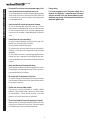
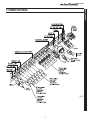
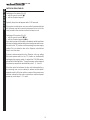
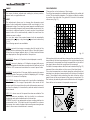
REMOTE CONTROL
BACKLIGHT
Illuminates the keys on the remote control
STAND-BY
LIGHT
Switches on the projector and puts it on
stand-by.
Keys 1-9
To select inputs directly.
SOURCE
Displays the menu for
Input Selection.
ESCAPE
Deactivates the On Screen Display.
Activates the test patterns for the
Zoom and Focus adjustments
Up/Down/Left/Right Arrow keys
Navigate through and make adjustments to
the on screen menus.
Arrow Up/Down call individual menus.
MENU Activates the On Screen Display and
is used to browse through its pages.
MENU +
Activates the On Screen Display menus and allows navigation though the various pages.
MEMORIES
FREEZE
Freezes a moving picture.
Activates the Memories management
menu.
ZOOM
F1
F1
Selects lens
zoom adjustment.
F2
INFO
F2
Displays selected source information and
system status.
FOCUS
Selects focus lens adjustment. It can be programmed to call different functions.
VCR
AUTO
Improves the video recorder signals quality.
Calls the automatic optimisation
function for the image projected on
the screen.
ASPECT
Selects picture aspect ratio.