1
Section 6. Storing and Retrieving
Datalogger Programs
CR500/510, CR10/10X, CR23X, 21X and CR7 programs can be uploaded and downloaded
between the datalogger and the Storage Module in the *D Mode. (OSX and OS7 series
PROMs required for 21X and CR7.) Campbell Scientific’s SMS software allows programs
to be transferred between the computer and the Storage Module. Using these capabilities,
a program can be developed in the computer, stored in the Storage Module, then carried
to the field and downloaded to the datalogger.
The Storage Module can store up to eight programs, numbered 1 to 8. These are stored in
an area of memory separate from that used for data storage.
With the release of the OS series PROMs (OS10, OSX, OS7), the dataloggers were given
the capability of automatically loading program 8 when the Storage Module is connected
to the datalogger at power-up. This feature is standard in the CR500/510, CR10/10X and
CR23X dataloggers. The program should be stored in program number eight in the
module with address one.
21X and CR7 PROMs before the current OSX and OS7 versions do not have the capability
to store and directly load programs from the Storage Module. Programs can be
transferred via the DSP4 Heads Up Display (see Section 6.3).
6.1 SMS Storage Module Support Software
Select the Program tab in SMS. See the PC208W manual for more
information.
6.2 *D Mode — With Datalogger
The *D Mode is used to transfer programs between the datalogger and Storage
Module. The general commands in Table 6-1 are used to save, retrieve or clear
programs from the Storage Module. See the appropriate datalogger manual for
instructions on using the *D Mode.
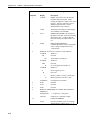
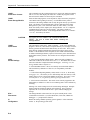
TABLE 6-1. *D Mode Keyboard Commands
Key
Display
Description
*D
7XA
1YA
2YA
3YA
13:00
7X:00
Enter *D Mode
Address Storage Module X
Store Program in Storage Module as Y (Y=1..8)
Load Program Y from Storage Module
Erase Program Y from Storage Module
command completed
13:0000
6-1