1
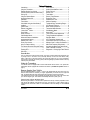
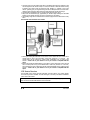
Multi-Level Features (default state)
Basic Features (press the FUNCTION button 1X)
FUNCTION
LOCK: ........................................................ aux 2
FUNCTION
START/STOP ............................................... cold weather
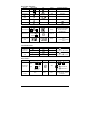
Multi-Car Operation (press the FUNCTION button 2X)
FUNCTION
FUNCTION
LOCK:......................... 2nd car lock
FUNCTION
FUNCTION
UNLOCK:..................... 2nd car unlock
FUNCTION
FUNCTION
START/STOP: ............... 2nd car start/stop
FUNCTION
FUNCTION
TRUNK: ....................... 2nd car trunk
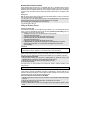
Customized Features (press the FUNCTION button 3X)
(May not be compatible with some vehicles)
Your installer can add customized features such as turning on the radio, opening sliding doors, etc.
FUNCTION
FUNCTION
FUNCTION
FUNCTION
FUNCTION
FUNCTION
FUNCTION
FUNCTION
FUNCTION
FUNCTION
FUNCTION
FUNCTION
LOCK: ................ customized feature 1
UNLOCK: ............ customized feature 2
START/STOP: ...... customized feature 3
TRUNK: .............. customized feature 4
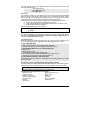
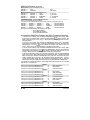
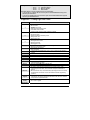
By default, the multi-level features are programmed as follows:
Level 1 (Basic Features)
Level 2 (Multi car operation)
Level 3 (Customized Features)
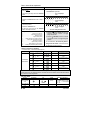
Accessing the Multi-Level Features and Other Transmitter Functions
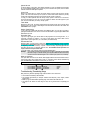
To access a Level 1 feature, press and hold the FUNCTION button until you hear a “beep”; within
three seconds of hearing the “beep”, release the FUNCTION button.
will be displayed. This
display means that you are now in Level 1. Simply press the corresponding button to access
the desired feature.
To access a Level 2 feature, press and hold the FUNCTION button until you hear a “beep within
three seconds of hearing the “beep”, release the FUNCTION button and press and release the
FUNCTION button once more.
will be displayed. This display means that you are now in
Level 2. Simply press the corresponding button to access the desired feature.
To access a Level 3 feature, press and hold the FUNCTION button until you hear a “beep”; within
three seconds of hearing the “beep”, release the FUNCTION button and press and release the
FUNCTION button two more times.
will be displayed. This display means that you are now
in Level 3. Simply press the corresponding button to access the desired feature.
To access the transmitter functions (clock and alarm adjustments), press and hold the FUNCTION
button until you hear a “beep”; within three seconds of hearing the “beep”, release the FUNCTION
button and press and release the FUNCTION button three more times. There will be two quick
“beeps” indicating that you are now in the transmitter functions adjustment menu. The Hour
position will be flashing. Simply press and release the FUNCTION button until you reach the
desired location and proceed with the adjustment by pressing the START/STOP or TRUNK buttons.
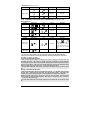
Your installer can customize the system as to personalize these multi-level features in an order that
best suits you. Your options are:
Option 1:
Multi car operation
Level 1 (requires pressing the FUNCTION button 1X)
Level 2 (requires pressing the FUNCTION button 2X)
Basic features
Level 3 (requires pressing the FUNCTION button 3X)
Customized features
Option 2:
Basic features
Level 1 (requires pressing the FUNCTION button 1X)
Level 2 (requires pressing the FUNCTION button 2X)
Multi car operation
Level 3 (requires pressing the FUNCTION button 3X)
Customized features
Option 3:
Level 1 (requires pressing the FUNCTION button 1X)
Customized features
Level 2 (requires pressing the FUNCTION button 2X)
Multi car operation
Level 3 (requires pressing the FUNCTION button 3X)
Basic features
Option 4:
Basic features
Level 1 (requires pressing the FUNCTION button 1X)
Level 2 (requires pressing the FUNCTION button 2X)
Customized features
Level 3 (requires pressing the FUNCTION button 3X)
Multi car operation
P. 12
User Guide