1
Windshield Wipers & Radio & Headlights
Certain vehicles require the radio and / or windshield wiper and / or headlight circuits to become
energized while running under remote start. When leaving the vehicle you must ensure that the
windshield wiper and headlight switches are OFF. Leaving the headlight switch ON on certain types
of vehicles could cause them to remain ON even after remote starter shut down, resulting in a dead
battery.
Driving Off
With the vehicle running under remote control, press the UNLOCK button to disarm and unlock the
doors. Enter the vehicle and do the following:
Turn the ignition key to the IGNITION ON (RUN) position. (Do not turn the key to the CRANK position
while the engine is running. This would cause the starter motor to re-engage.)
Press the brake pedal to disengage the remote starter unit.
You are now ready to drive off.
Using the Remote Starter
Arming the Starter Kill
The starter kill (if installed) can be configured by the installer so as to arm automatically (passive
mode) or not to arm automatically (active mode). See section passive or active arming on p. 6 for
more details on passive mode and active mode.
• To disarm the starter kill, press the UNLOCK button on the transmitter.
The parking lights will flash twice.
If remote door locks are installed, this will also unlock the doors.
• To arm the Starter Kill, press the LOCK button on the transmitter.
The parking lights will flash once.
If remote door locks are installed, this will also lock the doors.
• In passive mode, the starter kill will automatically arm if the ignition key is not inserted
Into the ignition switch within 1 or 3 minutes after unlocking (the key sense feature
must be installed).
Idle Mode
Convenience feature: Idle mode allows you to keep the engine running and the doors
locked while you stop, for example, at a convenience store or for a short delivery.
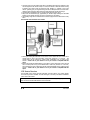
This feature allows you to let the remote starter take over control of the vehicle (i.e. no key in the
ignition switch) while the engine is running. For example, if you stop for a delivery or at a convenience store, lock your vehicle and leave it running for the length of a run cycle while you are away.
To leave the vehicle in idle mode:
1. With the engine running, press the LOCK or UNLOCK button (to unlock the doors) or the
START/STOP button on the remote control until the parking lights come on.
2. Remove the key and exit the vehicle. The engine will go on running.
3. Lock the doors if needed.
The engine will go on running until the user re-enters the vehicle or until the expiration of the
engine run time .
Caution!!! Do not leave children or pets unattended in a vehicle standing in Idle Mode.
Turbo Mode
If turbo mode is configured at installation, it will allow a turbocharger to idle down after the user
leaves the vehicle: the unit will take over the vehicle and keep it running for 60 seconds (or until it
is shut down by remote control), then shut down the engine.
Proceed as follows to set the system to Turbo Mode:
1. With the engine already running, press the LOCK button on the transmitter until the parking lights
come ON.
2. Remove the ignition key from the ignition switch. The engine will go on running.
3. Exit the vehicle and close the door.
4. Press the TRUNK button to lock the doors; the engine will shut down after 60 seconds of Turbo
Mode.
Guide d’installation
P. 3