1
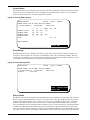
frame when the fault occurred, and the next 23 frames. The 64 frames of History Status can be a
very useful diagnostic tool. As such, it is recommended that the History Status buffer not be reset
until the designated fault condition that caused the buffer to be latched is viewed and investigated by a qualified service technician. After the alarm condition has been corrected, the History
Status buffer can be reset (unfrozen) by pressing and holding the Alarm Reset switch for at least
5 seconds.
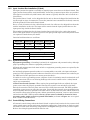
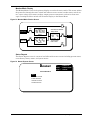
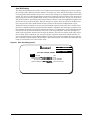
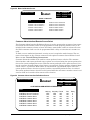
Figure 17 History Status Screen
HISTORY STATUS
ORDER - 000000
05/20/95
SITE ID - 00000
FRAME 41
SITE TAG - 0000000
**** ACTIVE ALARMS ****
Transfer Inhibit
Source1 Fail
Source1 UV
SOURCE 1 VOLTS
SOURCE 1 AMPS
SOURCE 2 VOLTS
SOURCE 2 AMPS
LOAD
09:17:52
A
B
C
387
1021
480
0
398
1138
480
0
392
1089
480
0
Peak-I1 OVLD
HERTZ
KVA
KW
96
65
60.0
60.0
UP : NEXT FRAME
DOWN : PREVIOUS FRAME
SELECT : EXIT
System Status
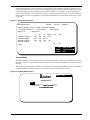
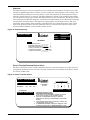
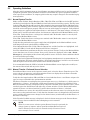
The System Status screen displays the total unit operating hours and the total number of switch
transfers, which are stored in nonvolatile memory. The total operating hours can not be reset by
the user.
The total number of switch transfers is also displayed on the Monitor/Mimic screen. The number
of switch transfers displayed can be reset by the user from the Setpoints screen.
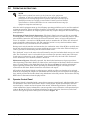
Figure 18 System Status Screen
SELECT : EXIT
SYSTEM STATUS
EXIT
Total Operating Hours
Total Transfers
000168
0078
Operating Instructions
19