1
Troubleshooting
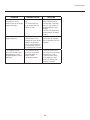
PROBLEM
POSSIBLE CAUSE
SOLUTION
The image appears too
'washed out', or the
darkest areas of the image
appear too bright.
· Brightness is set too
high.
· The DVD player may
be set for too high of a
brightness level.
· Turn down the
BRIGHTNESS level on
the Controller. If possible,
use a PLUGE pattern to
set the brightness level
properly.
· Set the DVD player for a
nominal output (no boost
or gain).
The colors of the image
appear abnormal
· The Red, Green and/
or Blue outputs of the
Controller or inputs to the
Projector are reversed.
· The Pr and Pb inputs on
the Component input on
the Controller are reversed
· Check the cable
connections on the back
of the Controller or on the
Projector.
The Projector will not
turn back on after it was
powered-down, or the
image disappears during
operation.
· The Projector will not
turn on for two minutes
after power-down to
protect its bulb.
· The bulb has failed
· Wait two minutes until
the LED on the front of the
Controller turns red.
· Check the error code
in the projector’s back
panel LCD display (see
projector’s manual).
23