1
Welcome!
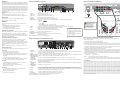
Explorer 4250HDC Front Panel
The Explorer® 4240HDC™ and 4250HDC™ Digital Set-Top with a MultiStream CableCARD™ (M-Card™) delivers high-deÞnition programming
in exceptional picture and audio quality. The M-Card provides system
security and authorization of digital services. Through the 4240HDC and
4250HDC you can also access interactive services, such as video-ondemand and pay-per-view programs. Contact your service provider for
information about these and other available services. Use the instructions
in this guide to install the 4240HDC or the 4250HDC and to access your
program services.
Important! If the M-Card is removed, the set-top will not operate
correctly.
For more information about this product, visit our website:
www.scientiÞcatlanta.com/products/consumers/new_cableboxes.htm
Safety First
Before using this set-top read the IMPORTANT SAFETY
INSTRUCTIONS section of this guide.
Explorer 4240HDC and 4250HDC
EXPLORER 4250HDC
CH+
STB SN: SABNFSRVG
GUIDE
EXIT
POWER
1
T12901
2
3
4
5
6 7 8 9 10
11
12
1 Power
Turns the set-top on and off
2 VOL +, VOL -
Increases and decreases the volume
3 CH+, CH -
Scrolls up and down through the channels
4 Select
Provides access to your on-screen selection
5 IR Sensor
Receives the infrared signal from the remote control
6 LED Display
Displays the selected channel number and time of day. The LED also displays the following:
• Message (
• Output Resolution (1080i, 720p, 480p, or 480i)
• AUTO - Automatically outputs native scan rates that your TV can accept
7 Guide
Accesses on-screen services, such as the on-screen guide, video-on-demand, or pay-per-view
• Info–Display program description
8 Info
Displays a description of the selected program. This button is available
from the on-screen guide and while viewing a program
Automatic Software Updates
A message appears on the TV screen when the set-top and the
M-Card module are receiving software updates. In addition,
download information also appears on the front panel of the set-top
during these updates. Wait for the current time to display on the front
panel before continuing. When the time appears, the update is
complete.
Exits menus, the on-screen guide, and program information
11 Smart Card Slot Reserved for future use
Connects to external equipment, such as a keyboard or mouse
(reserved for future use)
Back of
HDTV
OFF
R
L
VIDEO
Y
VIDEO
L/
MONO
AUDIO
PB
L
PR
AUDIO
Y
L/
MONO
PB
L
R
PR
AUDIO
ANT-1
OUT
R
R
R
HD 2
HD 1
IN
IN
OUT
IN
ANT-2
T13135
1. Insert the M-Card module if not already installed.
MULTI-STREAM CABLE CARD
STB SN: SABNFSRVG
CAUTION
ELECTRIQUE NE PAS OUVRIR
AUDIO OUT
2. Connect the set-top to the coaxial cable coming from the wall.
Pb
RISK OF ELECTRIC SHOCK
DO NOT OPEN
AVIS: RISQUE DE CHOC
L
Pr
eCM MAC: 001868C16907
IR
3. Connect the Y (green) connector on the HDTV to the Y (green) connector on the set-top; connect the Pb (blue) connector on the HDTV to the Pb
(blue) connector on the set-top; and connect the Pr (red) connector on the HDTV to the Pr (red) connector on the set-top.
STB RF MAC: 001868C16906
R
CABLE
IN
THIS DEVICE IS INTENDED TO
BE ATTACHED TO A RECEIVER
THAT IS NOT USED TO RECEIVE
OVER-THE-AIR BROADCAST
SIGNALS. CONNECTION OF THIS
DEVICE IN ANY OTHER FASHION
MAY CAUSE HARMFUL
INTERFERENCE TO RADIO
COMMUNICATIONS AND IS IN
VIOLATION OF THE FCC RULES,
PART 15.
Y
CABLE
OUT
HDTV
2
3
DIGITAL
AUDIO OUT
VIDEO
OUT
120 VAC
60HZ 400W
S - VIDEO
OPTICAL
OUT
AUDIO OUT
CATV CONVERTER
MADE IN MEXICO
USB
1394
1394
120 VAC
60HZ 40W
LISTED 14H1
CABLE EQUIP.
T13134
1
4
5 6789
10 11 12 13
14 15
• Verify that the M-Card module is installed.
2 Cable Out
Connects to a coaxial cable that sends analog audio and video signals to a TV or VCR. These signals are standarddeÞnition TV (SDTV) video and stereo audio
3 HDTV
Connects to the component video input (YPbPr) on the HDTV, when in HD mode.
• Verify the current TV program is broadcast in color.
DVI/HDCP
IN
120 VAC
60HZ 40W
LISTED 14H1
CABLE EQUIP.
Use the connection diagram and follow these steps to connect the set-top to an HDTV that has a component video connector (YPbPr) and an
audio left/right connector.
Connects to a coaxial cable that delivers the signal from your service provider
• Verify that the HDTV is in HD mode. If necessary, re-run the
HDTV Setup Wizard to select HD mode.
1394
Connecting to an HDTV with Component Input (YPbPr)
Explorer 4240HDC and 4250HDC Back Panel
1 Cable In
No color
1394
ANT (75 )
• Always set the set-top on its feet,
never on its side.
No picture
• The current channel may not be available in your service package.
Try selecting another channel to see if a picture appears.
USB
CATV CONVERTER
MADE IN MEXICO
Note: This illustration may vary from the actual product.
If the set-top does not perform as expected, the following tips may help.
• Verify that all cables are properly connected.
S - VIDEO
OPTICAL
OUT
AUDIO OUT
AUDIO
CENTER
CHANNEL IN
WARNING: Electric
shock hazard! Unplug
all electronic devices
before connecting or
disconnecting any device
cables to the set-top.
• Keep the top of the set-top free of
all objects and electronic devices,
including your TV.
Performance Tips
• If the set-top is plugged into a wall switch, verify the switch is in the
ON position. (Avoid plugging into an outlet that is controlled by a
wall switch.)
120 VAC
60HZ 400W
VIDEO
OUT
ON
Safety and Performance Tips
Provides access to the Settings menu
Note: If you need further assistance, contact your service provider.
• Verify that the power to your TV is turned on.
DIGITAL
AUDIO OUT
S-VIDEO
)
• Arrows–Highlight a program in the schedule
12 USB Port
HDTV
CABLE
OUT
AUDIO IN
DVI/HDCP
• Guide–Display the on-screen program guide
9 Exit
R
Y
)
• Power (
10 Settings
THIS DEVICE IS INTENDED TO
BE ATTACHED TO A RECEIVER
THAT IS NOT USED TO RECEIVE
OVER-THE-AIR BROADCAST
SIGNALS. CONNECTION OF THIS
DEVICE IN ANY OTHER FASHION
MAY CAUSE HARMFUL
INTERFERENCE TO RADIO
COMMUNICATIONS AND IS IN
VIOLATION OF THE FCC RULES,
PART 15.
Cable Input
Press the following remote control keys to access services and
programs:
• Select–Watch a speciÞc program in the guide
IR
STB RF MAC: 001868C16906
ELECTRIQUE NE PAS OUVRIR
• HDTV
Images such as letterbox bars or side bars, bright closed-captioning
backgrounds, station logos, or any other stationary images may
cause the HDTV screen to age unevenly and cause damage to your
HDTV. Refer to the user’s guide that came with your HDTV for more
information about screen burn-in.
Pb
RISK OF ELECTRIC SHOCK
DO NOT OPEN
AVIS: RISQUE DE CHOC
CABLE
IN
AUDIO OUT
eCM MAC: 001868C16907
CAUTION
SETTINGS
CH-
L
Pr
INFO
Watch TV
Avoid Screen Burn-In!
MULTI-STREAM CABLE CARD
SELECT
VOL+
VOL-
4 Digital Audio Out Connects to an RCA cable that sends a digital audio signal to a surround-sound receiver or other digital audio device
5 Out 2 (Secondary Connects to either a VCR or to another set of inputs (composite) on your TV
Video/ Audio Out)
4. Connect the left audio (white) connector on the HDTV to the left audio (white) connector on the set-top, and connect the right audio (red)
connector on the HDTV to the right audio (red) connector on the set-top.
5. Plug the set-top and the HDTV into an AC power source.
Important: To potentially protect the set-top from power surge damage, ground (earth) your cable product to provide some protection
against voltage surges and built-up static charges. You may be able to reduce the risk of damage from voltage surges, which can be
caused by lightning storms and power outages, by plugging the set-top into a surge protector.
6. Wait several minutes for the set-top to receive the latest software, programming, and service information. One of the following will display
on the front panel of the set-top:
• Current time
Note:
• Four dashes (----)
• If the current time displays, the update is complete.
• If four dashes display, you must call your service provider to get the set-top authorized.
6 Audio Out
(Left, Right)
Connects to RCA cables that send analog audio signals (left and right) to the stereo inputs on a TV
7 S-Video Out
Connects to an S-Video cable that sends an S-Video signal to your TV or VCR. This signal is standard deÞnition, but
higher quality than other SDTV connections
U.S. Patents
8 IR
Connector reserved for future use
A patent notice is afÞxed to this product. In addition, the product may also be covered by one or more of the following patents:
9 Optical Audio
Output
Connects to an optical cable that sends a digital audio signal to a surround-sound receiver or other digital audio device
4,498,169, 4,692,919, 4,748,667; 4,829,569; 4,866,770; 4,885,775; 4,888,799; 4,890,319; 4,922,456; 4,922,532; 4,924,498; 4,965,534; 4,991,011; 5,003,384; 5,012,510; 5,029,207;
5,045,816; 5,053,883; 5,054,071; 5,058,160; 5,142,575; 5,142,690; 5,146,526; 5,155,590; 5,214,390; 5,225,902; 5,225,925; 5,235,619; 5,237,610; 5,239,540; 5,241,610; 5,247,364;
5,255,086; 5,257,403; 5,267,071; 5,270,809; 5,271,041; 5,272,752; 5,282,028; 5,285,497; 5,287,351; 5,301,028; 5,309,514; 5,317,391; 5,319,709; 5,341,425; 5,347,388; 5,347,389;
5,357,276; 5,359,601; 5,361,156; 5,367,571; 5,379,141; 5,379,145; 5,381,481; 5,390,337; 5,400,401; 5,406,558; 5,418,782; 5,420,866; 5,420,923; 5,425,101; 5,428,404; 5,430,568;
5,434,610; 5,436,749; 5,438,370; 5,440,632; 5,442,472; 5,455,570; 5,457,701; 5,471,492; 5,477,199; 5,477,262; 5,477,282 5,477,370; 5,481,389; 5,481,542; 5,485,221; 5,493,339;
5,497,187; 5,500,758; 5,502,499; 5,506,904; 5,519,780; 5,539,822; 5,550,825; 5,579,055; 5,579,057; 5,583,562; 5,592,551; 5,596,606; 5,600,378; 5,602,933; 5,640,388; 5,657,414;
5,675,575; 5,684,876; 5,715,515; 5,724,525; 5,734,822; 5,740,300; 5,742,677; 5,754,940; 5,757,416; 5,771,064; 5,774,859; 5,825,829; 5,826,167; 5,850,305; 5,854,703; 5,870,474;
5,892,607; 5,920,626; 5,923,755; 5,930,024; 5,930,515; 5,937,067; 5,963,352; 5,966,163; 5,982,424; 5,991,139; 5,999,207; 6,005,631; 6,005,938; 6,016,163; 6,028,941; 6,029,046;
6,052,384; 6,055,244; 6,072,532; 6,105,134; 6,148,039; 6,157,719; 6,188,729; 6,195,389; 6,212,278; 6,215,530; 6,219,358; 6,240,103; 6,243,145; 6,246,767; 6,252,964; 6,272,226;
6,292,081; 6,292,568; 6,320,131; 6,374,275; 6,405,239; 6,411,602; 6,417,949; 6,424,714; 6,424,717; 6,433,906; 6,438,139; 6,463,586; 6,467,091; 6,476,878; 6,493,876; 6,510,519;
6,516,002; 6,516,412; 6,526,508; 6,538,595; 6,546,013; 6,560,340; 6,567,118; 6,570,888; 6,622,308; 6,629,227; 6,664,984; 6,667,994; 6,671,879; 6,674,967; 6,678,891; 6,714,598;
6,721,352; 6,721,956; 6,725,459; 6,738,982; 6,744,892; 6,744,967; 6,751,271; 6,760,918; 6,795,972; 6,802,077; 6,804,708; 6,811,447; 6,817,028; 6,822,972; 6,823,385; 6,832,386;
6,845,106; 6,868,473; 6,874,075; 6,889,191; 6,909,471; 6,917,622; 6,917,628; 6,922,412; 6,927,806; 6,928,656; 6,931,058; 6,937,729; 6,969,279; 6,971,008; 6,971,121; 6,978,310;
6,986,156; 6,988,900; 6,996,838; 7,010,801; 7,053,960; 7,065,213; 7,069,578; 7,069572; D348065; D354959; D359737; D363932; D390217; D434753; D507240; D507535;
D513407; D516518; RE36368; RE36988
• Adjust the TV color controls.
10 Multi-Stream
CableCARD
Installed by your service provider
No sound
11 HDMI
• If your setup includes a VCR or stereo, verify that you have
properly connected them to the set-top.
Connects an HDMITM cable to the HDMI input of an HDTV. HDMI supports both digital audio and video. May be used
to connect to a DVI interface using an HDMI-to-DVI adaptor for video and separate audio connections. Any of the
following audio connections may be used: Digital Audio Out (4); Audio Out: Left, Right (6); or Optical Audio Output (9)
12 USB
Connects to external USB devices such as a keyboard or a mouse
• Verify the volume is turned up.
13 1394
Connects to display devices that are equipped with a 1394 input
• Verify the mute function is not on.
14 AC Outlet
Connects to the AC power cord from another device, such as a TV
15 AC Power Input Connects to the power cord to deliver power to the set-top
Note: This illustration may vary from the actual product.
7. To begin watching TV, turn on the HDTV and press Power on the front panel of the set-top, or press Power on the remote control.
20070417 Patents