1
ARRI Gears 2.19D, 07/2011
1 Introduction
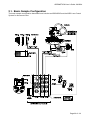
ARRI Gears is a handy, easy to use and fast to setup remote control unit for the ARRI Head-2
and CLM-2 lens motors. The motion of the head and the lens motors can be recorded and
played back immediately or can be saved for later playback.
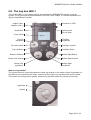
ARRI Gears is basically a standard ARRI Motion system with a simplified user interface on the
controlling Jogbox.
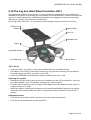
The ARRI Head can be controlled either directly with hand wheels attached to the head
motors, by means of the Jogbox Handwheel Adapter JHC-1 or by means of an encoded fluid
head. Gear ratio, maximum speed and acceleration can be set electronically.
The internal encoders of the Encoded ARRI Head-2 provide simple and fast referencing
methods for pan and tilt.
The CLM-2 lens motors can be controlled hard-wired either by a WCU-3 (with ZMU-3), WHA2 (with WZU and WFU) or by a ZMU-1/2 (with FIU).
For wireless control a UMC-3 can be connected.
Cameras are not directly controlled by ARRI Gears. Nevertheless, a button in the play/record
menu enables to start and stop most ARRI cameras. The remote emulation of the camera’s
LCD menu (435 and ARRICam) and controlling buttons enable the check of the camera state
and the remote change of speed and shutter settings (setting not possible on ARRICam ST
and ARRICam LT).
Video cameras can basically not be controlled. But the presence and run state of a video
camera with timecode output can be indicated on the Jogbox.
If appropriate for easier editing the first frame of every record/playback shot can be marked by
means of a Bloop Light.
In case of further questions about setup or operation please have a look at the appendices or
the corresponding chapter of the ARRI Motion (AM) manual.
Go through the ARRI Motion safety features (from the ARRI Motion manual) before you
start operating the ARRI Gears.
Application hints:
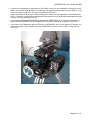
• The mechanical gear on the ARRI Head has always to be set to 1.
• Check that all breaks on the ARRI Head are released before you switch on the CHM-1
motors.
• On the CHM-1 motors and on the Jogbox Handwheel Controller there are brake
buttons which act on the corresponding hand wheel. If the system is tracking, but does
not react on your hand wheels, check the state of the brake buttons.
• If you are using a UMC-3 for wireless remote control all CLM-2 motors must still be
plugged into the ARRI Motion systems LCB. In the mimic list the UMC-3 will be
displayed as ZMU-3. The maximum control distance is somewhat lower compared to
the standard UMC-3 application when motors are controlled by the UMC-3 directly.
• Supply the AM system, the camera and your connected video equipment from the
same power plug to avoid sparks due to small potential differences of different power
lines.
Page 2 of 14