1
BIG 10 Router
3.8.2
VLAN configuration
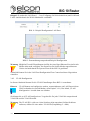
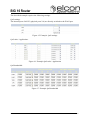
This view allows the VLAN configuration of the BIG 10.
Note
VLAN configuration requires at minimum one LAN port linked to the WAN
(Switch mode, see chapter 3.8.1). The menu „VLAN configuration“ is only visible in this case.
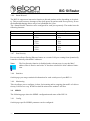
You can configure up to 8 VLAN at the BIG 10. Assign for each VLAN the associated
VLAN-ID and VLAN-Priority.
Warning
The VLAN-ID 1 is often not supported by many switches. If problems occur, it
can be recommended to choose another (2..4094).
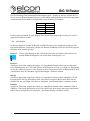
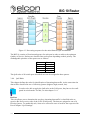
Finally select which ports in Switch-Mode VLAN belong to tagged / untagged.
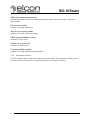
• „-“
means, that the port is no „Member/Mitglied“ of the respective VLAN.
→ only untagged Traffic
• „U“ means, that the port is an „untagged Member/Mitglied“ of the respective VLAN
→ untagged Traffic is marked with VLAN, while Tag is removed for tagged
Traffic (VLAN
• „T“ means, that the port is a„Member/Mitglied“ of the respective VLAN
→ only Traffic with the respective VLAN
• „S“ means, that the port adds to any traffic a pre-set VLAN-Tag (Service-Tag)
→ with tagged Traffic the according VLAN-Tag will be removed
3.8.3
QoS Settings
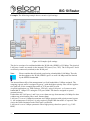
Data can be processed in a specific manner in order to secure services. This is often achieved
by “Quality of Service” or simply QoS settings.
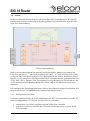
QoS improvements can be gained using two ways. First packets can be market via QoS rules
to process them prioritized. Secondly can a minimum and maximum bandwidth assigned to
ports and queues. Both methods are processed one after the other.
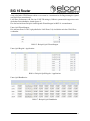
The following picture illustrates the processes of the different QoS methods.
Version: 2011/01/19
53