1
BIG 10 Router
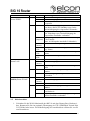
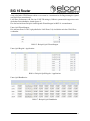
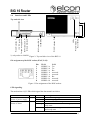
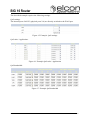
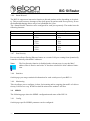
LED
LINK
Status of SHDSL
Colour Status
green OFF
flashing
ON
yellow OFF
ON
flashing
(slow)
flashing
(inverse)
blinking
at 1 Hz
blinking
at 2 Hz
blinking
at 4 Hz
green OFF
LAN
Status of LAN
flashing
(inverse)
ON
yellow OFF
ON
OFF
WLAN (only order no. blue
900220) Status WLAN
flashing
(inverse)
ON
yellow OFF
blinking
ON
2.5
Meaning
WAN link not established
Data-transfer over minimum one SHDSL
all PCS member sync; WAN link established
State WAN init done; all links down; all PCS
member sync; state without any interference
fastest link PCS sync, still not all members
sync; state with any interference
link-ID (1…4) fastest link G.hs-transfer
(up to 4 ON-pulses within 2 seconds)
fastest link line probing
fastest link training; „SHDSL Training“ status
fastest link data mode; „Line Probing“ status
(re-)init running; „G.hs“ status
LAN-port not established
data-transfer over minimum one LAN-port
Link established to at least one LAN port
state without any interference
state with any interference
WLAN deactivated
data transfer via WLAN
WLAN activated
state without any interference
after switching-on, until ready-state of WLAN
access point
initialization / state with any interference
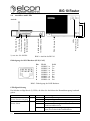
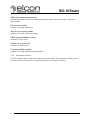
Cable connection
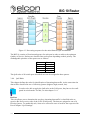
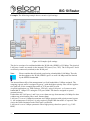
1. Connect the WAN-interface of the BIG 10 with the access port of your network operator, using a UTP (Unshielded Twisted Pair) CAT5 cable or better, to ensure optimal
transmission parameters. The cable contact assignment at the socket can be requested
from your network provider.
2. Link the BIG 10 with the network interface card of the PC. For this, use an Ethernet
cable and connect it to one of the „LAN“-marked RJ45-sockets on the BIG 10 and to
the RJ45-socket of the network interface card (see the related instructions).
3. Finally use the enclosed plug-in power supply module to connect the socket „12V
DC“ of the BIG 10 to the electricity network. Do not use any other power supply
module than the one included in delivery. The use of other power supply units will result in the loss of the CE conformance and exclude any warranty claims.
40
Version: 2011/01/19