1
Crestron SWE-8
®
Sonnex Multiroom Audio Unamplified
Expander, 8 Zone
Operations Guide
Important Safety Instructions
•
•
•
•
•
•
•
•
•
•
•
•
•
•
•
•
•
•
Read these instructions.
Keep these instructions.
Heed all warnings.
Follow all instructions.
Do not use this apparatus near water.
Clean only with dry cloth.
Do not block any ventilation openings. Install in accordance
with the manufacturer's instructions.
Do not install near any heat sources such as radiators, heat
registers, stoves, or other apparatus (including amplifiers)
that produce heat.
Do not defeat the safety purpose of the polarized or
grounding-type plug. A polarized plug has two blades with
one wider than the other. A grounding-type plug has two
blades and a third grounding prong. The wide blade or the
third prong are provided for your safety. If the provided plug
does not fit into your outlet, consult an electrician for
replacement of the obsolete outlet.
Protect the power cord from being walked on or pinched
particularly at plugs, convenience receptacles, and the point
where they exit from the apparatus.
Only use attachments/accessories specified by the
manufacturer.
Use only with the cart, stand, tripod, bracket or
table specified by the manufacturer or sold with
the apparatus. When a cart is used, use caution
when moving the cart/apparatus combination to
avoid injury from tip-over.
Unplug this apparatus during lightning storms or when
unused for long periods of time.
Refer all servicing to qualified service personnel. Servicing
is required when the apparatus has been damaged in any
way, such as power-supply cord or plug is damaged, liquid
has been spilled or objects have fallen into the apparatus, the
apparatus has been exposed to rain or moisture, does not
operate normally, or has been dropped.
Disconnect power prior to connecting or disconnecting
equipment.
Do not install in direct sunlight.
The apparatus must be installed in a way that the power cord
can be removed either from the wall outlet or from the
device itself in order to disconnect the mains power.
Prevent foreign objects from entering the device.
WARNING:
TO REDUCE THE RISK OF FIRE OR ELECTRIC SHOCK,
DO NOT EXPOSE THIS APPARATUS TO RAIN OR
MOISTURE. THE APPARATUS SHALL NOT BE EXPOSED
TO DRIPPING OR SPLASHING. OBJECTS FILLED WITH
LIQUIDS, SUCH AS VASES, SHOULD NOT BE PLACED
ON THE APPARATUS.
WARNING:
TO PREVENT ELECTRIC SHOCK, DO NOT REMOVE
COVER. THERE ARE NO USER SERVICEABLE PARTS
INSIDE. ONLY QUALIFIED SERVICE PERSONNEL
SHOULD PERFORM SERVICE.
The lightning flash with arrowhead symbol, within an
equilateral triangle, is intended to alert the user to the
presence of uninsulated “dangerous voltage” within the
product's enclosure t hat may be of sufficient magnitude
to constitute a risk of electric shock to persons.
The exclamation point within an equilateral triangle is
intended to alert the user to the presence of important
operating and maintenance (servicing) instructions in
the literature accompanying the appliance.
WARNING:
THIS IS AN APPARATUS WITH CLASS I
CONSTRUCTION. IT SHALL BE CONNECTED TO AN
ELECTRICAL OUTLET WITH AN EARTHING GROUND
TERMINAL.
IMPORTANT:
This device can be used with Class 2 output wiring.
Regulatory Compliance
As of the date of manufacture, the SWE-8 has been tested and found to comply with specifications for CE
marking.
Federal Communications Commission (FCC) Compliance Statement
This device complies with part 15 of the FCC Rules. Operation is subject to the following conditions:
(1) This device may not cause harmful interference and (2) this device must accept any interference received,
including interference that may cause undesired operation.
CAUTION: Changes or modifications not expressly approved by the manufacturer responsible for
compliance could void the user’s authority to operate the equipment.
NOTE: This equipment has been tested and found to comply with the limits for a Class B digital device,
pursuant to part 15 of the FCC Rules. These limits are designed to provide reasonable protection against
harmful interference in a residential installation. This equipment generates, uses and can radiate radio
frequency energy and, if not installed and used in accordance with the instructions, may cause harmful
interference to radio communications. However, there is no guarantee that interference will not occur in a
particular installation. If this equipment does cause harmful interference to radio or television reception,
which can be determined by turning the equipment off and on, the user is encouraged to try to correct the
interference by one or more of the following measures:
•
Reorient or relocate the receiving antenna
•
Increase the separation between the equipment and receiver
•
Connect the equipment into an outlet on a circuit different from that to which the receiver is connected
•
Consult the dealer or an experienced radio/TV technician for help
Industry Canada (IC) Compliance Statement
CAN ICES-3(B)/NMB-3(B)
The specific patents that cover Crestron products are listed at patents.crestron.com.
Crestron, the Crestron logo, Cresnet, Crestron Home, and Sonnex are either trademarks or registered trademarks of Crestron Electronics, Inc. in the
United States and/or other countries. Other trademarks, registered trademarks, and trade names may be used in this document to refer to either the
entities claiming the marks and names or their products. Crestron disclaims any proprietary interest in the marks and names of others. Crestron is not
responsible for errors in typography or photography.
This document was written by the Technical Publications department at Crestron.
©2014 Crestron Electronics, Inc.
Crestron SWE-8
Sonnex Multiroom Audio Unamplified Expander, 8 Zone
Contents
Sonnex Multiroom Audio Unamplified Expander, 8 Zone: SWE-8
1
Introduction ............................................................................................................................... 1
Features and Functions ................................................................................................ 1
Applications................................................................................................................. 3
Specifications .............................................................................................................. 3
Physical Description .................................................................................................... 5
Setup .......................................................................................................................................... 8
Sonnex Link Wiring .................................................................................................... 8
Installation ................................................................................................................... 8
Hardware Hookup ..................................................................................................... 10
Configuration ........................................................................................................................... 12
Uploading and Upgrading ........................................................................................................ 13
Establishing Communication ..................................................................................... 13
Programs and Firmware ............................................................................................ 13
Operation ................................................................................................................................. 14
Problem Solving ...................................................................................................................... 15
Troubleshooting......................................................................................................... 15
Check Wiring ............................................................................................................ 15
Reference Documents ................................................................................................ 15
Further Inquiries ........................................................................................................ 15
Future Updates .......................................................................................................... 16
Return and Warranty Policies .................................................................................................. 17
Merchandise Returns / Repair Service ...................................................................... 17
Crestron Limited Warranty........................................................................................ 17
Operations Guide – DOC. 7202B
Contents • i
Crestron SWE-8
Sonnex Multiroom Audio Unamplified Expander, 8 Zone
Sonnex Multiroom Audio
Unamplified Expander, 8 Zone:
SWE-8
Introduction
The SWE-8 is an 8-zone unamplified expander for the Sonnex® Multiroom Audio
System (SWAMP-24X8)1 from Crestron®. It provides eight zone outputs consisting
of four analog line-level and four S/PDIF digital outputs. All eight outputs also
include Crestron Home® (CH) CAT5 balanced audio outputs for long-distance
wiring applications. The SWE-8 is ideal for routing audio to AV receivers, powered
subwoofers, headphone amplifiers, phone systems (for music-on-hold), and other
audio equipment.
Features and Functions
•
•
•
•
•
•
•
•
•
•
Eight zone Sonnex expansion with line-level outputs
Four zones with balanced and unbalanced line outputs
Four zones with S/PDIF digital outputs
All eight zones include Crestron Home CAT5 balanced outputs
All ports on an output are paralleled2
Professional-quality audio performance
Advanced DSP, mono summing, and output bussing per zone
Single-cable interface to SWAMP-24X8 via Sonnex Link
Plug-and-play operation
Single-space rack mountable
8 Zones Unamplified
The SWE-8 allows routing of any of the main SWAMP-24X8’s 24 source inputs to
any of its eight zone outputs. Outputs 1-4 offer balanced, unbalanced, and CH
outputs. Outputs 5-8 offer S/PDIF and CH outputs.
1. Item sold separately.
2. The total load should be greater than 2 kΩ if multiple ports for the same zone are used
simultaneously.
Operations Guide – DOC. 7202B
Sonnex Multiroom Audio Unamplified Expander, 8 Zone: SWE-8 • 1
Crestron SWE-8
Sonnex Multiroom Audio Unamplified Expander, 8 Zone
Crestron Home CAT5 Audio Distribution
The CH CAT5 balanced outputs enable long-distance wire runs up to 500 feet
(152 meters) to feed remote equipment such as powered subwoofers and AV
receivers located throughout the house. The CH signal is easily converted to
unbalanced line-level at each remote location using an ABAR-1 CAT5 Balanced
Audio Receiver.1 CH outputs are also compatible with other Crestron Home products
such as the C2N-IADS30X24, CNX-BIPAD8, CNXRMCLV, C2N-DAP8,1 and
certain Crestron touch screens.
AUD-EXT Audio Extenders
For long-distance wiring applications requiring wire runs over 500 feet (152 m),
Crestron offers the AUD-EXT family of audio extenders.1 Using inexpensive CAT5
wire, these extenders allow unbalanced audio signals to be extended up to 2000 feet
(610 m), while SPDIF signal can be extended up to 600 feet (183 m).
Digital Signal Processing
Each zone features independent DSP for optimal sound quality and control in every
room. Sonnex DSP capabilities include the choice of graphic or parametric 5-band
EQ, dynamic range control, volume, bass, treble, balance, loudness, mute, mono
summing, and five selectable tone profiles. For subwoofer applications, a choice of
second or fourth order active crossover filters can be set using the parametric EQ,
leaving the four remaining EQ filters available for room correction and tonal
enhancement.
Output Bussing
Output bussing allows multiple zones to function as one, whether fed from the
SWE-8, the SWAMP-24X8, or another Sonnex Expander. Output bussing is ideal for
grouping adjacent listening areas together or associating a powered subwoofer with
its stereo speaker pair. Volume offset adjustments allow for balancing the levels of
each bussed zone for smooth, even coverage.
Simple, Versatile Installation
The SWE-8 can be installed along with the SWAMP-24X8 at the central equipment
rack, or separately at a remote location. It interfaces with the SWAMP-24X8 via a
single CAT5e shielded twisted pair (STP) cable up to 200 feet (61 meters) in length.2
This length can be increased to 2000 feet (610 meters) using multimode fiber optic
cable with the S-EXT1-S Sonnex Link over Fiber Extender.1 Plug-and-play
connectivity affords an extremely easy installation with full control access to all the
SWE-8 functions provided through the SWAMP-24X8.
1. Item(s) sold separately.
2. For connection of the Sonnex Link between the SWAMP-24X8 and each expander, use Crestron
DM-CBL-8G or high-quality CAT5e shielded twisted-pair cable. The maximum cable length using
DM-CBL-8G or CAT5e is 200 ft (61 m) per run. For longer distances, use the S-EXT1-S Sonnex
Link over Fiber Extender.
2 • Sonnex Multiroom Audio Unamplified Expander, 8 Zone: SWE-8
Operations Guide – DOC. 7202B
Crestron SWE-8
Sonnex Multiroom Audio Unamplified Expander, 8 Zone
Applications
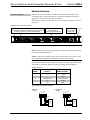
The following diagram shows a SWE-8 in a multizone application.
SWE-8 in a Multizone Application
Specifications
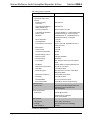
Specifications for the SWE-8 are listed in the following table.
SWE-8 Specifications
SPECIFICATION
DETAILS
Audio
Input Signal Type
Sonnex Link
Output Signal Types
Stereo analog line (unbalanced and
balanced), S/PDIF coaxial (2-channel PCM
only), Crestron Home CAT5 Balanced Audio
(Continued on following page)
Operations Guide – DOC. 7202B
Sonnex Multiroom Audio Unamplified Expander, 8 Zone: SWE-8 • 3
Crestron SWE-8
Sonnex Multiroom Audio Unamplified Expander, 8 Zone
SWE-8 Specifications (Continued)
SPECIFICATION
DETAILS
Audio (Continued)
Typical of 8 Stereo Zone
Outputs
Digital-to-Analog
Conversion
24-bit 48 kHz
Output Resolution/Bitrate
(digital outputs only)
24-bit 48 kHz
Frequency Response
20 Hz to 20 kHz, ±0.5 dB
Total Harmonic Distortion
(THD) + Noise
< 0.003% S/PDIF in, < 0.005% balanced or
unbalanced analog in, 20 Hz to 20 kHz
S/N Ratio
>106 dB S/PDIF in, >100 dB balanced or
unbalanced analog in, A-weighted
Stereo Separation
> 100 dB
Zone Separation
> 100 dB
Zone Volume Level Control
-80.0 to +20.0 dB, adjustable from 0% to
100% plus mute
Bass Control
±12.0 dB
Treble Control
±12.0 dB
Loudness Compensation
On/Off
Dynamic Range Control
On/Off
Balance Control
Left/right adjustable
Mono Summing
Selectable
Tone Profiles
Flat, Classical, Jazz, Pop, Rock, Spoken
Word
EQ Modes
5-band graphic or 5-band parametric EQ
GEQ Center Frequencies
63, 250, 1k, 4k, 16k Hz
GEQ Gain
±12.0 dB per band
PEQ Filter Types
EQ, High Pass, Low Pass, Treble Shelf,
Bass Shelf, Notch
PEQ Center Frequency
10 to 20,000 Hz per band
PEQ Gain
±12.0 dB per band
PEQ Bandwidth
0.1 to 3.5 octaves per band
Bus Volume Offset
±12.0 dB per zone for output bussing
Communications
Sonnex Link
64-channel (48 utilized) digital audio with
embedded control, auto-discovery,
auto-negotiating
Power Requirements
Power Pack
2 amps @ 24 volts dc
100-240 volts ac, 50/60 Hz;
power pack included
Environmental
Temperature
41º to 104º F (5º to 40º C)
Humidity
10% to 90% RH (non-condensing)
Heat Dissipation
41 Btu/h
(Continued on following page)
4 • Sonnex Multiroom Audio Unamplified Expander, 8 Zone: SWE-8
Operations Guide – DOC. 7202B
Crestron SWE-8
Sonnex Multiroom Audio Unamplified Expander, 8 Zone
SWE-8 Specifications (Continued)
SPECIFICATION
DETAILS
Enclosure
Chassis
Metal with black finish, vented sides
Front Panel
Metal with black finish and polycarbonate
label overlay
Mounting
Freestanding or 1U 19-inch rack-mountable
(feet and rack ears included)
Dimensions
Height
1.72 in (44 mm) without feet
Width
19.00 in (483 mm) with ears
17.30 in (440 mm) without ears
Depth
10.19 in (259 mm)
Weight
5.0 lbs (2.3 kg)
Included Accessory
24 volt dc, 2 amp regulated universal power
pack
Available Accessories
ABAR(I)-1
Crestron Home CAT5 Balanced Audio
Receiver
AUD-EXT
Audio Extenders
CBL Series
Crestron Certified Interface Cables
DM-8G-CONN
Cable Connector for DM-CBL-8G
DM-8G-CONN-WG
Cable Connector with Wire Guide for
DM-CBL-8G
DM-8G-CRIMP
Crimping Tool for DM-8G-CONN
DM-8G-CRIMP-WG
Crimping Tool for DM-8G-CONN-WG
DM-CBL-8G
High Performance CAT5e Shielded Twisted
Pair Cable
S-EXT1-S
Sonnex Link Over Fiber Extender
SWAMP(I)-24X8
Sonnex Multiroom Audio System
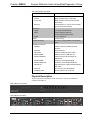
Physical Description
This section provides information on the connections, controls, and indicators
available on the SWE-8.
SWE-8 Physical View (Front)
SWE-8 Physical View (Rear)
Operations Guide – DOC. 7202B
Sonnex Multiroom Audio Unamplified Expander, 8 Zone: SWE-8 • 5
Sonnex Multiroom Audio Unamplified Expander, 8 Zone
Crestron SWE-8
SWE-8 Overall Dimensions
10.19 in
(259 mm)
17.30 in
(440 mm)
19.00 in
(483 mm)
1.72 in
(44 mm)
5
4
1
2
6
7
3
8
9
10
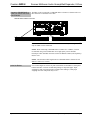
Connectors, Controls, and Indicators
1
#
CONNECTORS,
CONTROLS, AND
INDICATORS
1
PWR LED
2
HW-R
3
ZONE (1–8)
(Buttons and LEDs)
4
DIGITAL IN
Green
LED
Pin 8
Yellow
LED
DESCRIPTION
(1) Green LED indicates operating power
supplied via power pack
(1) Recessed push button for hardware reset
(8) Push buttons and green LEDs, select
output zone for routing and adjustment
(1) 8-wire RJ-45 female (8P8C modular jack);
Sonnex link input;
Connect to SWAMP-24X8 Multiroom Audio
2
System or S-EXT1-S Sonnex Link Over Fiber
2
Extender (each sold separately);
Green LED indicates link status;
Amber LED indicates data communication
Pin 1
(Continued on following page)
6 • Sonnex Multiroom Audio Unamplified Expander, 8 Zone: SWE-8
Operations Guide – DOC. 7202B
Crestron SWE-8
Sonnex Multiroom Audio Unamplified Expander, 8 Zone
Connectors, Controls, and Indicators (Continued)
1
#
CONNECTORS,
CONTROLS, AND
INDICATORS
5
1–4 L/R (unbalanced)
DESCRIPTION
(4) Pairs RCA female;
3
Unbalanced stereo line-level audio outputs
Output impedance: 100 Ω
Maximum output level: 2 Vrms
6
1–4 BALANCED L/R
(4) 5-pin 3.5 mm detachable terminal blocks;
3
Balanced stereo line-level audio outputs
Output impedance: 200 Ω balanced,
100 Ω unbalanced;
Maximum output level: 4 Vrms balanced,
2 Vrms unbalanced
7
1–8 BALANCED (CH)
(8) 8-wire RJ-45 female, shielded “Crestron
Home” CAT5 balanced stereo audio output
ports. Connect to any “CH” CAT5 audio input
3, 4
ports or bidirectional audio ports
Maximum cable length: 500 feet
(152 meters) per port
8
5–8 SPDIF OUT
PIN
WIRE COLORS
(568B)
AUDIO I/O
1
WHITE/ORANGE
+ Left Out
2
ORANGE
- Left Out
3
WHITE/GREEN
+ Right Out
4
BLUE
N/A
5
WHITE/BLUE
N/A
6
GREEN
- Right Out
7
WHITE/BROWN
N/A
8
BROWN
N/A
(4) RCA female; S/PDIF coaxial digital audio
outputs
Output impedance: 75 Ω
9
24 VDC 2.0A
10
GROUND
(1) 2.1 mm barrel dc power jack;
24 volt dc power input
(power pack included)
(1) 6-32 screw, chassis ground lug
1. Interface connectors for BALANCED L/R ports are provided with the unit.
2. For connection of the Sonnex Link between the SWE-8 and the SWAMP-24X8 or S-EXT1-S, use
Crestron DM-CBL-8G or high-quality CAT5e shielded twisted-pair cable. The maximum cable length
is 200 ft (61 meters) per run. For longer distances, use the S-EXT1-S.
3. All analog outputs are paralleled per zone.
4. This eight-pin RJ-45 port uses CAT5 wiring to provide connectivity to the ABAR-1 CAT5 Balanced
Audio Receiver and other Crestron Home products such as the C2N-IADS30X24, CNX-BIPAD8,
CNXRMCLV, C2N-DAP8, and certain Crestron touch screens.
Operations Guide – DOC. 7202B
Sonnex Multiroom Audio Unamplified Expander, 8 Zone: SWE-8 • 7
Sonnex Multiroom Audio Unamplified Expander, 8 Zone
Crestron SWE-8
Setup
Sonnex Link Wiring
Crestron recommends using Crestron DM-CBL-8G (sold separately) or high-quality
CAT5e shielded twisted-pair cable for Sonnex Link connections between the SWE-8
and the SWAMP-24X8 or S-EXT1-S.
NOTE: Shielded connectors such as the DM-8G-CONN (sold separately) must be
used.
DM-CBL-8G wire can carry Sonnex Link signals up to 200 feet (61 meters). If
additional length is needed, the S-EXT1-S can extend the Sonnex link up to 2000
feet (610 meters) over one multimode fiber strand. The S-EXT1-S is an optional
accessory that provides high performance signal extension.
Installation
Ventilation
The SWE-8 should be used in a well-ventilated area. The venting holes should not be
obstructed under any circumstances.
To prevent overheating, do not operate this product in an area that exceeds the
environmental temperature range listed in the table of specifications. Consider using
forced air ventilation or incrementing the spacing between units to reduce
overheating. Contact with thermal insulating materials should be avoided on all sides
of the unit.
Rack Mounting
The SWE-8 can be mounted in a rack or stacked with other equipment. Two “ears”
are provided with the SWE-8 so that the unit can be rack mounted. These ears must
be installed prior to mounting. Complete the following procedure to attach the ears
to the unit. The only tool required is a #1 or #2 Phillips screwdriver.
WARNING: To prevent bodily injury when mounting or servicing this unit in a
rack, observe the following guidelines:
•
When mounting this unit in a partially filled rack, load the rack from the
bottom to the top with the heaviest component at the bottom of the rack.
•
If the rack is provided with stabilizing devices, install the stabilizers before
mounting or servicing the unit in the rack.
NOTE: Observe the following guidelines when installing equipment in a rack:
•
Elevated Operating Ambient Temperature - If installed in a closed or
multi-unit rack assembly, the operating ambient temperature of the rack
environment may be greater than room ambient temperature. Therefore,
consideration should be given to installing the equipment in an environment
compatible with the maximum ambient temperature (Tma) specified by the
manufacturer.
•
Reduced Air Flow - Installation of the equipment in a rack should be such
that the amount of airflow required for safe operation of the equipment is
not compromised.
8 • Sonnex Multiroom Audio Unamplified Expander, 8 Zone: SWE-8
Operations Guide – DOC. 7202B
Crestron SWE-8
Sonnex Multiroom Audio Unamplified Expander, 8 Zone
•
Mechanical Loading - Mounting of the equipment in the rack should be
such that a hazardous condition is not achieved due to uneven mechanical
loading.
•
Circuit Overloading - Consideration should be given to the connection of
the equipment to the supply circuit and the effect that overloading of the
circuits might have on overcurrent protection and supply wiring.
Appropriate consideration of equipment nameplate ratings should be used
when addressing this concern.
•
Reliable Earthing - Reliable earthing of rack-mounted equipment should be
maintained. Particular attention should be given to supply connections other
than direct connections to the branch circuit (e.g., use of power strips)
NOTE: If rack mounting is not required, rubber feet are provided for tabletop
mounting or stacking. Apply the feet near the corner edges on the underside of the
unit.
To install the ears, use the following procedure.
CAUTION: To prevent equipment damage, use only the rack ears Crestron
provides for this device.
1.
Using a #1 or #2 Phillips screwdriver, remove the three screws closest to
the front panel from one side of the unit. Refer to the diagram following
step 3 for a detailed view.
2.
Position a rack ear so that its mounting holes align with the holes vacated
by the screws in step 2.
3.
Secure the ear to the unit with the three screws from step 2 as shown in the
following diagram.
Ear Attachment for Rack Mounting
4.
Stacking
Repeat procedure (steps 1 through 3) to attach the remaining ear to the
opposite side.
Four “feet” are provided with the SWE-8 so that if the unit is not rack mounted, the
rubber feet can provide stability when the unit is placed on a flat surface or stacked.
These feet should be attached prior to the hookup procedure.
NOTE: No more than two SWE-8 units should be stacked.
Operations Guide – DOC. 7202B
Sonnex Multiroom Audio Unamplified Expander, 8 Zone: SWE-8 • 9
Crestron SWE-8
Sonnex Multiroom Audio Unamplified Expander, 8 Zone
Hardware Hookup
Connect the Device
Make the necessary connections as called out in the illustration that follows this
paragraph. Refer to “Sonnex Link Wiring” on page 8 for additional information.
Apply power after all connections have been made.
When making connections to the SWE-8, use a Crestron power supply for Crestron
equipment.
Hardware Connections for the SWE-8
DIGITAL IN:
From SWAMP-24X8 Sonnex Multiroom Audio System or
S-EXT1-S Sonnex Link Over Fiber Extender
OUTPUTS:
To Amplifiers or
AUD-EXT Audio Extenders
POWER:
From Included
Power Pack
Ground
CAUTION: Keep the device unplugged until the output wiring is complete.
NOTE: Ensure the unit is properly grounded by connecting the chassis ground lug
to an earth ground (building steel).
NOTE: To prevent overheating, do not operate this product in an area that exceeds
the environmental temperature range listed in the table of specifications.
Four balanced/unbalanced audio outputs are provided, utilizing 5-pin terminal block
connectors. For connection details, refer to the following table and diagrams.
Audio Connections
SIGNAL
NAME
BALANCED AUDIO
OUTPUT
UNBALANCED
AUDIO OUTPUT
+
L+
L + Out
-
L-
Open
G
Shield/ground
Common ground
+
R+
R + Out
-
R-
Open
Typical Balanced/Unbalanced Outputs
Balanced
Output
L
Unbalanced
Output
R
+-G+-
L
R
+-G+-
Shield
+
+
Right
+
AMP
Left
10 • Sonnex Multiroom Audio Unamplified Expander, 8 Zone: SWE-8
Right
AMP
+
Left
Operations Guide – DOC. 7202B
Crestron SWE-8
Connect to SWAMP24X8 or
S-EXT1-S Sonnex Link Over
Fiber Extender
Sonnex Multiroom Audio Unamplified Expander, 8 Zone
The SWE-8 can be connected to a SWAMP-24X8 or S-EXT1-S Sonnex Link Over
Fiber Extender via shielded CAT5 cable.
SWAMP-24X8 to SWE-8 Connection
NOTE: When the SWAMP-24X8 is connected to a control system using Cresnet®,
only one SWE-8 can be connected.
NOTE: When connecting a SWAMP-24X8 or S-EXT1-S to a SWE-8, Crestron
recommends using Crestron DM-CBL-8G or high-quality CAT5e shielded
twisted-pair cable. Shielded connectors such as the DM-8G-CONN (sold separately)
must be used.
NOTE: The maximum cable length between a SWAMP-24X8 or S-EXT1-S and
SWE-8 is 200 feet (61 meters).
Label the Buttons
Operations Guide – DOC. 7202B
Use Crestron Engraver software to print custom labels for the SWE-8’s front panel
buttons and LEDs. Crestron recommends printing on 100-pound paper. Paper
weighing less than 100 pounds tends to crumple while sliding in, while paper
weighing more than 100 pounds may not fit.
Sonnex Multiroom Audio Unamplified Expander, 8 Zone: SWE-8 • 11
Sonnex Multiroom Audio Unamplified Expander, 8 Zone
Crestron SWE-8
Configuration
The SWE-8 is automatically configured from the front panel of a connected
SWAMP-24X8 or by Sonnex Tools software. For more information on configuration
options, refer to the SWAMP(I)-24X8 Sonnex Multiroom Audio System Operations
Guide (Doc. 7049) at www.crestron.com/manuals.
12 • Sonnex Multiroom Audio Unamplified Expander, 8 Zone: SWE-8
Operations Guide – DOC. 7202B
Crestron SWE-8
Sonnex Multiroom Audio Unamplified Expander, 8 Zone
Uploading and Upgrading
Crestron recommends using the latest programming software and that each device
contains the latest firmware to take advantage of the most recently released features.
However, before attempting to upload or upgrade it is necessary to establish
communication.
Establishing Communication
All communications with the SWE-8 are managed through the communication link
with a connected SWAMP-24X8. For information, refer to the SWAMP(I)-24X8
Sonnex Multiroom Audio System Operations Guide (Doc. 7049) at
www.crestron.com/manuals.
Programs and Firmware
Any program or firmware updates are managed by the connection with the
SWAMP-24X8. For information, refer to the SWAMP(I)-24X8 Sonnex Multiroom
Audio System Operations Guide (Doc. 7049) at www.crestron.com/manuals.
Operations Guide – DOC. 7202B
Sonnex Multiroom Audio Unamplified Expander, 8 Zone: SWE-8 • 13
Crestron SWE-8
Sonnex Multiroom Audio Unamplified Expander, 8 Zone
Operation
The SWE-8 operates in either Zone mode or Source mode. The SWE-8’s operating
mode is determined by the operating mode of the SWAMP-24X8.
For information on operating the SWAMP-24X8, refer to the SWAMP(I)-24X8
Sonnex Multiroom Audio System Operations Guide (Doc. 7049) at
www.crestron.com/manuals.
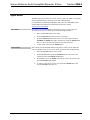
Zone Mode
Source Mode
Zone mode uses the SWAMP-24X8’s front panel to route a source signal to a
selected zone. To use Zone mode, perform the following procedure:
1.
Place the SWAMP-24X8 in Zone mode.
2.
Press the ZONE button of the zone to be controlled.
3.
Press the SOURCE button of the source to be routed. The associated
SOURCE and ZONE LEDs light. Alternatively, press the ZONE button
twice to turn on the zone and connect the last-selected source.
4.
To turn off the zone, press the ZONE button.
Source mode uses the SWAMP-24X8’s front panel to select a source signal and
route it to multiple zones. To use Source mode, perform the following procedure:
1.
Place the SWAMP-24X8 in Source mode.
2.
On the SWAMP-24X8, press the SOURCE button of the source to be
routed. The associated SOURCE LED lights.
3.
On the SWE-8, press the ZONE buttons of the zones to be selected. The
associated ZONE LED(s) lights.
4.
To remove a zone from a source, press the desired ZONE button. The
associated ZONE LED turns off.
14 • Sonnex Multiroom Audio Unamplified Expander, 8 Zone: SWE-8
Operations Guide – DOC. 7202B
Crestron SWE-8
Sonnex Multiroom Audio Unamplified Expander, 8 Zone
Problem Solving
Troubleshooting
The following table provides corrective action for possible trouble situations. If
further assistance is required, please contact a Crestron customer service
representative.
SWE-8 Troubleshooting
TROUBLE
POSSIBLE CAUSE(S)
CORRECTIVE
ACTION
Audio dropouts are
heard on an SWE-8
zone.
There is a bad shield or no
shield on the Sonnex cable
connecting the
SWAMP-24X8 and the
peripheral device.
Ensure continuity and
integrity of the shield on
both ends of the Sonnex
cable.
Device loses
functionality due to
electrostatic
discharge.
The device is improperly
grounded.
Check that all ground
connections have been
made properly.
An incorrect audio
signal is heard.
The signal is incorrectly
routed.
Reroute the signal.
The zone is incorrectly
bussed with other zones.
Remove the zone from
the bus.
Check Wiring
To ensure optimum performance over the full range of the installation topology, use
Crestron Certified Wire only. Failure to do so may incur additional charges if
support is required to identify performance deficiencies because of using improper
wire.
Reference Documents
All documents mentioned in this guide are available at www.crestron.com/manuals.
List of Related Reference Documents
DOCUMENT TITLE
SWAMP(I)-24X8 Sonnex Multiroom Audio System
Further Inquiries
To locate specific information or resolve questions after reviewing this guide,
contact Crestron's True Blue Support at 1-888-CRESTRON [1-888-273-7876] or, for
assistance within a particular geographic region, refer to the listing of Crestron
worldwide offices at www.crestron.com/offices.
To post a question about Crestron products, log onto Crestron’s Online Help at
www.crestron.com/onlinehelp. First-time users must establish a user account to fully
benefit from all available features.
Operations Guide – DOC. 7202B
Sonnex Multiroom Audio Unamplified Expander, 8 Zone: SWE-8 • 15
Sonnex Multiroom Audio Unamplified Expander, 8 Zone
Crestron SWE-8
Future Updates
As Crestron improves functions, adds new features, and extends the capabilities of
the SWE-8, additional information may be made available as manual updates. These
updates are solely electronic and serve as intermediary supplements prior to the
release of a complete technical documentation revision.
Check the Crestron website periodically for manual update availability and its
relevance. Updates are identified as an “Addendum” in the Download column.
16 • Sonnex Multiroom Audio Unamplified Expander, 8 Zone: SWE-8
Operations Guide – DOC. 7202B
Crestron SWE-8
Sonnex Multiroom Audio Unamplified Expander, 8 Zone
Return and Warranty Policies
Merchandise Returns / Repair Service
1.
No merchandise may be returned for credit, exchange or service without prior authorization from
Crestron. To obtain warranty service for Crestron products, contact an authorized Crestron dealer.
Only authorized Crestron dealers may contact the factory and request an RMA (Return
Merchandise Authorization) number. Enclose a note specifying the nature of the problem, name
and phone number of contact person, RMA number and return address.
2.
Products may be returned for credit, exchange or service with a Crestron Return Merchandise
Authorization (RMA) number. Authorized returns must be shipped freight prepaid to Crestron,
6 Volvo Drive, Rockleigh, N.J. or its authorized subsidiaries, with RMA number clearly marked
on the outside of all cartons. Shipments arriving freight collect or without an RMA number shall
be subject to refusal. Crestron reserves the right in its sole and absolute discretion to charge a 15%
restocking fee plus shipping costs on any products returned with an RMA.
3.
Return freight charges following repair of items under warranty shall be paid by Crestron,
shipping by standard ground carrier. In the event repairs are found to be non-warranty, return
freight costs shall be paid by the purchaser.
Crestron Limited Warranty
Crestron Electronics, Inc. warrants its products to be free from manufacturing defects in materials and
workmanship under normal use for a period of three (3) years from the date of purchase from Crestron,
with the following exceptions: disk drives and any other moving or rotating mechanical parts, pan/tilt heads
and power supplies are covered for a period of one (1) year; touch screen display and overlay components
are covered for 90 days; batteries and incandescent lamps are not covered.
This warranty extends to products purchased directly from Crestron or an authorized Crestron dealer.
Purchasers should inquire of the dealer regarding the nature and extent of the dealer's warranty, if any.
Crestron shall not be liable to honor the terms of this warranty if the product has been used in any
application other than that for which it was intended or if it has been subjected to misuse, accidental
damage, modification or improper installation procedures. Furthermore, this warranty does not cover any
product that has had the serial number altered, defaced or removed.
This warranty shall be the sole and exclusive remedy to the original purchaser. In no event shall Crestron
be liable for incidental or consequential damages of any kind (property or economic damages inclusive)
arising from the sale or use of this equipment. Crestron is not liable for any claim made by a third party or
made by the purchaser for a third party.
Crestron shall, at its option, repair or replace any product found defective, without charge for parts or labor.
Repaired or replaced equipment and parts supplied under this warranty shall be covered only by the
unexpired portion of the warranty.
Except as expressly set forth in this warranty, Crestron makes no other warranties, expressed or implied,
nor authorizes any other party to offer any warranty, including any implied warranties of merchantability or
fitness for a particular purpose. Any implied warranties that may be imposed by law are limited to the terms
of this limited warranty. This warranty statement supersedes all previous warranties.
Operations Guide – DOC. 7202B
Sonnex Multiroom Audio Unamplified Expander, 8 Zone: SWE-8 • 17
Crestron Electronics, Inc.
15 Volvo Drive Rockleigh, NJ 07647
Tel: 888.CRESTRON
Fax: 201.767.7576
www.crestron.com
Operations Guide – DOC. 7202B
(2033120)
03.14
Specifications subject to
change without notice.