1
APPENDIX D:
Hardcopy of the Text Screen
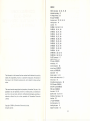
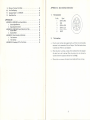
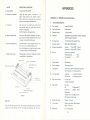
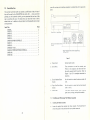
Table Of Contents
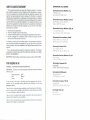
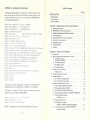
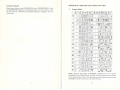
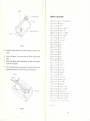
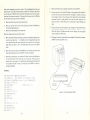
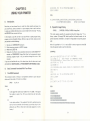
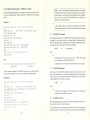
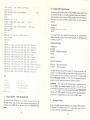
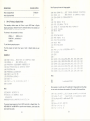
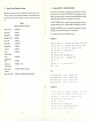
The following sample program can be used to get a hard printed copy of a pro
gram you have on your text screen. The Program is made to be used as a sub
routine. That means that when you use it, you must have a "GOSUB 60000" in
your program where appropriate.
3
REM
RflROCOPV
Congratulations
t
... r
1
Printer Features
, , ,
Customer Support
OF
TEXT
SCREEN
68G30
VR—FEEK ■:! 648 ) '+256
60640
69058
660*50
60079
OPEN 4,4
=REH PRINT IN
FOR CL=0 TO :~'2 : QF=© : RS$=" "
FOR RO—S TO 21
SC^FEEK C V-'F: *22#CL+RQ >
60680
IF
SC=34
IF
SCO162
THEN
GRflPHIC
MODE
QF-l-QF
THEN
60126
Hi^fiS^+QT^+RQ*;GOTObBIoS-G0T06S140
66129
SQ3 3S
IFQF-1HND <. 3C>= 12S > THENSC=SC-123 = GOTOS0140
IFSC>-128THENS:C=SC-128 = RF-1 R5*=R
rFSC>S3flNDSCO6T>flENflS=SC+32 ■ 6OTO603 ?&
*SQ 170
flS$^F!S$+CHR$^ HIS ">
60130
NEXT
RG
602S0
IFeF=STHENFRINT#4.P0*"2aMflS*■GOTO69220
£Q21 £1
PR I MT*t4 f PO$ "20 " RS*QT$
S&220
NEXT
68230
CLOSE4
6024Q
RETURN
CL
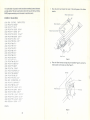
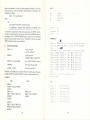
This program is made for Graphic Mode. If you wish to write the program in
Business Mode, you must change OPEN 4, 4 to OPEN 4, 4, 7 in line 60040,
3
A.
Unpacking Your Printer
3
B.
MPS-803 Printer Physical Characteristics
3
C.
Installing and Removing The Ribbon Cartridge .
5
D.
Paper Instructions
8
E.
Connecting The Printer To Your Computer
10
F.
Performing The Power-On Test
12
G.
Diagnostic Print Test
H.
Trouble Shooting
I.
Cautions . ,
12
,
,
14
,
15
CHAPTER 2: USING YOUR PRINTER
A.
Introduction
B.
BASIC Commands Associated With Your Printer
IFSO3 3. RHDSC<:64 THENflS«=SC ; GDTOSS170
S0160
]
2
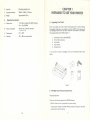
CHAPTER 1: PREPARING TO USE YOUR PRINTER
S0118
60150
Page No.
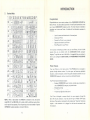
INTRODUCTION
16
,
ig
fg
1.
The OPEN Command
T
2_
The PRINT^FCommand
ig
3.
The CLOSE Command
17
4.
The CMD Command
17
5.
17
Command Example
^o
C.
Printing In The Direct Mode
ig
D.
Printing Under Program Control
E.
Secondary Address
ni
1.
SA=0: Printing in Graphic Mode
22
2.
SA=7: Printing in Business MadG
ja
Program Listing
F.
Special Control Character Functions
20
?}
26
1.
Enhance ON/OFF CHR$(14}/CHRS(15)
27
2.
Bit Image Printing Mode CHRS(S)
28
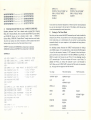
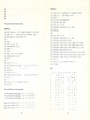
This program Is also made for VrC-20. If you wish to use this program to Com
3.
Reverse ON/OFF CHR$U8)/CHRS(14B)
32
modore 64, you should change line 60050, 60060.
4.
Selecting Character Mode In Local CHRS{17)/CHRSi145) ....
34
5.
Print Position Determination
6.
Repeat Graphic Printing
7.
Dot Address Determination
8.
Line Feed/Carriage Return CHRS(1Q)/CHRS(13)
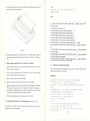
60856
FOR
CL~O
6086Q
FOR
69078
SC-Pi
R0=S
TO
TO
2-1
CHRSI16); "nHnL"
■ DF=0 : RS£=" "
39
CHRSI27);CHRS<16>; CHRSInH}; CHRS(nL)
NOTE:
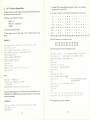
This program can't print the characters fallowing the reverse quote.
Automatic Printing
54
36
37
38
41
41)