1
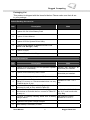
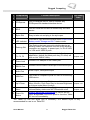
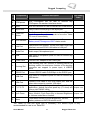
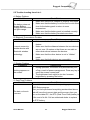
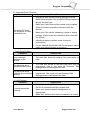
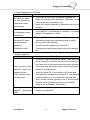
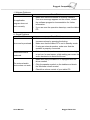
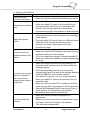
Rugged Computing 5.5 Trouble shooting from A to L A. Battery Problem Condition The battery does not charge (Battery Charge indicator does not light orange. Check Point Make sure that the AC adapter is properly connected. Make sure that the battery is not too hot or cold. Allow time for the battery pack to return to room temperature. Make sure that the battery pack is installed correctly. Make sure that the battery terminals are clean. B. Bluetooth Transmission Problem Condition Check Point Make sure that both devices have activated Bluetooth feature. I cannot connect to Make sure that the distance between the two devices another device with are not over 10 meters or that there are no walls or Bluetooth wireless other obstructions between the devices. technology. Make sure that the other device is not in “Hidden” C. Display Problem Condition Nothing appears on the screen. mode. Make sure that both devices are compatible. Check Point During operation, the screen may automatically turn off as a result of power management. Press any key to see if the screen comes back. The brightness level might be too low. Increase brightness by pressing the button. D. Date/Time Problems Condition Check Point Correct the date and time via the operating system or BIOS Setup program. After you have performed everything as described above The date or time is and still have the incorrect date and time every time you incorrect. turn on the tablet PC, the RTC (Real-Time Clock) battery is at the end of its life. Call an authorized dealer to replace the RTC battery. Users Manual 69 Rugged Tablet PCs