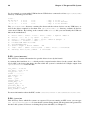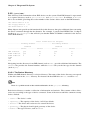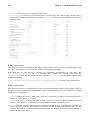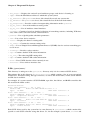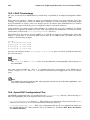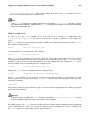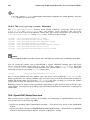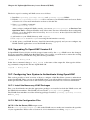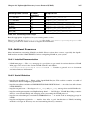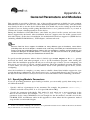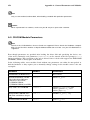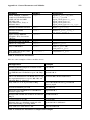
1
Red Hat Linux 8.0 The Official Red Hat Linux Reference Guide Red Hat Linux 8.0: The Official Red Hat Linux Reference Guide Copyright © 2002 by Red Hat, Inc. Red Hat, Inc. 1801 Varsity Drive Raleigh NC 27606-2072 USA Phone: +1 919 754 3700 Phone: 888 733 4281 Fax: +1 919 754 3701 PO Box 13588 Research Triangle Park NC 27709 USA rhl-rg(EN)-8.0-Print-RHI (2002-08-14T22:29-0400) Copyright © 2002 by Red Hat, Inc. This material may be distributed only subject to the terms and conditions set forth in the Open Publication License, V1.0 or later (the latest version is presently available at http://www.opencontent.org/openpub/). Distribution of substantively modified versions of this document is prohibited without the explicit permission of the copyright holder. Distribution of the work or derivative of the work in any standard (paper) book form for commercial purposes is prohibited unless prior permission is obtained from the copyright holder. Red Hat, Red Hat Network, the Red Hat "Shadow Man" logo, RPM, Maximum RPM, the RPM logo, Linux Library, PowerTools, Linux Undercover, RHmember, RHmember More, Rough Cuts, Rawhide and all Red Hat-based trademarks and logos are trademarks or registered trademarks of Red Hat, Inc. in the United States and other countries. Linux is a registered trademark of Linus Torvalds. Motif and UNIX are registered trademarks of The Open Group. Intel and Pentium are a registered trademarks of Intel Corporation. Itanium and Celeron are trademarks of Intel Corporation. AMD, AMD Athlon, AMD Duron, and AMD K6 are trademarks of Advanced Micro Devices, Inc. Netscape is a registered trademark of Netscape Communications Corporation in the United States and other countries. Windows is a registered trademark of Microsoft Corporation. SSH and Secure Shell are trademarks of SSH Communications Security, Inc. FireWire is a trademark of Apple Computer Corporation. All other trademarks and copyrights referred to are the property of their respective owners. The GPG fingerprint of the [email protected] key is: CA 20 86 86 2B D6 9D FC 65 F6 EC C4 21 91 80 CD DB 42 A6 0E Table of Contents Introduction....................................................................................................................................... vii 1. Changes To This Manual .................................................................................................... vii 2. Finding Appropriate Documentation .................................................................................viii 2.1. Documentation For First-Time Linux Users.......................................................viii 2.2. For the More Experienced ..................................................................................... x 2.3. Documentation for Linux Gurus............................................................................ x 3. Document Conventions......................................................................................................... x 4. Using the Mouse ................................................................................................................xiii 5. Copying and Pasting Text With X......................................................................................xiii 6. More to Come ....................................................................................................................xiii 6.1. We Need Feedback! ............................................................................................xiii 7. Sign Up for Support ........................................................................................................... xiv I. System Reference........................................................................................................................... xv 1. File System Structure.......................................................................................................... 17 1.1. Why Share a Common Structure?........................................................................ 17 1.2. Overview of File System Hierarchy Standard (FHS) .......................................... 17 1.3. Special File Locations.......................................................................................... 21 2. The proc File System......................................................................................................... 23 2.1. A Virtual File System........................................................................................... 23 2.2. Top-level Files in the proc Filesystem................................................................ 24 2.3. Directories in /proc/ .......................................................................................... 37 2.4. Using sysctl ...................................................................................................... 52 2.5. Additional Resources ........................................................................................... 52 3. Boot Process, Init, and Shutdown ....................................................................................... 55 3.1. The Boot Process ................................................................................................. 55 3.2. A Detailed Look at the Boot Process................................................................... 55 3.3. Running Programs at Boot Time ......................................................................... 60 3.4. Differences in the Boot Process of Other Architectures ...................................... 60 3.5. SysV Init .............................................................................................................. 60 3.6. Init Runlevels ....................................................................................................... 61 3.7. The /etc/sysconfig/ Directory...................................................................... 62 3.8. Shutting Down ..................................................................................................... 74 4. Boot Loaders....................................................................................................................... 77 4.1. Boot Loaders and System Architecture ............................................................... 77 4.2. GRUB................................................................................................................... 77 4.3. Installing GRUB .................................................................................................. 78 4.4. GRUB Terminology ............................................................................................. 79 4.5. GRUB Interfaces.................................................................................................. 80 4.6. GRUB Commands ............................................................................................... 81 4.7. GRUB Menu Configuration File.......................................................................... 82 4.8. LILO .................................................................................................................... 84 4.9. Options in /etc/lilo.conf ............................................................................. 85 4.10. Changing Runlevels at Boot Time ..................................................................... 86 4.11. Additional Resources ......................................................................................... 87 5. Users and Groups................................................................................................................ 89 5.1. Tools for User and Group Creation...................................................................... 89 5.2. Standard Users ..................................................................................................... 89 5.3. Standard Groups................................................................................................... 91 5.4. User Private Groups ............................................................................................. 92 5.5. Shadow Utilities................................................................................................... 94 6. The X Window System ....................................................................................................... 97 6.1. The Power of X .................................................................................................... 97 6.2. XFree86................................................................................................................ 97 6.3. Desktop Environments and Window Managers................................................. 102 6.4. Runlevels............................................................................................................ 103 6.5. Fonts................................................................................................................... 105 6.6. Additional Resources ......................................................................................... 106 II. Security Reference ..................................................................................................................... 109 7. Pluggable Authentication Modules (PAM)....................................................................... 111 7.1. Advantages of PAM ........................................................................................... 111 7.2. PAM Configuration Files ................................................................................... 111 7.3. PAM Modules .................................................................................................... 112 7.4. PAM Module Control Flags............................................................................... 113 7.5. PAM Module Paths ............................................................................................ 114 7.6. PAM Module Arguments ................................................................................... 114 7.7. Sample PAM Configuration Files ...................................................................... 114 7.8. PAM and Device Ownership.............................................................................. 116 7.9. Additional Resources ......................................................................................... 117 8. TCP Wrappers and xinetd .............................................................................................. 119 8.1. What Are TCP Wrappers? ................................................................................. 119 8.2. Host-Based Access Control Lists....................................................................... 119 8.3. Access Control Using xinetd .......................................................................... 122 8.4. Additional Resources ......................................................................................... 126 9. SSH Protocol..................................................................................................................... 129 9.1. Features of SSH ................................................................................................. 129 9.2. Event Sequence of an SSH Connection ............................................................. 130 9.3. Layers of SSH Security...................................................................................... 130 9.4. OpenSSH Configuration Files ........................................................................... 132 9.5. More Than a Secure Shell.................................................................................. 133 9.6. Require SSH for Remote Connections .............................................................. 134 10. Kerberos .......................................................................................................................... 137 10.1. Advantages of Kerberos................................................................................... 137 10.2. Kerberos Disadvantages................................................................................... 137 10.3. Kerberos Terminology ..................................................................................... 137 10.4. How Kerberos Works ....................................................................................... 139 10.5. Kerberos and PAM........................................................................................... 140 10.6. Configuring a Kerberos 5 Server ..................................................................... 140 10.7. Configuring a Kerberos 5 Client ...................................................................... 142 10.8. Additional Resources ....................................................................................... 142 11. Tripwire........................................................................................................................... 145 11.1. How to Use Tripwire........................................................................................ 145 11.2. Installing the Tripwire RPM ............................................................................ 146 11.3. Customizing Tripwire ...................................................................................... 147 11.4. Initialize the Tripwire Database....................................................................... 149 11.5. Running an Integrity Check ............................................................................. 150 11.6. Examining Tripwire Reports............................................................................ 150 11.7. Updating the Tripwire Database ...................................................................... 152 11.8. Updating the Tripwire Policy File ................................................................... 153 11.9. Updating the Tripwire Configuration File ....................................................... 154 11.10. Tripwire File Location Reference .................................................................. 155 11.11. Additional Resources ..................................................................................... 156 III. Network Services Reference .................................................................................................... 157 12. Network Scripts .............................................................................................................. 159 12.1. Network Configuration Files............................................................................ 159 12.2. Interface Configuration Files ........................................................................... 159 12.3. Interface Control Scripts .................................................................................. 163 12.4. Network Functions........................................................................................... 164 12.5. Additional Resources ....................................................................................... 165 13. Firewalls and iptables ................................................................................................. 167 13.1. Packet Filtering ................................................................................................ 167 13.2. Differences between iptables and ipchains ............................................. 168 13.3. Options Used in iptables Commands .......................................................... 169 13.4. Storing iptables Information ....................................................................... 175 13.5. Additional Resources ....................................................................................... 176 14. Apache HTTP Server ...................................................................................................... 177 14.1. Apache HTTP Server 2.0 ................................................................................. 177 14.2. Migrating Apache HTTP Server 1.3 Configuration Files ................................ 178 14.3. After Installation .............................................................................................. 187 14.4. Starting and Stopping httpd ........................................................................... 188 14.5. Configuration Directives in httpd.conf ....................................................... 189 14.6. Default Modules............................................................................................... 204 14.7. Adding Modules to Your Server ...................................................................... 205 14.8. Using Virtual Hosts.......................................................................................... 206 14.9. Additional Resources ....................................................................................... 208 15. Email ............................................................................................................................... 209 15.1. Protocols .......................................................................................................... 209 15.2. Email Program Classifications......................................................................... 211 15.3. Sendmail .......................................................................................................... 212 15.4. Fetchmail.......................................................................................................... 216 15.5. Procmail ........................................................................................................... 220 15.6. Security ............................................................................................................ 225 15.7. Additional Resources ....................................................................................... 226 16. Berkeley Internet Name Domain (BIND)....................................................................... 229 16.1. Introduction to DNS and BIND ....................................................................... 229 16.2. BIND Configuration Files................................................................................ 230 16.3. Using rndc ...................................................................................................... 240 16.4. Advanced Features of BIND............................................................................ 242 16.5. Common Mistakes to Avoid ............................................................................ 243 16.6. Additional Resources ....................................................................................... 244 17. Network File System (NFS)............................................................................................ 247 17.1. Methodology .................................................................................................... 247 17.2. NFS Server Configuration Files....................................................................... 249 17.3. NFS Client Configuration Files ....................................................................... 251 17.4. Securing NFS ................................................................................................... 253 17.5. Additional Resources ....................................................................................... 254 18. Lightweight Directory Access Protocol (LDAP)............................................................ 257 18.1. Why Use LDAP? ............................................................................................. 257 18.2. OpenLDAP Daemons and Utilities.................................................................. 258 18.3. LDAP Terminology.......................................................................................... 259 18.4. OpenLDAP Configuration Files....................................................................... 260 18.5. OpenLDAP Setup Overview............................................................................ 262 18.6. Upgrading To OpenLDAP Version 2.0 ............................................................ 263 18.7. Configuring Your System to Authenticate Using OpenLDAP......................... 263 18.8. Additional Resources ....................................................................................... 265 IV. Appendixes ................................................................................................................................ 267 A. General Parameters and Modules .................................................................................... 269 A.1. Specifying Module Parameters ......................................................................... 269 A.2. CD-ROM Module Parameters........................................................................... 270 A.3. SCSI parameters................................................................................................ 272 A.4. Ethernet Parameters .......................................................................................... 275 Index................................................................................................................................................. 281 Colophon.......................................................................................................................................... 293 Introduction Welcome to the Official Red Hat Linux Reference Guide. The Official Red Hat Linux Reference Guide contains useful information about your Red Hat Linux system. From fundamental concepts, such as the structure of the Red Hat Linux file system, to the finer points of system security and authentication control, we hope you will find this book to be a valuable resource. This guide is for you if you want to learn a bit more about how your Red Hat Linux system works. Topics that you can explore within this manual include the following: • The file system structure • The boot process • The X Windowing System • Security issues • Network services 1. Changes To This Manual This manual has been reorganized for clarity and updated for the latest features of Red Hat Linux 8.0. Some of the changes include: A New Boot Loaders Chapter The GRUB chapter has been revised and expanded to include LILO. An Updated Apache HTTP Server Chapter There is now a guide for migrating from version 1.3 to version 2.0 of the Apache HTTP Server. Also, the list of server configuration options has been updated. Special thanks to Gary Benson and Joe Orton for his hard work on the Apache HTTP Server migration guide. Updated LDAP Chapter The LDAP chapter has been cleaned up and reorganized. Updated iptables Chapter The iptables chapter has been clarified and reorganized. Updated Tripwire Chapter The Tripwire chapter has been clarified and reorganized (and even has a fancy new illustration ;-). Before reading this guide, you should be familiar with the contents of the Official Red Hat Linux Installation Guide concerning installation issues, the Official Red Hat Linux Getting Started Guide for basic Linux concepts and the Official Red Hat Linux Customization Guide for general customization instructions. The Official Red Hat Linux Reference Guide contains information about advanced topics that may not affect every user, depending upon how they use their Red Hat Linux system. HTML and PDF versions of all Official Red Hat Linux manuals are available online at http://www.redhat.com/docs. viii Introduction Note Although this manual reflects the most current information possible, you should read the Red Hat Linux Release Notes for information that may not have been available prior to our documentation being finalized. The Release Notes can be found on the Red Hat Linux CD #1 and online at the following URL: http://www.redhat.com/docs/manuals/linux 2. Finding Appropriate Documentation You need documentation that is appropriate to your level of Linux expertise. Otherwise, you might feel overwhelmed or not find the necessary information to answer your questions. The Official Red Hat Linux Reference Guide deals with the more technical aspects and options of your Red Hat Linux system. This section will help you decide whether to look in this manual for the information you need or consider other Red Hat Linux manuals, including online sources, in your search. Three different categories of people use Red Hat Linux, and each of these categories require different sets of documentation and informative sources. To help you figure out where you should start, determine your own experience level: New to Linux This type of user has never used any Linux (or Linux-like) operating system before or has had only limited exposure to Linux. They may or may not have experience using other operating systems (such as Windows). Is this you? If so, skip ahead to Section 2.1. Some Linux Experience This type of user has installed and successfully used Linux (but not Red Hat Linux) before or may have equivalent experience with other Linux-like operating systems. Does this describe you? If so, turn to Section 2.2. Experienced User This type of user has installed and successfully used Red Hat Linux before. If this describes you, turn to Section 2.3. 2.1. Documentation For First-Time Linux Users For someone new to Linux, the amount of information available on any particular subject, such as printing, starting up the system or partitioning your hard drive, can be overwhelming. It helps to initially step back and gain a decent base of information centered around how Linux works before tackling these kinds of advanced issues. Your first goal should be to obtain some useful documentation. This cannot be stressed enough. Without documentation, you will only become frustrated at your inability to get your Red Hat Linux system working the way you want. You should acquire the following types of Linux documentation: • A brief history of Linux — Many aspects of Linux are the way they are because of historical precedent. The Linux culture is also based on past events, needs or requirements. A basic understanding of the history of Linux will help you figure out how to solve many potential problems before you actually see them. Introduction ix • An explanation of how Linux works — While delving into the most arcane aspects of the Linux kernel is not necessary, it is a good idea to know something about how Linux is put together. This is particularly important if you have been working with other operating systems, as some of the assumptions you currently hold about how computers work may not transfer from that operating system to Linux. • An introductory command overview (with examples) — This is probably the most important thing to look for in Linux documentation. The underlying design philosophy for Linux is that it’s better to use many small commands connected together in different ways than it is to have a few large (and complex) commands that do the whole job themselves. Without examples that illustrate this approach to doing things, you may find yourself intimidated by the sheer number of commands available on your Red Hat Linux system. Keep in mind that you do not have to memorize all of the available Linux commands. Different techniques exist to help you find the specific command you need to accomplish a task. You need only know the general way in which Linux functions, what you need to accomplish, and how to access the tool that will give you the exact instructions you need to execute the command. The Official Red Hat Linux Installation Guide is a excellent reference for helping you get your Red Hat Linux system successfully installed and initially configured. The Official Red Hat Linux Getting Started Guide covers the history of Linux, basic system commands, GNOME, KDE, RPM, and many other fundamental concepts. You should start with these two books and use them to build the base of your Red Hat Linux knowledge. Before long, more complicated concepts will begin to make sense because you already grasp the general ideas. Beyond reading Red Hat Linux manuals, several other excellent documentation resources are available for little or no cost: 2.1.1. Introduction to Linux Websites • http://www.redhat.com — On the Red Hat website, you will find links to the Linux Documentation Project (LDP), online versions of the Red Hat Linux manuals, FAQs (Frequently Asked Questions), a database which can help you find a Linux Users Group near you, technical information in the Red Hat Support Knowledge Base, and more. • http://www.linuxheadquarters.com — The Linux Headquarters website features easy to follow, step-by-step guides for a variety of Linux tasks. 2.1.2. Introduction to Linux Newsgroups You can participate in newsgroups by watching the discussions of others attempting to solve problems, or by actively asking or answering questions. Experienced Linux users are known to be extremely helpful when trying to assist new users with various Linux issues — especially if you are posing your questions in the right venue. If you do not have access to a news reader application, you can access this information via the web at http://www.deja.com. Dozens of Linux-related newsgroups exist, including the following: • linux.help — A great place to get help from fellow Linux users. • linux.redhat — This newsgroup primarily covers Red Hat Linux-specific issues. • linux.redhat.install — Pose installation questions to this newsgroup or search it to see how others solved similar problems. • linux.redhat.misc — Questions or requests for help that do not really fit into traditional categories go here. • linux.redhat.rpm — A good place to go if you are having trouble using RPM to accomplish particular objectives. x Introduction 2.1.3. Beginning Linux Books • Red Hat Linux for Dummies, 2nd Edition by Jon "maddog" Hall; IDG • Special Edition Using Red Hat Linux by Alan Simpson, John Ray and Neal Jamison; Que • Running Linux by Matt Welsh and Lar Kaufman; O’Reilly & Associates • Red Hat Linux 7 Unleashed by William Ball and David Pitts; Sams The books suggested here are excellent primary sources of information for basic knowledge about a Red Hat Linux system. For more in-depth information concerning the various topics discussed throughout this book, many of the chapters list specific book titles, usually in an Additional Resources area. 2.2. For the More Experienced If you have used other Linux distributions, you probably already have a basic grasp of the most frequently used commands. You may have installed your own Linux system, and maybe you have even downloaded and built software you found on the Internet. After installing Linux, however, configuration issues can be very confusing. The Official Red Hat Linux Customization Guide is designed to help explain the various ways your Red Hat Linux system can be configured to meet specific objectives. Use this manual to learn about specific configuration options and how to put them into effect. When you are installing software that is not covered in the Official Red Hat Linux Customization Guide, it is often helpful to see what other people in similar circumstances have done. HOWTO documents from the Linux Documentation Project, available at http://www.redhat.com/mirrors/LDP/HOWTO/HOWTO-INDEX/howtos.html, document particular aspects of Linux, from low-level kernel esoteric changes to using Linux for amateur radio station work. 2.3. Documentation for Linux Gurus If you are a long-time Red Hat Linux user, you probably already know that one of the best ways to understand a particular program is to read its source code and/or configuration files. A major advantage of Red Hat Linux is the availability of the source code for anyone to read. Obviously, not everyone is a C programmer, so the source code may not be helpful for you. However, if you have the knowledge and skills necessary to read it, the source code holds all of the answers. 3. Document Conventions When you read this manual, you will see that certain words are represented in different fonts, typefaces, sizes, and weights. This highlighting is systematic; different words are represented in the same style to indicate their inclusion in a specific category. The types of words that are represented this way include the following: command Linux commands (and other operating system commands, when used) are represented this way. This style should indicate to you that you can type the word or phrase on the command line and press [Enter] to invoke a command. Sometimes a command contains words that would be Introduction xi displayed in a different style on their own (such as filenames). In these cases, they are considered to be part of the command, so the entire phrase will be displayed as a command. For example: Use the cat testfile command to view the contents of a file, named testfile, in the current working directory. filename Filenames, directory names, paths, and RPM package names are represented this way. This style should indicate that a particular file or directory exists by that name on your Red Hat Linux system. Examples: The .bashrc file in your home directory contains bash shell definitions and aliases for your own use. The /etc/fstab file contains information about different system devices and filesystems. Install the webalizer RPM if you want to use a Web server log file analysis program. application This style should indicate to you that the program named is an end-user application (as opposed to system software). For example: Use Mozilla to browse the Web. [key] A key on the keyboard is shown in this style. For example: To use [Tab] completion, type in a character and then press the [Tab] key. Your terminal will display the list of files in the directory that start with that letter. [key]-[combination] A combination of keystrokes is represented in this way. For example: The [Ctrl]-[Alt]-[Backspace] key combination will exit your graphical session and return you to the graphical login screen or the console. text found on a GUI interface A title, word, or phrase found on a GUI interface screen or window will be shown in this style. When you see text shown in this style, it is being used to identify a particular GUI screen or an element on a GUI screen (such as text associated with a checkbox or field). Example: Select the Require Password checkbox if you would like your screensaver to require a password before stopping. top level of a menu on a GUI screen or window When you see a word in this style, it indicates that the word is the top level of a pulldown menu. If you click on the word on the GUI screen, the rest of the menu should appear. For example: Under File on a GNOME terminal, you will see the New Tab option that allows you to open multiple shell prompts in the same window. If you need to type in a sequence of commands from a GUI menu, they will be shown like the following example: Go to Main Menu Button (on the Panel) => Programming => Emacs to start the Emacs text editor. xii Introduction button on a GUI screen or window This style indicates that the text will be found on a clickable button on a GUI screen. For example: Click on the Back button to return to the webpage you last viewed. computer output When you see text in this style, it indicates text displayed by the computer on the command line. You will see responses to commands you typed in, error messages, and interactive prompts for your input during scripts or programs shown this way. For example: Use the ls command to display the contents of a directory: $ ls Desktop Mail about.html backupfiles logs mail paulwesterberg.png reports The output returned in response to the command (in this case, the contents of the directory) is shown in this style. prompt A prompt, which is a computer’s way of signifying that it is ready for you to input something, will be shown in this style. Examples: $ # [stephen@maturin stephen]$ leopard login: user input Text that the user has to type, either on the command line, or into a text box on a GUI screen, is displayed in this style. In the following example, text is displayed in this style: To boot your system into the text based installation program, you will need to type in the text command at the boot: prompt. Additionally, we use several different strategies to draw your attention to certain pieces of information. In order of how critical the information is to your system, these items will be marked as note, tip, important, caution, or a warning. For example: Note Remember that Linux is case sensitive. In other words, a rose is not a ROSE is not a rOsE. Tip The directory /usr/share/doc contains additional documentation for packages installed on your system. Introduction xiii Important If you modify the DHCP configuration file, the changes will not take effect until you restart the DHCP daemon. Caution Do not perform routine tasks as root — use a regular user account unless you need to use the root account for system administration tasks. Warning If you choose not to partition manually, a server installation will remove all existing partitions on all installed hard drives. Do not choose this installation class unless you are sure you have no data you need to save. 4. Using the Mouse Red Hat Linux is designed to use a three-button mouse. If you have a two-button mouse, you should have selected three-button emulation during the installation process. If you’re using three-button emulation, pressing both mouse buttons at the same time equates to pressing the missing third (middle) button. In this document, if you are instructed to click with the mouse on something, that means click the left mouse button. If you need to use the middle or right mouse button, that will be explicitly stated. (This will be reversed if you’ve configured your mouse to be used by a left handed person.) The phrase "drag and drop" may be familiar to you. If you’re instructed to drag and drop an item on your GUI desktop, click on something and hold the mouse button down. While continuing to hold down the mouse button, drag the item by moving the mouse to a new location. When you’ve reached the desired location, release the mouse button to drop the item. 5. Copying and Pasting Text With X Copying and pasting text is easy using your mouse and the X Window System. To copy text, simply click and drag your mouse over the text to highlight it. To paste the text somewhere, click the middle mouse button in the spot where the text should be placed. 6. More to Come The Official Red Hat Linux Reference Guide is part of Red Hat’s commitment to provide useful and timely support to Red Hat Linux users. Future editions will feature expanded information on changes to system structure and organization, new and powerful security tools, and other resources to help you extend the power of your Red Hat Linux system — and your ability to use it. That’s where you can help. xiv Introduction 6.1. We Need Feedback! If you find an error in the Official Red Hat Linux Reference Guide, or if you have thought of a way to make this manual better, we’d love to hear from you! Please submit a report in Bugzilla (http://bugzilla.redhat.com/bugzilla) against the component rhl-rg. Be sure to mention the manual’s identifier: rhl-rg(EN)-8.0-Print-RHI (2002-08-14T22:29-0400) If you mention the manual’s identifier, we will know exactly which version of the guide you have. If you have a suggestion for improving the documentation, try to be as specific as possible when describing it. If you have found an error, please include the section number and some of the surrounding text so we can find it easily. 7. Sign Up for Support If you have an official edition of Red Hat Linux 8.0, please remember to sign up for the benefits you are entitled to as a Red Hat customer. You will be entitled to any or all of the following benefits, depending upon the Official Red Hat Linux product you purchased: • Official Red Hat support — Get help with your installation questions from Red Hat, Inc.’s support team. • Red Hat Network — Easily update your packages and receive security notices that are customized for your system. Go to http://rhn.redhat.com for more details. • Under the Brim: The Official Red Hat E-Newsletter — Every month, get the latest news and product information directly from Red Hat. To sign up, go to http://www.redhat.com/apps/activate/. You will find your Product ID on a black, red, and white card in your Official Red Hat Linux box. To read more about technical support for Official Red Hat Linux, refer to the Getting Technical Support Appendix in the Official Red Hat Linux Installation Guide. Good luck, and thank you for choosing Red Hat Linux! The Red Hat Documentation Team System Reference Chapter 1. File System Structure 1.1. Why Share a Common Structure? An operating system’s file system structure is its most basic level of organization. Almost all of the ways an operating system interacts with its users, applications, and security model are dependent upon the way it stores its files on a storage device. It is crucial for a variety of reasons that users, as well as programs, be able to refer to a common guideline to know where to read and write files. A file system can be seen in terms of two different logical categories of files: • Shareable vs. unshareable files • Variable vs. static files Shareable files are those that can be accessed by various hosts; unshareable files are not available to any other hosts. Variable files can change at any time without any intervention; static files, such as read-only documentation and binaries, do not change without an action from the system administrator or an agent that the system administrator has placed in motion to accomplish that task. The reason for looking at files in this way is to help you understand the type of permissions given to the directory that holds them. The way in which the operating system and its users need to use the files determines the directory where those files should be placed, whether the directory is mounted readonly or read-write, and the level of access allowed on each file. The top level of this organization is crucial, as the access to the underlying directories can be restricted or security problems may manifest themselves if the top level is left disorganized or without a widely-used structure. However, simply having a structure does not mean very much unless it is a standard. Competing structures can actually cause more problems than they fix. Because of this, Red Hat has chosen the the most widely-used file system structure and extended it only slightly to accommodate special files used within Red Hat Linux. 1.2. Overview of File System Hierarchy Standard (FHS) Red Hat is committed to the Filesystem Hierarchy Standard (FHS), a collaborative document that defines the names and locations of many files and directories. We will continue to track and follow the standard to keep Red Hat Linux FHS-compliant. The current FHS document is the authoritative reference to any FHS-compliant file system, but the standard leaves many areas undefined or extensible. In this section, we provide an overview of the standard and a description of the parts of the file system not covered by the standard. The complete standard is available at: http://www.pathname.com/fhs Compliance with the standard means many things, but the two most important are compatibility with other compliant systems and the ability to mount a /usr partition as read-only because it contains common executables and is not meant to be changed by users. Since the /usr directory is mounted read-only, it an be mounted from the CD-ROM or from another machine via a read-only NFS mount. 18 Chapter 1. File System Structure 1.2.1. FHS Organization The directories and files noted here are a small subset of those specified by the FHS document. Check the latest FHS document for the most complete information. 1.2.1.1. The /dev Directory The /dev directory contains file system entries which represent devices that are attached to the system. These files are essential for the system to function properly. 1.2.1.2. The /etc Directory The /etc directory is reserved for configuration files that are local to your machine. No binaries are to be put in /etc. Any binaries that were formerly put in /etc should now go into /sbin or possibly /bin. The X11 and skel directories are subdirectories of the /etc directory: /etc |- X11 |- skel The X11 directory is for X11 configuration files such as XF86Config. The skel directory is for "skeleton" user files, which are used to populate a home directory when a user is first created. 1.2.1.3. The /lib Directory The /lib directory should contain only those libraries that are needed to execute the binaries in /bin and /sbin. These shared library images are particularly important for booting the system and executing commands within the root file system. 1.2.1.4. The /mnt Directory The /mnt directory is for temporarily mounted file systems, such as CD-ROMs and floppy disks. 1.2.1.5. The /opt Directory The /opt directory provides an area for large, static application software packages to be stored. For packages that wish to avoid putting their files throughout the file system, /opt provides a logical and predictable organizational system under that package’s directory. This gives the system administrator an easy way to determine the role of each file within a particular package. For example, if sample is the name of a particular software package located within /opt, then all of its files could be placed within directories inside /opt/sample, such as /opt/sample/bin for binaries and /opt/sample/man for manual pages. Large packages that encompass many different sub-packages, each of which accomplish a particular task, also go within /opt, giving that large package a standardized way to organize itself. In this way, our sample package may have different tools that each go in their own sub-directories, such as /opt/sample/tool1 and /opt/sample/tool2, each of which can have their own bin, man, and other similar directories. Chapter 1. File System Structure 19 1.2.1.6. The /proc Directory The /proc directory contains special "files" that either extract information from or send information to the kernel. Due to the great variety of data available within /proc and the many ways this directory can be used to communicate with the kernel, an entire chapter has been devoted to the subject. For more information, please see Chapter 2. 1.2.1.7. The /sbin Directory The /sbin directory is for executables used only by the root user. The executables in /sbin are only used to boot and mount /usr and perform system recovery operations. The FHS says: "/sbin typically contains files essential for booting the system in addition to the binaries in /bin. Anything executed after /usr is known to be mounted (when there are no problems) should be placed in /usr/sbin. Local-only system administration binaries should be placed into /usr/local/sbin." At a minimum, the following programs should be in /sbin: arp, clock, getty, halt, init, fdisk, fsck.*, grub, ifconfig, lilo, mkfs.*, mkswap, reboot, route, shutdown, swapoff, swapon, update 1.2.1.8. The /usr Directory The /usr directory is for files that can be shared across a whole site. The /usr directory usually has its own partition, and it should be mountable read-only. At minimum, the following directories should be subdirectories of /usr: /usr |||||||||||||||- bin dict doc etc games include kerberos lib libexec local sbin share src tmp -> ../var/tmp X11R6 The bin directory contains executables, dict contains non-FHS compliant documentation pages, etc contains system-wide configuration files, games is for games, include contains C header files, kerberos contains binaries and much more for Kerberos, and lib contains object files and libraries 20 Chapter 1. File System Structure that are not designed to be directly utilized by users or shell scripts. The libexec directory contains small helper programs called by other programs, sbin is for system administration binaries (those that do not belong in /sbin), share contains files that are not architecture-specific, src is for source code, and X11R6 is for the X Window System (XFree86 on Red Hat Linux). 1.2.1.9. The /usr/local Directory The FHS says: "The /usr/local hierarchy is for use by the system administrator when installing software locally. It needs to be safe from being overwritten when the system software is updated. It may be used for programs and data that are shareable among a group of hosts, but not found in /usr." The /usr/local directory is similar in structure to the /usr directory. It has the following subdirectories, which are similar in purpose to those in the /usr directory: /usr/local |- bin |- doc |- etc |- games |- include |- lib |- libexec |- sbin |- share |- src 1.2.1.10. The /var Directory Since the FHS requires that you be able to mount /usr read-only, any programs that write log files or need spool or lock directories should write them to the /var directory. The FHS states /var is for: "...variable data files. This includes spool directories and files, administrative and logging data, and transient and temporary files." Below are some of the directories which should be subdirectories of /var: /var |||||||||||||||- account arpwatch cache crash db empty ftp gdm kerberos lib local lock log mail -> spool/mail mailman Chapter 1. File System Structure |||||+- ||||- 21 named nis opt preserve run spool |- anacron |- at |- cron |- fax |- lpd |- mail |- mqueue |- news |- rwho |- samba |- slrnpull |- squid |- up2date |- uucp |- uucppublic |- vbox |- voice tmp tux www yp System log files such as messages and lastlog go in /var/log. The /var/lib/rpm directory also contains the RPM system databases. Lock files go in /var/lock, usually in directories particular for the program using the file. The /var/spool directory has subdirectories for various systems that need to store data files. 1.2.2. /usr/local in Red Hat Linux In Red Hat Linux, the intended use for /usr/local is slightly different from that specified by the FHS. The FHS says that /usr/local should be where you store software that is to remain safe from system software upgrades. Since system upgrades from Red Hat are done safely with the rpm command and graphical Package Management Tool application, you do not need to protect files by putting them in /usr/local. Instead, we recommend you use /usr/local for software that is local to your machine. For instance, say you have mounted /usr via read-only NFS from a host named jake. If there is a package or program you would like to install, but you are not allowed to write to jake, you should install it under /usr/local. Later perhaps, if you have managed to convince the system administrator of jake to install the program on /usr, you can uninstall it from /usr/local. 1.3. Special File Locations Red Hat extends the FHS structure slightly to accommodate special files used by Red Hat Linux. Most files pertaining to the Red Hat Package Manager (RPM) are kept in the /var/lib/rpm/ directory. For more information on RPM see the chapter titled Package Management with RPM in the Official Red Hat Linux Customization Guide. 22 Chapter 1. File System Structure The /var/spool/up2date/ directory contains files used by Red Hat Update Agent, including RPM header information for the system. This location may also be used to temporarily store RPMs downloaded while updating your system. For more information on Red Hat Network, see the Red Hat Network website at https://rhn.redhat.com/. Another location specific to Red Hat Linux is the /etc/sysconfig/ directory. This directory stores a variety of configuration information. Many scripts that run at boot time use the files in this directory. See Section 3.7 for more information on what is within this directory and the role these files play in the boot process. Finally, one more directory worth noting is the /initrd/ directory. It is empty, but is used as a critical mount point during the boot process. Warning Do not remove the /initrd/ directory for any reason. Removing this directory will cause your system to fail to boot with a kernel panic error message. Chapter 2. The proc File System The Linux kernel has two primary functions: to control access to physical devices on the computer and to schedule when and how processes interact with these devices. The /proc/ directory contains a hierarchy of special files which represent the current state of the kernel — allowing applications and users to peer into the kernel’s view of the system. Within the /proc/ directory, one can find a wealth of information about the system hardware and any processes currently running. In addition, some of the files within the /proc/ directory tree can be manipulated by users and applications to communicate configuration changes to the kernel. 2.1. A Virtual File System Under Linux, all data are stored as files. Most users are familiar with the two primary types of files: text and binary. But the /proc/ directory contains another type of file called a virtual file. It is for this reason that /proc/ is often referred to as a virtual file system. These virtual files have unique qualities. Most of them are listed as zero bytes in size and yet when one is viewed, it can contain a large amount of information. In addition, most of the time and date settings on virtual files reflect the current time and date, indicative of the fact they constantly changing. Virtual files such as interrupts, /proc/meminfo, /proc/mounts, and /proc/partitions provide an up-to-the-moment glimpse of the system’s hardware. Others, like /proc/filesystems and the /proc/sys/ directory provide system configuration information and interfaces. For organizational purposes, files containing information on a similar topic are grouped into virtual directories and sub-directories. For instance, /proc/ide/ contains information for all physical IDE devices. Likewise, process directories contain information about each running process on the system. 2.1.1. Viewing Virtual Files By using the cat, more, or less commands on files within the /proc/ directory, you can immediately access an enormous amount of information about the system. For example, if you want to see what sort of CPU your computer has, type cat /proc/cpuinfo and you will see something similar to the following: processor : 0 vendor_id : AuthenticAMD cpu family : 5 model : 9 model name : AMD-K6(tm) 3D+ Processor stepping : 1 cpu MHz : 400.919 cache size : 256 KB fdiv_bug : no hlt_bug : no f00f_bug : no coma_bug : no fpu : yes fpu_exception : yes cpuid level : 1 wp : yes flags : fpu vme de pse tsc msr mce cx8 pge mmx syscall 3dnow k6_mtrr bogomips : 799.53 Chapter 2. The proc File System 24 When viewing different virtual files in the /proc/ file system, you will notice some of the information is easily understandable while some is not human-readable. This is in part why utilities exist to pull data from virtual files and display it in a useful way. Some examples of such applications are lspci, apm, free, and top. Note Some of the virtual files in the /proc/ directory are only readable by the root user. 2.1.2. Changing Virtual Files As a general rule, most virtual files within the /proc/ directory are read only. However, some can be used to adjust settings in the kernel. This is especially true for files in the /proc/sys/ subdirectory. To change the value of a virtual file, use the echo command and a symbol to redirect the new value to the file. For instance, to change your hostname on the fly, you can type: echo bob.subgenius.com > /proc/sys/kernel/hostname Other files act as binary or boolean switches. For instance, if you type cat /proc/sys/net/ipv4/ip_forward, you will see either a 0 or a 1. A 0 indicates the kernel is not forwarding network packets. By using the echo command to change the value of the ip_forward file to 1, you can immediately turn packet forwarding on. Tip Another command used to alter settings in the /proc/sys/ subdirectory is /sbin/sysctl. For more information on this command, see Section 2.4 For a listing of some of the kernel configuration files available in the /proc/sys/, see Section 2.3.9. 2.2. Top-level Files in the proc Filesystem Below is a list of some of the more useful virtual files in the top-level of the /proc/ directory. Note In most cases, the content of files listed in this section will not be the same on your machine. This is because much of the information pertains to the hardware on which you are running Red Hat Linux. 2.2.1. /proc/apm This file provides information about the state of the Advanced Power Management (APM) system and is used by the apm command. If the system with no battery is connected to an AC power source, this virtual file looks similar to this: 1.16 1.2 0x07 0x01 0xff 0x80 -1% -1 ? Chapter 2. The proc File System 25 Running the apm -v command on such a system results in output similar to this: APM BIOS 1.2 (kernel driver 1.16) AC on-line, no system battery For systems which do not use a battery as a power source, apm is able do little more than put the machine in standby mode. The apm command is much more useful on laptops. For example, the following output is from the command cat /proc/apm on a laptop running Red Hat Linux while plugged into a power outlet: 1.16 1.2 0x03 0x01 0x03 0x09 100% -1 ? When the same laptop is unplugged from its power source for a few minutes, the contents of the apm file change to something like this: 1.16 1.2 0x03 0x00 0x00 0x01 99% 1792 min The apm -v command will now yield more useful data, such as the following: APM BIOS 1.2 (kernel driver 1.16) AC off-line, battery status high: 99% (1 day, 5:52) 2.2.2. /proc/cmdline This file shows the parameters passed to the kernel at the time it is started. A sample /proc/cmdline file looks like this: ro root=/dev/hda2 This tell us the kernel is mounted read-only — signified by (ro) — off of the second partition on the first IDE device (/dev/hda2). 2.2.3. /proc/cpuinfo This virtual file identifies the type of processor used by your system. The following is an example of the output you would typically see from /proc/cpuinfo: processor vendor_id cpu family model model name stepping cpu MHz cache size fdiv_bug hlt_bug f00f_bug coma_bug fpu fpu_exception cpuid level wp flags bogomips : : : : : : : : : : : : : : : : : : 0 AuthenticAMD 5 9 AMD-K6(tm) 3D+ Processor 1 400.919 256 KB no no no no yes yes 1 yes fpu vme de pse tsc msr mce cx8 pge mmx syscall 3dnow k6_mtrr 799.53 Chapter 2. The proc File System 26 • processor — Provides each processor with an identifying you will only see a 0. number. If you only have one processor, — Authoritatively tells you the type of processor you have in the system. If your computer is an Intel-based system, simply place the number in front of "86" to determine the value. This is particularly helpful if you are wondering about the architecture of an older system such as the 586, 486, or 386. Because some RPM packages are compiled for each of these particular architectures, this value enables you determine which package to install. • cpu family • model name • cpu MHz point. — Gives you the common name of the processor, including its project name. — Shows the precise speed in megahertz for the processor to the thousandth decimal • cache size — Tells you the amount of level 2 memory cache available to the processor. — Defines a number of different qualities about the processor, such as the presence of a floating point unit (FPU) and the ability to process MMX instructions. • flags 2.2.4. /proc/devices This file displays the various character and block devices currently configured for use with the kernel. It does not include devices whose modules are not loaded into the kernel. Below is a sample output from this virtual file: Character devices: 1 mem 2 pty 3 ttyp 4 ttyS 5 cua 7 vcs 10 misc 14 sound 29 fb 36 netlink 128 ptm 129 ptm 136 pts 137 pts 162 raw 254 iscsictl Block devices: 1 ramdisk 2 fd 3 ide0 9 md 22 ide1 The output from /proc/devices includes the major number and name of the device and is broken into two major sections: Character devices and Block devices. Character devices are similar to block devices, except for two basic differences. Block devices have a buffer available, allowing them to order requests before dealing with them. This is important for devices designed to store information — such as hard drives — because the ability to order the information before writing it to the device allows it to be placed in more efficient order. Character devices do not require buffering. Chapter 2. The proc File System 27 The other difference is that block devices can send and receive information in blocks of a size configured per device. Character devices send data with no preconfigured size. For more information about devices see /usr/src/linux-2.4/Documentation/devices.txt. 2.2.5. /proc/dma This file contains a list of the registered ISA direct memory access (DMA) channels in use. A sample /proc/dma files looks like this: 4: cascade 2.2.6. /proc/execdomains This file lists the execution domains currently supported by the Linux kernel, along with the range of personalities they support. 0-0 Linux [kernel] Think of execution domains as the "personality" for a particular operating system. Because other binary formats, such as Solaris, UnixWare, and FreeBSD, can be used with Linux, programmers can change the way the operating system treats particular system calls from these binaries by changing the personality of the task. Except for the PER_LINUX execution domain, different personalities can be implemented as dynamically loadable modules. 2.2.7. /proc/fb This file contains a list of frame buffer devices, with the frame buffer device number and the driver that controls it. Typical output of /proc/fb for systems which contain frame buffer devices looks similar to this: 0 VESA VGA 2.2.8. /proc/filesystems This file displays a list of the file system types currently supported by the kernel. Sample output from a generic kernel’s /proc/filesystems file looks similar to this: nodev rootfs nodev bdev nodev proc nodev sockfs nodev tmpfs nodev shm nodev pipefs ext2 nodev ramfs iso9660 nodev devpts ext3 nodev autofs nodev binfmt_misc Chapter 2. The proc File System 28 The first column signifies whether the file system is mounted on a block device. Those beginning with nodev are not mounted on a device. The second column lists the name of the file systems supported. The mount command cycles through these file systems when one is not specified as an argument. 2.2.9. /proc/interrupts This file records the number of interrupts per IRQ on the x86 architecture. A standard /proc/interrupts looks similar to this: 0: 1: 2: 8: 10: 12: 14: 15: NMI: ERR: CPU0 80448940 174412 0 1 410964 60330 1314121 5195422 0 0 XT-PIC XT-PIC XT-PIC XT-PIC XT-PIC XT-PIC XT-PIC XT-PIC timer keyboard cascade rtc eth0 PS/2 Mouse ide0 ide1 For a multi-processor machine, this file may look slightly different: CPU0 0: 1366814704 1: 128 2: 0 8: 0 12: 5323 13: 1 16: 11184294 20: 8450043 30: 10432 31: 23 NMI: 0 ERR: 0 CPU1 0 340 0 1 5793 0 15940594 11120093 10722 22 XT-PIC IO-APIC-edge XT-PIC IO-APIC-edge IO-APIC-edge XT-PIC IO-APIC-level IO-APIC-level IO-APIC-level IO-APIC-level timer keyboard cascade rtc PS/2 Mouse fpu Intel EtherExpress Pro 10/100 Ethernet megaraid aic7xxx aic7xxx The first column refers to the IRQ number. Each CPU in the system has its own column and its own number of interrupts per IRQ. The next column reports the type of interrupt, and the last column contains the name of the device that is located at that IRQ. Each of the types of interrupts seen in this file, which are architecture-specific, mean something a little different. For x86 machines, the following values are common: • XT-PIC — This is the old AT computer interrupts. — The voltage signal on this interrupt transitions from low to high, creating an edge, where the interrupt occurs and is only signaled once. This kind of interrupt, as well as the IO-APIC-level interrupt, are only seen on systems with processors from the 586 family and higher. • IO-APIC-edge • IO-APIC-level low again. — Generates interrupts when its voltage signal goes high until the signal goes Chapter 2. The proc File System 29 2.2.10. /proc/iomem This file shows you the current map of the system’s memory for each physical device: 00000000-0009fbff : 0009fc00-0009ffff : 000a0000-000bffff : 000c0000-000c7fff : 000f0000-000fffff : 00100000-07ffffff : 00100000-00291ba8 00291ba9-002e09cb e0000000-e3ffffff : e4000000-e7ffffff : e4000000-e4003fff e5000000-e57fffff e8000000-e8ffffff : e8000000-e8ffffff ea000000-ea00007f : ea000000-ea00007f ffff0000-ffffffff : System RAM reserved Video RAM area Video ROM System ROM System RAM : Kernel code : Kernel data VIA Technologies, Inc. VT82C597 [Apollo VP3] PCI Bus #01 : Matrox Graphics, Inc. MGA G200 AGP : Matrox Graphics, Inc. MGA G200 AGP PCI Bus #01 : Matrox Graphics, Inc. MGA G200 AGP Digital Equipment Corporation DECchip 21140 [FasterNet] : tulip reserved The first column displays the memory registers used by each of the different types of memory. The second column tells the kind of memory located within those registers. In particular, this column will tell you which memory registers are used by the kernel within the system RAM or, if you have multiple Ethernet ports on your NIC, the memory registers assigned for each port. 2.2.11. /proc/ioports The output of /proc/ioports provides a list of currently registered port regions used for input or output communication with a device. This file can be quite long, with a beginning similar to this: 0000-001f : 0020-003f : 0040-005f : 0060-006f : 0070-007f : 0080-008f : 00a0-00bf : 00c0-00df : 00f0-00ff : 0170-0177 : 01f0-01f7 : 02f8-02ff : 0376-0376 : 03c0-03df : 03f6-03f6 : 03f8-03ff : 0cf8-0cff : d000-dfff : e000-e00f : e000-e007 e008-e00f e800-e87f : e800-e87f dma1 pic1 timer keyboard rtc dma page reg pic2 dma2 fpu ide1 ide0 serial(auto) ide1 vga+ ide0 serial(auto) PCI conf1 PCI Bus #01 VIA Technologies, Inc. Bus Master IDE : ide0 : ide1 Digital Equipment Corporation DECchip 21140 [FasterNet] : tulip The first column gives the IO port address range reserved for the device listed in the second column. Chapter 2. The proc File System 30 2.2.12. /proc/isapnp This file lists Plug and Play (PnP) cards in ISA slots on the system. This is most often seen with sound cards but may include any number of devices. A /proc/isapnp file with Soundblaster entry in it looks similar to this: Card 1 ’CTL0070:Creative ViBRA16C PnP’ PnP version 1.0 Product version 1.0 Logical device 0 ’CTL0001:Audio’ Device is not active Active port 0x220,0x330,0x388 Active IRQ 5 [0x2] Active DMA 1,5 Resources 0 Priority preferred Port 0x220-0x220, align 0x0, size 0x10, 16-bit address decoding Port 0x330-0x330, align 0x0, size 0x2, 16-bit address decoding Port 0x388-0x3f8, align 0x0, size 0x4, 16-bit address decoding IRQ 5 High-Edge DMA 1 8-bit byte-count compatible DMA 5 16-bit word-count compatible Alternate resources 0:1 Priority acceptable Port 0x220-0x280, align 0x1f, size 0x10, 16-bit address decoding Port 0x300-0x330, align 0x2f, size 0x2, 16-bit address decoding Port 0x388-0x3f8, align 0x0, size 0x4, 16-bit address decoding IRQ 5,7,2/9,10 High-Edge DMA 1,3 8-bit byte-count compatible DMA 5,7 16-bit word-count compatible This file can be quite long, depending on the number of devices displayed and their resource requirements. Each card lists its name, PnP version number, and product version number. If the device is active and configured, this file will also reveal the port and IRQ numbers for the device. In addition, to ensure better compatibility, the card will specify preferred and acceptable values for a number of different parameters. The goal here is to allow the PnP cards to work around one another and avoid IRQ and port conflicts. 2.2.13. /proc/kcore This file represents the physical memory of the system and is stored in the core file format. Unlike most /proc/ files, kcore displays a size. This value is given in bytes and is equal to the size of physical memory (RAM) used plus 4KB. The contents of this file are designed to be examined by a debugger, such as gdb and is not human readable. Warning Do not view the /proc/kcore virtual file. The contents of the file will scramble text output on the terminal. If you accidentally view this file, press [Ctrl]-[C] to stop the process then type reset to bring back the command line prompt. Chapter 2. The proc File System 31 2.2.14. /proc/kmsg This file is used to hold messages generated by the kernel. These messages are then picked up by other programs, such as /sbin/klogd. 2.2.15. /proc/ksyms This file holds the kernel exported symbol definitions used by the module tools to dynamically link and bind loadable modules. e003def4 e003b04c e00390c0 e002104c e00210a4 e00226cc speedo_debug [eepro100] eepro100_init [eepro100] st_template [st] RDINDOOR [megaraid] callDone [megaraid] megaraid_detect [megaraid] The first column lists the memory address for the kernel function, the second column refers to the name of the function, and the last column reveals the name of the loaded module. 2.2.16. /proc/loadavg This file provides a look at load average on the processor over time and additional data used by uptime and other commands. A sample /proc/loadavg file looks similar to this: 0.20 0.18 0.12 1/80 11206 The first three columns measure CPU utilization of the last 1, 5, and 10 minute periods. The fourth column shows the number of currently running processes and the total number of processes. The last column displays the last process ID used. 2.2.17. /proc/locks This files displays the files currently locked by the kernel. The content of this file contains internal kernel debugging data and can vary tremendously, depending on the use of the system. A sample /proc/locks file for a lightly loaded system looks similar to this: 1: FLOCK 2: POSIX ADVISORY ADVISORY WRITE 807 03:05:308731 0 EOF c2a260c0 c025aa48 c2a26120 WRITE 708 03:05:308720 0 EOF c2a2611c c2a260c4 c025aa48 Each lock has its own line which starts with a unique number. The second column refers to the class of lock used, with FLOCK signifying the older-style UNIX file locks from a flock system call and POSIX representing the newer POSIX locks from the lockf system call. The third column can have two values. ADVISORY means that the lock does not prevent other people from accessing the data; it only prevents other attempts to lock it. MANDATORY means that no other access to the data is permitted while the lock is held. The fourth column reveals whether the lock is allowing the holder READ or WRITE access to the file, and the fifth column shows the ID of the process holding the lock. The sixth column shows the ID of the file being locked, in the format of MAJORDEVICE:MINOR-DEVICE:INODE-NUMBER. The seventh column shows the start and end of the file’s locked region. The remaining columns point to internal kernel data structures used for specialized debugging and can be ignored. Chapter 2. The proc File System 32 2.2.18. /proc/mdstat This file contains the current information for multiple-disk, RAID configurations. If your system does not contain such a configuration, then your /proc/mdstat file will look similar to this: Personalities : read_ahead not set unused devices: none This file remains in the state above unless you create a software RAID or md device. In that case, you can view /proc/mdstat to give you a picture of what is currently happening with your mdX RAID devices. The /proc/mdstat file below shows a system with its md0 configured as a RAID 1 device. It is currently re-syncing the disks: Personalities : [linear] [raid1] read_ahead 1024 sectors md0: active raid1 sda2[1] sdb2[0] 9940 blocks [2/2] [UU] resync=1% finish=12.3min algorithm 2 [3/3] [UUU] unused devices: none 2.2.19. /proc/meminfo This is one of the more commonly used files in the /proc/ directory, as it reports back plenty of valuable information about the current RAM usage on the system. A system with 256MB of RAM and 384MB of swap space will likely have a /proc/meminfo file similar to this one: total: Mem: 261709824 Swap: 402997248 MemTotal: MemFree: MemShared: Buffers: Cached: Active: Inact_dirty: Inact_clean: Inact_target: HighTotal: HighFree: LowTotal: LowFree: SwapTotal: SwapFree: used: free: shared: buffers: cached: 253407232 8302592 0 120745984 48689152 8192 402989056 255576 kB 8108 kB 0 kB 117916 kB 47548 kB 135300 kB 29276 kB 888 kB 0 kB 0 kB 0 kB 255576 kB 8108 kB 393552 kB 393544 kB Much of the information here is used by the free, top, and ps commands. In fact, the output of the free command is even similar in appearance to the contents and structure of /proc/meminfo. But by looking directly at /proc/meminfo, more details are revealed: — Displays the current state of physical RAM in the system, including a full breakdown of total, used, free, shared, buffered, and cached memory utilization in bytes. • Mem • Swap — Displays the total, used, and free amounts of swap space, in bytes. • MemTotal — Total amount of physical RAM, in kilobytes. Chapter 2. The proc File System • MemFree — The amount of physical RAM, in kilobytes, left unused by the system. • MemShared versions. • Buffers 33 — Unused with 2.4 and higher kernels but left in for compatibility with earlier kernel — The amount of physical RAM, in kilobytes, used for file buffers. • Cached — The amount of physical RAM, in kilobytes, used as cache memory. • Active — The total amount of buffer or page cache memory, in kilobytes, that is in active use. • Inact_dirty available. — The total amount of buffer or cache pages, in kilobytes, that might be free and • Inact_clean — The total available. • Inact_target minute. amount of buffer or cache pages in kilobytes that are definitely free and — The net amount of allocations per second, in kilobytes, averaged over one and HighFree — The total and free amount of memory, respectively, that is not directly mapped into kernel space. The HighTotal value can vary based on the type of kernel used. • HighTotal and LowFree — The total and free amount of memory, respectively, that is directly mapped into kernel space. The LowTotal value can vary based on the type of kernel used. • LowTotal • SwapTotal • SwapFree — The total amount of swap available, in kilobytes. — The total amount of swap free, in kilobytes. 2.2.20. /proc/misc This file lists miscellaneous drivers registered on the miscellaneous major device, which is device number 10: 135 rtc 1 psaux 134 apm_bios The first column is the minor number of each device, and the second column shows the driver in use. 2.2.21. /proc/modules This file displays a list of all modules loaded into the kernel. Its contents will vary based on the configuration and use of your system, but it should be organized in a similar manner to this sample /proc/modules file output: ide-cd cdrom soundcore agpgart binfmt_misc iscsi scsi_mod autofs tulip ext3 jbd 27008 28960 4100 31072 5956 32672 94424 10628 48608 60352 39192 0 0 0 0 1 0 1 0 1 2 2 (autoclean) (autoclean) [ide-cd] (autoclean) (unused) (unused) [iscsi] (autoclean) (unused) [ext3] The first column contains the name of the module. The second column refers to the memory size of the module, in bytes. The third column tells you whether the module is currently loaded (1) or unloaded Chapter 2. The proc File System 34 (0). The final column states if the module can unload itself automatically after a period without use (autoclean) or if it is not being utilized (unused). Any module with a line containing a name listed in brackets ([ or ]) tells you that this module depends upon another module to be present in order to function. 2.2.22. /proc/mounts This file provides a quick list of all mounts in use by the system: rootfs / rootfs rw 0 0 /dev/hda2 / ext3 rw 0 0 /proc /proc proc rw 0 0 /dev/hda1 /boot ext3 rw 0 0 none /dev/pts devpts rw 0 0 none /dev/shm tmpfs rw 0 0 none /proc/sys/fs/binfmt_misc binfmt_misc rw 0 0 The output found here is similar to contents of /etc/mtab, except that /proc/mount can be more current. The first column specifies the device that is mounted, with the second column revealing the mountpoint. The third column tells the file system type, and the fourth column tells you if it is mounted read-only (ro) or read-write (rw). The fifth and sixth columns are dummy values designed to match the format used in /etc/mtab. 2.2.23. /proc/mtrr This file refers to the current Memory Type Range Registers (MTRRs) in use with the system. If your system’s architecture supports MTRRs, your mtrr might look something like this: reg00: base=0x00000000 ( 0MB), size= 64MB: write-back, count=1 MTRRs are used with Intel P6 family of processors (Pentium II and higher), and they are used to control processor access to memory ranges. When using a video card on a PCI or AGP bus, a properly configured /proc/mtrr file can increase performance over 150%. Most of the time, this value is properly configured for you. For more information on MTRRs and manually configuring this file, please see http://web1.linuxhq.com/kernel/v2.3/doc/mtrr.txt.html. 2.2.24. /proc/partitions Most of the information here is of little importance to the user, except for the following columns: — The major number of the device with this partition. The major number in our example (3) corresponds with the block device ide0 in /proc/devices. • major — The minor number of the device with this partition. This serves to separate the partitions into different physical devices and relates to the number at the end of the name of the partition. • minor • #blocks • name — Lists the number of physical disk blocks contained in a particular partition. — The name of the partition. Chapter 2. The proc File System 35 2.2.25. /proc/pci This file contains a full listing of every PCI device on your system. Depending on the number of PCI devices you have, /proc/pci can get rather long. An example from this file on a basic system looks similar to this: Bus 0, device 0, function 0: Host bridge: Intel Corporation 440BX/ZX - 82443BX/ZX Host bridge (rev 3). Master Capable. Latency=64. Prefetchable 32 bit memory at 0xe4000000 [0xe7ffffff]. Bus 0, device 1, function 0: PCI bridge: Intel Corporation 440BX/ZX - 82443BX/ZX AGP bridge (rev 3). Master Capable. Latency=64. Min Gnt=128. Bus 0, device 4, function 0: ISA bridge: Intel Corporation 82371AB PIIX4 ISA (rev 2). Bus 0, device 4, function 1: IDE interface: Intel Corporation 82371AB PIIX4 IDE (rev 1). Master Capable. Latency=32. I/O at 0xd800 [0xd80f]. Bus 0, device 4, function 2: USB Controller: Intel Corporation 82371AB PIIX4 USB (rev 1). IRQ 5. Master Capable. Latency=32. I/O at 0xd400 [0xd41f]. Bus 0, device 4, function 3: Bridge: Intel Corporation 82371AB PIIX4 ACPI (rev 2). IRQ 9. Bus 0, device 9, function 0: Ethernet controller: Lite-On Communications Inc LNE100TX (rev 33). IRQ 5. Master Capable. Latency=32. I/O at 0xd000 [0xd0ff]. Non-prefetchable 32 bit memory at 0xe3000000 [0xe30000ff]. Bus 0, device 12, function 0: VGA compatible controller: S3 Inc. ViRGE/DX or /GX (rev 1). IRQ 11. Master Capable. Latency=32. Min Gnt=4.Max Lat=255. Non-prefetchable 32 bit memory at 0xdc000000 [0xdfffffff]. This output shows a list of all PCI devices, sorted in the order of bus, device, and function. Beyond providing the name and version of the device, this list also gives you detailed IRQ information so you can quickly look for conflicts. Tip To get a more readable version of this informations, type: lspci -vb Chapter 2. The proc File System 36 2.2.26. /proc/slabinfo This file gives information about memory usage on the slab level. Linux kernels greater than 2.2 use slab pools to manage memory above the page level. Commonly used objects have their own slab pools. The following is a portion of a typical /proc/slabinfo virtual file: slabinfo - version: 1.1 kmem_cache 64 nfs_write_data 0 nfs_read_data 0 nfs_page 0 ip_fib_hash 10 journal_head 51 revoke_table 2 revoke_record 0 clip_arp_cache 0 ip_mrt_cache 0 68 0 160 200 113 7020 253 0 0 0 112 384 384 96 32 48 12 32 128 96 2 0 0 0 1 2 1 0 0 0 2 0 16 5 1 90 1 0 0 0 1 1 1 1 1 1 1 1 1 1 The values in this file occur in the following order: cache name, number of active objects, number of total objects, size of the object, number of active slabs (blocks) of the objects, total number of slabs of the objects, and the number of pages per slab. Note that active in this case means an object is in use. Therefore an active object is one that is in use, and an active slab is one that contains one or more active object. 2.2.27. /proc/stat This file keeps track of a variety of different statistics about the system since it was last restarted. The contents of /proc/stat, which can be quite long, begins something like this: cpu 1139111 3689 234449 84378914 cpu0 1139111 3689 234449 84378914 page 2675248 8567956 swap 10022 19226 intr 93326523 85756163 174412 0 3 3 0 6 0 1 0 428620 0 60330 0 1368304 5538681 disk_io: (3,0):(1408049,445601,5349480,962448,17135856) ctxt 27269477 btime 886490134 processes 206458 Some of the more popular statistics include: — Measures the number of jiffies (1/100 of a second) that the system has been in user mode, user mode with low priority (nice), system mode, and the idle task, respectively. The total for all CPUs is given at the top, and each individual CPU is listed below with its own statistics. • cpu • page — The number of memory pages the system has written in and out to disk. • swap — The number of swap pages the system has brought in and out. • intr — The number of interrupts the system has experienced. — The boot time, measured in the number of seconds since January 1, 1970, otherwise known as the epoch. • btime Chapter 2. The proc File System 37 2.2.28. /proc/swaps This file measures swap space and its utilization. For a system with only one swap partition, the output of /proc/swap may look similar to this: Filename /dev/hda6 Type partition Size 136512 Used 20024 Priority -1 While some of this information can be found in other files in the /proc/ directory, /proc/swap provides a snapshot of every swap filename, type of swap space, the total size, and the amount of this space that is in use (in kilobytes). The priority column is useful when multiple swap files are in use. The lower the priority, the more likely the swap file is to be used. 2.2.29. /proc/uptime This file contains information about how long the system has on since its last restart. The output of /proc/uptime is quite minimal: 350735.47 234388.90 The first number tells you the total number of seconds the system has been up. The second number tells you how much of that time the machine has spent idle in seconds. 2.2.30. /proc/version This files tells you the versions of the Linux kernel and gcc, as well as the version of Red Hat Linux installed on the system: Linux version 2.4.18-0.40 ([email protected])(gcc version 2.96 20000731 (Red Hat Linux 7.2 2.96-102)) #1 Tue May 28 04:28:05 EDT 2002 This information is used for a variety of purposes, including the version data presented when a user logs in. 2.3. Directories in /proc/ Common groups of information concerning the kernel are grouped into directories and subdirectories within the /proc/ directory. 2.3.1. Process Directories Every /proc/ directory contains a number of directories numerical names. A listing of them may start off like this: dr-xr-xr-x dr-xr-xr-x dr-xr-xr-x dr-xr-xr-x dr-xr-xr-x dr-xr-xr-x dr-xr-xr-x dr-xr-xr-x 3 3 3 3 3 3 3 3 root root xfs daemon root apache rpc rpcuser root root xfs daemon root apache rpc rpcuser 0 0 0 0 0 0 0 0 Feb Feb Feb Feb Feb Feb Feb Feb 13 13 13 13 13 13 13 13 01:28 01:28 01:28 01:28 01:28 01:28 01:28 01:28 1 1010 1087 1123 11307 13660 637 666 Chapter 2. The proc File System 38 These directories are called process directories, as they are named after a program’s process ID and contain information specific to that process. The owner and group of each process directory is set to the user running the process. When the process is terminated, its /proc/ process directory vanishes. Each process directory contains the following files: • cmdline — This file contains the command issued when starting the process. — Provides specific information about the utilization of each of the system’s CPUs. A process running on a dual CPU system produces output similar to this: • cpu cpu 11 3 cpu0 0 0 cpu1 11 3 • cwd — A symlink to the current working directory for the process. — Gives a list of the environment variables for the process. The environment variable is given in all upper-case characters, and the value is in lower-case characters. • environ • exe — A symlink to the executable of this process. — A directory containing all of the file descriptors for a particular process. These are given in numbered links: • fd total 0 lrwx-----lrwx-----lrwx-----lrwx-----lrwx-----lrwx-----lrwx-----lrwx------ 1 1 1 1 1 1 1 1 root root root root root root root root root root root root root root root root 64 64 64 64 64 64 64 64 May May May May May May May May 8 8 8 8 8 8 8 8 11:31 11:31 11:31 11:31 11:31 11:31 11:31 11:31 0 1 2 3 4 5 6 7 -> -> -> -> -> -> -> -> /dev/null /dev/null /dev/null /dev/ptmx socket:[7774817] /dev/ptmx socket:[7774829] /dev/ptmx — Contains memory maps to the various executables and library files associated with this process. This file can be rather long, depending upon the complexity of the process, but sample output from the sshd process begins like this: • maps 08048000-08086000 08086000-08088000 08088000-08095000 40000000-40013000 40013000-40014000 40031000-40038000 40038000-40039000 40039000-4003a000 4003a000-4003c000 4003c000-4003d000 • mem r-xp rw-p rwxp r-xp rw-p r-xp rw-p rw-p r-xp rw-p 00000000 0003e000 00000000 00000000 00013000 00000000 00006000 00000000 00000000 00001000 03:03 03:03 00:00 03:03 03:03 03:03 03:03 00:00 03:03 03:03 391479 391479 0 293205 293205 293282 293282 0 293218 293218 /usr/sbin/sshd /usr/sbin/sshd /lib/ld-2.2.5.so /lib/ld-2.2.5.so /lib/libpam.so.0.75 /lib/libpam.so.0.75 /lib/libdl-2.2.5.so /lib/libdl-2.2.5.so — The memory held by the process. This file cannot be read by the user. • root — A link to the root directory of the process. • stat — The status of the process. • statm — The status of the memory in use by the process. Below is a sample /proc/statm file: 263 210 210 5 0 205 0 The seven columns relate to different memory statistics for the process. From left to right, they report the following aspects of the memory used: 1. Total program size, in kilobytes 2. Size of memory portions, in kilobytes 3. Number of pages that are shared Chapter 2. The proc File System 39 4. Number of pages are code 5. Number of pages of data/stack 6. Number of pages of library 7. Number of dirty pages — The status of the process in a more readable form than stat or statm. Sample output for sshd looks similar to this: • status Name: sshd State: S (sleeping) Tgid: 797 Pid: 797 PPid: 1 TracerPid: 0 Uid: 0 0 0 0 Gid: 0 0 0 0 FDSize: 32 Groups: VmSize: 3072 kB VmLck: 0 kB VmRSS: 840 kB VmData: 104 kB VmStk: 12 kB VmExe: 300 kB VmLib: 2528 kB SigPnd: 0000000000000000 SigBlk: 0000000000000000 SigIgn: 8000000000001000 SigCgt: 0000000000014005 CapInh: 0000000000000000 CapPrm: 00000000fffffeff CapEff: 00000000fffffeff Other than the process’s name and ID, the state (such as S (sleeping) or R (running) and user/group ID running the process is available, as well as much more detailed data regarding memory usage. 2.3.1.1. /proc/self/ The /proc/self/ directory is a link to the currently running process. This allows a process to look at itself without having to know its process ID. Within a shell environment, a listing of the /proc/self/ directory produces the same contents as listing the process directory for that process. 2.3.2. /proc/bus/ This directory contains information specific to the various buses available on the system. So, for example, on a standard system containing ISA, PCI, and USB busses, current data on each of these buses is available in its directory under /proc/bus/. The contents of the subdirectories and files available varies greatly on the precise configuration of your system. However, each of the directories for each of the bus types has at least one directory for each bus of that type. These individual bus directories, usually signified with numbers, such as 00, contains binary files that refer to the various devices available on that bus. Chapter 2. The proc File System 40 So, for example, a system with a USB bus but no USB devices connected to it has a /proc/bus/usb/ directory containing several files: total 0 dr-xr-xr-x -r--r--r--r--r--r-- 1 root 1 root 1 root root root root 0 May 0 May 0 May 3 16:25 001 3 16:25 devices 3 16:25 drivers The /proc/bus/usb/ directory contains files that track the various devices on any USB buses, as well as the drivers required to use them. The /proc/bus/usb/001/ directory contains all devices on the first USB bus. By looking at the contents of the devices file, you can identify the USB root hub on the motherboard: T: B: D: P: S: S: C:* I: E: Bus=01 Lev=00 Prnt=00 Port=00 Cnt=00 Dev#= 1 Spd=12 MxCh= 2 Alloc= 0/900 us ( 0%), #Int= 0, #Iso= 0 Ver= 1.00 Cls=09(hub ) Sub=00 Prot=00 MxPS= 8 #Cfgs= 1 Vendor=0000 ProdID=0000 Rev= 0.00 Product=USB UHCI Root Hub SerialNumber=d400 #Ifs= 1 Cfg#= 1 Atr=40 MxPwr= 0mA If#= 0 Alt= 0 #EPs= 1 Cls=09(hub ) Sub=00 Prot=00 Driver=hub Ad=81(I) Atr=03(Int.) MxPS= 8 Ivl=255ms 2.3.3. /proc/driver/ This directory contains information for specific drivers in use by the kernel. A common file found here is rtc, which provides output from the driver for the system’s Real Time Clock (RTC), the device that keeps the time while the system is switched off. Sample output from /proc/driver/rtc looks like this: rtc_time : 01:38:43 rtc_date : 1998-02-13 rtc_epoch : 1900 alarm : 00:00:00 DST_enable : no BCD : yes 24hr : yes square_wave : no alarm_IRQ : no update_IRQ : no periodic_IRQ : no periodic_freq : 1024 batt_status : okay For more information about the RTC, review /usr/src/linux-2.4/Documentation/rtc.txt. 2.3.4. /proc/fs This directory shows which file systems are exported. If you are running an NFS server, you can type cat /proc/fs/nfs/exports to view the file systems being shared and the permissions granted for the those file systems. For more on sharing filesystem with NFS, see Chapter 17. Chapter 2. The proc File System 41 2.3.5. /proc/ide/ This directory holds information about IDE devices on the system. Each IDE channel is represented as a separate directory, such as /proc/ide/ide0 and /proc/ide/ide1. In addition, a drivers file is also available, providing the version number of the various drivers used on the IDE channels: ide-cdrom version 4.59 ide-floppy version 0.97 ide-disk version 1.10 Many chipsets also provide an informational file in this directory that gives additional data concerning the drives connected through the the channels. For example, a generic Intel PIIX4 Ultra 33 chipset produces a /proc/ide/piix that will tell you whether DMA or UDMA is enabled for the devices on the IDE channels: Intel PIIX4 Ultra 33 Chipset. ------------- Primary Channel ---------------- Secondary Channel ------------enabled enabled ------------- drive0 --------- drive1 -------- drive0 ---------- drive1 -----DMA enabled: UDMA enabled: UDMA enabled: UDMA DMA PIO yes yes 2 no no X yes no X no no X Navigating into the directory for an IDE channel, such as ide0, provides additional information. The channel file provides the channel number, while the model tells you the bus type for the channel (such as pci). 2.3.5.1. The Device Directory Within each IDE channel directory is a device directory. The name of the device directory corresponds to the drive letter in the /dev/ directory. For instance the first IDE drive on ide0 would be hda. Note There is a symlink to each of these device directories in the /proc/ide/ directory. Each device directory contains a collection of information and statistics. The contents of these directories vary according to the type of device connected. Some of the more useful files common to many devices include: • cache — The device’s cache. • capacity • driver • geometry • media — The capacity of the device, in 512 byte blocks. — The driver and version used to control the device. — The physical and logical geometry of the device. — The type of device, such as a disk. Chapter 2. The proc File System 42 • model — The model name or number of the device. — A collection of current parameters of the device. This file usually contains quite a bit of useful, technical information. A sample settings file for a standard IDE hard disk looks similar to this: • settings name ---bios_cyl bios_head bios_sect breada_readahead bswap current_speed file_readahead ide_scsi init_speed io_32bit keepsettings lun max_kb_per_request multcount nice1 nowerr number pio_mode slow unmaskirq using_dma value ----784 255 63 4 0 66 0 0 66 0 0 0 64 8 1 0 0 write-only 0 0 1 min --0 0 0 0 0 0 0 0 0 0 0 0 1 0 0 0 0 0 0 0 0 max --65535 255 63 127 1 69 2097151 1 69 3 1 7 127 8 1 1 3 255 1 1 1 mode ---rw rw rw rw r rw rw rw rw rw rw rw rw rw rw rw rw w rw rw rw 2.3.6. /proc/irq/ This directory is used to set IRQ to CPU affinity, which allows you to connect a particular IRQ to only one CPU. Alternatively, you can exclude a CPU from handling any IRQs. Each IRQ has its own directory, allowing for individual configuration of each IRQ. The /proc/irq/prof_cpu_mask file is a bitmask that contains the default values for the smp_affinity file in the IRQ directory. The values in smp_affinity specify which CPUs handle that particular IRQ. /usr/src/linux-2.4/Documentation/filesystems/proc.txt contains more information. 2.3.7. /proc/net/ This directory provides a comprehensive look at various networking parameters and statistics. Each of the files covers a specific range of information related to networking on the system. Below is a partial listing of these virtual files: — Contains the kernel’s ARP table. This file is particularly useful for connecting hardware address to an IP address on a system. • arp — A directory containing files with various Asynchronous Transfer Mode (ATM) settings and statistics. This directory is primarily used with ATM networking and ADSL cards. • atm — Lists the various network devices configured on the system, complete with transmit and receive statistics. This file will quickly tell you the number of bytes each interface has sent and received, the number of packets inbound and outbound, the number of errors seen, the number of packets dropped, and more. • dev Chapter 2. The proc File System • dev_mcast • igmp 43 — Displays the various Layer2 multicast groups each device is listening to. — Lists the IP multicast addresses which this system joined. • ip_fwchains — • ip_fwnames If ipchains are in use, this virtual file reveals any current rule. — If ipchains are in use, this virtual file lists all firewall chain names. • ip_masquerade — • ip_mr_cache — • ip_mr_vif Provides a table of masquerading information under ipchains. List of the multicast routing cache. — List of multicast virtual interfaces. — Contains a broad yet detailed collection of networking statistics, including TCP timeouts, SYN cookies sent and received, and much more. • netstat • psched • raw — List of global packet scheduler parameters. — List of raw device statistics. • route — Displays the kernel’s routing table. • rt_cache — Contains the current routing cache. — List of Simple Network Management Protocol (SNMP) data for various networking protocols in use. • snmp • sockstat • tcp • tr_rif • udp — Provides socket statistics. — Contains detailed TCP socket information. — The token ring RIF routing table. — Contains detailed UDP socket information. • unix — Lists UNIX domain sockets currently in use. • wireless — Lists wireless interface data. 2.3.8. /proc/scsi/ This directory is analogous to the /proc/ide/ directory only it is for connected SCSI devices. The primary file in this directory is /proc/scsi/scsi, which contains a list of every recognized SCSI device. From this listing, the type of devices, as well as the model name, vendor, SCSI channel and ID data is available. For example, if a system contains a SCSI CD-ROM, tape drive, hard drives, and RAID controller, this file would look similar to this: Attached devices: Host: scsi1 Channel: 00 Id: 05 Lun: 00 Vendor: NEC Model: CD-ROM DRIVE:466 Type: CD-ROM Host: scsi1 Channel: 00 Id: 06 Lun: 00 Vendor: ARCHIVE Model: Python 04106-XXX Type: Sequential-Access Host: scsi2 Channel: 00 Id: 06 Lun: 00 Vendor: DELL Model: 1x6 U2W SCSI BP Type: Processor Host: scsi2 Channel: 02 Id: 00 Lun: 00 Vendor: MegaRAID Model: LD0 RAID5 34556R Type: Direct-Access Rev: 1.06 ANSI SCSI revision: 02 Rev: 7350 ANSI SCSI revision: 02 Rev: 5.35 ANSI SCSI revision: 02 Rev: 1.01 ANSI SCSI revision: 02 Each SCSI driver used by the system has its own directory in /proc/scsi/, which contains files specific to each SCSI controller using that driver. So, for the example system above, aic7xxx and 44 Chapter 2. The proc File System megaraid directories are present, as those two drivers are being utilized. The files in each of the directories typically contain IO address range, IRQ, and statistics for the particular SCSI controller using that driver. Each controller can report a different type and amount of information. The Adaptec AIC-7880 Ultra SCSI host adapter’s file in this example system produces the following output: Adaptec AIC7xxx driver version: 5.1.20/3.2.4 Compile Options: TCQ Enabled By Default : Disabled AIC7XXX_PROC_STATS : Enabled AIC7XXX_RESET_DELAY : 5 Adapter Configuration: SCSI Adapter: Adaptec AIC-7880 Ultra SCSI host adapter Ultra Narrow Controller PCI MMAPed I/O Base: 0xfcffe000 Adapter SEEPROM Config: SEEPROM found and used. Adaptec SCSI BIOS: Enabled IRQ: 30 SCBs: Active 0, Max Active 1, Allocated 15, HW 16, Page 255 Interrupts: 33726 BIOS Control Word: 0x18a6 Adapter Control Word: 0x1c5f Extended Translation: Enabled Disconnect Enable Flags: 0x00ff Ultra Enable Flags: 0x0020 Tag Queue Enable Flags: 0x0000 Ordered Queue Tag Flags: 0x0000 Default Tag Queue Depth: 8 Tagged Queue By Device array for aic7xxx host instance 1: {255,255,255,255,255,255,255,255,255,255,255,255,255,255,255,255} Actual queue depth per device for aic7xxx host instance 1: {1,1,1,1,1,1,1,1,1,1,1,1,1,1,1,1} Statistics: (scsi1:0:5:0) Device using Narrow/Sync transfers at 20.0 MByte/sec, offset 15 Transinfo settings: current(12/15/0/0), goal(12/15/0/0), user(12/15/0/0) Total transfers 0 (0 reads and 0 writes) < 2K 2K+ 4K+ 8K+ 16K+ 32K+ 64K+ 128K+ Reads: 0 0 0 0 0 0 0 0 Writes: 0 0 0 0 0 0 0 0 (scsi1:0:6:0) Device using Narrow/Sync transfers at 10.0 MByte/sec, offset 15 Transinfo settings: current(25/15/0/0), goal(12/15/0/0), user(12/15/0/0) Total transfers 132 (0 reads and 132 writes) < 2K 2K+ 4K+ 8K+ 16K+ 32K+ 64K+ 128K+ Reads: 0 0 0 0 0 0 0 0 Writes: 0 0 0 1 131 0 0 0 From this screen, you can see the transfer speed to the various SCSI devices connected to the controller based on channel ID, as well as detailed statistics concerning the amount and sizes of files read or written by that device. For instance, from the output above you can see in the can see that this Chapter 2. The proc File System 45 controller is communicating with the CD-ROM at 20 megabytes per second, while the tape drive is only connected at 10 megabytes per second. 2.3.9. /proc/sys/ The /proc/sys/ directory is different from others in /proc/ because it not only provides information about the system but also allows you to make configuration changes to the kernel. This allows the administrator of the machine to immediately enable and disable kernel features. Warning Use caution when changing settings on a production system using the various files in the /proc/sys/ directory. Changing the wrong setting may render the kernel unstable, requiring a reboot of the system. For this reason, be sure you know the valid options for that file and the expected outcome before attempting to change a value in /proc/sys/. A good way to determine if a particular file can configured or is only designed to provide information is to list it with the -l flag in the terminal. If the file is writable, you may use it to configure the kernel. For example, a partial listing of /proc/sys/fs looks like this: -r--r--r--rw-r--r--r--r--r--rw-r--r--r--r--r-- 1 1 1 1 1 root root root root root root root root root root 0 0 0 0 0 May May May May May 10 10 10 10 10 16:14 16:14 16:14 16:14 16:14 dentry-state dir-notify-enable dquot-nr file-max file-nr In this listing, the files dir-notify-enable and file-max can be written to and, therefore, can be used to configure the kernel. The other files only provide feedback on current settings. Changing a value within a /proc/sys/ file is done by echoing the new value into the file. For example, to enable the System Request Key on a running kernel, type the command: echo 1 > /proc/sys/kernel/sysrq This will change the sysrq file’s value from 0 (off) to 1 (on). The purpose of the System Request Key is to allow you to immediately instruct the kernel to do a number of important activities by using a simple key combination, such as immediately shutting down or restarting a system, syncing all mounted file systems, or dumping important information to your console. This feature is most useful when using a development kernel or if you are experiencing system freezes. However, it is considered a security risk for an unattended console and is therefore turned off by default under Red Hat Linux. Refer to /usr/src/linux-2.4/Documentation/sysrq.txt for more information on the System Request Key. A few /proc/sys/ configuration files contain more than one value. In order to correctly send new values to them, place a space character between each value passed with the echo command, such as is done in this example: echo 4 2 45 > /proc/sys/kernel/acct Chapter 2. The proc File System 46 Note Any configuration changes you make using the echo command will disappear when the system is restarted. To make your configuration changes take effect at the time the system is booted, see Section 2.4. The /proc/sys/ directory contains several subdirectories controlling different aspects of a running kernel. 2.3.9.1. /proc/sys/dev/ This directory provides parameters for particular devices on the system. Most systems have at least two directories, cdrom and raid, but customized kernels can have others, such as parport, which provides the ability to share one parallel port between multiple device drivers. The cdrom directory contains a file called info, which reveals a number of important CD-ROM parameters: CD-ROM information, Id: cdrom.c 3.12 2000/10/18 drive name: hdc drive speed: 32 drive # of slots: 1 Can close tray: 1 Can open tray: 1 Can lock tray: 1 Can change speed: 1 Can select disk: 0 Can read multisession: 1 Can read MCN: 1 Reports media changed: 1 Can play audio: 1 Can write CD-R: 0 Can write CD-RW: 0 Can read DVD: 0 Can write DVD-R: 0 Can write DVD-RAM: 0 This file can be quickly scanned to discover the qualities of an unknown CD-ROM, at least in the eyes of the kernel. If multiple CD-ROMs are available on a system, each device is given its own column of information. Various files in /proc/sys/dev/cdrom, such as autoclose and checkmedia, can be used to control the system’s CD-ROM. Use the echo command to enable or disable to disable these features. If RAID support is compiled into the kernel, a /proc/sys/dev/raid/ directory will be available with at least two files in it: speed_limit_min and speed_limit_max. These settings determine how much to accelerate the RAID device for particularly I/O intensive tasks, such as resyncing the disks. 2.3.9.2. /proc/sys/fs/ This directory contains an array of options and information concerning various aspects of the file system, including quota, file handle, inode, and dentry information. The binfmt_misc directory is used to provide kernel support for miscellaneous binary formats. The important files in /proc/sys/fs include: Chapter 2. The proc File System • dentry-state — 47 Provides the status of the directory cache. The file looks similar to this: 57411 52939 45 0 0 0 The first number reveals the total number of directory cache entries, while the second number displays the number of unused entries. The third number tells the number of seconds between when a directory has been freed and when it can be reclaimed, and the fourth measures the pages currently requested by the system. The last two numbers are not used and currently display only zeros. • dquot-nr — Shows the maximum number of cached disk quota entries. — Allows you to change the maximum number of file handles that the kernel will allocate. Raising the value in this file can resolve errors caused by a lack of available file handles. • file-max — Displays the number of allocated file handles, used file handles, and the maximum number of file handles. • file-nr and overflowuid — Defines the fixed group ID and user ID, respectively, for use with file systems that only support 16-bit group and user IDs. • overflowgid • super-max • super-nr — Controls the maximum number of superblocks available. — Displays the current number of superblocks in use. 2.3.9.3. /proc/sys/kernel/ This directory contains a variety of different configuration files that directly affect the operation of the kernel. Some of the most important files include: — Controls the suspension of process accounting based on the percentage of free space available on the file system containing the log. By default, the file looks like this: • acct 4 2 30 The second value sets the threshold percentage of free space when logging will be suspended, while the first value dictates the percentage of free space required for logging to resume. The third value sets the interval in seconds that the kernel polls the file system to see if logging should be suspended or resumed. • cap-bound — Controls the capability bounding settings, which provide a list of capabilities for any process on the system. If a capability is not listed here, then no process, no matter how privileged, can do it. The idea is to make the system more secure by ensuring that certain things cannot happen, at least beyond a certain point in the boot process. The various values that are possible here are beyond the scope of this manual, so consult the kernel documentation for more information. — Controls whether [Ctrl]-[Alt]-[Delete] will gracefully restart the computer using init (value 0) or force an immediate reboot without syncing the dirty buffers to disk (value 1). • ctrl-alt-del • domainname • hostname — Allows you to configure the system’s domain name, such as subgenius.com. — Allows you to configure the system’s host name, such as bob.subgenius.com. • hotplug — Configures the utility to be used when a configuration change is detected by the system. This is primarily used with USB and Cardbus PCI. The default value of /sbin/hotplug should not be changed unless you are testing a new program to fulfill this role. — Sets the location of the program to be used to load kernel modules when necessary. The default value of /sbin/modprobe signifies that kmod will call it to actually load the module when a kernel thread calls kmod. • modprobe • msgmax — Sets the maximum size of any message sent from one process to another is set to 8192 bytes by default. You should be careful about raising this value, as queued messages between Chapter 2. The proc File System 48 processes are stored in non-swappable kernel memory. Any increase in msgmax would increase RAM requirements for the system. • msgmnb — Sets the maximum number of bytes in a single message queue. The default is 16384. • msgmni — Sets the maximum number of message queue identifiers. The default is 16. • osrelease — Lists the Linux kernel release number. This file can only be altered by changing the kernel source and recompiling. — Displays the type of operating system. By default, this file is set to Linux, and this value can only be changed by changing the kernel source and recompiling. • ostype and overflowuid — Defines the fixed group ID and user ID, respectively, for use with system calls on architectures that only support 16-bit group and user IDs. • overflowgid — Defines the number of seconds the kernel will postpone rebooting when the system experiences a kernel panic. By default, the value is set to 0, which disables automatic rebooting after a panic. • panic • printk — This file controls a variety of settings related to printing or logging error messages. Each error message reported by the kernel has a loglevel associated with it that defines the importance of the message. The loglevel values break down in this order: • 0 — Kernel emergency. The system is unusable. • 1 — Kernel alert. Action must be taken immediately. • 2 — Condition of the kernel is considered critical. • 3 — General kernel error condition. • 4 — General kernel warning condition. • 5 — Kernel notice of a normal but significant condition. • 6 — Kernel informational message. • 7 — Kernel debug-level messages. Four values are found in the printk file: 6 4 1 7 Each of these values defines a different rule for dealing with error messages. The first value, called the console loglevel, defines the lowest priority of messages that will be printed to the console. (Note that, the lower the priority, the higher the loglevel number.) The second value sets the default loglevel for messages without an explicit loglevel attached to them. The third value sets the lowest possible loglevel configuration for the console loglevel. The last value sets the default value for the console loglevel. — Configures the maximum number of POSIX realtime signals that the system may have queued at any one time. The default value is 1024. • rtsig-max • rtsig-nr — The current number of POSIX realtime signals queued by the kernel. — This file configures semaphore settings within the kernel. A semaphore is a System V IPC object that is used to control utilization of a particular process. • sem — Sets the total amount of shared memory that can be used at one time on the system, in bytes. By default, this value is 2097152. • shmall • shmmax — Sets the largest shared memory segment size allowed by the kernel, in bytes. By default, this value is 33554432. However, the kernel supports much larger values than this. — Sets the maximum number of shared memory segments for the whole system. By default, this value is 4096 • shmmni — Activates the System Request Key, if this value is set to anything other than the default of 0. See Section 2.3.9 for details about the System Request Key. • sysrq Chapter 2. The proc File System • threads-max value of 2048. 49 — Sets the maximum number of threads to be used by the kernel, with a default • version — Displays the date and time the kernel was last compiled. The first field in this file, such as #3, relates to the number of times a kernel was built from the source base. The random directory stores a number of values related to generating random numbers for the kernel. 2.3.9.4. /proc/sys/net/ This directory contains assorted directories concerning various networking topics. Various configurations at the time of kernel compilation make available different directories here, such as appletalk, ethernet, ipv4, ipx, and ipv6. Within these directories, you can adjust the assorted networking values for that configuration on a running system. Given the wide variety of possible networking options available with Linux and the great amount of space required to discuss them, only the most common /proc/sys/net/ directories will be discussed. The core directory contains a variety of settings that control the interaction between the kernel and networking layers. The most important files there are: — The amount of time in tenths of a second required to write a new warning message. This is used to prevent Denial of Service (DoS) attacks. The default setting is 50. • message_burst — Also used to prevent DoS attacks by placing a cost on every warning message. The higher the value of this file (default of 5), the more likely the warning message will be ignored. • message_cost The idea of a DoS attack is to bombard your system with requests that generate errors and fill up disk partitions with log files or require all of your system’s resources to handle the error logging. The settings in message_burst and message_cost are designed to be modified based on your system’s acceptable risk versus the need for comprehensive logging. • netdev_max_backlog — Sets the maximum number of packets allowed to queue when a particular interface receives packets faster than the kernel can process them. The default value for this file is 300. • optmem_max — Configures the maximum ancillary buffer size allowed per socket. • rmem_default — • rmem_max • wmem_default — • wmem_max Sets the receive socket buffer’s default size in bytes. — Sets the receive socket buffer’s maximum size in bytes. Sets the send socket buffer’s default size in bytes. — Sets the send socket buffer’s maximum size in bytes. The /ipv4 directory contains additional networking settings. Many of these settings, used in conjunction with one another, are very useful in preventing attacks on the system or using the system to act as a router. Caution An erroneous change to these files may affect your remote connectivity to the system. Here are some of the most important files in the /proc/sys/net/ipv4/ directory: • icmp_destunreach_rate, icmp_echoreply_rate, icmp_paramprob_rate and icmp_timeexeed_rate — Set the maximum ICMP send packet rate, in hundredths of a second, to hosts under certain conditions. A setting of 0 removes any delay and is not a good idea. Chapter 2. The proc File System 50 • icmp_echo_ignore_all and icmp_echo_ignore_broadcasts — Allows the kernel to ignore ICMP ECHO packets from every host or only those originating from broadcast and multicast addresses, respectively. A value of 0 allows the kernel to respond, while a value of 1 ignores the packets. • ip_default_ttl — Sets the default Time To Live (TTL), which limits the number of hops a packet may make before reaching its destination. Increasing this value can diminish system performance. — Permits interfaces on the system to forward packets to one other. By default, this file is set to 0. Setting this file to 1 will enable network packet forwarding. • ip_forward — Specifies the range of ports to be used by TCP or UDP when a local port is needed. The first number is the lowest port to be used, and the second number specifies the highest port. Any systems that expect to require more ports than the default 1024 to 4999 should use the 32768 to 61000 range in this file. • ip_local_port_range • tcp_syn_retries — Provides a limit on the number of times your system will re-transmit a SYN packet when attempting to make a connection. — Sets the number of permitted re-transmissions attempting to answer an incoming connection. Default of 3. • tcp_retries1 • tcp_retries2 — Sets the number of permitted re-transmissions of TCP packets. Default of 15. The /usr/src/linux-2.4/Documentation/networking/ip-sysctl.txt file contains a complete list of files and options available in the /proc/sys/net/ipv4/ directory. A number of other directories exist within the /proc/sys/net/ipv4/ directory cover specific topics. The conf directory allows each of the systems interfaces to be configured in different ways, including the use of a default settings for unconfigured devices (in the default subdirectory) and settings that override all special configurations (in the all subdirectory). In order to control connections between direct neighbors, meaning any other system directly connected to your system, the neigh directory allows special configurations for each interface. This would allow you to treat systems differently that you trust more due to their relatively proximity to your system. At the same time, it also makes it easy to put strict rules in place for systems several hops away. Routing over IPV4 also has its own directory, route. Unlike conf and neigh, the route directory contains specifications that apply to routing with any interfaces on the system. Many of these settings, such as max_size, max_delay, and min_delay, relate to controlling the size of the routing cache. To clear the routing cache, simply write any value to the flush file. Additional information about these directories and the possible values for their configuration files can be found in /usr/src/linux-2.4/Documentation/filesystems/proc.txt. 2.3.9.5. /proc/sys/vm/ This directory facilitates the configuration of the Linux kernel’s virtual memory (VM) subsystem. The kernel makes extensive and intelligent use of virtual memory, which is commonly called swap space. The following files are commonly found in the /proc/sys/vm/ directory: • bdflush — Sets various values related to the bdflush kernel daemon. • buffermem — Allows you to control the percentage amount of total system memory to be used for buffer memory. Typical output for this file looks like this: 2 10 60 The first and last values set the minimum and maximum percentage of memory to be used as buffer memory, respectively. The middle value sets the percentage of system memory dedicated to buffer memory where the memory management subsystem will begin to clear buffer cache more than other kinds of memory to compensate for a general lack of free memory. Chapter 2. The proc File System 51 — Sets various values concerned with the kernel swap-out daemon, kswapd. This file has three values: • kswapd 512 32 8 The first value sets the maximum number of pages that kswapd will attempt to free in a single attempt. The larger this number, the more aggressively the kernel can move to free pages. The second value sets the minimum number of times that kswapd attempts to free a page. The third value sets the number of pages kswapd attempts to write in a single attempt. Proper tuning of this final value can improve performance on a system using a lot of swap space by telling the kernel to write pages in large chunks, minimizing the number of disk seeks. — Configures the maximum number of memory map areas a process may have. In most cases, the default value of 65536 is appropriate. • max_map_count — When set to the default value of 0 the kernel estimates the amount of memory available and fails requests that are blatantly invalid. Unfortunately, since memory is allocated using a heuristic rather than a precise algorithm, it can sometimes overload the system. • overcommit_memory If overcommit_memory is set to 1, then the potential for system overload is increased, but so is the performance for memory intensive tasks, such as those used by some scientific software. For customers who need more less risk of over memory commitment, the following two option have been added. Setting overcommit_memory to 2 fails a memory request adds up to more that half of the physical RAM, plus swap. Setting it to 3 fails if a memory request adds up to more than swap alone can hold. — Controls the amount of memory used by the page cache. The values in pagecache are percentages, and they work in a similar way as buffermem to enforce minimums and • pagecache maximums of available page cache memory. • page-cluster — Sets the number of pages read in a single attempt. The default value of 4, which actually relates to 16 pages, is appropriate for most systems. • pagetable_cache — Controls the number of page tables that are cached on a per-processor basis. The first and second values relate to the minimum and maximum number of page tables to set aside, respectively. The /usr/src/linux-2.4/Documentation/sysctl/vm.txt file contains additional information on these various files. 2.3.10. /proc/sysvipc/ This directory contain information about System V IPC resources. The files in this directory relate to System V IPC calls for messages (msg), semaphores (sem), and shared memory (shm). 2.3.11. /proc/tty/ This directory contains information about the available and currently used tty devices on the system. Originally called a teletype device, any character-based data terminals are called tty devices. In Linux, there are three different kinds of tty devices. Serial devices are used with serial connections, such as over a modem or using a serial cable. Virtual terminals create the common console connection, such as the virtual consoles available when pressing [Alt]-[ F-key ] at the system console. Pseudo terminals create a two-way communication that is used by some higher level applications, such as X11. The drivers file is a list of the current tty devices in use: serial serial pty_slave /dev/cua /dev/ttyS /dev/pts 5 4 136 64-127 serial:callout 64-127 serial 0-255 pty:slave Chapter 2. The proc File System 52 pty_master pty_slave pty_master /dev/vc/0 /dev/ptmx /dev/console /dev/tty unknown /dev/ptm /dev/ttyp /dev/pty /dev/vc/0 /dev/ptmx /dev/console /dev/tty /dev/vc/%d 128 3 2 4 5 5 5 4 0-255 0-255 0-255 0 2 1 0 1-63 pty:master pty:slave pty:master system:vtmaster system system:console system:/dev/tty console The /proc/tty/driver/serial file lists the usage statistics and status of each of the serial tty lines. In order that tty devices can be used in a similar way as network devices, the Linux kernel will enforce line discipline on the device. This allows the driver to place a specific type of header with every block of data transmitted over the device, making it possible for the remote end of the connection to be able to see that block of data as just one in a stream of data blocks. SLIP and PPP are common line disciplines, and each are commonly used to connect systems to one other over a serial link. Registered line disciplines are stored in the ldiscs file, with detailed information available in the ldisc directory. 2.4. Using sysctl The sysctl command is used to view, set, and automate kernel settings in the /proc/sys/ directory. To get a quick overview of all settings configurable in the /proc/sys/ directory, type the sysctl -a command as root. This will create a large, comprehensive list, a small portion of which looks something like this: net.ipv4.route.min_delay = 2 kernel.sysrq = 0 kernel.sem = 250 32000 32 128 This is the same basic information you would see if you viewed each of the files individually. The only difference is the file location. The /proc/sys/net/ipv4/route/min_delay file is signified by net.ipv4.route.min_delay, with the directory slashes replaced by dots and the proc.sys portion assumed. The sysctl command can be use in place of echo to assign values to writable files in the /proc/sys/ directory. For instance instead of using this command: echo 1 > /proc/sys/kernel/sysrq You can use this sysctl command: sysctl -w kernel.sysrq="1" kernel.sysrq = 1 While quickly setting single values like this in /proc/sys/ is helpful during testing, it does not work as well on a production system, as all /proc/sys/ special settings are lost when the machine is rebooted. To preserve the settings that you like to make permanently to your kernel, add them to the /etc/sysctl.conf file. Every time the system boots, the init program runs the /etc/rc.d/rc.sysinit script. This script contains a command to execute sysctl using /etc/sysctl.conf to dictate the values passed to the kernel. Any values added to /etc/sysctl.conf will take effect each time the system boots. Chapter 2. The proc File System 53 2.5. Additional Resources Below are additional sources of information about /proc/. 2.5.1. Installed Documentation Most of the best /proc/ documentation is available on your system. • /usr/src/linux-2.4/Documentation/filesystems/proc.txt limited, information about all aspects of the /proc/ directory. • /usr/src/linux-2.4/Documentation/sysrq.txt options. — Contains assorted, but — An overview of System Request Key • /usr/src/linux-2.4/Documentation/sysctl — A directory containing a variety of sysctl tips, including modifying values that concern the kernel (kernel.txt), accessing file systems (fs.txt), and virtual memory use (vm.txt). • /usr/src/linux-2.4/Documentation/networking/ip-sysctl.txt — IP networking options. A look at various • /usr/src/linux-2.4 — Some of the most authoritative information on /proc/ can be found by reading the kernel source code. Make sure the kernel-source RPM is installed on your system and look in the /usr/src/linux-2.4 directory for the source code. 2.5.2. Useful Websites • http://www.linuxhq.com — This site maintain a complete database of source, patches, and documentation for various versions of the Linux kernel. 54 Chapter 2. The proc File System Chapter 3. Boot Process, Init, and Shutdown An important and powerful aspect of Red Hat Linux is the open method it uses for starting and stopping the operating system. During boot time, Red Hat Linux loads programs in a specific and configurable order. Once booted, you are free to change the configuration files controlling the boot process as well as the configuration files for the programs started at boot-time. Similarly, system shutdown gracefully terminates processes in an organized and configurable way, although customization of this process is rarely required. Understanding how the boot and shutdown processes work will not only allow you to easily customize Red Hat Linux to your needs, but will also make it easier to troubleshoot problems related to starting or shutting down your system. 3.1. The Boot Process Below are the basic stages of the boot process for an x86 system: 1. The system BIOS checks the system and launches the first stage boot loader on the MBR of the primary hard disk. 2. The first stage boot loader loads itself into memory and launches the second stage boot loader from the /boot/ partition. 3. The kernel is loaded into memory, which in turn loads any necessary modules and mounts the root partition read-only. 4. The kernel hands control of the boot process to the /sbin/init program. 5. The /sbin/init program loads all services and user-space tools, and mounts all partitions listed in /etc/fstab. 6. The user is presented with a login prompt for the freshly booted Linux system. Because configuration of the boot process is more common than the customization of the shutdown process, the remainder of this chapter will discuss in detail how the boot process works and how it can be customized to suite your needs. 3.2. A Detailed Look at the Boot Process The very beginning of the boot process varies depending the platform on which you are booting Red Hat Linux. However, once the kernel is found and loaded by the system, the default boot process is identical across all architectures. In the example outlined below, the system will be an x86 computer. 3.2.1. The BIOS When an x86 computer is booted, the processor looks at the end of system memory for the Basic Input/Output System or BIOS program and runs it. The BIOS controls not only the first step of the boot process, but also provides the lowest level interface to peripheral devices. For this reason it is written into read-only, permanent memory and is always available for use. Other platforms use different programs to perform low-level tasks roughly equivalent to those of the BIOS on an x86 system. For instance, Itanium-based computers use the Extensible Firmware Interface (EFI) Shell, while Alpha systems use the SRM console. 56 Chapter 3. Boot Process, Init, and Shutdown Once loaded, the BIOS tests the system, looks for and checks peripherals and then locates a valid device with which to boot the system. Usually, it first checks any floppy drives and CD-ROM drives present for bootable media, then it looks to the system’s hard drives. The order of the drives searched for booting can often be controlled with a setting in BIOS. Often, the first hard drive set to boot is the C drive or the master IDE device on the primary IDE bus. The BIOS loads whatever program is residing in the first sector of this device, called the Master Boot Record or MBR, into memory. The MBR is only 512 bytes in size and contains machine code instructions for booting the machine along with the partition table. Once found and loaded the BIOS passes control whatever program is on the MBR. 3.2.2. The Boot Loader This section looks at the boot process for the x86 platform. Depending on your system’s architecture, the boot process may differ slightly. Please see Section 3.4 for a brief overview of non-x86 boot processes. Linux boot loaders for the x86 platform are broken into at least two stages. The first stage is a small machine code binary on the MBR. Its sole job is to locate the second stage boot loader and load the first part of it into memory. Under Red Hat Linux you can install one of two boot loaders: GRUB or LILO. GRUB is the default boot loader, but LILO is available for those who require it for their hardware setup or who prefer it. For more information about configuring and using GRUB or LILO, see Chapter 4. If you are using LILO under Red Hat Linux, the second stage boot loader uses information on the MBR to determine what boot options are available to the user. This means that any time a configuration change is made or you upgrade your kernel manually, you must run the /sbin/lilo -v -v command to write the appropriate information to the MBR. For details on doing this, see Section 4.8. GRUB, on the other hand, can read ext2 partitions and therefore simply loads its configuration file — /boot/grub/grub.conf — when the second stage loader is called. See Section 4.7 for information on how to edit this file. Tip If you upgrade the kernel using the Red Hat Update Agent, the MBR or the /boot/grub/grub.conf will be updated automatically. For more information on RHN, refer to the following URL, https://rhn.redhat.com Once the second stage boot loader is in memory, it presents the user with the Red Hat Linux initial, graphical screen showing the different operating systems or kernels it has been configured to boot. If you have only Red Hat Linux installed and have not changed anything in the /etc/lilo.conf or /boot/grub/grub.conf, you will only see one option for booting. If you have configured the boot loader to boot other operating systems, this screen gives you the opportunity to select it. Use the arrow keys to highlight the operating system and press [Enter]. If you do nothing, the boot loader will load the default selection. Note If you installed Symmetric Multi-Processor (SMP) kernel support, you will see more than one option the first time you boot your system. Under LILO you will see linux and linux-up. Under GRUB you will see Red Hat Linux (kernel version) and Red Hat Linux (kernel version-smp). Thelinux or Red Hat Linux (kernel version-smp) option is the SMP kernel. If you experience any problems with the SMP kernel, select the linux-up or non-SMP kernel upon rebooting. Chapter 3. Boot Process, Init, and Shutdown 57 If you need to alter the command line arguments to the kernel, see Chapter 4. For information on changing the runlevel at the GRUB or LILO prompt, see Section 3.5. Once the second stage boot loader has determined which kernel to boot, it locates the corresponding kernel binary in the /boot/ directory. The proper binary is the /boot/vmlinuz-2.4.x-xx file that corresponds to the boot loader’s settings. Next the boot loader places the appropriate initial RAM disk image, called an initrd, into memory. The initrd is used by the kernel to load any drivers not compiled into it that are necessary to boot the system. This is particularly important if you have SCSI hard drives or are using the ext3 file system 1. Warning Do not remove the /initrd/ directory from the file system for any reason. Removing this directory will cause your system to fail with a kernel panic error message at boot time. Once the kernel and the initrd image are loaded into memory, the boot loader hands control of the boot process to the kernel. 3.2.3. The Kernel When the kernel loads, it immediately initializes and configures the computer’s memory. Next it configures the various hardware attached to the system, including all processors and I/O subsystems, as well as any storage devices. It then looks for the compressed initrd image in a predetermined location in memory, decompresses it, mounts it, and loads all necessary drivers. Next it initializes file system-related virtual devices, such as LVM or software RAID before unmounting the initrd disk image and freeing up all the memory it once occupied. After the kernel has initialized all the devices on the system, it creates a root device, mounts the root partition read-only, and frees unused memory. At this point, with the kernel loaded into memory and operational. However, with no user applications to give the user the ability to provide meaningful input to the system, not much can be done with it. To set up the user environment, the kernel starts the /sbin/init command. 3.2.4. The /sbin/init Program The init program coordinates the rest of the boot process and configures the environment for the user. When the init command starts, it becomes the parent or grandparent of all of the processes that start up automatically on a Red Hat Linux system. First, it runs the /etc/rc.d/rc.sysinit script, which sets your environment path, starts swap, checks the file systems, and so on. Basically, rc.sysinit takes care of everything that your system needs to have done at system initialization. For example, most systems use a clock, so on them rc.sysinit reads the /etc/sysconfig/clock configuration file to initialize the clock. Another example is if you have special serial port processes which must be initialized, rc.sysinit will execute the /etc/rc.serial file. The init command then runs the /etc/inittab script, which describes how the system should be set up in each SysV init runlevel 2. Among other things, the /etc/inittab sets the default runlevel and dictates that /sbin/update should be run whenever it starts a given runlevel 3. 1. For details on making an initrd, see the section about converting to an ext3 file system in the Official Red Hat Linux Customization Guide. 2. For more information on SysV init, see Section 3.5. For more about init runlevels, see Section 3.6. 3. The update command is used to flush dirty buffers back to disk. 58 Chapter 3. Boot Process, Init, and Shutdown Next, the init command sets the source function library, /etc/rc.d/init.d/functions, for the system. This spells out how to start or kill a program and how to determine the PID of a program. The init program starts all of the background processes by looking in the appropriate rc directory for the runlevel specified as default in /etc/inittab. The rc directories are numbered to corresponds to the runlevel they represent. For instance, /etc/rc.d/rc5.d/ is the directory for runlevel five. When booting to runlevel 5, the init program looks in the /etc/rc.d/rc5.d/ directory to determine which processes to start and stop. Below is an example listing for a runlevel 5, /etc/rc.d/rc5.d/ directory: K01pppoe -> ../init.d/pppoe K05innd -> ../init.d/innd K10ntpd -> ../init.d/ntpd K15httpd -> ../init.d/httpd K15mysqld -> ../init.d/mysqld K15pvmd -> ../init.d/pvmd K16rarpd -> ../init.d/rarpd K20bootparamd -> ../init.d/bootparamd K20nfs -> ../init.d/nfs K20rstatd -> ../init.d/rstatd K20rusersd -> ../init.d/rusersd K20rwalld -> ../init.d/rwalld K20rwhod -> ../init.d/rwhod K25squid -> ../init.d/squid K28amd -> ../init.d/amd K30mcserv -> ../init.d/mcserv K34yppasswdd -> ../init.d/yppasswdd K35dhcpd -> ../init.d/dhcpd K35smb -> ../init.d/smb K35vncserver -> ../init.d/vncserver K45arpwatch -> ../init.d/arpwatch K45named -> ../init.d/named K50snmpd -> ../init.d/snmpd K54pxe -> ../init.d/pxe K55routed -> ../init.d/routed K60mars-nwe -> ../init.d/mars-nwe K61ldap -> ../init.d/ldap K65kadmin -> ../init.d/kadmin K65kprop -> ../init.d/kprop K65krb524 -> ../init.d/krb524 K65krb5kdc -> ../init.d/krb5kdc K75gated -> ../init.d/gated K80nscd -> ../init.d/nscd K84ypserv -> ../init.d/ypserv K90ups -> ../init.d/ups K96irda -> ../init.d/irda S05kudzu -> ../init.d/kudzu S06reconfig -> ../init.d/reconfig S08ipchains -> ../init.d/ipchains S10network -> ../init.d/network S12syslog -> ../init.d/syslog S13portmap -> ../init.d/portmap S14nfslock -> ../init.d/nfslock S18autofs -> ../init.d/autofs S20random -> ../init.d/random S25netfs -> ../init.d/netfs S26apmd -> ../init.d/apmd S35identd -> ../init.d/identd Chapter 3. Boot Process, Init, and Shutdown 59 S40atd -> ../init.d/atd S45pcmcia -> ../init.d/pcmcia S55sshd -> ../init.d/sshd S56rawdevices -> ../init.d/rawdevices S56xinetd -> ../init.d/xinetd S60lpd -> ../init.d/lpd S75keytable -> ../init.d/keytable S80isdn -> ../init.d/isdn S80sendmail -> ../init.d/sendmail S85gpm -> ../init.d/gpm S90canna -> ../init.d/canna S90crond -> ../init.d/crond S90FreeWnn -> ../init.d/FreeWnn S90xfs -> ../init.d/xfs S95anacron -> ../init.d/anacron S95firstboot -> ../init.d/firstboot S97rhnsd -> ../init.d/rhnsd S99local -> ../rc.local S99mdmonitor -> ../init.d/mdmonitor As you can see, none of the scripts that actually start and stop the services are located in the /etc/rc.d/rc5.d/ directory. Rather, all of the files in /etc/rc.d/rc5.d/ are symbolic links pointing to scripts located in the /etc/rc.d/init.d/ directory. Symbolic links are used in each of the rc directories so that the runlevels can be reconfigured by creating, modifying, and deleting the symbolic links without affecting the actual scripts they reference. The name of each symbolic link begin with either a K or an S. The K links are processes that are killed on that runlevel, while those beginning with an S are started. The init command first stops all of the K symbolic links in the directory by issuing the /etc/rc.d/init.d/ command stop command, where command is the process to be killed. It then starts all of the S symbolic links by issuing /etc/rc.d/init.d/ command start. Tip After the system is finished booting, you can log in as root and execute these same scripts to start and stop services. For instance, the command /etc/rc.d/init.d/httpd stop will stop the Apache Web server. Each of the symbolic links are numbered to dictate start order. You can change the order in which the services are started or stopped by changing this number. Those symbolic links with the same number are started alphabetically. In the example /etc/rc.d/rc5.d/ directory above, the init command will kill pppoe, innd, ntpd, httpd, mysqld, pvmd, rarpd, bootparamd, nfs, rstatd, rusersd, rwalld, rwhod, squid, amd, mcserv, yppasswdd, dhcpd, smb, vncserver, arpwatch, named, snmpd, pxe, routed, mars-nwe, ldap, kadmin, kprop, krb524, krb5kdc, gated, nscd, ypserv, ups, and irda. After all processes are killed, init looks into the same directory and finds start scripts for kudzu, reconfig, ipchains, portmap, nfslock, autofs, random, netfs, apmd, identd, atd, pcmcia, sshd, rawdevices, xinetd, lpd, keytable, isdn, sendmail, gpm, canna, crond, FreeWnn, xfs, anacron, firstboot, rhnsd, and mdmonitor. The last thing the init program does is run any scripts located in /etc/rc.d/rc.local (see Section 3.3 for more on customizing the rc.local file). At this point, the system is considered to be operating at runlevel 5. 60 Chapter 3. Boot Process, Init, and Shutdown After the init command has progressed through the appropriate rc directory for the runlevel, the /etc/inittab script forks a getty process for each virtual console (login prompts) allocated to the runlevel. Runlevels 2 through 5 get all six virtual consoles, while runlevel 1 (single user mode) gets only one and runlevels 0 and 6 get none. The getty process opens communication pathways to tty devices 4, sets their modes, prints the login prompt, gets the user name, and initiates the login process for the user. In runlevel 5, /etc/inittab runs a script called /etc/X11/prefdm. The prefdm script runs the preferred X display manager, gdm if you are running GNOME or kdm if you are running KDE, based on the contents of the /etc/sysconfig/desktop/ directory. Finally, the init command runs the /etc/rc.d/rc.local script. At this point, you should be looking at a login prompt. 3.3. Running Programs at Boot Time The file /etc/rc.d/rc.local script is run by the init command at boot time, or when changing runlevels, after all other initialization is complete. You can use this file to add additional commands necessary for your environment. For instance, you can start additional daemons or initialize a printer. In addition, if you require serial ports setup at boot time, you can create and edit /etc/rc.serial. This script runs setserial commands to configure the system’s serial ports. See the setserial man page for more information. 3.4. Differences in the Boot Process of Other Architectures Once the Red Hat Linux kernel loads and hands off the boot process to the init command, the same sequence of events occurs on every architecture. So the main difference between each architecture’s boot process is in the application used to find and load the kernel. For example, the Alpha architecture uses the aboot boot loader, while the Itanium architecture uses the ELILO boot loader. Consult the Official Red Hat Linux Installation Guide specific to these platforms for information on configuring their boot loaders. 3.5. SysV Init The SysV init is a standard process used by Red Hat Linux to control which software the init command launches or shuts off on a given runlevel. SysV init chosen because it is easier to use and more flexible than the traditional BSD style init process. The configuration files for SysV init are in the /etc/rc.d/ directory. Within this directory, are the rc, rc.local, and rc.sysinit scripts as well as the following directories: init.d rc0.d rc1.d rc2.d rc3.d rc4.d rc5.d rc6.d 4. See Section 2.3.11 for more information on tty devices. Chapter 3. Boot Process, Init, and Shutdown 61 The init.d directory contains the scripts used by the init command when controlling services. Each of the numbered directories represent the six default runlevels configured by default under Red Hat Linux. For more information on runlevels, see Section 3.6. The default runlevel is listed in /etc/inittab. To find out the default runlevel for your system, look for the line similar to the one below near the top of /etc/inittab: id:3:initdefault: The default runlevel listed in the example above is three, as the number after the first colon indicates. If you want to change it, edit /etc/inittab as root. Warning Be very careful when editing /etc/inittab. Simple typos can cause your system to become unbootable. If this happens, you will either need a boot diskette for your system or you will need to enter rescue mode to boot your computer and fix the file. For more information on rescue mode, see the chapter titled Rescue Mode in the Official Red Hat Linux Customization Guide. 3.6. Init Runlevels The idea behind operating different services at different runlevels revolves around the fact that different systems can be used in a different ways. Some services cannot be used until the system is in a particular state, or mode, such as ready for more than one user or has networking available. There are times in which you may want to operate the system at a lower mode, such as fixing disk corruption problems in runlevel 1, when no other users can possibly be on the system or leaving a server in runlevel 3 without an X session running. In these cases, running services that depend upon a higher system mode to function does not make sense because they will not work correctly anyway. By already having each service assigned to start when its particular runlevel is reached, you ensure an orderly start up process and can quickly change the mode of the machine without worrying about which services to manually start or stop. Generally, Red Hat Linux operates in runlevel 3 or runlevel 5 — both full multi-user modes. The following runlevels are defined in Red Hat Linux: • 0 — Halt • 1 — Single-user mode • 2 — Not used (user-definable) • 3 — Full multi-user mode • 4 — Not used (user-definable) • 5 — Full multi-user mode (with an X-based login screen) • 6 — Reboot The default runlevel for a system to boot into and stop is configured in /etc/inittab. For more information on /etc/inittab, see Section 3.5. Feel free to configure runlevels 2 and 4 as you see fit. Many users configure those runlevels in a way that makes the most sense for them while leaving the standard runlevels 3 and 5 alone. This allows 62 Chapter 3. Boot Process, Init, and Shutdown them to quickly move in and out of their custom configuration without disturbing the normal set of features at the standard runlevels. If your machine gets into a state where it will not boot due to a bad /etc/inittab or will not let you log in because you have a corrupted /etc/passwd or if you have simply forgotten your password, you can boot into single-user mode. If you are using LILO, you can enter single-user mode by typing linux single at the LILO boot: prompt. If you are using GRUB as your boot loader, you can enter single-user mode using the following steps. • In the graphical GRUB boot loader screen, select the Red Hat Linux boot label and press [e] to edit it. • Arrow down to the kernel line and press [e] to edit it. • At the prompt, type single and press [Enter]. • You will be returned to the GRUB screen with the kernel information. Press the [b] key to boot the system into single user mode. A very bare system will boot, and you will have a command shell from which you can fix things. If this does not work, you will need to boot by typing linux init=/bin/bash at the LILO boot: prompt. This places you at a shell prompt; note that no file systems other than the root file system are mounted, and the root file system is mounted in read-only mode. To mount it in read-write mode (to allow editing of a broken /etc/inittab, for example) do: mount -n /proc mount -o rw,remount / 3.6.1. Initscript Utilities The /sbin/chkconfig utility is a simple command-line tool for maintaining the /etc/rc.d/init.d directory hierarchy. It relieves system administrators from having to directly manipulate the numerous symbolic links in the directories under /etc/rc.d. In addition, there is /sbin/ntsysv that provides a text-based interface, which you may find easier to use than chkconfig’s command-line interface. If you prefer a graphical interface, use the Services Configuration Tool program, which can be invoked using the redhat-config-services command. All of these utilities must be run as root. Please refer to the chapter titled Controlling Access to Services in Official Red Hat Linux Customization Guide for more information regarding these tools. Next, we will discuss information in the files within the /etc/sysconfig/ directory which define the parameters used by some services when they start up. 3.7. The /etc/sysconfig/ Directory The following information outlines some of the files found in the /etc/sysconfig/ directory, their function, and their contents. This information is not intended to be complete, as many of these files have a variety of options that are only used in very specific or rare circumstances. The /usr/share/doc/initscripts- version-number /sysconfig.txt file contains a more authoritative listing of the files found in the /etc/sysconfig directory and the configuration options available. Chapter 3. Boot Process, Init, and Shutdown 3.7.1. Files in the /etc/sysconfig/ Directory The following files are normally found in the /etc/sysconfig/ directory: • amd • apmd • arpwatch • authconfig • cipe • clock • desktop • dhcpd • firstboot • gpm • harddisks • hwconf • i18n • identd • init • ipchains • iptables • irda • keyboard • kudzu • mouse • named • netdump • network • ntpd • pcmcia • radvd • rawdevices • redhat-config-users • redhat-logviewer • samba • sendmail • soundcard • squid • tux • ups 63 64 Chapter 3. Boot Process, Init, and Shutdown • vncservers • xinetd It is possible that your system may be missing a few of them if the corresponding program that would need that file is not installed. Next, we will take a look at each one. 3.7.1.1. /etc/sysconfig/amd The /etc/sysconfig/amd file contains various parameters used by amd allowing for the automounting and automatic unmounting of file systems. 3.7.1.2. /etc/sysconfig/apmd The /etc/sysconfig/apmd file is used by apmd as a configuration for what things to start/stop/change on suspend or resume. It is set up to turn on or off apmd during startup, depending on whether your hardware supports Advanced Power Management (APM) or if you choose not to use it. apm is a monitoring daemon that works with power management code within the Linux kernel. It can alert you to a low battery if you are using Red Hat Linux on a laptop, among other things. 3.7.1.3. /etc/sysconfig/arpwatch The /etc/sysconfig/arpwatch file is used to pass arguments to the arpwatch daemon at boot time. The arpwatch daemon maintains a table of Ethernet MAC addresses and their IP address pairings. For more information about what parameters you can use in this file, type man arpwatch. By default, this file sets the owner of the arpwatch process to the user pcap. 3.7.1.4. /etc/sysconfig/authconfig The /etc/sysconfig/authconfig file sets the kind of authorization to be used on the host. It contains one or more of the following lines: • USEMD5= value , where value is one of the following: • yes — MD5 is used for authentication. • no — MD5 is not used for authentication. , where • USEKERBEROS= value is one of the following: value • yes — Kerberos is used for authentication. • no — Kerberos is not used for authentication. • USELDAPAUTH= value , where value • yes — LDAP is used for authentication. • no — LDAP is not used for authentication. is one of the following: Chapter 3. Boot Process, Init, and Shutdown 65 3.7.1.5. /etc/sysconfig/clock The /etc/sysconfig/clock file controls the interpretation of values read from the system clock. Earlier releases of Red Hat Linux used the following values (which are deprecated): • CLOCKMODE= value , where value is one of the following: • GMT — Indicates that the clock is set to Universal Time (Greenwich Mean Time). • ARC — Indicates the ARC console’s 42-year time offset is in effect (for Alpha-based systems only). Currently, the correct values are: • is one of the following boolean values: value true — Indicates that the clock is set to Universal Time. Any other value indicates that it is set to local time. • ARC= value • , where • UTC= value , where value is the following: true — Indicates the ARC console’s 42-year time offset is in effect. Any other value indicates that the normal UNIX epoch is assumed (for Alpha-based systems only). • ZONE= filename — Indicates the timezone file under /usr/share/zoneinfo that /etc/localtime is a copy of, such as: ZONE="America/New York" 3.7.1.6. /etc/sysconfig/desktop The /etc/sysconfig/desktop file specifies the desktop manager to be run, such as: DESKTOP="GNOME" 3.7.1.7. /etc/sysconfig/dhcpd The /etc/sysconfig/dhcpd file is used to pass arguments to the dhcpd daemon at boot time. The dhcpd daemon implements the Dynamic Host Configuration Protocol (DHCP) and the Internet Bootstrap Protocol (BOOTP). DHCP and BOOTP assign hostnames to machines on the network. For more information about what parameters you can use in this file, type man dhcpd. 3.7.1.8. /etc/sysconfig/firstboot Beginning with Red Hat Linux 8.0, the first time you boot the system, the /sbin/init program calls the etc/rc.d/init.d/firstboot script. This allows the user to install additional applications and documentation before the boot process completes. The /etc/sysconfig/firstboot file tells the firstboot command not to run on subsequent reboots. If you want firstboot to run the next time you boot the system, simply remove /etc/sysconfig/firstboot and execute chkconfig --level 5 firstboot on. 66 Chapter 3. Boot Process, Init, and Shutdown 3.7.1.9. /etc/sysconfig/gpm The /etc/sysconfig/gpm file is used to pass arguments to the gpm daemon at boot time. The gpm daemon is the mouse server which allows mouse acceleration and middle-click pasting. For more information about what parameters you can use in this file, type man gpm. By default, it sets the mouse device to /dev/mouse. 3.7.1.10. /etc/sysconfig/harddisks The /etc/sysconfig/harddisks file allows you to tune your hard drive(s). You can also use /etc/sysconfig/hardiskhd[a-h], to configure parameters for specific drives. Warning Do not make changes to this file lightly. If you change the default values stored here, you could corrupt all of the data on your hard drive(s). The /etc/sysconfig/harddisks file may contain the following: • USE_DMA=1, where setting this to 1 enables DMA. However, with some chipsets and hard drive combinations, DMA can cause data corruption. Check with your hard drive documentation or manufacturer before enabling this. • Multiple_IO=16, where a setting of 16 allows for multiple sectors per I/O interrupt. When enabled, this feature reduces operating system overhead by 30-50%. Use with caution. • EIDE_32BIT=3 enables • LOOKAHEAD=1 enables (E)IDE 32-bit I/O support to an interface card. drive read-lookahead. • EXTRA_PARAMS= specifies where extra parameters can be added. 3.7.1.11. /etc/sysconfig/hwconf The /etc/sysconfig/hwconf file lists all the hardware that kudzu detected on your system, as well as the drivers used, vendor ID and device ID information. The kudzu program detects and configures new and/or changed hardware on a system. The /etc/sysconfig/hwconf file is not meant to be manually edited. If you do edit it, devices could suddenly show up as being added or removed. 3.7.1.12. /etc/sysconfig/i18n The /etc/sysconfig/i18n file sets the default language, such as: LANG="en_US" 3.7.1.13. /etc/sysconfig/identd The /etc/sysconfig/identd file is used to pass arguments to the identd daemon at boot time. The identd daemon returns the username of processes with open TCP/IP connections. Some services on the network, such as FTP and IRC servers, will complain and cause slow responses if identd is not running. But in general, identd is not a required service, so if security is a concern, you should not run it. For more information about what parameters you can use in this file, type man identd. By default, the file contains no parameters. Chapter 3. Boot Process, Init, and Shutdown 67 3.7.1.14. /etc/sysconfig/init The /etc/sysconfig/init file controls how the system will appear and function during the boot process. The following values may be used: , where • BOOTUP= value is one of the following: value • BOOTUP=color means the standard color boot display, where the success or failure of devices • BOOTUP=verbose means an old style display, which provides more information than purely a • Anything else means a new display, but without ANSI-formatting. and services starting up is shown in different colors. message of success or failure. , where labels. Defaults to 60. • RES_COL= value value is the number of the column of the screen to start status , where value moves the cursor to the value in the RES_COL line. Defaults to ANSI sequences output by echo -e. • MOVE_TO_COL= value , where value sets the color to a color indicating success. Defaults to ANSI sequences output by echo -e, setting the color to green. • SETCOLOR_SUCCESS= value , where value sets the color to a color indicating failure. Defaults to ANSI sequences output by echo -e, setting the color to red. • SETCOLOR_FAILURE= value , where value sets the color to a color indicating warning. Defaults to ANSI sequences output by echo -e, setting the color to yellow. • SETCOLOR_WARNING= value • SETCOLOR_NORMAL= value sequences output by echo -e. , where value sets the color to ’normal’. Defaults to ANSI , where value sets the initial console logging level for the kernel. The default is 7; 8 means everything (including debugging); 1 means nothing except kernel panics. syslogd will override this once it starts. • LOGLEVEL= value • PROMPT= value , where value is one of the following boolean values: • yes — Enables the key check for interactive mode. • no — Disables the key check for interactive mode. 3.7.1.15. /etc/sysconfig/ipchains The /etc/sysconfig/ipchains file contains information used by the kernel to set up ipchains packet filtering rules at boot time or whenever the service is started. This file is modified by typing the command /sbin/service ipchains save when valid ipchains rules are in place. You should not manually edit this file. Instead, use the /sbin/ipchains command to configure the necessary packet filtering rules and then save the rules to this file using /sbin/service ipchains save. Use of ipchains to set up firewall rules is not recommended as it is deprecated and may disappear from future releases of Red Hat Linux. If you need a firewall, you should use iptables instead. 68 Chapter 3. Boot Process, Init, and Shutdown 3.7.1.16. /etc/sysconfig/iptables Like /etc/sysconfig/ipchains, the /etc/sysconfig/iptables file stores information used by the kernel to set up packet filtering services at boot time or whenever the service is started. You should not modify this file by hand unless you are familiar with how to construct iptables rules. The simplest way to add rules is to use the /usr/sbin/lokkit command or the gnomelokkit graphical application to create your firewall. Using these applications will automatically edit this file at the end of the process. If you wish, you can manually create rules using /sbin/iptables and then type /sbin/service iptables save to add the rules to the /etc/sysconfig/iptables file. Once this file exists, any firewall rules saved there will persist through a system reboot or a service restart. For more information on iptables see Chapter 13. 3.7.1.17. /etc/sysconfig/irda The /etc/sysconfig/irda file controls how infrared devices on your system are configured at startup. The following values may be used: • IRDA= value , where value is one of the following boolean values: • yes — irattach will be run, which periodically checks to see if anything is trying to connect • no — irattach will not be run, preventing infrared device communication. to the infrared port, such as another notebook computer trying to make a network connection. For infrared devices to work on your system, this line must be set to yes. • DEVICE= value connections. , where value is the device (usually a serial port) that handles infrared , where value specifies the type of dongle being used for infrared communication. This setting exists for people who use serial dongles rather than real infrared ports. A dongle is a device that is attached to a traditional serial port to communicate via infrared. This line is commented out by default because notebooks with real infrared ports are far more common than computers with add-on dongles. • DONGLE= value • DISCOVERY= value , where value is one of the following boolean values:d • yes — Starts irattach in discovery mode, meaning it actively checks for other infrared de- • no — Does not start irattach in discovery mode. vices. This needs to be turned on for the machine to be actively looking for an infrared connection (meaning the peer that does not initiate the connection). 3.7.1.18. /etc/sysconfig/keyboard The /etc/sysconfig/keyboard file controls the behavior of the keyboard. The following values may be used: • KEYBOARDTYPE=sun|pc, which is used on SPARCs only. sun means a Sun keyboard is attached on /dev/kbd, and pc means a PS/2 keyboard connected to a PS/2 port. • KEYTABLE= file , where file is the name of a keytable file. Chapter 3. Boot Process, Init, and Shutdown 69 For example: KEYTABLE="us". The files that can be used as keytables start in /usr/lib/kbd/keymaps/i386 and branch into different keyboard layouts from there, all labeled file .kmap.gz. The first file found beneath /usr/lib/kbd/keymaps/i386that matches the KEYTABLE setting is used. 3.7.1.19. /etc/sysconfig/kudzu The /etc/sysconfig/kuzdu allows you to specify a safe probe of your system’s hardware by kudzu at boot time. A safe probe is one that disables serial port probing. • SAFE= value , where value is one of the following: • yes — kuzdu does a safe probe. • no — kuzdu does a normal probe. 3.7.1.20. /etc/sysconfig/mouse The /etc/sysconfig/mouse file is used to specify information about the available mouse. The following values may be used: • FULLNAME= value • MOUSETYPE= value • , where , where value value refers to the full name of the kind of mouse being used. is one of the following: microsoft — A Microsoft™ mouse. • mouseman — A MouseMan™ mouse. • mousesystems — A Mouse Systems™ mouse. • ps/2 — A PS/2 mouse. • msbm — A Microsoft™ bus mouse. • logibm — A Logitech™ bus mouse. • atibm — An ATI™ bus mouse. • logitech — A Logitech™ mouse. • mmseries — An older MouseMan™ mouse. • mmhittab — An mmhittab mouse. • XEMU3= value , where value is one of the following boolean values: • yes — The mouse only has two buttons, but three mouse buttons should be emulated. • no — The mouse already has three buttons. , where value refers to the kind of mouse used when X is running. The options here are the same as the MOUSETYPE setting in this same file. • XMOUSETYPE= value • DEVICE= value , where value is the mouse device. In addition, /dev/mouse is a symbolic link that points to the actual mouse device. 70 Chapter 3. Boot Process, Init, and Shutdown 3.7.1.21. /etc/sysconfig/named The /etc/sysconfig/named file is used to pass arguments to the named daemon at boot time. The named daemon is a Domain Name System (DNS) server which implements the Berkeley Internet Name Domain (BIND) version 9 distribution. This server maintains a table of which hostnames are associated with IP addresses on the network. Currently, only the following values may be used: /some/where refers to the full directory path of a configured chroot environment under which named will run. This chroot environment must first be configured. Type info chroot for more information on how to do this. • ROOTDIR=" /some/where ", where value any option listed in the man page for named except -t. In place of -t, use the ROOTDIR line above instead. • OPTIONS=" value ", where For more information about what parameters you can use in this file, type man named. For detailed information on how to configure a BIND DNS server, see Chapter 16. By default, the file contains no parameters. 3.7.1.22. /etc/sysconfig/netdump The /etc/sysconfig/netdump file is the configuration file for the /etc/init.d/netdump service. The netdump service sends both oops data and memory dumps over the network. In general, netdump is not a required service, so you should only run it if you absolutely need to. For more information about what parameters you can use in this file, type man netdump. 3.7.1.23. /etc/sysconfig/network The /etc/sysconfig/network file is used to specify information about the desired network configuration. The following values may be used: , where • NETWORKING= value is one of the following boolean values: value • yes — Networking should be configured. • no — Networking should not be configured. , where value should be the Fully Qualified Domain Name (FQDN), such as hostname.domain.com, but can be whatever hostname you want. • HOSTNAME= value Note For compatibility with older software that people might install (such as trn), the /etc/HOSTNAME file should contain the same value as here. • GATEWAY= value , where • GATEWAYDEV= value • NISDOMAIN= value value , where , where is the IP address of the network’s gateway. value value is the gateway device, such as eth0. is the NIS domain name. Chapter 3. Boot Process, Init, and Shutdown 71 3.7.1.24. /etc/sysconfig/ntpd The /etc/sysconfig/ntpd file is used to pass arguments to the ntpd daemon at boot time. The ntpd daemon sets and maintains the system clock to synchronize with an Internet standard time server. It implements version 4 of the Network Time Protocol (NTP). For more information about what parameters you can use in this file, point a browser at the following file: /usr/share/doc/ntp version /ntpd.htm (where version is the version number of ntpd). By default, this file sets the owner of the ntpd process to the user ntp. 3.7.1.25. /etc/sysconfig/pcmcia The /etc/sysconfig/pcmcia file is used to specify PCMCIA configuration information. The following values may be used: • PCMCIA= value , where is one of the following: yes — PCMCIA support should be enabled. • no — PCMCIA support should not be enabled. , where value is one of the following: • i82365 — The computer has an i82365-style PCMCIA socket chipset. • tcic — The computer has a tcic-style PCMCIA socket chipset. CORE_OPTS= value is the socket driver (i82365 or tcic) timing parameters. value , where value is the list of pcmcia_core options. CARDMGR_OPTS= value , where value is the list of options for the PCMCIA cardmgr • PCIC_OPTS= value • value • • PCIC= value • , where (such as -q for quiet mode; -m to look for loadable kernel modules in the specified directory, and so on). Read the cardmgr man page for more information. 3.7.1.26. /etc/sysconfig/radvd The /etc/sysconfig/radvd file is used to pass arguments to the radvd daemon at boot time. The radvd daemon listens to for router requests and sends router advertisements for the IP version 6 protocol. This service allows hosts on a network to dynamically change their default routers based on these router advertisements. For more information about what parameters you can use in this file, type man radvd. By default, this file sets the owner of the radvd process to the user radvd. 3.7.1.27. /etc/sysconfig/rawdevices The /etc/sysconfig/rawdevices file is used to configure raw device bindings, such as: /dev/raw/raw1 /dev/sda1 /dev/raw/raw2 8 5 72 Chapter 3. Boot Process, Init, and Shutdown 3.7.1.28. /etc/sysconfig/redhat-config-users The /etc/sysconfig/redhat-config-users file is the configuration file for the graphical application, User Manager. Under Red Hat Linux 8.0 this file is used to filter out system users such as root, daemon, or lp. This file is edited by the Preferences => Filter system users and groups pulldown menu in the User Manager application and should not be edited by hand. For more information on using this application, see the chapter called User and Group Configuration in the Official Red Hat Linux Customization Guide. 3.7.1.29. /etc/sysconfig/redhat-logviewer The /etc/sysconfig/redhat-logviewer file is the configuration file for the graphical, interactive log viewing application, Log Viewer. This file is edited by the Edit => Preferences pull-down menu in the Log Viewer application and should not be edited by hand. For more information on using this application, see the chapter called Log Files in the Official Red Hat Linux Customization Guide. 3.7.1.30. /etc/sysconfig/samba The /etc/sysconfig/samba file is used to pass arguments to the smbd and the nmbd daemons at boot time. The smbd daemon offers file sharing connectivity for Windows clients on the network. The nmbd daemon offers NetBIOS over IP naming services. For more information about what parameters you can use in this file, type man smbd. By default, this file sets smbd and nmbd to run in daemon mode. 3.7.1.31. /etc/sysconfig/sendmail The /etc/sysconfig/sendmail file allows messages to be sent to one or more recipients, routing the message over whatever networks are necessary. The file sets the default values for the Sendmail application to run. Its default values are to run as a background daemon, and to check its queue once an hour in case something has backed up. The following values may be used: • DAEMON= value • , where value is one of the following boolean values: • yes — Sendmail should be configured to listen to port 25 for incoming mail. yes implies the use of Sendmail’s -bd options. • no — Sendmail should not be configured to listen to port 25 for incoming mail. QUEUE=1h which is given to Sendmail as -q$QUEUE. The -q option is not given to Sendmail if /etc/sysconfig/sendmail exists and QUEUE is empty or undefined. 3.7.1.32. /etc/sysconfig/soundcard The /etc/sysconfig/soundcard file is generated by sndconfig and should not be modified. The sole use of this file is to determine what card entry in the menu to pop up by default the next time sndconfig is run. Sound card configuration information is located in the /etc/modules.conf file. It may contain the following: • CARDTYPE= value card. , where value is set to, for example, SB16 for a Soundblaster 16 sound Chapter 3. Boot Process, Init, and Shutdown 73 3.7.1.33. /etc/sysconfig/squid The /etc/sysconfig/squid file is used to pass arguments to the squid daemon at boot time. The squid daemon is a proxy caching server for Web client applications. For more information on configuring a squid proxy server, use a Web browser to open the /usr/share/doc/squid! version " / directory (replace # version $ with the squid version number installed on your system). By default, this file sets squid top start in daemon mode and sets the amount of time before it shuts itself down. 3.7.1.34. /etc/sysconfig/tux The /etc/sysconfig/tux file is the configuration file for the Red Hat Content Accelerator (formerly known as TUX), the kernel-based web server. For more information on configuring the Red Hat Content Accelerator, use a Web browser to open the ! /usr/share/doc/tux- version " /tux/index.html (replace # version $ with the version number of TUX installed on your system). The parameters available for this file are listed in ! /usr/share/doc/tux- version " /tux/parameters.html. 3.7.1.35. /etc/sysconfig/ups The /etc/sysconfig/ups file is used to specify information about any Uninterruptible Power Supplies (UPS) connected to your system. A UPS can be very valuable for a Red Hat Linux system because it gives you time to correctly shut down the system in the case of power interruption. The following values may be used: ! " value " is one of the following: • yes — A UPS device is connected to your system. • no — A UPS device is not connected to your system. ! " , where connected to the system: • MODEL= value ! value " must be one of the following or set to NONE if no UPS is • apcsmart — For a APC SmartUPS™ or similar device. • fentonups — For a Fenton UPS™. • optiups — For an OPTI-UPS™ device. • bestups — For a Best Power™ UPS. • genericups — For a generic brand UPS. • ups-trust425+625 — For a Trust™ UPS. ! • DEVICE= value • ! , where • SERVER= value ! OPTIONS= " " , where ! value , where ! value " value " specifies where the UPS is connected, such as /dev/ttyS0. is a special command that needs to be passed to the UPS. 3.7.1.36. /etc/sysconfig/vncservers The /etc/sysconfig/vncservers file configures the way the Virtual Network Computing (VNC) server starts up. VNC is a remote display system which allows you to view a desktop environment not only on the machine where it is running but across different networks on a variety of architectures. 74 Chapter 3. Boot Process, Init, and Shutdown It may contain the following: % & , where % value & is set to something like "1:fred", to indicate that a VNC server should be started for user fred on display :1. User fred must have set a VNC password using vncpasswd before attempting to connect to the remote VNC server. • VNCSERVERS= value Note that when you use a VNC server, your communication with it is unencrypted, and so it should not be used on an untrusted network. For specific instructions concerning the use of SSH to secure the VNC communication, please read the information found at http://www.uk.research.att.com/vnc/sshvnc.html. To find out more about SSH, see Chapter 9 or Official Red Hat Linux Customization Guide. 3.7.1.37. /etc/sysconfig/xinetd The /etc/sysconfig/xinetd file is used to pass arguments to the xinetd daemon at boot time. The xinetd daemon starts programs that provide Internet services when a request to the port for that service is received. For more information about what parameters you can use in this file, type man xinetd. For more information on the xinetd service, see Section 8.3. 3.7.2. Directories in the /etc/sysconfig/ Directory The following directories are normally found in /etc/sysconfig/ and a basic description of what they contain: — This contains the Red Hat APM suspend/resume script. You should not edit this file directly. If you need customization, simple create a file called /etc/sysconfig/apmscripts/apmcontinue and it will be called at the end of the script. Also, you can control the script by editing /etc/sysconfig/apmd. • apm-scripts — This directory contains the configuration files needed to do Class Based Queuing for bandwidth management on network interfaces. • cbq — This directory is used by the Network Administration Tool (redhat-confignetwork) and its contents should not be edited manually. For more information about configuring • networking network interfaces using the Network Administration Tool, see the chapter called Network Configuration in the Official Red Hat Linux Customization Guide. • network-scripts — This directory contains the following network-related configuration files: • Network configuration files for each configured network interface, such as ifcfg-eth0 for the eth0 Ethernet interface. • Scripts used to bring up and down network interfaces, such as ifup and ifdown. • Scripts used to bring up and down ISDN interfaces, such as ifup-isdn and ifdown-isdn • Various shared network function scripts which should not be edited directly. For more information on the network-scripts directory, see Chapter 12 — This directory contains the configuration files and GPG keys for the Red Hat Network. No files in this directory should be edited by hand. For more information on the Red Hat Network, see the Red Hat Network website at the following URL: https://rhn.redhat.com. • rhn Chapter 3. Boot Process, Init, and Shutdown 75 3.8. Shutting Down To shut down Red Hat Linux, issue the shutdown command. You can read the shutdown man page for complete details, but the two most common uses are: /sbin/shutdown -h now /sbin/shutdown -r now You must run shutdown as root. After shutting everything down, the -h option will halt the machine, and the -r option will reboot. Non-root users can use the reboot and halt commands to shutdown the system while in runlevels 1 through 5. However, not all Linux operating systems support this feature. If your computer does not power itself down, be careful not turn off the computer until you see a message indicating that the system is halted. Failure to wait for this message means you may be turning off the machine before the hard drive partitions are unmounted, which can cause file system corruption 76 Chapter 3. Boot Process, Init, and Shutdown Chapter 4. Boot Loaders Before Red Hat Linux can run on a system, it must be started by special program called a boot loader. The boot loader program usually exists on the system’s primary hard drive or other media device and is responsible for loading the Linux kernel its required files, or, in some cases, other operating systems into memory. 4.1. Boot Loaders and System Architecture Each system architecture which can run Red Hat Linux uses a different boot loader. For example, the Alpha architecture uses the aboot boot loader, while the Itanium architecture uses the ELILO boot loader. This chapter discuss commands and configuration options for the two boot loaders supplied with Red Hat Linux 8.0 for x86 architecture: GRUB and LILO. 4.2. GRUB GNU GRand Unified Boot loader or GRUB is a program which enable the user to select which installed operating system or kernel to load at system boot time. It also allows the user to pass arguments to the kernel. 4.2.1. GRUB and the x86 Boot Process This section will discuss in more detail the specific role GRUB plays when booting an x86 system. For a detailed look at the overall boot process, see Section 3.2. GRUB loads itself into memory in the following stages: 1. The Stage 1 or primary boot loader is read into memory by the BIOS from the MBR 1. The primary boot loader exists on less than 512 bytes of disk space within the MBR. The only thing it does is load the Stage 1.5 or Stage 2 boot loader. 2. The Stage 1.5 boot loader is read into memory by the Stage 1 boot loader only if necessary. Some hardware requires an intermediate step to get to the Stage 2 boot loader. This is sometimes true when the /boot partition is above the 1024 cylinder head of the hard drive or when using LBA mode. The Stage 1.5 boot loader is found either on the /boot partition or on a small part of the MBR and the /boot partition. 3. The Stage 2 or secondary boot loader is read into memory. The secondary boot loader displays the GRUB menu and command environment. This interface allows you to select which operating system or Linux kernel to boot, pass arguments to the kernel, or look at system parameters, such as available RAM. 4. The secondary boot loader reads the operating system or kernel and initrd into memory. Once GRUB determines which operating system to start, it loads it into memory and hands control of the machine to that operating system. The boot method used to boot Red Hat Linux is called the direct loading method because the boot loader loads the operating system directly. There is no intermediary between the boot loader and the kernel. 1. For more on the system BIOS and the MBR, see Section 3.2.1. 78 Chapter 4. Boot Loaders The boot process used by other operating systems may differ. For example, Microsoft’s DOS and Windows operating systems, as well as various other proprietary operating systems, are loaded using a chain loading boot method. Under this method, the MBR simply points to the first sector of the partition holding the operating system. There it finds the files necessary to actually boot that operating system. GRUB supports both direct and chain-loading boot methods, allowing it to boot almost any operating system. Warning During installation, Microsoft’s DOS and Windows installer completely overwrites the MBR, destroying any existing boot loader. If creating a dual boot system, it is best to install the Microsoft operating system first. For instructions on how to do this, see the appendix titled Installing Red Hat Linux in a Dual-Boot Environment in the Official Red Hat Linux Installation Guide. 4.2.2. Features of GRUB GRUB contains a number of features that make it preferable to other boot loaders available for the x86 architecture. Below is a list of some of the more important features: • GRUB provides a true command-based, pre-OS environment on x86 machines. This affords the user maximum flexibility in loading operating systems with certain options or gathering information about the system. For years many non-x86 architectures have employed pre-OS environments that allow system booting from a command line. While some command features are available with LILO and other x86 boot loaders, GRUB is more feature rich. • GRUB supports Logical Block Addressing (LBA) mode. LBA places the addressing conversion used to find files in the hard driver’s firmware, and it is used on many IDE and all SCSI hard devices. Before LBA, boot loaders could encounter the 1024-cylinder BIOS limitation, where the BIOS could not find a file after that cylinder head of the disk. LBA support allows GRUB to boot operating systems from partitions beyond the 1024-cylinder limit, so long as the system BIOS supports LBA mode. Most modern BIOS revisions support LBA mode. • GRUB can read ext2 partitions. This allows GRUB to access its configuration file, /boot/grub/grub.conf, every time the system boots, obviating the need for the user to write a new version of the first stage boot loader to MBR when configuration changes are made. The only time a user would need to reinstall GRUB on the MBR is if the physical location of the /boot partition is moved on the disk. For details on installing GRUB to the MBR, see Section 4.3. 4.3. Installing GRUB If GRUB was not installed during the Red Hat Linux installation process, you can install it afterward and it will automatically become the default boot loader. Before installing GRUB, you should make sure you have the latest GRUB package available or you can use the GRUB package from the Red Hat Linux installation CD-ROMs. For instructions on installing packages, see the chapter titled Package Management with RPM in the Official Red Hat Linux Customization Guide. Once the GRUB package is installed, open a root shell prompt and run the command /sbin/grubinstall ' location ( , where ) location * is the location GRUB Stage 1 boot loader should be installed. Chapter 4. Boot Loaders 79 The following command installs GRUB to the MBR of the master IDE device on the primary IDE bus, alos known as the C drive: /sbin/grub-install /dev/hda The next time you boot the system, you should see the GRUB graphical boot loader menu before the kernel loads. 4.4. GRUB Terminology One of the most important things to understand before using GRUB is how the program refers to devices, such as hard drives and partitions. This information is particularly important when configuring GRUB to boot multiple operating systems. 4.4.1. Device Names The first hard drive of a system is called (hd0) by GRUB. The first partition on that drive is called (hd0,0), and the fifth partition on the second hard drive is called (hd1,4). In general, the naming convention for file systems when using GRUB breaks down in this way: + ( type-of-device ,-+ , + , bios-device-number , partition-number ) The parentheses and comma are very important to the device naming conventions. The device , refers to whether a hard disk (hd) or floppy disk (fd) is being specified. + type-of- The + bios-device-number , is the number of the device according to the system’s BIOS, starting with 0. The primary IDE hard drive is numbered 0, while the secondary IDE hard drive is numbered 1. The ordering is roughly equivalent to the way the Linux kernel arranges the devices by letters, where the a in hda relates to 0, the b in hdb relates to 1, and so on. Note GRUB’s numbering system for devices starts with 0, not 1. Failing to make this distinction is one of the most common mistakes made by new GRUB users. + , partition-number relates to the number of a specific partition on a disk device. Like the bios-device-number , the partition numbering starts at 0. While most partitions are specified by numbers, if a system uses BSD partitions, they are signified by letters, such as a or c. The + , GRUB uses the following rules when naming devices and partitions: • It does not matter if system hard drives are IDE or SCSI. All hard drives start with hd. Floppy disks start with fd. • To specify an entire device without respect to its partitions, simply leave off the comma and the partition number. This is important when telling GRUB to configure the MBR for a particular disk. For example, (hd0) specifies the MBR on the first device and (hd3) specifies the MBR on the fourth device. • If a system has multiple drive devices, it is very important to know the drive boot order set in the BIOS. This is rather simple to do if a system has only IDE or SCSI drives, but if there is a mix of devices, it can become confusing. 80 Chapter 4. Boot Loaders 4.4.2. File Names When typing commands to GRUB involving a file, such as a menu list to use when allowing the booting of multiple operating systems, it is necessary to include the file immediately after specifying the device and partition. A sample file specification to an absolute filename is organized as follows: . ( type-of-device /-. / . / bios-device-number , partition-number )/path/to/file Most of the time, a user will specify files by the directory path on that partition, plus the filename. It is also possible to specify files to GRUB that do not actually appear in the filesystem, such as a chain loader that appears in the first few blocks of a partition. To specify these files, you must provide a blocklist, which tells GRUB, block by block, where the file is located in the partition. Since a file can be comprised of several different sets of blocks, there is a specific way to write blocklists. Each file’s section location is described by an offset number of blocks and then a number of blocks from that offset point, and the sections are put together in a comma-delimited order. Consider the following blocklist: 0+50,100+25,200+1 This blocklist tells GRUB to use a file that starts at the first block on the partition and uses blocks 0 through 49, 99 through 124, and 199. Knowing how to write blocklists is useful when using GRUB to load operating systems that use chain loading, such as Microsoft Windows. It is possible to leave off the offset number of blocks if starting at block 0. As an example, the chain loading file in the first partition of the first hard drive would have the following name: (hd0,0)+1 The following shows the chainloader command with a similar blocklist designation at the GRUB command line after setting the correct device and partition as root: chainloader +1 4.4.3. GRUB’s Root Filesystem Some users are confused by the use of the term "root filesystem" with GRUB. It is important to remember that GRUB’s root filesystem has nothing to do with the Linux root filesystem. The GRUB root filesystem is the root partition for a particular device. GRUB uses this information to mount the device and load files from it. With Red Hat Linux, once GRUB has loaded its root partition, which equates to the /boot partition and contains the Linux kernel, the kernel command can be executed with the location of the kernel file as an option. Once the Linux kernel boots, it sets its own root filesystem. The original GRUB root filesystem and its mounts are forgotten; they only existed to boot the kernel file. Refer to the root and kernel commands in Section 4.6 for more information. 4.5. GRUB Interfaces GRUB features three interfaces, which provide different levels of functionality. Each of these interfaces allows users to boot operating systems, and move between interfaces within the GRUB environment. Chapter 4. Boot Loaders 81 4.5.1. Menu Interface If GRUB was automatically configured by the Red Hat Linux installation program, this is the interface shown by default. A menu of operating systems or kernels preconfigured with their own boot commands are displayed as a list, ordered by name. Use the arrow keys to select an option other than the default selection and press the [Enter] key to boot it. Alternatively, a timeout period is set, so that GRUB will start loading the default option. From the menu interface, press the [e] key to enter the entry editor interface or the [c] key to load a command line interface. See Section 4.7 for more information on configuring this interface. 4.5.2. Menu Entry Editor Interface To access the menu entry editor, press the [e] key from the boot loader menu. The GRUB commands for that entry are displayed here, and users may alter these command lines before booting the operating system by adding a command line ([o] inserts the new line after the current line and [O] before it), editing one ([e]), or deleting one ([d]). After all changes are made, hit the [b] key to execute the commands and boot the operating system. The [Esc] key discards any changes and reloads the standard menu interface. The [c] key will load the command line interface. 4.5.3. Command Line Interface The command line is the most basic GRUB interface, but it is also the one that grants the most control. The command line makes it possible to type any relevant GRUB commands followed by the [Enter] key to execute them. This interface features some advanced shell-like features, including [Tab] key completion, based on context, and [Ctrl] key combinations when typing commands, such as [Ctrl]-[a] to move to the beginning of a line, and [Ctrl]-[e] to move to the end of a line. In addition, the arrow, [Home], [End], and [Delete] keys work as they do in the bash shell. See Section 4.6, for a list of common commands. 4.5.4. Order of Interface Use When the GRUB environment loads the second stage boot loader, it looks for its configuration file. When found, it uses the configuration file to build the menu list and displays the boot menu interface. If the configuration file cannot be found, or if the configuration file is unreadable, GRUB will load the command line interface to allow users to manually type the commands necessary to boot an operating system. If the configuration file is not valid, GRUB will print out the error and ask for input. This can be very helpful, because users will then be able to see precisely where the problem occurred and fix it in the file. Pressing any key will reload the menu interface, where it is then possible to edit the menu option and correct the problem based on the error reported by GRUB. If the correction fails, the error is reported and GRUB will begin again. 4.6. GRUB Commands GRUB allows a number of useful commands in its command line interface. Some of the commands accept options after their name, and these options should be separated from the command and other options on that line by space characters. 82 Chapter 4. Boot Loaders The following is a list useful commands: • boot — Boots the operating system or chain loader that has been previously specified and loaded. 0 file-name 1 — Loads the specified file as a chain loader. To grab the file at the first sector of the specified partition, use +1 as the file’s name. • chainloader • displaymem — Displays the current use of memory, based on information from the BIOS. This is useful to determine how much RAM a system has prior to booting it. 0 1 file-name — Enables users to specify an initial RAM disk to use when booting. An initrd is necessary when the kernel needs certain modules in order to boot properly, such as when • initrd the root partition is formated with the ext3 file system. 2 stage-1 342 install-disk 352 stage-2 3 GRUB to the system MBR. • install p 2 config-file 3 — Installs Warning The install command will overwrite any other information in the MBR. If executed, any information (other than GRUB information) that is used to boot other operating systems, will be lost. Make sure you know what you are doing before executing this command. This command can be configured in several different ways. However, it is required to specify a 0 stage-1 1 , which signifies a device, partition, and file where the first boot loader image can be found, such as (hd0,0)/grub/stage1. In addition, specify the disk where the stage 1 boot loader should be installed, such as (hd0). The 0 stage-2 1 section tells the stage 1 boot loader where the stage 2 boot loader is located, such as (hd0,0)/grub/stage2. The p option tells the install command that a menu configuration file is being specified in the 0 config-file 1 section, such as (hd0,0)/grub/grub.conf. 0 kernel-file-name 160 option-1 160 option-N 1 — Specifies the kernel file to load from GRUB’s root filesystem when using direct loading to boot the operating system. Options can follow the kernel command and will be passed to the kernel when it is loaded. • kernel For Red Hat Linux, an example kernel command looks like the following: kernel /vmlinuz root=/dev/hda5 This line specifies that the vmlinuz file is loaded from GRUB’s root filesystem, such as (hd0,0). An option is also passed to the kernel specifying that the root filesystem for the Linux kernel when it loads should be on hda5, the fifth partition on the first IDE hard drive. Multiple options may be placed after this option, if needed. 0 device-and-partition 1 — Configures GRUB’s root partition to be the particular device and partition, such as (hd0,0), and mounts the partition so that files can be read. • root • rootnoverify 0 device-and-partition does not mount the partition. 1 — Does the same thing as the root command but Commands other than these are available. Type info grub for a full list of commands. 4.7. GRUB Menu Configuration File The configuration file, which is used to create the list in GRUB’s menu interface of operating systems to boot, essentially allows the user to select a pre-set group of commands to execute. The commands given in Section 4.6 can be used, as well as some special commands that are only available in the configuration file. Chapter 4. Boot Loaders 83 4.7.1. Special Configuration File Commands The following commands can only be used in the GRUB menu configuration file: 7 normal-color 897 selected-color 8 — Allows for the set up specific colors to be used in the menu, where two colors are configured as the foreground and background. Use simple color names, such as red/black. For example: • color color red/black green/blue 7 • default times out. • fallback title-name 7 8 title-name 8 — The default entry title name that will be loaded if the menu interface — If used, the entry title name to try if first attempt fails. — If used, prevents the GRUB menu interface from being displayed, loading the default entry when the timeout period expires. The user can see the standard GRUB menu by pressing the [Esc] key. • hiddenmenu 7 password 8 — If used, prevents the user who does not know the password from editing the entries for this menu option. • password Optionally, it is possible to specify an alternate menu configuration file after the 7 password 8 , so that, if the password is known, GRUB will restart the second stage of the boot loader and use this alternate configuration file to build the menu. If this alternate file is left out of the command, then a user who knows the password would be able to edit the current configuration file. • timeout — If used, sets the interval, in seconds, before GRUB loads the entry designated by the default command. • splashimage — • Specifies the location of the splash screen image to be used when GRUB boots. title — Sets a title to be used with a particular group of commands used to load an operating system. The # character can be used to place comments in the menu configuration file. 4.7.2. Configuration File Structure GRUB menu interface’s configuration file is /boot/grub/grub.conf. The commands to set the global preferences for the menu interface are placed at the top of the file, followed by the different entries for each of the operating systems or kernels listed in the menu. A very basic GRUB menu configuration file designed to boot either Red Hat Linux or Microsoft Windows 2000 might look as follows: default=0 timeout=10 splashimage=(hd0,0)/grub/splash.xpm.gz # section to load linux title Red Hat Linux (2.4.18-5.47) root (hd0,0) kernel /vmlinuz-2.4.18-5.47 ro root=/dev/sda2 initrd /initrd-2.4.18-5.47.img # section to load Windows 2000 title windows rootnoverify (hd0,0) chainloader +1 84 Chapter 4. Boot Loaders This file would tell GRUB to build a menu with Red Hat Linux as the default operating system, set to autoboot it after 10 seconds. Two sections are given, one for each operating system entry, with commands specific to this system’s disk partition table. Note Note the default is specified as a number. This refers to the first title line GRUB comes across. If you want windows to be the default, change the default= value to 1. Configuring a GRUB menu configuration file to boot multiple operating systems is beyond the scope of this chapter. Please consult Section 4.11 for detailed information about configuring GRUB to boot different operating systems. 4.8. LILO LILO is an acronym for LInux LOader and has been used to boot Linux on x86 systems for many years. Although GRUB is now the default boot loader, some prefer to use LILO because it is more familiar to them and others use it out of necessity, since GRUB may have trouble booting some hardware. 4.8.1. LILO and the x86 Boot Process This section will discuss in more detail the specific role LILO plays when booting an x86 system. For a detailed look at the overall boot process, see Section 3.2. LILO loads itself into memory almost identically to GRUB, except it is only a two stage loader. 1. The Stage 1 or primary boot loader is read into memory by the BIOS from the MBR 2. The primary boot loader exists on less than 512 bytes of disk space within the MBR. The only thing it does is load the Stage 2 boot loader and pass to it disk geometry information. 2. The Stage 2 or secondary boot loader is read into memory. The secondary boot loader displays the Red Hat Linux initial screen. This screen allows you to select which operating system or Linux kernel to boot. 3. The Stage 2 boot loader reads the operating system or kernel and initrd into memory. Once LILO determines which operating system to start, it loads it into memory and hands control of the machine to that operating system. Once the Stage 2 boot loader is in memory, LILO displays the initial Red Hat Linux screen with the different operating systems or kernels it has been configured to boot. If you only have Red Hat Linux installed and have not changed anything in LILO’s configuration file, you will see only linux as an option. If you install SMP kernel support, you will see linux-up as an option. If you have set up LILO to boot other operating systems as well, this screen is your chance to select what operating system will boot. Use your arrow keys to highlight the operating system and press [Enter] If you would like to have a command prompt to enter a command to LILO, press [Ctrl]-[X]. LILO displays a LILO: prompt on the screen and waits for input from the user. 2. For more on the system BIOS and the MBR, see Section 3.2.1. Chapter 4. Boot Loaders 85 4.8.2. LILO vs. GRUB In general, LILO works similarly to GRUB except for three major differences: • It has no interactive command interface. • It stores information about the location of the kernel or other operating system it is to load on the MBR. • It cannot read ext2 partitions. The first point means the command prompt for LILO is not interactive and only allows one command with arguments. The last two points mean that if you change LILO’s configuration file or install a new kernel, you must rewrite the Stage 1 LILO boot loader to the MBR by issuing the /sbin/lilo -v -v command. This is more risky than GRUB’s method, because a misconfigured MBR leaves the system unbootable. With GRUB, if the configuration file is erroneously configured, it will simply default to its command line interface. Tip If you upgrade the kernel using the Red Hat Update Agent, the MBR will be updated automatically. For more information on RHN, refer to the following URL, https://rhn.redhat.com 4.9. Options in /etc/lilo.conf The /sbin/lilo -v -v command accesses the LILO configuration file, /etc/lilo.conf, to determine what to write to the MBR. If you are planning on using the lilo command, you need to know how to edit this file. Warning If you are planning to edit /etc/lilo.conf, be sure to make a backup copy of the file before making any changes. Also, be sure that you have a working boot floppy available so that you will be able to boot the system and make changes to the MBR if there is a problem. See the man pages for mkbootdisk for more information on creating a boot disk. The file /etc/lilo.conf is used by lilo to determine which operating system or kernel to start, as well as to know where to install itself (for example, /dev/hda for the first MBR of the first IDE hard drive). A sample /etc/lilo.conf file looks like this (your /etc/lilo.conf may look a little different): boot=/dev/hda map=/boot/map install=/boot/boot.b prompt timeout=50 message=/boot/message lba32 default=linux image=/boot/vmlinuz-2.4.0-0.43.6 86 Chapter 4. Boot Loaders label=linux initrd=/boot/initrd-2.4.0-0.43.6.img read-only root=/dev/hda5 other=/dev/hda1 label=dos This example shows a system configured to boot two operating systems: Red Hat Linux and DOS. Here is a deeper look at a few of the lines of this file: • boot=/dev/hda tells LILO to install itself on the first hard disk on the first IDE controller. • map=/boot/map locates the map file. In normal use, this should not be modified. • install=/boot/boot.b tells LILO to install the specified file as the new boot sector. In normal use, this should not be altered. If the install line is missing, LILO will assume a default of /boot/boot.b as the file to be used. • The existence of prompt tells LILO to show you whatever is referenced in the message line. While it is not recommended that you remove the prompt line, if you do remove it, you can still get a prompt by holding down the [Shift] key while your machine starts to boot. sets the amount of time that LILO will wait for user input before proceeding with booting the default line entry. This is measured in tenths of a second, with 50 as the default. • timeout=50 • message=/boot/message system or kernel to boot. refers to the screen that LILO displays to let you select the operating describes the hard disk geometry to LILO. Another common entry here is linear. You should not change this line unless you are very aware of what you are doing. Otherwise, you could put your system in an unbootable state. • lba32 refers to the default operating system for LILO to boot from the options listed below this line. The name linux refers to the label line below in each of the boot options. • default=linux • image=/boot/vmlinuz-2.4.0-0.43.6 boot option. specifies the linux kernel to boot with this particular names the operating system option in the LILO screen. In this case, it is also the name referred to by the default line. • label=linux • initrd=/boot/initrd-2.4.0-0.43.6.img refers to the initial ram disk image that is used at boot time to actually initialize and start the devices that makes booting the kernel possible. The initial ram disk is a collection of machine-specific drivers necessary to operate a SCSI card, hard drive, or any other device needed to load the kernel. You should never try to share initial ram disks between machines. • read-only specifies that the root partition (see the root line below) is read-only and cannot be altered during the boot process. • root=/dev/hda5 tells LILO what disk partition to use as the root partition. 4.10. Changing Runlevels at Boot Time Under Red Hat Linux, it is possible to change your default runlevel at boot time. If you use LILO as your boot loader, access the boot: prompt by typing [Ctrl]-[X]. Then type: linux number Chapter 4. Boot Loaders 87 In this command, replace number with either the number of the runlevel you wish to boot into (1 through 5), or the word single. If you are using GRUB as your boot loader, follow these steps: • In the graphical GRUB boot loader screen, select the Red Hat Linux boot label and press [e] to edit it. • Arrow down to the kernel line and press [e] to edit it. • At the prompt, type the number of the runlevel you wish to boot into (1 through 5), or the word single and press [Enter]. • You will be returned to the GRUB screen with the kernel information. Press the [b] key to boot the system. For more information about runlevels, see Section 3.6. 4.11. Additional Resources This chapter is only intended as an introduction to GRUB and LILO. Consult the following resources to discover more about how GRUB and LILO work. 4.11.1. Installed Documentation • /usr/share/doc/grub-0.92 — figuring GRUB. • This directory contains good information about using and con- The GRUB info page, accessible by typing the info grub command, contains a tutorial, a user reference manual, a programmer reference manual, and an FAQ document about GRUB and its usage. — This directory contains a wealth of information about using and configuring LILO. In particular, the doc subdirectory contains a postscript file called User_Guide.ps that is highly informative. • /usr/share/doc/lilo-21.4.4 4.11.2. Useful Websites • http://www.gnu.org/software/grub — The home page of the GNU GRUB project. This site contains information concerning the state of GRUB development and a FAQ. • http://www.uruk.org/orig-grub — The original GRUB documentation before the project was handed off to the Free Software Foundation for further development. • http://www.redhat.com/mirrors/LDP/HOWTO/mini/Multiboot-with-GRUB.html — Investigates various uses for GRUB, including booting operating systems other than Linux. • http://www.linuxgazette.com/issue64/kohli.html — An introductory article discussing the configuration of GRUB on a system from scratch, including an overview of GRUB command line options. • http://www.tldp.org/HOWTO/mini/LILO.html — This mini-HOWTO discusses various uses for LILO, including booting operating systems other than Linux. 88 Chapter 4. Boot Loaders Chapter 5. Users and Groups Control of users and groups is a core element of Red Hat Linux system administration. Users can be either people, meaning accounts tied to physical users, or logical users, meaning accounts which exist for specific applications to use. Both types of users have a unique User ID (UID) and Group ID (GID). Groups are logical expressions of organization. Groups tie users together, giving them permissions to read, write, or execute files. When a file is created it is assigned a user and group. It is also assigned separate read, write, and execute permissions for the file’s owner, group, and everyone else. The user and group of a particular file, as well as the access permissions on the file, can be changed by root or, in most cases, by the creator of the file. Proper management of users and groups and effective management of file permissions, are among the most important tasks a system administrator undertakes in the course of his duties. 5.1. Tools for User and Group Creation Managing users and groups can be a tedious task, but Red Hat Linux provides a few tools and conventions to make management easier for administrators. You can use tools like useradd or groupadd to create new users and groups from the shell prompt. But an easier way to manage users and groups is through the graphical application, User Manager. For more information on User Manager, refer to the Official Red Hat Linux Customization Guide. In Section 5.4 further discuss file permission concepts and will walk through command line steps for managing users. 5.2. Standard Users In Table 5-1, you will find the standard users set up by the installation process in the /etc/passwd file. The Group ID (GID) in this table is the primary group for the user. See Section 5.3 for a listing of standard groups. User UID GID Home Directory Shell root 0 0 /root /bin/bash bin 1 1 /bin /sbin/nologin daemon 2 2 /sbin /sbin/nologin adm 3 4 /var/adm /sbin/nologin lp 4 7 /var/spool/lpd /sbin/nologin sync 5 0 /sbin /bin/sync shutdown 6 0 /sbin /sbin/shutdown halt 7 0 /sbin /sbin/halt 90 Chapter 5. Users and Groups User UID GID Home Directory Shell mail 8 12 /var/spool/mail /sbin/nologin news 9 13 /var/spool/news uucp 10 14 /var/spool/uucp operator 11 0 /root /sbin/nologin games 12 100 /usr/games /sbin/nologin gopher 13 30 /usr/lib/gopher-data /sbin/nologin ftp 14 50 /var/ftp /sbin/nologin nobody 99 99 / /sbin/nologin vcsa 69 69 /dev /sbin/nologin /sbin/nologin rpm 37 37 /var/lib/rpm /bin/bash wnn 49 49 /var/lib/wnn /bin/bash ntp 38 38 /etc/ntp /sbin/nologin ntp 38 38 /etc/ntp /sbin/nologin nscd 28 28 / /bin/false apache 48 48 /var/www /bin/false mysql 27 27 /var/lib/mysql /bin/bash mailnull 47 47 /var/spool/mqueue /sbin/nologin smmsp 51 51 /var/spool/mqueue /sbin/nologin rpc 32 32 / /sbin/nologin xfs 43 43 /etc/X11/fs /sbin/nologin gdm 42 42 /var/gdm /sbin/nologin rpcuser 29 29 /var/lib/nfs /sbin/nologin nsfnobody 65534 65534 /var/lib/nfs /sbin/nologin ident 98 98 / /sbin/nologin radvd 75 75 / /bin/false sshd 74 74 /var/empty/sshd /sbin/nologin postgres 26 26 /var/lib/pgsql /bin/bash squid 23 23 /var/spool/squid /dev/null named 25 25 /var/named /bin/false pcap 77 77 /var/arpwatch /sbin/nologin amanda 33 6 var/lib/amanda/ /bin/bash mailman 41 41 /var/mailman /bin/false netdump 34 34 /var/crash /bin/bash ldap 55 55 /var/lib/ldap /bin/false Chapter 5. Users and Groups 91 User UID GID Home Directory Shell postfix 89 89 /var/spool/postfix /bin/true privoxy 100 101 /etc/privoxy pvm 24 24 /usr/share/pvm3 /bin/bash Table 5-1. Standard Users 5.3. Standard Groups In Table 5-2, you will find the standard groups set up by the installation program. Groups are stored on Red Hat Linux in the /etc/group file. Group GID Members root 0 root bin 1 root, bin, daemon daemon 2 root, bin, daemon sys 3 root, bin, adm adm 4 root, adm, daemon tty 5 disk 6 root lp 7 daemon, lp mem 8 kmem 9 wheel 10 mail 12 mail news 13 news uucp 14 uucp man 15 games 20 gopher 30 dip 40 ftp 50 lock 54 nobody 99 users 100 slocate 21 floppy 19 vcsa 69 root 92 Chapter 5. Users and Groups Group GID Members rpm 37 rpm utmp 22 wnn 49 ntp 38 nscd 28 apache 48 mysql 27 mailnull 47 smmsp 51 rpc 32 xfs 43 gdm 42 rpcuser 29 nfsnobody 65534 ident 98 radvd 75 sshd 74 postgres 26 squid 23 named 25 pcap 77 wine 66 mailman 41 netdump 34 ldap 55 postdrop 90 postfix 89 privoxy 101 pvm 24 Table 5-2. Standard Groups 5.4. User Private Groups Red Hat Linux uses a user private group (UPG) scheme, which makes UNIX groups easier to use. The UPG scheme does not add or change anything in the standard UNIX way of handling groups; it simply offers a new convention. Whenever you create a new user, by default, they have a unique group. The scheme works as follows: Chapter 5. Users and Groups 93 User Private Group Every user has a primary group; the user is the only member of that group. umask = 002 Traditionally, on UNIX systems the umask is 022, which prevents other users and other members of a user’s primary group from modifying a user’s files. Since every user has their own private group in the UPG scheme, this "group protection" is not needed. A umask of 002 will prevent users from modifying other users’ private files. The umask is set in /etc/profile. setgid bit on Directories If you set the setgid bit on a directory (with chmod g+s directory ), files created in that directory will have their group set to the directory’s group. Many IT organizations like to create a group for each major project and then assign people to the group if they need to access that group’s files. Using this traditional scheme, managing files has been difficult because when someone creates a file, it is associated with the primary group to which they belong. When a single person works on multiple projects, it is difficult to associate the right files with the right group. Using the UPG scheme, however, groups are automatically assigned to files created within a directory with the setgid bit set, which makes managing group projects that share a common directory very simple. For example, say you have a big project called devel, with many people editing the devel files in a devel directory. Make a group called devel, chgrp the devel directory to devel, and add all of the devel users to the devel group. You can add a user to a group using User Manager (see the Official Red Hat Linux Customization Guide), or if you prefer to use the command line, use the /usr/sbin/groupadd groupname command to create a group. The /usr/bin/gpasswd -a loginname groupname command will add a user loginname to a group. (See the groupadd and gpasswd man pages if you need more information on their options.) The /etc/group file contains the group information for your system. If you created the devel group, added users to the devel group, changed the group for devel directory to the devel group, and set the setgid bit for the devel directory, all devel users will be able to edit the devel files and create new files in the devel directory. The files they create will always retain their devel group status, so other devel users will always be able to edit them. If you have multiple projects like devel and users who are working on multiple projects, these users will never have to change their umask or group when they move from project to project. If set correctly, the setgid bit on each project’s main directory "selects" the proper group for all files created in that directory. Since each user’s home directory is owned by the user and their private group, it is safe to set the setgid bit on the home directory. However, by default, files are created with the primary group of the user, so the setgid bit would be redundant. 5.4.1. User Private Group Rationale Although the User Private Group (UPG) has existed in Red Hat Linux for quite some time, many people still have questions about it, such as why UPG is necessary. To illustrate its use, consider the following scenario. You would like to have a group of people work on a set of files in the /usr/lib/emacs/sitelisp/ directory. You trust a few people to modify the directory but certainly not everyone. So first create an emacs group: /usr/sbin/groupadd emacs In order to associate the contents of the directory with the emacs group, type: 94 Chapter 5. Users and Groups chown -R root.emacs /usr/lib/emacs/site-lisp Now, it is possible to add the proper users to the group with gpasswd: /usr/bin/gpasswd -a : username ; emacs Allow the users to actually create files in the directory with the following command: chmod 775 /usr/lib/emacs/site-lisp When a user creates a new file, it is assigned the group of the user’s default private group. To prevent this, perform the following command, which causes everything in the directory to be created with the emacs group: chmod 2775 /usr/lib/emacs/site-lisp If the new file needs to be mode 664 for another user in the emacs group to be able to edit it, make the default umask 002. At this point, by making the default umask 002, you can easily set up groups that users can take advantage of without any extra work every time users write files to the group’s common directory. Just create the group, add the users, and do the above chown and chmod on the group’s directories. 5.5. Shadow Utilities If you are in a multiuser environment and not using a networked authentication scheme such as Kerberos, you should consider using Shadow Utilities (also known as shadow passwords) for the enhanced protection offered for your system’s authentication files. During the installation of Red Hat Linux, shadow password protection for your system is enabled by default, as are MD5 passwords (an alternative and arguably more secure method of encrypting passwords for storage on your system). Shadow passwords offer a few distinct advantages over the previous standard of storing passwords on UNIX and Linux systems, including: • Improved system security by moving the encrypted passwords (normally found in /etc/passwd) to /etc/shadow which is readable only by root • Information concerning password aging (how long it has been since a password was last changed) • Control over how long a password can remain unchanged before the user is required to change it • The ability to use the /etc/login.defs file to enforce a security policy, especially concerning password aging The shadow-utils package contains a number of utilities that support: • Conversion from normal to shadow passwords and back (pwconv, pwunconv) • Verification of the password, group, and associated shadow files (pwck, grpck) • Industry-standard methods of adding, deleting and modifying user accounts (useradd, usermod, and userdel) • Industry-standard methods of adding, deleting, and modifying user groups (groupadd, groupmod, and groupdel) • Industry-standard method of administering the /etc/group file using gpasswd There are some additional points of interest concerning these utilities: Chapter 5. Users and Groups 95 • The utilities will work properly whether shadowing is enabled or not. • The utilities have been slightly modified to support Red Hat’s user private group scheme. For a description of the modifications, see the useradd man page. For more information on user private groups, turn to Section 5.4. • The adduser script has been replaced with a symbolic link to /usr/sbin/useradd. • The tools in the shadow-utils package are not Kerberos, NIS, hesiod, or LDAP enabled. New users will be local only. For more information on Kerberos and LDAP, see Chapter 10 and Chapter 18. 96 Chapter 5. Users and Groups Chapter 6. The X Window System While the heart of Red Hat Linux is the kernel, for many users, the face of the operating system is the graphical environment provided by the X Window System, also called simply X. This chapter is an introduction to the behind-the-scenes world of XFree86, the open-source implementation of X provided with Red Hat Linux. 6.1. The Power of X Linux began as a powerful, server-based operating system, excelling at efficiently processing complicated programs requiring high CPU utilization and handling requests from hundreds or thousands of clients through network connections. However, because of its open nature and stability, Linux has quickly developed into a popular GUI-based operating system for workstations, both in the home or in the workplace. In the UNIX™ world, windowing environments have existed for decades, predating many of the current mainstream operating systems. The X Window System is now the dominant graphical user interface (GUI) for UNIX-like operating systems. To create this GUI for the user, X uses a client-server architecture. An X server process is started and X client processes can connect to it via a network or local loopback interface. The server process handles the communication with the hardware, such as the video card, monitor, keyboard, and mouse. The X client exists in the user-space, issuing requests to the X server. On Red Hat Linux systems, the XFree86 server fills the role of the X server. As a large scope open source software project, with hundreds of developers around the world, XFree86 features rapid development, a wide degree of support for various hardware devices and architectures, and the ability to run on different operating systems and platforms. Most Red Hat Linux desktop users are unaware of the XFree86 server running on their system. They are much more concerned with the particular desktop environment in which they spend most of their time. The Red Hat Linux installation program does an excellent job of configuring your XFree86 server during the installation process, ensuring that X performs optimally when first started. The X server performs many difficult tasks using a wide array of hardware, requiring detailed configuration. If some aspect of your system changes, such as the monitor or video card, XFree86 will need to be reconfigured. In addition, if you are troubleshooting a problem with XFree86 that cannot be solved using a configuration utility, such as the X Configuration Tool (redhat-config-xfree86), you may need to access its configuration file directly. Tip X Configuration Tool is capable of configuring XFree86 while the X server is active. To activate the configuration program from the command-line, type redhat-config-xfree86. To start X Configuration Tool while in an active X session, go to the Main Menu Button (on the Panel) => System Tools => Display. After using X Configuration Tool during an X session, you will need to log out of the current X session, then log back in for the changes to take effect. 98 Chapter 6. The X Window System 6.2. XFree86 Red Hat Linux 8.0 uses XFree86 version 4.2 as the base X Window System, which includes the various necessary X libraries, fonts, utilities, documentation, and development tools. Note Red Hat no longer provides the older XFree86 version 3 server packages. Before upgrading to the latest version of Red Hat Linux be sure that your video card is compatible with XFree86 version 4 by checking the Red Hat Hardware Compatibility List located at this URL:http://hardware.redhat.com/hcl/. The X server includes many cutting edge XFree86 technology enhancements such as hardware 3D acceleration support, the XRender extension for anti-aliased fonts, a modular driver based design, support for modern video hardware and input devices, and many other features. The Red Hat Linux installation program installs the base components of XFree86. You may choose to install any optional XFree86 packages. The X Window System resides primarily in two locations in the file system: /usr/X11R6/ directory A directory containing X client binaries (the bin directory), assorted header files (the include directory), libraries (the lib directory), and manual pages (the man directory), and various other X documentation (the /usr/X11R6/lib/X11/doc/ directory). /etc/X11/ directory The /etc/X11/ directory hierarchy contains all of the configuration files for the various components that make up the X Window System. This includes configuration files for the X server itself, the X font server (xfs), the X Display Manager (xdm), and many other base components. Display managers such as gdm and kdm, as well as various window managers, and other X tools also store their configuration in this hierarchy. XFree86 version 4 server is a single binary executable — /usr/X11R6/bin/XFree86. This server dynamically loads various X server modules at runtime from the /usr/X11R6/lib/modules/ directory including video drivers, font engine drivers, and other modules as needed. Some of these modules are automatically loaded by the server, whereas some are optional features that you must specify in the XFree86 server’s configuration file, /etc/X11/XF86Config, before they can be used. The video drivers are located in the /usr/X11R6/lib/modules/drivers/ directory. The DRI hardware accelerated 3D drivers are located in the /usr/X11R6/lib/modules/dri/ directory. 6.2.1. XFree86 Server Configuration Files The XFree86 server configuration files are stored in the /etc/X11/ directory. The XFree86 version 4 server uses /etc/X11/XF86Config. When Red Hat Linux is installed, the configuration files for XFree86 are created using information gathered during the installation process. While there is rarely a need to manually edit these files, it is useful to know about the various sections and optional parameters found in them. Each section begins with a Section " < section-name = " line and ends with an EndSection line. Within each of the sections, you will find several lines containing an option name and at least one option value, occasionally seen in quotes. The following list explores the most useful sections of an XFree86 version 4 file and the roles of various popular settings. Chapter 6. The X Window System 99 Device Specifies information about the video card used by the system. You must have at least one Device section in your configuration file. You may have multiple Device sections in the case of multiple video cards or multiple settings that can run a single card. The following options are required or widely used: — Specifies the bus location of the video card. This option is only necessary for systems with multiple cards and must be set so that the Device section will use the proper settings for the correct card. • BusID • Driver — Tells XFree86 which driver to load in order to use the video card. — Provides a unique name for this video card. Usually, this name is set to the exact name of the video card used in the Device section. • Identifier • Screen — An optional setting used when a video card has more than one head, or connector, to go out to a separate monitor. If you have multiple monitors connected to one video card, separate Device sections must exist for each of them with a different Screen value for each Device section. The value accepted by this option is a number starting at 0 and increasing by one for each head on the video card. • VideoRam — The amount of RAM available on the video card in kilobytes. This setting is not normally necessary since the XFree86 server can usually probe the video card to autodetect the amount of video RAM. But since there are some video cards XFree86 cannot correctly autodetect, this option allows you to specify the amount of video RAM. DRI Direct Rendering Infrastructure (DRI) is an interface which primarily allows 3D software applications to take advantage of the 3D hardware acceleration capabilities on modern supported video hardware. In addition, DRI can improve 2D hardware acceleration performance when using drivers that have been enhanced to use the DRI for 2D operations. This section is ignored unless DRI is enabled in the Module section. Since different video cards use DRI in different ways. Before changing any DRI values, read the /usr/X11R6/lib/X11/doc/README.DRI file for specific information about your particular video card. Files This section sets paths for services vital to the XFree86 server, such as the font path. Common options include: • FontPath — Sets the locations where the XFree86 server can find fonts. Different fixed paths to directories holding font files can be placed here, separated by commas. By default, Red Hat Linux uses xfs as the font server and points FontPath to unix/:7100. This tells the XFree86 server to obtain font information by using UNIX-domain sockets for inter-process communication (IPC). See Section 6.5 for more information concerning XFree86 and fonts. — Allows you to set up multiple directories to use for storing modules loaded by the XFree86 server. • ModulePath • RgbPath — Tells the XFree86 server where the RGB color database is located on the system. This database file defines all valid color names in XFree86 and ties them to specific RGB values. 100 Chapter 6. The X Window System InputDevice Configures an input device such as a mouse or keyboard used to submit information into the system using the XFree86 server. Most systems have at least two InputDevice sections, keyboard and mouse. Each section includes these two lines: • Driver — Tells XFree86 the name of the driver to load to use the device. — Sets the name of the device, usually the name of the device followed by a number, starting with 0 for the first device. For example, the first keyboard InputDevice would have an Identifier of Keyboard0. • Identifier Most InputDevice sections contain lines assigning specific options to that device. Each of these lines start with Option and contain the name of the option in quotes, followed by the value to assign to that option. Mice usually receive options such as Protocol, such as PS/2, and Device, which designates the mouse to use for this section. The InputDevice section is well commented, allowing you to configure additional options for your particular devices by uncommenting certain lines. Module Tells the XFree86 server which modules from the /usr/X11R6/lib/modules/ directory to load. Modules provide the XFree86 server with additional functionality. Caution You should not edit these values. Monitor Refers to the type of monitor used by the system. While one Monitor section is the minimum, there may be several Monitor sections, one for each monitor in use with the machine. Warning Be careful when manually editing values in the options of the Monitor section. Inappropriate values in this section could damage or destroy your monitor. Consult the documentation that came with your monitor for the safe operating parameters available. The following options are usually configured during installation or when using X Configuration Tool: — Tells XFree86 the range of horizontal sync frequencies compatible with the monitor in kHz. These values are used as a guide by the XFree86 server so that it will know whether to use a particular Modeline entry’s values with this monitor. • HorizSync — Provides a unique name for this monitor, usually numbering each monitor starting at 0. The first monitor would be named Monitor0, the second Monitor1, and so on. • Identifier — Used to specify the video modes used by the monitor at particular resolutions, with certain horizontal sync and vertical refresh resolutions. Modeline entries are usually preceded by a comment that explains what the mode line specifies. • Modeline If your configuration file does not include comments for the various mode lines, you can scan over the values (also called mode descriptions) to uncover what the mode line is attempting to do. See the XF86Config man page for detailed explanations of each mode description section. • ModelName — An optional parameter that displays the model name of the monitor. • VendorName tor. — An optional parameter that displays the vendor that manufactured the moni- Chapter 6. The X Window System 101 — Lists the vertical refresh range frequencies supported by the monitor, in kHz. These values are used as a guide by the XFree86 server so that it will know whether to use a particular Modeline entry’s values with this monitor. • VertRefresh Screen Binds together a particular Device and Monitor that can be utilized as a pair and contain certain settings. You must have at least one Screen section in your configuration file. The following options are common: — Tells the Screen section the default color depth to try in bits. 8 is the default, 16 provides thousands of colors, and 32 displays millions of colors. • DefaultDepth • Device — Signifies the name of the Device section to use with this Screen section. • Identifier — Identifies the Screen section so that it can be referred to by a ServerLayout section and be utilized. • Monitor — Tells the name of the Monitor section to be used with this Screen section. You may also have a Display subsection within the Screen section which tells the XFree86 server the color depth (Depth) and resolution (Mode) to try first when using this particular monitor and video card. ServerFlags Contains miscellaneous global XFree86 server settings. These settings may be overridden by options placed in the ServerLayout section. Among the most useful settings: • DontZap — Prevents the use of the [Ctrl]-[Alt]-[Backspace] key combination to immediately terminate the XFree86 server. — Prevents cycling through configured video resolutions using the [Ctrl]-[Alt][Keypad-Plus] and [Ctrl]-[Alt]-[Keypad-Minus] key combinations. • DontZoom ServerLayout Binds together a Screen section with the necessary InputDevice sections and various options to create a unified collection of preferences used by the XFree86 server as it starts. If you have more than one ServerLayout section, and the one to use is not specified on the command line when bringing up the XFree86 server, the first ServerLayout section in the configuration file is used. The following options are used in a ServerLayout section: • Identifier — A unique name used to describe this ServerLayout section. — The names of any InputDevice sections to be used with the XFree86 server. Most users will only have two lines here, Keyboard0 and Mouse0, the first keyboard and mouse configured for the system. The options CoreKeyboard and CorePointer refer to the fact that these are the preferred keyboard and mouse, respectively, to use with the XFree86 server. • InputDevice — The name of the Screen section to use. The number to the left of the name of the Screen section refers to the particular screen number to use in a multi-head configuration. For standard single-head video cards, this value is 0. The numbers to the right give the X and Y absolute coordinates for the upper-left corner of the screen, by default 0 0. • Screen Below is an example of a typical screen entry: Screen 0 "Screen0" 0 0 102 Chapter 6. The X Window System For more information, refer to the XF86Config man page. To review the current configuration of your XFree86 server, type the xset -q command. This provides you with information about the keyboard, pointer, screen saver, and font paths. 6.3. Desktop Environments and Window Managers The configuration of an XFree86 server is useless until accessed by an X client that will use it to display a program using the hardware controlled by the X server. X clients are programs designed to take advantage of the X server’s hardware, usually to provide interactivity with a user. You do not have to run a complicated window manager in conjunction with a particular desktop environment to use X client applications. Assuming that you are not already in an X environment and do not have an .xinitrc file in your home directory, type the xinit command to start X with a basic terminal window (the default xterm application). You will see that this basic environment utilizes your keyboard, mouse, video card, and monitor with the XFree86 server, using the server’s hardware preferences. Type exit at the xterm prompt to leave this basic X environment. Of course, most computer users require more features and utility from their GUI. Developers have added layers of features to create highly developed and interactive environments that utilize the full power of the XFree86 server. These layers break into two fundamental groups based on their purpose. 6.3.1. Window Managers Window managers are X client programs that control the way other X clients are positioned, resized, or moved. Window managers can also provide titlebars to windows, keyboard focus by keyboard or mouse, and user-specified key and mouse button bindings. Window managers work with a collection of different X clients, wrapping around the program, making it look a certain way and appear on the screen in a particular place. Four window managers are included with Red Hat Linux 8.0: — The minimalist Tab Window Manager, which provides the most basic toolset of any of the window managers. • twm • mwm — The default window manager for the GNOME desktop environment, mwm stands for Metacity Window Manager. It is a simple and efficient window manager which supports custom themes. — This full featured window manager for was was the default until the release of Red Hat Linux 8.0. It can be used either with or without the GNOME desktop environment. • sawfish — WindowMaker is a full-featured GNU window manager designed to emulate the look and feel of the NEXTSTEP environment. • wmaker These window managers can be run as individual X clients to gain a better sense of their differences. Type the xinit > path-to-window-manager ? command, where > path-to-windowmanager ? is the location of the window manager binary file. The binary file can be found by typing which > window-manager-name ? or by looking for the name of the window manager in a bin directory. 6.3.2. Desktop Environments A desktop environment brings together assorted X clients that can be run together using similar methods, utilizing a common development environment. Desktop environments are different from window managers, which only control the appearance and placement of X client windows. Desktop environments contain advanced features that allow X clients and other running processes to communicate with one another. This allows all applications written Chapter 6. The X Window System 103 to work in that environment to commonly integrate and be used in new ways, such as permitting drag-and-drop behavior with text. GNOME is the default desktop environment for Red Hat Linux, using the GTK2 base widget toolkit and miscellaneous other widgets that extend the base functionality. KDE, another desktop environment, uses a different toolkit called Qt. GNOME and KDE both contain advanced productivity applications, such as word processors, spreadsheets, and control panel devices that allow you to have complete control of the look-and-feel of your user experience. Both environments can run standard X client applications, and most KDE applications can run in GNOME, if the Qt libraries are installed. When you start X using the startx command, a pre-specified desktop environment is utilized. To change the default desktop environment used when X starts, open a terminal and type the switchdesk command. This brings up a graphical utility that allows you to select the desktop environment or window manager to use the next time X starts. Desktop environments utilize window managers to provide the consistency in appearance between different applications. KDE contains its own window manager, called kwm, specifically for this functionality. For information on the customization of the GNOME and KDE desktop environments, see the Official Red Hat Linux Getting Started Guide. 6.4. Runlevels Most users run X from runlevels 3 or 5. Runlevel 3 places your system in multi-user mode with full networking capabilities. The machine will boot to a text-based login prompt with all necessary preconfigured services started. Most servers are run in runlevel 3, as X is not necessary to provide any services utilized by most users. Runlevel 5 is similar to 3, except that it automatically starts X and provides a graphical login screen. Many workstation users prefer this method, because it never forces them to see a command prompt. The default runlevel used when your system boots can be found in the /etc/inittab file. If you have a line in that file that looks like id:3:initdefault:, then your system will boot to runlevel 3. If you have a line that looks like id:5:initdefault:, your system is set to boot into runlevel 5. As root, change the runlevel number in this file to set a different default. Save the file and restart your system to verify that it boots to the correct runlevel. More information on runlevels can be found in Section 3.6. 6.4.1. Runlevel 3: startx When in runlevel 3, the preferred way to start an X session is to type the startx command. startx, a front-end to the xinit program, launches the XFree86 server and connects the X clients to it. Because you must already be logged into the system at runlevel 3 to be able to type commands, startx is only designed to bring up certain X clients, such as a desktop environment, in a particular manner. It does not provide any user authentication. When startx begins, it looks for a .xinitrc file in the user’s home directory to define the X clients to run. If it does not find that file present, it will run the system default /etc/X11/xinit/xinitrc script instead. The startx script then does the same thing with the .xserverrc file, looking for it in the user’s home directory and then running the default /etc/X11/xinit/xserverrc script if it cannot be found. Since many different X clients exist, the xinitrc files are very important. The xserverrc script is less important. It only sets the X server to connect to the X clients. Since the default X server is already configured with the /etc/X11/X link, Red Hat Linux does not install a default xserverrc. The default xinitrc script then looks for user-defined files and default system files, including .Xresources, .Xmodmap, and .Xkbmap in the user’s home directory and Xresources, Xmodmap, and Xkbmap in the /etc/X11/ directory. The Xmodmap and Xkbmap files, if they exist, are used by the 104 Chapter 6. The X Window System xmodmap utility to configure the keyboard. The Xresources files are read to assign specific preference values to particular applications. After setting these options, the xinitrc script executes all scripts located in the /etc/X11/xinit/xinitrc.d/ directory. One important script in this directory is xinput, which configures settings such as the default language to use and the desktop environment to start from (/etc/sysconfig/desktop). Next, the xinitrc script tries to execute .Xclients in the user’s home directory and turns to /etc/X11/xinit/Xclients if it cannot be found. The purpose of the Xclients file is to start the desktop environment or, possibly, just a basic window manager. The .Xclients script in the user’s home directory starts the user-specified desktop environment or window manager in the .Xclients-default file. If .Xclients does not exist in the user’s home directory, the standard /etc/X11/init/Xclients script attempts to start another desktop environment, trying GNOME first and then KDE. If a desktop environment cannot be found by this point, Xclients attempts the default window manager listed in the .wm_style file in the user’s home directory. If this fails, it cycles through a predefined list of window managers. The preferred X client applications should now have started by this point, along with the XFree86 server. If you need more details concerning starting X in runlevel 3, refer to the startx and xinit man pages and read through the scripts named above. 6.4.2. Runlevel 5: prefdm Runlevel 5 uses a slightly different method to start X. When the system starts, no one is logged into the system by default. In order for a user to start a session, they must log in to the system. In runlevel 5, users authenticating themselves at the console use a display manager, a special X client that allows the user to submit their login name and password. Depending on the desktop environments installed on your specific Red Hat Linux system, three different display managers are available to handle the user authentication. The xdm display manager is the original X authentication tool. xdm only allows you to log in and start an X session, nothing more. The gdm display manager, designed to work with the GNOME desktop environment, and kdm display manager, used with the KDE desktop environment, allow you to set the desktop environment, or session, you would like to use after authentication. Additionally, you can restart or halt the system from the login screen. The gdm display manager also allows you to configure the language you would like to use. When the system enters runlevel 5, a line in the /etc/inittab file specifies that the prefdm script is executed in order to determine the preferred display manager to bring up for user authentication. The prefdm script uses the preferences stated in the /etc/sysconfig/desktop file to find the proper display manager. If no desktop environment is specified, prefdm cycles through the gdm, kdm, and xdm display managers to find one to use. Once one is found, prefdm launches it to handle the user login. Each of the display managers look to the /etc/X11/xdm/Xsetup_0 file to set up the login screen. Once the user logs into the system, the /etc/X11/xdm/GiveConsole script runs to assign ownership of the console to the user. Then, the /etc/X11/xdm/Xsession script runs to accomplish many of the tasks normally done by the xinitrc script when starting X in runlevel 3, including setting system and user resources, as well as running the scripts in the /etc/X11/xinit/xinitrc.d/ directory. The user can specify which desktop environment they want to utilize when they authenticate using the gdm or kdm display managers by selecting it from the Session menu. If the desktop environment is not specified in the display manager, the /etc/X11/xdm/Xsession script will check the .xsession and .Xclients files in the user’s home directory to decide which desktop environment to load. As a last resort, the /etc/X11/xinit/Xclients file is used to select a desktop environment or window manager to use in the same way as runlevel 3. Chapter 6. The X Window System 105 When the user finishes an X session on the default display (:0) and logs out, the /etc/X11/xdm/TakeConsole script runs and reassigns ownership of the console to the root user. The original display manager, which continued running after the user logged in, takes control by spawning a new display manager. This restarts the XFree86 server, displays a new login window, and starts the entire process over again. For more information about how display managers control user authentication, read the xdm man page. 6.5. Fonts Red Hat Linux uses xfs (X Font Server) to provide fonts to the XFree86 server and the X client applications that connect to it. While it is possible to not use xfs and place the paths to font directories in your XF86Config configuration file, xfs has several advantages: • It is easier to add and remove fonts, including editing the font path. The font path is a collection of paths in the file system where font files are stored. The xfs service keeps the font path out of the XFree86 configuration files, making it easier to edit. • Fonts may be stored on one machine acting as a networked font server and can be shared among multiple X servers over the network. A common set of fonts can be maintained in one place and easily shared between all users. • More types of fonts are supported. xfs can handle TrueType, Type1, and bitmap fonts. The XFree86 configuration files know whether to use xfs or hard coded font paths because of the FontPath setting in their Files sections. By default, the FontPath is set to unix/:7100. This tells the XFree86 server to connect to port 7100 using an inner-machine communication link. The xfs server listening on this port will respond with font information when queried by the XFree86 server. The xfs service must be running when X is started. If it is not, you will be returned to a command prompt with an error similar to failed to set default font path ’unix/:7100’. Check to see if xfs is running using the ps aux | grep xfs command. By default, xfs is set to start in runlevels 2, 3, 4, and 5, covering all runlevels where you would run X. If xfs is not running on your system, you can start it as root using the /sbin/service xfs start command. Use the /usr/sbin/ntsysv, serviceconf, or /sbin/chkconfig utilities to force it to start at the correct runlevels. For more on configuring services for a particular runlevel, refer to the chapter titled Controlling Access to Services in the Official Red Hat Linux Customization Guide 6.5.1. xfs Configuration The /etc/rc.d/init.d/xfs script starts the xfs server. Several options can be configured in the /etc/X11/fs/config file: — Sets a list of alternate font servers to be used if this font server is not available. A comma must separate every font server in the list. • alternate-servers • catalogue — An ordered list of font paths to use that contain the font files. A comma must follow every font path before a new font path can be started in the list. You can use the string :unscaled immediately after the font path to make the unscaled fonts in that path load first. Then, you can specify the entire path again, so that other scaled fonts will also be loaded. • client-limit — Sets the number of clients this font server will service before refusing to handle any more. The default is 10. 106 Chapter 6. The X Window System • clone-self — Decides if the font server will clone a new version of itself when the client- limit is hit. By default, this option is on. Set it to off to disable this feature. • default-point-size — Sets the default point size for any font that does not specify this value. The value for this option is set in decipoints. The default of 120 corresponds to 12 point fonts. — Specifies a list of resolutions supported by the XFree86 server. Each resolution in the list must be separated by a comma. • default-resolutions — Tells xfs whether to defer the loading of glyphs, which is an image used to visually represent a font. You can disable this feature (none), enable this feature for all fonts (all), or turn this this feature on only for 16-bit fonts (16), which are largely used with Asian languages. • deferglyphs • error-file be logged. — Allows you to specify the path and file name of a locations where xfs errors can — Tells xfs not to listen using a particular protocol. By default, this option is set to tcp to prevent xfs from listening on TCP ports, primarily for security reasons. If you plan on using xfs to serve fonts to networked workstations on a LAN, you need to remove the tcp from this line. • no-listen • port — Specifies the TCP port that xfs will listen on if no-listen does not exist or is commented out. • use-syslog — Tells xfs to use the system error log if set to on. 6.5.2. Adding Fonts When using xfs, adding fonts to your system is rather straightforward. Use the chkfontpath -list command to see the font paths currently configured on your system. To add new fonts in a new directory, follow these instructions as the root user: 1. Create a font directory, such as /usr/share/fonts and place the fonts inside that directory. Be sure to set the permissions correctly; it is only necessary that the files can be read, no other permissions are necessary. 2. Type the chkfontpath --add @ font-directory-path A command, where the @ fontdirectory-path A is the full path to the directory holding the fonts. This will add this font path to the xfs configuration file. Note You must have a fonts.dir file in your new font directory for the chkfontpath command to work correctly. The creation of the fonts.dir file, as well as any other files used by xfs with these fonts, is beyond the scope of this document. Many font collections available for Linux include these files for you, it may not be necessary to create them by hand. 3. Restart xfs using the /sbin/service xfs restart command. You will also need to restart your X session. 4. Typing the chkfontpath --list command will show the new font path. Any fonts you added will be available for use. The Red Hat Support website contains more information on this subject, see: http://www.redhat.com/support for additional help documents. Chapter 6. The X Window System 107 6.6. Additional Resources Much more can be said about the XFree86 server, the clients that connect to it, and the assorted desktop environments and window managers. Advanced users interested in tweaking their XFree86 configuration will find these additional sources of information useful. 6.6.1. Installed Documentation — Briefly describes the XFree86 architecture and how to get additional information about the XFree86 project as a new user. • /usr/X11R6/lib/X11/doc/README • /usr/X11R6/lib/X11/doc/README.Config open to XFree86 version 3 users. • /usr/X11R6/lib/X11/doc/RELNOTES — features available in XFree86. — Explains the advanced configuration options For advanced users that want to read about the latest — Contains information about the XFree86 configuration files, including the meaning and syntax for the different sections within the files. • man XF86Config — The primary man page for all XFree86 information, details the difference between local and network X server connections, explores common environmental variables, lists command line options, and provides helpful administrative key combinations. • man XFree86 • man Xserver — Discribes the X display server. 6.6.2. Useful Websites • http://www.xfree86.org — Home page of the XFree86 project, which produces the XFree86 open source version of the X Window System. XFree86 is bundled with Red Hat Linux to control the necessary hardware and provide a GUI environment. • http://dri.sourceforge.net — Home page of the DRI (Direct Rendering Infrastructure) project. The DRI is the core hardware 3D acceleration component of XFree86. • http://www.redhat.com/mirrors/LDP/HOWTO/XFree86-HOWTO — A HOWTO document detailing the manual installation and custom configuration of XFree86. • http://www.gnome.org — The home of the GNOME project. • http://www.kde.org — The home of the KDE desktop environment. 6.6.3. Related Books • The Concise Guide to XFree86 for Linux by Aron Hsiao; Que — Provides an expert’s view of the operation of XFree86 on Linux systems. • The New XFree86 by Bill Ball; Prima Publishing — Discuses XFree86 and its relationship with the popular desktop environments, such as GNOME and KDE. • Beginning GTK+ and GNOME by Peter Wright; Wrox Press, Inc. — Introduces programmers to the GNOME architecture, showing them how to get started with GTK+. • GTK+/GNOME Application Development by Havoc Pennington; New Riders Publishing — An advanced look into the heart of GTK+ programming, focusing on sample code and a thorough look at the available APIs. 108 • Chapter 6. The X Window System KDE 2.0 Development by David Sweet and Matthias Ettrich; Sams Publishing — Instructs beginning and advanced developers in how to take advantage of the many environment guidelines required to built QT applications for KDE. Security Reference Chapter 7. Pluggable Authentication Modules (PAM) Programs which give privileges to users must properly authenticate each user. For instance, when you log into a system, you provide your username and password, and the log in process uses this username and password to verify your identity. Pluggable Authentication Modules (PAM) allows the system administrator to set authentication policies for PAM-aware applications without having to recompile authentication programs. PAM does this by utilizing a pluggable, modular architecture. Which modules PAM calls for a particular application is determined by looking at that application’s PAM configuration file in the /etc/pam.d/ directory. In most situations, you will never need to alter the default PAM configuration files for a PAM-aware application. Whenever you use RPM to install programs that require authentication, they automatically make the changes necessary to do normal password authentication using PAM. However, if you need to customize the PAM configuration file, you must understand the structure of this file (see Section 7.2 for more information). 7.1. Advantages of PAM When used correctly, PAM provides the following advantages for a system administrator: • It provides a common authentication scheme that can be used with a wide variety of applications. • It allows great flexibility and control over authentication for both the system administrator and application developer. • It allows application developers to develop their program without implementing a particular authentication scheme. Instead, they can focus purely on the details of their program. 7.2. PAM Configuration Files The directory /etc/pam.d/ contains the PAM configuration files for PAM-aware applications. In earlier versions of PAM, the file /etc/pam.conf was used, but this file is now deprecated. The pam.conf file is only read if the /etc/pam.d/ directory does not exist. Each PAM-aware application or service — as applications designed to be used by many users are commonly known — has its own file within the /etc/pam.d/ directory. These files have a specific layout containing calls to modules usually located in the /lib/security/ directory. Additionally, each line within a PAM configuration file specifies a module type, a control flag, a path to the module, and, sometimes, module arguments. 7.2.1. PAM Service Names Each PAM configuration file in the /etc/pam.d/ directory is named after the service for which it controls access. It is up to the PAM-aware program to define its service name and install its PAM configuration file in the pam.d directory. For example, the login program defines its service name as /etc/pam.d/login. In general, the service name is the name of the program used to access the service, not the program used to provide the service. This is why the service wu-ftpd, defines its service name as /etc/pam.d/ftp. 112 Chapter 7. Pluggable Authentication Modules (PAM) The next four sections will describe the basic format of PAM configuration files and how they use PAM modules to perform authentication for PAM-aware applications. 7.3. PAM Modules There are four types of PAM modules used to control access to services. These types correlate to different aspects of the authorization process: — These modules are used to authenticate the user by, for example, asking for and checking a password. It can also set credentials, such as group membership or Kerberos tickets. • auth — These modules are used to make sure access is allowed. For example, it can check if the account is expired, or it can check if the user is allowed to log in at a particular time of day. • account • password — These modules are used to set passwords. — These modules are used after a user has been authenticated to manage the user’s session. This module type can also perform additional tasks which are needed to allow access, like mounting a user’s home directory or making his mailbox available. • session Note An individual module can address more than one of the above module types. For instance pam_unix.so has components which address all four module types. In a PAM configuration file, the module type is the first aspect defined. For example a typical line in a configuration may look like this: auth required /lib/security/pam_unix.so This instructs PAM to look at the auth component of the pam_unix.so module. 7.3.1. Stacking Modules Modules can be stacked, or placed upon one another, so that multiple modules are used together for a particular purpose. Therefore the order in which the modules are listed is very important to the authentication process. Stacking makes it very easy for an administrator to require several conditions to exist before allowing user authentication. For example, rlogin normally uses five stacked auth modules, as seen in its PAM configuration file: auth auth auth auth auth required required required sufficient required /lib/security/pam_nologin.so /lib/security/pam_securetty.so /lib/security/pam_env.so /lib/security/pam_rhosts_auth.so /lib/security/pam_stack.so service=system-auth Before someone is allowed to use rlogin, PAM verifies that the /etc/nologin file does not exist, that they are not trying to log in remotely as a root user over an unencrypted network connection, and that any environmental variables can be loaded. Then, a successful rhosts authentication is performed before the connection is allowed. If rhosts authentication fails, then standard password authentication is performed. Chapter 7. Pluggable Authentication Modules (PAM) 113 7.3.2. Creating Modules New PAM modules can be added at any time, and PAM-aware applications can then use them. For example, if you create a one-time-password creation method and write a PAM module to support it, PAM-aware programs can immediately use the new module and password method without being recompiled or otherwise modified. This is very beneficial because it lets you mix-and-match, as well as test, authentication methods for different programs without recompiling them. Documentation on writing modules is included with the system in the /usr/share/doc/pamversion-number/ directory. 7.4. PAM Module Control Flags All PAM modules generate a success or failure result when checked. Control flags tell PAM what do with the result. Since modules can be stacked in a particular order, control flags give you the ability to set the importance of a module in respect to the modules that follow it. Again, consider the rlogin PAM configuration file: auth auth auth auth auth required required required sufficient required /lib/security/pam_nologin.so /lib/security/pam_securetty.so /lib/security/pam_env.so /lib/security/pam_rhosts_auth.so /lib/security/pam_stack.so service=system-auth Important The order in which required modules are called is not critical. The sufficient and requisite control flags is what causes order to become important. See below for an explanation of each type of control flag. After the module type is specified, the control flags decide how important the success or failure of that particular module should be in the overall goal of allowing access to the service. Four types of control flags are defined by the PAM standard: — the module must be successfully checked in order to allow authentication. If a required module check fails, the user is not notified until all other modules of the same module type • required have been checked. — the module must be successfully checked in order for the authentication to be successful. However, if a requisite module check fails, the user is notified immediately with a message reflecting the first failed required or requisite module. • requisite — the module checks are ignored if it fails. But, if a sufficient flagged module is successfully checked and no required flagged modules above it have failed, then no other modules of this module type are checked and the user is authenticated. • sufficient — the module checks are ignored if it fails. If the module check is successful, it does not play a role in the overall success or failure for that module type. The only time a module flagged as optional is necessary for successful authentication is when no other modules of that type have succeeded or failed. In this case, an optional module determines the overall PAM authentication for that module type. • optional 114 Chapter 7. Pluggable Authentication Modules (PAM) A newer control flag syntax allowing for even more control is now available for PAM. Please see the PAM docs located in the /usr/share/doc/pam-version-number/ directory for information on this new syntax. 7.5. PAM Module Paths Module paths tell PAM where to find the pluggable module to be used with the module type specified. Usually, it is provided as the full path to the module, such as /lib/security/pam_stack.so. However, if the full path is not given (in other words, the path does not start with a /), then the module indicated is assumed to be in the /lib/security/ directory — the default location for PAM modules. 7.6. PAM Module Arguments PAM uses arguments to pass information to a pluggable module during authentication for a particular module type. These arguments allow the PAM configuration files for particular programs to use a common PAM module but in different ways. For example, the pam_userdb.so module uses secrets stored in a Berkeley DB file to authenticate the user. Berkeley DB is an open source database system designed to be embedded in many applications to track information. The module takes a db argument, specifying the Berkeley DB filename to use, which can be different for different services. So, the pam_userdb.so line in a PAM configuration file look like this: auth required /lib/security/pam_userdb.so db=path/to/file Invalid arguments are ignored and do not otherwise affect the success or failure of the PAM module. When an invalid argument is passed, an error is usually written to /var/log/messages file. However, since the reporting method is controlled by the PAM module, the module must be written correctly to log the error to this file. 7.7. Sample PAM Configuration Files Below is a sample PAM application configuration file: #%PAM-1.0 auth auth auth account password password session required required required required required required required /lib/security/pam_securetty.so /lib/security/pam_unix.so shadow nullok /lib/security/pam_nologin.so /lib/security/pam_unix.so /lib/security/pam_cracklib.so retry=3 /lib/security/pam_unix.so shadow nullok use_authtok /lib/security/pam_unix.so The first line is a comment as denoted by the # character — the comment symbol in PAM configuration files. Lines two through four stack three modules for login authentication. auth required /lib/security/pam_securetty.so This line makes sure that if the user is trying to log in as root, the tty on which they are logging in is listed in the /etc/securetty file, if that file exists. auth required /lib/security/pam_unix.so nullok Chapter 7. Pluggable Authentication Modules (PAM) 115 This line causes the user to be asked for a password and then checks the password using the information stored in /etc/passwd and, if it exists, /etc/shadow. The pam_unix.so module automatically detects and utilizes shadow passwords, stored in /etc/shadow, to authenticate users. Please refer to the Section 5.5 for more information on shadow passwords. The argument nullok instructs the pam_unix.so module to allow a blank password. auth required /lib/security/pam_nologin.so This is the final authentication step. It checks to see if the file /etc/nologin exists. If nologin does exist and the user is not root, authentication fails. Note In this example, all three auth modules are checked, even if the first auth module fails. This prevents the user from knowing at what stage their authentication failed. Such knowledge in the hands of an attacker could allow them to more easily deduce how to crack the system. account required /lib/security/pam_unix.so This line causes any necessary account verification to be done. For example, if shadow passwords have been enabled, the account component of the pam_unix.so module will check to see if the account has expired or if the user has not changed their password within the grace period allowed. password required /lib/security/pam_cracklib.so retry=3 If a password has expired, the password component of the pam_cracklib.so module prompts for a new password. It then tests the newly created password to see whether the it can easily be determined by a dictionary-based password cracking program. If it fails this test the first time, it gives the user two more chances to create a strong password, due to the retry=3 argument. password required /lib/security/pam_unix.so shadow nullok use_authtok This line specifies that if the program changes the user’s password, it should use the password component of the pam_unix.so module to do so. This will happen only if the auth portion of the pam_unix.so module has determined that the password needs to be changed — for example, if a shadow password has expired. The argument shadow tells the module to create shadow passwords when updating a user’s password. The argument nullok instructs the module to allow the user to change their password from a blank password, otherwise a null password is treated as an account lock. The final argument on this line, use_authtok, provides a good example of how one can stack PAM modules. This argument tells the module not to prompt the user for a new password. Instead it is to accept any password that passes through previous password module. This way all new passwords must pass the pam_cracklib.so test for secure passwords before being accepted. session required /lib/security/pam_unix.so The final line specifies that the session component of the pam_unix.so module will manage the session. This module logs the username and the service type to /var/log/messages at the the beginning and end of each session. It can be supplemented by stacking it with other session modules if you need more functionality. The next sample configuration file will illustrate auth module stacking for the rlogin program — a program that allows users to log in remotely. 116 Chapter 7. Pluggable Authentication Modules (PAM) #%PAM-1.0 auth auth auth auth auth required required required sufficient required /lib/security/pam_nologin.so /lib/security/pam_securetty.so /lib/security/pam_env.so /lib/security/pam_rhosts_auth.so /lib/security/pam_stack.so service=system-auth First, pam_nologin.so checks to see if /etc/nologin exists. If is does, no one can log in except for root. auth required /lib/security/pam_securetty.so The pam_securetty.so module then prevents root logins from occurring on insecure terminals. This effectively disallows all root rlogin attempts for security reasons. Tip If you need to log in as root, use OpenSSH instead. For more information on the SSH protocol, see Chapter 9. auth required /lib/security/pam_env.so This line loads the pam_env.so module, which sets the environmental variables specified in /etc/security/pam_env.conf. auth sufficient /lib/security/pam_rhosts_auth.so The pam_rhosts_auth.so modules then authenticates the user using .rhosts in the user’s home directory. If this succeeds, PAM immediately authenticates the rlogin session. If pam_rhosts_auth.so fails to authenticate the user, this failed authentication attempt is ignored. auth required /lib/security/pam_stack.so service=system-auth If the pam_rhosts_auth.so module fails to authenticate the user, the pam_stack.so module performs normal password authentication. The argument service=system-auth means the user must now pass through the PAM configuration for system authorization found in /etc/pam.d/system-auth. Note If you do not want to prompt for a password when the securetty check fails and determines that the user is trying to login as root remotely, you can change the pam_securetty.so module from required to requisite. 7.8. PAM and Device Ownership Red Hat Linux allows the first privileged user to log in on the physical console of the machine the ability to manipulate devices and perform tasks normally reserved for root. This is done through a PAM module called pam_console.so. Chapter 7. Pluggable Authentication Modules (PAM) 117 7.8.1. Device Ownership When a user logs into a machine under Red Hat Linux, the pam_console.so module is called by login or the graphical login programs, gdm and kdm. If this user is the first user to log in at the physical console — called the console user — the module grants ownership of a variety of devices normally owned by root. The console user owns these devices until the last local session for that user ends. Once the user has logged out, ownership of the devices reverts back to their default values. The devices affected include, but are not limited to, sound cards, floppy drives, and CD-ROM drives. This allows a local user to manipulate these devices without attaining root, thus simplifying common tasks for the console user. In the file /etc/security/console.perms, you can edit the list of devices controlled by pam_console.so. 7.8.2. Application Access The console user is also allowed access to any program with a file bearing the command name in the /etc/security/console.apps/ directory. These files do not need to contain any data, but must have the exact name of the command to which they correspond. One notable group of applications the console user has access to are three programs which shut off or reboot the system. These are: • /sbin/halt • /sbin/reboot • /sbin/poweroff Because these are PAM-aware applications, they call the pam_console.so as a requirement for use. For more information see the man pages for pam_console, console.perms, and console.apps. 7.9. Additional Resources Below is a list of information sources for using and configuring PAM on your system. In addition to these sources, you should read the PAM configuration files on your system to better understand how they are structured. 7.9.1. Installed Documentation man page — Good introductory information on PAM, including the structure and purpose of the PAM configuration files. • pam — Contains a System Administrators’ Guide, a Module Writers’ Manual, and an Application Developers’ Manual. Also contains a copy of the PAM standard, DCE-RFC 86.0. • /usr/share/doc/pam-version-number 7.9.2. Useful Websites • http://www.kernel.org/pub/linux/libs/pam — The primary distribution website for the Linux-PAM project, containing information on various PAM modules, a FAQ, and additional PAM documentation. 118 Chapter 7. Pluggable Authentication Modules (PAM) Chapter 8. TCP Wrappers and xinetd Controlling access to network services can be a challenge. Firewalls are useful for controlling access in and out of a particular network, but they can be difficult to configure. TCP wrappers and xinetd control access to services by hostname and IP addresses. In addition, these tools also include logging and utilization management capabilities that are easy to configure. 8.1. What Are TCP Wrappers? TCP wrappers is installed by default with a server-class installation of Red Hat Linux 8.0, and provides access control to a variety of services. Most modern network services, such as SSH, Telnet, and FTP, make use of TCP wrappers, a program that is designed to stand guard between an incoming request and the requested service. The idea behind TCP wrappers is that client requests to server applications are "wrapped" by an authenticating service, allowing a greater degree of access control and logging for anyone attempting to use the service. The functionality behind TCP wrappers is provided by libwrap.a, a library that network services, such as xinetd, sshd, and portmap, are compiled against. Additional network services, even networking programs you may write, can be compiled against libwrap.a to provide this functionality. Red Hat Linux bundles the necessary TCP wrapper programs and library in the tcp_wrappersB version C RPM file. 8.1.1. TCP Wrapper Advantages When a user attempts to gain client access to a network service that is using TCP wrappers, a small wrapper program reports the name of the service requested and the client’s host information. The wrapper program does not directly send any information back to the client, and after the access control directives are satisfied, the wrapper is unloaded and frees up its resources. The client and the server can then resume actions without further wrapper intervention. TCP wrappers provide two basic advantages over other network service control techniques: • The connecting client is unaware that TCP wrappers are in use. — Legitimate users will not notice anything different, and attackers never receive any additional information about why their attempted connections have failed. • TCP wrappers operate separately from the applications the wrapper program protects. — This allows many server applications to share a common set of configuration files for simpler management. 8.2. Host-Based Access Control Lists Host-based access for services that use TCP wrappers is controlled by two files: /etc/hosts.allow and /etc/hosts.deny. These file use a simple format to control access to services on a server. If no rules are specified in either hosts.allow or hosts.deny, then the default rule is to allow anyone to access to the services. Order is important since rules in hosts.allow take precedence over rules specified in hosts.deny. Even if a rule specifically denying all access to a particular service is defined in hosts.deny, hosts Chapter 8. TCP Wrappers and xinetd 120 specifically given access to the service in hosts.allow are allowed to access the service. In addition, all rules in each file take effect from the top down. Any changes to these files take effect immediately, so restarting services is not required. 8.2.1. Formatting Rules All access control rules are placed on lines within hosts.allow and hosts.deny, and any blank lines or lines that start with the comment character (#) are ignored. Each rule needs to be on its own line. The rules must be formatted in the following manner: D E daemon_list : D E client_list [: spawn D shell_command E ] Each of these options refer to a different part of the rule: • daemon_list whitespace. — A collection of one or more process names or special wildcards, separated by — One or more hostnames, host addresses, patterns, or wildcards, separated by whitespace, to use when a particular process name matches a requested service. • client_list • shell_command — is utilized. An optional component that specifies something to be done in the event a rule Patterns are particularly helpful when specifying groups of clients that may or may not access a certain service. By placing a "." character at the beginning of a string, all hosts that share the end of that string are applied to that rule. So, .domain.com would catch both system1.domain.com and system2.domain.com. The "." character at the end of a string has the same effect, except going the other direction. This is primarily used for IP addresses, as a rule pertaining to 192.168.0. would apply to the entire class C block of IP addresses. Netmask expressions can also be used as a pattern to control access to a particular group of IP addresses. You can even use asterisks (*) or question marks (?) to select entire groups of hostnames or IP addresses, so long as you do not use them in the same string as the other types of patterns. If a list of hostnames with access a service is too long or is difficult to control within host.allow or hosts.deny, you can also specify the full path to a file (such as /etc/telnet.hosts.deny). This file contains hostnames, host addresses, or patterns, separated by whitespace, that you want to allow or deny access to that service. This method also works well to share access control lists between various services, as changes would only need to be made in one file per service. The following wildcards may be used in the access control rules instead of using specific hosts or groups of hosts: — Matches every client with a service. To allow a client access to all services, use the ALL in the daemons section. • ALL • LOCAL — Matches any host that does not contain a "." character. • KNOWN — Matches any host where the hostname and host address are known or where the user is known. — Matches any host where the hostname or host address are unknown or where the user is unknown. • UNKNOWN • PARANOID — Matches any host where the hostname does not match the host address. Chapter 8. TCP Wrappers and xinetd 121 Caution The KNOWN, UNKNOWN, and PARANOID wildcards should be used very carefully, as a disruption in name resolution may make prevent legitimate users from gaining access to a service. The access control language also contains a powerful operator, EXCEPT, which allows separate lists to be combined within the same rule line. When EXCEPT is used between two lists, the first list applies unless an entry from the second list matches an entity covered by the first list. EXCEPT can be used with daemon or client lists. Consider the following hosts.allow example: # all domain.com hosts are allowed to connect # to all services except cracker.domain.com ALL: .domain.com EXCEPT cracker.domain.com # 123.123.123.* addresses can use all services except FTP ALL EXCEPT in.ftpd: 123.123.123. Note Organizationally, it usually makes more sense to use EXCEPT operators sparingly, choosing instead to place the exceptions to the rule in the other access control file. This allows all administrators to quickly scan the appropriate files to see what hosts should be allowed or denied access to which services, without having to sort through the various EXCEPT operators. The best way to manage access control with hosts.allow and hosts.deny is to use the two files together to achieve the desired results. Users that wish to prevent any hosts other than specific ones from accessing services usually place ALL: ALL in hosts.deny. Then, they place lines in hosts.allow, such as: in.telnetd: 10.0.1.24 in.ftpd: 10.0.1. EXCEPT 10.0.1.1 Alternatively, if you wish to allow anyone to use network services except for specific hosts, leave hosts.allow blank and add any necessary restrictions to hosts.deny such as: in.fingerd: 192.168.0.2 Warning Be very careful about using hostnames and domain names in both access control files, especially hosts.deny. Various tricks could be used by an attacker to circumvent rules specifying a hostname or domain name. In addition, if your system selectively allows access based on hostname and domain name information, any disruption in DNS service would prevent even authorized users from using network services. Using IP addresses whenever possible can prevent many problems when constructing access control rules, especially those that deny access. Beyond simply allowing or denying access to services for certain hosts, the TCP wrappers also supports the use of shell commands. These shell commands are most commonly used with deny rules to set up booby traps, which usually trigger actions that log information about failed attempts to a Chapter 8. TCP Wrappers and xinetd 122 special file or email an administrator. Below is an example of a booby trap in the hosts.deny file which will write a log line containing the date and client information every time a host from the the IP range 10.0.1.0 to 10.0.1.255 attempts to connect via Telnet: in.telnetd: 10.0.1.: spawn (/bin/echo ‘date‘ %c >> /var/log/telnet.log) & Another feature of using shell commands is support for expansions. Expansions provide the command with information about the client, server, and process involved. Below is a list of supported expansions: • %a — The client’s IP address. • %A — The server’s IP address. • %c — Supplies and IP address. a variety of client information, such as the username and hostname, or the username • %d — The daemon process name. • %h — The client’s hostname (or IP address, if the hostname is unavailable). • %H — The server’s hostname (or IP address, if the hostname is unavailable). — The client’s hostname. If unavailable, unknown is printed. If the client’s hostname and host address do not match, paranoid is printed. • %n — The server’s hostname. If unavailable, unknown is printed. If the server’s hostname and host address do not match, paranoid is printed. • %N • %p — The daemon process ID. — Various types of server information, such as the daemon process and the host or IP address of the server. • %s • %u — The client’s username. If unavailable, unknown is printed. For a full explanation of available shell commands, as well as some additional access control examples, review see the man page for hosts_access. Note Special attention must be given to portmap when host access control lists. Only IP addresses or the ALL option should be used when specifying hosts to allow or deny, as host names are not supported. In addition, changes to the host access control lists that concern portmap may not take affect immediately. As widely used services, such as NIS and NFS, depend on portmap to operate, be aware of these limitations before depending on hosts.allow and hosts.deny to control access. 8.3. Access Control Using xinetd The benefits offered by TCP wrappers are enhanced when the libwrap.a library is used in conjunction with xinetd, a super-daemon that provides additional access, logging, binding, redirection and resource utilization control. Red Hat Linux configures a variety of popular network services to be used with xinetd, including FTP, IMAP, POP, and Telnet. When any of these services are accessed via their port numbers in /etc/services, the xinetd daemon handles the request. Before bringing up the requested network service, xinetd ensures that the client host information meets the access control rules, the number of Chapter 8. TCP Wrappers and xinetd 123 instances of this service is under a particular threshold, and any other rules specified for that service or all xinetd services are followed. Once the target service is brought up for the connecting client, xinetd goes back to sleep, waiting for additional requests for the services it manages. 8.3.1. xinetd Configuration Files The xinetd service is controlled by the /etc/xinetd.conf file, as well as the various servicespecific files in the /etc/xinetd.d/ directory. 8.3.1.1. /etc/xinetd.conf The xinetd.conf file is the parent of all xinetd-controlled service configuration files, as the service-specific files are also parsed every time xinetd starts. By default, xinetd.conf contains some basic configuration settings that apply to every service. Below is an example of a typical xinetd.conf: defaults { instances log_type log_on_success log_on_failure cps = = = = = 60 SYSLOG authpriv HOST PID HOST 25 30 } includedir /etc/xinetd.d These lines control various aspects of xinetd: • instances — Sets the maximum number of requests a particular service can handle at once. — Tells xinetd to use the authpriv log, specified in /etc/syslog.conf and set to /var/log/secure by default, rather than using another specific file. Using FILE /var/log/xinetdlog here instead would move xinetd logging to a separate /var/log/xinetdlog file. • log_type — Lets xinetd know what to log if the connection is successful. By default, the remote host’s IP address and the process ID of server processing the request are recorded. • log_on_success • log_on_failure — Tells xinetd what to log if the connection fails or is not allowed. — Tells xinetd to allow no more than 25 connections per second to a given service. If this limit is reached, the service is retired for 30 seconds. • cps Note Both the log_on_success and log_on_failure settings in /etc/xinetd.conf are often modified by each service, meaning that successful and failed connections will usually log more information than is indicated in /etc/xinetd.conf. Various logging options are available in /etc/xinetd.conf and the service-specific xinetd configuration files: • ATTEMPT — Logs the fact that a failed attempt was made. (log_on_failure) • DURATION — Logs the length of time the service is used by a remote system. (log_on_success) Chapter 8. TCP Wrappers and xinetd 124 • EXIT — Logs the exit status or termination signal of the service. (log_on_success) • HOST — Logs the remote host’s IP address. (log_on_failure and log_on_success) • PID — Logs the process ID of the server receiving the request. (log_on_success) — Records information about the remote system in the case the service cannot be started. Only particular services, such as login and finger, may use this option. (log_on_failure) • RECORD — Logs the remote user using the method defined in RFC 1413 for all multi-threaded stream services. (log_on_failure and log_on_success) • USERID Other options for /etc/xinetd.conf are available, such as per_source, which limits the maximum number of connections from a particular IP address to a specific service. See the man page for xinetd for more information. 8.3.1.2. Files in the /etc/xinetd.d/ Directory The files in the /etc/xinetd.d/ directory are read every time xinetd starts, due to the includedir /etc/xinetd.d/ statement at the bottom of /etc/xinetd.conf. These files, with names such as finger, ipop3, and rlogin, correlate to the services controlled by xinetd. The files in /etc/xinetd.d/ use the same conventions as /etc/xinetd.conf. The primary reason they are stored in separate configuration files is to make it easier to add and remove a service from xinetd without affecting other services. To get an idea of how these files are structured, consider the wu-ftp file: service ftp { socket_type wait user server server_args log_on_success log_on_failure nice disable } = stream = no = root = /usr/sbin/in.ftpd = -l -a += DURATION USERID += USERID = 10 = yes The first line defines the service’s name. The lines within the brackets contain settings that define how this service is supposed to be started and used. The wu-ftp file states that the FTP service uses a stream socket type (rather than dgram), the binary executable file to use, the arguments to pass to the binary, the information to log in addition to the /etc/xinetd.conf settings, the priority with which to run the service, and more. The use of xinetd with a service also can serve as a basic level of protection from a Denial of Service (DoS) attack. The max_load option takes a floating point value to set a CPU usage threshold when no more connections for a particular service will be accepted, preventing certain services from overwhelming the system. The cps option accepts an integer value to set a rate limit on the number of connections available per second. Configuring this value to something low, such as 3, will help prevent attackers from being able to flood your system with too many simultaneous requests for a particular service. Chapter 8. TCP Wrappers and xinetd 125 8.3.1.3. Access Control within xinetd Users of xinetd services can choose to use the TCP wrapper host access control files (/etc/hosts.allow and /etc/hosts.deny), provide access control via the xinetd configuration files, or a mixture of both. Information concerning the use of TCP wrapper host access control files can be found in Section 8.2. This section will discuss using xinetd to control access to services. Note Unlike TCP wrapper host access control files, any changes to xinetd configuration files require a restart of the xinetd service to go into affect. The xinetd host access control available through its various configuration files is different from the method used by TCP wrappers. While TCP wrappers places all of the access configuration within two files, /etc/hosts.allow and /etc/hosts.deny, each service’s file in /etc/xinetd.d can contain access control rules based on the hosts that will be allowed to use that service. The following options are supported in the xinetd files to control host access: • only_from — Allows the hosts specified to use the service. • no_access — Blocks these hosts from using this service. • access_times — Specifies the time range when a particular service may be used. The time range must be stated in a HH:MM-HH:MM format using 24-hour notation. The only_from and no_access options can use a list of IP addresses or host names, or can specify an entire network. Like TCP wrappers, combining xinetd access control with the proper logging configuration for that service, you can not only block the request but also record every attempt to access it. For example, the following /etc/xinetd.d/telnet file can be used to block telnet access to a system by a particular network group and restrict the overall time range that even legitimate users can log in: service telnet { disable flags socket_type wait user server log_on_failure no_access log_on_success access_times } = no = REUSE = stream = no = root = /usr/sbin/in.telnetd += USERID = 10.0.1.0/24 += PID HOST EXIT = 09:45-16:15 In this example, when any system from the 10.0.1.0/24 subnet, such as 10.0.1.2, tries to telnet into the server, they will receive a message stating Connection closed by foreign host. In addition, their login attempt is logged in /var/log/secure: May May May May 15 15 15 15 17:35:47 17:38:49 17:38:49 17:38:49 boo boo boo boo xinetd[16188]: xinetd[16252]: xinetd[16256]: xinetd[16252]: START: telnet pid=16191 from=10.0.1.2 START: telnet pid=16256 from=10.0.1.2 FAIL: telnet address from=10.0.1.2 EXIT: telnet status=0 pid=16256 126 Chapter 8. TCP Wrappers and xinetd 8.3.1.4. Binding and Port Redirection The service configuration files for xinetd also support binding the service to an IP address and redirecting incoming requests for that service to another IP address, hostname, or port. Binding is controlled with the bind option in the service configuration files and links the service to one IP address on the system. When used, the bind option only allows requests for the proper IP address to access the service. Each service can be bound to different network interfaces based on your needs. This is particularly useful for systems with multiple network adapters or using multiple IP addresses. For instance, you can configure telnet to listen only on the interface connected to a private network and not to the interface connected with the Internet. The redirect option accepts an IP address or hostname followed by a port number. It tells the service to redirect any requests for this service to the specified host and port number. This feature can be used to point to another port number on the same system, redirect the request to different IP address on the same machine, shift the request to a totally different system and port number, or any combination of these options. In this way, a user connecting to certain service on a system may be rerouted to another system with no disruption. The xinetd daemon is able to accomplish this redirection by spawning a process that stays alive for the duration of the connection between the requesting client machine and the host actually providing the service, transferring data between the two systems. The real strength of the bind and redirect options can be seen when they are used together. By binding a service to a particular IP address on a system and then redirecting requests for this service to a second machine that only the first machine can see, you can use an internal system to provide services for a totally different network. Alternatively, these options can be used to limit the exposure of a particular service on a multi-homed machine to a known IP address, as well as redirect any requests for that service to another machine specially configured for that purpose. For example, consider a system that is used as a firewall with this setting for its telnet service: service telnet { socket_type = stream wait = no server = /usr/sbin/in.telnetd log_on_success += DURATION USERID log_on_failure += USERID bind = 123.123.123.123 redirect = 10.0.1.13 21 23 } The bind and redirect options in this file will ensure that the telnet service on the machine is bound to the external IP address (123.123.123.123), the one facing the Internet. In addition, any requests for telnet service sent to 123.123.123.123 will be redirected via a second network adapter to an internal IP address (10.0.1.13) that only the firewall and internal systems can access. The firewall will then send the communication between the two systems, and the connecting system will think it is connected to 123.123.123.123 when it is actually connected to a different machine. This feature is particularly useful for users with broadband connections and only one fixed IP address. When using Network Address Translation (NAT), the systems behind the gateway machine, which are using internal-only IP addresses, are not available from outside the gateway system. However, when certain services controlled by xinetd are configured with the bind and redirect options, the gateway machine can act as a type of proxy between outside systems and a particular internal machine configured to provide the service. In addition, the various xinetd access control and logging options are also available for additional protection, such as limiting the number of simultaneous connections for the redirected service. Chapter 8. TCP Wrappers and xinetd 127 8.4. Additional Resources Additional information concerning TCP wrappers and xinetd is available on system documentation and on the Web. 8.4.1. Installed Documentation The bundled documentation on your system is a good place to start looking for additional TCP Wrappers, xinetd, and access control configuration options. F G — Contains a README file that discusses how TCP wrappers work and the various hostname and host address spoofing risks that exist. • /usr/share/doc/tcp_wrappers- version F G — Includes a README file that discusses aspects of access control and a sample.conf file with various ideas for modifying /etc/xinetd.d service configurations. • /usr/share/doc/xinetd- version • For detailed information concerning the creation of TCP wrapper access control rules, read the hosts_access(5)and hosts_options(5) man pages. • The xinetd(8) and xinetd.conf(5) man pages contain additional information for creating xinetd configuration files and a description of how xinetd works. 8.4.2. Useful Websites • http://www.xinetd.org — The home of xinetd, containing sample configuration files, a full listing of features, and an informative FAQ. • http://www.macsecurity.org/resources/xinetd/tutorial.shtml — A thorough tutorial that discusses many different ways to tweak default xinetd configuration files to meet specific security goals. 128 Chapter 8. TCP Wrappers and xinetd Chapter 9. SSH Protocol SSH™ allows users to log into host systems remotely. Unlike rlogin or telnet SSH encrypts the login session, making it impossible for intruders to collect clear-text passwords. SSH is designed to replace older, less secure terminal applications used to log into remote systems, such as telnet or rsh. A related program called scp replaces older programs designed to copy files between hosts, such as ftp or rcp. Because these older applications do not encrypt passwords between the client and the server, you should avoid them whenever possible. Using secure methods to remotely log into other systems will decrease the security risks for both your system and the system you are logging into. 9.1. Features of SSH SSH (or Secure SHell) is a protocol for creating a secure connection between two systems using a client server architecture. Under the SSH protocol, the client machine initiates all connections to a server. The SSH protocol provides the following safeguards: • After an initial connection, the client verifies it is connecting to the same server during subsequent sessions. • The client transmits its authentication information to the server, such as a username and password, in an encrypted format. • All data sent and received during the connection is transferred using strong, 128 bit encryption, making intercepted transmissions extremely difficult to decrypt and read. • The client has the ability to use X11 1 applications launched from the shell prompt. This technique, called X11 forwarding, provides a secure means to use graphical applications over a network. Because the SSH protocol encrypts everything it sends and receives, it can be used to secure otherwise insecure protocols. Using a technique called port forwarding, an SSH server can become a conduit to secure insecure protocols, like POP, increasing overall system and data security. Red Hat Linux 8.0 includes the general OpenSSH package (openssh), the OpenSSH server (openssh-server) and client (openssh-clients) packages. Please see the chapter titled OpenSSH in the Official Red Hat Linux Customization Guide for instructions on installing and deploying OpenSSH. Also note that the OpenSSH packages require the OpenSSL package (openssl). OpenSSL installs several important cryptographic libraries that help OpenSSH provide encrypted communications. A large number of client and server programs can use the SSH protocol. Several different SSH client versions are available for almost every major operating system in use today. Even if the users connecting to your system are not running Red Hat Linux, they can still find and use an SSH client native for their operating system. 1. X11 refers to the X11R6 windowing display system, traditionally referred to as X. Red Hat Linux includes XFree86, a widely used, open source X Window System, which is based on X11R6. 130 Chapter 9. SSH Protocol 9.1.1. Why Use SSH? Nefarious computer users have a variety of tools at their disposal to disrupt, intercept, and re-route network traffic in an effort to gain access to your system. In general terms, these threats can be categorized as follows: • Interception of communication between two systems — In this scenario, the attacker can be somewhere on the network between the communicating entities, copying any information passed between them. The attacker may intercept and keep the information or alter the information and send it on to the intended recipient. • Impersonation of a particular host — Using this strategy, an attacker’s system is configured to pose as the intended recipient of a transmission. If this strategy works, the user’s system will remain unaware it is communicating with the wrong host. This can be attack can be mounted through the use of a packet sniffer — a common network utility. This can be attack can be mounted through techniques known as DNS poisoning 2 or IP spoofing 3. Both techniques intercept potentially sensitive information, and if the interception is for hostile reasons, the results can be disastrous. If SSH is used for remote shell login and file copying, these security threats can be greatly diminished. This is because the SSH client and server use digital signatures to verify their identity. Additionally, all communication between the client and server systems is encrypted. Attempts to spoof the identity of either side of a communication will not work, since each packet is encrypted using a key known only by the local and remote systems. 9.2. Event Sequence of an SSH Connection The following series of events help protect the integrity of SSH communication between two hosts. First, a secure transport layer is created so that the client knows it is communicating with the correct server. Then, the communication is encrypted between the client and server using a symmetric cipher. With a encrypted connection to the server in place, the client safely authenticates itself to the server without sending information in plain text. Finally, with the client authenticated to the server, several different services can be safely and securely used through the connection, such as an interactive shell session, X11 applications, and tunneled TCP/IP ports. 9.3. Layers of SSH Security The SSH protocol allows any client and server programs built to the protocol’s specifications to communicate securely and to be used interchangeably. Two varieties of SSH currently exist. SSH version 1 contains several patented encryption algorithms (however, several of these patents have expired) and a security hole that potentially allows for data to be inserted into the data stream. The OpenSSH suite under Red Hat Linux 8.0 uses SSH version 2.0 by default, although it also supports version 1. It is recommended that you use SSH version 2-compatible servers and clients whenever possible. 2. DNS poisoning occurs when an intruder cracks a DNS server, pointing client systems to a maliciously du- plicated host. 3. IP spoofing occurs when an intruder sends network packets which falsely appear to be from a trusted host on the network. Chapter 9. SSH Protocol 131 Both SSH protocol versions 1 and 2 add layers of security with each of these layers providing its own type of protection. 9.3.1. Transport Layer The primary role of the transport layer is to facilitate safe and secure communication between the two hosts at the time of and after authentication. Usually running over TCP/IP, the transport layer accomplishes this by handling the encryption and decryption of data and providing integrity protection of data packets as they are sent and received. In addition, the transport layer provides compression, speeding the transfer of information. Once an SSH client contacts a server, key information is exchanged so that the two systems can correctly construct the transport layer. The following steps occur during this exchange: • Key exchange • The public key algorithm to be used • The symmetric encryption algorithm to be used • The message authentication algorithm to be used • The hash algorithm to be used During the key exchange, the server identifies itself to the client with a host key. If the client has never communicated with this particular server before, the server’s key will be unknown to the client and it will not connect. OpenSSH gets around this problem by accepting the server’s host key after the user is notified and verifies that he will accept the new host key. In subsequent connections, the server’s host key is checked against the saved version on the client, providing confidence that the client is indeed communicating with the intended server. If, in the future, the host key no longer matches, the user must remove the client’s saved version before a connection can occur. Caution It is possible for an attacker to masquerade as the SSH server during the initial contact since the local system does not know the difference between the intended server and a false one set up by an attacker. To help prevent this you should verify the integrity of a new SSH server by contacting the server administrator before connecting for the first time or after a host key has changed. SSH is designed to work with almost any kind of public key algorithm or encoding format. After an initial key exchange creates a hash value used for exchanges and a shared secret value, the two systems immediately begin calculating new keys and algorithms to protect authentication and future data sent over the connection. After a certain amount of data has been transmitted using a given key and algorithm (the exact amount depends on the SSH implementation), another key exchange occurs, which generates another set of hash values and a new shared secret value. Even if an attack is able to determine the hash and shared secret value, he would have to determine this information each time a new key exchange is made in order to monitor the communication. 9.3.2. Authentication Once the transport layer has constructed a secure tunnel to pass information between the two systems, the server tells the client the different authentication methods supported, such as using a private keyencoded signature or typing a password. The client will then try to authenticate itself to the server using any of the supported methods. 132 Chapter 9. SSH Protocol Servers can be configured to allow different types of authentication, which gives each side the optimal amount of control. The server can decide which encryption methods it will support based on its security model, and the client can choose the order of authentication methods to attempt from among the available options. Thanks to the secure nature of the SSH transport layer, even seemingly insecure authentication methods, such as a host-based authentication, are safe to use. Most users requiring a secure shell will authenticate using a password. Since the password is encrypted when moving over the the transport layer, it can be safely sent across any network. 9.3.3. Connection After a successful authentication over the SSH transport layer, multiple channels are opened by multiplexing4 the single connection between the two systems. Each of these channels handles communication for different terminal sessions, forwarded X11 sessions, or other services seeking to use the SSH connection. Both clients and servers can create a new channel. Each channel is then assigned a different number for each end of the connection. When the client attempts to open a new channel, the clients sends the channel number along with the request. This information is stored by the server and is used to direct communication to that channel. This is done so that different types of sessions will not affect one another and so that when a given session ends, its channel can be closed without disrupting the primary SSH connection. Channels also support flow-control, which allows them to send and receive data in an orderly fashion. In this way, data is not sent over the channel until the client receives a message that the channel is open. The client and server negotiate the characteristics of each channel automatically, depending on the type of service the client requests and the way the user is connected to the network. This allows great flexibility in handling different types of remote connections without having to change the basic infrastructure of the protocol. 9.4. OpenSSH Configuration Files OpenSSH has two different sets of configuration files: one for client programs (ssh, scp, and sftp) and one for the server daemon (sshd). System-wide SSH configuration information is stored in the /etc/ssh/ directory: — Contains Diffie-Hellman groups used for the Diffie-Hellman key exchange which is critical for constructing a secure transport layer. When keys are exchanged at the beginning of an SSH session, a shared, secret value is created which cannot be determined by either party alone. This value is then used to provide host authentication. • moduli — The system-wide default SSH client configuration file. It is overridden if one is also present in the user’s home directory (~/.ssh/config). • ssh_config • sshd_config — The configuration file for the sshd daemon. • ssh_host_dsa_key — The DSA private key used by the sshd daemon. • ssh_host_dsa_key.pub — • ssh_host_key tocol. 4. The DSA public key used by the sshd daemon. — The RSA private key used by the sshd daemon for version 1 of the SSH pro- A multiplexed connection consists of several signals being sent over a shared, common medium. With SSH, different channels are sent over a common secure connection. Chapter 9. SSH Protocol 133 • ssh_host_key.pub — The RSA public key used by the sshd daemon for version 1 of the SSH • ssh_host_rsa_key — The RSA private key used by the sshd daemon for version 2 of the SSH protocol. protocol. • ssh_host_rsa_key.pub protocol. — The RSA public key used by the sshd for version 2 of the SSH User-specific SSH configuration information is stored in the user’s home directory within the ~/.ssh/ directory: — This file holds a list of "authorized" public keys for servers. When the client connects to a server, the server authenticates the client by checking its signed public key stored within this file. This is an optional authentication method. • authorized_keys • id_dsa — Contains the DSA authentication identity of the user. • id_dsa.pub • id_rsa — The DSA public key of the user. — The RSA public key used by sshd for version 2 of the SSH protocol. • identity — The RSA private key used by sshd for version 1 of the SSH protocol. • known_hosts — This file contains DSA host keys of SSH servers accessed by the user. This file is very important for ensuring that the SSH client is connecting the correct SSH server. If a host’s key has changed, and you are not absolutely certain why, you should contact the system administrator of the SSH server to make sure that the server has not been compromised. If a server’s host keys are legitimately altered by a re-installation of Red Hat Linux the next time you log into that server you will be notified that the host key stored in the known_hosts file does not match. To connect to the server, the user must open the known_hosts file in a text editor and delete the key for that host. This allows the SSH client to create a new host key. See the man pages for ssh and sshd for information concerning the various directives available in the SSH configuration files. 9.5. More Than a Secure Shell A secure command line interface is just the beginning of the many ways SSH can be used. Given the proper amount of bandwidth, X11 sessions can be directed over an SSH channel. Or, by using TCP/IP forwarding, previously insecure port connections between systems can be mapped to specific SSH channels. 9.5.1. X11 Forwarding Opening an X11 session over an established SSH connection is as easy as running an X program on the local machine. When an X program is run from the secure shell prompt, the SSH client and server create a new secure channel, and the X program data is sent over that channel to your client machine transparently. X11 forwarding can be very useful. For example, you can use X11 forwarding to create a secure, interactive session with up2date on the server to update packages. To do this, connect to the server using ssh and type: up2date & You will be asked to supply the root password for the server. Then, Red Hat Update Agent will appear and you can update your packages on the server as though you were sitting in front of the machine. 134 Chapter 9. SSH Protocol 9.5.2. Port Forwarding With SSH you can secure otherwise insecure TCP/IP protocols via port forwarding. When using this technique, the SSH server becomes an encrypted conduit to the SSH client. Port forwarding works by mapping a local port on the client to a remote port on the server. SSH allows you to map any port from the server to any port on the client; the port numbers do not need to match for it to work. To create a TCP/IP port forwarding channel which listens for connections on the localhost, use the following command: ssh -L local-port:remote-hostname:remote-port username@hostname Note Setting up port forwarding to listen on ports below 1024 requires root access. So if you want to check your email on a server called mail.domain.com using POP through an encrypted connection, you can use the following command: ssh -L 1100:mail.domain.com:110 mail.domain.com Once the port forwarding channel is in place between your machine and the mail server, you can direct a POP mail client to use port 1100 on localhost to check for new mail. Any requests sent to port 1100 on your system will be directed securely to the mail.domain.com server. If mail.domain.com is not running an SSH server daemon, but you can log in via SSH to a machine on the same network, you can still use SSH to secure the part of the POP connection. However, a slightly different command is necessary: ssh -L 1100:mail.domain.com:110 other.domain.com In this example, POP requests from port 1100 on your machine are forwarded through the SSH connection on port 22 to the ssh server, other.domain.com. Then, other.domain.com connects to port 110 on mail.domain.com to allow you to check for new mail. Note that by using this technique, only the connection between your system and other.domain.com is secure. Port forwarding can also be used to get information securely through network firewalls. If the firewall is configured to allow SSH traffic via its standard port (22) but block access to other ports, a connection between two hosts using the blocked ports is still possible by redirecting their communication over an established SSH connection. Note Using port forwarding to forward connections in this manner allows any user on the client system to connect to the service to which you are forwarding connections. If the client system becomes compromised, the attacker will also have access to forwarded services. System administrators concerned about port forwarding can disable this functionality on the server by specifying a No parameter for the AllowTcpForwarding line in /etc/ssh/sshd_config and restarting the sshd service. Chapter 9. SSH Protocol 135 9.6. Require SSH for Remote Connections For SSH to be truly effective in protecting your network connections, you must stop using all insecure connection protocols, such as telnet and rsh. Otherwise, a user’s password may be protected using ssh for one log in only to be captured when he logs in again using telnet. To disable insecure connection methods to your system, use the command line program chkconfig, the ncurses-based program ntsysv, or the graphical application Services Configuration Tool (redhat-config-services). All of these tools require root access. Some services to disable include: • telnet • rsh • ftp • rlogin • wu-ftpd • vsftpd For more information on runlevels and configuring services with chkconfig, ntsysv, and Services Configuration Tool, refer to the chapter titled Controlling Access to Services in the Official Red Hat Linux Customization Guide. 136 Chapter 9. SSH Protocol Chapter 10. Kerberos Kerberos is a network authentication protocol created by MIT which uses secret-key cryptography — obviating the need to send passwords over the network. By authenticating using Kerberos, unauthorized users trying to intercept passwords on the network are effectively thwarted. 10.1. Advantages of Kerberos Most conventional network systems use password-based authentication schemes. When a user authenticates to a network server, he must supply a user name and password for each service requiring authentication. This information is sent over the network, and the server verifies their identity using this information. However, the transmission of authentication information for many services is in plain text. An attacker with access to the network and a packet analyzer, also known as a packet sniffer, can intercept any passwords sent in this manner. The primary design goal of Kerberos is to eliminate the transmission across the network of authentication information. The proper use of Kerberos effectively eliminates the threat packet sniffers would otherwise pose on a network. 10.2. Kerberos Disadvantages Although Kerberos removes a common and severe security threat, it may be difficult to implement for various reasons: • Migrating user passwords from a standard UNIX password database, such as /etc/passwd or /etc/shadow, to a Kerberos password database can be tedious as there is no automated mechanism to perform this task. For more information, refer to question number 2.23 in the Kerberos FAQ at the following URL: http://www.nrl.navy.mil/CCS/people/kenh/kerberos-faq.html. • Kerberos has only partial compatibility with the Pluggable Authentication Modules (PAM) system used by most servers running Red Hat Linux. For more information on this issue, see Section 10.5. • For an application to use Kerberos, its source must be modified to make the appropriate calls into the Kerberos libraries. For some applications, this can be quite problematic due to size or frequency that krb libraries must be called. For other applications, changes must be made to the way in which the server and client side communicate. Again, this may require extensive programming. Closedsource applications that do not have Kerberos support by default are often the most problematic. • Kerberos assumes that you are using trusted hosts on an untrusted network. Its primary goal is to prevent plain text passwords from being sent across that network. However, if anyone other than the proper user has physical access to any of the hosts, especially the one that issues tickets used for authentication, the entire Kerberos authentication system is at risk of being compromised. • Kerberos is an all or nothing solution. If you decide to use Kerberos on your network, you must remember any passwords transferred to a service which does not use Kerberos for authentication run the risk of being captured by packet sniffers. Thus, your network gains no benefit from the use of Kerberos. To secure your network with Kerberos, you must either kerberize all applications which send plain text passwords or do not use those applications on your network at all. 138 Chapter 10. Kerberos 10.3. Kerberos Terminology Like any other system, Kerberos has its own terminology to define various aspects of the service. Before learning how the service works, it is important to learn the following terms. ciphertext Encrypted data. plain text Unencrypted, human-readable data. client An entity on the network (a user, a host, or an application) that can get a ticket from Kerberos. credential cache or ticket file A file which contains the keys for encrypting communications between a user and various network services. Kerberos 5 supports a framework for using other cache types, such as shared memory, but files are more thoroughly supported. crypt hash A one way hash used to authenticate users. While more secure than plain text, it is fairly easy to decrypt for an experienced cracker. key Data used when encrypting or decrypting other data. Encrypted data cannot be decrypted without the proper key or extremely good guessing. Key Distribution Center (KDC) A service that issues Kerberos tickets, usually run on the same host as the Ticket Granting Server key table or keytab A file that includes an unencrypted list of principals and their keys. Servers retrieve the keys they need from keytab files instead of using kinit. The default keytab file is /etc/krb5.keytab. The /usr/kerberos/sbin/kadmind command is the only service that uses any other file (it uses /var/kerberos/krb5kdc/kadm5.keytab). principal A user or service that can authenticate using Kerberos. A principal’s name is in the form root[/instance]@REALM. For a typical user, the root is the same as their login ID. The instance is optional. If the principal has an instance, it is separated from the root with a forward slash ("/"). An empty string ("") is considered a valid instance (which differs from the default NULL instance), but using it can be confusing. All principals in a realm have their own key, which is derived from their password or randomly set for services. realm A network that uses Kerberos, composed of one or more servers called KDCs and a potentially large number of clients. service A program accessed over the network. Chapter 10. Kerberos 139 ticket A temporary set of electronic credentials that verify the identity of a client for a particular service. Ticket Granting Service (TGS) A server that issues tickets for a desired service which are in turn given to users for access to the service. The TGS usually runs on the same host as the KDC Ticket Granting Ticket (TGT) A special ticket that allows the client to obtain additional tickets without applying for them from the KDC. 10.4. How Kerberos Works Now that the Kerberos terminology has been defined, the following is an overview of how the Kerberos authentication system works. Rather than authentication occurring between each client machine and each server, Kerberos uses symmetric encryption and a trusted third party — known as the Key Distribution Center or KDC — to authenticate users on a network to a suite of services on a network. Once authenticated, Kerberos stores a ticket specific to that session on the user’s machine and any kerberized service will look for this ticket rather than asking the user to authenticate using a password. When a user on a kerberized network logs in to their workstation, their principal is sent to the Key Distribution Center as a request for a Ticket Granting Ticket (TGT). This request can be sent by the login program so that it is transparent to the user or can be sent by the kinit program after the user logs in. The KDC checks for the principal in its database. If the principal is found, the KDC creates a TGT, encrypts it using the user’s key and sends it back to the user. The login program on the client machine or kinit decrypts the TGT using the user’s key (which it computes from the user’s password). The TGT is set to expire after a certain period of time and stored in the client machine’s credentials cache. The expiration time is set so a compromised TGT can only be used for a certain period of time (usually eight hours). This is safer than tradition password model because the password is never passed over the network. Once the TGT is issued, the user will not have to re-enter their password to the KDC until the TGT expires or they logout and login again. When the user needs access to a network service, the client uses the TGT to request a ticket for the service from the Ticket Granting Service (TGS), which runs on the KDC. The TGS issues a ticket for the desired service, which is then used to authenticate the user. Warning The Kerberos system can be compromised anytime any user on the network authenticates against a non-kerberized service by sending a password in plain text. Therefore use of non-kerberized services should be discouraged. Such services include telnet and ftp. Use of other secure protocols, such as SSH or SSL secured services, however, is acceptable. This, of course, is a broad overview of how Kerberos authentication on a network would typically work. For a more in-depth look at Kerberos authentication, refer to Section 10.8. 140 Chapter 10. Kerberos Note Kerberos depends on certain network services to work correctly. First, Kerberos requires approximate clock synchronization between the machines on the network. Therefore, a clock synchronization program should be set up for the network, such as ntpd. Also, since certain aspects of Kerberos rely on the Domain Name Service (DNS), be sure that the DNS entries and hosts on the network are all properly configured. See the Kerberos V5 System Administrator’s Guide, provided in PostScript and HTML formats in /usr/share/doc/krb5-serverversion-number , (where version-number is the version installed on the system) for more information. 10.5. Kerberos and PAM Currently, kerberized services do not make use of Pluggable Authentication Modules (PAM) — kerberized servers bypass PAM completely. However, applications that use PAM can make use of Kerberos for authentication if the pam_krb5 module (provided in the pam_krb5 package) is installed. The pam_krb5 package contains sample configuration files that allow services like login and gdm to authenticate users and obtain initial credentials using their passwords. If access to network servers is always done using kerberized services or services that use GSS-API, like IMAP, the network can be considered reasonably safe. Careful administrators will not add Kerberos password checking to all network services because most of the protocols used by these services do not encrypt the password before sending it over the network. The next section will describe how to set up a basic Kerberos server. 10.6. Configuring a Kerberos 5 Server When you are setting up Kerberos, install the server first. If you need to set up slave servers, the details of setting up relationships between master and slave servers are covered in the Kerberos 5 Installation Guide located in the /usr/share/doc/krb5-server- H version-number I directory. To configure a basic Kerberos server, follow these steps: 1. Be sure that you have clock synchronization and DNS working on your server before configuring Kerberos 5. Pay particular attention to time synchronization between the Kerberos server and its various clients. If the server and client clocks are different by more than five minutes (this default amount is configurable in Kerberos 5), Kerberos clients will not be able to authenticate to the server. This clock synchronization is necessary to prevent an attacker from using an old Kerberos ticket to masquerade as a valid user. You should set up a Network Time Protocol (NTP) compatible client/server network under, even if you are not using Kerberos. Red Hat Linux 8.0 includes the ntp package for easy installation. See http://www.eecis.udel.edu/~ntp for additional information on NTP. 2. Install the krb5-libs, krb5-server, and krb5-workstation packages on the dedicated machine which will run your KDC. This machine needs to be very secure — if possible, it should not run any services other than the KDC. If you would like to use a Graphical User Interface utility to administrate Kerberos, you should also install the gnome-kerberos package. It contains krb5, a GUI tool for managing tickets. 3. Edit the /etc/krb5.conf and /var/kerberos/krb5kdc/kdc.conf configuration files to reflect your realm name and domain-to-realm mappings. A simple realm can be constructed by replacing instances of EXAMPLE.COM and example.com with your domain name — being certain to keep uppercase and lowercase names in the correct format — and by changing the Chapter 10. Kerberos 141 KDC from kerberos.example.com to the name of your Kerberos server. By convention, all realm names are uppercase and all DNS hostnames and domain names are lowercase. For full details on the formats of these files, see their respective man pages. 4. Create the database using the kdb5_util utility from a shell prompt: /usr/kerberos/sbin/kdb5_util create -s The create command creates the database that will be used to store keys for your Kerberos realm. The -s switch forces creation of a stash file in which the master server key is stored. If no stash file is present from which to read the key, the Kerberos server (krb5kdc) will prompt the user for the master server password (which can be used to regenerate the key) every time it starts. 5. Edit the /var/kerberos/krb5kdc/kadm5.acl file. This file is used by kadmind to determine which principals have access to the Kerberos database and their level of access. Most organizations will be able to get by with a single line: */[email protected] * Most users will be represented in the database by a single principal (with a NULL, or empty, instance, such as [email protected]). With this configuration, users with a second principal with an instance of admin (for example, joe/[email protected]) will be able to wield full power over the realm’s Kerberos database. Once kadmind is started on the server, any user will be able to access its services by running kadmin on any of the clients or servers in the realm. However, only users listed in the kadm5.acl file will be able to modify the database in any way, except for changing their own passwords. Note The kadmin utility communicates with the kadmind server over the network, and they use Kerberos to handle authentication. Of course, you need to create the first principal before you can connect to the server over the network to administer it. Create the first principal with the kadmin.local command, which is specifically designed to be used on the same host as the KDC and does not use Kerberos for authentication. Type the following kadmin.local command at the KDC terminal to create the first principal: /usr/kerberos/sbin/kadmin.local -q "addprinc username/admin" 6. Start Kerberos using the following commands: /sbin/service krb5kdc start /sbin/service kadmin start /sbin/service krb524 start 7. Add principals for your users using the addprinc command with kadmin. kadmin and kadmin.local on the master KDC are a command line interfaces to the Kerberos administration system. As such, many commands are available after launching the kadmin program. Please see the kadmin man page for more information. 8. Verify that your server will issue tickets. First, run kinit to obtain a ticket and store it in a credential cache file. Then use klist to view the list of credentials in your cache and use kdestroy to destroy the cache and the credentials it contains. Note By default, kinit attempts to authenticate using the login user name of the account you used when you first logged into your system (not the Kerberos server). If that system user name does not correspond to a principal in the Kerberos database, you will receive an error message. If that happens, supply kinit with the name of your principal as an argument on the command line (kinit principal). 142 Chapter 10. Kerberos Once you have completed the steps listed above, the Kerberos server should be up and running. Next, we will set up a Kerberos client. 10.7. Configuring a Kerberos 5 Client Setting up a Kerberos 5 client is less involved than setting up a server. At minimum, install the client packages and provide each client with a valid krb5.conf configuration file. Kerberized versions of rsh and rlogin will also require some configuration changes. 1. Be sure that you have time synchronization in place between the Kerberos client and KDC. See Section 10.6 for more information. In addition, verify that DNS is working properly on the Kerberos client before configuring the Kerberos client programs. 2. Install the krb5-libs and krb5-workstation packages on all of the client machines. You must supply a version of /etc/krb5.conf for each client; usually this can be the same krb5.conf used by the KDC. 3. Before a workstation in the realm can allow users to connect using kerberized rsh and rlogin, that workstation will need to have the xinetd package installed and have its own host principal in the Kerberos database. The kshd and klogind server programs will also need access to the keys for their service’s principal. Using kadmin, add a host principal for the workstation on the KDC. The instance in this case will be the hostname of the workstation. You can use the -randkey option to kadmin’s addprinc command on the KDC to create the principal and assign it a random key: addprinc -randkey host/blah.example.com Now that you have created the principal, you can extract the keys for the workstation by running kadmin on the workstation itself , and using the ktadd command within kadmin: ktadd -k /etc/krb5.keytab host/blah.example.com In order to use the kerberized versions of rsh and rlogin, you must enable klogin, eklogin, and kshell. 1 4. Other kerberized network services will need to be started. To use kerberized telnet, you must enable krb5-telnet. To provide FTP access, create and extract a key for a principal with a root of ftp, with the instance set to the hostname of the FTP server. Then enable gssftp. The IMAP server included in the imap package will use GSS-API authentication using Kerberos 5 if it finds the proper key in /etc/krb5.keytab. The root for the principal should be imap. The CVS gserver uses a principal with a root of cvs and is otherwise identical to a pserver. 10.8. Additional Resources For more information on Kerberos, refer to the following resources. 1. Refer to the chapter titled Controlling Access to Services in the Official Red Hat Linux Customization Guide for details on enabling services. Chapter 10. Kerberos 143 10.8.1. Installed Documentation J K — The Kerberos V5 Installation Guide and the Kerberos V5 System Administrator’s Guide in PostScript and HTML formats. You must have the krb5-server RPM package installed. • /usr/share/doc/krb5-server- version-number J K — The Kerberos V5 UNIX User’s Guide in PostScript and HTML formats. You must have the krb5-workstation RPM package installed. • /usr/share/doc/krb5-workstation- version-number 10.8.2. Useful Websites • http://web.mit.edu/kerberos/www — Kerberos: The Network Authentication Protocol webpage from MIT. • http://www.nrl.navy.mil/CCS/people/kenh/kerberos-faq.html — The Kerberos Frequently Asked Questions (FAQ). • ftp://athena-dist.mit.edu/pub/kerberos/doc/usenix.PS — The PostScript version of Kerberos: An Authentication Service for Open Network Systems by Jennifer G. Steiner, Clifford Neuman, and Jeffrey I. Schiller. This document is the original paper describing Kerberos. • http://web.mit.edu/kerberos/www/dialogue.html — Designing an Authentication System: a Dialogue in Four Scenes originally by Bill Bryant in 1988, modified by Theodore Ts’o in 1997. This document is a conversation between two developers who are thinking through the creation of a Kerberos-style authentication system. The conversational style of the discussion make this a good starting place for people who are completely unfamiliar with Kerberos. • http://www.ornl.gov/~jar/HowToKerb.html — How to Kerberize your Site. • http://www.networkcomputing.com/netdesign/kerb1.html — Kerberos Network Design Manual is a thorough overview of the Kerberos system. 144 Chapter 10. Kerberos Chapter 11. Tripwire Tripwire data integrity assurance software monitors the reliability of critical system files and directories by identifying changes made to them. Tripwire configuration options include the ability to receive alerts via email if particular files are altered and automated integrity checking via a cron job. Using Tripwire for intrusion detection and damage assessment helps you keep track of system changes. Because Tripwire can positively identify files that have been added, modified, or deleted, it can speed recovery from a break-in by keeping the number of files which must be restored to a minimum. Tripwire compares files and directories against a database of file locations, dates modified, and other data. The database contains baselines, which are snapshots of specified files and directories at a specific point in time. The contents of the baseline database should be generated before the system is at risk of intrusion. After creating the baseline database, Tripwire then compares the current system to the baseline and reports any modifications, additions, or deletions. While Tripwire is a valuable tool for auditing the security state of Red Hat Linux systems, Tripwire is not supported by Red Hat, Inc. Refer to the Tripwire project’s website (http://www.tripwire.org) for more information about Tripwire. 11.1. How to Use Tripwire The following flowchart illustrates how Tripwire works: Figure 11-1. Using Tripwire The following describes in more detail the numbered blocks shown in Figure 11-1 146 Chapter 11. Tripwire 1. Install Tripwire and customize the policy file. Install the tripwire RPM (Section 11.2). Then, customize the sample configuration and policy files (/etc/tripwire/twcfg.txt and /etc/tripwire/twpol.txt respectively) and run the configuration script, /etc/tripwire/twinstall.sh. For more information, see Section 11.3. 2. Initialize the Tripwire database. Build a database of critical system files to monitor based on the contents of the new, signed Tripwire policy file, /etc/tripwire/tw.pol. For more information, see Section 11.4. 3. Run a Tripwire integrity check. Compare the newly-created Tripwire database with the actual system files, looking for missing or altered files. For more information, see Section 11.5. 4. Examine the Tripwire report file. View the Tripwire report file using /usr/sbin/twprint to note integrity violations. For more information, see Section 11.6.1. 5. If unauthorized integrity violations occur, take appropriate security measures. If monitored files have been altered inappropriately, you can either replace the original files from backup copies reinstall the program, or completely reinstall the operating system. 6. If the file alterations were valid, verify and update the Tripwire database file. If the changes made to monitored files are intentional, edit Tripwire’s database file to ignore those changes in subsequent reports. For more information, see Section 11.7. 7. If the policy file fails verification, update the Tripwire policy file. To change the list of files Tripwire monitors or how it treats integrity violations, update the supplied policy file (/etc/tripwire/twpol.txt), regenerate a signed copy (/etc/tripwire/tw.pol), and update the Tripwire database. For more information, see Section 11.8. Refer to the appropriate sections within this chapter for detailed instructions on each step. 11.2. Installing the Tripwire RPM The easiest way to install Tripwire is to select the tripwire RPM during the Red Hat Linux 8.0 installation process. However, if you have already installed Red Hat Linux 8.0, you can use rpm or Package Management Tool (redhat-config-packages) to install the Tripwire RPM from the Red Hat Linux 8.0 CD-ROMs. If you are not sure whether or not Tripwire is installed, type the following command at a shell prompt: rpm -q tripwire If Tripwire is installed, this command will return the following: L tripwire- version-number M The following steps outline how to find and install Tripwire from CD-ROM using the RPM command line application: 1. Insert CD 2 of the Red Hat Linux 8.0 installation CD-ROMs. Chapter 11. Tripwire 147 2. If the CD-ROM does not automatically mount, type the following command: mount /mnt/cdrom 3. Verify that the tripwire RPM is on the CD-ROM by typing: ls /mnt/cdrom/RedHat/RPMS/ | grep tripwire If the RPM is on the CD-ROM, this command will display the package name. If the RPM is not on the CD-ROM, the shell prompt will return. In this case, you will need to check CD 3 and, possibly, CD 1 of the Red Hat Linux 8.0 installation CD-ROMs by first unmounting the CD-ROM then repeating steps one through three. Unmount the CD-ROM by right-clicking on the CD-ROM icon and selecting Eject or by typing the following command at the shell prompt: umount /mnt/cdrom 4. Once you have located the tripwire RPM, install it by typing the following command as the root user: rpm -Uvh /mnt/cdrom/RedHat/RPMS/tripwire*.rpm In the /usr/share/doc/tripwire- N version-number O / directory, you will find release notes and README files for Tripwire. These documents contain important information about the default policy file and other topics. 11.3. Customizing Tripwire After you have installed the Tripwire RPM, you need to complete the following steps to initialize the software: 11.3.1. Edit /etc/tripwire/twcfg.txt Although you are not required to edit this sample Tripwire configuration file, you may find it necessary for your situation. For instance you may want to alter the location of Tripwire files, customize email settings, or customize the level of detail for reports. Below is a list of required user configurable variables in the /etc/tripwire/twcfg.txt file: • POLFILE — Specifies the location of the policy file; /etc/tripwire/tw.pol is the default value. — Specifies the location of the database file; /var/lib/tripwire/$(HOSTNAME).twd is the default value. • DBFILE • REPORTFILE — Specifies the location of the report files. By default this value is set to /var/lib/tripwire/report/$(HOSTNAME)-$(DATE).twr. • SITEKEYFILE default value. — Specifies the location of the site key file; /etc/tripwire/site.key is the • LOCALKEYFILE — Specifies the location of the local key file; /etc/tripwire/$(HOSTNAME)- local.key is the default value. Important If you edit the configuration file and leave any of the above variables undefined, the configuration file will be invalid. If this occurs, when you execute the tripwire command it will report an error and exit. The rest of the configurable variables in the sample /etc/tripwire/twcfg.txt file are optional. These include the following: 148 Chapter 11. Tripwire • EDITOR — Specifies the text editor called by Tripwire. The default value is /bin/vi. — If set to true this variable configures Tripwire to wait as long as possible before prompting the user for a password, thereby minimizing the amount of time the password is in memory. The default value is false. • LATEPROMPTING — If set to true this variable configures Tripwire to report if a file within a watched directory changes and not to report the change for the directory itself. This limits redundancy in Tripwire reports. The default value is false. • LOOSEDIRECTORYCHECKING • SYSLOGREPORTING — If set to true, this variable configures Tripwire to report information to the syslog daemon via the "user" facility. The log level is set to notice. See the syslogd man page for more information. The default value is false. — If set to true this variable configures Tripwire to email a report at a regular interval regardless of whether or not any violations have occurred. The default value is true. • MAILNOVIOLATIONS • EMAILREPORTLEVEL — Specifies the level detail for emailed reports. Valid values for this variable are 0 through 4. The default value is 3. — Specifies the level detail for reports generated by the twprint command. This value can be overridden on the command line, but is set to 3 by default. • REPORTLEVEL • MAILMETHOD — Specifies which mail protocol Tripwire should use. Valid values are SMTP and SENDMAIL. The default value is SENDMAIL. • MAILPROGRAM — Specifies which mail program Tripwire should use. The default value is /usr/sbin/sendmail -oi -t. After editing the sample configuration file, you will need to configure the sample policy file. Warning For security purposes, you should either delete or store in a secure location any copies of the plain text /etc/tripwire/twcfg.txt file after running the installation script or regenerating a signed configuration file. Alternatively, you can change the permissions so that it is not world readable. 11.3.2. Edit /etc/tripwire/twpol.txt Although it is not required, you should edit this heavily commented sample Tripwire policy file to take into account the specific applications, files, and directories on your system. Relying on the unaltered sample configuration from the RPM may not adequately protect your system. Modifying the policy file also increases the usefulness of Tripwire reports by minimizing false alerts for files and programs you are not using and by adding functionality, such as email notification. Note Notification via email is not configured by default. See Section 11.8.1 for more on configuring this feature. If you modify the sample policy file after running the configuration script, see Section 11.8 for instructions on regenerating a signed policy file. Chapter 11. Tripwire 149 Warning For security purposes, you should either delete or store in a secure location any copies of the plain text /etc/tripwire/twpol.txt file after running the installation script or regenerating a signed configuration file. Alternatively, you can change the permissions so that it is not world readable. 11.3.3. Run the twinstall.sh Script As the root user, type /etc/tripwire/twinstall.sh at the shell prompt to run the configuration script. The twinstall.sh script will ask you for site and local passwords. These passwords are used to generate cryptographic keys for protecting Tripwire files. The script then creates and signs these files. When selecting the site and local passwords, you should consider the following guidelines: • Use at least eight alphanumeric and symbolic characters, but for each password do not exceed 1023. • Do not use quotes in a password. • Make the Tripwire passwords completely different from the root or any other password for the system. • Use unique passwords for both the site key and the local key. The site key password protects the Tripwire configuration and policy files. The local key password protects the Tripwire database and report files. Warning There is no way to decrypt a signed file if you forget your password. If you forget the passwords, the files are unusable and you will have to run the configuration script again. By encrypting its configuration, policy, database, and report files, Tripwire protects them from being viewed by anyone who does not know the site and local passwords. This means that, even if an intruder obtains root access to your system, they will not be able to alter the Tripwire files to hide their tracks. Once encrypted and signed, the configuration and policy files generated by running the twinstall.sh script should not be renamed or moved. 11.4. Initialize the Tripwire Database Initialize the Tripwire database file by issuing the /usr/sbin/tripwire --init command at the command line. When initializing its database, Tripwire builds a collection of file system objects based on the rules in the policy file. This database serves as the baseline for integrity checks. To initialize the Tripwire database, use the following command: /usr/sbin/tripwire --init This command can take several minutes to run. Once you finish these steps successfully, Tripwire has the baseline snapshot of your file system necessary to check for changes in critical files. After initializing the Tripwire database, you should run 150 Chapter 11. Tripwire an initial integrity check. This check should be done prior to connecting the computer to the network, and putting it into production. For instructions on doing this see Section 11.5. Once Tripwire is configured to your satisfaction, you are free to place the system into production. 11.5. Running an Integrity Check By default the Tripwire RPM adds a shell script called tripwire-check to the /etc/cron.daily/ directory. This will automatically run an integrity check once per day. You can, however, run a Tripwire integrity check at any time by typing the following command: /usr/sbin/tripwire --check During an integrity check, Tripwire compares the current state of file system objects with the properties recorded in its database. Violations are printed to the screen and an encrypted copy of the report is created in /var/lib/tripwire/report/. You can view the report using the twprint command as outlined in Section 11.6.1. If you would like to receive an email when certain types of integrity violations occur, you can configure this in the policy file. See Section 11.8.1 for instructions on how to set up and test this feature. 11.6. Examining Tripwire Reports The /usr/sbin/twprint command is used to view encrypted Tripwire reports and databases. 11.6.1. Viewing Tripwire Reports The twprint -m r command will display the contents of a Tripwire report in clear text. You must, however, tell twprint which report file to display. A twprint command for printing Tripwire reports looks similar to the following: P Q /usr/sbin/twprint -m r --twrfile /var/lib/tripwire/report/ name .twr The -m r option in the command directs twprint to decode a Tripwire report. The --twrfile option directs twprint to use a specific Tripwire report file. The name of the Tripwire report that you want to see includes the name of the host that Tripwire checked to generate the report, plus the creation date and time. You can review previously saved reports at any time. Simply type ls /var/lib/tripwire/report to see a list of Tripwire reports. Tripwire reports can be rather lengthy, depending upon the number of violations found or errors generated. A sample report starts off like this: Tripwire(R) 2.3.0 Integrity Check Report Report generated by: Report created on: Database last updated on: root Fri Jan 12 04:04:42 2001 Tue Jan 9 16:19:34 2001 ======================================================================= Report Summary: ======================================================================= Host name: some.host.com Host IP address: 10.0.0.1 Host ID: None Policy file used: /etc/tripwire/tw.pol Configuration file used: /etc/tripwire/tw.cfg Chapter 11. Tripwire Database file used: Command line used: 151 /var/lib/tripwire/some.host.com.twd /usr/sbin/tripwire --check ======================================================================= Rule Summary: ======================================================================= ----------------------------------------------------------------------Section: Unix File System ----------------------------------------------------------------------Rule Name Severity Level Added Removed Modified -------------------------------- -------Invariant Directories 69 0 0 0 Temporary directories 33 0 0 0 * Tripwire Data Files 100 1 0 0 Critical devices 100 0 0 0 User binaries 69 0 0 0 Tripwire Binaries 100 0 0 0 11.6.2. View Tripwire Databases You can also use twprint to view the entire database or information about selected files in the Tripwire database. This is useful for seeing just how much information Tripwire is tracking on your system. To view the entire Tripwire database, type this command: /usr/sbin/twprint -m d --print-dbfile | less This command will generate a large amount of output, with the first few lines appearing similar to this: Tripwire(R) 2.3.0 Database Database generated by: Database generated on: Database last updated on: root Tue Jan Tue Jan 9 13:56:42 2001 9 16:19:34 2001 ================================================================= Database Summary: ================================================================= Host name: some.host.com Host IP address: 10.0.0.1 Host ID: None Policy file used: /etc/tripwire/tw.pol Configuration file used: /etc/tripwire/tw.cfg Database file used: /var/lib/tripwire/some.host.com.twd Command line used: /usr/sbin/tripwire --init ================================================================= Object Summary: ================================================================= ----------------------------------------------------------------# Section: Unix File System ----------------------------------------------------------------Mode UID Size Modify Time ------------------------ ---------/ drwxr-xr-x root (0) XXX XXXXXXXXXXXXXXXXX /bin drwxr-xr-x root (0) 4096 Mon Jan 8 08:20:45 2001 152 Chapter 11. Tripwire /bin/arch -rwxr-xr-x root (0) /bin/ash -rwxr-xr-x root (0) /bin/ash.static -rwxr-xr-x root (0) 2844 Tue Dec 12 05:51:35 2000 64860 Thu Dec 7 22:35:05 2000 405576 Thu Dec 7 22:35:05 2000 To see information about a particular file that Tripwire is tracking, such as /etc/hosts, use the following command: /usr/sbin/twprint -m d --print-dbfile /etc/hosts The result will look similar to this: Object name: Property: ------------Object Type Device Number Inode Number Mode Num Links UID GID /etc/hosts Value: ----------Regular File 773 216991 -rw-r--r-1 root (0) root (0) See man page for twprint for more options. 11.7. Updating the Tripwire Database If you run an integrity check and Tripwire finds violations, you will first need to determine whether the violations discovered are actual security breaches or the product of authorized modifications. If you recently installed an application or edited critical system files, Tripwire will correctly report integrity check violations. In this case, you should update your Tripwire database so those changes are no longer reported as violations. However, if unauthorized changes are made to system files that generate integrity check violations, then you should restore the original file from a backup, reinstall the program, or, if the breach is severe enough, completely reinstall the operating system. To update the Tripwire database so it accepts valid policy violations, Tripwire first cross-references a report file against the database, then integrates into it valid violations from the report file. When updating the database, be sure to use the most recent report. Use the following command to update the Tripwire database, where name is the name of the most recent report file: R S /usr/sbin/tripwire --update --twrfile /var/lib/tripwire/report/ name .twr Tripwire will display the report file using the default text editor specified on the EDITOR line of the Tripwire configuration file. This give you an opportunity to deselect files you do not wish to update in the Tripwire database. Chapter 11. Tripwire 153 Important It is important that you change only authorized integrity violations in the database. All proposed updates to the Tripwire database start with an [x] before the file name, similar to the following example: Added: [x] "/usr/sbin/longrun" Modified: [x] "/usr/sbin" [x] "/usr/sbin/cpqarrayd" If you want to specifically exclude a valid violation from being added to the Tripwire database, remove the x. To accept any files with an x beside them as changes. To edit files in the default text editor, vi, type i and press [Enter] to enter insert mode and make any necessary changes. When finished press the [Esc] key, type :wq, and press [Enter]. After the editor closes, enter your local password and the database will be rebuilt and signed. After a new Tripwire database is written, the newly authorized integrity violations will no longer show up as warnings. 11.8. Updating the Tripwire Policy File If you want to change the files Tripwire records in its database, change email configuration, or modify the severity at which certain violations are reported, you need to edit your Tripwire policy file. First, make whatever changes are necessary to the sample policy file /etc/tripwire/twpol.txt. If you deleted this file (as you should whenever you are finished configuring Tripwire), you can regenerate it by issuing the following command: twadmin --print-polfile > /etc/tripwire/twpol.txt A common change to this policy file is to comment out any files that do not exist on your system so that they will not generate a file not found error in your Tripwire reports. For example, if your system does not have a /etc/smb.conf file, you can tell Tripwire not to try to look for it by commenting out its line in twpol.txt with the # character as in the following example: # /etc/smb.conf -> $(SEC_CONFIG) ; Next, you must generate a new, signed /etc/tripwire/tw.pol file and generate an updated database file based on this policy information. Assuming /etc/tripwire/twpol.txt is the edited policy file, use this command: /usr/sbin/twadmin --create-polfile -S site.key /etc/tripwire/twpol.txt You will be asked for the site password. Then, the twpol.txt file will be encrypted and signed. It is important that you update the Tripwire database after creating a new /etc/tripwire/tw.pol file. The most reliable way to accomplish this is to delete your current Tripwire database and create a new database using the new policy file. If your Tripwire database file is named bob.domain.com.twd, type this command: rm /var/lib/tripwire/bob.domain.com.twd 154 Chapter 11. Tripwire Then type the following command to create a new database using the updated policy file: /usr/sbin/tripwire --init To make sure the database was correctly changed, run the first integrity check manually and view the contents of the resulting report. See Section 11.5 and Section 11.6.1 for more on doing these tasks. 11.8.1. Tripwire and Email You can configure Tripwire to send an email to one or more accounts if a specific type of policy is violated. In order to do this, you need to figure out what policy rules should be monitored and who should get the email when those rules are broken. Note that on large systems with multiple administrators, you can have different sets of people notified depending on the types of violations. Once you have determined who to notify and what rule violations to report to them, edit the /etc/tripwire/twpol.txt file, adding an emailto= line to the rule directive section for each appropriate rule. Do this by adding a comma after the severity= line and putting emailto= on the next line, followed by one or more email addresses. More than one email address can be specified if the addresses are separated by a semi-colon. For example, if two administrators, Johnray and Bob, need to be notified if a networking program is modified, change the Networking Programs rule directive in the policy file to look like this: ( rulename = "Networking Programs", severity = $(SIG_HI), emailto = [email protected];[email protected] ) After changing the policy file, follow the instructions in Section 11.8 to generate an updated, encrypted and signed copy of the Tripwire policy file. 11.8.1.1. Sending Test Email Messages To test Tripwire’s email notification configuration, use the following command: /usr/sbin/tripwire --test --email [email protected] A test email will immediately be sent to the email address by the tripwire program. 11.9. Updating the Tripwire Configuration File If you want to change Tripwire’s configuration file, you should first edit the sample configuration file /etc/tripwire/twcfg.txt. If you deleted this file (as you should whenever you are finished configuring Tripwire), you can regenerate it by issuing the following command: twadmin --print-cfgfile > /etc/tripwire/twcfg.txt Tripwire will not recognize any configuration changes until the configuration text file is correctly signed and converted to /etc/tripwire/tw.pol with the twadmin command. Use the following command to regenerate a configuration file from the /etc/tripwire/twcfg.txt text file: /usr/sbin/twadmin --create-cfgfile -S site.key /etc/tripwire/twcfg.txt Chapter 11. Tripwire 155 Since the configuration file does not not alter any Tripwire policies or files tracked by the application, it is not necessary to regenerate the Tripwire database. 11.10. Tripwire File Location Reference Before working with Tripwire, you should know where important files for the application are located. Tripwire stores its files in a variety of places depending on their role. • • • Within the /usr/sbin/ directory you will find the following programs: • tripwire • twadmin • twprint Within the /etc/tripwire/ directory you will find the following files: • twinstall.sh — The initialization script for Tripwire. • twcfg.txt — The sample configuration file supplied by the Tripwire RPM. • tw.cfg — The signed configuration file created by the twinstall.sh script. • twpol.txt — The sample policy file supplied by the Tripwire RPM. • tw.pol — The signed policy file created by the twinstall.sh script. • Key Files — The local and site keys created by the twinstall.sh script which end with a .key file extension. After running the twinstall.sh installation script you will find the following files in the /var/lib/tripwire/ directory: • The Tripwire Database — The database of your system’s files which has a .twd file extension. • Tripwire Reports — The report/ directory is where Tripwire reports are stored. The next section explains more about the roles these files play in the Tripwire system. 11.10.1. Tripwire Components The following describes in more detail the roles the listed in the previous section play in the Tripwire system. /etc/tripwire/tw.cfg This is the encrypted Tripwire configuration file which stores system-specific information, such as the location of Tripwire data files. The twinstall.sh installer script and twadmin command generates this file using the information in the text version of the configuration file, /etc/tripwire/twcfg.txt. After running the the installation script, the system administrator can change parameters by editing /etc/tripwire/twcfg.txt and regenerating a signed copy of the tw.cfg file using the twadmin command. See Section 11.9 for more information on how to do this. 156 Chapter 11. Tripwire /etc/tripwire/tw.pol The active Tripwire policy file is an encrypted file containing comments, rules, directives, and variables. This file dictates the way Tripwire checks your system. Each rule in the policy file specifies a system object to be monitored. Rules also describe which changes to the object to report and which to ignore. System objects are the files and directories you wish to monitor. Each object is identified by an object name. A property refers to a single characteristic of an object that Tripwire software can monitor. Directives control conditional processing of sets of rules in a policy file. During installation, the sample text policy file , /etc/tripwire/twpol.txt, is used to generate the active Tripwire policy file. After running the the installation script, the system administrator can update the Tripwire policy file by editing /etc/tripwire/twpol.txt and regenerating a signed copy of the tw.pol file using the twadmin command. See Section 11.8 for more information on how to do this. /var/lib/tripwire/host_name.twd When first initialized, Tripwire uses the signed policy file rules to create this database file. The Tripwire database is a baseline snapshot of the system in a known secure state. Tripwire compares this baseline against the current system to determine what changes have occurred. This comparison is called an integrity check. /var/lib/tripwire/report/host_name-date_of_report-time_of_report.twr When you perform an integrity check, Tripwire produces report files in the /var/lib/tripwire/report/ directory. The report files summarize any file changes that violated the policy file rules during the integrity check. Tripwire reports are named using the following convention: host_name-date_of_report-time_of_report.twr. These reports detail the differences between the Tripwire database and your actual system files. 11.11. Additional Resources Tripwire can do more than what is covered in this chapter. Refer to these additional sources for more information about Tripwire. 11.11.1. Installed Documentation T U — An excellent starting point for learning about how to customize the configuration and policy files in the /etc/tripwire/ directory. • /usr/share/doc/tripwire- version-number • Also, refer to the man pages for tripwire, twadmin and twprint for help using those utilities. 11.11.2. Useful Websites • http://www.tripwire.org — The home of the Tripwire Open Source Project, where you can find the latest news on the application, including a helpful FAQ. • http://sourceforge.net/project/showfiles.php?group_id=3130 — This links to the latest official documentation from the Tripwire project. Network Services Reference Chapter 12. Network Scripts Using Red Hat Linux, all network communications occur between configured interfaces and physical networking devices connected to the system. The different types of interfaces that exist are as varied as the physical devices they support. The configuration files for network interfaces and the scripts to activate and deactivate them are located in the /etc/sysconfig/network-scripts/ directory. While the existence of interface files can differ from system to system, the three different types of files that exist in this directory, interface configuration files, interface control scripts, and network function files, work together to enable Red Hat Linux to use various network devices. This chapter will explore the relationship between these files and how they are used. 12.1. Network Configuration Files Before we review the interface configuration files themselves, let us itemize the primary configuration files used by Red Hat Linux to configure networking. Understanding the role these files play in setting up the network stack can be helpful when customizing your system. The primary network configuration files are as follows: — The main purpose of this file is to resolve hostnames that cannot be resolved any other way. It can also be used on resolve hostnames on small networks with no DNS serer. Regardless of the type of network the computer is on, this file should contain a line specifying the IP address of the loopback device (127.0.0.1) as localhost.localdomain. For more information see the hosts man page. • /etc/hosts • /etc/resolv.conf — This file specifies the IP addresses of DNS servers and the search domain. Unless configured to do otherwise, the network initialization scripts populate this file. For more information on this file see the resolv.conf man page. • /etc/sysconfig/network — Specifies routing and host information for all network interfaces. For more information on this file and what directives it accepts, see Section 3.7.1.23. V W — For each network interface on a Red Hat Linux system, there is a corresponding interface configuration script. Each of these files provide information specific to a particular network interface. See Section 12.2 for more information on this type of file and what directives it accepts. • /etc/sysconfig/network-scripts/ifcfg- interface-name Caution The /etc/sysconfig/networking/ directory is used by the Network Administration Tool (redhat-config-network) and its contents should not be edited manually. For more information about configuring network interfaces using the Network Administration Tool, see the chapter called Network Configuration in the Official Red Hat Linux Customization Guide. 12.2. Interface Configuration Files Interface configuration files control the operation of individual network interface device. As your Red Hat Linux system boots, it uses these files to determine what interfaces to bring up and how to 160 Chapter 12. Network Scripts configure them. These files are usually named ifcfg- X name Y , where of the device that the configuration file controls. X name Y refers to the name 12.2.1. Ethernet Interfaces One of the most common interface files is ifcfg-eth0, which controls the first network interface card or NIC in the system. In a system with multiple NICs, you will also have multiple ifcfg-eth files, each one with a unique number at the end of the file name. Because each device has its own configuration file, you can control how each interface functions individually. Below is a sample ifcfg-eth0 file for a system using a fixed IP address: DEVICE=eth0 BOOTPROTO=none ONBOOT=yes NETWORK=10.0.1.0 NETMASK=255.255.255.0 IPADDR=10.0.1.27 USERCTL=no The values required in an interface configuration file can change based on other values. For example, the ifcfg-eth0 file for an interface using DHCP looks quite a bit different, because IP information is provided by the DHCP server: DEVICE=eth0 BOOTPROTO=dhcp ONBOOT=yes Most of the time you will probably want to use a GUI utility, such as Network Administration Tool (redhat-config-network) to make changes to the various interface configuration files. See the Official Red Hat Linux Customization Guide for instructions on using this tool. You can also edit the configuration file for a given network interface by hand. Below is a listing of the parameters one can expect to configure in an interface configuration file. Within each of the interface configuration files, the following values are common: X • BOOTPROTO= protocol • Y X , where protocol Y is one of the following: none — No boot-time protocol should be used. • bootp — The BOOTP protocol should be used. • dhcp — The DHCP protocol should be used. X • BROADCAST= address cated. Y , where X address Y is the broadcast address. This directive is depre- X Y , where X name Y is the name of the dynamically-allocated PPP devices where it is the logical name). • DEVICE= name X Y X physical device (except Y , where address is a name server address to be placed in /etc/resolv.conf if the PEERDNS directive is set to yes. • DNS{1,2}= address X • IPADDR= address X • NETMASK= mask X Y Y , where , where • NETWORK= address X • ONBOOT= answer Y Y X X address mask , where , where X X Y Y is the IP address. is the netmask value. address answer Y Y is the network address. This directive is deprecated. is one of the following: Chapter 12. Network Scripts 161 • yes — This device should be activated at boot-time. • no — This device should not be activated at boot-time. Z • PEERDNS= answer • [ , where Z answer [ is one of the following: yes — Modify /etc/resolv.conf if the DNS directive is set. If you are using DCHP, then yes is the default. • no — Do not modify /etc/resolv.conf. • SRCADDR= address , where • USERCTL= answer , where Z packets. [ Z [ Z Z address answer [ [ is the specified source IP address for outgoing is one of the following: • yes — Non-root users are allowed to control this device. • no — Non-root users are not allowed to control this device. 12.2.2. Dialup Interfaces If you connect to the Internet via PPP dialup connection, you need a configuration file for that interface as well. This file is created automatically for you when you use wvdial, Network Administration Tool or Kppp to create a dialup account. In addition, any changes to dialup account settings are reflected in these interface configuration files. The Official Red Hat Linux Getting Started Guide contains instructions for using these GUI-based dialup connection tools. You can also create and edit this file manually. A typical ifcfg-ppp0 files looks like this: DEVICE=ppp0 NAME=test WVDIALSECT=test MODEMPORT=/dev/modem LINESPEED=115200 PAPNAME=test USERCTL=true ONBOOT=no PERSIST=no DEFROUTE=yes PEERDNS=yes DEMAND=no IDLETIMEOUT=600 Serial Line Internet Protocol (SLIP) is another dialup interface, although it is less commonly used. SLIP files have interface configuration file names such as ifcfg-sl0. Among the options not already discussed that may be used in these files: Z • DEFROUTE= answer [ , where Z answer [ is one of the following: • yes — Set this interface as the default route. • no — Do not set this interface as the default route. Z • DEMAND= answer [ , where Z answer [ is one of the following: 162 Chapter 12. Network Scripts • yes — This interface will allow pppd to initiate a connection when someone attempts to use it. • no — A connection must be manually established for this interface. \ ] , where interface will disconnect itself. • IDLETIMEOUT= value \ value ] is the number of seconds of idle activity before the \ ] , where \ string ] is the initilization string passed to the modem device. This option is primarily used with SLIP interfaces. • INITSTRING= string \ ] , where \ value ] is the baud rate of the device. Possible standard values here include 57600, 38400, 19200, and 9600. • LINESPEED= value \ ] , where \ device ] is the name of the serial device that is used to establish the connection for the interface. • MODEMPORT= device \ ] , where \ value ] is the Maximum Transfer Unit (MTU) setting for the interface. The MTU refers to the largest number of bytes of data a frame can carry, not counting its header information. In some dialup situations, setting this to a value of 576 will result in fewer dropped packets and slightly improve the throughput for a connection. • MTU= value \ ] , where tion configurations. • NAME= name \ name ] is the reference to the title given to a collection of dialup connec- \ ] , where \ name ] is the username given during the Password Authentication Protocol (PAP) exchange that occurs to allow you to connect to a remote system. • PAPNAME= name \ ] \ , where • PEERDNS= answer ] is one of the following: answer • yes — Modify thedd system’s /etc/resolv.conf file entries to use the DNS servers provided • no — The /etc/resolv.conf file will not be modified. by the remote system when a connection is established. \ • PERSIST= answer ] , where \ answer ] is one of the following: • yes — This interface should be kept active at all times, even if deactivated after a modem hang • no — This interface should not be kept active at all times. up. \ • REMIP= address unspecified. ] \ , where ] \ address \ ] is the remote system’s IP address. This is usually left ] , where name associates this interface with a dialer configuration in /etc/wvdial.conf, which contains the phone number to be dialed and other important informa- • WVDIALSECT= name tion for the interface. 12.2.3. Other Interfaces Other common interface configuration files that use these options include ifcfg-lo, which controls the IP protocol’s local loopback device, ifcfg-irlan0, which arranges settings for the first infrared device, ifcfg-plip0, which controls the first PLIP device, and ifcfg-tr0, used with the first Token Ring device. A local loopback interface is often used in testing, as well as a variety of applications that require an IP address pointing back to the same system. Any data sent to the loopback device is immediately returned to the host’s network layer. Chapter 12. Network Scripts 163 Warning Never edit the loopback interface script, /etc/sysconfig/network-scripts/ifcfg-lo, by hand. Doing so can prevent the system from operating correctly. An infrared interface allows information between devices, such as a laptop and a printer, to flow over an infrared link which works in a similar way to an Ethernet device except that it commonly occurs over a peer-to-peer connection. A Parallel Line Interface Protocol (PLIP) connection works much the same way, except that it utilizes a parallel port. Token Ring topologies are not as common on Local Area Networks as they once were, having been eclipsed by Ethernet. 12.2.4. Alias and Clone Files Two lesser-used types of interface configuration files found in the /etc/sysconfig/networkscripts/ directory are alias and clone files. ^ _ ^ Alias interface configuration files take names in the format of ifcfg- if-name : aliasvalue , and they allow an alias to point to an interface. For example, a ifcfg-eth0:0 file could be configured to specify DEVICE=eth0:0 and a static IP address of 10.0.0.2, serving as an alias of an Ethernet interface already configured to receive its IP information via DHCP in ifcfg-eth0. At that point, the eth0 device is bound to a dynamic IP address, but it can always be referred to on that _ system via the fixed 10.0.0.2 IP address. A clone interface configuration file should follow this naming convention, ifcfg- ^ if-name _ ^ clone-name _ . While an alias file is another way to refer to an existing interface configuration file, a clone file is used to specify additional options when specifying an interface. For example, if you have a standard DHCP Ethernet interface called eth0, it may look similar to this: DEVICE=eth0 ONBOOT=yes BOOTPROTO=dhcp Since USERCTL is set to no if it is not specified, users cannot bring this interface up and down. To give users this ability, create a clone by copying ifcfg-eth0 to ifcfg-eth0-user and add the following line: USERCTL=yes When a user brings up the eth0 interface with the ifup eth0-user command, the configuration options from ifcfg-eth0 and ifcfg-eth0-user are conmbined. While this is a very basic example, this method can be used with a variety of options and interfaces. The easiest way to create alias and clone interface configuration files is to use the graphical network configuration tool, Network Administration Tool. For more on using this tool, see the chapter called Network Configuration in the Official Red Hat Linux Customization Guide. 12.3. Interface Control Scripts The interface control scripts activate and deactivated system interfaces. There are two primary interface control scripts, /sbin/ifdown and /sbin/ifup, that call on control scripts located in the /etc/sysconfig/network-scripts/ directory. 164 Chapter 12. Network Scripts The two interface control scripts are ifdown and ifup and are symbolic links to scripts in the /sbin/ directory. When either of these scripts are called, they require a value of the interface to be specified, such as: ifup eth0 Determining IP information for eth0... done. At that point, the /etc/rc.d/init.d/functions and /etc/sysconfig/networkscripts/network-functions files are used to perform a variety of tasks. See Section 12.4 for more information. After verifying that an interface has been specified and that the user executing the request is allowed to control the interface, the correct script for the type of interface device brings the interface up or down. The following interface control scripts are the most common: • ifup-aliases — Configures IP aliases from interface configuration files when more than one IP address is associated with an interface. • ifdown-cipcb up and down. and ifup-cipcb — Used to bring Crypto IP Encapsulation (CIPE) connections and ifup-ipv6 — Contains IPv6-related function calls using environment variables in various interface configuration files and /etc/sysconfig/network. • ifdown-ipv6 • ifup-ipx — Used to bring up an IPX interface. • ifup-plip — Used to bring up a PLIP interface. • ifup-plusb — Used to bring up a USB interface for network connections. • ifdown-post and ifup-post — up or down. • ifdown-ppp Contains commands to be executed after an interface is brought and ifup-ppp — Used to bring a PPP interface up or down. • ifup-routes — Adds static routes for a device as its interface is brought up. and ifup-sit — Contains function calls related to bringing up and down an IPv6 tunnel within an IPv4 connection. • ifdown-sit • ifdown-sl and ifup-sl — Used to bring an SLIP interface up or down. Be aware that removing or modifying any scripts in the /etc/sysconfig/network-scripts/ directory can cause interface connections to act strangely or fail, as these scripts. Only advanced users should modify scripts related to a network interface. You can also use the init script /etc/rc.d/init.d/network to activate and deactive all network interfaces configured to start at boot time with the command: /sbin/service network action Where action is either start, stop, or restart. You can also use the command /sbin/service/network status to view a list of configured devices and currently active devices. 12.4. Network Functions Red Hat Linux makes use of several files that contain important functions that are used in various ways to bring interfaces up and down. Rather than forcing each interface control file to contain the same functions as another, these functions are grouped together in a few files that can be sourced when needed. Chapter 12. Network Scripts 165 The most common network functions file is network-functions, located in the /etc/sysconfig/network-scripts/ directory. This file contains a variety of common IPv4 functions useful to many interface control scripts, such as contacting running programs that have requested information about changes in an interface’s status, setting host names, finding a gateway device, seeing if a particular device is down or not, and adding a default route. As the functions required for IPv6 interfaces are different than IPv4 interfaces, a network-functions-ipv6 file exists specifically to hold this information. IPv6 support must be enabled in the kernel in order to communicate via that protocol. A function is present in this file that checks for the presence of IPv6 support. Additionally, functions that configure and delete static IPv6 routes, create and remove tunnels, add and remove IPv6 addresses to an interface, and test for the existence of an IPv6 address on an interface can also be found in this file. 12.5. Additional Resources More information concerning network scripts can be found in the following places. ` a A comprehensive guide to available options for network configuration files, including IPv6 options not covered in this chapter. • /usr/share/doc/initscripts- version /sysconfig.txt — ` a — This Postscript™ file contains a wealth of information about the ip command, which can be used to manipulate routing tables, among other things. Use ghostview or kghostview to look at this file. • /usr/share/doc/iproute- version /ip-cref.ps 166 Chapter 12. Network Scripts Chapter 13. Firewalls and iptables Linux comes with advanced tools for packet filtering — the process of controlling network packets as they enter, move through, and exit the network stack within the kernel. Pre-2.4 kernels relied on ipchains for packet filtering and used lists of rules applied to packets at each step of the filtering process. The introduction of the 2.4 kernel brought with it iptables (also called netfilter), which is similar to ipchains but greatly expands on the scope and control available for filtering network packets. This chapter focuses on packet filtering basics, defines the differences between ipchains and iptables, explains various options available with iptables commands, and shows how filtering rules can be preserved between system reboots. If you require instructions for constructing iptables rules or setting up a firewall based on these rules, please see Section 13.5 for more information. Warning The default firewall mechanism under the 2.4 kernel is iptables, but iptables cannot be used if ipchains are already running. If ipchains are present at boot time, the kernel will issue an error and fail to start iptables. The functionality of ipchains is not affected by these errors. 13.1. Packet Filtering Traffic moves through a network in packets. A network packet is collection of data in a specific size and format. In order to transmit a file over a network, the sending computer must first break the file into packets using the rules of the network protocol. Each of these packets holds a small part of the file data. Upon receiving the transmission, the target computer reassembles the packets into the file. Every packet contains information which helps it navigate the network and move toward its destination. The packet can tell computers along the way, as well as the destination machine, where it came from, where it is going, and what type of packet it is, among other things. Most packets are designed to carry data, although some protocols use packets in special ways. For example, the Transmission Control Protocol (TCP) uses a SYN packet, which contains no data, to initiate communication between two systems. The Linux kernel contains the built-in ability to filter packets, allowing some of them into the system while stopping others. The 2.4 kernel’s netfilter has three built-in tables or rules lists. They are as follows: • filter • nat — This is the default table for handling network packets. — This table used to alter packets that create a new connection. • mangle — This table is used for specific types of packet alteration. Each of these tables in turn have a group of built-in chains which correspond to the actions performed on the packet by the netfilter. The built-in chains for the filter table are as follows: • INPUT — This chain applies to packets received via a network interface. 168 Chapter 13. Firewalls and iptables • OUTPUT — This chain applies to packets sent out via the same network interface which received the packets. • FORWARD — This chain applies to packets received on one network interface and sent out on another. The built-in chains for the nat table are as follows: • PREROUTING — This chain alters packets received via a network interface when they arrive. • OUTPUT — This chain alters locally-generated packets before they are routed via a network interface. • POSTROUTING — This chain alters packets before they are sent out via a network interface. The built-in chains for the mangle table are as follows: • PREROUTING — This chain alters packets received via a network interface before they are routed. • OUTPUT — This chain alters locally-generated packets before they are routed via a network interface. Every network packet received by or sent out of a Linux system is subject to at least one table. A packet may be checked against multiple rules within each rules list before emerging at the end of the chain. The structure and purpose of these rules may vary, but they usually seek to identify a packet coming from or going to a particular IP address or set of addresses when using a particular protocol and network service. Regardless of their destination, when packets match a particular rule on one of the tables, they are designated for a particular target or action to be applied to them. If the rule specifies an ACCEPT target for a matching packet, the packet skips the rest of the rule checks and is allowed to continue to its destination. If a rule specifies a DROP target, that packet is refused access to the system and nothing is sent back to the host that sent the packet. If a rule specifies a REJECT target, the packet is dropped, but an error packet is sent to the packet’s originator. Every chain has a default policy to ACCEPT, DROP, REJECT, or QUEUE the packet to be passed to user-space. If none of the rules in the chain apply to the packet, then the packet is dealt with in accordance with the default policy. The iptables command allows you to configure these rule lists, as well as set up new tables to be used for your particular situation. 13.2. Differences between iptables and ipchains At first glance, ipchains and iptables appear to be quite similar. Both methods of packet filtering use chains of rules operating within the Linux kernel to decide not only which packets to let in or out, but also what to do with packets that match certain rules. However, iptables offers a much more extensible way of filtering packets, giving the administrator a greater amount of control without building too much complexity into the entire system. Specifically, users comfortable with ipchains should be aware of the following significant differences between ipchains and iptables before attempting to use iptables: • Under iptables, each filtered packet is processed using rules from only one chain rather than multiple chains. For instance, a FORWARD packet coming into a system using ipchains would have to go through the INPUT, FORWARD, and OUTPUT chains in order to move along to its destination. However, iptables only sends packets to the INPUT chain if they are destined for the local system and only sends them to the OUTPUT chain if the local system generated the Chapter 13. Firewalls and iptables 169 packets. For this reason, you must be sure to place the rule designed to catch a particular packet in the rule that will actually see the packet. The advantage is that you now have more control over the disposition of each packet. If you are attempting to block access to a particular website, it is now possible to block access attempts from clients running on hosts which use your host as a gateway. An OUTPUT rule which denies access will no longer prevent access for hosts which use your host as a gateway. • The DENY target has been changed to DROP. In ipchains, packets that matched a rule in a chain could be directed to the DENY target, which silently dropped the packet. This target must be changed to DROP in iptables to have the same effect. • Order matters when placing options in a rule. Previously, with ipchains, it did not matter very much how you ordered the rule options. The iptables command is a bit pickier about where some options may go. For example, you must now specify the source or destination port after the protocol (ICMP, TCP, or UDP) to be used in a rule. • When specifying network interfaces to be used with a rule, you must only use incoming interfaces (-i option) with INPUT or FORWARD chains and outgoing interfaces (-o option) with FORWARD or OUTPUT chains. This is necessary because OUTPUT chains are no longer used by incoming interfaces, and INPUT chains are not seen by packets moving through outgoing interfaces. This is by no means a comprehensive list of the changes, given that iptables represents a fundamentally rewritten network filter. For more specific information, consult the Linux 2.4 Packet Filtering HOWTO and the sources found in Section 13.5. 13.3. Options Used in iptables Commands Rules that allow packets to be filtered by the kernel are put in place by running the iptables command. When using the iptables command, you must specify the following options: • Packet Type — This dictates what type of packets the command filters. • Packet Source or Destination — This dictates what packets the command filters based on the source or destination of the packet. • Target — This dictates what action is taken on packets matching the above criteria. The options used with given iptables rule must be grouped logically, based on the purpose and conditions of the overall rule, in order for the rule to be valid. 13.3.1. Tables A powerful aspect of iptables is that multiple tables can be used to decide the fate of a particular packet, depending upon the type of packet being monitored and what is to be done with the packet. Thanks to the extensible nature of iptables, specialized tables can be created and stored in the /etc/modules/ b kernel-version c /kernel/net/ipv4/netfilter/ directory to meet specific goals. Think of iptables as being able to run multiple sets of ipchains rules in defined chains, with each set fulfilling a particular role. The default table, named filter, contains the standard built-in INPUT, OUTPUT, and FORWARD chains. This is somewhat similar to the standard chains in use with ipchains. However, by default, iptables also includes two additional tables that perform specific packet filtering jobs. The nat table can be used to modify the source and destination addresses recorded in packets, and the mangle table allows you to alter packets in specialized ways. Each table contains default chains that perform necessary tasks based on the purpose of the table, but you can easily set up new chains in each of the tables. Chapter 13. Firewalls and iptables 170 13.3.2. Structure Many iptables commands have the following structure: d e d efd iptables [-t table-name ] command chain-name option-1 parameter-n option-n d ehd eid e egd parameter-1 e \ In this example, the d table-name e option allows the user to select a table other than the default filter table to use with the command. The d command e option is the center of the command, dictating a specific action to perform, such as appending or deleting a rule from a particular chain, which is specified by the d chain-name e option. Following the d chain-name e are pairs of parameters and options that actually define the way the rule will work and what will happen when a packet matches the rule. When looking at the structure of an iptables command, it is important to remember that, unlike most other commands, the length and complexity of an iptables command can change based on its purpose. A simple command to remove a rule from a chain can be very short, while a command designed to filter packets from a particular subnet using a variety of specific parameters and options can be rather lengthy. When creating iptables commands it is helpful to recognize that some parameters and options may create the need for other parameters and options to further specify the previous option’s request. In order to construct a valid rule, this must continue until every parameter and option that requires another set of options is satisfied. Type iptables -h to see a comprehensive list of iptables command structures. 13.3.3. Commands Commands tell iptables to perform a specific action. Only one command is allowed per iptables command string. With the exception of the help command, all commands are written in upper-case characters. The iptables commands are as follows: — Appends the iptables rule to the end of the specified chain. This is the command used to simply add a rule when rule order in the chain does not matter. • -A — Checks a particular rule before adding it to the user-specified chain. This command can help you construct complicated iptables rules by prompting you for additional parameters and options. • -C — Deletes a rule in a particular chain by number (such as 5 for the fifth rule in a chain). You can also type the entire rule, and iptables will delete the rule in the chain that matches it. • -D — Renames a user-defined chain. This does not affect the structure of the table. Rather, it just saves you the trouble of deleting the chain, creating it under the new name, and reconfiguring all of your rules for that chain. • -E — Flushes the selected chain, which effectively deletes every rule in the the chain. If no chain is specified, this command flushes every rule from every chain. • -F — Provides a list of helpful command structures, as well as a quick summary of command parameters and options. • -h • -I — Inserts a rule in a chain at a particular point. Assign a number to the rule to be inserted and iptables will put it there. If no number is specified, iptables will place your command at the top of the rule list. Chapter 13. Firewalls and iptables 171 Caution Be aware of which option (-A or -I) you are using when adding a rule. The order of the rules can be very important when determining if a particular packet applies to one rule or another. Make sure when adding a rule to the beginning or end of the chain that it does not affect other rules in that chain. — Lists all of the rules in the chain specified after the command. To list all rules in all chains in the default filter table, do not specify a chain or table. Otherwise, the following syntax should be used to list the rules in a specific chain in a particular table: • -L iptables -L j chain-name k -t j table-name k Powerful options for the -L command that provide rule numbers and allow more verbose rule descriptions, among others, are described in Section 13.3.7. • -N — Creates a new chain with a user-specified name. — Sets the default policy for a particular chain, so that when packets traverse an entire chain without matching a rule, they will be sent on to a particular target, such as ACCEPT or DROP. • -P — Replaces a rule in a particular chain. You must use a rule’s number after the chain’s name to replace that rule. The first rule in a chain relates to rule number 1. • -R • -X — Deletes a user-specified chain. Deleting a built-in chain for any table is not allowed. • -Z — Zeros the byte and packet counters in all chains for a particular table. 13.3.4. Parameters Once certain iptables commands are specified, including those used to add, append, delete, insert, or replace rules within a particular chain, parameters are required to begin the construction of the packet filtering rule. • -c — Resets the counters for a particular rule. This parameter accepts the PKTS and BYTES options to specify what counter to reset. — Sets the destination hostname, IP address, or network of a packet that will match the rule. When matching a network, you can use two different methods for signifying the netmask, such as 192.168.0.0/255.255.255.0 or 192.168.0.0/24. • -d • -f — Applies this rule only to fragmented packets. By using the ! option after this parameter, only unfragmented packets will be matched. — Sets the incoming network interface, such as eth0 or ppp0, to use with a particular rule. With iptables, this optional parameter may only be used with the INPUT and FORWARD chains when used with the filter table and the PREROUTING chain with the nat and mangle tables. • -i This parameter features several useful options that may be used before specifying the name of an interface: • ! — Tells this parameter not to match, meaning that any specified interfaces are specifically excluded from this rule. • + — A wildcard character used to match all interfaces which match a particular string. For example, the parameter -i eth+ would apply this rule to any Ethernet interfaces on your system but exclude any other interfaces, such as ppp0. If the -i parameter is used but no interface is specified, then every interface is affected by the rule. — Tells iptables to jump to a particular target when a packet matches a particular rule. Valid targets to be used after the -j option include the standard options, ACCEPT, DROP, QUEUE, and RETURN, as well as extended options that are available through modules loaded by default with the Red Hat Linux iptables RPM package, such as LOG, MARK, and REJECT, among others. See the • -j 172 Chapter 13. Firewalls and iptables iptables man page for more information on these and other targets, including rules regarding their use. You may also direct a packet matching this rule to a user-defined chain outside of the current chain. This allows you to apply other rules against this packet, further filtering it with more specific criteria. If no target is specified, the packet moves past the rule with no action taken. However, the counter for this rule is still increased by one, as the packet matched the specified rule. • -o — Sets the outgoing network interface for a particular rule, and may only be used with OUTPUT and FORWARD chains in the filter table and the POSTROUTING chain in the nat and mangle tables. This parameter’s options are the same as those of the incoming network interface parameter (-i). — Sets the IP protocol for the rule, which can be either icmp, tcp, udp, or all, to match every supported protocol. In addition, lesser used protocols listed in /etc/protocols may also be used. If this option is omitted when creating a rule, the all option is the default. • -p — Sets the source for a particular packet, using the same syntax as the destination (-d) parameter. • -s 13.3.5. Match Options Different network protocols provide specialized matching options which may be set in specific ways to match a particular packet using that protocol. Of course, the protocol must first be specified in the iptables command, such as using -p tcp l protocol-name m , to make the options for that protocol available. 13.3.5.1. TCP Protocol These match options are available for the TCP protocol (-p tcp): • --dport — Sets the destination port for the packet. You can use either a network service name (such as www or smtp), port number, or range of port numbers to configure this option. To browse the names and aliases of network services and the port numbers they use, view the /etc/services file. You can also use --destination-port to specify this match option. To specify a specific range of port numbers, separate the two numbers with a colon (:), such as -p tcp --dport 3000:3200. The largest valid range is 0:65535. You may also use an exclamation point character (!) as a flag after the --dport option to tell iptables to match all packets which do not use that network service or port. • --sport — Sets the source port of the packet, using the same options as --dport. You can also use --source-port to specify this match option. • --syn — Applies to all TCP packets designed to initiate communication, commonly called SYN packets. Any packets that carry a data payload are not touched. Placing an exclamation point character (!) as a flag after the --syn option causes all non-SYN packets to be matched. • --tcp-flags — Allows TCP packets with specific bits, or flags, set to be matched with a rule. The --tcp-flags match option accepts two parameters after it, which are flags for the various bits arranged in a comma-separated list. The first parameter is the mask, which sets the flags to be examined on the packet. The second parameter refers to the flags that must be set in the packet to make a match. The possible flags are ACK, FIN, PSH, RST, SYN, and URG. In addition, ALL and NONE can also be used to match every flag or none of them. For example, an iptables rule which contains -p tcp --tcp-flags ACK,FIN,SYN SYN will only match TCP packets that have the SYN flag set and the ACK and FIN flags unset. Chapter 13. Firewalls and iptables 173 Like many other options, using the exclamation point character (!) after --tcp-flags reverses the effect of the match option, so that the second parameter’s flags must not be set in order to match. • --tcp-option — Attempts to match with TCP-specific options that can be set within a particular packet. This match option can also be reversed with the exclamation point character (!). 13.3.5.2. UDP Protocol These match options are available for the UDP protocol (-p udp): • --dport — Specifies the destination port of the UDP packet, using the service name, port number, or range of port numbers. The --destination-port match option may be used instead of -dport. See the --dport match option in Section 13.3.5.1 for various ways to use this option. • --sport — Specifies the source port of the UDP packet, using the service name, port number, or range of port numbers. The --source-port match option may be used instead of --sport. See the --dport match option in Section 13.3.5.1 for various ways to use this option. 13.3.5.3. ICMP Protocol Packets using the Internet Control Message Protocol (ICMP) can be matched using the following option when -p icmp is specified: • --icmp-type — Sets the name or number of the ICMP type to match with the rule. A list of valid ICMP names can be seen by typing the iptables -p icmp -h command. 13.3.5.4. Modules with Additional Match Options Additional match options are also available through modules loaded when the iptables command calls them. To use a match option module, you must load the module by name by including -m n module-name o in the iptables command. A large number of modules are available by default. It is even possible to create your own modules to provide additional match option functionality. Many modules exist, but only the most popular ones are discussed here. The limit module allows you to place a limit on how many packets will be matched to a particular rule. This is especially beneficial when logging rule matches so that a flood of matching packets will not fill up your logs with repetitive messages or use too many system resources. • --limit — Sets the number of matches for a particular range of time, specified with a number and n n time modifier arranged in a number o / time o format. For example, using --limit 5/hour only lets a rule match five times in a single hour. If a number and time modifier are not used, the default value of 3/hour is assumed. • --limit-burst — Sets a limit on the number of packets able to match a rule at one time. This option should be used in conjunction with the --limit option, and it accepts a number to set the burst threshold. If no number is specified, only five packets are initially able to match the rule. The state module, which uses the --state match option, can match a packet with these particular connection states: • ESTABLISHED — The matching packet is associated with other packets in an established connec- tion. Chapter 13. Firewalls and iptables 174 • INVALID — The matching packet cannot be tied to a known connection. • NEW — The matching packet is either creating a new connection or is part of a two-way connection • not previously seen. RELATED — The matching packet is starting a new connection related in some way to an existing connection. These connection states can be used in combination with one another by separating them with commas, such as -m state --state INVALID,NEW. To specifically match a hardware MAC address of an Ethernet device, use the mac module, which accepts --mac-source plus a MAC address as an option. To exclude a MAC address from a rule, place an exclamation point (!) after the --mac-source match option. To view other match options available through modules, see the iptables man page. 13.3.6. Target Options Once a packet has matched a particular rule, the rule can direct the packet to a number of different targets that decide its fate and, possibly, take additional actions, such as logging the action. Additionally, each chain has a default target, which is used if none of the rules on that chain match a packet or if none of the rules which match the packet specify a target. There are only a few standard targets available to decide what happens with the packet: • p user-defined-chain q — The name of a previously created and defined chain within this table with rules that will be checked against this packet, in addition to any other rules in any other chains that must be checked against this packet. • ACCEPT — Allows the packet to successfully move on to its destination or another chain. — Drops the packet without responding to the requester. The system that sent the packet is not notified of the failure. The packet is simply removed from the rule checking the chain and discarded. • DROP • QUEUE — The packet is queued for handling by a user-space application. • RETURN — Stops checking the packet against rules in the current chain. If the packet with a RETURN target matches a rule in a chain called from another chain, the packet is returned to the first chain to resume rule checking where it left off. If the RETURN rule is used on a built-in chain and the packet cannot move up to its previous chain, the default target for the current chain decides what action to take. In addition to these standard targets, various other targets may be used with extensions called target modules. For more information about match option modules, see Section 13.3.5.4. There are many extended target modules, most of which only apply to specific tables or situations. A couple of the most popular target modules included by default in Red Hat Linux are: • LOG Logs all packets that match this rule. Since the packets are logged by the kernel, the /etc/syslog.conf file determines where these log entries are written. By default, they are placed in the /var/log/messages file. Various options can be used after the LOG target to specify the way in which logging occurs: • • --log-level — Sets the priority level a of logging event. A list of priority levels can be found in the syslog.conf man page. --log-ip-options — Any options set in the header of a IP packet is logged. Chapter 13. Firewalls and iptables • 175 --log-prefix — Places a string before the log line when it is written. Accepts up to 29 characters after the --log-prefix option. This is useful for writing syslog filters for use in conjunction with packet logging. • --log-tcp-options — Any options set in the header of a TCP packet is logged • --log-tcp-sequence — Writes the TCP sequence number for the packet in the log. — Sends an error packet back to the system which sent the packet, and then drops the packet. This target is useful if you would like to notify the system sending the matching packet of the problem. • REJECT The REJECT target accepts a --reject-with r type s option which allows more detailed information to be sent with the error packet. The message port-unreachable is the default r type s error given if no other option is used. For a full list of r type s options that can be used, see the iptables man page. Other target extensions, including several that are useful with masquerading using the nat table or with packet alteration using the mangle table, can be found in the iptables man page. 13.3.7. Listing Options The default list command, iptables -L, provides a very basic overview of the default filter table’s current chains. Additional options provide more information and arrange that information in specific ways: — Display verbose output, such as the number of packets and bytes each chain has seen, the number of packets and bytes each rule has matched, and which interfaces apply to a particular rule. • -v — Expands numbers into their exact values. On a busy system, the number of packets and bytes seen by a particular chain or rule may be abbreviated using K (thousands), M (millions), and G (billions) at the end of the number. This option forces the full number to be displayed. • -x — Displays IP addresses and port numbers in numeric format, rather than the default hostname and network service format. • -n • --line-numbers — Lists rules in each chain next to their numeric order in the chain. This option is useful when attempting to delete a specific rule in a chain, or to locate where to insert a rule within a chain. 13.4. Storing iptables Information Rules created with the iptables command are stored in RAM only. If you restart your system after setting up iptables rules, they will be lost. So in order for netfilter rules to persist through system reboot, you need to save them to the /etc/sysconfig/iptables file. To do this, type the /sbin/service iptables save command as the root user. This causes the iptables init script to run the /sbin/iptables-save program and write the current iptables configuration to the /etc/sysconfig/iptables file. This file should only be readable by root, so your packet filtering rules are not viewable by average users. The next time the system boots, the iptables init script will reapply the rules saved in /etc/sysconfig/iptables by using the /sbin/iptables-restore command. While it is always a good idea to test a new iptables rule before committing it to the /etc/sysconfig/iptables file, it is possible to copy iptables rules into this file from another Chapter 13. Firewalls and iptables 176 system’s version of this file. This allows you to quickly distribute sets of iptables rules to many different machines. Important If you distribute the /etc/sysconfig/iptables file to other machines, you must type /sbin/service iptables restart for the new rules take effect. 13.5. Additional Resources See the sources below for additional information on packet filtering with iptables. 13.5.1. Installed Documentation • The iptables man page contains a comprehensive description of various commands, parameters, and other options. 13.5.2. Useful Websites • http://netfilter.samba.org — Contains assorted information about iptables, including an FAQ addressing specific problems you may experience and various helpful guides by Rusty Russell, the Linux IP firewall maintainer. The HOWTO documents here cover subjects such as basic networking concepts, 2.4 kernel packet filtering and NAT configurations. • http://www.linuxnewbie.org/nhf/Security/IPtables_Basics.html — A basic and general look at the way packets move through the Linux kernel, plus an introduction to constructing simple iptables commands. • http://www.redhat.com/support/resources/networking/firewall.html — This webpage contains update-to-date links to a variety of packet filter resources. Chapter 14. Apache HTTP Server The Apache HTTP Server is a robust, commercial-grade open source Web server developed by the Apache Software Foundation (http://www.apache.org). Red Hat Linux 8.0 includes the Apache HTTP Server version 2.0 as well as a number of server modules designed to enhance its functionality. The default configuration file installed with the Apache HTTP Server works without alteration for most situations. This chapter, however, outlines how to customize the Apache HTTP Server configuration file (/etc/httpd/conf/httpd.conf) for situations where the default configuration does not suit your needs. Warning If you plan to use the graphical HTTP Configuration Tool (redhat-config-httpd), do not edit the Apache HTTP Server’s configuration file. The HTTP Configuration Tool regenerates this file whenever it is used. If you need more information on the HTTP Configuration Tool, please see the chapter titled Apache HTTP Server Configuration in the Official Red Hat Linux Customization Guide. 14.1. Apache HTTP Server 2.0 Red Hat Linux 8.0 ships with version 2.0 of the Apache HTTP Server. There are important differences between version 2.0 and version 1.3 — which shipped with earlier releases of Red Hat Linux. This section reviews some of the new features of Apache HTTP Server 2.0 and outlines important changes. If you need to migrate a version 1.3 configuration file to the new format, refer to Section 14.2. 14.1.1. Features of Apache HTTP Server 2.0 The arrival of Apache HTTP Server 2.0 brings with it a number of new features. Among them are the following: • New Apache API — The Apache HTTP Server has a new, more powerful set of Application Programing Interfaces (APIs) for modules. Caution Modules built for Apache HTTP Server 1.3 will not work without being ported to the new API. If you are unsure whether or not a particular module has been ported, consult with the package maintainer before upgrading. • Filtering — Modules for Apache HTTP Server 2.0 have the ability to act as content filters. See Section 14.2.4 for more on how filtering works. • IPv6 Support — Apache HTTP Server 2.0 supports next generation IP addressing. • Simplified Directives — A number of confusing directives have been removed while others have been simplified. See Section 14.5 for more information about specific directives. • Multilingual Error Responses — When using Server Side Include (SSI) documents, customizable error response pages can be delivered in multiple languages. • Multiprotocol Support — Apache HTTP Server 2.0 has the ability to serve multiple protocols. 178 Chapter 14. Apache HTTP Server A more complete list complete list of changes can be found online at http://httpd.apache.org/docs-2.0/. 14.1.2. Packaging Changes in Apache HTTP Server 2.0 Under Red Hat Linux 8.0 the Apache HTTP Server package has been renamed. Also, some related packages have been renamed, deprecated, or incorporated into other packages. Below is a list of the packaging changes: • The apache, apache-devel and apache-manual packages have been renamed as httpd, httpd-devel and httpd-manual respectively. • The mod_dav package has been incorporated into the httpd package. • The mod_put and mod_roaming packages have been removed, since their functionality is a subset of that provided by mod_dav. • The mod_auth_any and mod_bandwidth packages have been removed. • The version number for the mod_ssl package is now synchronized with the httpd package. This means that the mod_ssl package for Apache HTTP Server 2.0 has a lower version number than mod_ssl package for Apache HTTP Server 1.3. 14.1.3. File System Changes in Apache HTTP Server 2.0 The following changes to the file system layout occur when upgrading to Apache HTTP Server 2.0: • A new configuration directory, /etc/httpd/conf.d/, has been added. — This new directory is used to store configuration files for individually packaged modules, such as mod_ssl, mod_perl, and php. The server is instructed to load configuration files from this location by the directive Include conf.d/*.conf within the Apache HTTP Server configuration file, /etc/httpd/conf/httpd.conf. Warning It is vital that this line be inserted when migrating an existing configuration. • The ab and logresolve programs have been moved. — These utility programs have been moved from the /usr/sbin/ directory and into the /usr/bin/ directory. This will cause scripts with absolute paths for these binaries to fail. • The dbmmanage command has been replaced. — The dbmmanage command has been replaced by htdbm. See Section 14.2.4.4 for more information. • The logrotate configuration file has has been renamed. — The logrotate configuration file has been renamed from /etc/logrotate.d/apache to /etc/logrotate.d/httpd. The next section will outline how to migrate an Apache HTTP Server 1.3 configuration to the new 2.0 format. 14.2. Migrating Apache HTTP Server 1.3 Configuration Files If you have upgraded your server from a previous version of Red Hat Linux upon which the Apache HTTP Server was already installed, then the new stock configuration file for the Apache HTTP Server 2.0 package will be installed as /etc/httpd/conf/httpd.conf.rpmnew and your original version 1.3 httpd.conf will not be touched. It is, of course, entirely up to you whether you use the new configuration file and migrate your old settings to it, or use your existing file as a base and modify Chapter 14. Apache HTTP Server 179 it to suit; however, some parts of the file have changed more than others and a mixed approach is generally the best. The stock configuration files for both version 1.3 and version 2.0 are divided into three sections. The goal of this guide is to suggest what is hopefully the easiest route. If your httpd.conf is a modified version of the default Red Hat version and you have saved a copy of the original then you may find it easiest to invoke the diff command, as in the following example: diff -u httpd.conf.orig httpd.conf | less This command will highlight the modifications you have made. If you do not have a copy of the original file, extract it from an RPM package using the rpm2cpio and cpio commands, as in the following example: rpm2cpio apache-1.3.23-11.i386.rpm | cpio -i --make Finally, it is useful to know that the Apache HTTP Server has a testing mode to check your configuration for errors. To use access it, type the following command: apachectl configtest 14.2.1. Global Environment Configuration The global environment section of the configuration file contains directives which affect the overall operation of the Apache HTTP Server, such as the number of concurrent requests it can handle and the locations of the various files it uses. This section requires a large number of changes compared with the others and it is therefore recommended that you base this section on the Apache HTTP Server 2.0 configuration file and migrate your old settings into it. 14.2.1.1. Selecting Which Interfaces and Ports To Bind To The BindAddress and Port directives no longer exist; their functionality is now provided by a more flexible Listen directive. If you had set Port 80 in your 1.3 version configuration file, you should change it to Listen 80 instead. If you had set Port to some value other than 80 then you must also append the port number to the contents of your ServerName directive. For example, the following is a sample Apache HTTP Server 1.3 directive: Port 123 ServerName www.example.com To migrate this setting to Apache HTTP Server 2.0, use the following structure: Listen 123 ServerName www.example.com:123 For more on this topic, refer to the following documentation on the Apache Software Foundation’s website: • http://httpd.apache.org/docs-2.0/mod/mpm_common.html#listen • http://httpd.apache.org/docs-2.0/mod/core.html#servername 180 Chapter 14. Apache HTTP Server 14.2.1.2. Server-pool Size Regulation In Apache HTTP Server 2.0, the responsibility for accepting requests and dispatching child-processes to handle them has been abstracted into a group of modules called Multi-Processing Modules (MPMs). Unlike other modules, only one module from the MPM group can be loaded by the Apache HTTP Server because an MPM module is responsible for basic request handling and dispatching. There are three MPM modules that ship with version 2.0: prefork, worker, and perchild. The original Apache HTTP Server 1.3 behavior has been moved into the prefork MPM. Currently only the prefork MPM is available on Red Hat Linux, although other MPMs may be made available at some later date. The MPM supplied by default on Red Hat Linux is prefork which accepts the same directives as Apache HTTP Server 1.3. The following directives may be migrated directly: • StartServers • MinSpareServers • MaxSpareServers • MaxClients • MaxRequestsPerChild For more on this topic, refer to the following documentation on the Apache Software Foundation’s website: • http://httpd.apache.org/docs-2.0/mpm.html 14.2.1.3. Dynamic Shared Object (DSO) Support There are many changes required here and it is highly recommended that anyone trying to modify an Apache 1.3 configuration to suit Apache 2.0 (as opposed to migrating your changes into the Apache 2.0 configuration) copy this section from the stock Red Hat Linux Apache HTTP Server 2.0 configuration file. Important If you do decide to try and modify your original file, please note that it is of paramount importance that your httpd.conf contains the following directive: Include conf.d/*.conf Omission of this directive will result in the failure of all modules packaged in their own RPMs (such as mod_perl, php, and mod_ssl). Those who still do not want to copy the section from the stock Apache HTTP Server 2.0 configuration should note the following: • The AddModule and ClearModuleList directives no longer exist. These directives where used to ensure that modules could be enabled in the correct order. The Apache 2.0 API allows modules to specify their ordering, eliminating the need for these two directives. • The order of the LoadModule lines is no longer relevant. • Many modules have been added, removed, renamed, split up, or incorporated with each other. Chapter 14. Apache HTTP Server 181 lines for modules packaged in their own RPMs (mod_ssl, php, mod_perl, and the like) are no longer necessary as they can be found in the relevant file in the /etc/httpd/conf.d/ directory. • LoadModule • The various HAVE_XXX definitions are no longer defined. 14.2.1.4. Other Global Environment Changes The following directives have been removed from Apache HTTP Server 2.0’s configuration: • ServerType — The Apache this directive irrelevant. HTTP Server can only be run as ServerType standalone making and ResourceConfig — These directives have been removed since they mirror the functionality of the Include directive. If you have AccessConfig and ResourceConfig directives set then you need to replace these with Include directives. • AccessConfig To ensure that the files are read in the order implied by the older directives the Include directives should be placed at the end of httpd.conf, with the one corresponding to ResourceConfig preceding the one corresponding to AccessConfig. If you were making use of the default values you will need to include them explicitly as conf/srm.conf and conf/access.conf. 14.2.2. Main Server Configuration The main server configuration section of the configuration file sets up the main server, which responds to any requests that are not handled by a t VirtualHost u definition. Values here also provide defaults for any t VirtualHost u containers you may define. The directives used in this section have changed little between Apache HTTP Server 1.3 and version 2.0. If your main server configuration is heavily customized you may find it easier to modify your existing configuration to suit Apache 2.0. Users with only lightly customized main server sections should migrate their changes into the stock Apache 2.0 configuration. 14.2.2.1. UserDir Mapping The UserDir directive is used to enable URLs such as http://example.com/~jim/ to map to a subdirectory within the home directory of the user jim, such as /home/jim/public_html. A sideeffect of this feature allows a potential attacker to determine whether a given username is present on the system, so the default configuration for Apache HTTP Server 2.0 disables this directive. To enable UserDir mapping, change the directive in httpd.conf from: UserDir disable to the following: UserDir public_html For more on this topic, refer to the following documentation on the Apache Software Foundation’s website: • http://httpd.apache.org/docs-2.0/mod/mod_userdir.html#userdir 182 Chapter 14. Apache HTTP Server 14.2.2.2. Logging The following logging directives have been removed: • AgentLog • RefererLog • RefererIgnore However, agent and referrer logs are still available using the CustomLog and LogFormat directives. For more on this topic, refer to the following documentation on the Apache Software Foundation’s website: • http://httpd.apache.org/docs-2.0/mod/mod_log_config.html#customlog • http://httpd.apache.org/docs-2.0/mod/mod_log_config.html#logformat 14.2.2.3. Directory Indexing The deprecated FancyIndexing directive has now been removed. The same functionality is available through the FancyIndexing option within the IndexOptions directive. The new VersionSort option to the IndexOptions directive causes files containing version numbers to be sorted in the natural way, so that httpd-2.0.6.tar would appear before httpd-2.0.36.tar in a directory index page. The defaults for the ReadmeName and HeaderName directives have changed from README and HEADER to README.html and HEADER.html. For more on this topic, refer to the following documentation on the Apache Software Foundation’s website: • http://httpd.apache.org/docs-2.0/mod/mod_autoindex.html#indexoptions • http://httpd.apache.org/docs-2.0/mod/mod_autoindex.html#readmename • http://httpd.apache.org/docs-2.0/mod/mod_autoindex.html#headername 14.2.2.4. Content Negotiation The CacheNegotiatedDocs directive now takes the argument on or off. Existing instances of CacheNegotiatedDocs should be replaced with CacheNegotiatedDocs on. For more on this topic, refer to the following documentation on the Apache Software Foundation’s website: • http://httpd.apache.org/docs-2.0/mod/mod_negotiation.html#cachenegotiateddocs 14.2.2.5. Error Documents To use a hard-coded message with the ErrorDocument directive, the message should be enclosed in a pair of double quotes, rather than just preceded by a double quote as required in Apache 1.3. To migrate an ErrorDocument setting to Apache HTTP Server 2.0, use the following structure: ErrorDocument 404 "The document was not found" Note that there is a trailing double quote in the example ErrorDocument directive above. Chapter 14. Apache HTTP Server 183 For more on this topic, refer to the following documentation on the Apache Software Foundation’s website: • http://httpd.apache.org/docs-2.0/mod/core.html#errordocument 14.2.3. Virtual Hosts Configuration The contents of all v VirtualHost w containers should be migrated in the same way as the main server section as described in Section 14.2.2. Important Note that SSL/TLS virtual host configuration has been moved out of the main server configuration file and into /etc/httpd/conf.d/ssl.conf. For more on this topic, refer to the following documentation on the Apache Software Foundation’s website: • http://httpd.apache.org/docs-2.0/vhosts/ 14.2.4. Modules and Apache HTTP Server 2.0 In Apache HTTP Server 2.0, the module system has been changed to allow modules to be chained together or combined in new and interesting ways. CGI scripts, for example, can generate serverparsed HTML documents which can then be processed by mod_include. This opens up a tremendous number of possibilities with regards to how modules can be combined to achieve a specific goal. The way this works is that each request is served by exactly one handler module followed by zero or more filter modules. Under Apache 1.3, for example, a PHP script would be handled in its entirety by the PHP module. Under Apache 2.0, the request is initially handled by the core module — which serves static files — and is then filtered by the PHP module. Exactly how to use this and all the other new features of Apache 2.0 for that matter is beyond the scope of this document; however, the change has ramifications if you have used PATH_INFO, which contains trailing path information after the true filename, in a document which is handled by a module that is now implemented as a filter. The core module, which initially handles the request, does not by default understand PATH_INFO and will return 404 Not Found errors for requests that contain such information. You can use the AcceptPathInfo directive to coerce the core module into accepting requests with PATH_INFO. Below is an example of this directive: AcceptPathInfo on For more on this topic, refer to the following documentation on the Apache Software Foundation’s website: • http://httpd.apache.org/docs-2.0/mod/core.html#acceptpathinfo • http://httpd.apache.org/docs-2.0/handler.html • http://httpd.apache.org/docs-2.0/filter.html 184 Chapter 14. Apache HTTP Server 14.2.4.1. The mod_ssl Module The configuration for mod_ssl has been moved from httpd.conf into the file /etc/httpd/conf.d/ssl.conf. For this file to be loaded, and hence for mod_ssl to work, you must have the statement Include conf.d/*.conf in your httpd.conf as described in Section 14.2.1.3. ServerName directives in SSL virtual hosts must explicitly specify the port number. For example, the following is a sample Apache HTTP Server 1.3 directive: ## ## SSL Virtual Host Context ## x y VirtualHost _default_:443 # General setup for the virtual host ServerName ssl.host.name ... /VirtualHost x y To migrate this setting to Apache HTTP Server 2.0, use the following structure: ## ## SSL Virtual Host Context ## x y x VirtualHost _default_:443 # General setup for the virtual host ServerName ssl.host.name:443 ... /VirtualHost y For more on this topic, refer to the following documentation on the Apache Software Foundation’s website: • http://httpd.apache.org/docs-2.0/mod/mod_ssl.html • http://httpd.apache.org/docs-2.0/vhosts/ 14.2.4.2. The mod_proxy Module Proxy access control statements are now placed inside a { proxy: . z Proxy { block rather than a z Directory The caching functionality of the old mod_proxy has been split out into the following three modules: • mod_cache • mod_disk_cache • mod_file_cache These generally use the same or similar directives as the older versions of the mod_proxy module. For more on this topic, refer to the following documentation on the Apache Software Foundation’s website: • http://httpd.apache.org/docs-2.0/mod/mod_proxy.html Chapter 14. Apache HTTP Server 185 14.2.4.3. The mod_include Module The mod_include module is now implemented as a filter (see Section 14.2.4 for more on filters) and is therefore enabled differently. For example, the following is a sample Apache HTTP Server 1.3 directive: AddType text/html .shtml AddHandler server-parsed .shtml To migrate this setting to Apache HTTP Server 2.0, use the following structure: AddType text/html .shtml AddOutputFilter INCLUDES .shtml Note that just as before, the Options +Includes directive is still required for the section or in a .htaccess file. | Directory } For more on this topic, refer to the following documentation on the Apache Software Foundation’s website: • http://httpd.apache.org/docs-2.0/mod/mod_include.html 14.2.4.4. The mod_auth_dbm and mod_auth_db Modules Apache HTTP Server 1.3 supported two authentication modules, mod_auth_db and mod_auth_dbm, which used Berkeley Databases and DBM databases respectively. These modules have been combined into a single module named mod_auth_dbm in Apache HTTP Server 2.0, which can access several different database formats. To migrate from mod_auth_db in version 1.3, configuration files should be adjusted by replacing AuthDBUserFile and AuthDBGroupFile with the mod_auth_dbm equivalents: AuthDBMUserFile and AuthDBMGroupFile. Also, you must add the directive AuthDBMType DB to indicate the type of database file in use. The following example shows a sample mod_auth_db configuration for Apache 1.3: ~ ~ Location /private/> AuthType Basic AuthName "My Private Files" AuthDBUserFile /var/www/authdb require valid-user /Location> To migrate this setting to version 2.0 of Apache HTTP Server, use the following structure: ~ ~ Location /private/> AuthType Basic AuthName "My Private Files" AuthDBMUserFile /var/www/authdb AuthDBMType DB require valid-user /Location> Note that the AuthDBMUserFile directive can also be used in .htaccess files. The dbmmanage Perl script, used to manipulate username and password databases, has been replaced by htdbm in Apache HTTP Server 2.0. The htdbm program offers equivalent functionality and like mod_auth_dbm can operate a variety of database formats; the -T option can be used on the command line to specify the format to use. Table 14-1 shows how to migrate from a DBM-format database to htdbm format using dbmmanage. 186 Chapter 14. Apache HTTP Server Action dbmmanage command (Apache 1.3) Equivalent htdbm command (Apache 2.0) Add user to database (using given password) dbmmanage authdb add username password htdbm -b -TDB authdb username password Add user to database (prompts for password) dbmmanage authdb adduser username htdbm -TDB authdb username Remove user from database dbmmanage authdb delete username htdbm -x -TDB authdb username List users in database dbmmanage authdb view htdbm -l -TDB authdb Verify a password dbmmanage authdb check username htdbm -v -TDB authdb username Table 14-1. Migrating from dbmmanage to htdbm The -m and -s options work with both dbmmanage and htdbm, enabling the use of the MD5 or SHA1 algorithms for hashing passwords, respectively. When creating a new database with htdbm, the -c option must be used. For more on this topic, refer to the following documentation on the Apache Software Foundation’s website: • http://httpd.apache.org/docs-2.0/mod/mod_auth_dbm.html 14.2.4.5. The mod_perl Module The configuration for mod_perl has been moved from httpd.conf into the file /etc/httpd/conf.d/perl.conf. For this file to be loaded, and hence for mod_perlto work, you must have the statement Include conf.d/*.conf in your httpd.conf as described in Section 14.2.1.3. Occurances of Apache:: in your httpd.conf must be replaced with ModPerl::. Additionally, the manner in which handlers are registered has been changed. This is a sample Apache HTTP Server 1.3 mod_perl configuration: Directory /var/www/perl SetHandler perl-script PerlHandler Apache::Registry Options +ExecCGI /Directory This is the equivalent mod_perl for Apache HTTP Server 2.0: Directory /var/www/perl SetHandler perl-script PerlModule ModPerl::Registry PerlHandler ModPerl::Registry::handler Options +ExecCGI /Directory Most modules for mod_perl 1.x should work without modification with mod_perl 2.x. XS modules will require recompilation and may possibly require minor Makefile modifications. Chapter 14. Apache HTTP Server 187 14.2.4.6. The mod_python Module The configuration for mod_python; has been moved from httpd.conf into the file /etc/httpd/conf.d/python.conf. For this file to be loaded, and hence for mod_python; to work, you must have the statement Include conf.d/*.conf in your httpd.conf as described in Section 14.2.1.3. 14.2.4.7. PHP The configuration for PHP has been moved from httpd.conf into the file /etc/httpd/conf.d/php.conf. For this file to be loaded, you must have the statement Include conf.d/*.conf in your httpd.conf as described in Section 14.2.1.3. The PHP is now implemented as a filter and must therefore be enabled in a different manor. See Section 14.2.4 for more about filters. Under Apache HTTP Server 1.3, PHP was implemented using the following directives: AddType application/x-httpd-php .php AddType application/x-httpd-php-source .phps Under Apache HTTP Server 2.0, use the following directives instead: Files *.php SetOutputFilter PHP SetInputFilter PHP /Files In PHP 4.2.0 and later the default set of predefined variables which are available in the global scope has changed. Individual input and server variables are, by default, no longer placed directly into the global scope. This change may cause scripts to break. You may revert to the old behavior by setting register_globals to On in the file /etc/php.ini. For more on this topic, refer to the following URL for details concerning the global scope changes: • http://www.php.net/release_4_1_0.php 14.3. After Installation After you have installed the httpd package, the Apache HTTP Server’s documentation is available by installing the httpd-manual package and pointing a Web browser to http://localhost/manual/ or you can browse the Apache documentation available on the Web at http://httpd.apache.org/docs-2.0/. The Apache HTTP Server’s documentation contains a full list and complete descriptions of all configuration options. For your convenience, this chapter provides short descriptions of the configuration directives used by Apache HTTP Server 2.0. The version of the Apache HTTP Server included with Red Hat Linux includes the ability to set up secure Web servers using the strong SSL encryption provided by the mod_ssl and openssl packages. As you look through the configuration files, be aware that it includes both a non-secure and a secure Web server. The secure Web server runs as a virtual host, which is configured in the /etc/httpd/conf.d/ssl.conf file. For more information about virtual hosts, see Section 14.8. For information on configuring a secure server virtual host, Section 14.8.2. For information on setting up an Apache HTTP Secure Server see the chapter titled Apache HTTP Secure Server Configuration in the Official Red Hat Linux Customization Guide. 188 Chapter 14. Apache HTTP Server Note Red Hat, Inc. does not ship FrontPage extensions as the Microsoft™ license prohibits the inclusion of these extensions in a third party product. To find out more about FrontPage extensions and the Apache HTTP Server, refer to http://www.rtr.com/fpsupport/. 14.4. Starting and Stopping httpd The the httpd RPM installs the /etc/rc.d/init.d/httpd Bourne script, which is accessed using the /sbin/service command. To start your server, as root type: /sbin/service httpd start Note If you are running the Apache HTTP Server as a secure server, you will be prompted to type your password. To stop your server, type the command: /sbin/service httpd stop The command restart is a shorthand way of stopping and then starting your server. The restart command explicitly stops and then starts your server. You will be prompted for your password if you are running the Apache HTTP Server as a secure server. The restart command looks like the following: /sbin/service httpd restart If you just finished editing something in your httpd.conf file, you do not need to explicitly stop and start your server. Instead, you can use the reload command. Note If you are running the Apache HTTP Server as a secure server, you will not need to type your password when using the reload option as the password will remain cached across reloads. The reload command looks like the following example: /sbin/service httpd reload By default, the httpd process will not start automatically when your machine boots. You will need to configure the httpd service to start up at boot time using an initscript utility, such as /sbin/chkconfig, /sbin/ntsysv, or the Services Configuration Tool program. Please refer to the chapter titled Controlling Access to Services in Official Red Hat Linux Customization Guide for more information regarding these tools. Chapter 14. Apache HTTP Server 189 Note If you are running the Apache HTTP Server as a secure server, you will be prompted for the secure server’s password after the machine boots, unless you generated a specific type of server key file. For information about setting up an Apache HTTP Secure Server see the chapter titled Apache HTTP Secure Server Configuration in the Official Red Hat Linux Customization Guide. 14.5. Configuration Directives in httpd.conf The Apache HTTP Server configuration file is /etc/httpd/conf/httpd.conf. The httpd.conf file is well-commented and mostly self-explanatory. Its default configuration will work for most situations, however you should become familiar some of the more important configuration options. Warning With the release of Apache HTTP Server 2.0, many configuration options have changed. If you need to migrate a version 1.3 configuration file to the new format, refer to Section 14.2. If you need to configure the Apache HTTP Server, edit httpd.conf and then either reload, restart, or stop and start the httpd process. How to reload, stop and start the Apache HTTP Server is covered in Section 14.4. Before you edit httpd.conf, you should first copy the original file to something like httpd.confold, for example. By creating a backup, you can recover potential mistakes made while editing the new configuration file. If you do make a mistake and your Web server does not work correctly, first review what you have recently edited in httpd.conf. Make sure there are no typos. Next look in the Web server’s error log (/var/log/httpd/error_log). The error log may not be easy to interpret, depending on your level of experience. If you have just experienced a problem, however, the last entries in the error log should provide information about what happened. The next sections provide short descriptions of the directives included in httpd.conf. These descriptions are not exhaustive. If you need more information, refer to the Apache documentation provided in HTML format at http://localhoast/manual/ or the Apache group documentation at http://httpd.apache.org/docs-2.0/. For more information about mod_ssl directives, refer to the documentation included in HTML format at http://localhost/mod/mod_ssl.html or the Apache group mod_ssl documentation at http://httpd.apache.org/docs-2.0/mod/mod_ssl.html. 14.5.1. ServerRoot The ServerRoot is the top-level directory which contains the server’s files. Both your secure and non-secure servers are set to use a ServerRoot of "/etc/httpd". 14.5.2. LockFile LockFile sets the path to the lockfile used when httpd is compiled with either USE_FCNTL_SERIALIZED_ACCEPT or USE_FLOCK_SERIALIZED_ACCEPT. LockFile should be left at its default value. 190 Chapter 14. Apache HTTP Server 14.5.3. PidFile PidFile names the file where the server records its process ID (pid). Your Web server is set to record its pid in /var/run/httpd.pid. 14.5.4. ScoreBoardFile The ScoreBoardFile stores internal server process information, which is used for communication between the parent server process and its child processes. Red Hat Linux uses shared memory to store the ScoreBoardFile, the default of /etc/httpd/logs/apache_runtime_status is only used as a fallback. 14.5.5. Timeout Timeout defines, in seconds, the amount of time that your server will wait for receipts and transmissions during communications. Specifically, Timeout defines how long your server will wait to receive a GET request, how long it will wait to receive TCP packets on a POST or PUT request and how long it will wait between ACKs responding to TCP packets. Timeout is set to 300 seconds, which is appropriate for most situations. 14.5.6. KeepAlive KeepAlive sets whether your server will allow more than one request per connection (in other words, it will allow persistent connections). KeepAlive can be used to prevent any one client from consum- ing too much of the server’s resources. By default Keepalive is set to off. If Keepalive is set to on and the server becomes very busy, the server can quickly spawn the maximum number of child processes. In this situation, the server will slow down significantly. If Keepalive is enabled, it is a good idea to set the the KeepAliveTimeout low (see Section 14.5.8) and monitor the servers /var/log/httpd/error_log. This log will report when the server is running out of child processes. 14.5.7. MaxKeepAliveRequests This directive sets the maximum number of requests allowed per persistent connection. The Apache Group recommends a high setting, which will improve your server’s performance. MaxKeepAliveRequests is set to 100 by default, which should be appropriate for most situations. 14.5.8. KeepAliveTimeout KeepAliveTimeout sets the number of seconds your server will wait after a request has been served before it closes the connection. Once the server receives a request, the Timeout directive applies instead. 14.5.9. MinSpareServers and MaxSpareServers The Apache HTTP Server dynamically adapts to the perceived load by maintaining an appropriate number of spare server processes based on the traffic. The server checks the number of servers waiting for a request and kills some if there are more than MaxSpareServers or creates some if the number of servers is less than MinSpareServers. Chapter 14. Apache HTTP Server 191 Your server’s default MinSpareServers is 5; your server’s default MaxSpareServers is 20. These default settings should be appropriate in most situations. You should not increase the MinSpareServers to a large number. Doing so will create a heavy processing load on your server even when traffic is light. 14.5.10. StartServers StartServers sets how many server processes are created upon startup. Since your Web server dynamically kills and creates server processes based on traffic load, you will not need to change this parameter. Your Web server is set to start eight server processes at startup. 14.5.11. MaxClients MaxClients sets a limit on the total number of server processes, or simultaneously connected clients, that can run at one time. You should keep MaxClients at a high number (your server’s default is set to 150), because no one else will be allowed to connect once that number of simultaneously connected clients is reached. You can not set MaxClients to higher than 256 without recompiling Apache. The main reason for having MaxClients is to keep a runaway Web server from crashing your operating system. 14.5.12. MaxRequestsPerChild MaxRequestsPerChild sets the total number of requests each child server process serves before the child dies. The main reason for setting MaxRequestsPerChild is to avoid long-lived process induced memory leaks. The default MaxRequestsPerChild for your server is 1000. 14.5.13. Listen The Listen command identifies the ports on which your Web server will accept incoming requests. Your Web server is set to listen to port 80 for non-secure Web communications and (in the virtual host tags that define the secure server) to port 443 for secure Web communications. If you set the Apache HTTP Server to listen to a port under 1024, you must be root to start it. For port 1024 and above, httpd can be started as a regular user. Listen can also be used to specify particular IP addresses over which the server will accept connec- tions. 14.5.14. Include Include allows other configuration files to be included at runtime. The path to these configuration files can be absolute or relative to the ServerRoot. Important In order for the server to use individually packaged modules, such as mod_ssl, mod_perl, and php, the following directive must be in Section 1: Global Environment of http.conf: Include conf.d/*.conf 192 Chapter 14. Apache HTTP Server 14.5.15. LoadModule LoadModule is used to load in Dynamic Shared Object (DSO) modules. More information on the the Apache HTTP Server’s DSO support, including exactly how to use the LoadModule directive, can be found in Section 14.7. Note, the load order of the modules is no longer important with Apache HTTP Server 2.0. See Section 14.2.1.3 for more information about Apache HTTP Server 2.0 DSO support. 14.5.16. IfDefine The IfDefine and /IfDefine tags surround configuration directives that are applied if the "test" stated in the IfDefine tag is true. The directives are ignored if the test is false. The test in the IfDefine tags is a parameter name (for example, HAVE_PERL). If the parameter is defined, meaning that it is provided as an argument to the server’s start-up command, then the test is true. In this case, when your Web server is started, the test is true and the directives contained in the IfDefine tags are applied. By default, IfDefine HAVE_SSL tags surround the virtual host tags for your secure server. IfDefine HAVE_SSL tags also surround the LoadModule and AddModule directives for the ssl_module. 14.5.17. ExtendedStatus The ExtendedStatus directives controls whether Apache generates basic (off) or detailed server status information (on), when the server-status handler is called. Server-status is called using Location tags. More information on calling server-status is included in Section 14.5.65. 14.5.18. User The User directive sets the userid used by the server to answer requests. User’s setting determines the server’s access. Any files inaccessible to this user will also be inaccessible to your website’s visitors. The default for User is apache. The User should only have privileges so that it can access files which are supposed to be visible to the outside world. The User is also the owner of any CGI processes spawned by the server. The User should not be allowed to execute any code which is not intended to be in response to HTTP requests. Note For security reasons, the Apache HTTP Server will refuse to run as User root. Using root as the User will create large security holes for your Web server. The parent httpd process first runs as root during normal operations but is then immediately handed off to the apache user. The server must start as root because it needs to bind to a port below 1024 (the default port for secure Web communications is port 443; the default port for non-secure Web communications is port 80). Ports below 1024 are reserved for system use, so they can not be used by anyone but root. Once the server has attached itself to its port, however, it hands the process off to the User before it accepts any connection requests. Chapter 14. Apache HTTP Server 193 14.5.19. Group The Group directive is similar to the User. The Group sets the group under which the server will answer requests. The default Group is apache. 14.5.20. ServerAdmin ServerAdmin should be the email address of the Web server’s administrator. This email address will show up in error messages on server-generated webpages, so users can report a problem by sending email to the server administrator. ServerAdmin is set by default to root@localhost. Typically, a good way to set up ServerAdmin is to set it to webmaster@your_domain.com. Then alias webmaster to the person responsible for the Web server in /etc/aliases. Finally, run /usr/bin/newaliases to add the new alias. 14.5.21. ServerName Use ServerName to set a hostname and port number (matching the Listen directive) for the server. The ServerName does not need to match the machine’s actual hostname. For example, you might want to use www.your_domain.com when your server’s real name is actually foo.your_domain.com. Note that the ServerName must be a valid Domain Name Service (DNS) name that you have the right to use — do not just make something up. For example: ServerName www.your_domain.com:80 If you do specify a ServerName, be sure its IP address and server name pair are included in your /etc/hosts file. 14.5.22. DocumentRoot The DocumentRoot is the directory which contains most of the HTML files which will be served in response to requests. The default DocumentRoot for both the non-secure and secure Web servers is the /var/www/html directory. For example, the server might receive a request for the following document: http://your_domain/foo.html The server will look for the following file in the default directory: /var/www/html/foo.html If you want to change the DocumentRoot so that it is not shared by the secure and the non-secure Web servers, see Section 14.8. 14.5.23. Directory Directory /path/to/directory and /Directory tags are used to enclose a group of configuration directives that are meant to apply only to that directory and all of its subdirectories. Any directive which is applicable to a directory may be used within Directory tags. File tags can be used in the same way, to apply to a specific file or files. By default, very restrictive parameters are applied to the root directory, using the Options (see Section 14.5.24) and AllowOverride (see Section 14.5.25) directives. Under this configuration, any directory on your system which needs more permissive settings has to be explicitly given those settings. 194 Chapter 14. Apache HTTP Server Using Directory tags, the DocumentRoot is defined to have less rigid parameters, so that HTTP requests can be served from it. The cgi-bin directory is set up to allow the execution of CGI scripts, with the ExecCGI option. If you need to execute a CGI script in another directory, you will need to set ExecCGI for that directory. For example, if your cgi-bin is /var/www/cgi-bin, but you want to execute CGI scripts from within /home/my_cgi_directory, add an ExecCGI directive to a set of Directory directives like the following to your httpd.conf file: Directory /home/my_cgi_directory Options +ExecCGI /Directory To allow CGI script execution in /home/my_cgi_directory, you will need to take a few extra steps besides setting ExecCGI. You will also need to have the AddHandler directive uncommented to identify files with the .cgi extension as CGI scripts. See Section 14.5.59 for instructions on setting AddHandler. Permissions for CGI scripts, and the entire path to the scripts, must be set to 0755. 14.5.24. Options The Options directive controls which server features are available in a particular directory. For example, under the restrictive parameters specified for the root directory, Options is set to only FollowSymLinks. No features are enabled, except that the server is allowed to follow symbolic links in the root directory. By default, in your DocumentRoot directory, Options is set to include Indexes, Includes and FollowSymLinks. Indexes permits the server to generate a directory listing for a directory if no DirectoryIndex (for example, index.html) is specified. Includes means that server-side includes are permitted. FollowSymLinks allows the server to follow symbolic links in that directory. You will also need to include Options statements for directories within virtual hosts directives, if you want your virtual hosts to recognize those Options. For example, server side includes are already enabled inside the /var/www/html directory, because of the Options Includes line within the Directory "/var/www/html" directives section. However, if you want a virtual host to recognize server side includes, you will need to include a section like the following within your virtual host’s tags: Directory /var/www/html Options Includes /Directory 14.5.25. AllowOverride The AllowOverride directive sets whether or not any Options can be overridden by the declarations in an .htaccess file. By default, both the root directory and the DocumentRoot are set to allow no .htaccess overrides. 14.5.26. Order The Order directive simply controls the order in which allow and deny directives are evaluated. Your server is configured to evaluate the Allow directives before the Deny directives for your DocumentRoot directory. Chapter 14. Apache HTTP Server 195 14.5.27. Allow Allow specifies which requester can access a given directory. The requester can be all, a domain name, an IP address, a partial IP address, a network/netmask pair, and so on. Your DocumentRoot directory is configured to Allow requests from all meaning everyone has access. 14.5.28. Deny Deny works just like Allow, but you are specifying who is denied access. Your DocumentRoot is not configured to Deny requests from anyone by default. 14.5.29. UserDir UserDir is the name of the subdirectory within each user’s home directory where they should place personal HTML files which are to be served by the Web server. By default, the subdirectory is public_html. For example, the server might receive the following request: http://your_domain/~username/foo.html The server would look for the file: /home/username/public_html/foo.html In the above example, /home/username/ is the user’s home directory (note that the default path to users’ home directories may be different on your system). Make sure that the permissions on the users’ home directories are set correctly. Users’ home directories must be set to 0711. The read (r) and execute (x) bits must be set on the users’ public_html directories (0755 will also work). Files that will be served in users’ public_html directories must be set to at least 0644. This directive is set to disable by default. 14.5.30. DirectoryIndex The DirectoryIndex is the default page served by the server when a user requests an index of a directory by specifying a forward slash (/) at the end of the directory name. When a user requests the page http://your_domain/this_directory/, they will get either the DirectoryIndex page if it exists, or a server-generated directory list. The default for DirectoryIndex is index.html index.htm index.shtml index.php index.php4 index.php3 index.cgi. The server will try to find any one of these files, and will return the first one it finds. If it does not find any of these files and Options Indexes is set for that directory, the server will generate and return a listing, in HTML format, of the subdirectories and files in the directory. 14.5.31. AccessFileName AccessFileName names the file which the server should use for access control information in each directory. By default, your Web server is set to use .htaccess, if it exists, for access control information in each directory. Immediately after the AccessFileName directive, a set of Files tags apply access control to any file beginning with a .ht. These directives deny Web access to any .htaccess files (or other files which begin with .ht) for security reasons. 196 Chapter 14. Apache HTTP Server 14.5.32. CacheNegotiatedDocs By default, your Web server asks proxy servers not to cache any documents which were negotiated on the basis of content (that is, they may change over time or because of the input from the requester). If you set CacheNegotiatedDocs to on, you are disabling that function and proxy servers will be allowed to cache documents. 14.5.33. UseCanonicalName UseCanonicalName is set by default to on. UseCanonicalName allows the server to construct an URL that references itself, using ServerName and Port. When the server refers to itself in response to requests from clients, it uses this URL. If you set UseCanonicalName to off, the server will instead use the value that came in the request from the client to refer to itself. 14.5.34. TypesConfig TypesConfig names the file which sets the default list of MIME type mappings (filename extensions to content types). The default TypesConfig file is /etc/mime.types. Instead of editing /etc/mime.types, the recommended way to add MIME type mappings is to use the AddType directive. For more information about AddType, refer to Section 14.5.58. 14.5.35. DefaultType DefaultType sets a default content type for the Web server to use for documents whose MIME types can not be determined. Your Web server defaults to assume a plain text content type for any file with an indeterminate content type. 14.5.36. IfModule IfModule and /IfModule tags surround directives that are conditional. The directives contained within the IfModule tags are processed under one of two conditions. The directives are pro cessed if the module contained within the starting IfModule tag is loaded in to httpd. Or, if an "!" (an exclamation point) is included before the module name, the directives are processed only if the module in the starting IfModule tag is not compiled in. The mod_mime_magic.c file is included in these IfModule tags. The mod_mime_magic module can be compared to the UNIX file command, which looks at a few bytes of a file’s contents, then uses "magic numbers" and other hints in order to figure out the MIME type of the file. If the mod_mime_magic module is compiled in to the Apache HTTP Server, these IfModule tags tell the mod_mime_magic module where the hints definition file is: /usr/share/magic in this case. The mod_mime_magic module is not compiled in by default. If you would like to use it, see Section 14.7, for instructions on how to add modules to your server. 14.5.37. HostnameLookups HostnameLookups can be set to on, off or double. If you allow HostnameLookups (by setting it to on), your server will automatically resolve the IP address for each connection which requests a document from your Web server. Resolving the IP address means that your server will make one or more connections to the DNS in order to find out the hostname that corresponds to a particular IP address. If you set HostnameLookups to double, your server will perform a double-reverse DNS. In Chapter 14. Apache HTTP Server 197 other words, after a reverse lookup is performed, a forward lookup is performed on the result. At least one of the IP addresses in the forward lookup must match the address from the first reverse lookup. Generally, you should leave HostnameLookups set to off, because the DNS requests add a load to your server and may slow it down. If your server is busy, the effects of HostnameLookups will be noticeable. HostnameLookups are also an issue for the Internet as a whole. All of the individual connections made to look up each hostname add up. Therefore, for your own Web server’s benefit, as well as for the good of the Internet as a whole, you should leave HostnameLookups set to off. If you like to see the hostnames in your log files, consider running one of the many log analyzer tools that perform the DNS lookups more efficiently and in bulk when you come to rotate your log files. 14.5.38. ErrorLog ErrorLog names the file where server errors are logged. As this directive indicates, the error log file for your Web server is /var/log/httpd/error_log. The error log is a good place to look if your Web server generates any errors or fails, and you are not sure what happened. 14.5.39. LogLevel LogLevel sets how verbose the error messages in the error logs will be. LogLevel can be set (from least verbose to most verbose) to emerg, alert, crit, error, warn, notice, info or debug. The default LogLevel is warn. 14.5.40. LogFormat The LogFormat directives in your httpd.conf file set up a format for the messages in your access log. The actual LogFormat used will depend on the settings given in the CustomLog directive (see Section 14.5.41). 14.5.41. CustomLog CustomLog identifies the log file and the log file format. In your Web server’s default configuration, CustomLog defines the log file in which accesses to your Web server are recorded: /var/log/httpd/access_log. You will need to know the location of this file if you want to generate any access-based server performance statistics for your Web server. CustomLog also sets the log file format to combined. The common logfile format looks like this: remotehost rfc931 authuser [date] "request" status bytes referer user-agent remotehost The remote hostname. If the hostname is not available from DNS, or if HostnameLookups is set to Off, then remotehost will be the IP address of the remote host. rfc931 Not used. You will see a - in the log file in its place. 198 Chapter 14. Apache HTTP Server authuser If authentication was required, this is the username with which the user identified herself. Usually, this is not used, so you will see a - in its place. [date] The date and time of the request. "request" The request string exactly as it came from the browser or client. status The HTTP status code which was returned to the browser or client. bytes The size of the document. referer This can give the URL of the webpage which linked to the the current request. user-agent This gives the name of the browser or client making the request. 14.5.42. ServerSignature The ServerSignature directive adds a line containing the Apache server version and the ServerName of the serving host to any server-generated documents (for example, error messages sent back to clients). ServerSignature is set to on by default. You can change it to off, so no signature line will be added, or you can change it to EMail. EMail will add a mailto:ServerAdmin HTML tag to the signature line. 14.5.43. Alias The Alias setting allows directories to be outside the DocumentRoot directory and yet still accessible to the Web server. Any URL ending in the alias will automatically resolve to the alias’ path. By default, one alias is already set up. An icons directory can be accessed by the Web server, but the directory is not in the DocumentRoot. The icons directory, an alias, is actually /var/www/icons/, not /var/www/html/icons/. 14.5.44. ScriptAlias The ScriptAlias setting defines where CGI scripts (or other types of scripts) can be found. Generally, you do not want to leave CGI scripts within the DocumentRoot. If CGI scripts are in DocumentRoot, they could potentially be viewed as text documents. Even if you do not care if people can see and then use your CGI scripts, revealing how they work creates opportunities for unscrupulous people to exploit any security holes in the script and may create a security risk for your server. By default, the cgi-bin directory is a ScriptAlias of /cgi-bin/ and is actually located in /var/www/cgibin/. Your /var/www/cgi-bin directory has Options ExecCGI set, meaning that execution of CGI scripts is permitted within that directory. Chapter 14. Apache HTTP Server 199 See Section 14.5.59 and Section 14.5.23 for instructions on how to execute CGI scripts in directories other than the cgi-bin. 14.5.45. Redirect When a webpage is moved, Redirect can be used to map the old URL to a new URL. The format is as follows: Redirect /path/foo.html http://new_domain/path/foo.html So, if an HTTP request is received for a page which used to be found at http://your_domain/path/foo.html, the server will send back the new URL (http://new_domain/path/foo.html) to the client, which should attempt to fetch the document from the new URL. For more advanced Redirection you can use the mod_rewrite module included with the server. 14.5.46. IndexOptions IndexOptions controls the appearance of server generated directing listings, by adding icons, file descriptions, and so on. If Options Indexes is set (see Section 14.5.24), your Web server may generate a directory listening when your Web server receives an HTTP request like the following: http://your_domain/this_directory/ First, your Web server looks in that directory for a file from the list after the DirectoryIndex directive (usually, index.html). If your Web server does not find one of those files, it creates an HTML directory listing of the subdirectories and files in the directory. You can modify the appearance of this directory listing using certain directives in httpd.conf, including IndexOptions. Your default configuration sets FancyIndexing on. If FancyIndexing is turned on, clicking on the column headers in the directory listing will sort the order of the display by that header. Another click on the same header will switch from ascending to descending order and back. FancyIndexing also shows different icons for different files, depending upon file extensions. If you use the AddDescription directive and turn FancyIndexing on, then a short description of a file will be included in the server generated directory listing. IndexOptions has a number of other parameters which can be set to control the appearance of server generated directories. Parameters include IconHeight and IconWidth, to make the server include HTML HEIGHT and WIDTH tags for the icons in server generated webpages; IconsAreLinks, for making the icons act as part of the HTML link anchor along with the filename and others. 14.5.47. AddIconByEncoding This directive names icons which will be displayed by files with MIME encoding, in server generated directory listings. For example, by default, your Web server shows the compressed.gif icon next to MIME encoded x-compress and x-gzip files in server generated directory listings. 14.5.48. AddIconByType This directive names icons which will be displayed next to files with MIME types in server generated directory listings. For example, your server is set to show the icon text.gif next to files with a mime-type of "text," in server generated directory listings. 200 Chapter 14. Apache HTTP Server 14.5.49. AddIcon AddIcon tells the server which icon to show in server generated directory listings for certain file types or for files with certain extensions. For example, your Web server is set to show the icon binary.gif for files with .bin or .exe extensions. 14.5.50. DefaultIcon DefaultIcon names the icon to show in server generated directory listings for files which have no other icon specified. The unknown.gif image file is the DefaultIcon for those files by default. 14.5.51. AddDescription You can use AddDescription to show text that you specify for certain files, in server generated directory listings (you will also need to enable FancyIndexing as an IndexOptions). You can name specific files, wildcard expressions or file extensions to specify the files which this directive should apply to. For example, you could use the following line: AddDescription "A file that ends in .ni" .ni In server generated directory listings, all files with extensions of .ni would have the description A file that ends in .ni after the filename. Note that you will also need FancyIndexing turned on. 14.5.52. ReadmeName ReadmeName names the file which (if it exists in the directory) will be appended to the end of server generated directory listings. The Web server will first try to include the file as an HTML document and then try to include it as plain text. By default, ReadmeName is set to README. 14.5.53. HeaderName HeaderName names the file which (if it exists in the directory) will be prepended to the start of server generated directory listings. Like ReadmeName, the server will try to include it as an HTML document if possible, or in plain text if not. 14.5.54. IndexIgnore IndexIgnore lists file extensions, partial filenames, wildcard expressions or full filenames. The Web server will not include any files which match any of those parameters in server generated directory listings. 14.5.55. AddEncoding AddEncoding names filename extensions which should specify a particular encoding type. AddEncoding can also be used to instruct some browsers (not all) to uncompress certain files as they are downloaded. Chapter 14. Apache HTTP Server 201 14.5.56. AddLanguage AddLanguage associates filename extensions with specific content languages. This directive is mostly useful for content negotiation, when the server returns one of several documents based on the client’s language preference as set in their browser. 14.5.57. LanguagePriority LanguagePriority allows you to set precedence for different languages in which to serve files, which will be in effect if the client expressed no preference for language in their browser. 14.5.58. AddType Use the AddType directive to define MIME type and file extension pairs. For example, if you are using PHP4, your Web server is using the AddType directive to make your Web server recognize files with PHP extensions (.php4, .php3 .phtml .php) as PHP MIME types. The following directive tells the Apache HTTP Server to recognize the .shtml file extension: AddType text/html .shtml AddHandler server-parsed .shtml You will need to include the above line within the virtual host tags for any virtual hosts which should allow server side includes. 14.5.59. AddHandler AddHandler maps file extensions to specific handlers. For example, the cgi-script handler can be used matched with the extension .cgi to automatically treat a file ending with .cgi as a CGI script. This will work, even for files outside of the ScriptAlias directory, as long as you follow the instructions provided here. You have a CGI AddHandler line in your httpd.conf file: AddHandler cgi-script .cgi You will have to uncomment the line. Then Apache will execute CGI scripts for files ending in .cgi, even if they are outside of the ScriptAlias, which is set by default to locate your /cgi-bin/ directory in /var/www/cgi-bin/. You will also need to set ExecCGI as an Options for any directory containing a CGI script. See Section 14.5.23 for more information about setting ExecCGI for a directory. Additionally, you will need to make sure the permissions are set correctly for the CGI scripts and the directories containing CGI scripts. CGI scripts and the entire directory path to the scripts must be set to 0755. You will need to add the same AddHandler line to your VirtualHost setup, if you are using virtual hosts and you want them to also recognize CGI scripts outside the ScriptAlias. In addition to CGI scripts, your Web server also uses AddHandler to process server-parsed HTML and imagemap files. 14.5.60. Action Action allows you to specify a MIME content type and CGI script pair, so that whenever a file of that media type is requested, a particular CGI script will be executed. 202 Chapter 14. Apache HTTP Server 14.5.61. MetaDir MetaDir specifies the name of a directory where your Web server should look for files containing meta information (extra HTTP headers) to include when serving documents. 14.5.62. MetaSuffix MetaSuffix specifies the filename suffix for the file that contains meta information (extra HTTP headers), which should be located in the MetaDir directory. 14.5.63. ErrorDocument By default, in the event of a problem or error, your Web server outputs a simple and usually cryptic error message back to the requesting client. Instead of using the default, you can use ErrorDocument to configure your Web server so that it outputs a customized message or redirects the client to a local or external URL. The ErrorDocument directive simply associates a HTTP response code with a message or a URL which will be sent back to the client. Important You must enclose the error message in a pair of double quotes for it to be valid. 14.5.64. BrowserMatch The BrowserMatch directive allows your server to define environment variables and take appropriate actions based on the User-Agent HTTP header field — which identifies the client’s browser. By default, your Web server uses BrowserMatch to deny connections to specific browsers with known problems and also to disable keepalives and HTTP header flushes for browsers that are known to have problems with those actions. 14.5.65. Location Location and /Location tags allow you to specify access control based on URL. If you want to allow people connecting from your domain to see server status reports, you should uncomment the next section of directives: # Location /server-status # SetHandler server-status # Order deny,allow # Deny from all # Allow from .your_domain.com # /Location You must replace .your_domain.com with your second level domain name. If you want to provide server configuration reports (including installed modules and configuration directives) to requests from inside your domain, you will need to uncomment the following lines: # Location /server-info # SetHandler server-info # Order deny,allow Chapter 14. Apache HTTP Server 203 # Deny from all # Allow from .your_domain.com # /Location Again, you must fill in .your_domain.com. 14.5.66. ProxyRequests If you uncomment the IfModule tags surrounding the ProxyRequests directives, your Apache HTTP Server will also function as a proxy server. You will also need to load the mod_proxy module. For instructions on how to load in modules, see Section 14.7. 14.5.67. ProxyVia The ProxyVia command controls whether or not an HTTP Via: header line is sent along with requests or replies which go through the Apache proxy server. The Via: header will show the hostname if ProxyVia is set to On, the hostname and the Apache HTTP Server version for Full, any Via: lines will be passed along unchanged for Off, and Via: lines will be removed for Block. 14.5.68. Cache Directives A number of cache directives are commented out in the proxy IfModule tags mentioned above. If you are using the proxy server functionality and you want to also enable the proxy cache, you should uncomment the cache directives as described. The default settings for your cache directives should be appropriate for most configurations. CacheRoot sets the name of the directory which will contain cached files. The default CacheRoot is /var/cache/httpd. CacheSize sets how much space the cache can use, in KB. The default CacheSize is 5 KB. CacheGcInterval sets a number of hours. After that number of hours, files in the cache will be deleted if the cache is using more space than allowed by CacheSize. The default for CacheGcInterval is four hours. Cached HTML documents will be retained (without a reload from the originating Web server) in the cache for a maximum number of hours set by CacheMaxExpire. The default is 24 hours. The CacheLastModifiedFactor affects the creation of an expiry (expiration) date for a document which did not come from its originating server with its own expiry set. The default CacheLastModifiedFactor is set to 0.1, meaning that the expiry date for such documents equals one-tenth of the amount of time since the document was last modified. CacheDefaultExpire is the expiry time in hours for a document that was received using a protocol that does not support expiry times. The default is set to one hour. Any document that is retrieved from a host or domain that matches one set in NoCache will not be cached. If you know of hosts or domains from which you do not want to cache documents, uncomment NoCache and set their domains or hostnames here. 14.5.69. NameVirtualHost You will need to use the NameVirtualHost directive for the IP address and port number, if necessary, of any name-based virtual hosts you are setting up. The name-based virtual hosts configuration is used when you want to set up different virtual hosts for different domains, but you do not have or do not want to use different IP addresses for all of the different domain names for which your Web server serves documents. 204 Chapter 14. Apache HTTP Server Note Any name-based virtual hosts you set up will only work with non-secure HTTP connections as you cannot use name-based virtual hosts with a secure server. If you need to use virtual hosts with a secure server, you will need to use IP address-based virtual hosts. If you are using name-based virtual hosts, uncomment the NameVirtualHost configuration directive and add the correct IP address for your server after NameVirtualHost. Then add more information about the different domains using the VirtualHost tags which surround the ServerName for each virtual host, plus any other configuration directives which are only applicable to that virtual host. 14.5.70. VirtualHost VirtualHost and /VirtualHost tags surround any configuration directives which are intended to apply to a virtual host. Most configuration directives can be used within virtual host tags, and then they only apply to that particular virtual host. A set of commented out VirtualHost tags surround some example configuration directives and placeholders for the information you would need to fill in to set up a virtual host. Please see Section 14.8, for more information about virtual hosts. Note All SSL virtual hosts contexts have been moved into the file /etc/httpd/conf.d/ssl.conf. 14.5.71. SetEnvIf The Apache configuration directive SetEnvIf can be used to set environment variables based on headers in the request. In the supplied httpd.conf file, it is used to disable HTTP keepalive and to allow SSL to close the connection without a close notify alert from the client browser. This setting is necessary for certain browsers that do not reliably shut down the SSL connection. 14.5.72. SSL Configuration Directives The SSL directives in /etc/httpd/conf.d/ssl.conf file can be configured to enable secure Web communications using SSL and TLS. For more information on SSL directives, please point your browser to http://localhost/manual/mod/mod_ssl.html or the Apache group mod_ssl documentation at http://httpd.apache.org/docs-2.0/mod/mod_ssl.html. For information about setting up an Apache HTTP Secure Server see the chapter titled Apache HTTP Secure Server Configuration in the Official Red Hat Linux Customization Guide. Note Do not modify your SSL directives unless you are absolutely sure about what you are doing. In most cases, the SSL directives are configured appropriately as installed. Chapter 14. Apache HTTP Server 205 14.6. Default Modules The Apache HTTP Server is distributed with a number of modules. By default the following modules are installed and enabled with the httpd package on Red Hat Linux: mod_access mod_auth mod_auth_anon mod_auth_dbm mod_auth_digest mod_include mod_log_config mod_env mod_mime_magic mod_cern_meta mod_expires mod_headers mod_usertrack mod_unique_id mod_setenvif mod_mime mod_dav mod_status mod_autoindex mod_asis mod_info mod_cgi mod_dav_fs mod_vhost_alias mod_negotiation mod_dir mod_imap mod_actions mod_speling mod_userdir mod_alias mod_rewrite Additionally, the following modules are available by installing additional packages: mod_auth_mysql mod_auth_pgsql mod_perl mod_python mod_ssl php squirrelmail 14.7. Adding Modules to Your Server Since the Apache HTTP Server 2.0 supports DSOs, you can easily load Apache modules or compile in your own modules. DSO support also means modules are dynamically loaded at runtime only as necessary, conserving memory resources on the server. The Apache Group provides complete DSO Documentation at http://httpd.apache.org/docs2.0/dso.html. After installation of the http-manual package, you can also check http://localhost/manual/mod/ for documentation on Apache modules. For the Apache HTTP Server to use a dynamically shared module, that module must have a LoadModule line in httpd.conf. 206 Chapter 14. Apache HTTP Server A sample LoadModule line looks like this: LoadModule access_module modules/mod_access.so If you add or delete modules from http.conf, you must reload or restart Apache, as covered in Section 14.4. If you have your own module, you can add it to the httpd.conf file so that it is compiled in and loaded as a DSO. For this you need have the httpd-devel package installed because it contains the include files, the header files, and the APache eXtenSion (apxs) application. The apxs command uses the include files and the header files to compile Apaches modules. If you have written your own module or are using a third party module, you should be able to use apxs to compile your module sources outside the Apache source tree, without needing to tweak any compiler or linker flags. If you need more information on apxs, please see the Apache documentation at http://httpd.apache.org/docs-2.0/dso.html and the apxs, man page. Once you have compiled the module, put your module in the /usr/lib/httpd/ directory. Then add a LoadModule line to httpd.conf. After the LoadModule list in httpd.conf, add a line for the shared object file for your module like the following: LoadModule foo_module modules/ mod_foo.so Note that you will need to change the name of priate. foo_module and mod_foo.so as appro- Once you have completed these steps, stop and start your Web server as outlined in Section 14.4. If you have done everything correctly and your module is correctly coded, the Web server should find your module and load it. 14.8. Using Virtual Hosts You can use the Apache HTTP Server’s virtual hosts capability to run different servers for different IP addresses, different host names, or different ports on the same server. If you are interested in using virtual hosts, complete information is provided in the Apache documentation on your machine or on the Web at http://httpd.apache.org/docs-2.0/vhosts/. Note You cannot use name-based virtual hosts with your Red Hat Linux Advanced Server, because the SSL handshake occurs before the HTTP request which identifies the appropriate name-based virtual host. If you want to use name-based virtual hosts, they will only work with your non-secure Web server. Virtual hosts are configured within the httpd.conf file, as described in Section 14.5. Please review that section before you start to change the virtual hosts configuration on your machine. 14.8.1. The Secure Web Server Virtual Host The default configuration of your Web server runs a non-secure and a secure server. Both servers use the same IP address and host name, but they listen on different ports, and the secure server is a virtual host configured. This configuration enables you to serve both secure and non-secure documents in an manner. Setting up the secure HTTP transmission is very resource intensive, so generally you will be able to serve far fewer pages per second with a secure server. You need to consider this when you decide what information to include on the secure server and the non-secure server. Chapter 14. Apache HTTP Server 207 The configuration directives for your secure server are contained within virtual host tags in the /etc/httpd/conf.d/ssl.conf file. If you need to change anything about the configuration of your secure server, you will need to change the configuration directives inside the virtual host tags. By default, both the secure and the non-secure Web servers share the same DocumentRoot. To change the DocumentRoot so that it is no longer shared by both the secure server and the non-secure server, change one of the DocumentRoot directives. The DocumentRoot either inside or outside of the virtual host tags in httpd.conf defines the DocumentRoot for the non-secure Web server. The DocumentRoot within the virtual host tags in conf.d/ssl.conf define the document root for the secure server. The secure the Apache HTTP Server server listens on port 443, while your non-secure Web server listens on port 80. To stop the non-secure Web server from accepting connections find the line which reads: Then comment out any line in httpd.conf which reads Listen 80. 14.8.2. Setting Up Virtual Hosts To create a virtual host, you will need to alter the virtual host lines, provided as an example in httpd.conf or create your own virtual host section. The virtual host example lines read as follows: # VirtualHost * # ServerAdmin [email protected] # DocumentRoot /www/docs/dummy-host.example.com # ServerName dummy-host.example.com # ErrorLog logs/dummy-host.example.com-error_log # CustomLog logs/dummy-host.example.com-access_log common # /VirtualHost Uncomment all of the lines, and add the correct information for the virtual host. In the first line, change * to your server’s IP address. Change the ServerName to a valid DNS name to use for the virtual host. You will also need to uncomment one of the NameVirtualHost lines below: NameVirtualHost * Next change the IP address to the IP address, and port if necessary, for the virtual host. When finished it will look similar to the following example: NameVirtualHost 192.168.1.1:80 If you set up a virtual host and want it to listen on a non-default port, you will need to set up a virtual host for that port and add a Listen directive for corresponding to that port. Then add the port number to the first line of the virtual host configuration as in the following example: VirtualHost ip_address_of_your_server:12331 This line would create a virtual host that listens on port 12331. You must restart httpd to start a new virtual host. See Section 14.4 for instructions on how to start and stop httpd. Comprehensive information about creating and configuring both name-based and IP address-based virtual hosts is provided on the Web at http://httpd.apache.org/docs-2.0/vhosts/. 208 Chapter 14. Apache HTTP Server 14.9. Additional Resources To learn more about the Apache HTTP Server, refer to the following resources. 14.9.1. Useful Websites • http://httpd.apache.org — The official website for the Apache Web server with documentation on all the directives and default modules. • http://www.modssl.org — The official website for mod_ssl. • http://www.apacheweek.com — A comprehensive online online weekly about all things Apache. 14.9.2. Related Books • Apache Desktop Reference by Ralf S. Engelschall; Addison Wesley Written by ASF member and mod_ssl author Ralf Engelschall, the Apache Desktop Reference provides a concise but comprehensive reference guide to using Apache at compilation, configuration, and run time. This book is available online at http://www.apacheref.com/. • Professional Apache by Peter Wainwright; Wrox Press Ltd Professional Apache is from Wrox Press Ltd’s "Programmer to Programmer" series and is aimed at both experienced and novice Web server administrators. • Administering Apache by Mark Allan Arnold; Osborne Media Group • Apache Server Unleashed by Richard Bowen, et al; SAMS BOOKS • Apache Pocket Reference by Andrew Ford, Gigi Estabrook; O’Reilly This book is targeted at Internet Service Providers who aim to provide more secure services. An encyclopedic source for Apache. This is the latest addition to the O’Reilly Pocket Reference series. Chapter 15. Email Email is one of the most widely used services on the Internet. Red Hat Linux offers many ways to serve and access email, whether you are a desktop user or a system administrator. This chapter looks at popular email protocols that are in use today and some of the programs designed to deal with email. 15.1. Protocols Email, like other network services, uses a variety of protocols. These protocols allow different machines, often running different operating systems and using different email programs, to communicate with one another via email. The following protocols are the most commonly used to transfer email from system to system. 15.1.1. IMAP The Internet Message Access Protocol (IMAP) is a method used by email client applications to access remotely stored messages. When using IMAP email messages remain on the remote mail server where users can read or delete them and create, rename, or delete mailboxes to store the email. In addition, IMAP is fully compatible with important Internet messaging standards, such as the Multipurpose Internet Mail Extensions (MIME), to allow for receiving attachments. Many email clients that use IMAP can also be configured to cache a copy of the messages locally, so that you can browse previously read messages when you are not directly connected to the IMAP server. IMAP is primarily used by those who access their email using multiple machines. Also, users that connect to the Internet or a private network via a low-bandwidth connection often use IMAP because only the email header information is pulled off at first. This allows them to defer the downloading of messages containing large attachments until a time when their limited bandwidth is not in use. In the same way, email that the user does not want can be deleted without viewing the message body, saving the need to even download it through their network connection. The Request for Comment (RFC) documents that cover IMAP contain the assorted details and specifics about how the protocol is designed to work. RFC-1730 first defined the way IMAP is used in version 4, but RFC-2060 discusses the IMAP implementation used with many IMAP servers, called version IMAP4rev1. The imap package in Red Hat Linux allows users to connect to your system and receive their email using IMAP. Secure IMAP connections are supported through Secure Socket Layer (SSL) technology built into the /usr/sbin/imapd daemon, allowing it to use the /usr/share/ssl/certs/imapd.pem certificate file. The stunnel program is not required to provide SSL-encryption for IMAP connections, though it can be used. See Section 15.6.2 for more information concerning these two encryption options. Other free, as well as commercial, IMAP clients and servers are available, many of which extend the IMAP protocol and provide additional functionality. A comprehensive list can be found at http://www.imap.org/products/longlist.htm. 15.1.2. POP The Post Office Protocol (POP) allows email clients to download email from remote servers and save those messages on their local machine. Most POP email clients are automatically configured to delete 210 Chapter 15. Email the message on the email server after it has been successfully transferred to the client’s system, though this can usually be changed. To connect to a POP server, the email client opens a TCP connection to port 110 on the server. At the time the connection is made, the POP server sends the POP client a greeting, after which the two machines send each other commands and responses specified in the protocol. As part of this communication, the POP client is asked to authenticate itself in what is called the Authentication State, where the user’s username and password are sent to the POP server. If authentication is successful, then the POP client moves on to the Transaction State, where commands like LIST, RETR, and DELE can be used to list, download, and delete the messages from the server. Messages set to be deleted are not actually removed from the server until the POP client sends the QUIT command to end the session. At this point, the POP server enters the Update State, where it deletes the flagged messages and cleans up any resources remaining from the session. POP is a much simpler protocol than IMAP, since fewer commands are sent between the client and the server. POP works best for users who only have one system to read email with since they download their messages to that machine. POP also works well if you do not have a constant connection to the Internet or the network containing your mail server. Several RFCs cover the POP protocol, but RFC-1939 defines the basic outline of POP3, the current version. Occasionally, you may run into lesser-used POP protocol variants: • APOP — POP3 with MDS authentication, where an encoded hash of your password is sent from the email client to the server rather then sending the password in plain text. • KPOP — POP3 with Kerberos authentication. See Chapter 10 for more information concerning Kerberos authentication. • RPOP — POP3 with RPOP authentication, which uses an ID issued per user, similar to a password, to authenticate POP requests. However, this ID is not encrypted, so RPOP is no more secure than standard POP. Many POP servers, clients, and assorted other applications are available with Red Hat Linux. If you prefer a graphical email client, either Mozilla Mail or Ximian Evolution is a good choice. In addition, other email utilities, such as Fetchmail, can retrieve email via POP. If you are using your Red Hat Linux system as a mail server, the imap package installs POP2 (ipop2) and POP3 (ipop3) daemons in the /usr/sbin/ directory. 15.1.3. SMTP While the IMAP and POP protocols involve allowing a user to be able to receive their email, the Simple Mail Transfer Protocol (SMTP) is used to send email. Outgoing email uses SMTP to move from the client’s machine to the server, on its way toward its final destination. Email servers attempting to move a message between one another also use SMTP to communicate. SMTP uses port 25 on the server for communication. A basic SMTP exchange begins with the connecting system issuing a MAIL From: email-address command to initiate exchange. The receiving system responds with a 250 message to acknowledge receipt of the first command. Then, the connecting system hands the email addresses to receive the message to the receiving system, followed by a DATA message. This tells the receiving system that the next part of the communication will be the actual body of the email message. When the connecting system is finished with the email message, it places a single dot (.) on a line. At that point, the message is considered sent. SMTP also handles cases where email needs to be forwarded between systems, when the receiving system knows where to send the message. The protocol can verify that certain users are served by a Chapter 15. Email 211 particular mail server using the VRFY command or expand a mailing list using the EXPN command. Email can also be relayed between two SMTP servers, if both systems permit such activity. Unlike IMAP and POP, the SMTP protocol does not require authentication. This means that SMTP servers can allow anyone on the Internet to use your system to send or relay mail to large lists of recipients. It is this characteristic of SMTP that makes spam possible. Modern SMTP applications attempt to minimize this behavior by restricting relaying and allowing only known hosts to send email. RFC-821 outlines the basic behavior of SMTP, but several SMTP extensions, made possible by RFC1869, have added additional functionality to SMTP over the years by making new commands available. By initiating a conversation with an SMTP server with an EHLO command rather than HELO, the connecting server can identify itself as one that supports SMTP extensions. The receiving server answers with a 250 line containing the various SMTP extensions it supports. Then, the connecting server can use the supported extensions as it wishes to accomplish the goals of the communication. One extension adds SMTP Authentication through the AUTH command as outlined in RFC-2554. Another widely used SMTP extension, detailed in RFC-2034, discusses the use of dot-separated, standardized error codes for use between SMTP applications. Reading the various RFCs that involve SMTP provides a background to the way email moves around the Internet. In addition, you can connect to an SMTP server via telnet by specifying port 25, such as telnet localhost 25. Executing a few commands and sending a mail manually is a good way to understand how SMTP communications work. Red Hat Linux 8.0 uses Sendmail (/usr/sbin/sendmail)as its SMTP program by default. However, an easier to use application called Postfix (/usr/sbin/postfix) is also available for use. Section 15.2.2 for more on this topic. 15.2. Email Program Classifications In general, all email applications fall into at least one of three classifications. Each of these classifications plays a specific role in the process of moving and managing email messages. While most users are only aware of the specific email program they use to receive and send messages, each of these types is important for making sure email arrives at the correct destination. 15.2.1. Mail User Agent A Mail User Agent (MUA) is a program that, at the very least, allows a user to read and compose email messages. An MUA is often referred to as an email client. Of course, many MUAs help users do more than that, including retrieving messages via the POP or IMAP protocols, setting up mailboxes to store messages, or helping present new messages to a Mail Transfer Agent that will deliver them to their final destination. MUA programs may be graphical, such as Mozilla Mail, or have a very simple, text-based interface, such as mutt. 15.2.2. Mail Transfer Agent A Mail Transfer Agent (MTA) transfers email messages between machines using SMTP. A message may involve several MTAs as it moves to its intended destination. Most users are totally unaware of the presence of MTAs, even though every email message is sent through at least one MTA. While the delivery of messages between machines may seem rather straightforward, the entire process of deciding if a particular MTA can or should accept a message for delivery is quite complicated. In addition, due to problems from spam, use of a particular MTA is usually restricted by the MTA’s own configuration or network access to the system running it. 212 Chapter 15. Email Many of the larger and more complex MUAs can also be used to send email. However, this action should not be confused with the actions of a true MTA. In order for users not running their own MTA to move outbound messages off of their machine and onto a remote machine for delivery, they must use a capacity in the MUA that transfers the message to an MTA they are authorized to use. However, the MUA does not directly deliver the message to the intended recipient’s email server — that role is reserved for the MTA. Red Hat Linux uses Sendmail as its default MTA, though others may be used in its place. Tip For information about how to switch the default MTA from Sendmail to Postfix, see the chapter called Mail Transport Agent (MTA) Configuration in the Official Red Hat Linux Customization Guide. 15.2.3. Mail Delivery Agent A Mail Delivery Agent (MDA) is used by the MTA to deliver email to a particular user’s mailbox. In many cases, an MDA is actually a Local Delivery Agent (LDA), such as /bin/mail or procmail. However, Sendmail can also play the role of an MDA, such as when it accepts a message for a local user and appends it to their email spool file. Any program that actually handles a message for delivery to the point where it can be read by an MUA can be considered an MDA. Note that MDAs do not transport messages between systems or interface with the end user. Many users do not directly use MDAs, because only MTAs and MUAs are necessary to send and receive email. However, some MDAs may be used to sort messages before they are read by a user, which is a big help if you receive a lot of email. 15.3. Sendmail Red Hat Linux uses Sendmail as its default MTA, whether they are intended for users on the same system or for remote destinations. Other MTAs do exist, but many system administrators elect to use Sendmail as their MTA due to its power, scalability, and compliance to important Internet standards, such as SMTP. Sendmail’s core duty, like other MTAs, is to safely move email between hosts, usually using the SMTP protocol. However, Sendmail is highly configurable, allowing you to control almost every aspect of how email is handled, including the protocol used. 15.3.1. History Sendmail’s roots can be traced to the birth of email, occurring in the decade before the birth of ARPANET, the precursor to the Internet. In those days, every user’s mailbox was a file that only they had rights to read, and mail applications simply added text to that file. Every user had to wade through their mail file to find any old mail, and reading new mail was a equally difficult. The first actual transfer of a mail message file from one host to another did not take place until 1972, when email began to be moved by FTP over the NCP network protocol. This easier method of communication quickly became popular, even to the point where it made up most of ARPANET’s traffic in less than a year. However, a lack of standardization between competing protocols made email much harder to send from some systems. This continued until the ARPANET standardized on TCP/IP in 1982. Soon after, a new protocol, SMTP, materialized for transporting email messages. These developments, combined with HOSTS files being replaced with DNS, allowed full-featured MTAs to materialize. Sendmail, Chapter 15. Email 213 which grew out of an earlier email delivery system called Delivermail, quickly became the standard as the email began to expand and become widely used. 15.3.2. Purpose and Limitations It is important to be aware of what Sendmail is and what it can do for you as opposed to what it is not. In these days of monolithic applications that fulfill multiple roles, you might initially think that Sendmail is the only application you need to run an email server within your organization. Technically, this is true, as Sendmail can spool mail to your users’ directories and accepts new email via the command line. But, most users actually require much more than simple email delivery. They usually want to interact with their email using an MUA that uses POP or IMAP to download their messages to their local machine. Or, they may prefer a Web interface to gain access to their mailbox. These other applications can work in conjunction with Sendmail and SMTP, but they actually exist for different reasons and can operate separately from one another. It is beyond the scope of this section to go into all that Sendmail should or could be configured to do. With literally hundreds of different options and rule sets, entire volumes are dedicated to helping explain everything that can be done and how to fix things that go wrong. You should consult the many excellent resources on Sendmail in order to shape it to fit your exact specifications. However, you should understand what files are installed with Sendmail by default on your system and know how to make basic configuration changes. You should also be aware of how to stop unwanted email (spam) and how to extend Sendmail with the Lightweight Directory Access Protocol (LDAP). 15.3.3. The Default Sendmail Installation While you can download the source code for Sendmail and build your own copy, many users prefer to use the version of Sendmail installed by default with their Red Hat Linux system. You can also use the Red Hat Linux CD-ROMs to reinstall the sendmail RPM at a later point. Be aware that you must alter the default configuration file for Sendmail to use it as a mail server for more the localhost. See Section 15.3.4 for details. After installation, the sendmail executable is placed in the /usr/sbin/ directory. Sendmail’s lengthy and detailed configuration file, sendmail.cf, is installed in the /etc/mail/ directory. You should avoid editing the sendmail.cf file directly. Instead, to make configuration changes to Sendmail, edit the /etc/mail/sendmail.mc file, back up the original /etc/mail/sendmail.cf, and then use the included m4 macro processor to create a new /etc/mail/sendmail.cf. More information on configuring Sendmail can be found in Section 15.3.4. Various Sendmail configuration files are installed in the /etc/mail/ directory including: • access — Specifies which systems can use Sendmail for relaying email. • domaintable — Allows you to provide domain name mapping. • local-host-names — • mailertable — The place where you include all aliases for your machine. Specifies instructions that override routing for particular domains. • virtusertable — Permits you to do a domain-specific domains to be hosted on one machine. form of aliasing, allowing multiple virtual Several of the configuration files in /etc/mail/, such as access, domaintable, mailertable and virtusertable, must actually store their information in database files before Sendmail can use any configuration changes. To include any changes you make to these configurations in their database files, you must run the makemap hash /etc/mail/ name /etc/mail/ name command, where name is the name of the configuration file to convert. 214 Chapter 15. Email For example, if you want all email addressed to any domain.com account to be delivered to <[email protected]>, you need to add a line similar to the one below to the virtusertable file: @domain.com [email protected] Then, to add this new information to the virtusertable.db file, execute makemap hash /etc/mail/virtusertable /etc/mail/virtusertable as root. This will create a new virtusertable.db containing the new configuration. 15.3.4. Common Sendmail Configuration Changes Although a default sendmail.cf file is installed in /etc/mail/ during the Red Hat Linux installation process, you will need to alter it to use some of the program’s more advanced features. When altering the Sendmail configuration file, it is best generate /etc/mail/sendmail.cf file instead of editing an existing one. a entirely new Caution Before changing the sendmail.cf file, it is a good idea to backup the default version. To add the desired functionality Sendmail edit the /etc/mail/sendmail.mc file. When you are finished, use the m4 macro processor to generate a new sendmail.cf by executing the m4 /etc/mail/sendmail.mc ¡ /etc/mail/sendmail.cf command. After creating a new /etc/mail/sendmail.cf, you must restart Sendmail to make it take effect. The easiest way to do this is to type the /sbin/service sendmail restart command as root. By default, the m4 macro processor is installed with Sendmail and is part of the sendmail-cf package. Important The default sendmail.cf does not allow sendmail to accept network connections from any host other than the local computer. If you want to configure sendmail as a server for other clients, please edit /etc/mail/sendmail.mc and change DAEMON_OPTIONS to also listen on network devices or comment out this option all together. Then regenerate /etc/mail/sendmail.cf by running: m4 /etc/mail/sendmail.mc ¢ /etc/mail/sendmail.cf This configuration should work for most SMTP-only sites. It will not work for UUCP (UNIX to UNIX Copy) sites; you will need to generate a new sendmail.cf if you must use UUCP mail transfers. You should consult the /usr/share/sendmail-cf/README file before you edit any of the files in the directories under the /usr/share/sendmail-cf directory, as they can affect how future /etc/mail/sendmail.cf files are configured. 15.3.4.1. Masquerading One common Sendmail configuration is to have a single machine act as a mail gateway for all the machines on the network. For instance, a company may want to have a machine called mail.bigcorp.com that handles all their email and assigns a consistant return address to all out going mail. Chapter 15. Email 215 In this situation, the sendmail server needs to masquerade the machine names on the company network so that their return address is [email protected] instead of [email protected]. To do this, add the following lines to /etc/mail/sendmail.mc. FEATURE(always_add_domain)dnl FEATURE(‘masquerade_entire_domain’) FEATURE(‘masquerade_envelope’) FEATURE(‘allmasquerade’) MASQUERADE_AS(‘bigcorp.com.’) MASQUERADE_DOMAIN(‘bigcorp.com.’) MASQUERADE_AS(bigcorp.com) After generating a new sendmail.cf using m4, this configuration will make all mail from inside the network appear as if it were sent from bigcorp.com. 15.3.5. Stopping Spam with Sendmail Email spam can be defined as unnecessary and unwanted email received by a user who never requested the communication. It is a disruptive, costly, and widespread abuse of Internet communication standards. Sendmail has made it relatively easy to block new spamming techniques being employed to send junk email using your system. It even blocks many of the more usual spamming methods by default. You would need to consciously activate them by changing your /etc/mail/sendmail.mc file in a particular way to make your system susceptible. For example, forwarding of SMTP messages, also referred to as SMTP relaying, has been disabled by default since Sendmail version 8.9. Before this change occurred, Sendmail would direct your mail host (x.org) to accept messages from one party (y.com) and send them to a different party (z.net). Now, however, you have to specifically tell Sendmail to permit a domain to relay mail through your domain. Simply edit the /etc/mail/relay-domains file and restart Sendmail by typing the service sendmail restart command as root to activate the changes. However, many times, your users may be bombarded with spam from other servers throughout the Internet that are beyond your control. In these instances, you can use Sendmail’s access control features available through the /etc/mail/access file. As root, add the domains that you would like to block or specifically allow access, such as in this example: badspammer.com tux.badspammer.com 10.0 550 Go away and do not spam us anymore OK RELAY Because /etc/mail/access.db is a database, you need to use makemap to activate your changes by recreating the database map. This is easily done by running the makemap hash /etc/mail/access £ /etc/mail/access command as root. This example shows that any email sent from badspammer.com would be blocked with a 550 RFC-821 compliant error code and message back to the spammer, except for email sent from the tux.badspammer.com sub-domain, which would be accepted. The last line shows that any email sent from the 10.0.*.* network can be relayed through your mail server. As you might expect, this example only scratches the surface of what Sendmail can do in terms of allowing or blocking access. See the /usr/share/doc/sendmail/README.cf for more detailed information and examples. 216 Chapter 15. Email 15.3.6. Using Sendmail with LDAP Using the Lightweight Directory Access Protocol (LDAP) is a very quick and powerful way to find specific information about a particular user from a much larger group. For example, you could use an LDAP server to look up a particular email address from a common corporate directory by a user’s last name. In this kind of implementation, LDAP is largely separate from Sendmail, with LDAP storing the hierarchical user information and Sendmail only being given the result of LDAP queries in preaddressed email messages. However, Sendmail supports a much greater integration with LDAP, where it uses LDAP to replace separately maintained files, such as aliases and virtusertables, on different mail servers that work together to support a medium- to enterprise-level organization. In short, you can use LDAP to abstract the mail routing level from Sendmail and its separate configuration files to a powerful LDAP cluster that is being leveraged by many different applications. The current version of Sendmail contains support for LDAP. To extend your Sendmail server using LDAP, first get an LDAP server, such as OpenLDAP, running and properly configured. Then, you need to edit your /etc/mail/sendmail.mc to include the following: LDAPROUTE_DOMAIN(’yourdomain.com’)dnl FEATURE(’ldap_routing’)dnl Note This is only for a very basic configuration of Sendmail with LDAP. Your configuration should differ greatly from this depending on your implementation of LDAP, especially if you wish to configure several Sendmail machines to use a common LDAP server. Consult /usr/share/doc/sendmail/README.cf for detailed LDAP routing configuration instructions and examples. Next, recreate your /etc/mail/sendmail.cf file by running m4 and restarting Sendmail. See Section 15.3.4 for instructions on doing this. For more information on LDAP, see Chapter 18. 15.4. Fetchmail Fetchmail is a program that can retrieve email from remote servers for on-demand TCP/IP connections. Many users appreciate the ability to separate the process of downloading their messages located on a remote server from the process of reading and organizing their email in an MUA. Designed with the needs of dial-up users in mind, Fetchmail will connect and quickly download all of your email messages to your mail spool file using any number of protocols, including the POP3 and IMAP. It can even forward your email messages to an SMTP server, if necessary. Before attempting to use Fetchmail, be sure that it is installed on your system. If it is not, you can install it using the fetchmail RPM on the Red Hat Linux CD-ROMs. Fetchmail is configured for each user through the use of a .fetchmailrc file in the user’s home directory. A program bundled with Fetchmail, called fetchmailconf, is very helpful for configuring a basic .fetchmailrc file that you can customize at will. Using preferences in the .fetchmailrc file, Fetchmail will check for email on a remote server and pull it off, attempting to deliver it to port 25 on the local machine, using the local MTA to place the email in the correct user’s spool file. If Procmail is available, it can then be used to filter the email and place it in a mailbox so that it can be read by an MUA. Chapter 15. Email 217 15.4.1. Fetchmail Configuration Options Although it is possible to pass all options on the command line necessary to check for email on a remote server when executing Fetchmail, using a .fetchmailrc file is much easier. All of your configuration options go in the .fetchmailrc file, but you can override them at the time Fetchmail is run by specifying that option on the command line. A user’s .fetchmailrc file is divided into three particular types of configuration options: • global options — Gives Fetchmail instructions that control the operation of the program or provide settings for every connection that checks for email. • server options — Specifies necessary information about the server being polled, such as the hostname, as well as preferences you would like to see enforced with a particular email server, such as the port to check or number of seconds to wait before timing out. These options affect every user option used with that server. • user options — Contains information, such as username and password, necessary to authenticate and check for email using a particular email server. Global options go at the top of the .fetchmailrc file, followed by one or more server options, each of which designate a different email server that Fetchmail should check. User options follow server options for each user account you would like to check on that email server. Like server options, multiple user options may be specified for use with a particular server, such as when you would like to check multiple email accounts on the same server. Server options are called into service in the .fetchmailrc file by the use of a special option verb, poll or skip, that precedes any of the server information. The poll action tells Fetchmail to use this server option when it is run, which actually checks it for email using the various user options. Any server options after a skip action, however, are not checked unless you specify this server’s hostname when Fetchmail is invoked. The skip option allows you to set up test configurations in .fetchmailrc and only check using that server when specifically desired, without affecting any currently working configurations. A sample .fetchmailrc file looks like this: set postmaster "user1" set bouncemail poll pop.domain.com proto pop3 user ’user1’ there with password ’secret’ is user1 here poll mail.domain2.com user ’user5’ there with password ’secret2’ is user1 here user ’user7’ there with password ’secret3’ is user1 here In this example, the global are options set so the user is sent email as a last resort (postmaster option) and all email errors are sent to the postmaster instead of the sender (bouncemail option). The set action tells Fetchmail that this line contains a global option. Then, two email servers are specified, one set to check using POP3, and the other for trying various protocols to find one that works. Two users are checked using the second server option, but all email found for any users is sent to user1’s mail spool. This allows multiple mailboxes to be checked on multiple servers, while appearing in a single MUA inbox. Each user’s specific information begins with the user action. Note You do not have to place your password in the .fetchmailrc file. You can omit the with password ’ password ’ section. Fetchmail will then ask for your password when it is started with the fetchmail command. ¤ ¥ 218 Chapter 15. Email While you can set up your .fetchmailrc file manually, it is much easier to let the included fetchmailconf program do it for you. However, when testing new configurations, it is usually easier to edit the .fetchmailrc file directly. As expected with a program that services such a mature network service as email and uses so many protocols, Fetchmail contains many different global, server, and local options. Many of these options are rarely used or only apply to very specific situations. The fetchmail man page explains each of these options in detail, but the most common ones are listed here. 15.4.1.1. Global Options Each global option should be placed on a single line after a set action. ¦ seconds § — Tells Fetchmail to automatically use daemon-mode, where it will stay in the background and poll for mail at the interval specified. • daemon • postmaster — Gives Fetchmail a local user to send mail to in case of delivery problems. — Tells Fetchmail to start logging error and status messages in the system’s log file. By default, this is /var/log/maillog. • syslog 15.4.1.2. Server Options Place server options on their own line in .fetchmailrc after a poll or skip action. ¦ auth-type § — Specifies the type of authentication to be used. By default, password authentication is used, but some protocols support other types of authentication, including kerberos_v5, kerberos_v4, and ssh. If the any authentication type is used, Fetchmail will first try methods that do not require a password, then methods that mask your password, and finally attempt to send your password in the clear to authenticate to the server. • auth ¦ number § — Tells Fetchmail to only poll this server every ¦ number § of times that it checks for email on all configured servers. This option might be used with email servers where you rarely receive messages. • interval • port ¦ ¦ port-number § § — Overrides the default port number for a specified protocol. — Tells Fetchmail to use a specific protocol, such as pop3 or imap, to check for messages on this server. • proto protocol ¦ seconds § — Configures Fetchmail to give up after a certain interval of server inactivity. If this value is not set, a default of 300 seconds is assumed. • timeout 15.4.1.3. User Options User options may be placed on their own lines beneath a server option or on the same line as the server option. In either case, the user options follow the user option (defined below). — Orders Fetchmail to download all messages in the queue, including messages that have already been viewed. By default, Fetchmail only pulls down new messages. • fetchall • fetchlimit stopping. ¦ number § — Only allows a certain number of messages to be retrieved before — Tells Fetchmail to delete all previously viewed messages in the queue before retrieving new messages. • flush Chapter 15. Email 219 ¨ max-number-bytes © — Allows you to specify that only messages below a particular size may be retrieved. This option is useful with slow network links, when a large message will take too long to download. • limit ¨ © • password ’ password ’ — ¨ © Specifies the password to be used for this user. • preconnect " command " — Tells Fetchmail ing messages for this user. ¨ © • postconnect " command " — Tells ing messages for this user. to execute the specified command before retriev- Fetchmail to execute the specified command after retriev- — Allows Fetchmail to collect the message via an encrypted SSL connection, if the server supports this. • ssl Sets the username used by Fetchmail to retrieve messages. This option ¨ © should be listed before any other user options. • user " username " — 15.4.2. Fetchmail Command Options Most of the Fetchmail options that may be used on the command line, when executing the fetchmail command, mirror the .fetchmailrc configuration options. This is done so that Fetchmail may be used with or without a configuration file. Most users will not use these options on the command line, as it is easier to leave them in the .fetchmailrc file to be used whenever Fetchmail is run. However, there are times when you may want to run the fetchmail command with other options for a particular purpose. As any options specified at the command line override configuration file options, you can also issue command options to temporarily override a .fetchmailrc setting that is causing an error. 15.4.2.1. Informational or Debugging Options Certain options used after the fetchmail command can provide you with important information. • --configdump — Displays every possible option based on information from .fetchmailrc and Fetchmail defaults. No email is retrieved for any users when using this option. — Executes Fetchmail in silent mode, preventing any messages, other than errors, from appearing after the fetchmail command. • -s — Executes Fetchmail in verbose mode, displaying every communication between Fetchmail and the remote email servers. • -v — Causes Fetchmail to display detailed version information, list its global options, and show settings to be used with each user, including the email protocol and authentication method. No email is retrieved for any users when using this option. • -V 15.4.2.2. Special Options These options are occasionally useful for overriding defaults often found in the .fetchmailrc file. — Tells Fetchmail to download all messages from the remote email server, whether new or previously viewed. By default, Fetchmail will only download new messages. • -a — Causes Fetchmail to leave the messages on the remote email server after downloading them. This option overrides the default behavior of deleting messages after downloading them. • -k ¨ max-number-bytes © — Tells Fetchmail to not download any messages over a particular size and leave them on the remote email server. • -l 220 • --quit Chapter 15. Email — Quits the Fetchmail daemon process. More commands and .fetchmailrc options can be found on the fetchmail man page. 15.5. Procmail Procmail allows you to filter email as it is received from a remote email server, or placed in your spool file on a local or remote email server. It is powerful, gentle on system resources, and widely used. Procmail, commonly referred to as a Local Delivery Agent (LDA), plays a small role in delivering email to be read by an MUA. In order to use Procmail, it must first be installed. Type the rpm -q procmail command to see if the procmail package is installed. If, for some reason, Procmail is not on your system, install it from the Red Hat Linux installation CD-ROMs. Procmail can be invoked in several different ways. As email is placed on your email spool file, Procmail can be configured to start up, filter the email to locations configured for use with your MUA, and quit. Or, your MUA could be configured to bring up Procmail any time a message is received so that messages are moved into their correct mailboxes. In many cases, the presence of a .procmailrc file in the user’s home directory will invoke Procmail, if Sendmail is being used. The actions Procmail takes with an email are dependent upon instructions from particular recipes, or rules, that messages are matched against by the program. If a message matches the recipe, then the email will be placed in a certain file, deleted, or otherwise processed. When Procmail starts, it reads the email message and separates the body from the header information. Next, Procmail looks for the /etc/procmailrc file and rc files in the /etc/procmailrcs directory for default, system-wide, Procmail environmental variables and recipes. Then, Procmail looks for a .procmailrc file in the user’s home directory to find rules specific to that user. Many users also create additional rc files of their own for Procmail that are referred to by their .procmailrc file but may be turned on or off quickly if a mail filtering problem develops. By default, no system-wide rc files exist in the /etc directory, and no user .procmailrc files exist. To begin using Procmail, you will need to construct a .procmailrc file with particular environment variables and recipes explaining what you would like to do with certain messages. In most configurations, the decision as to whether Procmail starts and attempts to filter your email is based the existence of a user’s .procmailrc file. To disable Procmail, but save your work on the .procmailrc file, move it to a similar file’s name using the mv ~/.procmailrc ~/.procmailrcSAVE command. When you are ready to begin testing Procmail again, change the name of the file back to .procmailrc. Procmail will begin working again immediately. 15.5.1. Procmail Configuration Procmail configuration files, most notably the user’s .procmailrc, contain important environmental variables. These variables tell Procmail which messages to sort, what to do with the messages that do not match any recipes, and so on. These environmental variables usually appear at the beginning of .procmailrc in the following format: ª « ª « env-variable =" value " ª In this example, the the variable. env-variable « is the name of the variable, and the ª value « section defines Chapter 15. Email 221 Many environment variables are not used by most Procmail users, and many of the more important environment variables are already defined a default value. Most of the time, you will be dealing with the following variables: • DEFAULT — Sets the default mailbox where messages that do not match any recipes will be placed. The default DEFAULT value is the same as $ORGMAIL. — Specifies additional rc files containing more recipes for messages to be checked against. This allows you to break up your Procmail recipe lists into individual files that fulfill different roles, such as blocking spam and managing email lists, that can then be turned off or on by using comment characters in the user’s .procmailrc file. • INCLUDERC For example, two lines in a user’s .procmailrc file may look like this: MAILDIR=$HOME/Msgs INCLUDERC=$MAILDIR/lists.rc INCLUDERC=$MAILDIR/spam.rc If the user would like to turn off the Procmail filtering of their email lists but leave spam control in place, they could simple comment out the first INCLUDERC line with a # character. — Sets the amount of time, in seconds, between attempts by Procmail to use a particular lockfile. The default is eight seconds. • LOCKSLEEP — Sets the amount of time, in seconds, that must pass after a lockfile was last modified before Procmail will assume that the lockfile is simply old and can be deleted. The default is 1024 seconds. • LOCKTIMEOUT • LOGFILE — The location and file to contain any Procmail informational or error messages. — Sets the current working directory for Procmail. If set, all other Procmail paths are relative to this directory. • MAILDIR — Specifies the original mailbox, or another place to put the messages if they cannot be placed in the default or recipe-required location. • ORGMAIL By default, a value of /var/spool/mail/$LOGNAME is used. — Sets the amount of time, in seconds, that Procmail will pause if a necessary resource, such as swap space, is not available. • SUSPEND — Allows a user to specify an external file containing additional Procmail recipes, much like the INCLUDERC option, except that recipe checking is actually stopped on the referring configuration file and only the recipes on the SWITCHRC-specified file are used. • SWITCHRC • VERBOSE — Causes Procmail to log much more information. This option is useful for debugging. Other important environmental variables are pulled from your shell, such as LOGNAME, which is your login name, HOME, which is the location of your home directory, and SHELL, which is your default shell. A comprehensive explanation of all environments variables, as well as their default values, is available on the procmailrc man page. 15.5.2. Procmail Recipes New users often find the construction of recipes the most difficult part of learning to use Procmail. To some extent, this is understandable, as recipes do their message matching using regular expressions, which is a particular format used to specify qualifications for a matching string. However, regular expressions are not very difficult to construct and even less difficult to understand when read. Additionally, the consistency of the way Procmail recipes are written, regardless of regular expressions, makes it easy to figure out what is going on. 222 Chapter 15. Email A thorough explanation of regular expressions is beyond the scope of this chapter. The structure of Procmail recipes is more important, and useful sample Procmail recipes can be found at various places on the Internet, including http://www.iki.fi/era/procmail/links.html. The proper use and adaptation of the regular expressions found in these recipe examples depends upon an understanding of Procmail recipe structure. Introductory information specific to basic regular expression rules can be found on the grep man page. A Procmail recipe takes the following form: ¬ :0 flags : * * * ¬ ¬ ¬ ¬ ¬ lockfile-name special-condition-character special-condition-character special-condition-character special-action-character ®¬ g¬ g¬ g¬ condition-1 condition-2 condition-N action-to-perform The first two characters in a Procmail recipe are a colon and a zero. Various flags can optionally be placed after the zero to control what Procmail does when processing this recipe. A colon after the ¬ flags section specifies that a lockfile will be created for this message. If a lockfile is to be created, you specify its name in the ¬ lockfile-name space. A recipe can contain several conditions to match against the message. If it has no conditions, every message will match the recipe. Regular expressions are placed in some conditions in order to facilitate a match with a message. If multiple conditions are used, they must all match in order for an action to be performed. Conditions are checked based on the flags set in the recipe’s first line. Optional special characters placed after the * character can further control the condition. The ¬ action-to-perform specifies what is to happen to a message if it matches one of the conditions. There can only be one action per recipe. In many cases, the name of a mailbox is used here to direct matching messages into that file, effectively sorting the email. Special action characters may also be used before the action is specified. 15.5.2.1. Delivering vs. Non-Delivering Recipes The action used if the recipe matches a particular message determines whether recipe is considered delivering or non-delivering. A delivering recipe contains an action that writes the message to a file, sends the message to another program, or forwards the message to another email address. A nondelivering recipe covers any other actions, such as when a nesting block is used. A nesting block is an action contained in braces { } that designates additional actions to perform on messages that match the recipe’s conditions. Nesting blocks can be nested, providing greater control for identifying and performing actions on messages. Delivering recipes that match messages causes Procmail to perform the action specified and stop comparing the message against any other recipes. Messages that match conditions in non-delivering recipes will continue to be compared against other recipes in the current and following rc files. In other words, non-delivering recipes cause the message to continue through the recipes after the specified action is taken on it. 15.5.2.2. Flags Flags are very important in determining how or if a recipe’s conditions are compared to a message. The following flags are commonly used: — Specifies that this recipe will only be used if the last previous recipe without an A or a flag also matched this message. • A Chapter 15. Email 223 To ensure that the action on this last previous matching recipe was successfully completed before allowing a match on the current recipe, use the a flag instead. • B — Parse the body of the message and look for matching conditions. — Use the body in any resulting action, such as writing the message to a file or forwarding it. This is the default behavior. • b — Generate a carbon copy of the email. This is useful with delivering recipes, since the required action can be performed on the message and a copy of the message can continue being processed in the rc files. • c — Makes the egrep comparison case-sensitive. By default, the comparison process is not casesensitive. • D • E — Similar to the A flag, except that the conditions in this recipe are only compared to the message if the immediately preceding recipe without an E flag did not match. This is comparable to an else action. Use the e flag instead if you only want this recipe checked if the preceding recipe matched but the action failed. • f — Uses the pipe as a filter. • H — Parses the header of the message and looks for matching conditions. This occurs by default. • h — Uses the header in a resulting action. This is the default behavior. — Tells Procmail to wait for the specified filter or program to finish and report whether or not it was successful before considering the message filtered. • w If you would like to ignore "Program failure" messages when deciding whether a filter or action succeeded, use the W option instead. Additional flags can be found in the procmailrc man page. 15.5.2.3. Specifying a Local Lockfile Lockfiles are very useful with Procmail to ensure that more than one process does not try to alter a certain message at the same time. You can specify a local lockfile by placing a colon (:) after any flags on a recipe’s first line. This will create a local lockfile based on the destination filename plus whatever has been set in the LOCKEXT global environment variable. Alternatively, you can specify the name of the local lockfile to be used with this recipe after the colon. 15.5.2.4. Special Conditions and Actions Particular characters used before Procmail recipe conditions and actions change the way they are interpreted. The following characters may be used after the * character at the beginning of a recipe’s condition line: — Inverts the condition, causing a match to occur only if the condition does not match the message. • ! • • ¯ ° — Checks to see if the message is under the specified number of bytes. — Checks to see if the message is over a particular number of bytes. The following characters are used to perform special actions: • ! — Tells Procmail to forward the message to the specified email addresses 224 Chapter 15. Email • $— Refers to a variable set earlier in the rc file. This is usually used to set a common mailbox that will be referred to by various recipes. • | — The pipe character tells Procmail to start a specific program to deal with this message. and } — Constructs a nesting block, used to contain additional recipes to apply to matching messages. • { If no special character is used at the beginning of the action line, then Procmail assumes that the action line is specifying a mailbox where the message should be written. 15.5.2.5. Recipe Examples Procmail is an extremely flexible program, allowing you to match messages with very specific conditions and then perform detailed actions on them. As a result of this flexibility, however, composing a Procmail recipe from scratch to achieve a certain goal can be difficult for new users. The best way to develop the skills to build Procmail recipe conditions stems from a strong understanding of regular expressions combined with looking at many examples built by others. The following very basic examples exist to serve as a demonstration of the structure of Procmail recipes and can provide the foundation for more intricate constructions. The most basic recipes does not even contain conditions, as is illustrated in the following example. :0: new-mail.spool The first line starts the recipe by specifying that a local lockfile is to be created but does not specify a name, leaving Procmail to use the destination filename and the LOCKEXT to name it. No condition is specified, so every message will match this recipe and, therefore, will be placed in the single spool file called new-mail.spool, located within the directory specified by the MAILDIR environment variable. An MUA can then view the messages in this file. This basic recipe could go at the end of all rc files to direct messages to a default location. A more complicated example might grab messages from a particular email address and throw them away, as can be seen in this example. :0 * ^From: [email protected] /dev/null With this example, any messages sent by [email protected] are immediately moved to /dev/null, deleting them. Caution Be very careful that a rule is working correctly before moving messages matching it to /dev/null, which is a permanent deletion. If your recipe conditions inadvertently catch unintended messages, you will not even know you are missing those messages unless the sender tells you. A better solution is to point the recipe’s action to a special mailbox that you can check from time to time in order to look for false positives, or messages that inadvertently matched the conditions. Once you are satisfied that no messages are accidentally being matched, you can delete the mailbox and direct the action to send the messages to /dev/null. Procmail is primarily used as a filter for email, automatically placing it in the right place so that you do not have to sort it manually. The following recipe in grabs email sent from a particular mailing list and puts in the correct folder for you. Chapter 15. Email 225 :0: * ^(From|CC|To).*tux-lug tuxlug Any messages sent from the [email protected] mailing list will be placed in the tuxlug mailbox automatically for your MUA. Note that the condition in this example will match the message if it has the mailing list’s email address on the From, CC, or To lines. Procmail can also be used to block spam, although this is not a good long-term solution for junk mail. The following example illustrates a temporary spam filtering solution, where multiple recipes are set to use a common mailbox to store the junk. SPAM=junk :0: * To??^$ $SPAM :0: * ^(To|CC):.*,.*,.*,.*,.*,.*,.*,.*,.*,.*,.*, $SPAM :0: * ^Message-Id:.* [^@]* $SPAM ± ² In this example, the junk mailbox is associated with the SPAM variable, so that you can change the mailbox that holds your spam in one place. Then, three recipes look for messages to send to the junk mailbox. The first recipe looks for messages that have no recipient in the To line. The second recipe matches any messages with 12 or more recipients. The third recipe looks for messages with a bad message ID. These simple examples are provided to help get you started creating recipes. Consult the many Procmail online resources available from Section 15.7 to see more detailed and powerful recipes. 15.6. Security Like any other service that flows over a network unencrypted, important email information, such as usernames, passwords, and entire messages, may be intercepted and viewed, all without the knowledge of the email server or client. When using standard POP and IMAP protocols, all authentication information is sent "in the clear," meaning that someone on a network between the client and the remote server can easily view it. 15.6.1. Secure Email Clients Thankfully, most Linux MUAs designed to check email on remote servers support SSL to encrypt messages as they are sent back and forth over the network. In order to use SSL when retrieving email, it must be enabled on the email client and server. SSL is easy to enable on the client-side, often done with the click of a button in the MUA’s configuration area. Secure IMAP and POP have known port numbers (993 and 995, respectively) that the MUA will use to authenticate and download messages. Popular MUAs included with Red Hat Linux, such as Mozilla Mail, mutt, and pine, offer SSLencrypted email sessions. 226 Chapter 15. Email 15.6.2. Secure Email Servers Offering SSL encryption to IMAP and POP users on the email server is almost as easy. Red Hat Linux also includes the stunnel package, which is an SSL encryption wrapper that wraps around standard, non-secure network traffic for certain services and prevents interceptors from being able to "sniff" the communication between client and server. The stunnel program uses external SSL libraries, such as the OpenSSL libraries included with Red Hat Linux, to provide strong cryptography and protect your connections. You can apply to a Certificate Authority (CA) for an SSL certificate, or you can create a self-signed certificate to provide the benefit of the SSL encrypted communication. To create a self-signed SSL certificate, change to the /usr/share/ssl/certs/ directory, type the make stunnel.pem command, and answer the questions. Then, use stunnel to start the mail daemon that you wish to use. For example, the following command could be used to start the IMAP server included with Red Hat Linux: /usr/sbin/stunnel -d 993 -l /usr/sbin/imapd imapd You should now be able to open an IMAP email client and connect to your email server using SSL encryption. Of course, you will probably want to go a step further and configure your stunnelwrapped IMAP server to automatically start up at the correct runlevels. For more information about how to use stunnel, read the stunnel man page or refer to the documents in the /usr/share/doc/stunnel- ³ version-number ´ directory. Alternatively, the imap package bundled with Red Hat Linux contains the ability to provide SSL encryption on its own without stunnel. For secure IMAP connections, create the SSL certificate by changing to the /usr/share/ssl/certs/ directory and running the make imapd.pem command. Then, set the imapd service to start at the proper runlevels. You can also use the ipop3 package bundled with Red Hat Linux to provide SSL encryption on its own without stunnel. 15.7. Additional Resources Many users initially find email programs difficult to configure, primarily due to the large number of options available. Below is a list of additional documentation to help you properly configure your mail applications. 15.7.1. Installed Documentation • Information about how to configure Sendmail is included with the sendmail and sendmail-cf packages. • /usr/share/doc/sendmail/README.cf — Contains information on m4, file locations for • /usr/share/doc/sendmail/README — Contains information on the Sendmail directory Sendmail, supported mailers, how to access enhanced features, and more. structure, IDENT protocol support, details on directory permissions, and the common problems these permissions can cause if misconfigured. In addition, the sendmail and aliases man pages contain helpful information covering various Sendmail options and the proper configuration of the Sendmail /etc/mail/aliases file, respectively. Chapter 15. Email 227 µ ¶ — Contains a full list of Fetchmail features in the FEATURES file and an introductory FAQ document. • /usr/share/doc/fetchmail- version-number µ ¶ — Contains a README file that provides an overview of Procmail, a FEATURES file that explores every program feature, and an FAQ file with answers to many common configuration questions. • /usr/share/doc/procmail- version-number When learning how Procmail works and creating new recipes, the following Procmail man pages are invaluable: • procmail — Provides an overview of how Procmail works and the steps involved with filtering • procmailrc — Explains the rc file format used to construct recipes. email. • procmailex — Gives a number of useful, real-world examples of Procmail recipes. • procmailsc — Explains the weighted scoring technique used by Procmail to see if a particular recipe matches a certain message. 15.7.2. Useful Websites • http://www.redhat.com/mirrors/LDP/HOWTO/Mail-Administrator-HOWTO.html — Provides an overview of how email works and examines possible email solutions and configurations on the client and server sides. • http://www.redhat.com/mirrors/LDP/HOWTO/Mail-User-HOWTO — Looks at email from the user’s perspective, investigates various popular email client applications and gives an introduction to topics such as aliases, forwarding, auto-replying, mailing lists, mail filters, and spam. • http://www.redhat.com/mirrors/LDP/HOWTO/mini/Secure-POP+SSH.html — Demonstrates a way to retrieve POP email using SSH with port forwarding, so that your email passwords and messages will be transferred securely. • http://www.sendmail.net — Contains news, interviews, and articles concerning Sendmail, including an expanded view of the many options available. • http://www.sendmail.org — Offers a thorough technical breakdown of Sendmail features and configuration examples. • http://tuxedo.org/~esr/fetchmail — The home page for Fetchmail, featuring an online manual, and a thorough FAQ. • http://www.procmail.org — The home page for Procmail, with links to assorted mailing lists dedicated to Procmail as well as various FAQ documents. • http://www.ling.helsinki.fi/users/reriksso/procmail/mini-faq.html — An excellent Procmail FAQ, with troubleshooting tips and details about file locking and the use of wildcard characters. • http://www.uwasa.fi/~ts/info/proctips.html — Points out dozens of tips that make using Procmail in various situations much easier, including how to test .procmailrc files and use Procmail scoring to decide if a particular action should be taken. 15.7.3. Related Books • Sendmail by Bryan Costales with Eric Allman et al; O’Reilly & Associates — A good Sendmail reference written with the assistance of the original creator of Delivermail and Sendmail. 228 Chapter 15. Email • Removing the Spam: Email Processing and Filtering by Geoff Mulligan; Addison-Wesley Publishing Company — A volume that looks at various methods used by email administrators that use established tools, such as Sendmail and Procmail, to manage spam problems. • Internet Email Protocols: A Developer’s Guide by Kevin Johnson; Addison-Wesley Publishing Company — Provides a very thorough review of major email protocols and the security they provide. • Managing IMAP by Dianna Mullet and Kevin Mullet; O’Reilly & Associates — Details the steps required to configure an IMAP server. Chapter 16. Berkeley Internet Name Domain (BIND) Today, the Internet and almost all local networks depend upon a working and reliable Domain Name Service (DNS), which is used to resolve names of systems into IP addresses and vice versa. In order to facilitate DNS on your network, a nameserver is required to translate these names into the IP addresses necessary to make the connection. In addition, a nameserver can translate IP addresses back into a system’s name, commonly called a reverse lookup. This chapter discusses BIND, the structure of its configuration files, and how it may be locally or remotely administered. For instructions on configuring BIND using the graphical Bind Configuration Tool (redhat-config-bind), please see the chapter called BIND Configuration in the Official Red Hat Linux Customization Guide. Warning If you use the Bind Configuration Tool, you should not manually edit any BIND configuration files because all changes will be overwritten the next time you use the Bind Configuration Tool. 16.1. Introduction to DNS and BIND Systems using IP networks must know the IP address of a remote machine in order to connect to it. However, most users prefer to use the name of a machine, called a hostname or a fully qualified domain name (FQDN), when connecting to it. Use of fully qualified domain names also have advantages for system administrators. They allow administrators to flexibility in changing the IP addresses for individual machines without effecting name-based queries to the machines. Conversely, administrators can shuffle which machines handle a name-based query in a way transparent to the user. The service that facilitates this is caused DNS, and it is normally implemented using centralized servers that are authoritative for some domains and refer to other DNS servers for other domains. DNS under Linux is made possible through the use of a nameserver daemon that performs the IP/hostname translation. A client application will request information from the nameserver, usually connecting to it on the server’s port 53. The nameserver will attempt to resolve the FQDN based on its resolver library, which may contain authoritative information about the host requested or cached data about that name from an earlier query. If the nameserver does not already have the answer in its resolver library, it will turn to other nameservers, called root nameservers, to determine which nameservers are authoritative for the FQDN in question. Then, with that information, it will query the authoritative nameservers for that name to determine the IP address. If performing a reverse lookup, the same procedure is used, except the query is made with an unknown IP address rather than a name. 16.1.1. Zones On the Internet, the FQDN of a host can be broken down into different sections, and these sections are organized in a hierarchy much like a tree, with a main trunk, primary branches, secondary branches, and so forth. Consider the following FQDN: bill.sales.domain.com 230 Chapter 16. Berkeley Internet Name Domain (BIND) When looking at how a FQDN is resolved to find the IP address that relates to a particular system, you must read the name from right to left, with each level of the hierarchy divided by dots (.). In this example, the com defines the top level domain for this FQDN. The domain name is a sub-domain under com, with sales as a sub-domain under domain. The name furthest left in a FQDN is the hostname, identifying a particular machine. Except for the hostname, every section is a called a zone, which defines a particular namespace. A namespace controls the naming of the sub-domains to its left. While this example only contains two sub-domains, a FQDN must contain at least one sub-domain but may include many more, depending upon how the namespace is organized. Zones are defined on authoritative nameservers through the use of zone files, which describe the namespace of that zone, the mail servers to be used for a particular domain or sub-domain, and more. Zone files are stored on primary nameservers (also called master nameservers), which are truly authoritative and where changes are made to the files, and secondary nameservers (also called slave nameservers), which receive their zone files from the primary nameservers. Any nameserver can be a primary and secondary nameserver for different zones at the same time, and they may also be considered authoritative for multiple zones. It all depends on the nameserver’s configuration. 16.1.2. Types of Nameservers There are four primary nameserver configuration types: • master — Stores original and authoritative zone records for a certain namespace, answering questions from other nameservers searching for answers concerning that namespace. • slave — Also answers queries from other nameservers concerning namespaces for which it is considered an authority. However, slave nameservers get their namespace information from master nameservers via a zone transfer, where the slave sends the master a NOTIFY request for a particular zone and the master responds with the information, if the slave is authorized to receive the transfer. • caching-only — Offers name to IP resolution services but is not authoritative for any zones. Answers for all resolutions are usually cached in a database stored in memory for a fixed period of time, usually specified by the retrieved zone record, for quicker resolution for other DNS clients after the first resolution. • forwarding — Forwards requests to a specific list of nameservers to be resolved. If none of the specified nameservers can perform the resolution, the process stops and the resolution fails. A nameserver may be one or more of these types. For example, a nameserver can be a master for some zones, a slave for others, and only offer forwarding resolution. 16.1.3. BIND as a Nameserver Red Hat Linux includes BIND, which is a very popular, powerful, open source nameserver. BIND uses the named daemon to provide name resolution services. BIND version 9 also includes a utility called /usr/sbin/rndc which allows the administration of the running named daemon. More information about rndc can be found in Section 16.3. 16.2. BIND Configuration Files The BIND nameserver named server configuration is /etc/named.conf. All zone files are placed in the /var/named/ directory. Chapter 16. Berkeley Internet Name Domain (BIND) 231 The /etc/named.conf file must be free of errors in order for named to start. While some erroneous options are not considered critical enough to stop the server, any errors in the statements themselves will prevent the named service from starting. Warning Do not manually edit the /etc/named.conf file or any files in the /var/named/ directory if you are using the Bind Configuration Tool. Any manual changes to those files will be overwritten the next time the Bind Configuration Tool is used. 16.2.1. /etc/named.conf The /etc/named.conf file is a collection of statements using nested options placed in ellipses { }. A sample /etc/named.conf file is organized similar to this: · ¸ · · ¸ · ¸ · ¸ · ¸ · ¸ · ¸ statement-1 [" statement-1-name "] [ statement-1-class ] { option-1 ; option-2 ; option-N ; }; · ¸ ¸ · · ¸ ¸ · statement-2 [" statement-2-name "] [ statement-2-class ] { option-1 ; option-2 ; option-N ; }; · ¸ ¸ · · ¸ ¸ · statement-N [" statement-N-name "] [ statement-N-class ] { option-1 ; option-2 ; option-N ; }; · · ¸ ¸ ¸ The ¹ statement-N-name º is only needed with acl, include, server, view, and zone statements. The ¹ statement-N-class º may only be specified with the zone statement. The following is a list of valid comment tags you may use within /etc/named.conf: • // • # — Use at the begining of a line comment that line. — Use at the begining of a line comment that line. /* and */ — Enclose text in these tags to create a block comment. • The following statements may be used in /etc/named.conf: » acl-name ¼ 4 — Configures an access control list of IP addresses to be allowed or disallowed certain named services. Most of the time, individual IP addresses or IP network notation (such as 10.0.1.0/24) is used identify the exact IP addresses. • acl A few access control lists are already defined, so you do not have to configure an acl statement to define them: • any — Matches every IP address. • localhost — Matches any IP address in use by the local system. • localnets — Matches any IP address on any network to which the local system is connected . • none — Matches no IP addresses. 232 Chapter 16. Berkeley Internet Name Domain (BIND) When used with other /etc/named.conf statements and their options, acl statements can be very useful in ensuring the proper use of your BIND nameserver as in this example: acl black-hats { 10.0.2.0/24; 192.168.0.0/24; }; acl red-hats { 10.0.1.0/24; }; options { blackhole { black-hats; }; allow-query { red-hats; }; allow-recursion { red-hats; }; } This named.conf contains two access control lists black-hats and red-hats. — Configures various security requirements necessary to use the rndc command to administer the named service. • controls See Section 16.3.1.1 to see how the controls statement should look, including various options that may only be used with it. ½ ¾ — Includes the specified file within the current configuration file, allowing sensitive configuration data (such as keys) to be placed in a separate file with permissions that prevent non-privileged users from reading it. • include " file-name " ½ ¾ — Defines a particular key by name. Keys are used to authenticate various actions, such as secure updates or the use of the rndc command. Two options are used with key: • key " key-name " ½ ¾ — The type of algorithm used, such as dsa or hmac-md5. • algorithm • secret " key-value " — The encrypted key. ½ algorithm-name ¾ See Section 16.3.1.2 for instruction on how to write a key statement. — Allows for the use of multiple types of logs, called channels. By using the channel option within the logging statement, a customized type of log, with its own file name (file), size limit (size), versioning (version), and level of importance (severity), can be constructed. Once a customized channel has been defined, a category option is used the categorize the channel and begin logging when named is restarted. • logging By default, named logs standard messages to the syslog daemon, which places them in /var/log/messages. This occurs because several standard channels are built into BIND with various severity levels, such as one that handles informational logging messages (default_syslog) and another that specifically handles debugging messages (default_debug). A default category, called default, uses the built-in channels to do normal logging without any special configuration. Customizing the logging process can be a very detailed process and is beyond the scope of this chapter. For information on creating custom BIND logs, see the BIND 9 Administrator Reference Manual. • options — Assigns values to many assorted options, including the use of forwarders, the location of the named working directory, the names of the various files, and much more. The following options are among the most commonly used: • allow-query — Specifies which hosts are allowed to query this nameserver. By default, all hosts are allowed to query. An access control list or collection of IP addresses or networks may be used here to only allow particular hosts to query the nameserver. Chapter 16. Berkeley Internet Name Domain (BIND) 233 • allow-recursion — Similar to allow-query, except it applies to recursive queries. By de- • directory — Changes the named working directory to something other than the default, /var/named. • forward — Controls how forwarding occurs, if the forwarders option contains valid IP ad- fault, all hosts are allowed to perform recursive queries on the nameserver. dresses designating where to send requests. If the first option is used, then the nameservers specified in the forwarders option are queried first for the information, and if they do not have it, named will attempt the resolution itself. If the only option is used, named will not attempt the resolution itself if the forwarders are not successful. • forwarders — Specifies a list of nameservers where requests should be forwarded for resolu- • listen-on — Specifies the network interface that named will use to listen for queries. By tion. default, all interfaces are used. This option is useful if you have more than one network interface and would like to limit the systems that can make requests of your nameserver. For example, if you have a machine serving as a gateway and a nameserver, and you would like to block any requests except those that originate from your private network, your listen-on option might look like this: options { listen-on { 10.0.1.1; }; }; In this way, only requests that arrive from the network interface serving the private network (10.0.1.1) will be accepted. • notify — Controls whether named notifies the slave servers when a zone is updated. The default is yes, but you can set this to no, to prevent slaves from being notified, or explicit, to only notify servers in an also-notify list. • pid-file — Allows you to specify the location of the process ID file created by named when • statistics-file — Allows you to specify the location of where the statistics file is written. By default, named statistics are saved in /var/named/named.stats. it starts. Dozens of other options are also available, many of which rely upon one another to work properly. See the BIND 9 Administrator Reference Manual for more details. • server — Defines particular options that affect how named should act toward remote nameservers, especially regarding notifications and zone transfers. The transfer-format option controls whether one resource record is sent with each message (one-answer) or multiple resource records are sent with each message (many-answers). While many-answers is more efficient, only newer BIND nameservers understand it. — Contains assorted public keys used for DNSSEC. See Section 16.4.3 for an introduction to BIND security. • trusted-keys ¿ À — Creates special views that respond with a particular type of information depending upon the host contacting the nameserver. This allows some hosts to receive one answer regarding a particular zone while other hosts receive totally different information. Alternatively, certain zones may only be made available to particular trusted hosts while non-trusted hosts can only make queries for other zones. • view " view-name " Multiple views may be used, so long as their names are unique. The match-clients option specifies the IP addresses that apply to a particular view. Any option statements may also be used within a view, overriding the global options already configured for named. Most view statements contain multiple zone statements that apply to the match-clients list. The order in which view 234 Chapter 16. Berkeley Internet Name Domain (BIND) statements are listed is important, as the first view statement that matches a particular client’s IP address is used. See Section 16.4.2 for more information about the view statement. Á  — Specifies particular zones for which this nameserver is authoritative. The zone statement is primarily used to specify the file containing the zone’s configuration and pass certain options about that zone to named that override other global option statements used in /etc/named.conf. • zone " zone-name " The name of the zone is important, as it is the default value assigned to the $ORIGIN directive used in the zone file and is appended to non-FQDNs. So, for example, if this zone statement defines the namespace for domain.com, you should use domain.com as the à zone-name Ä so it will be placed at the end of hostnames used in the zone file. The most common zone statement options include: • allow-query — Specifies the clients that are allowed to request information about this zone. • allow-transfer — Specifies the slave servers that are allowed to request a transfer of the • allow-update — Specifies the hosts that are allowed to dynamically update information in The default is to allow all query requests. zone’s information. The default is to allow all transfer requests. their zone. The default is to deny all dynamic update requests. Be very careful about allowing hosts to update information about their zone. Do not enable this option unless the host specified is completely trusted. It is generally better to have an administrator manually update the zone’s records and reload the named service, if possible. • file — Specifies the name of the file in the named working directory that contains the zone’s configuration data. The default is /var/named. • masters — Used if the zone is defined as a slave type. The masters option tells a slave’s named the IP addresses from which to request authoritative zone information. • notify — Works in a similar manner to the notify option used with the option statement. • type — Defines the type of zone. The following types may be used: • • forward — Tells the nameserver to forward all requests for information about this zone to • hint — A special type of zone that is used to point to the root nameservers, which are used to • master — Designates this nameserver as authoritative for this zone. A zone should be set as the master type if you have the zone’s configuration files on this system. • slave — Designates this nameserver as a slave server for this zone, telling named to request other nameservers. resolve queries when a zone is not otherwise known. You should not need to configure a hint zone beyond the default in /etc/named.conf. the zone’s configuration files from the master nameserver’s IP address for that zone. zone-statistics — Tells named to keep statistics concerning this zone, writing them to either the default location (/var/named/named.stats) or the place specially designated by the statistics-file option in the server statement, if it exists. 16.2.1.1. Sample Zone Statements Most changes to the /etc/named.conf file of a master or slave nameserver involves adding, modifying, or deleting zone statements. While these zone statements can contain many options, most Chapter 16. Berkeley Internet Name Domain (BIND) 235 nameservers use only few of them. The following zone statements are very basic examples that can be used in a master-slave nameserver relationship. The following is an example of a zone statement for the primary nameserver hosting domain.com: zone "domain.com" IN { type master; file "domain.com.zone"; allow-update { none; }; }; In the statement, the zone is identified as domain.com, the type is set to master, and the named service is instructed to read the /var/named/domain.com.zone file. It also tells named not to allow by any other hosts to update. A slave server’s zone statement for domain.com looks slightly different form the previous example. For a slave server, the type is set to slave and in place of the allow-update line is a directive telling named the IP address of the master server. A slave server’s zone statement for domain.com may look like this: zone "domain.com" { type slave; file "domain.com.zone"; masters { 192.168.0.1; }; }; This zone statement tells named on the slave server to look for the master server at the 192.168.0.1 IP address to find information for the domain.com zone. The information the slave server receives from the master server is saved in the /var/named/domain.com.zone file. 16.2.2. Zone Files Zone files, which contain information about a particular namespace, are stored in the named working directory. By default, this is /var/named. Each zone file is named according to the file option data in the zone statement, usually in a way that relates to the domain in question and identifies the file as containing zone data, such as example.com.zone. Each zone file may contain directives and resource records. Directives tell the nameserver to do a certain thing or apply a special setting to the zone. Resource records define the parameters of the zone, assigning an identity within the zone’s namespace to particular systems. Directives are optional, but resource records are required to provide nameservice to that zone. All directives and resource records should go on their own lines. Comments can be placed after semicolon characters (;) in zone files. 16.2.2.1. Zone File Directives Directives are identified by the leading $ character before the name of the directive and usually placed at the top of the zone file. The following directives are the most commonly used: — Tells named to include another zone file in this zone file at the place where the directive is used. This allows additional zone settings to be stored apart from the main zone file. • $INCLUDE — Sets the domain name to be appended to any unqualified records, such as those that only specify the host and nothing more. • $ORIGIN 236 Chapter 16. Berkeley Internet Name Domain (BIND) For example, a zone file may contains the following line: $ORIGIN domain.com At this point, any names that are used in resource records and do not end in a trailing dot (.) will have this domain name added to them. So, in other words, when the zone record is read by the nameserver, the first line below will be interpreted as the second line: ftp ftp.domain.com. IN IN CNAME CNAME server1 server1.domain.com. Note The use of the $ORIGIN directive is unnecessary if you name the zone in /etc/named.conf the same as the value you would assign to $ORIGIN. The zone’s name is used as the $ORIGIN directive’s value by default. — Sets the default Time to Live (TTL) value for the zone. This is the number, in seconds, given to nameservers that tells how long the zone’s resource records should continue to be valid. A resource record can contains its own TTL value, which would override this directive. • $TTL Increasing this value tells remote nameservers to cache this zone’s information for a longer time. This reduces the number of queries made concerning this zone, but it also lengthens the amount of time required to proliferate resource record changes. 16.2.2.2. Zone File Resource Records Zone file resource records contain columns of data, separated by whitespace, that define the record. All zone file resource records are assigned a particular type, which designates the record’s purpose. The following types of resource records are the most commonly used: Å • A — Address record, which specifies an IP address to assign to a name, as in this example: host Æ IN Å A IP-address Æ If the Ç host È value is omitted, then an A record points to a default IP address for the top of the namespace. This system will be the target of all non-FQDN requests. Consider the following A record examples for the domain.com zone file: IN IN server1 A A 10.0.1.3 10.0.1.5 Requests for domain.com are pointed to 10.0.1.3, while requests for server1.domain.com are pointed to 10.0.1.5. • CNAME — Canonical name record, maps one name to another: an alias. The next example tells named that any requests sent to the Ç alias-name È will point to the host, Ç real-name È . CNAME records are most commonly used to point services that use a common naming scheme to the correct host. Å alias-name Æ IN CNAME Å real-name Æ Consider the following example. In this set up an A record binds a hostname to an IP address, while a CNAME record points the commonly used www hostname to it. server1 www IN IN A CNAME 10.0.1.5 server1 — Mail eXchange record, which tells where mail sent to a particular namespace controlled by this zone should go. • MX IN MX Å preference-value Æ Å email-server-name Æ In this example, the Ç preference-value È allows you to numerically rank the email servers you would prefer to receive email for this namespace, giving preference to some email systems Chapter 16. Berkeley Internet Name Domain (BIND) 237 over others. The MX resource record with the lowest É preference-value Ê is preferred over the others, but you can set multiple email servers with the same value to distribute email traffic between them. The É email-server-name Ê may be a hostname or FQDN, as long as it points to the correct system. IN IN MX MX 10 20 mail.domain.com. mail2.domain.com. In this example, the first mail.domain.com email server is preferred to the mail2.domain.com email server when receiving email destined for the domain.com domain. • NS — NameServer record, which announces the authoritative nameservers for a particular zone. This is an example of an NS record: The É IN Ë Ì nameserver-name NS nameserver-name Ê should be a FQDN. Next, two nameservers are listed as authoritative for the domain. It is not important whether these nameservers are slaves or if one is a master; they are both still considered authoritative. IN IN • PTR NS NS dns1.domain.com. dns2.domain.com. — PoinTeR record, designed to point to another part of the namespace. PTR records are primarily used for reverse name resolution, as they point IP addresses back to a particular name. See Section 16.2.2.4 for more examples of PTR records in use. • SOA — Start Of Authority record, proclaims important authoritative information about a namespace to the nameserver. Located after the directives, an SOA resource record is the first resource record in a zone file. The following example shows the basic structure of an SOA record: @ IN Ë SOA primary-name-server serial-number time-to-refresh time-to-retry time-to-expire minimum-TTL ) Ì Ë Ë Ë Ë Ë Ì Ì Ì Ì Ì Ë hostmaster-email Ì ( The @ symbol places the $ORIGIN directive (or the zone’s name, if the $ORIGIN directive is not set) as the namespace being defined by this SOA resource record. The primary nameserver that is authoritative for this domain is used for the É primary-name-server Ê , and the email of the person to contact about this namespace is substituted for the É hostmaster-email Ê . The É serial-number Ê is incremented every time you change the zone file so that named will know that it should reload this zone. The É time-to-refresh Ê tells any slave servers how long to wait before asking the master nameserver if any changes have been made to the zone. The É serial-number Ê value is used by the slave to determine if it is using outdated zone data and should refresh it. The É time-to-retry Ê tells the slave nameserver the interval to wait before issuing another refresh request, if the master nameserver is not answering. If the master has not replied to a refresh request before the É time-to-expire Ê elapses, the slave stops responding as an authority for requests concerning that namespace. The É minimum-TTL Ê requests that other nameservers cache the zone’s information for at least this amount of time (in seconds). With BIND, all times refer to seconds. However, you can also use abbreviations for other units of time other than seconds, such as minutes (M), hours (H), days (D), and weeks (W). The table in Table 16-1 shows an amount of time in seconds and the equivalent time in another format. 238 Chapter 16. Berkeley Internet Name Domain (BIND) Seconds Other Time Units 60 1M 1800 30M 3600 1H 10800 3H 21600 6H 43200 12H 86400 1D 259200 3D 604800 1W Table 16-1. Seconds compared to other time units The following example illustrates the form an SOA resource record might take when it is configured with real values. @ IN SOA dns1.domain.com. hostmaster.domain.com. ( 2001062501 ; serial 21600 ; refresh after 6 hours 3600 ; retry after 1 hour 604800 ; expire after 1 week 86400 ) ; minimum TTL of 1 day 16.2.2.3. Zone File Examples Seen individually, the directives and resource records can be difficult to grasp. However, everything makes much more sense when it is placed together in a common file. The next example shows a very basic zone file. $ORIGIN domain.com $TTL 86400 @ IN SOA dns1.domain.com. hostmaster.domain.com. ( 2001062501 ; serial 21600 ; refresh after 6 hours 3600 ; retry after 1 hour 604800 ; expire after 1 week 86400 ) ; minimum TTL of 1 day IN IN NS NS dns1.domain.com. dns2.domain.com. IN IN MX MX 10 20 IN A 10.0.1.5 server1 server2 dns1 dns2 IN IN IN IN A A A A 10.0.1.5 10.0.1.7 10.0.1.2 10.0.1.3 ftp mail mail2 www IN IN IN IN CNAME CNAME CNAME CNAME server1 server1 server2 server2 mail.domain.com. mail2.domain.com. Chapter 16. Berkeley Internet Name Domain (BIND) 239 In this example, standard directives and SOA values are used. The authoritative nameservers are set to be dns1.domain.com and dns2.domain.com, which have A records that tie them to 10.0.1.2 and 10.0.1.3, respectively. The email servers configured with the MX records point to server1 and server2 via CNAME records. Since the server1 and server2 names do not end in a trailing dot (.), the $ORIGIN domain is placed after them, expanding them to server1.domain.com and server2.domain.com. Through the related A resource records, their IP addresses can be determined. The popular FTP and Web services, available at the standard ftp.domain.com and www.domain.com names, are pointed toward machines providing the appropriate services for those names using CNAME records. 16.2.2.4. Reverse Name Resolution Zone Files A reverse name resolution zone file is used to translate an IP address in a particular namespace into a FQDN. It looks very similar to a standard zone file, except that PTR resource records are used to link the IP addresses to a certain system’s name. A PTR record looks similar to this: Í last-IP-digit Î IN PTR Í FQDN-of-system Î The Ï last-IP-digit Ð relates to the last number in an IP address that should point to a particular system’s FQDN. In the follow example, IP addresses 10.0.1.20 through 10.0.1.25 are pointed to corresponding FQDNs. $ORIGIN 1.0.10.in-addr.arpa $TTL 86400 @ IN SOA dns1.domain.com. hostmaster.domain.com. ( 2001062501 ; serial 21600 ; refresh after 6 hours 3600 ; retry after 1 hour 604800 ; expire after 1 week 86400 ) ; minimum TTL of 1 day 20 21 22 23 24 25 IN IN NS NS dns1.domain.com. dns2.domain.com. IN IN IN IN IN IN PTR PTR PTR PTR PTR PTR alice.domain.com. betty.domain.com. charlie.domain.com. doug.domain.com. ernest.domain.com. fanny.domain.com. This zone file would be called into service with a zone statement in the /etc/named.conf file that looks similar to this: zone "1.0.10.in-addr.arpa" IN { type master; file "domain.com.rr.zone"; allow-update { none; }; }; There is very little difference between this example an a standard zone statement, except for how the zone is named. Note that a reverse name resolution zone requires the first three blocks of the IP 240 Chapter 16. Berkeley Internet Name Domain (BIND) address to be reversed and ".in-addr.arpa" to be included after them. This allows the single block of IP numbers used in the reverse name resolution zone file to be correctly attached with this zone. 16.3. Using rndc BIND includes a utility called rndc which allows you to use command line statements to administer the named daemon, locally, or remotely. The rndc program uses the /etc/rndc.conf file for its configuration options, which can be overridden with command line options. In order to prevent unauthorized users on other systems from controlling BIND on your server, a shared secret key method is used to explicitly grant privileges to particular hosts. In order for rndc to issue commands to any named, even on a local machine, the keys used in /etc/named.conf and /etc/rndc.conf must match. 16.3.1. Configuring rndc Before attempting to use the rndc command, verify that the proper configuration lines are in place in the necessary files. Most likely, your configuration files are not properly set if you run rndc and see a message that states: rndc: connect: connection refused 16.3.1.1. rndc and /etc/named.conf In order for rndc to be allowed to connect to your named service, you must have a controls statement in your /etc/named.conf file when named starts. The sample controls statement shown in the next example will allow you to execute rndc commands locally. controls { inet 127.0.0.1 allow { localhost; } keys { }; Ñ Ò key-name ; }; This statement tells named to listen on the default TCP port 953 of the loopback address and allow rndc commands coming from the localhost, if the proper key is given. The Ó key-name Ô relates to the key statement, which is also in the /etc/named.conf file. The next example illustrates a sample key statement. Ñ Ò key " key-name " { algorithm hmac-md5; secret " key-value "; }; Ñ Ò In this case, the Ó key-value Ô is a HMAC-MD5 key. You can generate your own HMAC-MD5 keys with the following command: dnssec-keygen -a hmac-md5 -b Ñ bit-length Ò -n HOST Ñ key-file-name Ò A key with at least a 256-bit length is good idea. The actual key that should be placed in the value Ô area can found in the Õ key-file-name Ö . The name of the key used in /etc/named.conf should be something other than key. Ó key- Chapter 16. Berkeley Internet Name Domain (BIND) 241 16.3.1.2. /etc/rndc.conf You need to add the following lines to /etc/rndc.conf if rndc is to automatically use the keys specified in /etc/named.conf. This is done with an options statement: options { default-server default-key }; localhost; " key-name "; × Ø This command sets a global default key, but the rndc command can also use different keys for particular servers, as in the following example: server localhost { key " key-name "; }; × Ø However, this server statement is only really helpful if you connect to multiple servers with rndc. The key is the most important statement in /etc/rndc.conf. × Ø key " key-name " { algorithm hmac-md5; secret " key-value "; }; The Ù × key-name Ú /etc/named.conf. Ø and Ù key-value Ú should be exactly the same as their settings in To test all of the settings, try the rndc reload command. You should see response similar to this: rndc: reload command successful If the command was not successful, carefully look over the /etc/named.conf and /etc/rndc.conf files and look for errors. 16.3.2. rndc Command Line Options An rndc command takes the following form: Øi× command Øf× command-options Ø The Ù options Ú area is not required, and you do not have to use Ù rndc × options the command requires them. command-options Ú unless When executing rndc on a properly configured localhost, the following commands are available: • halt — Stops the named service immediately. • querylog • refresh — Turns on logging of all queries made by clients to this nameserver. — Refreshes the nameserver’s database. — Tells the nameserver to reload the zone files but keep all other previously cached responses. This allows you to make changes to zone files and have them take effect on your master and slave servers without losing all stored name resolutions. • reload If your changes only affected a particular zone, you can tell named to only reload that one zone. Type the name of the zone after the reload command. 242 Chapter 16. Berkeley Internet Name Domain (BIND) • stats • stop — Dumps the current named stats to the /var/named/named.stats file. — Stops the server gracefully, saving any dynamic update and IXFR data before exiting. Occasionally, you may want to override the default settings in the /etc/rndc.conf file. The following options are available: • -c Û • -p Û configuration-file /etc/rndc.conf. port-number than the default 953. Ü Ü — Tells rndc to use a configuration file other than the default — Specifies a different port number to use for the rndc connection other Û server Ü — Tells rndc to send the command to a server other than the default-server option in /etc/rndc.conf file. • -s In order for this to work, you must have configured the other named service to accept commands from your host and have the key for that nameservice. Û Ü key-name — Allows you to specify a key other than the default-key option in /etc/rndc.conf file. • -y Additional information about these options can be found in the rndc man page. 16.4. Advanced Features of BIND Most BIND implementations only use named to provide name resolution services or to act as an authority for a particular domain or sub-domain. However, BIND version 9 has a number of advanced features that, when properly configured, allow for a more secure and efficient DNS service. Caution Some of these advanced features, such as DNSSEC, TSIG, and IXFR, should only be used in network environments with nameservers that support the features. If your network environment includes non-BIND or older BIND nameservers, check to see if a particular advanced feature is available before attempting to use it. Do not assume another type of nameserver supports all of these features, as many do not. All of the features discussed here are discussed in greater detail in the BIND 9 Administrator Reference Manual. See Section 16.6 for places to find this manual. 16.4.1. DNS Protocol Enhancements BIND supports Incremental Zone Transfers (IXFR), where slave nameserver will only download the updated portions of a zone modified on a master nameserver. The standard transfer AXFR process requires that the entire zone be transferred to each slave nameserver for even the smallest change. For very popular domains with very lengthy zone files and many slave nameservers, IXFR makes the notification and update process much less resource intensive. Note that IXFR is only available if you are also using dynamic updating to make changes to master zone records. If you are manually editing zone files to make changes, AXFR will be used. More information on dynamic updating is available in the BIND 9 Administrator Reference Manual. Chapter 16. Berkeley Internet Name Domain (BIND) 243 16.4.2. Multiple Views Through the use of the view statement in /etc/named.conf, BIND allows you to configure a nameserver to answer queries for some clients in a different way than it answers them for others. This is primarily used to deny particular types of DNS queries from clients outside of your network, while allowing those same queries from clients on the local network. The view statement uses the match-clients option to match IP addresses or entire networks and give them special options and zone data. 16.4.3. Security BIND supports a number of different methods to protect the updating and transfer of zones, on both master and slave nameservers: • DNSSEC — Short for DNS SECurity, this feature allows for zones to be cryptographically signed with a zone key. In this way, the information about a specific zone can be verified as coming from a nameserver that has signed it with a particular private key, as long as the recipient has that nameserver’s public key. BIND version 9 also supports the SIG(0) public/private key method of message authentication. • TSIG — Short for Transaction SIGnatures, a shared secret key exists on the master and slave server, verifying that a transfer from master to slave is authorized. This feature strengthens the standard IP address-based method of transfer authorization. An attacker would not only need to have access to the IP address to transfer the zone, but they would also need to know the secret key. BIND version 9 also support TKEY, which is another shared secret key method of authorizing zone transfers. 16.4.4. IP version 6 BIND version 9 can provide nameservice in IP version 6 (IPv6) environments, through the use of A6 zone records. If your network environment includes both IPv4 and IPv6 hosts, you should use the lwresd lightweight resolver daemon on your network clients. This daemon is essentially a very efficient, caching-only nameserver, which understands the new A6 and DNAME records used with IPv6. See the lwresd man page for more information. 16.5. Common Mistakes to Avoid It is very common for beginners to make mistakes when editing BIND configuration files or run in to initial difficulties using named. Be sure to avoid the following problems: • Make sure you increment the serial number when editing a zone file. If the serial number is not incremented, your master nameserver may have the correct, new information, but your slave nameservers will never be notified of the change or attempt to refresh their data of that zone. • Be careful to use ellipses and semi-colons correctly in the /etc/named.conf file. An omitted semi-colon or unclosed ellipse section will cause named to refuse to start. 244 • Chapter 16. Berkeley Internet Name Domain (BIND) Remember to place dots (.) in zone files after all FQDNs and omit them on hostnames. The dot denotes a fully qualified domain name. If the dot is omitted, then named will place the name of the zone or the $ORIGIN value after the name to complete it. • If you are having problems with your firewall blocking connections from your named program to other nameservers, you may need to edit its configuration file. By default, BIND version 9 uses random ports above 1024 to query other nameservers. Some firewalls, however, expect all nameservers to communicate using only port 53. You can force this behavior by adding the following line to an options statement in /etc/named.conf: query-source address * port 53; 16.6. Additional Resources The following sources of information will provide additional resources regarding BIND. 16.6.1. Installed Documentation • • BIND features a full-range of installed documentation covering many different topics, each placed in its own subject directory: Ý Þ Ý Þ Ý Þ Ý Þ Ý Þ — Contains a README file with a list of the • /usr/share/doc/bind- version-number • /usr/share/doc/bind- version-number /arm — Contains HTML and SGML of the • /usr/share/doc/bind- version-number /draft — Contains assorted technical docu- • /usr/share/doc/bind- version-number /misc — Contains documents designed to address specific advanced issues. Users of BIND version 8 should consult the migration document for specific changes they must make when moving to BIND 9. The options file lists all of the options implemented in BIND 9 that are used in /etc/named.conf. • /usr/share/doc/bind- version-number /rfc — Every RFC document related to most recent features. BIND 9 Administrator Reference Manual, which details BIND resource requirements, how to configure different types of nameservers, perform load balancing, and other advanced topics. For most new users of BIND, this is the best place to start. ments that look at issues related to DNS service and some methods proposed to address them. BIND is in this directory. The following man pages are also useful: • named — Explores assorted arguments that can be used to control the BIND nameserver daemon, • rndc — Explains the different options available when using the rndc command to control a such as the use of an alternative configuration file and running on a different port number or as a different user. BIND nameserver. 16.6.2. Useful Websites • http://www.isc.org/products/BIND — The home page of the BIND project, where you can find information concerning current releases and download a PDF version of the BIND 9 Administrator Reference Manual. Chapter 16. Berkeley Internet Name Domain (BIND) • 245 http://www.redhat.com/mirrors/LDP/HOWTO/DNS-HOWTO.html — Covers the use of BIND as a resolving, caching nameserver or the configuration of various zone files necessary to serve as the primary nameserver for a domain. 16.6.3. Related Books • DNS and BIND by Paul Albitz and Cricket Liu; O’Reilly & Associates — A popular reference that explains both common and esoteric BIND configuration options, as well as providing strategies to secure your DNS server. • The Concise Guide to DNS and BIND by Nicolai Langfeldt; Que — Looks at the connection between multiple network services and BIND, with an emphasis on task-oriented, technical topics. 246 Chapter 16. Berkeley Internet Name Domain (BIND) Chapter 17. Network File System (NFS) NFS (Network File System) exists to allow hosts to mount partitions on a remote system and use them as though they were local file systems. This allows files to be organized in a central location, while providing the functionality of allowing authorized users continuous access to them. Two versions of NFS are currently in use. NFS version 2 (NFSv2), which has been around for several years, is widely supported by various operating systems. NFS version 3 (NFSv3) has several more features, including a variable file handle size and better error reporting. Red Hat Linux supports both NFSv2 and NFSv3, and uses NFSv3 by default when connecting with a server that supports it. This chapter will focus on NFS version 2, though many of the concepts discussed also apply to version 3. Additionally, only fundamental NFS concepts and supplemental information will be provided. For specific instructions regarding the configuration and operation of NFS on client or server machines, see the chapter titled Network File System (NFS) in the Official Red Hat Linux Customization Guide. 17.1. Methodology Linux uses a combination of kernel-level support and continuously running daemon processes to provide NFS file sharing, however, NFS support must be enabled in the Linux kernel to function. NFS uses Remote Procedure Calls (RPC) to route requests between clients and servers, meaning that the portmap service must be enabled and active at the proper runlevels for NFS communication to occur. Working with portmap, various other processes ensure that a particular NFS connection is allowed and may proceed without error: — The running process that receives the mount request from an NFS client and checks to see if it matches with a currently exported file system. • rpc.mountd — The process that implements the user-level part of the NFS service. It works with the Linux kernel to meet the dynamic demands of NFS clients, such as providing additional server threads for NFS clients to uses. • rpc.nfsd • rpc.lockd — A daemon that is not necessary with modern kernels. NFS file locking is now done by the kernel. It is included with the nfs-utils package for users of older kernels that do not include this functionality by default. • rpc.statd — Implements the Network Status Monitor (NSM) RPC protocol. This provides reboot notification when an NFS server is restarted without being gracefully brought down. • rpc.rquotad — An RPC server that provides user quota information for remote users. Not all of these programs are required for NFS service. The only services that must be enabled are rpc.mountd, rpc.nfsd, and portmap. The other daemons provide additional functionality and should only be used if your server environment requires them. NFS version 2 uses the User Datagram Protocol (UDP) to provide a stateless network connection between the client and server. NFS version 3 can use UDP or TCP running over an IP. The stateless UDP connection minimizes network traffic, as the NFS server sends the client a cookie after the client is authorized to access the shared volume. This cookie is a random value stored on the server’s side and is passed with along with RPC requests from the client. The NFS server can be restarted without affecting the clients and the cookie will remain intact. NFS only performs authentication when a client system attempts to mount a remote file system. To limit access, the NFS server first employs TCP wrappers. TCP wrappers reads the /etc/hosts.allow and /etc/hosts.deny files to determine if a particular client should be 248 Chapter 17. Network File System (NFS) permitted or prevented access to the NFS server. For more information on configuring access controls with TCP wrappers, see Chapter 8. After the client is allowed past TCP wrappers, the NFS server refers to its configuration file, /etc/exports, to determine whether the client has enough privileges to mount any of the exported file systems. After granting access, any file and directory operations are sent to the server using remote procedure calls. Warning NFS mount privileges are granted specifically to a client, not a user. If you grant a client machine access to an exported file system, any users of that machine will have access to the data. When configuring the /etc/exports file, be extremely careful about granting read-write permissions (rw) to a remote host. 17.1.1. NFS and portmap NFS relies upon remote procedure calls (RPC) to function. portmap is required to map RPC requests to the correct services. RPC processes notify portmap when they start, revealing the port number they are monitoring and the RPC program numbers they expect to serve. The client system then contacts portmap on the server with a particular RPC program number. portmap then redirects the client to the proper port number to communicate with its intended service. Because RPC-based services rely on portmap to make all connections with incoming client requests, portmap must be available before any of these services start. If, for some reason, the portmap service unexpectedly quits, restart portmap and any services running when it was started. The portmap service can be used with the host access files (/etc/hosts.allow and /etc/hosts.deny) to control which remote systems are permitted to use RPC-based services on your machine. See Chapter 8 for more information. Access control rules for portmap will affect all RPC-based services. Alternatively, you can specify each of the NFS RPC daemons to be affected by a particular access control rule. The man pages for rpc.mountd and rpc.statd contain information regarding the precise syntax of these rules. 17.1.1.1. portmap Status As portmap provides the coordination between RPC services and the port numbers used to communicate with them, it is useful to be able to get a picture of the current RPC services using portmap when troubleshooting. The rpcinfo command shows each RPC-based service with its port number, RPC program number, version, and IP protocol type (TCP or UDP). To make sure the proper NFS RPC-based services are enabled for portmap, rpcinfo -p can be useful: program vers proto 100000 2 tcp 100000 2 udp 100024 1 udp 100024 1 tcp 100011 1 udp 100011 2 udp 100005 1 udp 100005 1 tcp 100005 2 udp 100005 2 tcp 100005 3 udp port 111 111 1024 1024 819 819 1027 1106 1027 1106 1027 portmapper portmapper status status rquotad rquotad mountd mountd mountd mountd mountd Chapter 17. Network File System (NFS) 100005 100003 100003 100021 100021 100021 3 2 3 1 3 4 tcp udp udp udp udp udp 1106 2049 2049 1028 1028 1028 249 mountd nfs nfs nlockmgr nlockmgr nlockmgr The -p option probes the portmapper on the specified host or defaults to localhost if no specific host is listed. Other options are available from the rpcinfo man page. From the output above, various NFS services can be seen running. If one of the NFS services does not start up correctly, portmap will be unable to map RPC requests from clients for that service to the correct port. In many cases, restarting NFS as root (/sbin/service nfs restart) will cause those service to correctly register with portmap and begin working. 17.2. NFS Server Configuration Files Configuring a system to share files and directories using NFS is straightforward. Every file system being exported to remote users via NFS, as well as the access rights relating to those file systems, is located in the /etc/exports file. This file is read by the exportfs command to give rpc.mountd and rpc.nfsd the information necessary to allow the remote mounting of a file system by an authorized host. The exportfs command allows you to selectively export or unexport directories without restarting the various NFS services. When exportfs is passed the proper options, the file systems to be exported are written to /var/lib/nfs/xtab. Since rpc.mountd refers to the xtab file when deciding access privileges to a file system, changes to the list of exported file systems take effect immediately. Various options are available when using exportfs: — Causes all directories listed in /etc/exports to be exported by constructing a new export list in /etc/lib/nfs/xtab. This option effectively refreshes the export list with any changes that have been made to /etc/exports. • -r — Causes all directories to be exported or unexported, depending on the other options passed to exportfs. • -a • -o options — Allows the user to specify directories to be exported that are not listed in /etc/exports. These additional file system shares must be written in the same way they are specified in /etc/exports. This option is used to test an exported file system before adding it permanently to the list of file systems to be exported. — Tells exportfs to ignore /etc/exports; only options given from the command line are used to define exported file systems. • -i — Unexports directories from being mounted by remote users. The command exportfs -ua effectively suspends NFS file sharing while keeping the various NFS daemons up. To allow NFS sharing to continue, type exportfs -r. • -u — Verbose operation, where the file systems being exported or unexported are displayed in greater detail when the exportfs command is executed. • -v If no options are passed to the exportfs command, it displays a list of currently exported file systems. Changes to /etc/exports can also be read by reloading the NFS service with the service nfs reload command. This keeps the NFS daemons running while re-exporting the /etc/exports file. 250 Chapter 17. Network File System (NFS) 17.2.1. /etc/exports The /etc/exports file is the standard for controlling which file systems are exported to which hosts, as well as specifying particular options that control everything. Blank lines are ignored, comments can be made using #, and long lines can be wrapped with a backslash (\). Each exported file system should be on its own line. Lists of authorized hosts placed after an exported file system must be separated by space characters. Options for each of the hosts must be placed in parentheses directly after the host identifier, without any spaces separating the host and the first parenthesis. In its simplest form, /etc/exports only needs to know the directory to be exported and the hosts permitted to use it: /some/directory bob.domain.com /another/exported/directory 192.168.0.3 After re-exporting /etc/exports with the /sbin/service nfs reload command, the bob.domain.com host will be able to mount /some/directory and 192.168.0.3 can mount /another/exported/directory. Because no options are specified in this example, several default NFS preferences take effect: — Read-only. Hosts mounting this file system will not be able to change it. To allow hosts to make changes to the file system, you must specify rw (read-write). • ro — Allows the server to write data to the disk when it sees fit. While this is not important if the host is accessing data as read-only, if a host is making changes to a read-write file system and the server crashes, data could be lost. By specifying the sync option, all file writes must be committed to the disk before the write request by the client is actually completed. This may lower performance. • async — Causes the NFS server to delay writing to the disk if it suspects another write request is imminent. This can improve performance by reducing the number of times the disk must be accessed by separate write commands, reducing write overhead. Use no_wdelay to turn this feature off, which only works if you are using the sync option. • wdelay — Makes any client accesses to the exported file system, made as the root user on the client machine, take place as the nobody user ID. This effectively "squashes" the power of the remote root user to the lowest local user, preventing remote root users from acting as though they were the root user on the local system. Alternatively, the no_root_squash option turns off root squashing. To squash every remote user, including root, use the all_squash option. To specify the user and group IDs to use with remote users from a particular host, use the anonuid and anongid options, respectively. In this way, you can create a special user account for remote NFS users to share and specify (anonuid= ß uid-value à ,anongid= ß gid-value à ), where ß uidvalue à is the user ID number and ß gid-value à is the group ID number. • root_squash In order to override these defaults, you must specify an option that takes its place. For example, if you do not specify rw, then that export will only be shared read-only. Each default for every exported file system must be explicitly overridden. Additionally, other options are available where no default value is in place. These include the ability to disable sub-tree checking, allow access from insecure ports, and allow insecure file locks (necessary for certain early NFS client implementations). See the exports man page for details on these lesser used options. When specifying hostnames, you can use the following methods: • single host — Where one particular host is specified with a fully qualified domain name, hostname, or IP address. • wildcards — Where a * or ? character is used to take into account a grouping of fully qualified domain names or IP addresses or those that match a particular string of letters. Chapter 17. Network File System (NFS) 251 However, be careful when using wildcards with fully qualified domain names, as they tend to be more exact than you would expect. For example, the use of *.domain.com as wildcard will allow sales.domain.com to access the exported file system, but not bob.sales.domain.com. To match both possibilities, as well as sam.corp.domain.com, you would have to provide *.domain.com *.*.domain.com. • • IP networks — Allows the matching of hosts based on their IP addresses within a larger network. For example, 192.168.0.0/28 will allow the first 16 IP addresses, from 192.168.0.0 to 192.168.0.15, to access the exported file system but not 192.168.0.16 and higher. netgroups — Permits an NIS netgroup name, written as @ á group-name â , to be used. This effectively puts the NIS server in charge of access control for this exported file system, where users can be added and removed from an NIS group without affecting /etc/exports. Warning The way in which the /etc/exports file is formatted is very important, particularly concerning the use of space characters. Remember to always separate exported file systems from hosts and hosts from one another with a space character. However, there should be no other space characters in the file unless they are used in comment lines. For example, the following two lines do not mean the same thing: /home bob.domain.com(rw) /home bob.domain.com (rw) The first line allows only users from bob.domain.com read-write access to the /home directory. The second line allows users from bob.domain.com to mount the directory read-only (the default), but the rest of the world can mount it read-write. Be careful where space characters are used in /etc/exports. 17.3. NFS Client Configuration Files Any NFS share made available by a server can be mounted using various methods. Of course, the share can be manually mounted, using themount command, to acquire the exported file system at a particular mount point. However, this requires that the root user type the mount command every time the system restarts. In addition, the root user must remember to unmount the file system when shutting down the machine. Two methods of configuring NFS mounts include modifying the /etc/fstab or using the autofs service. 17.3.1. /etc/fstab Placing a properly formatted line in the /etc/fstab file has the same effect as manually mounting the exported file system. The /etc/fstab file is read by the /etc/rc.d/init.d/netfs script at system startup. The proper file system mounts, including NFS, are put into place. A sample /etc/fstab line to mount an NFS export looks like the following: á â á server : /path/of/dir âiá /local/mnt/point â nfs á options â 0 0 The á server-host â relates to the hostname, IP address, or fully qualified domain name of the server exporting the file system. The á /path/to/shared/directory â tells the server what export to mount. The á /local/mount/point â specifies where on the local file system to mount the exported directory. This mount point must exist before /etc/fstab is read or the mount will fail. The nfs option specifies the type of file system being mounted. 252 Chapter 17. Network File System (NFS) The ã options ä area specifies how the file system is to be mounted. For example, if the options area states rw,suid on a particular mount, the exported file system will be mounted read-write and the user and group ID set by the server will be used. Note, parentheses are not to be used here. For more mount options, see Section 17.3.3. 17.3.2. autofs One drawback to using /etc/fstab is that, regardless of how much you use that mounted file system, your system must dedicate resources to keep that mount in place. This is not a problem with one or two mounts, but when your system is maintaining mounts to a dozen systems at one time, overall system performance can suffer. An alternative to /etc/fstab is to use the kernel-based automount utility, which will mount and unmount NFS file systems automatically, saving resources. The autofs script, located in /etc/rc.d/init.d, is used to control automount through the /etc/auto.master primary configuration file. While automount can be specified on the command line, it is more convenient to specify the mount points, hostname, exported directory, and options in a set of files rather than typing them all by hand. By running autofs as a service that starts and stops in designated runlevels, the mount configurations in the various files can be automatically implemented. In order to use autofs, you must have the autofs RPM installed on your system. The autofs configuration files are arranged in a parent-child relationship. A main configuration file (/etc/auto.master) refers mount points on your system that are linked to a particular map type, which take the form of other configuration files, programs, NIS maps, and other less common mount methods. The auto.master file contains lines referring to each of these mount points, organized like this: ã mount-point ä ã map-type ä The ã mount-point ä indicates where the device or exported file system should mount on your local file system. The ã map-type ä relates to the way in which the mount point will be mounted. The most common method for auto mounting NFS exports is to use a file as the map type for the particular mount point. The map file, usually named auto. ã mount-point ä , where ã mount-point ä is the mount point designated in auto.master, contains lines that look like this: ã directory äåã mount-options äæã ä ã host : exported-file-system ä The ã directory ä refers to the directory within the mount point where the exported file system should be mounted. Much like a standard mount command, the host exporting the file system, as well as the file system being exported, are required in the ã host ä : ã exported-file system ä section. To specify particular options to be used when mounting the exported file system, place them in the ã mount-options ä section, separated by commas. For NFS mounts that use autofs, you should definitely place -fstype=nfs in the ã mount-options ä section, at a minimum. While autofs configuration files can be used for a variety of mounts to many types of devices and file systems, they are particularly useful in creating NFS mounts. For example, some organizations store a user’s /home directory on a central server via an NFS share. Then, they configure the auto.master file on each of the workstations to point to an auto.home file containing the specifics for how to mount the /home directory via NFS. This allows the user to access personal data and configuration files in their /home directory by logging in anywhere on the internal network. The auto.master file in this situation would look similar to this: /home /etc/auto.home This sets up the /home mount point on the local system to be configured by the /etc/auto.home file, which may look similar to this: * -fstype=nfs,soft,intr,rsize=8192,wsize=8192,nosuid server.domain.com:/home/& Chapter 17. Network File System (NFS) 253 This line states that any directory a user tries to access under the local /home directory (due to the asterisk character) should result in an NFS mount on the server.domain.com system within its exported /home file system. The mount options specify that each /home directory NFS mounts should use a particular collection of settings. For more information on mount options, including the ones used in this example, see Section 17.3.3. 17.3.3. Common NFS Mount Options Beyond mounting a file system via NFS on a remote host, a number of different options may be specified at the time of the mount that can make it easier to use. These options can be used with manual mount commands, /etc/fstab settings, and autofs, and other mounting methods. The following options are the most popular for NFS mounts: or soft — specifies whether the program using a file via an NFS connection should stop and wait (hard) for the server to come back online if the host serving the exported file system is unavailable, or if it should report an error (soft). • hard If you specify hard, you will not be able to terminate the process waiting for the NFS communication to resume unless you also specify the intr option. If you specify soft, you can set an additional timeo= ç value è option, where ç value è specifies the number of seconds to pass before the error is reported. • intr — allows NFS requests to be interrupted if the server goes down or cannot be reached. — is occasionally required when connecting to older NFS server. To require locking, use the lock option. • nolock — does not permit the execution of binaries on the mounted file system. This is useful if your Red Hat Linux system is mounting a non-Linux file system via NFS that contains binaries that will not execute on your machine. • noexec • nosuid — does not allow set-user-identifier or set-group-identifier bits to take effect. • rsize=8192 and wsize=8192 — may speed up NFS communication for reads (rsize) and writes (wsize) by setting a larger data block size, in bytes, to be transferred at one time. Be careful when changing these values; some older Linux kernels and network cards may not work well with larger block sizes. • nfsvers=2 or nfsvers=3 — specify which version of the NFS protocol to use. Many more options are listed on the mount man page, including options for mounting non-NFS file systems. 17.4. Securing NFS NFS works well for sharing entire file systems with a large number of known hosts in a largely transparent manner. Many users accessing files over an NFS mount may not be aware that the file system they are using is not local to their system. However, with ease of use comes a variety of potential security problems. The following points should be considered when exporting NFS file systems on a server or mounting them on a client. Doing so will minimize NFS security risks and better protect your data. 254 Chapter 17. Network File System (NFS) 17.4.1. Host Access NFS controls who can mount an exported file system based on the host making the mount request, not the user that will actually use the file system. Hosts must be given explicit rights to mount the exported file system. Access control is not possible for users, other than file and directory permissions. In other words, when you export a file system via NFS to a remote host, you are not only trusting the host you are allowing to mount the file system. You are also allowing any user with access to that host to use your file system as well. The risks of doing this can be controlled, such as requiring read-only mounts and squashing users to a common user and group ID, but these solutions may prevent the mount from being used in the way originally intended. Additionally, if an attacker gains control of the DNS server used by the system exporting the NFS file system, the system associated with a particular hostname or fully qualified domain name can be pointed to an unauthorized machine. At this point, the unauthorized machine is the system permitted to mount the NFS share, since no username or password information is exchanged to provide additional security for the NFS mount. The same risks hold true to compromised NIS servers, if NIS netgroups are used to allow certain hosts to mount an NFS share. By using IP addresses in /etc/exports, this kind of attack is more difficult. Wildcards should be used sparingly when granting host access to an NFS share. The scope of the wildcard may encompass systems that you may not know exist and should not be allowed to mount the file system. 17.4.2. File Permissions Once the NFS file system is mounted read-write by a remote host, protection for each shared file involves its permissions, and its user and group ID ownership. If two users that share the same user ID value mount the same NFS file system, they will be able to modify each others files. Additionally, anyone logged in as root on the client system can use the su - command to become a user who could access particular files via the NFS share. The default behavior when exporting a file system via NFS is to use root squashing. This sets the user ID of anyone accessing the NFS share as the root user on their local machine to a value of the server’s nobody account. You should never turn off root squashing unless multiple users with root access to your server does not bother you. If you are only allowing users to read files via your NFS share, consider using the all_squash option, which makes every user accessing your exported file system to take the user ID of the nobody user. 17.5. Additional Resources Administering an NFS server can be a challenge. Many options, including quite a few not mentioned in this chapter, are available for exporting NFS file systems or mounting them as a client. Consult these sources of information for more details. 17.5.1. Installed Documentation é ê — Covers the way NFS is implemented in Linux, including a look at various NFS configurations and their impact on file transfer performance. • /usr/share/doc/nfs-utilrs- version-number • The following man pages are very helpful: • mount — Contains a comprehensive look at mount options for both NFS server and client con- figurations. Chapter 17. Network File System (NFS) 255 • fstab — Gives details for the format of the /etc/fstab file used to mount file systems at • nfs — Provides detail on NFS-specific file system export and mount options. • exports — Shows common options used in the /etc/exports file when exporting NFS file system boot. systems. 17.5.2. Related Books • Managing NFS and NIS by Hal Stern, Mike Eisler, and Ricardo Labiaga; O’Reilly & Associates — Makes an excellent reference guide for the many different NFS export and mount options available. • NFS Illustrated by Brent Callaghan; Addison-Wesley Publishing Company — Provides comparisons of NFS to other network file systems and shows, in detail, how NFS communication occurs. 256 Chapter 17. Network File System (NFS) Chapter 18. Lightweight Directory Access Protocol (LDAP) Lightweight Directory Access Protocol (LDAP) is a set of open protocols used to access centrally stored information over a network. It is based on the X.500 standard for directory sharing, but is less complex and resource intensive. For this reason, LDAP is sometimes referred to as X.500 Lite. Like X.500, LDAP organizes information in a hierarchal manner using directories. These directories can store a variety of information and can even be used in a manner similar to Network Information Service (NIS), enabling anyone to access their account from any machine on the LDAP enabled network. In most cases, however, LDAP is used simply as a virtual phone directory, allowing users to easily access contact information for other users. But LDAP goes beyond a traditional phone directory, because it is capable of propagating its directories to other LDAP servers throughout the world, providing global access to information. Currently, however, LDAP is more commonly used within individual organizations, like universities, government departments, and private companies. LDAP is a client-server system. The server can use a variety of databases to store a directory, each optimized for quick and copious read operations. When an LDAP client application connects to an LDAP server it can either query a directory or upload information to it. In the event of a query, the server either answers the query or, if it can not answer locally, it can refer the query upstream to a higher level LDAP server which does have the answer. If the client application is attempting to upload information to an LDAP directory, the server verifies that the user has permission to make the change and then adds or updates the information. This chapter will refer to the configuration and use of OpenLDAP 2.0, an open source implementation of the LDAPv2 and LDAPv3 protocol. 18.1. Why Use LDAP? The main benefit of LDAP is that information for an entire organization can be consolidated into a central repository. For example, rather than managing user lists for each group within an organization, you can use LDAP as a central directory accessible from anywhere on the network. And since LDAP supports Secure Sockets Layer (SSL) and Transport Layer Security (TLS), sensitive data can be protected from prying eyes. LDAP also supports a number of back-end databases in which to store directories. This allows administrators the flexibility to deploy the database best suited for the type of information the server is to disseminate. Also, because LDAP has a well-defined Application Programming Interface (API), the number of LDAP-enabled applications are numerous and increasing in quantity and quality. On the negative side, LDAP can be non-trivial to configure. 18.1.1. OpenLDAP 2.0 Feature Enhancements OpenLDAP 2.0 includes a number of important features. • LDAPv3 Support — OpenLDAP 2.0 supports Simple Authentication and Security Layer (SASL), Transport Layer Security (TLS), and Secure Sockets Layer (SSL), among other improvements. Many of the changes in the protocol since LDAPv2 are designed to make LDAP more secure. • IPv6 Support — OpenLDAP supports the next generation Internet Protocol version 6. • LDAP Over IPC — OpenLDAP can communicate within a system using interprocess communication (IPC). This enhances security by obviating the need to communicate over a network. 258 Chapter 18. Lightweight Directory Access Protocol (LDAP) • Updated C API — Improves the way programmers can connect to and use the application. • LDIFv1 Support — Full compliance with the LDAP Data Interchange Format (LDIF) version 1. • Enhanced Stand-Alone LDAP Server — Includes an updated access control system, thread pooling, better tools and much more. 18.2. OpenLDAP Daemons and Utilities The suite of OpenLDAP libraries and tools is spread out over the following packages: • openldap — Contains the libraries necessary to run the openldap server and client applications. • openldap-clients an LDAP server. • openldap-server LDAP server. — Contains command-line tools for viewing and modifying directories on — Contains the servers and other utilities necessary to configure and run an There are two servers contained in the openldap-servers package: the Standalone LDAP Daemon (/usr/sbin/slapd) and the Standalone LDAP Update Replication Daemon (/usr/sbin/slurpd). The slapd daemon is the standalone LDAP server while the slurpd daemon is used to synchronize changes from one LDAP server to other LDAP servers on the network. The slurpd daemon is only necessary when dealing with multiple LDAP servers. To perform administrative tasks, the openldap-server package installs the following utilities into the /usr/sbin/ directory: • slapadd — Adds entries from an LDIF file to an LDAP directory. For example, /usr/sbin/slapadd -l ldif-input will read in the LDIF file, ldif-input, containing the new entries. — Pulls entries out of an LDAP directory in the default format — Berkeley DB — and saves them in an LDIF file. For example, the command /usr/sbin/slapcat -l ldif-output will output an LDIF file called ldif-output containing the entries from the LDAP directory. • slapcat • slapindex — Re-indexes the slapd directory based on the current content. — Generates an encrypted user password value for use with ldapmodify or the rootpw value in the slapd configuration file, /etc/openldap/slapd.conf. Execute /usr/sbin/slappasswd to create the password. • slappasswd Warning Be sure to stop slapd by issuing /usr/sbin/service slapd stop before using slapadd, slapcat or slapindex. Otherwise, the consistency of the LDAP directory is at risk. See the man pages for each of these utilities for more information about how to use them. The openldap-clients package installs tools used to add, modify, and delete entries in an LDAP directory into /usr/bin/. These tools include the following: • ldapmodify — Modifies • ldapadd — Adds entries entries in an LDAP directory, accepting input via a file or standard input. to your directory by accepting input via a file or standard input; ldapadd is actually a hard link to ldapmodify -a. Chapter 18. Lightweight Directory Access Protocol (LDAP) • ldapsearch 259 — Searches for entries in the LDAP directory using a shell prompt. — Deletes entries from an LDAP directory by accepting input via user input at the terminal or via a file. • ldapdelete With the exception of ldapsearch, each of these utilities is more easily used by referencing a file containing the changes to be made rather than typing a command for each entry you wish to change in an LDAP directory. The format of such a file is outlined in each application’s man page. 18.2.1. NSS, PAM, and LDAP In addition to the OpenLDAP packages, Red Hat Linux includes a package called nss_ldap which enhances LDAP’s ability to integrate into both Linux and other UNIX environments. The nss_ldap package provides the following modules: ë ì • /lib/libnss_ldap- glibc-version .so • /lib/security/pam_ldap.so The libnss_ldap- ë glibc-version ì .so module allows applications to look up user, group, hosts, and other information using an LDAP directory via glibc’s Nameservice Switch (NSS) interface. NSS allows applications to authenticate using LDAP in conjunction with Network Information Service (NIS) name service and flat authentication files. The pam_ldap module allows PAM-aware applications to authenticate users using information stored in an LDAP directory. PAM-aware applications include console login, POP and IMAP mail servers, and Samba. By deploying an LDAP server on your network, all of these login situations can authenticate against one user ID and password combination, greatly simplifying administration. 18.2.2. PHP4, the Apache HTTP Server, and LDAP Red Hat Linux includes a package containing LDAP module for the PHP server-side scripting language. The php-ldap package adds LDAP support to the PHP4 HTML-embedded scripting language via the /usr/lib/php4/ldap.so module. This module allows PHP4 scripts to access information stored in an LDAP directory. Important Red Hat Linux 8.0 no longer ships with the auth_ldap package. This package provided LDAP support for versions 1.3 and earlier of the Apache HTTP Server. See the Apache Software Foundation website at http://www.apache.org/ for details on the status of this module. 18.2.3. LDAP Client Applications There are graphical LDAP clients available which support creating and modifying directories, but they do not ship with Red Hat Linux 8.0. One such application is LDAP Browser/Editor — A Java-based tool available at http://www.iit.edu/~gawojar/ldap. Most other LDAP clients access directories as read-only, using them to reference, but not alter, organization-wide information. Some examples of such applications are Mozilla-based Web browsers, Sendmail Balsa, Pine, Evolution, Gnome Meeting. 260 Chapter 18. Lightweight Directory Access Protocol (LDAP) 18.3. LDAP Terminology An entry is one unit in an LDAP directory. Each entry is identified by its unique Distinguished Name (DN). Each entry has attributes, which are pieces of information directly associated with the entry. For example, an organization could be an LDAP entry. Attributes associated with the organization might be its fax number, its address, and so on. People can also be entries in the LDAP directory. Common attributes for people include the person’s telephone numbers and email addresses. Some attributes are required, while other attributes are optional. An objectclass definition sets which attributes are required and which are not for each entry. Objectclass definitions are found in various schema files, located in the /etc/openldap/schema/ directory. The LDAP Data Interchange Format (LDIF) is an ASCII text format for LDAP entries. Files that import or export data to and from LDAP servers must be in LDIF format. An LDIF entry looks similar to the following example: í î [ id ] dn: distinguished name attrtype : attrvalue attrtype : attrvalue attrtype : attrvalue í í í í î í î î í í î î î î An entry can contain as many í attrtype î : the end of an entry. Caution ï ð All attrtype and this information. ï attrvalue ð í attrvalue î pairs as needed. A blank line indicates pairs must be defined in a corresponding schema file to use Any value enclosed within a í and a î is a variable and can be set whenever a new LDAP entry is created, except for í id î . The í id î is a number determined by the application you use to edit the entry. Note You should never need to edit an LDIF entry by hand. Instead use an LDAP client application, such as the ones listed in Section 18.2. 18.4. OpenLDAP Configuration Files OpenLDAP configuration files are installed into the /etc/openldap/ directory. The following is a brief list highlighting the most important directories and files: • /etc/openldap/schema/ directory — This subdirectory contains the schema used by the slapd daemon. See Section 18.4.2 for more information about this directory. • /etc/openldap/ldap.conf — This is the configuration file for all client applications which use the OpenLDAP libraries. These include, but are not limited to, Sendmail, Pine, Balsa, Evolution, and Gnome Meeting. Chapter 18. Lightweight Directory Access Protocol (LDAP) 261 — This is the configuration file for the slapd daemon. See Section 18.4.1 for more information about this file. • /etc/openldap/slapd.conf Note If the nss_ldap package is installed, it will create a file named /etc/ldap.conf. This file is used by the PAM and NSS modules supplied by the nss_ldap package. See Section 18.7 for more information about this configuration file. 18.4.1. slapd.conf In order to use the slapd LDAP server, you will need to modify its configuration file, /etc/openldap/slapd.conf. You must to edit this file to make it specific to your domain and server. The suffix line names the domain for which the LDAP server will provide information. The suffix line should be changed from: suffix "dc=your-domain,dc=com" so that it reflects your domain name. For example: suffix "dc=example,dc=com" The rootdn entry is the Distinguished Name (DN) for a user who is unrestricted by access controls or administrative limit parameters set for operations on the LDAP directory. The rootdn user can be thought of as the root user for the LDAP directory. In the configuration file, change the rootdn line from its default value to something like the example below: rootdn "cn=root,dc=example,dc=com" Change the rootpw line to something like the example below: rootpw {SSHA}vv2y+i6V6esazrIv70xSSnNAJE18bb2u In the rootpw example, you are using an encrypted root password, which is a much better idea than leaving a plain text root password in the slapd.conf file. To make this encrypted string, type the following command: slappasswd You will be prompted to type and then re-type a password. The program prints the resulting encrypted password to the terminal. Warning LDAP passwords, including the rootpw directive specified in /etc/openldap/slapd.conf, are sent over the network in plain text unless you enable TLS encryption. For added security, the rootpw directive should only be used if the initial configuration and population of the LDAP directory occurs over a network. After the task is completed, it is best to comment out the rootpw directive by preceding it with a pound sign (#). 262 Chapter 18. Lightweight Directory Access Protocol (LDAP) Tip If you are using the slapadd command-line tool locally to populate the LDAP directory, using the rootpw directive is not necessary. 18.4.2. The /etc/openldap/schema/ Directory The /etc/openldap/schema/ directory holds LDAP definitions, previously located in the slapd.at.conf and slapd.oc.conf files. All attribute syntax definitions and objectclass definitions are now located in the different schema files. The various schema files are referenced in /etc/openldap/slapd.conf using include lines, as shown in this example: include include include include include include include /etc/openldap/schema/core.schema /etc/openldap/schema/cosine.schema /etc/openldap/schema/inetorgperson.schema /etc/openldap/schema/nis.schema /etc/openldap/schema/rfc822-MailMember.schema /etc/openldap/schema/autofs.schema /etc/openldap/schema/kerberosobject.schema Caution You should not modify any of the schema items defined in the schema files installed by OpenLDAP. You can extend the schema used by OpenLDAP to support additional attribute types and object classes using the default schema files as a guide. To do this, create a local.schema file in the /etc/openldap/schema directory. Reference this new schema within slapd.conf by adding the following line below your default include schema lines: include /etc/openldap/schema/local.schema Next, go about defining your new attribute types and object classes within the local.schema file. Many organizations use existing attribute types and object classes from the schema files installed by default and modify them for use in the local.schema file. This can help you to learn the schema syntax while meeting the immediate needs of your organization. Extending schema to match certain specialized requirements is quite involved and beyond the scope of this chapter. Visit http://www.openldap.org/doc/admin/schema.html for information on writing new schema files. 18.5. OpenLDAP Setup Overview This section provides a quick overview for installing and configuring an OpenLDAP directory. For more details, refer to the following URLs: • http://www.openldap.org/doc/admin/quickstart.html — The Quick-Start Guide on the OpenLDAP website. • http://www.redhat.com/mirrors/LDP/HOWTO/LDAP-HOWTO.html — The LDAP Linux HOWTO from the Linux Documentation Project, mirrored on Red Hat’s website Chapter 18. Lightweight Directory Access Protocol (LDAP) 263 The basic steps for creating an LDAP server are as follows: 1. Install the openldap, openldap-servers, and openldap-clients RPMs. 2. Edit the /etc/openldap/slapd.conf file to reference your LDAP domain and server. Refer to Section 18.4.1 for more information on how to edit this file. 3. Start slapd with the command: /sbin/service/ldap start After you have configured LDAP correctly, you can use chkconfig, ntsysv, or Services Configuration Tool to configure LDAP to start at boot time. For more information about configuring services, see to the chapter titled Controlling Access to Services in the Official Red Hat Linux Customization Guide. 4. Add entries to your LDAP directory with ldapadd. 5. Use ldapsearch to see if slapd is accessing the information correctly. 6. At this point, your LDAP directory should be functioning properly and you can configure any LDAP-enabled applications to use the LDAP directory. 18.6. Upgrading To OpenLDAP Version 2.0 In OpenLDAP Version 2.0, the on-disk storage format used by the slapd LDAP server has changed. If you are upgrading LDAP from Red Hat Linux 7.0 or earlier, you will need to extract the existing LDAP directories to an LDIF file using the following command: ñóò ldbmcat -n ldif_file ñ In the above command, change ô ldif_file õ to the name of the output file. Next type the following command to import this file into OpenLDAP 2.0: slapadd -l ò ldif_file ñ 18.7. Configuring Your System to Authenticate Using OpenLDAP This section provides a brief overview of how to configure a Red Hat Linux system to authenticate using OpenLDAP. Unless you are an OpenLDAP expert, you will probably need more documentation than is provided here. Please refer to the references provided in Section 18.8 for more information. 18.7.1. Install the Necessary LDAP Packages First, you should make sure that the appropriate packages are installed on both the LDAP server and the LDAP client machines. The LDAP server needs the openldap-server package. The LDAP client machines need the following packages installed: openldap, openldap-clients, and nss_ldap. 18.7.2. Edit the Configuration Files 18.7.2.1. On the Server, Edit slapd.conf Edit the /etc/openldap/slapd.conf file on the LDAP server to make sure it matches the specifics of your organization. Please refer to Section 18.4.1 for instructions on editing slapd.conf. 264 Chapter 18. Lightweight Directory Access Protocol (LDAP) 18.7.2.2. On the Clients, Edit /etc/ldap.conf and /etc/openldap/ldap.conf On all client machines, both /etc/ldap.conf and /etc/openldap/ldap.conf need to contain the proper server and search base information for your organization. The simplest way to do this is to run the authconfig application and select Use LDAP on the the User Information Configuration screen. You can also edit these files by hand. 18.7.2.3. On the Clients, Edit /etc/nsswitch.conf On all client machines, the /etc/nsswitch.conf must be edited to use LDAP. The simplest way to do this is to run the authconfig application and select Use LDAP on the the User Information Configuration screen. If editing /etc/nsswitch.conf by hand, add ldap to the appropriate fields. For example: passwd: files ldap shadow: files ldap group: files ldap 18.7.2.4. PAM and LDAP To have standard PAM-enabled applications use LDAP for authentication, run authconfig and select Use LDAP Authentication on the the Authentication Configuration screen. For more on configuring PAM consult, Chapter 7 and the PAM man pages. 18.7.3. Migrating Old Authentication Information to LDAP Format The /usr/share/openldap/migration/ directory contains a set of shell and Perl scripts for migrating authentication information into LDAP format. Note You must have Perl installed on your system to use these scripts. First, you will need to modify the migrate_common.ph file so that it reflects your domain. The default DNS domain should be changed from its default value to something like: $DEFAULT_MAIL_DOMAIN = "your_company"; The default base should also be changed, to something like: $DEFAULT_BASE = "dc=your_company,dc=com"; The job of migrating a user database into a format LDAP can read falls to a group of migration scripts installed with the nss_ldap package. Using Table 18-1, decide which script to run in order to migrate your user database. Chapter 18. Lightweight Directory Access Protocol (LDAP) Existing name service Is LDAP running? Script to Use /etc flat files yes migrate_all_online.sh /etc flat files no migrate_all_offline.sh NetInfo yes migrate_all_netinfo_online.sh NetInfo no migrate_all_netinfo_offline.sh NIS (YP) yes migrate_all_nis_online.sh NIS (YP) no migrate_all_nis_offline.sh 265 Table 18-1. LDAP Migration Scripts Run the appropriate script based on your existing name service. The README and the migration-tools.txt files in the /usr/share/openldap/migration directory provide more details on how to migrate the information. 18.8. Additional Resources More information concerning LDAP is available. Please review these sources, especially the OpenLDAP website and the LDAP HOWTO, before configuring LDAP on your system. 18.8.1. Installed Documentation • LDAP man pages — The ldap man page is a good place to get started for an introduction to LDAP. Man pages also exist for the various LDAP daemons and utilities. ö • /usr/share/docs/openldap- versionnumber and miscellaneous information. ÷ — Contains a general README document 18.8.2. Useful Websites • http://www.openldap.org — Home of the OpenLDAP Project. This website contains a wealth of information about configuring OpenLDAP. • http://www.redhat.com/mirrors/LDP/HOWTO/LDAP-HOWTO.html — An older, but still relevant LDAP HOWTO. • http://www.padl.com — Developers of nss_ldap and pam_ldap, among other useful LDAP tools. • http://www.kingsmountain.com/ldapRoadmap.shtml — Jeff Hodges’ LDAP Road Map contains links to several useful FAQs and emerging news concerning the LDAP protocol. • http://www.webtechniques.com/archives/2000/05/wilcox — A useful look at managing groups in LDAP. • http://www.ldapman.org/articles — Articles that offer a good introduction to LDAP, including methods to design an directory tree and customizing directory structures. 266 Chapter 18. Lightweight Directory Access Protocol (LDAP) 18.8.3. Related Books • Implementing LDAP by Mark Wilcox; Wrox Press, Inc. • Understanding and Deploying LDAP Directory Services by Tim Howes et al.; Macmillan Technical Publishing Appendixes Appendix A. General Parameters and Modules This appendix is provided to illustrate some of the possible parameters available for some common hardware device drivers1. In most cases, these additional parameters are unnecessary, since the kernel may already be able to use the device without them. You should only use the settings provided in this appendix if you are having trouble getting Red Hat Linux to use a particular device or you need to override the system’s default parameters for the device. During the installation of Red Hat Linux, some limits are placed on file systems and some device drivers supported by the kernel. After installation, however, support exists for all file systems available under Linux. At the time of installation, the modularized kernel has support for (E)IDE devices (including ATAPI CD-ROM drives), SCSI adapters, and network cards. Note Because Red Hat Linux supports installation on many different types of hardware, some drivers (including those for SCSI adapters, network cards, and many CD-ROMs) are not built into the Linux kernel used by the installation program. Rather, they are available as modules and are loaded as you need them during the installation process. If necessary, you will have the chance to specify options for these modules when they are loaded from the driver disk. To specify module parameters when a driver is loaded, type linux expert at the boot: prompt and insert the driver disk when prompted to do so by the installation program. After reading the driver disk, the installation program will ask you to select the type of device you are configuring. On that screen, you can elect to specify a module parameter. Then, the installation program will display a screen where you can type the correct parameters based on the particular type of device you are configuring. After the installation is complete, you may want to rebuild a kernel that includes support for your specific hardware configuration. Note that in most cases, a custom-built kernel is not necessary. See the Official Red Hat Linux Customization Guide for more information about rebuilding your kernel. A.1. Specifying Module Parameters If you are providing parameters upon loading a module, you can usually specify them using one of two different methods: • Specify a full set of parameters in one statement. For example, the parameter cdu31=0x340,0 could be used with a Sony CDU 31 or 33 at port 340 with no IRQ. • Specify the parameters individually. This method is used when one or more parameters in the first set are not needed. For example, cdu31_port=0x340 cdu31a_irq=0 can be used as the parameter for the same CD-ROM used as an example for the first method. An OR is used in the CD-ROM, SCSI, and Ethernet tables in this appendix to show where the first parameter method stops and the second method begins. 1. A driver is software enabling your system to use a particular hardware device. Without the driver, the kernel may not know how to correctly access the device. 270 Appendix A. General Parameters and Modules Note Only use one method, and not both, when loading a module with particular parameters. Caution When a parameter has commas, make sure you do not put a space after a comma. A.2. CD-ROM Module Parameters Note Not all of the CD-ROM drives that are listed are supported. Please check the Hardware Compatibility List on Red Hat’s website at http://hardware.redhat.com to make sure your CD-ROM drive is supported. Even though parameters are specified after loading the driver disk and specifying the device, one of the more commonly used parameters (hdX=cdrom) can be entered at the boot prompt (boot:) during installation. This exception to the rule is allowed since it deals with support for IDE/ATAPI CD-ROMs, which is already part of the kernel. In the following tables, most modules listed without any parameters can either be auto-probed to find the hardware or they require you to manually change settings in the module source code and recompile. Hardware Module ATAPI/IDE CD-ROM Drives Parameters hdX=cdrom Aztech CD268-01A, Orchid CD-3110, Okano/Wearnes CDD110, Conrad TXC, CyCDROM CR520, CyCDROM CR540 (non-IDE) aztcd.o aztcd=io_port Sony CDU-31A CD-ROM cdu31a.o cdu31a=io_port,IRQ OR cdu31a_port=base_addr cdu31a_irq=irq Philips/LMS CDROM drive 206 with cm260 host adapter card cm206.o cm206=io_port,IRQ Goldstar R420 CD-ROM gscd.o gscd=io_port Appendix A. General Parameters and Modules 271 Hardware Module Parameters ISP16, MAD16, or Mozart sound card CD-ROM interface (OPTi 82C928 and OPTi 82C929) with Sanyo/Panasonic, Sony, or Mitsumi drives isp16.o isp16=io_port,IRQ,dma, drive_type OR isp16_cdrom_base=io_port isp16_cdrom_irq=IRQ isp16_cdrom_dma=dma isp16_cdrom_type=drive_type Mitsumi CD-ROM, Standard mcd.o mcd=io_port,IRQ Mitsumi CD-ROM, Experimental mcdx.o mcdx=io_port_1,IRQ_1, io_port_n,IRQ_n Optics storage 8000 AT "Dolphin" drive, Lasermate CR328A optcd.o Parallel-Port IDE CD-ROM pcd.o SB Pro 16 Compatible sbpcd.o sbpcd=io_port Sanyo CDR-H94A sjcd.o sjcd=io_port OR sjcd_base=io_port Sony CDU-535 & 531 (some Procomm drives) sonycd535.o sonycd535=io_port Table A-1. Hardware Parameters Here are some examples of these modules in use: Configuration Example ATAPI CD-ROM, jumpered as master on the second IDE channel hdc=cdrom non-IDE Mitsumi CD-ROM on port 340, IRQ 11 mcd=0x340,11 Three non-IDE Mitsumi CD-ROM drives using the experimental driver, io ports 300, 304, and 320 with IRQs 5, 10 and 11 mcdx=0x300,5,0x304,10,0x320,11 Sony CDU 31 or 33 at port 340, no IRQ cdu31=0x340,0 OR cdu31_port=0x340 cdu31a_irq=0 Aztech CD-ROM at port 220 aztcd=0x220 Panasonic-type CD-ROM on a SoundBlaster interface at port 230 sbpcd=0x230,1 Phillips/LMS cm206 and cm260 at IO 340 and IRQ 11 cm206=0x340,11 Goldstar R420 at IO 300 gscd=0x300 Mitsumi drive on a MAD16 soundcard at IO Addr 330 and IRQ 1, probing DMA isp16=0x330,11,0,Mitsumi Sony CDU 531 at IO address 320 sonycd535=0x320 Table A-2. Hardware Parameters Configuration Examples 272 Appendix A. General Parameters and Modules Note Most newer Sound Blaster cards come with IDE interfaces. For these cards, you do not need to use sbpcd parameters; only use hdX parameters. A.3. SCSI parameters Hardware Module Adaptec 28xx, R9xx, 39xx aic7xxx.o 3ware Storage Controller 3w-xxxx.o NCR53c810/820/720, NCR53c700/710/700-66 53c7,8xx.o Parameters AM53/79C974 (PC-SCSI) Driver AM53C974.o Most Buslogic (now Mylex) cards with "BT" part number BusLogic.o Mylex DAC960 RAID Controller DAC960.o MCR53c406a-based SCSI NCR53c406a.o Initio INI-A100U2W a100u2w.o Adaptec AACRAID aacraid.o Advansys SCSI Cards advansys.o Adaptec AHA-152x aha152x.o Adaptec AHA 154x amd 631x-based aha1542.o Adaptec AHA 1740 aha1740.o Adaptec AHA-274x, AHA-284x, aic7xxx.o AHA-29xx, AHA-394x, AHA-398x, AHA-274x, AHA-274xT, AHA-2842, AHA-2910B, AHA-2920C, AHA-2930/U/U2, AHA-2940/W/U/UW/AU/, U2W/U2/U2B/, U2BOEM, AHA-2944D/WD/UD/UWD, AHA-2950U2/W/B, AHA-3940/U/W/UW/, AUW/U2W/U2B, AHA-3950U2D, AHA-3985/U/W/UW, AIC-777x, AIC-785x, AIC-786x, AIC-787x, AIC-788x , AIC-789x, AIC-3860 a100u2w=io,IRQ,scsi_id aha152x=io,IRQ,scsi_id Appendix A. General Parameters and Modules Hardware Module ACARD ATP870U PCI SCSI Controller atp870u.o Compaq Smart Array 5300 Controller cciss.o Compaq Smart/2 RAID Controller cpqarray.o 273 Parameters Compaq FibreChannel Controller cpqfc.o Domex DMX3191D dmx3191d.o Data Technology Corp DTC3180/3280 dtc.o DTP SCSI host adapters (EATA/DMA) PM2011B/9X ISA, PM2021A/9X ISA, PM2012A, PM2012B, PM2022A/9X EISA, PM2122A/9X, PM2322A/9X, SmartRAID PM3021, PM3222, PM3224 eata.o DTP SCSI Adapters PM2011, PM2021, PM2041, PM3021, PM2012B, PM2022, PM2122, PM2322, PM2042, PM3122, PM3222, PM3332, PM2024, PM2124, PM2044, PM2144, PM3224, PM3334 eata_dma.o Sun Enterprise Network Array (FC-AL) fcal.o Future Domain TMC-16xx SCSI fdomain.o NCR5380 (generic driver) g_NCR5380.o ICP RAID Controller gdth.o I2O Block Driver i2o_block.o IOMEGA MatchMaker parallel port SCSI adapter imm.o Always IN2000 ISA SCSI card in2000.o Initio INI-9X00U/UW SCSI host adapters initio.o IBM ServeRAID ips.o AMI MegaRAID 418, 428, 438, 466, 762 megaraid.o in2000=setup_string:value OR in2000 setup_string=value 274 Appendix A. General Parameters and Modules Hardware Module Parameters NCR SCSI controllers with 810/810A/815/ 825/825A/860/875/876/895 chipsets ncr53c8xx.o ncr53c8xx=option1:value1, option2:value2,... OR ncr53c8xx="option1:value1 option2:value2..." Pro Audio Spectrum/Studio 16 pas16.o PCI-2000 IntelliCache pci2000.o PCI-2220I EIDE RAID pci2220i.o IOMEGA PPA3 parallel port SCSI host adapter ppa.o Perceptive Solutions PSI-240I EIDE psi240i.o Qlogic 1280 qla1280.o Qlogic 2x00 qla2x00.o QLogic Fast SCSI FASXXX ISA/VLB/PCMCIA qlogicfas.o QLogic ISP2100 SCSI-FCP qlogicfc.o QLogic ISP1020 Intelligent SCSI qlogicisp.o cards IQ-PCI, IQ-PCI-10, IQ-PCI-D Qlogic ISP1020 SCSI SBUS qlogicpti.o Future Domain TMC-885, TMC-950 Seagate ST-01/02, Future Domain TMC-8xx seagate.o controller_type=2 base_address=base_addr irq=IRQ Cards with the sym53c416 chipset sym53c416.o sym53c416=PORTBASE,[IRQ] OR sym53c416 io=PORTBASE irq=IRQ Trantor T128/T128F/T228 SCSI Host Adapter t128.o Tekram DC-390(T) PCI tmscsim.o UltraStor 14F/34F (not 24F) u14-34f.o UltraStor 14F, 24F, and 34F ultrastor.o WD7000 Series wd7000.o Table A-3. SCSI Parameters Here are some examples of these modules in use: Configuration Example Adaptec AHA1522 at port 330, IRQ 11, SCSI ID 7 aha152x=0x330,11,7 Adaptec AHA1542 at port 330 bases=0x330 Appendix A. General Parameters and Modules 275 Configuration Example Future Domain TMC-800 at CA000, IRQ 10 controller_type=2 base_address=0xca000 irq=10 Table A-4. SCSI Parameters Configuration Examples A.4. Ethernet Parameters Hardware Module Parameters 3Com 3c501 3c501.o 3c501=io_port,IRQ 3Com 3c503 and 3c503/16 3c503.o 3c503=io_port,IRQ OR 3c503 io=io_port_1,io_port_n irq=IRQ_1,IRQ_n 3Com EtherLink Plus (3c505) 3c505.o 3c505=io_port,IRQ OR 3c505 io=io_port_1,io_port_n irq=IRQ_1,IRQ_2 3Com EtherLink 16 3c507.o 3c507=io_port,IRQ OR 3c507 io=io_port irq=IRQ 3Com EtherLink III 3c509.o 3c509=io_port,IRQ 3Com ISA EtherLink XL "Corkscrew" 3c515.o 3Com EtherLink PCI III/XL Vortex (3c590, 3c592, 3c595, 3c597) Boomerang (3c900, 3c905, 3c595) 3c59x.o RTL8139, SMC EZ Card Fast Ethernet 8139too.o RealTek cards using RTL8129 or RTL8139 Fast Ethernet chipsets 8139too.o Apricot 82596 82596.o Ansel Communications Model 3200 ac3200.o Alteon AceNIC Gigabit acenic.o Aironet Arlan 655 arlan.o Allied Telesis AT1700 at1700.o Broadcom BCM5700 10/100/1000 ethernet adapter bcm5700.o full_duplex= 0 is off 1 is on ac3200=io_port,IRQ OR ac3200 io=io_port_1,io_port_n irq=IRQ_1,IRQ_n at1700=io_port,IRQ OR at1700 io=io_port irq=IRQ 276 Appendix A. General Parameters and Modules Hardware Module Crystal SemiconductorCS89[02]0 cs89x0.o EtherWORKS DE425 de4x5.o TP/COAX EISA, DE434 TP PCI, DE435/450 TP/COAX/AUI PCI DE500 10/100 PCI Kingston, LinkSys, SMC8432, SMC9332, Znyx31[45], and Znyx346 10/100 cards with DC21040 (no SROM), DC21041[A], DC21140[A], DC21142, DC21143 chipsets Parameters de4x5=io_port OR de4x5 io=io_port de4x5 args=’ethX[fdx] autosense=MEDIA_STRING’ D-Link DE-600 Ethernet Pocket Adapter de600.o D-Link DE-620 Ethernet Pocket Adapter de620.o DIGITAL DEPCA & EtherWORKS DEPCA, DE100, DE101, DE200 Turbo, DE201Turbo DE202 Turbo TP/BNC, DE210, DE422 EISA depca.o Digi Intl. RightSwitch SE-X EISA and PCI dgrs.o Davicom DM9102(A)/DM9132/ DM9801 Fast Ethernet dmfe.o Intel Ether Express/100 driver e100.o Intel EtherExpress/1000 Gigabit e1000.o Cabletron E2100 e2100.o e2100=io_port,IRQ,mem OR e2100 io=io_port irq=IRQ mem=mem Intel EtherExpress Pro10 eepro.o eepro=io_port,IRQ OR eepro io=io_port irq=IRQ Intel i82557/i82558 PCI EtherExpressPro driver eepro100.o depca=io_port,IRQ OR depca io=io_port irq=IRQ e100_speed_duplex=X If X = 0 = autodetect speed and duplex 1 = 10Mbps, half duplex 2 = 10Mbps, full duplex 3 = 100Mbps, half duplex 4 = 100Mbps, full duplex Appendix A. General Parameters and Modules 277 Hardware Module Parameters Intel EtherExpress 16 (i82586) eexpress.o eexpress=io_port,IRQ OR eexpress io=io_port irq=IRQ options= 0x10 10base T half duplex 0x20 10base T full duplex 0x100 100base T half duplex 0x200 100baseT full duplex SMC EtherPower II 9432 PCI (83c170/175 EPIC series) epic100.o Racal-Interlan ES3210 EISA es3210.o ICL EtherTeam 16i/32 EISA eth16i.o eth16i=io_port,IRQ OR eth16i ioaddr=io_port IRQ=IRQ EtherWORKS 3 (DE203, DE204 and DE205) ewrk3.o ewrk=io_port,IRQ OR ewrk io=io_port irq=IRQ A Packet Engines GNIC-II Gigabit hamachi.o HP PCLAN/plus hp-plus.o hp-plus=io_port,IRQ OR hp-plus io=io_port irq=IRQ HP LAN Ethernet hp.o hp=io_port,IRQ OR hp io=io_port irq=IRQ 100VG-AnyLan Network Adapters HP J2585B, J2585A, J2970, J2973, J2573 Compex ReadyLink ENET100-VG4, FreedomLine 100/VG hp100.o hp100=io_port,name OR hp100 hp100_port=io_port hp100_name=name IBM Token Ring 16/4, Shared-Memory IBM Token Ring 16/4 ibmtr.o ibmtr=io_port OR io=io_port AT1500, HP J2405A, most NE2100/clone lance.o Mylex LNE390 EISA lne390.o NatSemi DP83815 Fast Ethernet natsemi.o NE1000 / NE2000 (non-pci) ne.o PCI NE2000 cards ne2k-pci.o RealTEk RTL-8029, Winbond 89C940, Compex RL2000, PCI NE2000 clones, NetVin, NV5000SC, Via 82C926, SureCom NE34 Novell NE3210 EISA ne3210.o ne=io_port,IRQ OR ne io=io_port irq=IRQ 278 Appendix A. General Parameters and Modules Hardware Module MiCom-Interlan NI5010 ni5010.o NI5210 card (i82586 Ethernet chip) ni52.o NI6510 Ethernet ni65.o IBM Olympic-based PCI token ring olympic.o AMD PCnet32 and AMD PCnetPCI pcnet32.o SIS 900/701G PCI Fast Ethernet sis900.o SysKonnect SK-98XX Gigabit sk98lin.o SMC Ultra and SMC EtherEZ ISA ethercard (8K, 83c790) smc-ultra.o SMC Ultra32 EISA Ethernet card (32K) smc-ultra32.o Sun BigMac Ethernet sunbmac.o Sundance ST201 Alta sundance.o Sun Happy Meal Ethernet sunhme.o Sun Quad Ethernet sunqe.o ThunderLAN tlan.o Digital 21x4x Tulip PCI Ethernet cards SMC EtherPower 10 PCI(8432T/8432BT) SMC EtherPower 10/100 PCI(9332DST) DEC EtherWorks 100/10 PCI(DE500-XA) DEC EtherWorks 10 PCI(DE450) DEC QSILVER’s, Znyx 312 etherarray Allied Telesis LA100PCI-T Danpex EN-9400, Cogent EM110 tulip.o VIA Rhine PCI Fast Ethernet cards with either the VIA VT86c100A Rhine-II PCI or 3043 Rhine-I D-Link DFE-930-TX PCI 10/100 via-rhine.o AT&T GIS (nee NCR) WaveLan ISA Card wavelan.o Parameters ni52=io_port,IRQ OR ni52 io=io_port irq=IRQ smc-ultra=io_port,IRQ OR smc-ultra io=io_port irq=IRQ io=io_port wavelan=[IRQ,0],io_port, NWID Appendix A. General Parameters and Modules 279 Hardware Module Parameters WD8003 and WD8013-compatible Ethernet cards wd.o wd=io_port,IRQ,mem, mem_end OR wd io=io_port irq=IRQ mem=mem mem_end=end Compex RL100ATX-PCI winbond.o Packet Engines Yellowfin yellowfin.o Table A-5. Ethernet Module Parameters Here are some examples of these modules in use: Configuration Example NE2000 ISA card at IO address 300 and IRQ 11 ne=0x300,11 ether=0x300,11,eth0 Wavelan card at IO 390, autoprobe for IRQ, and use the NWID to 0x4321 wavelan=0,0x390,0x4321 ether=0,0x390,0x4321,eth0 Table A-6. Ethernet Parameter Configuration Examples A.4.1. Using Multiple Ethernet Cards You can use multiple Ethernet cards in one machine. If each card uses a different driver (for example, a 3c509 and a DE425), you simply need to add alias (and possibly options) lines for each card to /etc/modules.conf. See the Official Red Hat Linux Customization Guide for more information. If any two Ethernet cards use the same driver (such as two 3c509 cards or a 3c595 and a 3c905), you will need to either give the two card addresses on the driver’s options line (for ISA cards) or simply add one alias line for each card (for PCI cards). For additional information about using more than one Ethernet card, see the Linux Ethernet-HOWTO at http://www.redhat.com/mirrors/LDP/HOWTO/Ethernet-HOWTO.html. 280 Appendix A. General Parameters and Modules Index Apache configuration directive, 200 AddIconByEncoding Symbols .fetchmailrc, 217 global options, 218 server options, 218 user options, 218 .procmailrc, 220 /dev directory, 18 /etc directory, 18 /etc/exports, 250 /etc/fstab, 251 /etc/named.conf (See BIND) /etc/pam.conf, 111 (See Also PAM) /etc/pam.d, 111 (See Also PAM) /etc/sysconfig directory, 21 /etc/sysconfig/ directory (See sysconfig directory) /lib directory, 18 /lib/security/, 111 (See Also PAM) /mnt directory, 18 /opt directory, 18 /proc directory, 19 /proc/ directory (See proc file system) /sbin directory, 19 /usr directory, 19 /usr/local directory, 20, 21 /var directory, 20 /var/lib/rpm directory, 21 /var/spool/up2date directory, 21 modules (See kernel modules) A aboot, 60, 77 access control (See TCP wrappers) AccessFileName Apache configuration directive, 195 Action Apache configuration directive, 201 AddDescription Apache configuration directive, 200 AddEncoding Apache configuration directive, 200 AddHandler Apache configuration directive, 201 AddIcon Apache configuration directive, 199 AddIconByType Apache configuration directive, 199 AddLanguage Apache configuration directive, 201 AddType Apache configuration directive, 201 Alias Apache configuration directive, 198 Allow Apache configuration directive, 195 AllowOverride Apache configuration directive, 194 Apache (See Apache HTTP Server) Apache HTTP Server 1.3 version migration to 2.0, 178 2.0 version features of, 177 file system changes, 178 migration from 1.3, 178 packaging changes, 178 additional resources, 208 related books, 208 useful websites, 208 configuration, 189 introducing, 177 log files, 189 reloading, 188 restarting, 188 running without security, 206 server status reports, 202 starting, 188 stopping, 188 troubleshooting, 189 Apache HTTP Server modules, 205 APXS Apache utility, 205 authconfig and LDAP, 264, 264 autofs, 252 282 B Basic Input/Output System (See BIOS) Berkeley Internet Name Domain (See BIND) BIND additional resources, 244 installed documentation, 244 related books, 245 useful websites, 244 common mistakes, 243 configuration files, 230 /etc/named.conf, 231 /var/named/ directory, 230 zone files, 235 configuration of reverse name resolution, 239 zone file directives, 235 zone file examples, 238 zone file resource records, 236 zone statements, 234 features, 242 DNS enhancements, 242 IPv6, 243 multiple views, 243 security, 243 introducing, 229, 229 named daemon, 230 nameserver definition of, 229 nameserver types caching-only, 230 forwarding, 230 master, 230 slave, 230 rndc program, 240 /etc/rndc.conf, 241 command line options, 241 configuring keys, 241 configuring named to use, 240 root nameserver definition of, 229 zones definition of, 229 BIOS definition of, 55 (See Also boot process) block devices, 26 (See Also /proc/devices) definition of, 26 boot loaders, 77, 77, 77, 84 (See Also ELILO) (See Also GRUB) (See Also aboot) (See Also LILO) definition of, 77 types of, 77 boot process, 55, 55 (See Also boot loaders) chain loading, 77 direct loading, 77 for x86, 55 stages of, 55, 55 /sbin/init command, 57 BIOS, 55 boot loader, 56 EFI shell, 55 kernel, 57 BrowserMatch Apache configuration directive, 202 C cache directives for Apache, 203 CacheNegotiatedDocs Apache configuration directive, 196 caching-only nameserver (See BIND) CD-ROM modules (See kernel modules) CGI scripts allowing execution outside cgi-bin, 194 outside the ScriptAlias, 201 character devices, 26 (See Also /proc/devices) definition of, 26 chkconfig, 62 (See Also services) common logfile format, 197 configuration Apache, 189 SSL, 204 virtual hosts, 206 configuration directives, Apache, 189 AccessFileName, 195 Action, 201 AddDescription, 200 AddEncoding, 200 AddHandler, 201 AddIcon, 200 AddIconByEncoding, 199 AddIconByType, 199 AddLanguage, 201 AddType, 201 Alias, 198 Allow, 195 AllowOverride, 194 BrowserMatch, 202 CacheNegotiatedDocs, 196 CustomLog, 197 283 DefaultIcon, 200 DefaultType, 196 Deny, 195 Directory, 193 DirectoryIndex, 195 DocumentRoot, 193 ErrorDocument, 202 ErrorLog, 197 ExtendedStatus, 192 for cache functionality, 203 for SSL functionality, 204 Group, 193 HeaderName, 200 HostnameLookups, 196 IfDefine, 192 IfModule, 196 Include, 191 IndexIgnore, 200 IndexOptions, 199 KeepAlive, 190 KeepAliveTimeout, 190 LanguagePriority, 201 Listen, 191 LoadModule, 192 Location, 202 LockFile, 189 LogFormat, 197 LogLevel, 197 MaxClients, 191 MaxKeepAliveRequests, 190 MaxRequestsPerChild, 191 MaxSpareServers, 190 MetaDir, 202 MetaSuffix, 202 MinSpareServers, 190 NameVirtualHost, 203 Options, 194 Order, 194 PidFile, 190 ProxyRequests, 203 ProxyVia, 203 ReadmeName, 200 Redirect, 199 ScoreBoardFile, 190 ScriptAlias, 198 ServerAdmin, 193 ServerName, 193 ServerRoot, 189 ServerSignature, 198 SetEnvIf, 204 StartServers, 191 Timeout, 190 TypesConfig, 196 UseCanonicalName, 196 User, 192 UserDir, 195 VirtualHost, 204 conventions document, x copying and pasting text when using X, xiii CustomLog Apache configuration directive, 197 D DefaultIcon Apache configuration directive, 200 DefaultType Apache configuration directive, 196 Denial odf Service attack, 49 (See Also /proc/sys/net/ directory) definition of, 49 Denial of Service, 124 (See Also xinetd) Deny Apache configuration directive, 195 desktop environments (See XFree86) devices, local ownership of, 116 (See Also PAM) directories /dev, 18 /etc, 18 /lib, 18 /mnt, 18 /opt, 18 /proc, 19 /sbin, 19 /usr, 19 /usr/local, 20, 21 /var, 20 Directory Apache configuration directive, 193 DirectoryIndex Apache configuration directive, 195 display managers (See XFree86) DNS, 229 (See Also BIND) documentation experienced user, x finding appropriate, viii first-time users, viii books, x newsgroups, ix websites, ix guru, x DocumentRoot Apache configuration directive, 193 284 changing, 206 changing shared, 207 DoS (See Denial of Service) DoS attack (See Denial odf Service attack) drag and drop, xiii drivers (See kernel modules) DSOs loading, 205 E e-mail (See email) EFI shell definition of, 55 (See Also boot process) ELILO, 60, 77 email, 209 additional resources, 226 installed documentation, 226 related books, 227 useful websites, 227 Fetchmail, 216 Procmail, 220 program classifications, 211 protocols, 209 IMAP, 209 POP, 209 SMTP, 210 security, 225 clients, 225 servers, 226 Sendmail, 212 types Mail Delivery Agent, 212 Mail Transfer Agent, 211 Mail User Agent, 211 epoch, 36 (See Also /proc/stat) definition of, 36 ErrorDocument Apache configuration directive, 202 ErrorLog Apache configuration directive, 197 Ethernet (See network) Ethernet modules (See kernel modules) execution domains, 27 (See Also /proc/execdomains) definition of, 27 ExtendedStatus Apache configuration directive, 192 Extensible Firmware Interface shell (See EFI shell) F feedback contact information, xiv Fetchmail, 216 additional resources, 226 command options, 219 informational, 219 special, 219 configuration options, 217 global options, 218 server options, 218 user options, 218 FHS, 18, 17 (See Also file system) (See Also file system) file system FHS standard, 18 hierarchy, 17 organization, 18 structure, 17 virtual (See proc file system) files, proc file system changing, 24, 52 viewing, 23, 52 forwarding nameserver (See BIND) frame buffer device, 27 (See Also /proc/fb) FrontPage, 188 G GNOME, 102 (See Also XFree86) Group Apache configuration directive, 193 groups, 89 definition of, 89 GID, 89 standard, 91 tools for management of groupadd, 89, 92 redhat-config-users, 89, 92 user private, 89, 92 rationale behind, 93 GRUB, 56 (See Also boot loaders) additional resources, 87 installed documentation, 87 285 useful websites, 87 boot process, 77 changing runlevels with, 81, 86 commands, 81 configuration file /boot/grub/grub.conf, 83 structure, 83 definition of, 77 features, 78 installing, 78 interfaces, 80 command line, 81 menu, 81 menu entry editor, 81 order of use, 81 menu configuration file, 82 commands, 83 role in boot process, 56 terminology, 79 devices, 79 files, 80 root filesystem, 80 grub.conf, 83 (See Also GRUB) (See Also boot process) directories used by, 60 role in boot process, 57 (See Also boot process) runlevels accessed by, 61 SysV init definition of, 60 initrd directory, 21 initscript utilities, 62 (See Also services) introduction, vii ipchains (See iptables) iptables additional resources, 176 installed documentation, 176 useful websites, 176 chains H halt, 75 HeaderName Apache configuration directive, 200 hierarchy, file system, 17 HostnameLookups Apache configuration directive, 196 hosts.allow (See TCP wrappers) hosts.deny (See TCP wrappers) httpd.conf (See configuration directives, Apache) target, 167 compared with ipchains, 168 match options, 172 modules, 173 options, 169 commands, 170 listing, 175 parameters, 171 structure, 170 tables, 169 target, 174 I IfDefine Apache configuration directive, 192 ifdown, 163 IfModule Apache configuration directive, 196 ifup, 163 Include Apache configuration directive, 191 IndexIgnore Apache configuration directive, 200 IndexOptions Apache configuration directive, 199 init command, 57 overview of, 167 packet filtering basics, 167 protocols ICMP, 173 TCP, 172 UDP, 173 rules list, 167 saving rules, 175 tables, 167 286 K KDE, 102 (See Also XFree86) KeepAlive Apache configuration directive, 190 KeepAliveTimeout Apache configuration directive, 190 Kerberos additional resources, 142 installed documentation, 143 useful websites, 143 advantages of, 137 and PAM, 140 clients set up, 142 definition of, 137 disadvantages of, 137 how it works, 139 Key Distribution Center (KDC), 139 server set up, 140 terminology, 138 Ticket Granting Service (TGS), 139 Ticket Granting Ticket (TGT), 139 kernel role in boot process, 57 kernel modules CD-ROM modules examples, 271 parameters, 270 Ethernet modules examples, 279 parameters, 275 supporting multiple cards, 279 introducing, 269 module parameters specifying, 269 SCSI modules examples, 274 parameters, 272 types of, 269 L LanguagePriority Apache configuration directive, 201 LDAP additional resources, 265 installed documentation, 265 related books, 266 useful websites, 265 advantages of, 257 applications, 259 ldapadd, 258 ldapdelete, 258 ldapmodify, 258 ldapsearch, 258 OpenLDAP suite, 258 slapadd, 258 slapcat, 258 slapd, 258 slapindex, 258 slappasswd, 258 slurpd, 258 utilities, 258 authentication using, 263 authconfig, 264 editing /etc/ldap.conf, 264 editing /etc/nsswitch.conf, 264 editing /etc/openldap/ldap.conf, 264 editing slapd.conf, 263 packages, 263 PAM, 264 setting up clients, 264 configuration files /etc/ldap.conf, 260 /etc/openldap/ldap.conf, 260 /etc/openldap/schema/ directory, 260, 262 /etc/openldap/slapd.conf, 260, 261 daemons, 258 definition of, 257 LDAPv2, 257 LDAPv3, 257 OpenLDAP features, 257 setting up, 262 migrating 1.x directories, 263 terminology, 260 using with Apache HTTP Server, 259 using with NSS, 259 using with PAM, 259 using with PHP4, 259 ldapadd command, 258 (See Also LDAP) ldapdelete command, 258 (See Also LDAP) ldapmodify command, 258 (See Also LDAP) ldapsearch command, 258 (See Also LDAP) Lightweight Directory Access Protocol (See LDAP) LILO, 56 (See Also boot loaders) additional resources, 87 installed documentation, 87 useful websites, 87 boot process, 84 changing runlevels with, 86 configuration file /etc/lilo.conf, 85 definition of, 84 role in boot process, 56 lilo.conf, 85 287 (See Also LILO) Listen Apache configuration directive, 191 LoadModule Apache configuration directive, 192 Location Apache configuration directive, 202 LockFile Apache configuration directive, 189 log files common logfile format, 197 LogFormat Apache configuration directive, 197 LogLevel Apache configuration directive, 197 lspci, 35 M Mail Delivery Agent, 212 Mail Transfer Agent, 211 Mail User Agent, 211 Master Boot Record (See MBR) (See MBR) master nameserver (See BIND) MaxClients Apache configuration directive, 191 MaxKeepAliveRequests Apache configuration directive, 190 MaxRequestsPerChild Apache configuration directive, 191 MaxSpareServers Apache configuration directive, 190 MBR definition of, 55, 55 (See Also boot loader) (See Also boot process) MDA (See Mail Delivery Agent) Metacity, 102 (See Also XFree86) MetaDir Apache configuration directive, 202 MetaSuffix Apache configuration directive, 202 MIA (See Mail User Agent) MinSpareServers Apache configuration directive, 190 module parameters (See kernel modules) modules (See kernel modules) Apache loading, 205 your own, 205 default, 205 mouse how to use, xiii MTA (See Mail Transfer Agent) N named daemon (See BIND) named.conf (See BIND) nameserver (See BIND) NameVirtualHost Apache configuration directive, 203 netfilter (See iptables) network additional resources, 165 commands /sbin/ifdown, 163 /sbin/ifup, 163 /sbin/service network, 163 configuration, 159 functions, 164 interfaces, 159 alias, 163 clone, 163 dialup, 161 Ethernet, 160 scripts, 159 Network File System (See NFS) NFS additional resources, 254 installed documentation, 254 related books, 255 client /etc/fstab, 251 autofs, 252 configuration, 251 mount options, 253 introducing, 247 methodology, 247 portmap, 248 security, 253 file permissions, 254 host access, 254 server configuration files, 249 NIC modules 288 (See kernel modules) non-secure Web server disabling, 207 ntsysv, 62 (See Also services) O objects, dynamically shared (See DSOs) OpenLDAP (See LDAP) OpenSSH, 129 (See Also SSH) configuration files for, 132 Options Apache configuration directive, 194 Order Apache configuration directive, 194 P packet filtering (See iptables) PAM additional resources, 117 installed documentation, 117 useful websites, 117 advantages of, 111 configuration files, 111 control flags, 113 definition of, 111 Kerberos and, 140 modules, 112 arguments, 114 components, 112 creating, 113 location of, 114 stacking, 112, 114 types, 112 pam_console definition of, 116 sample configuration files, 114 service names, 111 shadow passwords, 114 pam_console (See PAM) password, 114 (See Also PAM) shadow passwords, 114 PidFile Apache configuration directive, 190 Pluggable Authentication Modules (See PAM) portmap, 248 rpcinfo, 248 prefdm (See XFree86) proc file system /proc/apm, 24 /proc/bus/ directory, 39 /proc/cmdline, 25 /proc/cpuinfo, 25 /proc/devices block devices, 26 character devices, 26 /proc/dma, 27 /proc/driver/ directory, 40 /proc/execdomains, 27 /proc/fb, 27 /proc/filesystems, 27 /proc/fs/ directory, 40 /proc/ide directory device directories, 41 /proc/ide/ directory, 41 /proc/interrupts, 28 /proc/iomem, 29 /proc/ioports, 29 /proc/irq/ directory, 42 /proc/isapnp, 30 /proc/kcore, 30 /proc/kmsg, 31 /proc/ksyms, 31 /proc/loadavg, 31 /proc/locks, 31 /proc/mdstat, 32 /proc/meminfo, 32 /proc/misc, 33 /proc/modules, 33 /proc/mounts, 34 /proc/mtrr, 34 /proc/net/ directory, 42 /proc/partitions, 34 /proc/pci viewing using lspci, 35 /proc/scsi/ directory, 43 /proc/self/ directory, 39 /proc/slabinfo, 36 /proc/stat, 36 /proc/swaps, 37 /proc/sys/ directory, 45, 52 (See Also sysctl) /proc/sys/dev/ directory, 46 /proc/sys/fs/ directory, 46 /proc/sys/kernel/ directory, 47 /proc/sys/kernel/sysrq (See system request key) /proc/sys/net/ directory, 49 /proc/sys/vm/ directory, 50 /proc/sysvipc/ directory, 51 /proc/tty/ directory, 51 289 /proc/uptime, 37 /proc/version, 37 additional resources, 53 installed documentation, 53 useful websites, 53 changing files within, 24, 45, 52 files within, top-level, 24 introduced, 23 process directories, 37 subdirectories within, 37 viewing files within, 23 Procmail, 220 additional resources, 226 configuration, 220 recipes, 221 delivering, 222 examples, 224 flags, 222 local lockfiles, 223 non-delivering, 222 special actions, 223 special conditions, 223 programs running at boot time, 60 proxy server, 203, 203 ProxyRequests Apache configuration directive, 203 ProxyVia Apache configuration directive, 203 public_html directories, 195 R rc.local modifying, 60 ReadmeName Apache configuration directive, 200 Red Hat Linux-specific file locations /etc/sysconfig/, 21 (See Also sysconfig directory) /var/lib/rpm, 21 /var/spool/up2date, 21 Redirect Apache configuration directive, 199 root nameserver (See BIND) rpcinfo, 248 runlevels, 61 changing at boot time, 86 changing with GRUB, 81 S sawfish, 102 (See Also XFree86) ScoreBoardFile Apache configuration directive, 190 ScriptAlias Apache configuration directive, 198 SCSI modules (See kernel modules) security configuring, 204 running Apache without, 206 Sendmail, 212 additional resources, 226 aliases, 214 common configuration changes, 214 default installation, 213 history, 212 LDAP and, 216 limitations, 213 masquerading, 214 purpose, 213 spam, 215 with UUCP, 214 server side includes, 194, 201 virtual hosts, 194 ServerAdmin Apache configuration directive, 193 ServerName Apache configuration directive, 193 ServerRoot Apache configuration directive, 189 ServerSignature Apache configuration directive, 198 services configuring with chkconfig, 62 configuring with ntsysv, 62 configuring with Services Configuration Tool, 62 Services Configuration Tool, 62 (See Also services) SetEnvIf Apache configuration directive, 204 shadow (See password) utilities, 94 shutdown, 75 slab pools (See /proc/slabinfo) slapadd command, 258 (See Also LDAP) slapcat command, 258 (See Also LDAP) slapd command, 258 (See Also LDAP) slapindex command, 258 290 (See Also LDAP) slappasswd command, 258 (See Also LDAP) slave nameserver (See BIND) slurpd command, 258 (See Also LDAP) SSH protocol, 129 authentication, 131 configuration files, 132 connection sequence, 130 features of, 129 insecure protocols and, 135 layers of, 130 channels, 132 transport layer, 131 port forwarding, 134 requiring for remote login, 135 security risks, 130 X11 forwarding, 133 SSL directives, 204 StartServers Apache configuration directive, 191 startx, 103 (See Also XFree86) structure common, 17 stunnel, 226 sysconfig directory /etc/sysconfig/amd, 64 /etc/sysconfig/apm-scripts/ directory, 74 /etc/sysconfig/apmd, 64 /etc/sysconfig/arpwatch, 64 /etc/sysconfig/authconfig, 64 /etc/sysconfig/cbq/ directory, 74 /etc/sysconfig/clock, 65 /etc/sysconfig/desktop, 65 /etc/sysconfig/dhcpd, 65 /etc/sysconfig/firstboot, 65 /etc/sysconfig/gpm, 66 /etc/sysconfig/harddisks, 66 /etc/sysconfig/hwconf, 66 /etc/sysconfig/identd, 66 /etc/sysconfig/init, 67 /etc/sysconfig/ipchains, 67 /etc/sysconfig/iptables, 68, 175 /etc/sysconfig/irda, 68 /etc/sysconfig/keyboard, 68 /etc/sysconfig/kudzu, 69 /etc/sysconfig/mouse, 69 /etc/sysconfig/named, 70 /etc/sysconfig/netdump, 70 /etc/sysconfig/network, 70 /etc/sysconfig/network-scripts/ directory, 159, 74 (See Also network) /etc/sysconfig/networking/ directory, 74 /etc/sysconfig/ntpd, 71 /etc/sysconfig/pcmcia, 71 /etc/sysconfig/radvd, 71 /etc/sysconfig/rawdevices, 71 /etc/sysconfig/redhat-config-users, 72 /etc/sysconfig/redhat-logviewer, 72 /etc/sysconfig/rhn/ directory, 74 /etc/sysconfig/samba, 72 /etc/sysconfig/sendmail, 72 /etc/sysconfig/soundcard, 72 /etc/sysconfig/squid, 73 /etc/sysconfig/tux, 73 /etc/sysconfig/ups, 73 /etc/sysconfig/vncservers, 73 /etc/sysconfig/xinetd, 74 additional information about, 62 directories in, 74 files found in, 63 sysctl configuring with /etc/sysctl.conf, 52 controlling /proc/sys/, 52 SysReq (See system request key) SysRq (See system request key) system shutdown, 75 system request key definition of, 45 enabling, 45 SysV init (See init command) T TCP wrappers access control, 119 /etc/hosts.allow, 119 /etc/hosts.deny, 119 expansions, 121 formatting rule, 120 operators, 121 patterns, 120 shell commands, 121 wildcards, 120 additional resources, 127 installed documentation, 127 useful websites, 127 advantages of, 119 definition of, 119 uses for, 119 xinetd, 122 Timeout Apache configuration directive, 190 Tripwire 291 additional resources, 156 installed documentation, 156 useful websites, 156 applications, 155 tripwire, 155 tripwire-check, 150 twadmin, 153, 154, 155 twinstall.sh, 155 twprint, 150, 151, 155 configuration files, 155 database file, 155, 155 key files, 155 modifying, 147 report files, 155, 155 signing of, 154 tw.cfg, 155, 155 tw.pol, 155, 155 twcfg.txt, 155 twpol.txt, 155 updating, 154 database definition of, 155 initialization of, 149 updating, 152 email functions, 154 testing, 154 flowchart of, 145 installation of customizing configuration, 147 initializing Tripwire database, 149 installing the RPM, 146 setting passwords, 149 tripwire --init command, 149 twinstall.sh script, 149 integrity check tripwire --check command, 150 introducing, 145 policy file modifying, 148 updating, 153 reports definition of, 155 generating, 150 viewing, 150 troubleshooting error log, 197 TypesConfig Apache configuration directive, 196 U UseCanonicalName Apache configuration directive, 196 User Apache configuration directive, 192 user private groups (See groups) rationale behind, 93 UserDir Apache configuration directive, 195 users, 89 /etc/passwd, 89 definition of, 89 personal HTML directories, 195 standard, 89 tools for management of redhat-config-users, 89 useradd, 89 types of, 89 UID, 89 utilities shadow, 94 V virtual file system (See proc file system) virtual files (See proc file system) virtual hosts configuring, 206 Listen command, 207 name-based, 206 Options, 194 server side includes, 194, 201 VirtualHost Apache configuration directive, 204 W webmaster email address for, 193 window managers, 102 (See Also XFree86) Windowmaker (See wmaker) wmaker, 102 (See Also XFree86) X X (See XFree86) X Window System (See XFree86) X.500 (See LDAP) X.500 Lite (See LDAP) XFree86 additional resources, 107 installed documentation, 107 related books, 107 useful websites, 107 configuration files /etc/X11/ directory, 98 /etc/X11/XF86Config, 98 options within, 98 desktop environments, 102 fonts, 105 introducing, 97 runlevels, 103 3, 103 5, 104 utilities X Configuration Tool, 97 X clients, 97 desktop environments, 102 GNOME, 102 KDE, 102 mwm (Metacity), 102 sawfish, 102 twm, 102 window managers, 102, 102 wmaker, 102 xinit command, 102 X display managers definition of, 104 gdm, 104 kdm, 104 prefdm script, 104 xdm, 104 X font server adding fonts, 106 configuration of, 105 xfs, 98, 105 X server, 97 features of, 98 XFree86, 98 xfs (See XFree86) xinetd, 122 (See Also TCP wrappers) access control with, 125 binding, 126 configuration files, 123 /etc/xinetd.conf, 123 /etc/xinetd.d/ directory, 124 port redirection, 126 to prevent DoS attacks, 124 xinit (See XFree86) Colophon The Official Red Hat Linux manuals are written in DocBook SGML v4.1 format. The HTML and PDF formats are produced using custom DSSSL stylesheets and custom jade wrapper scripts. Marianne Pecci <[email protected]> created the admonition graphics (note, tip, important, caution, and warning). They may be redistributed with written permission from Marianne Pecci and Red Hat, Inc.. The Red Hat Linux Product Documentation Team consists of the following people: Sandra A. Moore — Primary Writer/Maintainer of the Official Red Hat Linux x86 Installation Guide; Contributing Writer to the Official Red Hat Linux Getting Started Guide Tammy Fox — Primary Writer/Maintainer of the Official Red Hat Linux Customization Guide; Contributing Writer to the Official Red Hat Linux Getting Started Guide; Writer/Maintainer of custom DocBook stylesheets and scripts Edward C. Bailey — Contributing Writer to the Official Red Hat Linux x86 Installation Guide Johnray Fuller — Primary Writer/Maintainer of the Official Red Hat Linux Reference Guide; Cowriter/Co-maintainer of the Official Red Hat Linux Security Guide John Ha — Primary Writer/Maintainer to the Official Red Hat Linux Getting Started Guide; Cowriter/Co-maintainer of the Official Red Hat Linux Security Guide 294