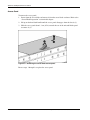
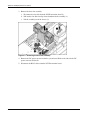
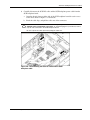
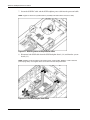
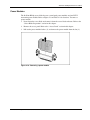
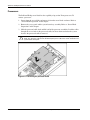
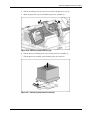
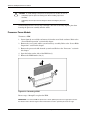
1
HP ProLiant BL40p Server Blade Maintenance and Service Guide June 2003 (Second Edition) Part Number 316079-002 © 2003 Hewlett-Packard Development Company, L.P. Microsoft and Windows are U.S. registered trademarks of Microsoft Corporation. Intel is a registered trademark of Intel Corporation in the US and other countries and is used under license. Hewlett-Packard Company shall not be liable for technical or editorial errors or omissions contained herein. The information in this document is provided “as is” without warranty of any kind and is subject to change without notice. The warranties for HP products are set forth in the express limited warranty statements accompanying such products. Nothing herein should be construed as constituting an additional warranty. HP ProLiant BL40p Server Blade Maintenance and Service Guide June 2003 (Second Edition) Part Number 316079-002 Contents About This Guide Audience Assumptions............................................................................................................................... vii Technician Notes........................................................................................................................................ vii Where to Go for Additional Help.............................................................................................................. viii Integrated Management Log ............................................................................................................... viii Telephone Numbers ...............................................................................................................................ix Chapter 1 Illustrated Parts Catalog ProLiant BL40p Server Blade Components .............................................................................................. 1-2 Mechanical Exploded View................................................................................................................ 1-2 System Exploded View....................................................................................................................... 1-3 Server Blade Spare Parts List ............................................................................................................. 1-4 Chapter 2 Removal and Replacement Procedures Safety Considerations................................................................................................................................ 2-1 Electrostatic Discharge Information ................................................................................................... 2-1 Server Blade Warnings and Cautions ................................................................................................. 2-1 Rack Warnings and Cautions.............................................................................................................. 2-2 Symbols on Equipment ....................................................................................................................... 2-3 Server Blade Components ......................................................................................................................... 2-4 Server Blade Preparation .................................................................................................................... 2-4 Host-Bus Adapter Cards ................................................................................................................... 2-14 Hard Drive Blanks ............................................................................................................................ 2-16 Hot-Plug SCSI Hard Drives.............................................................................................................. 2-17 DIMMs.............................................................................................................................................. 2-18 Power Modules ................................................................................................................................. 2-19 Processors ......................................................................................................................................... 2-20 Processor Power Module .................................................................................................................. 2-22 DC Power Converter......................................................................................................................... 2-23 Smart Array 5i Plus Memory Module .............................................................................................. 2-23 Battery-Backed Write Cache Enabler ............................................................................................... 2-24 Processor Fan Assembly ................................................................................................................... 2-26 Ethernet Passthrough Board.............................................................................................................. 2-28 PCI-X Mezzanine Board................................................................................................................... 2-29 NIC I/O Board .................................................................................................................................. 2-30 SCSI Backplane ................................................................................................................................ 2-31 Power Button/LED Board................................................................................................................. 2-33 HP ProLiant BL40p Server Blade Maintenance and Service Guide iii Contents Battery ...............................................................................................................................................2-34 System Board ....................................................................................................................................2-36 Server Blade Blanks ..........................................................................................................................2-38 Chapter 3 Diagnostic Tools ProLiant BL p-Class Diagnostic Tools ......................................................................................................3-2 Firmware Upgrades for Management Modules .........................................................................................3-4 Chapter 4 Connectors, LEDs, and Switches Connectors .................................................................................................................................................4-2 Front Panel Connectors .......................................................................................................................4-2 Rear Panel Connectors ........................................................................................................................4-3 System Components and Connectors.........................................................................................................4-3 LEDs ..........................................................................................................................................................4-5 ProLiant BL40p Server Blade Front Panel..........................................................................................4-5 Hot-Plug SCSI Hard Drives ................................................................................................................4-6 Switches .....................................................................................................................................................4-8 System Switches..................................................................................................................................4-8 Chapter 5 Port 84 Codes Determining Port 84 Codes........................................................................................................................5-1 Defining Port 84 Codes..............................................................................................................................5-6 Index List of Figures 1-1 1-2 2-1 2-2 2-3 2-4 2-5 2-6 2-7 2-8 2-9 2-10 2-11 2-12 2-13 2-14 2-15 2-16 2-17 iv ProLiant BL40p server blade mechanical components .......................................................................1-2 ProLiant BL40p server blade system components ..............................................................................1-3 Pressing the Power On/Standby button ...............................................................................................2-5 Unlocking the server blade from the server blade enclosure...............................................................2-6 Removing the server blade from the server blade enclosure...............................................................2-6 Removing the locking handle..............................................................................................................2-7 Removing the server blade access panel .............................................................................................2-8 System board tray assembly removal connector locations ..................................................................2-9 Removing the three-fan assembly .....................................................................................................2-10 Disconnecting the SCSI I2C cable and the SCSI backplane cable....................................................2-11 Attaching cables to the processor baffle............................................................................................2-12 Disconnecting the SCSI cables..........................................................................................................2-12 Unlocking the system board tray.......................................................................................................2-13 Removing the system board tray .......................................................................................................2-13 Removing host-bus adapter card blanks............................................................................................2-14 Installing a host-bus adapter card ......................................................................................................2-15 Removing a hard drive blank ............................................................................................................2-16 Removing a hot-plug SCSI hard drive ..............................................................................................2-17 Removing a DIMM ...........................................................................................................................2-18 HP ProLiant BL40p Server Blade Maintenance and Service Guide Contents 2-18 2-19 2-20 2-21 2-22 2-23 2-24 2-25 2-26 2-27 2-28 2-29 2-30 2-31 2-32 2-33 2-34 2-35 2-36 2-37 4-1 4-2 4-3 4-4 4-5 4-6 5-1 5-2 5-3 Removing a power module ............................................................................................................... 2-19 Removing the processor baffle ......................................................................................................... 2-20 Removing the processor cage ........................................................................................................... 2-21 Removing the processor assembly.................................................................................................... 2-21 Removing a PPM .............................................................................................................................. 2-22 Removing the Smart Array Plus memory module ............................................................................ 2-23 Disconnecting the Battery-Backed Write Cache Enabler ................................................................. 2-24 Removing the Battery-Backed Write Cache Enabler........................................................................ 2-25 Disconnecting the processor fan assembly ....................................................................................... 2-26 Removing the processor fan assembly.............................................................................................. 2-27 Removing the Ethernet passthrough board ....................................................................................... 2-28 Removing the PCI-X mezzanine board ............................................................................................ 2-29 Removing the NIC I/O board............................................................................................................ 2-30 Opening the SCSI backplane doors .................................................................................................. 2-31 Removing the SCSI backplane ......................................................................................................... 2-32 Removing the power button/LED board........................................................................................... 2-33 Removing the battery from the system board ................................................................................... 2-35 Loosening the system board thumbscrew ......................................................................................... 2-36 Disengaging the system board .......................................................................................................... 2-37 Removing a server blade blank......................................................................................................... 2-38 ProLiant BL40p diagnostic port.......................................................................................................... 4-2 ProLiant BL40p server blade rear panel connectors ........................................................................... 4-3 ProLiant BL40p system components and connectors ......................................................................... 4-4 ProLiant BL40p server blade front panel LEDs ................................................................................. 4-5 Hot-plug SCSI hard drive LEDs ......................................................................................................... 4-6 Server blade system switches.............................................................................................................. 4-8 Port 84 location on the system board .................................................................................................. 5-2 Port 84 LEDs ...................................................................................................................................... 5-3 Sample port 84 reading ....................................................................................................................... 5-5 List of Tables 1-1 2-1 3-1 4-1 4-2 4-3 4-4 4-5 4-6 4-7 5-1 5-2 5-3 5-4 Server Blade Spare Parts List ............................................................................................................. 1-4 System Board Tray Assembly Removal Connector Locations........................................................... 2-9 Diagnostic Tools ................................................................................................................................. 3-2 ProLiant BL40p Server Blade Rear Panel Connectors ....................................................................... 4-3 System Components and Connectors.................................................................................................. 4-4 ProLiant BL40p Server Blade Front Panel LEDs ............................................................................... 4-5 Hot-Plug SCSI Hard Drive LEDs ....................................................................................................... 4-7 Server Blade System Switches............................................................................................................ 4-8 System ID Switch (SW1) Settings...................................................................................................... 4-9 System Maintenance Switch (SW3) Settings...................................................................................... 4-9 Port 84 LEDs ...................................................................................................................................... 5-3 Port 84 Code Translations................................................................................................................... 5-4 Sample Port 84 Code .......................................................................................................................... 5-5 Port 84 Codes Defined ........................................................................................................................ 5-6 HP ProLiant BL40p Server Blade Maintenance and Service Guide v About This Guide This maintenance and service guide can be used for reference when servicing ProLiant BL40p server blades. WARNING: To reduce the risk of personal injury from electric shock and hazardous energy levels, only authorized service technicians should attempt to repair this equipment. Improper repairs can create conditions that are hazardous. Audience Assumptions This guide is for service technicians. HP assumes you are qualified in the servicing of computer equipment and trained in recognizing hazards in products with hazardous energy levels and are familiar with weight and stability precautions for rack installations. Technician Notes WARNING: Only authorized technicians trained by HP should attempt to repair this equipment. All troubleshooting and repair procedures are detailed to allow only subassembly/module-level repair. Because of the complexity of the individual boards and subassemblies, no one should attempt to make repairs at the component level or to make modifications to any printed wiring board. Improper repairs can create a safety hazard. WARNING: To reduce the risk of personal injury from electric shock and hazardous energy levels, do not exceed the level of repairs specified in these procedures. Because of the complexity of the individual boards and subassemblies, do not attempt to make repairs at the component level or to make modifications to any printed wiring board. Improper repairs can create conditions that are hazardous. WARNING: To reduce the risk of electric shock or damage to the equipment: • Disconnect power from the system by unplugging all power cords from the power supplies. • Do not disable the power cord grounding plug. The grounding plug is an important safety feature. • Plug the power cord into a grounded (earthed) electrical outlet that is easily accessible at all times. HP ProLiant BL40p Server Blade Maintenance and Service Guide vii About This Guide CAUTION: To properly ventilate the system, you must provide at least 7.6 cm (3.0 in) of clearance at the front and back of the server. CAUTION: The computer is designed to be electrically grounded (earthed). To ensure proper operation, plug the AC power cord into a properly grounded AC outlet only. NOTE: Any indications of component replacement or printed wiring board modifications may void any warranty. Where to Go for Additional Help In addition to this guide, the following information sources are available: • HP ProLiant BL p-Class System Setup and Installation Guide • HP ProLiant BL p-Class System Hardware Installation and Configuration poster • HP Servers Troubleshooting Guide • Altiris eXpress Deployment Server for ProLiant Servers User Guide • Integrated Lights-Out User Guide • ROM-Based Setup and Utility User Guide • White paper: HP ProLiant BL p-Class System Overview and Planning • White paper: Configuring a Preboot eXecution Environment (PXE) using Red Hat Linux 7.2 on HP ProLiant Servers • QuickSpecs • Service Quick Reference Guide Integrated Management Log The server includes an integrated, nonvolatile management log that contains fault and management information. The contents of the Integrated Management Log (IML) can be viewed with Insight Manager. viii HP ProLiant BL40p Server Blade Maintenance and Service Guide About This Guide Telephone Numbers For the name of the nearest HP authorized reseller: • In the United States, call 1-800-345-1518. • In Canada, call 1-800-263-5868. For HP technical support: • In the United States and Canada, call 1-800-652-6672. • Outside the United States and Canada, refer to www.hp.com HP ProLiant BL40p Server Blade Maintenance and Service Guide ix 1 Illustrated Parts Catalog This chapter provides illustrated parts and spare parts lists for the HP ProLiant BL40p server blade components. Table 1-1 lists the referenced spare parts. HP ProLiant BL40p Server Blade Maintenance and Service Guide 1-1 Illustrated Parts Catalog ProLiant BL40p Server Blade Components Mechanical Exploded View Figure 1-1: ProLiant BL40p server blade mechanical components 1-2 HP ProLiant BL40p Server Blade Maintenance and Service Guide Illustrated Parts Catalog System Exploded View Figure 1-2: ProLiant BL40p server blade system components HP ProLiant BL40p Server Blade Maintenance and Service Guide 1-3 Illustrated Parts Catalog Server Blade Spare Parts List Table 1-1: Server Blade Spare Parts List Item Description Spare Part Number Mechanical Components 1 Access panel 314456-001 2 Hard drive blank 122759-001 Boards 3 Front panel power button/LED board 303478-001 4 SCSI backplane board 303474-001 5 System board 303475-001 6 PCI-X mezzanine board 303477-001 7 HP Smart Array 5i Controller module 260741-001 8 NIC I/O board 303473-001 9 Ethernet passthrough board 303476-001 System Components 10 Intel Xeon processor with heatsink 10a 1.5 GHz, 1-MB L3 cache * 309617-001 10b 2.0 GHz, 1-MB L3 cache * 327839-001 10c 2.0 GHz, 2-MB L3 cache * 309618-001 10d 2.8 GHz, 2-MB L3 cache * 327841-001 (reserved) (reserved0 11 Processor power module (PPM) 298564-001 12 System board/PCI-X mezzanine power modules 307645-001 13 Power converter, 48-V 303481-001 14 SCSI fan cage assembly 303479-001 15 Processor fan cage assembly 303480-001 Miscellaneous 16 Plastics and kit 314455-001 16a PCI-X latch assembly * 16b PCI-X retainer guide * 16c SCSI fan baffle * 16d System board tray assembly ejector latch * * Not Shown continued 1-4 HP ProLiant BL40p Server Blade Maintenance and Service Guide Illustrated Parts Catalog Table 1-1: Server Blade Spare Parts List continued Item Description 16e Processor baffle cover 16f LED power switch bezel * 16g Drive cage bezel * 16h Mate left bezel * 16i Mate upper right bezel * 16j Mate lower right bezel * 16k SCSI fan latch, left * 16l System board tray assembly ejector lever * 16m Battery carrier * Spare Part Number 17 Fans 314453-001 18 Cable kit * 314454-001 18a RJ-45 signal board * 18b Power button/LED board * 18c Processor fans * 18d SCSI I2C * 18e External power * 18f SCSI fan board * 18g SCSI backplane power * 18h Ultra3 SCSI port 1 * 18i Ultra3 SCSI port 2 * Hard Drives 19 Hot-plug SCSI hard drive, 18 GB, 15K RPM 289240-001 19a Hot-plug SCSI hard drive, 36 GB, 10K RPM * 289041-001 19b Hot-plug SCSI hard drive, 36 GB, 15K RPM * 289241-001 19c Hot-plug SCSI hard drive, 72 GB, 10K RPM * 289042-001 19d Hot-plug SCSI hard drive, 72 GB, 15K RPM * 289243-001 19e Hot-plug SCSI hard drive, 146 GB, 10K RPM * 289044-001 20 Replacement battery, 3-V lithium * 179322-001 21 Return kit * 323089-001 * Not shown continued HP ProLiant BL40p Server Blade Maintenance and Service Guide 1-5 Illustrated Parts Catalog Table 1-1: Server Blade Spare Parts List continued Item Description Spare Part Number Memory 22 DIMM, 256-MB, registered, PC2100 ECC DDR 300699-001 23 DIMM, 512-MB, registered, PC2100 ECC DDR * 300700-001 24 DIMM, 1-GB, registered, PC2100 ECC DDR * 300701-001 25 DIMM, 2-GB, registered, PC2100 ECC DDR * 300702-001 Options 26 Battery-Backed Write Cache Enabler, with cable 260740-001 * Not shown 1-6 HP ProLiant BL40p Server Blade Maintenance and Service Guide 2 Removal and Replacement Procedures This chapter provides subassembly/module-level removal and replacement procedures for system components. After completing all necessary removal and replacement procedures, verify that all components operate properly by running the appropriate diagnostic software: • For server blade components, run the Server Diagnostics utility, available from the HP website: www.hp.com • For server blade enclosure and power enclosure components, run the infrastructure diagnostics. Refer to Chapter 3, “Diagnostic Tools,” for more information. Safety Considerations Electrostatic Discharge Information A discharge of static electricity can damage static-sensitive devices or microcircuitry. Proper packaging and grounding techniques are necessary precautions to prevent damage. To prevent electrostatic damage, observe the following precautions: • Transport products in static-safe containers such as conductive tubes, bags, or boxes. • Keep electrostatic-sensitive parts in their containers until they arrive at static-free stations. • Cover workstations with approved static-dissipating material. Use a wrist strap connected to the work surface and properly grounded tools and equipment. • Keep the work area free of nonconductive materials such as ordinary plastic assembly aids and foam packing. • Always be properly grounded when touching a static-sensitive component or assembly. • Use conductive field service tools. Server Blade Warnings and Cautions WARNING: To reduce the risk of shock or injury from high current electrical energy, do not remove the server blade access panel while the server blade is installed in the server blade enclosure. Do not remove the server blade access panel and then install the server blade into the server blade enclosure. HP ProLiant BL40p Server Blade Maintenance and Service Guide 2-1 Removal and Replacement Procedures WARNING: Setting the server blade Power On/Standby button to the standby position removes power from most areas of the server blade. This process may take 30 seconds, during which time some internal circuitry remains active. To remove power completely, remove the server blade from the server blade enclosure. WARNING: To reduce the risk of personal injury from hot surfaces, allow the internal system components to cool before touching them. CAUTION: When performing non-hot-plug operations, you must power down the server blade and/or the system. However, it may be necessary to leave the server blade powered up when performing other operations, such as hot-plug installations or troubleshooting. Rack Warnings and Cautions WARNING: The power supply enclosure and the server blade enclosure are very heavy. To reduce the risk of personal injury or damage to the equipment: • Observe local occupational health and safety requirements and guidelines for manual material handling. • Remove hot-plug power supplies and server blades from their enclosures before installing or removing the enclosures. • Use caution and get help to lift and stabilize enclosures during installation or removal, especially when the enclosure is not fastened to the rack. WARNING: Always use at least two people to lift a power supply enclosure or server blade enclosure into the rack. If the enclosure is being loaded into the rack above chest level, a third person MUST assist with aligning the enclosure with the rails while the other two people support the weight of the enclosure. WARNING: To reduce the risk of personal injury or damage to the equipment, be sure that: • The leveling jacks of the rack are extended to the floor. • The full weight of the rack rests on the leveling jacks. • The stabilizers are attached to the rack if it is a single rack installation. • The racks are coupled in multiple rack installations. WARNING: When installing the server blade enclosure in a telco rack, be sure that the rack frame is adequately secured to the building structure. WARNING: To reduce the risk of personal injury or damage to the equipment, at least two people are needed to safely unload the rack from the pallet. An empty 42U rack weighs 115 kg (253 lb), is over 2.1 m (7 ft) tall, and may become unstable when being moved on its casters. Do not stand in front of the rack as it rolls down the ramp from the pallet, but handle the rack from both sides. 2-2 HP ProLiant BL40p Server Blade Maintenance and Service Guide Removal and Replacement Procedures WARNING: To reduce the risk of shock or injury from high current electrical energy, do not reach into a server blade enclosure once it has been installed in a rack and connected to a working rack bus bar. Do not touch the power or data backplanes within the server blade enclosure once it has been installed. WARNING: To reduce the risk of shock or injury from high current electrical energy, do not reach into a power supply enclosure once it has been installed in a rack and connected to a power source. Do not touch the connectors within the power supply enclosure once it has been installed. WARNING: To reduce the risk of shock or injury from high current electrical energy, do not open any access covers on the rack bus bar after it has been connected to a power source. CAUTION: Protect equipment from power fluctuations and temporary interruptions with a regulating UPS device or battery bank. This device protects the hardware from damage caused by power surges and voltage spikes and keeps the system in operation during a power failure. CAUTION: Always ensure that equipment is properly grounded before beginning any installation procedure. Electrostatic discharge resulting from improper grounding can damage electronic components. For more information, refer to the setup and installation guide. Symbols on Equipment Any product or assembly marked with these symbols indicates that the component exceeds the recommended weight for one individual to handle safely. 25 kg 55 lb WARNING: To reduce the risk of personal injury or damage to the equipment, observe local occupational health and safety requirements and guidelines for manual material handling. Any surface or area of the equipment marked with these symbols indicates the presence of a hot surface or hot component. WARNING: To reduce the risk of injury from a hot component, allow the surface to cool before touching it. To reduce the risk of injury from electric shock hazards, do not open this enclosure. WARNING: Any surface or area of the equipment marked with these symbols indicates the presence of electric shock hazards. The enclosed area contains no operator serviceable parts. Any RJ-45 receptacle marked with these symbols indicates a Network Interface Controller (NIC). WARNING: To reduce the risk of electric shock, fire, or damage to the equipment, do not plug telephone or telecommunications connectors into this receptacle. HP ProLiant BL40p Server Blade Maintenance and Service Guide 2-3 Removal and Replacement Procedures Server Blade Components Use the procedures in this section to perform service events on ProLiant BL40p server blades. NOTE: Slate blue components denote serviceable parts. Server Blade Preparation To service any internal server blade component, you must power down the server blade and remove it from the server blade enclosure. CAUTION: Electrostatic discharge can damage electronic components. Be sure you are properly grounded before beginning any installation procedure. For more information, refer to the “Electrostatic Discharge Information” section in this chapter. System power in server blades does not completely shut off with the front panel Power On/Standby switch or Integrated Lights-Out (iLO) Virtual Power Button feature. The function toggles between on and standby modes, rather than on and off. The standby position removes power from most electronics and the drives, but portions of the power supply and some internal circuitry remain active. To service internal server blade components: 1. Identify the proper server blade in the server blade enclosure. 2. Remove power from the server blade in one of the following ways: — Use the Virtual Power Button feature in the iLO Remote Console to power down the server blade from a remote location. Be sure that the server blade is in standby mode by observing that the power LED is amber. — Press the Power On/Standby button on the front of the server blade. Be sure that the server blade is in standby mode by observing that the power LED is amber. 2-4 HP ProLiant BL40p Server Blade Maintenance and Service Guide Removal and Replacement Procedures Figure 2-1: Pressing the Power On/Standby button CAUTION: After you press the release button, the server blade is unlocked from the server blade enclosure. Use both hands to support the server blade when you remove it from the rack. 3. Remove the server blade from the server blade enclosure: a. If the server blade is installed in either of the end bays and has a fibre channel hostbus adapter card installed in a PCI-X slot, raise the locking handle at the back of the server blade to unlock it from the server blade enclosure. CAUTION: To avoid damaging the equipment, be sure to unplug any fibre channel host-bus adapter card cables from the rear of the server blade before removing the server blade from the server blade enclosure. HP ProLiant BL40p Server Blade Maintenance and Service Guide 2-5 Removal and Replacement Procedures Figure 2-2: Unlocking the server blade from the server blade enclosure b. Press the button to release the locking lever (1). c. Pull open the locking lever (2). d. Grasp the lever and slide the server blade from the server blade enclosure (3). Place a hand under the server blade to support it as you remove it from the enclosure. Figure 2-3: Removing the server blade from the server blade enclosure 4. Place the server blade on a flat, level surface. 2-6 HP ProLiant BL40p Server Blade Maintenance and Service Guide Removal and Replacement Procedures CAUTION: Always populate server blade enclosure bays with either a server blade or server blade blank. Operating the server blade enclosure without a server blade or server blade blank results in improper airflow and improper cooling that can lead to thermal damage. Reverse steps 1 through 3 to install and power up a server blade. Server blades are set to power up automatically upon insertion. If you have changed this setting, use the Power On/Standby button or iLO Virtual Power Button feature to power up the server blade. For more information about iLO, refer to the Integrated Lights-Out User Guide. If you are not installing the server blade into either of the end bays, you will need to remove the locking handle at the back of the server blade before installing it into the server blade enclosure. To remove the locking handle: 1. Use a Torx-15 screwdriver to remove the three screws from the locking handle (1). 2. Remove the locking handle from the back of the server blade. Figure 2-4: Removing the locking handle HP ProLiant BL40p Server Blade Maintenance and Service Guide 2-7 Removal and Replacement Procedures Access Panel To remove the access panel: 1. Power down the server blade and remove it from the server blade enclosure. Refer to the “Server Blade Preparation” section in this chapter. 2. Lift up on the hood latch handle until the access panel disengages from the chassis (1). 3. Slide the access panel about 1.3 cm (0.5 in) toward the rear of the unit and lift the panel to remove it (2). Figure 2-5: Removing the server blade access panel Reverse steps 1 through 3 to replace the access panel. 2-8 HP ProLiant BL40p Server Blade Maintenance and Service Guide Removal and Replacement Procedures Removing the System Board Tray Assembly The system board tray assembly must be removed from the chassis for the replacement of some components, but is not required for all preparation procedures. Refer to the instructions for replacing a specific option to determine whether the system board tray must be removed. Refer to Figure 2-6 for connector locations on the system board. To remove the system board tray assembly: CAUTION: All power must be removed from the server blade before performing these procedures. Figure 2-6: System board tray assembly removal connector locations Table 2-1: System Board Tray Assembly Removal Connector Locations Item Component User Task 1 PCI-X mezzanine slots Remove any installed PCI-X host-bus adapter cards 2 Fan cable Disconnect from the PCI-X mezzanine board 3 DC power converter Disconnect from system board 4 RJ-45 cables Disconnect from PCI-X mezzanine board 5 SCSI I2C cable Disconnect from SCSI backplane board and secure to processor baffle 6 SCSI backplane power cable Disconnect from SCSI backplane board and secure to processor baffle 7 SCSI cables Disconnect from system board and SCSI backplane board 1. Remove the access panel. Refer to Figure 2-5 in this chapter. 2. Remove any installed PCI-X host-bus adapter cards. HP ProLiant BL40p Server Blade Maintenance and Service Guide 2-9 Removal and Replacement Procedures 3. Remove the three-fan assembly: a. Disconnect the fan cable from the PCI-X mezzanine board (1). b. Pull out the slate blue fan clips located underneath the assembly (2). c. Lift the assembly out of the chassis (3). Figure 2-7: Removing the three-fan assembly 4. Remove the DC power converter from the system board. Refer to the label on the DC power converter for details. 5. Disconnect the RJ-45 cables from the PCI-X mezzanine board. 2-10 HP ProLiant BL40p Server Blade Maintenance and Service Guide Removal and Replacement Procedures 6. Carefully disconnect the SCSI I2C cable and the SCSI backplane power cable from the SCSI backplane board: a. Open the chassis doors on either side of the SCSI backplane board for easier access to the cables. Refer to Figure 2-31 for details. b. Pinch the cable clips, and pull the cables out of the connectors. CAUTION: The SCSI I2C cable and the SCSI backplane power cable must remain attached to the system board at this point. To avoid damaging the system board, remove only the ends connected to the SCSI backplane board. Be sure to pinch the cable clips before pulling the cables out. Figure 2-8: Disconnecting the SCSI I2C cable and the SCSI backplane cable HP ProLiant BL40p Server Blade Maintenance and Service Guide 2-11 Removal and Replacement Procedures 7. Secure the SCSI I2C cable and the SCSI backplane power cable into the processor baffle. NOTE: Figure 2-9 shows the system board tray assembly removed from the chassis for clarity. Figure 2-9: Attaching cables to the processor baffle 8. Disconnect both SCSI cables from the SCSI backplane board (1, 4) and from the system board (2, 3). NOTE: Numbers 3 and 4 in Figure 2-10 reference ports A (short cable). Numbers 1 and 2 reference ports B (long cable). Crossing the cables can result in incorrect data presentation. Figure 2-10: Disconnecting the SCSI cables 2-12 HP ProLiant BL40p Server Blade Maintenance and Service Guide Removal and Replacement Procedures 9. Lift the system board tray release latch (1) and turn a quarter turn to unlock the system board tray from the chassis (2). 10. Push the plastic hook to release the slate blue system board tray lever (3) and slowly pull it forward to slide the tray towards the front of the server blade (4). IMPORTANT: To avoid damaging the equipment, be sure to lift all cables away from the system board before sliding the tray out. Figure 2-11: Unlocking the system board tray 11. When the system board tray lever is completely forward, slide the system board tray out of the chassis. Figure 2-12: Removing the system board tray To replace the system board tray, reverse steps 1 through 11. HP ProLiant BL40p Server Blade Maintenance and Service Guide 2-13 Removal and Replacement Procedures Host-Bus Adapter Cards The ProLiant BL40p server blade PCI-X expansion slots support only fibre channel host-bus adapter cards. To install a host-bus adapter card into a PCI-X slot: 1. Power down the server blade and remove it from the server blade enclosure. Refer to “Server Blade Preparation” in this chapter. 2. Remove the access panel. Refer to “Access Panel” in this chapter. 3. Remove the host-bus adapter card blank corresponding to PCI-X slot 1 by pressing down on the release lever (1), then pulling up (2). 4. Slide the slate blue host-bus adapter card blank out of the slot (3). Figure 2-13: Removing host-bus adapter card blanks 2-14 HP ProLiant BL40p Server Blade Maintenance and Service Guide Removal and Replacement Procedures 5. Open the slate blue alignment guide (1). 6. Install the host-bus adapter card into PCI-X slot 1 (2). 7. Close the slate blue alignment guide (3) 8. Close the release lever (4). Figure 2-14: Installing a host-bus adapter card 9. Repeat steps 2 through 6 for PCI-X slot 2 if installing an additional host-bus adapter card. 10. Reinstall the access panel. 11. Install the server blade into the server blade enclosure. 12. Cable the host-bus adapter card as necessary. Refer to the documentation included with the host-bus adapter card. HP ProLiant BL40p Server Blade Maintenance and Service Guide 2-15 Removal and Replacement Procedures Hard Drive Blanks To remove a hard drive blank: 1. Press the release buttons simultaneously (1). 2. Pull the blank out of the drive bay (2). Figure 2-15: Removing a hard drive blank CAUTION: Always populate hard drive bays with either a hot-plug SCSI hard drive or hard drive blank. Operating the server blade without a hot-plug SCSI hard drive or hard drive blank results in improper airflow and improper cooling that can lead to thermal damage. To replace the hard drive blank, slide the blank into the bay until it locks into place. 2-16 HP ProLiant BL40p Server Blade Maintenance and Service Guide Removal and Replacement Procedures Hot-Plug SCSI Hard Drives To assess hard drive status, observe the hot-plug SCSI hard drive status LEDs. For a detailed explanation of these LEDs, refer to Chapter 4, “Connectors, LEDs, and Switches.” CAUTION: Read the section on hot-plug hard drive replacement in the HP Servers Troubleshooting Guide before removing a hard drive. IMPORTANT: It is not necessary to power down the server blade before removing or replacing a hot-plug SCSI hard drive. To remove a hot-plug SCSI hard drive: 1. Press the release button (1). 2. Open the ejector lever (2). 3. Slide the drive out of the drive cage (3). Figure 2-16: Removing a hot-plug SCSI hard drive CAUTION: Always populate hard drive bays with either a hot-plug SCSI hard drive or hard drive blank. Operating the server blade without a hot-plug SCSI hard drive or hard drive blank results in improper airflow and improper cooling that can lead to thermal damage. To replace a hot-plug SCSI hard drive: 1. Slide the drive into the cage until it is fully seated. 2. Close the lever, locking the drive into place. HP ProLiant BL40p Server Blade Maintenance and Service Guide 2-17 Removal and Replacement Procedures DIMMs To remove a DIMM: 1. Power down the server blade and remove it from the server blade enclosure. Refer to the “Server Blade Preparation” section in this chapter. 2. Remove the access panel. Refer to the “Access Panel” section in this chapter. NOTE: The server blade ships with at least two DIMMs installed in slots 1A and 2A. 3. Open the DIMM slot latches (1). 4. Remove the DIMM from the slot (2). Figure 2-17: Removing a DIMM CAUTION: For proper DIMM configuration, refer to the setup and installation guide. CAUTION: Use only HP DIMMs. DIMMs from other sources may adversely affect data integrity. IMPORTANT: Always install DIMMs in identical pairs. IMPORTANT: DIMMs do not seat fully if turned the wrong way. Reverse steps 1 through 4 to replace a DIMM. 2-18 HP ProLiant BL40p Server Blade Maintenance and Service Guide Removal and Replacement Procedures Power Modules The ProLiant BL40p server blade has two system board power modules and one PCI-X mezzanine power module. Refer to Figure 4-3 and Table 4-2 for locations. To remove a power module: 1. Power down the server blade and remove it from the server blade enclosure. Refer to the “Server Blade Preparation” section in this chapter. 2. Remove the access panel. Refer to the “Access Panel” section in this chapter. 3. Pull out the power module latches (1), and remove the power module from the slot (2). Figure 2-18: Removing a power module HP ProLiant BL40p Server Blade Maintenance and Service Guide 2-19 Removal and Replacement Procedures Processors The ProLiant BL40p server blade has the capability of up to four Xeon processors. To remove a processor: 1. Power down the server blade and remove it from the server blade enclosure. Refer to “Server Blade Preparation” in this chapter. 2. Remove the access panel and the system board tray assembly. Refer to “Server Blade Preparation” in this chapter. 3. Slide the processor baffle back and lift it off of the processor assemblies. Push the cables through the access holes in the processor baffle, but leave them attached to the system board as the processor baffle is removed. CAUTION: To avoid damaging the system board, use caution when removing the processor baffle. The SCSI I2C cable and the SCSI backplane power cable must remain attached to the system board at this point. Figure 2-19: Removing the processor baffle 2-20 HP ProLiant BL40p Server Blade Maintenance and Service Guide Removal and Replacement Procedures 4. Lift the slate blue processor cage lever to release the processor cage (1). 5. Raise the processor cage away from the processor assembly (2). Figure 2-20: Removing the processor cage 6. Lift the processor-locking lever to release the processor assembly (1). 7. Lift the processor assembly away from the processor socket (2). Figure 2-21: Removing the processor assembly HP ProLiant BL40p Server Blade Maintenance and Service Guide 2-21 Removal and Replacement Procedures CAUTION: To avoid damage to the processors and processor sockets, be sure to: • Completely open the processor-locking lever when installing a processor assembly. • Completely close the processor-locking lever before lowering the processor cage. To install the processor, reverse steps 1 through 7. Be sure to correctly align the pins when lowering the processor assembly onto the socket. Processor Power Module To remove a PPM: 1. Power down the server blade and remove it from the server blade enclosure. Refer to the “Server Blade Preparation” section in this chapter. 2. Remove the access panel and the system board tray assembly. Refer to the “Server Blade Preparation” section in this chapter. 3. Remove the processor baffle from the system board. Refer to the “Processors” section in this chapter. 4. Open the latches on the sides of the PPM slot (1). 5. Remove the PPM from the slot (2). Figure 2-22: Removing a PPM Reverse steps 1 through 5 to replace the PPM. IMPORTANT: To remove PPMs for processors 2 and 3, pull the processor fan cage open to access the release levers. Refer to Figure 2-26 for instructions on how to open the processor fan cage. 2-22 HP ProLiant BL40p Server Blade Maintenance and Service Guide Removal and Replacement Procedures DC Power Converter Refer to the label on the DC power converter for removal instructions. Smart Array 5i Plus Memory Module To remove the Smart Array 5i Plus memory module: 1. Power down the server blade and remove it from the server blade enclosure. Refer to the “Server Blade Preparation” section in this chapter. 2. Remove the access panel. Refer to the “Access Panel” section in this chapter. 3. Remove the DC power converter from the system board. Refer to the label on the DC power converter. 4. Disconnect the Battery-Backed Write Cache Enabler cable, if the option is installed. IMPORTANT: If the data in the Smart Array 5i Battery-Backed Write Cache Enabler needs to be saved, do not disconnect the battery module cable. 5. Pull out the levers on either side of the memory module (1). 6. Lift out the memory module at a 45° angle (2). Figure 2-23: Removing the Smart Array Plus memory module Reverse steps 1 through 6 to replace the Smart Array Plus memory module. HP ProLiant BL40p Server Blade Maintenance and Service Guide 2-23 Removal and Replacement Procedures Battery-Backed Write Cache Enabler To remove the Smart Array 5i Battery-Backed Write Cache Enabler: 1. Power down the server blade and remove it from the server blade enclosure. Refer to the “Server Blade Preparation” section in this chapter. 2. Remove the access panel. Refer to the “Access Panel” section in this chapter. 3. Remove the DC power converter from the system board. Refer to the label on the DC power converter. 4. Disconnect the battery module cable from the Smart Array 5i Plus memory module. IMPORTANT: If the data in the Smart Array 5i Battery-Backed Write Cache Enabler needs to be saved, do not disconnect the battery module cable. Figure 2-24: Disconnecting the Battery-Backed Write Cache Enabler 2-24 HP ProLiant BL40p Server Blade Maintenance and Service Guide Removal and Replacement Procedures 5. Turn the standoffs to release the Battery-Backed Write Cache Enabler (1), and lift it off of the system board (2). Figure 2-25: Removing the Battery-Backed Write Cache Enabler Reverse steps 1 through 5 to replace the Battery-Backed Write Cache Enabler. HP ProLiant BL40p Server Blade Maintenance and Service Guide 2-25 Removal and Replacement Procedures Processor Fan Assembly To remove the processor fan assembly: 1. Power down the server blade and remove it from the server blade enclosure. Refer to the “Server Blade Preparation” section in this chapter. 2. Remove the access panel. Refer to the “Access Panel” section in this chapter. 3. Remove the system board tray assembly. Refer to the “Removing the System Board Tray Assembly” section in this chapter. 4. Disconnect the fan cable from the system board. Refer to Figure 4-3 to identify the fan cable connector. 5. Press the release levers on the front of the fan assembly (1), and slide the tray to the open position (2). Figure 2-26: Disconnecting the processor fan assembly 2-26 HP ProLiant BL40p Server Blade Maintenance and Service Guide Removal and Replacement Procedures 6. Press in the spring locks on either side of the fan assembly (1), and slide the fan assembly out (2). 7. To remove an individual fan, squeeze the port-colored levers on either side of the fan (3), and lift the fan out (4). Figure 2-27: Removing the processor fan assembly Reverse steps 1 through 6 to replace the processor fan assembly. HP ProLiant BL40p Server Blade Maintenance and Service Guide 2-27 Removal and Replacement Procedures Ethernet Passthrough Board To remove the Ethernet passthrough board: 1. Power down the server blade and remove it from the server blade enclosure. Refer to the “Server Blade Preparation” section in this chapter. 2. Remove the access panel. Refer to the “Access Panel” section in this chapter. 3. Disconnect RJ-45 cables from either the PCI-X mezzanine board or the Ethernet passthrough board. 4. Turn the thumbscrew to release the Ethernet passthrough board (1) and pull the board out of the chassis (2). Figure 2-28: Removing the Ethernet passthrough board Reverse steps 1 through 4 to replace the Ethernet passthrough board. 2-28 HP ProLiant BL40p Server Blade Maintenance and Service Guide Removal and Replacement Procedures PCI-X Mezzanine Board To remove the PCI-X mezzanine board: 1. Power down the server blade and remove it from the server blade enclosure. Refer to “Server Blade Preparation” in this chapter. 2. Remove the access panel and the system board tray assembly. Refer to “Server Blade Preparation” in this chapter. 3. Disconnect RJ-45 cables from the PCI-X mezzanine board. 4. Remove any host-bus adapter cards installed in the PCI-X mezzanine board. Refer to “Host-Bus Adapter Cards” in this chapter. 5. Simultaneously raise the two slate blue release levers to a 90° angle (1). 6. Lift the PCI-X mezzanine board off of the system board (2). Figure 2-29: Removing the PCI-X mezzanine board Reverse steps 1 through 6 to replace the PCI-X mezzanine board. HP ProLiant BL40p Server Blade Maintenance and Service Guide 2-29 Removal and Replacement Procedures NIC I/O Board To remove the NIC I/O board: 1. Power down the server blade and remove it from the server blade enclosure. Refer to the “Server Blade Preparation” section in this chapter. 2. Remove the access panel and the system board tray assembly. Refer to the “Server Blade Preparation” section in this chapter. 3. Remove the PCI-X mezzanine board. Refer to the “PCI-X Mezzanine Board” section in this chapter. 4. Turn the two slate blue thumbscrews on either side of the NIC I/O board to loosen it from the system board (1). 5. Lift the slate blue release handle to a 45° angle to disengage the NIC I/O board (2) and pull it away from the system board (3). Figure 2-30: Removing the NIC I/O board Reverse steps 1 through 5 to replace the NIC I/O board. CAUTION: To avoid damaging the NIC I/O board pins, be sure to use use caution when aligning it back into the system board. 2-30 HP ProLiant BL40p Server Blade Maintenance and Service Guide Removal and Replacement Procedures SCSI Backplane To remove the SCSI backplane: 1. Power down the server blade and remove it from the server blade enclosure. Refer to the “Server Blade Preparation” section in this chapter. 2. Remove the access panel. Refer to the “Access Panel” section in this chapter. 3. Remove any hot-plug SCSI hard drives or hard drive blanks: — If any hard drive blanks are installed, refer to the “Hard Drive Blanks” section in this chapter. — If any hot-plug SCSI hard drives are installed, refer to the “Hot-Plug SCSI Hard Drives” section in this chapter. 4. Remove the three-fan assembly. Refer to the “Server Blade Preparation” section in this chapter. 5. Open the chassis doors on either side of the SCSI backplane to provide adequate room for SCSI backplane removal: a. Pull the slate blue locking pin out (1) and turn a quarter turn to lock in the open position (2). b. Slide doors towards the back of the chassis (3). 6. Disconnect any cables from the SCSI backplane board (4). IMPORTANT: If the SCSI I2C cable or the SCSI backplane power cable remain attached to the SCSI backplane board when it is removed, damage may occur to the system board. All cables must be disconnected from the SCSI backplane board before removing it. Figure 2-31: Opening the SCSI backplane doors HP ProLiant BL40p Server Blade Maintenance and Service Guide 2-31 Removal and Replacement Procedures 7. Turn the thumbscrew to release the SCSI backplane (1) and lift out (2). Figure 2-32: Removing the SCSI backplane Reverse steps 1 through 7 to replace the SCSI backplane. 2-32 HP ProLiant BL40p Server Blade Maintenance and Service Guide Removal and Replacement Procedures Power Button/LED Board To remove the power button/LED board: 1. Power down the server blade and remove it from the server blade enclosure. Refer to the “Server Blade Preparation” section in this chapter. 2. Remove the access panel and the system board tray assembly. Refer to the “Server Blade Preparation” section in this chapter. 3. Use a Torx-15 screwdriver to remove the two retaining screws from the power button/LED board (1). 4. Lift the power button/LED board off the chassis (2). Figure 2-33: Removing the power button/LED board Reverse steps 1 through 4 to replace the power button/LED board. HP ProLiant BL40p Server Blade Maintenance and Service Guide 2-33 Removal and Replacement Procedures Battery If the server blade no longer automatically displays the correct date and time, you may need to replace the battery that provides power to the real-time clock. Under normal use, battery life is 5 to 10 years. WARNING: This server blade contains either an internal lithium manganese dioxide or a vanadium pentoxide battery. A risk of fire and burns exists if the battery pack is not handled properly. To reduce the risk of personal injury: • Do not attempt to recharge the battery. • Do not expose to temperatures higher than 60°C (140° F). • Do not disassemble, crush, puncture, short external contacts, or dispose of in fire or water. • Replace only with the spare designated for this product. CAUTION: Loss of BIOS settings will occur if the lithium battery is removed. BIOS settings must be reconfigured whenever the battery is replaced. CAUTION: Batteries, battery packs, and accumulators should not be disposed of along with general household waste. In order to forward them for recycling or proper disposal, please use the public collection system or return them to the authorized partners or their agents. IMPORTANT: Run the System Utility to configure the system after replacing the battery. Refer to the HP ProLiant BL p-Class System Setup and Installation Guide for more information. To remove the system board battery: 1. Power down the server blade and remove it from the server blade enclosure. Refer to the “Server Blade Preparation” section in this chapter. 2. Remove the access panel. Refer to the “Access Panel” section in this chapter. 3. Locate the battery holder on the system board. 2-34 HP ProLiant BL40p Server Blade Maintenance and Service Guide Removal and Replacement Procedures 4. Insert a pen or other narrow object into the slot at the front of the battery holder to release the battery (1). 5. Lift the battery away from the battery holder (2). Figure 2-34: Removing the battery from the system board Reverse steps 1 through 5 to replace the system board battery. HP ProLiant BL40p Server Blade Maintenance and Service Guide 2-35 Removal and Replacement Procedures System Board To remove the system board: 1. Power down the server blade and remove it from the server blade enclosure. Refer to the “Server Blade Preparation” section in this chapter. 2. Remove the access panel and the system board tray assembly. Refer to the “Server Blade Preparation” section in this chapter. 3. Remove the DIMMs. Refer to the “DIMMs” section in this chapter. 4. Remove the PPMs. Refer to the “Processor Power Module” section in this chapter. 5. Remove the processor assemblies. Refer to the “Processors” section in this chapter. 6. Pull the processor fan assembly into the open position using the buttons on the front of the assembly. Refer to the “Processor Fan Assembly” section in this chapter. 7. Remove the Battery-Backed Write Cache Enabler, if the option is installed. Refer to the “Battery-Backed Write Cache Enabler” section in this chapter. 8. Remove the Smart Array Plus memory module. Refer to the “DC Power Converter” section in this chapter. 9. Remove the NIC I/O board. Refer to the “NIC I/O Board” section in this chapter. 10. Remove all cables connected to the system board. 11. Loosen the system board thumbscrew. Figure 2-35: Loosening the system board thumbscrew 2-36 HP ProLiant BL40p Server Blade Maintenance and Service Guide Removal and Replacement Procedures 12. Slide the system board toward the front of the server blade (1). Be sure that the board unseats from the alignment keys. 13. Using the handles on the processor cages and the PCI-X support handle, lift the system board out of the chassis (2). Figure 2-36: Disengaging the system board Reverse steps 1 through 13 to replace the system board. HP ProLiant BL40p Server Blade Maintenance and Service Guide 2-37 Removal and Replacement Procedures Server Blade Blanks To remove a server blade blank: 1. Press the release buttons simultaneously (1). 2. Slide the server blade blank from the server blade enclosure (2). Figure 2-37: Removing a server blade blank CAUTION: Always populate server blade enclosure bays with either a server blade or server blade blank. Operating the server blade enclosure without a server blade or server blade blank results in improper airflow and improper cooling that can lead to thermal damage. To replace a server blade blank, align the blank with the empty bay and slide it in until the blank is fully seated. 2-38 HP ProLiant BL40p Server Blade Maintenance and Service Guide 3 Diagnostic Tools This chapter is an overview of software and firmware diagnostic tools that are available for configuring, monitoring, and managing the system. Refer to the HP ProLiant BL40p Server Blade Setup and Installation Guide on the Documentation CD, or to www.hp.com HP ProLiant BL40p Server Blade Maintenance and Service Guide 3-1 Diagnostic Tools ProLiant BL p-Class Diagnostic Tools Use the following tools to diagnose problems, test hardware, and monitor and manage system operations. Table 3-1: Diagnostic Tools Tool Description How to run the tool Array Diagnostics Utility (ADU) ADU is designed to run on all HP systems that support HP array controllers. ADU collects information about the array controllers in the system and generates a list of detected problems. For a list of HP systems that support ADU, visit the HP website: www.compaq.com/support/files For a complete list of ADU error messages, refer to the HP Servers Troubleshooting Guide. Automatic Server Recovery-2 (ASR-2) ASR-2 automatically restarts the server blade after a catastrophic operating system failure. Run RBSU and set ASR-2 to enable this tool. With ASR-2, you have multiple recovery options: HP Diagnostics • Available Recovery provides software error recovery and environmental recovery. • Unattended Recovery logs the error information to the IML, resets the server blade, and tries to restart the operating system. HP Diagnostics tests and verifies operation of HP hardware. If HP Diagnostics finds a hardware failure, it isolates the replaceable part, if possible. Access HP Diagnostics when POST detects a system configuration error. For a complete list of POST error messages, refer to the HP Servers Troubleshooting Guide. HP Diagnostics can be downloaded from the HP website: www.compaq.com/support/files Insight Manager 7 Insight Manager 7 is a client/server application used to remotely manage HP hardware in a network environment. Insight Manager reports hardware fault conditions (both failure and prefailure) and collects data for reporting and graphing. For more information on viewing and printing the event list, refer to the Insight Manager User Guide or the setup and installation guide. ROMPaq Utility The ROMPaq Utility checks the system and provides a choice of available ROM revisions and controller firmware. You can download this utility from the HP website: www.hp.com continued 3-2 HP ProLiant BL40p Server Blade Maintenance and Service Guide Diagnostic Tools Table 3-1: Diagnostic Tools continued Tool Description How to run the tool Survey Utility The Survey Utility gathers critical hardware and software information on server blades. The Survey Utility is available on the ProLiant Essential Rapid Deployment Pack CD or on the HP website: If a significant change occurs between data-gathering intervals, the Survey Utility marks the previous information and overwrites the survey text files to reflect the latest changes in the configuration. www.compaq.com/support/files/ servers/us/index.html Integrated Lights-Out ROM-Based Setup Utility (iLO RBSU) The iLO RBSU is the recommended method to configure and set up the iLO. The iLO RBSU is designed to assist you with setting up an iLO on a network; it is not intended for continued administration. Run iLO RBSU by pressing the F8 key during POST. Integrated Management Log (IML) The IML is a log of system events such as system failures or nonfatal error conditions. View events in the IML from within: The IML requires HP operating system management drivers. Refer to the ProLiant Essentials Rapid Deployment Pack CD for instructions on installing the appropriate drivers. Option ROM Configuration for Arrays (ORCA) • Insight Manager 7 • Survey Utility • Operating system-specific IML utilities The Option ROM Configuration for Arrays utility is a menu-driven utility that does not require a CD and can be started when the server blade is booting. This utility enables users to perform the following functions: • Create, configure, and/or delete logical drives. • Specify RAID levels. • Assign online spares. • Set interrupts and the boot controller order. Run ORCA by pressing the F8 key during POST. ProLiant Essentials Rapid Deployment Pack The optional ProLiant Essentials Rapid Deployment Pack is the preferred method for rapid, high-volume server blade deployments. The Rapid Deployment Pack includes Altiris eXpress Deployment Server and the SmartStart Scripting Toolkit. Install the CD in the CD-ROM drive of the administrator workstation or client PC and refer to the documentation that ships with the software. Embedded Server Setup (ESS) The Diagnostics Utility, which checks the validity of three server blade subsystems needed to boot an OS, is enabled through the ESS System Maintenance menu. It includes the Memory Test, CPU Test, and Boot Disk Test. The Inspect Utility, which allows you to view system configuration information, is also enabled through ESS. Run ESS by pressing the F10 key during POST. Syslog file The syslog file implies a Linux OS and records server blade activity. View the syslog file through /var/log messages continued HP ProLiant BL40p Server Blade Maintenance and Service Guide 3-3 Diagnostic Tools Table 3-1: Diagnostic Tools continued Tool Description How to run the tool Nteventlog file The nteventlog file implies a Microsoft Windows OS and records server blade activity. View the nteventlog file through the Windows Event Viewer. ROM-Based Setup Utility (RBSU) RBSU configures the hardware installed in the server blade. This utility enables users to: Run RBSU by pressing the F9 key during POST. • Store configuration information in nonvolatile memory. • Manage memory installation, processor upgrades, network interface cards, and mass storage devices. • Assist in installing an operating system. • Configure ports and IRQs, if required. Firmware Upgrades for Management Modules For information about upgrading server blade management module or power management module firmware, refer to the HP website: www.hp.com 3-4 HP ProLiant BL40p Server Blade Maintenance and Service Guide 4 Connectors, LEDs, and Switches This chapter explains the location and function of system connectors, internal and external LEDs, and switches. HP ProLiant BL40p Server Blade Maintenance and Service Guide 4-1 Connectors, LEDs, and Switches Connectors Use the following sections to identify connectors on the ProLiant BL40p server blade. Front Panel Connectors The server blade has one front panel connector, a diagnostic port that accepts the diagnostic cable for configuration and troubleshooting purposes. Figure 4-1: ProLiant BL40p diagnostic port 4-2 HP ProLiant BL40p Server Blade Maintenance and Service Guide Connectors, LEDs, and Switches Rear Panel Connectors Use Figure 4-2 and Table 4-1 to identify ProLiant BL40p server blade rear panel connectors. Figure 4-2: ProLiant BL40p server blade rear panel connectors Table 4-1: ProLiant BL40p Server Blade Rear Panel Connectors Item Description 1 Power connectors 2 Signal connectors System Components and Connectors Use Figure 4-3 and Table 4-2 to identify ProLiant BL40p system components and connectors. HP ProLiant BL40p Server Blade Maintenance and Service Guide 4-3 Connectors, LEDs, and Switches Figure 4-3: ProLiant BL40p system components and connectors Table 4-2: System Components and Connectors Item Component Item Component 1 Processor socket 3 18 Smart Array 5i Plus memory module 2 LED/power switch board connector 19 System board 3 PPM slot 3 20 DC power converter connector 4 SCSI I2C cable connector 21 DIMM slots (6) 5 PPM slot 4 22 System board power modules (2)* 6 Processor socket 4 23 Channel B SCSI connector 7 System battery 24 System maintenance switch (SW3) 8 SCSI fan power connector 25 Channel A SCSI connector 9 PCI-X mezzanine board connector 26 Processor 1 10 PCI-X mezzanine board 27 SCSI power connector 11 64-bit/100 MHz PCI-X slot 2 28 PPM 1 12 64-bit/100 MHz PCI-X slot 1 29 System ID switch (SW1) 13 PCI-X mezzanine power module* 30 Processor fan connector 14 Battery-Backed Write Cache Enabler 31 PPM slot 2 15 Ethernet passthrough board (connects to chassis) 32 Processor socket 2 16 RJ-45 connectors 33 LED/power switch board 17 NIC I/O board * same component 4-4 HP ProLiant BL40p Server Blade Maintenance and Service Guide Connectors, LEDs, and Switches LEDs Use the following section to identify LEDs on the following ProLiant BL p-Class system components: • ProLiant BL40p server blade front panel • Hot-plug SCSI hard drives ProLiant BL40p Server Blade Front Panel Six LEDs on the front of the server blade indicate server status. Use Figure 4-4 and Table 4-3 to identify LED locations and functions. Figure 4-4: ProLiant BL40p server blade front panel LEDs Table 4-3: ProLiant BL40p Server Blade Front Panel LEDs Item LED Description Status 1 Unit identification Blue = Flagged Blue flashing = Management mode Off = No remote management 2 Internal health Green = Normal (when server blade is powered on) Off = Normal (when server blade is on standby) Amber = System degraded Red = System critical continued HP ProLiant BL40p Server Blade Maintenance and Service Guide 4-5 Connectors, LEDs, and Switches Table 4-3: ProLiant BL40p Server Blade Front Panel LEDs continued Item 3 LED Description Status External health Green = Normal (when server blade is powered on) Off = Normal (when server blade is on standby) Amber = Redundant fan failed Red = Critical fan failure 4 NIC 1 Green = Linked to network 5 NIC 2 Green flashing = Network activity 6 NIC 3 Off = No activity 7 NIC 4 8 NIC 5 9 Power On/Standby Green = On Amber = Standby (power available) Off = Unit off Hot-Plug SCSI Hard Drives Each hot-plug SCSI hard drive has three LED indicators located on the front of the drive. The LEDs provide activity, online, and fault status for each corresponding drive when configured as a part of an array and attached to a powered-on Smart Array controller. Their behavior may vary depending on the status of other drives in the array. Use Figure 4-5 and Table 4-4 to identify LED locations and functions. Figure 4-5: Hot-plug SCSI hard drive LEDs 4-6 HP ProLiant BL40p Server Blade Maintenance and Service Guide Connectors, LEDs, and Switches Table 4-4: Hot-Plug SCSI Hard Drive LEDs 1 Activity 2 Online 3 Fault Means On Off Off Do not remove the drive. Removing a drive during this process causes data loss. The drive is being accessed and is not configured as part of an array. On Flashing Off Do not remove the drive. Removing a drive during this process causes data loss. The drive is rebuilding or undergoing capacity expansion. Flashing Flashing Flashing Do not remove the drive. Removing a drive during this process causes data loss. The drive is part of an array being selected by the Array Configuration Utility. -OrThe Options ROMPaq is upgrading the drive. Off Off Off OK to replace the drive online if a predictive failure alert is received and the drive is attached to an array controller. The drive is not configured as part of an array. -OrIf this drive is part of an array, a powered-on controller is not accessing the drive. -OrThe drive is configured as an online spare. Off Off On OK to replace the drive online. The drive has failed and has been placed offline. Off On Off OK to replace the drive online if a predictive failure alert is received, provided that the array is configured for fault tolerance, and all other drives in the array are online. The drive is online and configured as part of an array. On or flashing On Off OK to replace the drive online if a predictive failure alert is received, provided that the array is configured for fault tolerance, and all other drives in the array are online. The drive is online and being accessed. HP ProLiant BL40p Server Blade Maintenance and Service Guide 4-7 Connectors, LEDs, and Switches Switches Use the following sections to identify the locations and functions of push-button and system switches. System Switches System switches enable you to change certain settings or to perform advanced diagnostic procedures. The following sections explain the functions of each switch. Use Figure 4-6 and Table 4-5 to identify switch locations and functions. Figure 4-6: Server blade system switches Table 4-5: Server Blade System Switches Item 4-8 Description 1 System ID switch (SW1) 2 NMI switch 3 System maintenance switch (SW3) HP ProLiant BL40p Server Blade Maintenance and Service Guide Connectors, LEDs, and Switches System ID Switch (SW1) The system ID switch is a three-position switch used for chassis ID. Settings should be changed only by an authorized service provider. Refer to Table 4-6 for system ID switch settings. Table 4-6: System ID Switch (SW1) Settings Position Description On/Off Function 1 Chassis ID0 2 Chassis ID1 All pins will be set to off. HP does not recommend changing this switch setting. 3 Chassis ID2 System Maintenance Switch (SW3) The system maintenance switch is an eight-position switch that implements protection and override functions. The default setting for all 8 positions is off. For the proper system maintenance switch settings, refer to Table 4-7 or to the labels attached to the inside of the server blade access panel. Table 4-7: System Maintenance Switch (SW3) Settings Position 1 Description On/Off Function iLO Security Override Off = iLO Security is enabled. On = Overrides iLO security function. 2 Configuration lock Off = System configuration can be modified. On = System configuration is locked and cannot be modified. 3 iLO Power Button Override Off = System power button is controlled through iLO. Rack power availability is checked before system can power on. On = System power button turns on the system, regardless of power availability. 4 Enable Diskette Boot Off = Diskette boot is controlled by configuration. On = Override diskette boot. 5 Password Disable Off = Power-on password is normal. On = Power-on password is disabled. 6 Invalidate Configuration Off = Normal. On = ROM treats the system configuration as invalid. 7 Interlock Disable Off = Normal. On = Disable interlock. 8 Hot Spare Boot Disable Off = Hot spare boot is enabled. On = Hot spare boot functionality is disabled. HP ProLiant BL40p Server Blade Maintenance and Service Guide 4-9 5 Port 84 Codes Determining Port 84 Codes A combination of port 84 LEDs is translated into a hexadecimal code, which can be used for troubleshooting. This chapter describes how to determine the port 84 code, and what the codes mean. Refer to Figure 5-1 for the location of the port 84 LEDs. The port 84 LEDs can be viewed using one of these methods: • With the server blade in the enclosure, log into iLO to view the port 84 codes. • Use the diagnostic station to power up the server blade outside the rack, and remove the access panel to view the port 84 LEDs. Refer to the HP ProLiant BL p-Class System Diagnostic Station User Guide for instructions. IMPORTANT: iLO port 84 codes may differ from port 84 LED codes. Table 5-4 defines port 84 codes for the system board port 84 LEDs only. WARNING: Only qualified service personnel should power up the server blade with the access panel removed. To reduce the risk of injury from electric shock or hazardous energy when working on the server: • Remove all watches, rings, and any other loose-fitting jewelry. • Avoid the risk of conductive tools inside the server that could bridge live parts. HP ProLiant BL40p Server Blade Maintenance and Service Guide 5-1 Port 84 Codes Figure 5-1: Port 84 location on the system board 5-2 HP ProLiant BL40p Server Blade Maintenance and Service Guide Port 84 Codes The port 84 LEDs consist of two groups of four LEDs. Each group of four LEDs represents one character of the code. Figure 5-2 and Table 5-1 explain the components of the port 84 LEDs. Figure 5-2: Port 84 LEDs Table 5-1: Port 84 LEDs Item Description 1 Front of the server blade* 2 First code character (Most Significant Bit) 3 Second code character (Least Significant Bit) 4 Rear of server blade* * When reading the port 84 LEDs, you must be oriented to the server blade properly. The rear of the server blade should be at the right; the front should be at the left. When determining the port 84 code: • A green LED indicates 1. • An off LED indicates 0. Therefore, each LED will be assigned either 0 or 1. HP ProLiant BL40p Server Blade Maintenance and Service Guide 5-3 Port 84 Codes Moving from left to right, the series of numbers assigned to the first four LEDs is translated into a code, which consists of any characters 0 through 9 or A through F. The series of numbers assigned to the next four LEDs is translated into the same code, resulting in a final two-character code. Refer to Table 5-2 to determine how to read the code from the LED pattern. Table 5-2: Port 84 Code Translations 5-4 LED pattern Character 0000 0 0001 1 0010 2 0011 3 0100 4 0101 5 0110 6 0111 7 1000 8 1001 9 1010 A 1011 B 1100 C 1101 D 1110 E 1111 F HP ProLiant BL40p Server Blade Maintenance and Service Guide Port 84 Codes Refer to Figure 5-3 and Table 5-3 for a sample LED reading and the corresponding code determined from that LED reading. Figure 5-3: Sample port 84 reading Table 5-3: Sample Port 84 Code MSB LED LSB LED Status Code 1 Off 0 2 On 1 3 Off 0 4 On 1 5 Off 0 6 On 1 7 On 1 8 Off 0 Using the code translation from Table 5-2, the resulting code would be 56. HP ProLiant BL40p Server Blade Maintenance and Service Guide 5-5 Port 84 Codes Defining Port 84 Codes Refer to Table 5-4 for a description of each port 84 code. IMPORTANT: iLO port 84 codes may differ from port 84 LED codes. Table 5-4 defines port 84 codes for the system board port 84 LEDs only. Table 5-4: Port 84 Codes Defined Port 84 Code Description 00 Init flags, MSW, IDTLIM 01 8042 Initialization/self-test 02 8042 received read command 03 No response from 8042 04 Look for manufacturing ROM at E0000 05 Look for manufacturing ROM at C8000 06 No manufacturing ROMs 07 Read CMOS reset code 08 Init 8259, 80287 09 Jump indirect indexed by reset code 0A Vector via 40:67 reset function 0B Vector via 40:67 with EOI function 0C Boot reset function 0D Test #2 8254 counter 0 0E Test #2 8254 counter 2 0F Warm Boot 10 PPI disabled, Program timers 0 & 1 11 Turn off disk motors 12 Initialize PICs and Timers 13 Test timer 0 14 Disable RTC interrupts 15 Check battery power 16 CMOS Battery has lost power 17 Clear CMOS_DIAGS 18 Test base memory (first 128K) 19 Clear and init base memory 1A Unused 1B Test the system ROM (not used in E12) continued 5-6 HP ProLiant BL40p Server Blade Maintenance and Service Guide Port 84 Codes Table 5-4: Port 84 Codes Defined continued Port 84 Code Description 1C Test CMOS 1D Test DMA controller & page registers 1E Test keyboard controller 1F Unused 20 Test real and extended memory 21 Init time-of-day 22 Init 287 coprocessor 23 Test the keyboard and interface 24 Reset A20 and set default CPU speed 25 Test diskette subsystem 26 Test fixed disk subsystem 27 Initialize SCSI drives 28 Perform search for opt & sys ROM 29 Test for valid system configuration 2A Clear screen re-enable NMI 2B Check for invalid time and date 2C Boot 2D Test timer 2 2E Unused 2F Unused 30 Clear RAM used for stack during POST 31 Load interrupt vectors 70-77 32 Load interrupt vectors 00-1F 33 Initialize MEMSIZE and RESETWD 34 Verify CMOS checksum 35 CMOS checksum is not valid 36 CMOS checksum valid/check battery power 37 Check for communication adapters 38 Check for serial ports 39 Check/initialize parallel printer ports 3A Initialize port and comm timeouts 3B Flush keyboard buffer init kbd queue 3C Unused 3D Unused continued HP ProLiant BL40p Server Blade Maintenance and Service Guide 5-7 Port 84 Codes Table 5-4: Port 84 Codes Defined continued Port 84 Code Description 3E Unused 3F Unused 40 Start of Base Memory test 41 Check RAM refresh 42 Start write cycle of 128K RAM test 43 Reset parity checks 44 Start verify cycle of 128K RAM test 45 Check for parity errors 46 No RAM errors 47 Got a RAM error 48 Unused 49 Unused 4A Unused 4B Unused 4C Unused 4D Unused 4E Unused 4F Unused 50 CPR test and setup POST 51 Base memory error during CPR reset 52 Start VDU option ROM search 53 Vector to VDU option ROMs 54 Ready to replace E000 ROM 55 Unused 56 Unused 57 Unused 58 Unused 59 Unused 5A Unused 5B Unused 5C Unused 5D Unused 5E Unused 5F Unused continued 5-8 HP ProLiant BL40p Server Blade Maintenance and Service Guide Port 84 Codes Table 5-4: Port 84 Codes Defined continued Port 84 Code Description 60 Start of memory test 61 Enter protected mode 62 Start memory sizing 63 Get CMOS expected memory size 64 Compare CMOS to detected 65 Start test of extended memory 66 Save size of real and extended memory 67 Update 128K-Option installed CMOS bit 68 Prepare to return to real mode 69 Back in real mode-test successful 6A Back in real mode-error during test 6B Display error messages 6C End of memory test 6D Unused 6E Start of segment+CMOS test 6F Start of MEMTEST for “found_size” 70 Start of MEMTEST 71 Test each RAM segment 72 High order address test 73 Exit MEMTEST 74 Parity error on bus after 75 Unused 76 Unused 77 Unused 78 Unused 79 Unused 7A Unused 7B Unused 7C High order address test failure 7D Entered cache controller test 7E Programming memory cacheability 7F Copy System ROM to high RAM 80 Start of 8042 test 81 Do 8042 self-test continued HP ProLiant BL40p Server Blade Maintenance and Service Guide 5-9 Port 84 Codes Table 5-4: Port 84 Codes Defined continued Port 84 Code Description 82 Check result from self-test 83 Fail self-test 84 Self-test successful init with 5Dh 85 Unused 86 Start kbd test, reset keyboard 87 Got acknowledge from test 88 Check result of kbd test 89 Test for stuck keys 8A Key seems to be stuck 8B Test keyboard interface 8C Waiting for self-test timeout to fail 8D End of test, no errors 8E Unused 8F Unused 90 Start of CMOS test 91 CMOS seems to be OK 92 Error on CMOS read/write test 93 Start of DMA controller test 94 Page registers seem OK 95 DMA controller OK 96 8237 (DMA Controller) Init complete 97 SMI init 98 SMI init – Secondary Processor 99 SMI occurred 9A Unused 9B Unused 9C Unused 9D Unused 9E Unused 9F Unused A0 Start of POWER ON diskette tests A1 Unused A2 Unused A3 Unused continued 5-10 HP ProLiant BL40p Server Blade Maintenance and Service Guide Port 84 Codes Table 5-4: Port 84 Codes Defined continued Port 84 Code Description A4 FDC time-out error A5 FDC failed reset A6 FDC passed reset A7 Unused A8 Start of determine drive type A9 Unused AA Unused AB Unused AC Unused AD Unused AE Unused AF Diskette tests complete B0 Start of fixed drive tests B1 Combo board not found, exit B2 Combo controller failed, exit B3 Testing drive 1 B4 Testing drive 2 B5 Drive error (error condition) B6 Drive failed (failed to respond) B7 CMOS RAM invalid or no fixed drives B8 Fixed drive tests complete B9 Fixed drive bootable BA Attempt to boot fixed drive BB Boot attempt failed BC Boot record read successful BD Drive error, retry booting BE Unused BF Unused C0 EISA NVRAM check_sum C1 Init mem map, copy ROM 2 RAM C2 EISA IRQ initialization C3 EISA DMA initialization C4 PCI and EISA slot inits C5 EISA display config error msgs continued HP ProLiant BL40p Server Blade Maintenance and Service Guide 5-11 Port 84 Codes Table 5-4: Port 84 Codes Defined continued Port 84 Code Description C6 EISA PZ initialization began C7 EISA PZ initialization done C8 Verify Proc config C9 Server Manager/R POST Self Test RMU CA Verify system/board revs CB Unused CC Autoconfigure PCI devices CD Unused CE Unused CF Unused D0 Entry to clear memory routine D1 Ready to go to protected mode D2 Ready to clear extended mem D3 Ready to reset back to real mode D4 Back in real mode/loading IDT D5 Clear base memory D6 Entry into ATA code D7 Finished searching for drives D8 Finished programming IDE timing D9 Start of check CD code DA End of check CD code DB Unused DC Unused DD Unused DE Unused DF Exit from ATA code E0 Unused E1 Unused E2 Unused E3 Unused E4 Unused E5 Unused E6 Unused E7 Unused continued 5-12 HP ProLiant BL40p Server Blade Maintenance and Service Guide Port 84 Codes Table 5-4: Port 84 Codes Defined continued Port 84 Code Description E8 Unused E9 Unused EA Unused EB Unused EC Unused ED Unused EE Unused EF Unused F0 Unused F1 Unused F2 Unused F3 Unused F4 Unused F5 Unused F6 Unused F7 Unused F8 Unused F9 Unused FA Unused FB Unused FC Unused FD Unused FE Unused FF Unused HP ProLiant BL40p Server Blade Maintenance and Service Guide 5-13 Index A C access panel removing 2-8 replacing 2-8 spare part number 1-4 warning 5-1 ADU See Array Diagnostics Utility (ADU) alignment keys 2-37 Altiris eXpress Deployment Server 3-3 anchor pins, spare part number 1-5 Array Diagnostics Utility (ADU) access 3-2 description 3-2 ASR-2 See Automatic Server Recovery-2 (ASR-2) Automatic Server Recovery-2 (ASR-2) access 3-2 description 3-2 cables and cabling Battery-Backed Write Cache Enabler 2-23, 2-24 disconnecting system board 2-9 fan 2-10 PCI-X host-bus adapter card 2-5 RJ-45 2-10 SCSI 2-12 SCSI backplane 2-10 SCSI PIC 2-10 component-level repairs vii B battery caution 2-34 disposal 2-34 removing 2-34 replacing 2-35 spare part number 1-5 warnings 2-34 Battery-Backed Write Cache Enabler removing 2-24 replacing 2-25 spare part number 1-6 bezel assembly, spare part number 1-5 BIOS settings cautions 2-34 reconfiguring 2-34 buttons, Power On/Standby 2-4 D DC power converter 2-23 diagnostic tools 3-1 Diagnostics utility access 3-2 description 3-2 DIMMs removing 2-18 replacing 2-18 spare part number 1-6 E electric shock, warnings 2-3 electrostatic discharge 2-1 Embedded Server Setup 3-3 explosion, warnings 2-34 F fan cage assembly, spare part numbers 1-4 G grounding viii grounding guidelines 2-1 grounding plug vii HP ProLiant BL40p Server Blade Maintenance and Service Guide Index-1 Index guides HP ProLiant BL p-Class System Setup and Installation Guide 3-2 HP Servers Troubleshooting Guide 3-2 H hard drive blank removing 2-16 replacing 2-16 spare part number 1-4 help resources viii host-bus adapter card, installing 2-14 hot surfaces, warnings 2-3 hot-plug SCSI hard drives LEDs 4-6 removing 2-17 replacing 2-17 HP authorized reseller ix HP Diagnostics utility access 3-2 description 3-2 HP ProLiant BL p-Class System Setup and Installation Guide 3-2 HP Servers Troubleshooting Guide 3-2 HP website ix I icons, symbols on equipment 2-3 iLO RBSU See Integrated Lights-Out ROM-Based Setup Utility (iLO RBSU) IML See Integrated Management Log (IML) Insight Manager See Insight Manager 7 Insight Manager 7 access 3-2 description 3-2 installing See replacing Integrated Lights-Out (iLO), system board switch 4-8 Integrated Lights-Out ROM-Based Setup Utility (iLO RBSU) access 3-3 description 3-3 Integrated Management Log (IML) access 3-3 description 3-3 viewing 3-3 K keys, alignment 2-37 kits plastics and hardware, server blade 1-4 return, server blade 1-5 Index-2 L LEDs hot-plug SCSI hard drive 4-6 NICs 4-6 Power On/Standby 4-6 server blade, front panel 4-5 server health 4-5 levers host bus adapter card release 2-14 system board tray 2-13 locking handle, engaging 2-5 M memory See DIMMs N NIC I/O board removing 2-30 replacing 2-30 NICs, LEDs 4-6 nteventlog file 3-4 numbers See spare part numbers O Option ROM Configuration for Arrays (ORCA) access 3-3 description 3-3 ORCA See Option ROM Configuration for Arrays (ORCA) P part numbers See spare part numbers parts catalog, illustrated 1-1 PCI-X slot, host-bus adapter card installation 2-14 plastics and hardware kit, spare part number 1-4 port 84 codes defining 5-6 sample 5-5 translating 5-3 power button/LED board removing 2-33 replacing 2-33 spare part number 1-4 power converter module, spare part number 1-4 power modules 2-19 Power On/Standby button, pressing 2-4 powering down, server blade 2-4 PPM See processor power module (PPM) processor assembly removing 2-20 replacing 2-22 HP ProLiant BL40p Server Blade Maintenance and Service Guide Index processor power module (PPM) removing 2-22 replacing 2-22 spare part number 1-4 ProLiant Essentials Rapid Deployment Pack access 3-3 description 3-3 S R rack cautions 2-2 warnings 2-2 weight 2-2 RBSU See ROM-Based Setup Utility removing access panel 2-8 battery 2-34 Battery-Backed Write Cache Enabler DIMMs 2-18 hard drive blank 2-16 hot-plug SCSI hard drives 2-17 NIC I/O board 2-30 power button/LED board 2-33 PPM 2-22 processor assembly 2-20 SCSI backplane 2-31 server blade blank 2-38 server blades 2-5 Smart Array 5i Plus memory module system board, server blade 2-36 system fan assembly 2-26 replacing access panel 2-8 battery 2-35 Battery-Backed Write Cache Enabler DIMMs 2-18 hard drive blank 2-16 hot-plug SCSI hard drives 2-17 NIC I/O board 2-30 power button/LED board 2-33 PPM 2-22 processor assembly 2-22 SCSI backplane 2-32 server blade 2-7 server blade blank 2-38 Smart Array 5i Plus memory module system board 2-37 system fan assembly 2-27 return kit, server blade 1-5 ROM-Based Setup Utility (RBSU) access 3-4 description 3-4 ROMPaq Utility access 3-2 description 3-2 2-24 2-23 2-25 2-23 SCSI backplane part number 1-4 removing 2-31 replacing 2-32 SCSI hard drives See hot-plug SCSI hard drives server blade cautions 2-1 LEDs 4-5 powering down 2-4 removing 2-5 replacing 2-7 spare parts list 1-4 system switches 4-8 warnings 2-1 server blade access panel See access panel server blade blank removing 2-38 replacing 2-38 server blade locking handle, engaging 2-5 Smart Array 5i Plus memory module removing 2-23 replacing 2-23 spare part number 1-4 SmartStart Scripting Toolkit 3-3 spare part numbers 1-4 Survey Utility access 3-3 description 3-3 switches iLO (SW2) 4-8 NMI 4-8 server blade system 4-8 system (SW3) 4-8 system ID (SW1) 4-9 system maintenance (SW3) 4-9 symbols, on equipment 2-3 syslog file 3-3 system board removal 2-9 replacing 2-37 system board thumbscrew, spare part number 1-5 system board, server blade removing 2-36 spare part number 1-4 system fan assembly removing 2-26 replacing 2-27 system ID switch 4-9 system maintenance switch 4-9 T technician notes vii telephone numbers ix HP ProLiant BL40p Server Blade Maintenance and Service Guide Index-3 Index translating port 84 5-3 ROMPaq 3-2 Survey Utility 3-3 syslog file 3-3 U unit identification (UID), LEDs 4-5 utilities Embedded Server Setup 3-3 HP Diagnostics 3-2 Insight Manager 7 3-2 Integrated Lights-Out ROM-Based Setup Utility (iLO RBSU) 3-3 nteventlog file 3-4 Option ROM Configuration for Arrays (ORCA) 3-3 ProLiant Essentials Rapid Deployment Pack 3-3 RBSU 3-4 Index-4 V ventilation clearances viii voltage regulator module See processor power module (PPM) VRM See processor power module (PPM) W warranty viii website, HP ix HP ProLiant BL40p Server Blade Maintenance and Service Guide