1
Contents
About This Guide
Symbols in Text........................................................................................................... v
Important Safety Information .............................................................................. v
Compaq Technician Notes ......................................................................................... vi
Where to Go for Additional Help ..............................................................................vii
Integrated Management Log ..............................................................................vii
Telephone Numbers ...........................................................................................vii
Chapter 1
Illustrated Parts Catalog
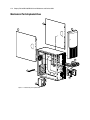
Mechanical Parts Exploded View.............................................................................1-2
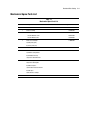
Mechanical Spare Parts List .....................................................................................1-3
System Components Exploded View .......................................................................1-4
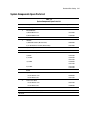
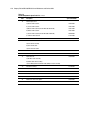
System Components Spare Parts List .......................................................................1-5
Chapter 2
Removal and Replacement Procedures
Electrostatic Discharge Information.........................................................................2-2
Symbols on Equipment ............................................................................................2-3
Preparation Procedures.............................................................................................2-4
Powering Down the Server................................................................................2-4
Server Warnings and Precautions......................................................................2-4
Front Bezel ...............................................................................................................2-5
Access Panel.............................................................................................................2-6
Storage Devices........................................................................................................2-7
Bezel Blanks......................................................................................................2-8
Drive Tray .........................................................................................................2-9
ATA Hard Drive Compartment (ProLiant ML330e Server) ...........................2-10
SCSI Hard Drive Compartment (ProLiant ML330 Server).............................2-12
Hard Drives .....................................................................................................2-14
Power Switch..........................................................................................................2-15
Fan..........................................................................................................................2-17
Cable Routing Diagrams ........................................................................................2-18
Processor with Heatsink .........................................................................................2-21
Memory Modules ...................................................................................................2-23
Removing a Memory Module ................................................................................2-25
Expansion Slots ......................................................................................................2-26
Server Feature Board..............................................................................................2-27