1
Using the Navigation Buttons
OK
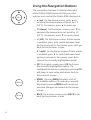
The navigation buttons located on the right
of the Daikin ENVi thermostat let you select
options and control the Daikin ENVi thermostat.
▲ (up) On the Home screen, press ▲ to
increase the temperature set point by 1°F
(0.5°C). For menus, press ▲ to move up.
▼ (down) On the Home screen, press ▼ to
decrease the temperature set point by 1°F
(0.5°C). For menus, press ▼ to move down.
◀ (left) On the Home screen, if Auto mode
is enabled, press ◀ to switch between heat
and cool set points. For menus, press ◀ to go
back to the previous screen.
▶ (right) On the Home screen, if Auto mode
is enabled, press ▶ to switch between heat
and cool set points. For menus, press ▶ to
choose the currently highlighted option.
OK On a menu screen, press OK to choose
the currently highlighted option. If a
configuration option is selected, pressing OK
will keep its new value and return back to
the previous screen.
MENU
BACK
4
MENU Pressing MENU displays a list of
all available options. If a menu is currently
displayed, pressing MENU will cancel any
unsaved changes and return to the Home
screen.
BACK On a menu screen, press BACK to go
back to the previous screen.