1
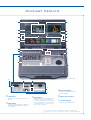
D
G
F
C
E
B
H
H
A
I
4
5
3
6
2
7
1
8
9
10
11
13
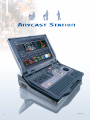
Simulated image
Front view
14
G: Audio Level Display
12
Left Side Panel
D: PVW Viewer
Displays the next source selected for output after the
transition.
E: Effect Display
The currently selected effect pattern is indicated with
an effect icon. Effect and DSK transition durations
are also displayed.
F: Guide Display
Displays guides for controlling compatible Sony
Pan/Tilt/Zoom cameras such as zoom, pan, tilt,
focus, and iris. Also displays the camera position
memory numbers/names of a camera selected
on the NEXT button row, as well as the general
menu selections and settings.
Displays the audio output levels of PGM,
MIX, AUX1, and AUX2.
H : Built-in Stereo Speakers
I : Key Status Display
Indicates the status (On/Off) of the key.
* Please contact your nearest Sony office or authorized dealer for information on compatible displays.
**Please contact your nearest Sony office or authorized dealer for information on compatible keyboards and mice.
5