1
2
QuickStat Installation & Operation Manual
Installation
Important: This thermostat must be installed according to all national
and local electrical codes. The installation must be performed by qualified personnel.
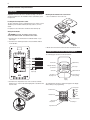
Mounting the thermostat in the electrical box
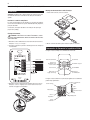
1. Use a screwdriver to remove the cover.
Locating the floor temperature sensor
The floor temperature sensor is installed under the floor surface. See the
QuickNet System Installation Manual (H57704), Section 6, for more
details.
If required, the sensor cable can be extended to about 300 ft (91 m).
Wiring the thermostat
WARNING: TURN OFF THE POWER TO THE CIRCUIT
AT THE MAIN POWER PANEL TO AVOID ELECTRIC SHOCK.
1. Connect power to the thermostat’s line terminals marked “L1 (L)”
and “L2 (N)”.
2. Connect the floor warming cold lead to the load terminals marked
“Load 16A Max”.
2. Mount the thermostat in the wall socket and re-attached the cover.
Thermostat Controls and Display Symbols
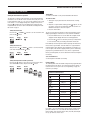
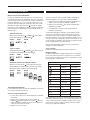
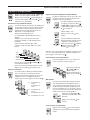
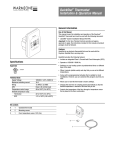
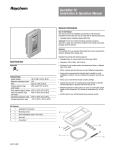
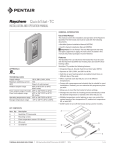
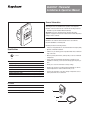
The following figure shows the thermostat controls:
QuickStat®
GFCI Class A
LINE
Line (black)
L1 (L)
240/(120)VAC
Neutral (white)
L2 (N)
SENSOR
LOAD
16A
Max.
Cold lead
Reset button
Cold lead
Red light indicating
ground-fault
Adjustment up
Reset
OK - accept
GFCI
Test
1/4" (6 mm)
Strip length
R
Test button
Adjustment down
Pin button for
adjusting clock
Reset button for
factory settings
Digital
display
3. Connect the floor temperature sensor to the screw-less terminals
marked “Sensor”. Push on the terminal spring with a screwdriver and
insert the wires.
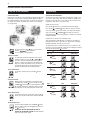
The following figure shows the symbols that appear in the display
window while you are programming:
A
C
)
)V
A
(L
L1
20
(N
)
(1
0/
Hig UT
po h VolION
wer ta :
su ge pp D
ly is
co
be
DU
fore nnec
38 AL V
se t
40
rvic
19 W OLT
20 /240 AG
ing
W/2 V E
12 AC 50/6
0V (1 0
AC 6A Hz
(16A)
)
E
N
S
O
R
1
M 6A
ax
.
LO
A
D
Night
S
24
Wake
L2
Q
G uic
F k
s
LI CI Sta
N Cla t
E s
®
4-event symbol:
Clock function
Out
CA
Manual mode
Home
% switch-on time
Time and
temperature
Day number
Heating on