1
4200 Transmitters
July 2013
Instruction Manual
D200354X012
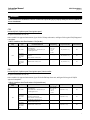
The following procedure sets the high and low position switches, and the deadband for each of them. The high
position switch must be adjusted before the low position switch. Use an ohmmeter connected between the normally
closed (NC) and common (C) connections on terminal block TB1 (high switch) or TB2 (low switch) to observe relay
switching action as directed by the procedures.
The potentiometer alignment procedures must be performed before calibrating the position switch circuits. For
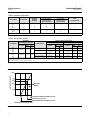
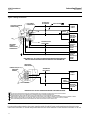
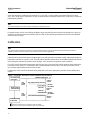
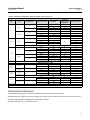
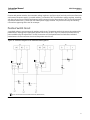
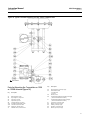
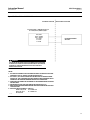
transmitter and position switch switch conditions, refer to figure 7 while performing the following calibration:
1. If necessary, perform the potentiometer alignment procedure.
2. Remove power from the instrument.
3. Remove the transmitter covers. Note that you will need to loosen the set screws (key 106) before removing the
covers.
4. To provide an indication of switch conditions, remove power from the instrument. Disconnect the position switch
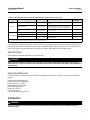
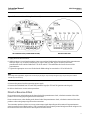
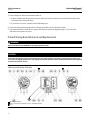
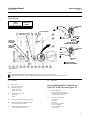
field wiring from TB1 and TB2, and connect an ohmmeter to TB1 between the (NC) and (C) terminals (figure 4).
Turn both the high and low deadband potentiometers (DBH, R4, and DBL, R5) fully counterclockwise to set the
deadbands to minimum and set the low position switch potentiometer (LOW, R6) fully counterclockwise.
Note
The potentiometers are 25 turn trimpots with a slip clutch. To set these potentiometers at their maximum counterclockwise
position, turn them 25 or more turns in the counterclockwise direction.
Setting the High Position Switch
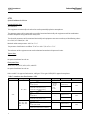
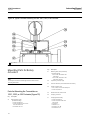
For 4210, 4220, 4212, 4222, and 4215 direct acting transmitters, refer to figure 5 for location of adjustments.
1. Turn the high position switch potentiometer (HIGH, R3) fully clockwise.
2. Stroke the valve or device to the point of travel where the high position switch is to operate (see figure 7).
3. Apply power to the instrument.
4. Turn the high position switch potentiometer (R3) slowly counterclockwise until the high position switch trips, the
ohmmeter changes from a high resistance to a low resistance reading.
5. The high position switch is now set.
Setting the High Position Switch Deadband
1. Slowly stroke the actuator or device between the tripped and reset point of the high position switch. Observe this
by the changing readings of the ohmmeter. Note the differences in travel between the trip point and reset points.
This is the deadband of the switch.
2. If necessary, increase the deadband by turning the potentiometer (DBH, R4), clockwise.
3. Repeat steps 1 and 2 until the desired deadband setting is obtained.
Setting the Low Position Switch
Note
Perform the high position switch adjustment procedures before adjusting the low position switch.
24