1
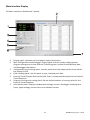
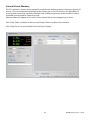
Main Interface Display The Main interface is divided into 7 panels. 1.
2.
3.
4.
5.
6.
7.
Display panel: Indicates real‐time power supply information. Main Configuration and Datalogger Display panel: Use this panel to adjust general program settings and to view External Timed Programs, Internal Preset Memory data, and Datalogger information. Voltage and Current setting panel: Use this panel to set the output values and to switch the output On/Off. Data handling panel: Use this panel to save, load and print data. External Timed Program Description field: Enter a customized description for an External Timed Sequence. Program running cycle setting panel: Set the desired number of running cycles for the External Timed Sequence. Information panel: Displays the Maximum voltage/ current, Datalogger Sampling time (rate), upper voltage/ current limits, and software version. 12
DCP60‐en‐EU_V1.5 9/14