1
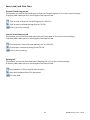
Save, Load, and Print Data External Timed Program tab The buttons are used to Save and Load an External Timed Program or Print the current settings. If desired, add a description in the Program Description field. Click to save an External Timed Program to a CSV file. Click to open and load settings from a CSV file. Click to print the settings. Internal Preset Memory tab The buttons are used to Save and Load Internal Preset data or Print the current settings. If desired, add a description in the Program Description field. Click to save an Internal Preset Memory set to a CSV file. Click to open and load a setting from CSV file. Click to print a setting. Datalog tab The buttons are used to Save and Load a Datalog file or Print the current settings. If desired, add a description in the Program Description field. Save the data in CSV format for later analysis. Open and load data from CSV document. Print the data. 18
DCP60‐en‐EU_V1.5 9/14