1
NetLinx Programming of DXLink Transmitters and Receivers
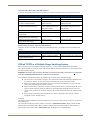
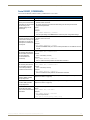
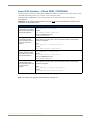
Common DXLink Transmitter / Receiver SEND_COMMANDs
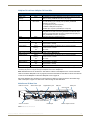
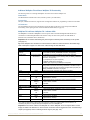
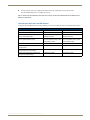
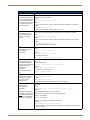
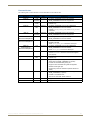
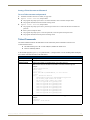
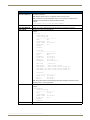
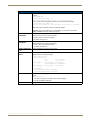
Common NetLinx SEND_COMMANDs for the DXLink Transmitters and Receivers are provided in the following table.
These commands can be sent to any port (the #3 Toggle must be set to ON).
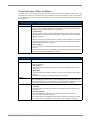
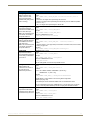
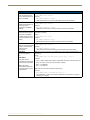
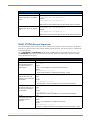
Common NetLinx SEND-COMMANDs (Transmitters and Receivers)
Command
Description
?FWVERSION
Syntax:
SEND_COMMAND <DEV>,"'?FWVERSION'"
Requests the firmware
Example:
version of the
TX or RX.
SEND_COMMAND dvRX,"'?FWVERSION'"
Returns a COMMAND of the form:
FWVERSION <version-string>
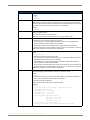
LED-DIS
Syntax:
LED-DIS
Disable all LEDs to the
Example:
right of the Program
port.
SEND_COMMAND DEVICE_1,"'LED-DIS'"
Disables all LEDs to the right of the Program port on DEVICE_1.
Note: This parameter does not get stored in non-volatile memory. LEDs are enabled by default
at each power-up.
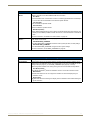
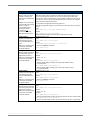
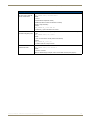
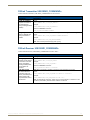
LED-EN
Syntax:
Enable all LEDs to the
right of the Program
port (default).
Example:
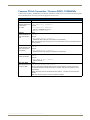
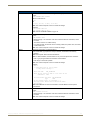
REBOOT
Syntax:
LED-EN
SEND_COMMAND DEVICE_1,"'LED-EN'"
Enables all LEDs to the right of the Program port on DEVICE_1.
Reboot the module.
REBOOT
Example:
SEND_COMMAND DEVICE_1,"'REBOOT'"
Reboots DEVICE_1.
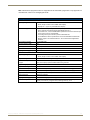
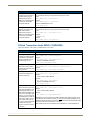
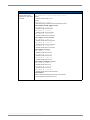
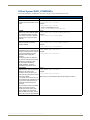
SET_NDX_DESC
Syntax:
SET_NDX_DESC-friendly name:location
Set Friendly name and
Max of 25 characters for friendly name and max of 25 characters for location. If more than
location for NDP.
25 characters are sent for either friendly name or location, they will be truncated to a max of
25 characters.
Neither the friendly name nor the location should contain a “:” character, as that is used as a
delimiter.
Note: This command requires a reboot to enable new settings.
Instruction Manual – DXLink™ Twisted Pair Transmitters/Receiver
95