1
2.5 Dual Monitor and Surround Display Features
Dual Monitor Feature
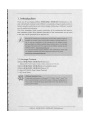
This motherboard supports dual monitor feature. With the internal VGA output support (HDMI and D-Sub), you can easily enjoy the benefits of dual monitor feature
without installing any add-on VGA card to this motherboard. This motherboard also
provides independent display controllers for HDMI and D-Sub to support dual VGA
output so that HDMI and D-sub can drive same or different display contents.
To enable dual monitor feature, please follow the below steps:
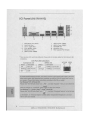
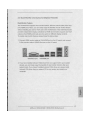
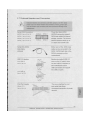
1. Connect HDMI monitor cable to VGA/HDMI port on the I/O panel, and connect
D-Sub monitor cable to VGA/D-Sub port on the I/O panel.
L *
f * .
VGA/D-Sub port
VGA/HDMI port
2. If you have installed onboard VGA driver from our support CD to your system
already, you can freely enjoy the benefits of dual monitor function after your
system boots. If you haven't installed onboard VGA driver yet, please install
onboard VGA driver from our support CD to your system and restart your
computer.
.52
O)
C
LU
17
ASRock H61 M-HVGS / H61 M-HVS Motherboard