1
INSTALLING THE EMC38-12
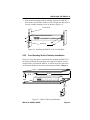
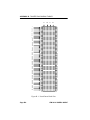
3. With the rack mounting brackets installed, position the EMC38-12
between the vertical frame members of the 19-inch rack and fasten it
securely with the mounting screws as shown in Figure 2-2.
19-Inch Rack
EMC38-12
PWR
TPLINK
XMT
RCV
FOLNK
12 11 10 9 8 7 6 5 4 3 2 1
Ethernet Media Converter WITH LANVIEW
RX TX
RX TX
RX TX
RX TX
RX TX
RX TX
RX TX
RX TX
RX TX
RX TX
RX TX
RX TX
12
11
10
9
8
7
6
5
4
3
2
1
Screws (4)
Figure 2-2. Installing the EMC38-12 in a 19-Inch Rack
2.2.2
Free-Standing Shelf or Tabletop Installation
Figure 2-3 shows the surface requirements for installing the EMC38-12
on a shelf or tabletop. Shelving units must support 30 pounds of static
weight. Before you install the EMC38-12, ensure the power source and
enviromental conditions meet the requirements specified in Chapter 1.
21 IN.
18 IN.
EMC38-12 Ethernet Media Converter WITH LANVIEW
6 IN.
PWR
TPLINK
XMT
RCV
FOLNK
RX TX
12 11 10 9 8 7 6 5 4 3 2 1
12
RX TX
RX TX
RX TX
RX TX
RX TX
RX TX
RX TX
RX TX
RX TX
RX TX
RX TX
11
10
9
8
7
6
5
4
3
2
1
7 FT.
Figure 2-3. Shelf or Table-top Installation
EMC38-12 USER’S GUIDE
Page 2-3