1
COMPUTER SETUP 5
This setup allows the CPU to learn a new device or sensor such as the hub, heart rate strap and
optional cadence sensor. NOTE: This process only needs to be used if a new sensor or hub is
being used in conjunction with your CPU or vice versa. There are 2 Learn sequences, 1 and 2.
Learn 1 is used when you have switched sensors or the CPU and there are no other like bikes
with PowerTap within a 30’ radius. Learn 2 is used if there are other devices in the area but
requires you to remove and reinsert the battery for that device before activating the Learn 2
sequence.
Set
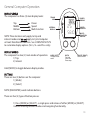
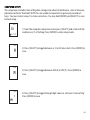
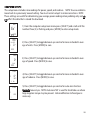
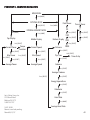
1) From the computer setup main menu press [SELECT] and scroll until the
number five (5) is flashing and press [MODE] to enter setup mode.
t
Ed
12345
2) Press [SELECT] to toggle through the digit values to set the Hub ID.
Press [MODE] to advance to the next digit. After the last digit is set,
press [MODE] to save.
hub
Id
Note: Use either Learn 1 or Learn 2 to set the hub ID when the
numberical value is not known. (Most cases) Make sure the hub is awake by
spinning the wheel or axel.
45847
hub
1
Id
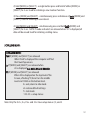
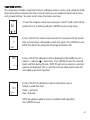
3) Initiate Learn 1 by holding [SELECT] until “Learn” begins to flash.
Learn 1 will search for any active hub so be sure there are no other native
hubs in the area. When the search is complete press [MODE] to advance to
Learn 2.
Note: If Learn 1 was successful, learn 2 is not necessary.
LEArn
hub
1
Id
LEArn
flashing
hub
2
Id
LEArn
hub
2
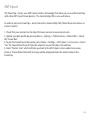
4) Initiate Learn 2 by first removing the batteries from the hub for 5
seconds and replacing them. Then hold [Select] until "Learn" begins to
flash. When the CPU has learned the hub I.D. it will display the I.D.
Press [Mode] to save and proceed to the next device I.D. If it did not learn
the device it will take you back to the most recent Hub I.D.
Id
LEArn
flashing
31