1
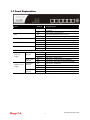
1.1 Panel Explanation
LED
Status
Explanation
ACT (Activity)
Blinking
Off
On
Blinking
On
Off
On
Blinking
On
Blinking
The router is powered on and running
normally.
The router is powered off.
The DoS/DDoS function is active.
It will blink while detecting an attack.
DMZ Host is specified in certain site.
DMZ Host is inactive.
The WAN1 or WAN2 connection is ready.
It will blink while transmitting data.
USB device is connected and ready for use.
The data is transmitting.
On
Off
Blinking
On
Off
On
Off
Blinking
On
Off
The port is connected.
The port is disconnected.
The data is transmitting.
The port is connected with 1000Mbps.
The port is disconnected with 10/100Mbps.
The port is connected.
The port is disconnected.
The data is transmitting.
The port is connected with 1000Mbps.
The port is disconnected with 10/100Mbps.
DoS
DMZ
WAN1 ~ WAN4
USB1 ~ USB2
LED on Connector
Left LED
LAN 1/2
(Green)
(Giga)
WAN 1/2/3/4
(Giga)
Right LED
(Green)
Left LED
(Green)
Right LED
(Green)
3
Vigor300B Quick Start Guide