1
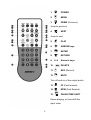
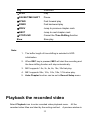
You can use PLAY CONTROL keys to pause, fast forward, and fast
backward play the video, photo, and music.
Key
Function
PLAY
Start to play
PAUSE
Pause
FFWD
Fast forward play
FRWD
Fast backward play
PREV
Jump to previous photo, or music file
NEXT
Jump to next photo, or music file
STOP
Stop the playing, a green indication displayed
SLOW
Slow playing video file
When previewing a file, only selected media type will be shown on the
media type bar, you can not change the media type. You can press i, j
key to select other folder, all media types will be shown, press g, h key to
change media type. You may press i, j key to select other folder and
press ENTER key to browse.
ME1 supports 1.5x, 2x, 4x, 8x, 16x, 32x fast play and 3/4x, 1/2x, 1/4x, 1/8x,
1/16x slow play
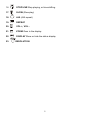
You can press DELETE key to delete the selected file.
B. USB port
You may store your multimedia files in USB flash drive, USB hard disk
drive, or memory card.
ME1 can browse the files from USB flash drive,
USB hard disk drive, and USB card reader directly. You need to have a
USB card reader (Not supplied) to read the files in memory card.
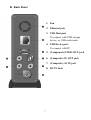
Plug USB storage device or USB card reader to USB Host port on the
back panel.
30