1
Getting Started
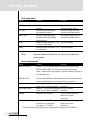
First setup panel
Setting
Function
Adjusting
LCD Sleep
Sets how long the touchscreen
stays on.
Sets how long the backlight of
the touchscreen stays on.
Sets how long the backlight of
the direct-access and Left/Right
buttons stays on.
Selects the beep volume (Off, 1,2,3)
for Touch Screen buttons
Selects the beep volume (Off, 1,2,3)
for Hard buttons.
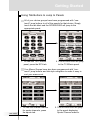
Tap the LCD button and use
the Left and Right buttons.
Tap the LCD Light button and
use the Left and Right buttons.
Tap the Button Light button and
use the Left and Right buttons.
LCD Light
Button Light
Touch
Button
Note:
Tap the LCD button.
Tap the LCD button.
Use the down scroll arrow to move to the second
setup panel.
Second setup panel
Setting
Mode Menu Active
SPECIAL NOTE
Function
Adjusting
Deactive - Turns off the Mode Menu Icon so the user cannot access
SETUP, LEARN, LABEL etc. Good when children are tech-savvy.
Active - Normal. Anyone can program or adjust the Remote by tapping on
the Mode Menu icon.
To access the MODE menu after deactivating it, press and hold the spot
where the Mode Menu icon used to be for five or six seconds.
Macro Menu Active
DeActive - Turns off Macro Navigation.Tap the LCD button
Active- Turns on Macro Navigation. repeatedly.
Device Menu Active
DeActive - Turns off Device Navigation.Tap the LCD button
Active- Turns on Device Navigation. repeatedly.
Calibrate
Calibrates the touchscreen.
Tap the Calibrate button and
follow the on-screen
instructions.
Revert*
Reverts the RC9200/5200 to
Tap the Revert button and
the Revert 2.01 configuration
follow the on-screen
(see pages 15, 17 and 57).
instructions.
*The Revert button will only appear if one change has been made to the RC9200/520o
User Guide
14