1
Prioritize your voice traffic
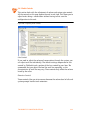
If your Internet connection is shared between computers and TalkSwitch
(i.e. data and voice), it is critical that the voice traffic has priority over the
data traffic. Many routers support Quality of Service (QoS) routing for this
purpose. If your router supports QoS, ensure that it is enabled (see your
router documentation for configuration details).
DDNS Support
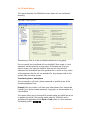
If you are using Dynamic Domain Name Service (DDNS) to manage the IP
address of the SIP server, ensure that your router(s) support the specific
DDNS service that you are using.
5.3 SETTING UP A VOIP NETWORK
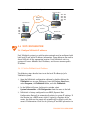
A TalkSwitch VoIP network can be set up in 4 steps:
1. Connect a TalkSwitch or SIP-compatible gateway at each location.
2. Select a TalkSwitch to use as the SIP network server.
3. Assign phone numbers to each VoIP location.
4. Configure TalkSwitch to make and manage VoIP calls.
5.3.1 Connect TalkSwitch or SIP-compatible gateways
In order to create a VoIP network, a VoIP-equipped TalkSwitch or a VoIP
compatible gateway, such as a Mediatrix® 2102, is required at each location.
Each location in a multi-location network can support up to 4 TalkSwitch
units, with a maximum of 32 local extensions (analog and/or IP phones) and
16 VoIP lines per location.
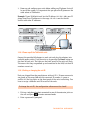
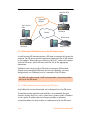
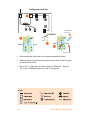
Example: Figure 118 on page 166 shows a multi-location network where two
locations are equipped with TalkSwitch systems and a teleworker is equipped
with a Mediatrix 2102 device. TalkSwitch and the Mediatrix 2102 route VoIP
calls over the Internet, while local calls are routed over the regular
(traditional) telephone network.
VOIP INFORMATION
165