1
FS1-X
Installation & Operation Guide
Version 1.0
Published: April 23, 2014
Table of Contents
Notices . . . . . . . . . . . . . . . . . . . . . . . . . . . . . . . . . . . . . . . . . . . . . . . . . . . . . . . . 9
Trademarks . . . . . . . . . . . . . . . . . . . . . . . . . . . . . . . . . . . . . . . . . . . . . . . . . . . . . . . . . . . . . . . . . . . . . . . 9
Copyright . . . . . . . . . . . . . . . . . . . . . . . . . . . . . . . . . . . . . . . . . . . . . . . . . . . . . . . . . . . . . . . . . . . . . . . . . 9
Contacting Support . . . . . . . . . . . . . . . . . . . . . . . . . . . . . . . . . . . . . . . . . . . . . . . . . . . . . . . . . . . . . . . 9
Chapter 1: Introduction . . . . . . . . . . . . . . . . . . . . . . . . . . . . . . . . . . . . . . .10
Overview. . . . . . . . . . . . . . . . . . . . . . . . . . . . . . . . . . . . . . . . . . . . . . . . . . . . . . . . . . . . . . . . . . . . . . . . .
Video Features . . . . . . . . . . . . . . . . . . . . . . . . . . . . . . . . . . . . . . . . . . . . . . . . . . . . . . . . . . . . . . .
Audio Features. . . . . . . . . . . . . . . . . . . . . . . . . . . . . . . . . . . . . . . . . . . . . . . . . . . . . . . . . . . . . . .
Other Features . . . . . . . . . . . . . . . . . . . . . . . . . . . . . . . . . . . . . . . . . . . . . . . . . . . . . . . . . . . . . . .
Typical Applications. . . . . . . . . . . . . . . . . . . . . . . . . . . . . . . . . . . . . . . . . . . . . . . . . . . . . . . . . .
FS1-X Control . . . . . . . . . . . . . . . . . . . . . . . . . . . . . . . . . . . . . . . . . . . . . . . . . . . . . . . . . . . . . . . . . . . .
Front Panel Control . . . . . . . . . . . . . . . . . . . . . . . . . . . . . . . . . . . . . . . . . . . . . . . . . . . . . . . . . .
Remote Web Browser Control . . . . . . . . . . . . . . . . . . . . . . . . . . . . . . . . . . . . . . . . . . . . . . . .
GPI Inputs and Outputs . . . . . . . . . . . . . . . . . . . . . . . . . . . . . . . . . . . . . . . . . . . . . . . . . . . . . .
SNMP Interface Monitoring. . . . . . . . . . . . . . . . . . . . . . . . . . . . . . . . . . . . . . . . . . . . . . . . . . .
Optional FS1-X Features . . . . . . . . . . . . . . . . . . . . . . . . . . . . . . . . . . . . . . . . . . . . . . . . . . . . . . . . . .
Frame Rate Converter (FRC) . . . . . . . . . . . . . . . . . . . . . . . . . . . . . . . . . . . . . . . . . . . . . . . . . .
Fiber I/O . . . . . . . . . . . . . . . . . . . . . . . . . . . . . . . . . . . . . . . . . . . . . . . . . . . . . . . . . . . . . . . . . . . . .
Technical Description. . . . . . . . . . . . . . . . . . . . . . . . . . . . . . . . . . . . . . . . . . . . . . . . . . . . . . . . . . . . .
Video Processors . . . . . . . . . . . . . . . . . . . . . . . . . . . . . . . . . . . . . . . . . . . . . . . . . . . . . . . . . . . . .
Audio Processor. . . . . . . . . . . . . . . . . . . . . . . . . . . . . . . . . . . . . . . . . . . . . . . . . . . . . . . . . . . . . .
Operation Overview . . . . . . . . . . . . . . . . . . . . . . . . . . . . . . . . . . . . . . . . . . . . . . . . . . . . . . . . . . . . . .
About Inputs and Outputs. . . . . . . . . . . . . . . . . . . . . . . . . . . . . . . . . . . . . . . . . . . . . . . . . . . .
About Reference and Genlock Source. . . . . . . . . . . . . . . . . . . . . . . . . . . . . . . . . . . . . . . . .
1 Channel vs. 2 Channel FS1-X Operation . . . . . . . . . . . . . . . . . . . . . . . . . . . . . . . . . . . . .
Sidebar Video Keying . . . . . . . . . . . . . . . . . . . . . . . . . . . . . . . . . . . . . . . . . . . . . . . . . . . . . . . .
Retained Settings . . . . . . . . . . . . . . . . . . . . . . . . . . . . . . . . . . . . . . . . . . . . . . . . . . . . . . . . . . . .
In This Manual. . . . . . . . . . . . . . . . . . . . . . . . . . . . . . . . . . . . . . . . . . . . . . . . . . . . . . . . . . . . . . . . . . . .
10
10
11
11
11
11
12
12
12
12
12
12
12
13
13
14
14
14
14
15
15
15
16
Chapter 2: Controls, Indicators, and Connections. . . . . . . . . . . . . . . .17
Overview. . . . . . . . . . . . . . . . . . . . . . . . . . . . . . . . . . . . . . . . . . . . . . . . . . . . . . . . . . . . . . . . . . . . . . . . .
Front Panel Description. . . . . . . . . . . . . . . . . . . . . . . . . . . . . . . . . . . . . . . . . . . . . . . . . . . . . . . . . . .
Alphanumeric Display . . . . . . . . . . . . . . . . . . . . . . . . . . . . . . . . . . . . . . . . . . . . . . . . . . . . . . . .
Operational Summary . . . . . . . . . . . . . . . . . . . . . . . . . . . . . . . . . . . . . . . . . . . . . . . . . . .
Pushbuttons . . . . . . . . . . . . . . . . . . . . . . . . . . . . . . . . . . . . . . . . . . . . . . . . . . . . . . . . . . . . . . . . .
Control Knobs . . . . . . . . . . . . . . . . . . . . . . . . . . . . . . . . . . . . . . . . . . . . . . . . . . . . . . . . . . . . . . .
LED Indicators . . . . . . . . . . . . . . . . . . . . . . . . . . . . . . . . . . . . . . . . . . . . . . . . . . . . . . . . . . . . . . .
Incompatibility Alarms . . . . . . . . . . . . . . . . . . . . . . . . . . . . . . . . . . . . . . . . . . . . . . . . . . . . . . .
Incompatible Video Formats . . . . . . . . . . . . . . . . . . . . . . . . . . . . . . . . . . . . . . . . . . . . .
Example Reference and Video Incompatibility Alarms . . . . . . . . . . . . . . . . . . . . .
Rear Panel Description. . . . . . . . . . . . . . . . . . . . . . . . . . . . . . . . . . . . . . . . . . . . . . . . . . . . . . . . . . . .
Connectors . . . . . . . . . . . . . . . . . . . . . . . . . . . . . . . . . . . . . . . . . . . . . . . . . . . . . . . . . . . . . . . . . .
17
17
17
18
18
20
21
22
22
22
24
24
Chapter 3: Installation & Configuration . . . . . . . . . . . . . . . . . . . . . . . . .26
Installation Overview . . . . . . . . . . . . . . . . . . . . . . . . . . . . . . . . . . . . . . . . . . . . . . . . . . . . . . . . . . . . .
Installation Summary. . . . . . . . . . . . . . . . . . . . . . . . . . . . . . . . . . . . . . . . . . . . . . . . . . . . . . . . .
Unpacking . . . . . . . . . . . . . . . . . . . . . . . . . . . . . . . . . . . . . . . . . . . . . . . . . . . . . . . . . . . . . . . . . . . . . . .
Shipping Box Contents . . . . . . . . . . . . . . . . . . . . . . . . . . . . . . . . . . . . . . . . . . . . . . . . . . . . . . .
Installing Optional Fiber Optic I/O Modules . . . . . . . . . . . . . . . . . . . . . . . . . . . . . . . . . . . . . . .
FS1-X Chassis Installation . . . . . . . . . . . . . . . . . . . . . . . . . . . . . . . . . . . . . . . . . . . . . . . . . . . . . . . . .
FS1-X v1.0
2
26
26
27
27
27
28
www.aja.com
Physical Requirements for Mounting the Chassis . . . . . . . . . . . . . . . . . . . . . . . . . . . . . .
Chassis Dimensions . . . . . . . . . . . . . . . . . . . . . . . . . . . . . . . . . . . . . . . . . . . . . . . . . . . . . .
Cabling and Cooling Requirements. . . . . . . . . . . . . . . . . . . . . . . . . . . . . . . . . . . . . . .
Power Requirements . . . . . . . . . . . . . . . . . . . . . . . . . . . . . . . . . . . . . . . . . . . . . . . . . . . . . . . . .
Networking . . . . . . . . . . . . . . . . . . . . . . . . . . . . . . . . . . . . . . . . . . . . . . . . . . . . . . . . . . . . . . . . . . . . . .
FS1-X Default Network Settings. . . . . . . . . . . . . . . . . . . . . . . . . . . . . . . . . . . . . . . . . . . . . . .
Networking Using DHCP or Default Static IP. . . . . . . . . . . . . . . . . . . . . . . . . . . . . . . . . . .
Networking the FS1-X Using Your Own Static IP . . . . . . . . . . . . . . . . . . . . . . . . . . . . . . .
Using Ping to Test the Network Connection . . . . . . . . . . . . . . . . . . . . . . . . . . . . . . . . . . .
Mac Ping Procedure . . . . . . . . . . . . . . . . . . . . . . . . . . . . . . . . . . . . . . . . . . . . . . . . . . . . .
Windows PC Ping Procedure . . . . . . . . . . . . . . . . . . . . . . . . . . . . . . . . . . . . . . . . . . . . .
Web Browser Control . . . . . . . . . . . . . . . . . . . . . . . . . . . . . . . . . . . . . . . . . . . . . . . . . . . . . . . . . . . . .
Software Update Installation. . . . . . . . . . . . . . . . . . . . . . . . . . . . . . . . . . . . . . . . . . . . . . . . . . . . . .
Download the Latest Software. . . . . . . . . . . . . . . . . . . . . . . . . . . . . . . . . . . . . . . . . . . . . . . .
Unpack the Software . . . . . . . . . . . . . . . . . . . . . . . . . . . . . . . . . . . . . . . . . . . . . . . . . . . . . . . . .
Uploading and Installing the Software to the FS1-X . . . . . . . . . . . . . . . . . . . . . . . . . . .
System Cabling. . . . . . . . . . . . . . . . . . . . . . . . . . . . . . . . . . . . . . . . . . . . . . . . . . . . . . . . . . . . . . . . . . .
System Video/Audio Cable Connections . . . . . . . . . . . . . . . . . . . . . . . . . . . . . . . . . . . . . .
GPI Connections . . . . . . . . . . . . . . . . . . . . . . . . . . . . . . . . . . . . . . . . . . . . . . . . . . . . . . . . . . . . .
FS1-X Audio Level Choices—Pro or Consumer, US or EBU. . . . . . . . . . . . . . . . . . . . . .
Stand Alone Tests . . . . . . . . . . . . . . . . . . . . . . . . . . . . . . . . . . . . . . . . . . . . . . . . . . . . . . . . . . . . . . . .
First Power Up . . . . . . . . . . . . . . . . . . . . . . . . . . . . . . . . . . . . . . . . . . . . . . . . . . . . . . . . . . . . . . .
Setup. . . . . . . . . . . . . . . . . . . . . . . . . . . . . . . . . . . . . . . . . . . . . . . . . . . . . . . . . . . . . . . . . . . .
Procedure . . . . . . . . . . . . . . . . . . . . . . . . . . . . . . . . . . . . . . . . . . . . . . . . . . . . . . . . . . . . . . .
Internal Test Signals to All Outputs . . . . . . . . . . . . . . . . . . . . . . . . . . . . . . . . . . . . . . . . . . .
Setup. . . . . . . . . . . . . . . . . . . . . . . . . . . . . . . . . . . . . . . . . . . . . . . . . . . . . . . . . . . . . . . . . . . .
Procedure . . . . . . . . . . . . . . . . . . . . . . . . . . . . . . . . . . . . . . . . . . . . . . . . . . . . . . . . . . . . . . .
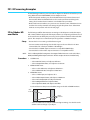
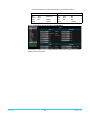
FS1-X Processing Examples . . . . . . . . . . . . . . . . . . . . . . . . . . . . . . . . . . . . . . . . . . . . . . . . . . . . . . .
SD to Sidebar HD over Matte . . . . . . . . . . . . . . . . . . . . . . . . . . . . . . . . . . . . . . . . . . . . . . . . .
Setup. . . . . . . . . . . . . . . . . . . . . . . . . . . . . . . . . . . . . . . . . . . . . . . . . . . . . . . . . . . . . . . . . . . .
Procedure . . . . . . . . . . . . . . . . . . . . . . . . . . . . . . . . . . . . . . . . . . . . . . . . . . . . . . . . . . . . . . .
HD to Letterbox SD over Video . . . . . . . . . . . . . . . . . . . . . . . . . . . . . . . . . . . . . . . . . . . . . . .
Setup. . . . . . . . . . . . . . . . . . . . . . . . . . . . . . . . . . . . . . . . . . . . . . . . . . . . . . . . . . . . . . . . . . . .
Procedure . . . . . . . . . . . . . . . . . . . . . . . . . . . . . . . . . . . . . . . . . . . . . . . . . . . . . . . . . . . . . . .
Conversion Across Frame Rate Families . . . . . . . . . . . . . . . . . . . . . . . . . . . . . . . . . . . . . . .
Setup. . . . . . . . . . . . . . . . . . . . . . . . . . . . . . . . . . . . . . . . . . . . . . . . . . . . . . . . . . . . . . . . . . . .
Procedure . . . . . . . . . . . . . . . . . . . . . . . . . . . . . . . . . . . . . . . . . . . . . . . . . . . . . . . . . . . . . . .
28
28
28
28
29
30
30
30
32
33
33
33
33
33
34
34
35
35
35
35
37
37
37
37
38
38
38
39
39
39
39
40
40
40
40
41
41
Chapter 4: Display Menus. . . . . . . . . . . . . . . . . . . . . . . . . . . . . . . . . . . . . .43
Overview. . . . . . . . . . . . . . . . . . . . . . . . . . . . . . . . . . . . . . . . . . . . . . . . . . . . . . . . . . . . . . . . . . . . . . . . .
Parameter Menus . . . . . . . . . . . . . . . . . . . . . . . . . . . . . . . . . . . . . . . . . . . . . . . . . . . . . . . . . . . .
Menu Operation Examples . . . . . . . . . . . . . . . . . . . . . . . . . . . . . . . . . . . . . . . . . . . . . . . . . . .
Status Pages . . . . . . . . . . . . . . . . . . . . . . . . . . . . . . . . . . . . . . . . . . . . . . . . . . . . . . . . . . . . .
Simple Menus: Config Format Alarm Filters . . . . . . . . . . . . . . . . . . . . . . . . . . . . . . .
Hidden Parameter Menus: Video ProcAmp. . . . . . . . . . . . . . . . . . . . . . . . . . . . . . . .
Multiple Field Parameters: IP Address. . . . . . . . . . . . . . . . . . . . . . . . . . . . . . . . . . . . .
Menu Parameter Interactions . . . . . . . . . . . . . . . . . . . . . . . . . . . . . . . . . . . . . . . . . . . . . . . . .
STATUS Menu Group . . . . . . . . . . . . . . . . . . . . . . . . . . . . . . . . . . . . . . . . . . . . . . . . . . . . . . . . . . . . .
I/O Status . . . . . . . . . . . . . . . . . . . . . . . . . . . . . . . . . . . . . . . . . . . . . . . . . . . . . . . . . . . . . . . . . . . .
Vid1 Format Status . . . . . . . . . . . . . . . . . . . . . . . . . . . . . . . . . . . . . . . . . . . . . . . . . . . . . . . . . . .
Vid1 Format Alarm Status . . . . . . . . . . . . . . . . . . . . . . . . . . . . . . . . . . . . . . . . . . . . . . . . . . . .
Vid2 Format Status . . . . . . . . . . . . . . . . . . . . . . . . . . . . . . . . . . . . . . . . . . . . . . . . . . . . . . . . . . .
Vid 2 Format Alarm Status . . . . . . . . . . . . . . . . . . . . . . . . . . . . . . . . . . . . . . . . . . . . . . . . . . . .
Output Status . . . . . . . . . . . . . . . . . . . . . . . . . . . . . . . . . . . . . . . . . . . . . . . . . . . . . . . . . . . . . . . .
FS1-X v1.0
3
43
43
44
44
44
45
46
47
47
48
48
48
48
48
49
www.aja.com
Power/Temp Alarm . . . . . . . . . . . . . . . . . . . . . . . . . . . . . . . . . . . . . . . . . . . . . . . . . . . . . . . . . .
Caption Status . . . . . . . . . . . . . . . . . . . . . . . . . . . . . . . . . . . . . . . . . . . . . . . . . . . . . . . . . . . . . . .
FRC Status . . . . . . . . . . . . . . . . . . . . . . . . . . . . . . . . . . . . . . . . . . . . . . . . . . . . . . . . . . . . . . . . . . .
System Status . . . . . . . . . . . . . . . . . . . . . . . . . . . . . . . . . . . . . . . . . . . . . . . . . . . . . . . . . . . . . . . .
REMOTE Menu Group . . . . . . . . . . . . . . . . . . . . . . . . . . . . . . . . . . . . . . . . . . . . . . . . . . . . . . . . . . . .
1 Remote Control . . . . . . . . . . . . . . . . . . . . . . . . . . . . . . . . . . . . . . . . . . . . . . . . . . . . . . . . . . . .
1.1 Authentication . . . . . . . . . . . . . . . . . . . . . . . . . . . . . . . . . . . . . . . . . . . . . . . . . . . . . . . . . . .
2.1–4 GPI IN 1–4 Response. . . . . . . . . . . . . . . . . . . . . . . . . . . . . . . . . . . . . . . . . . . . . . . . . . . .
3.1–4 GPI 1–4 OUT . . . . . . . . . . . . . . . . . . . . . . . . . . . . . . . . . . . . . . . . . . . . . . . . . . . . . . . . . . .
Interaction of Presets and GPIs . . . . . . . . . . . . . . . . . . . . . . . . . . . . . . . . . . . . . . . . . . . . . . .
Example of a Serial Recall . . . . . . . . . . . . . . . . . . . . . . . . . . . . . . . . . . . . . . . . . . . . . . . .
Example of an Unintended Recall. . . . . . . . . . . . . . . . . . . . . . . . . . . . . . . . . . . . . . . . .
CONFIG Menu Group . . . . . . . . . . . . . . . . . . . . . . . . . . . . . . . . . . . . . . . . . . . . . . . . . . . . . . . . . . . . .
1 System Name . . . . . . . . . . . . . . . . . . . . . . . . . . . . . . . . . . . . . . . . . . . . . . . . . . . . . . . . . . . . . .
Name Entry Procedure . . . . . . . . . . . . . . . . . . . . . . . . . . . . . . . . . . . . . . . . . . . . . . . . . . .
2.1 IP Config . . . . . . . . . . . . . . . . . . . . . . . . . . . . . . . . . . . . . . . . . . . . . . . . . . . . . . . . . . . . . . . . .
2.2 IP Address . . . . . . . . . . . . . . . . . . . . . . . . . . . . . . . . . . . . . . . . . . . . . . . . . . . . . . . . . . . . . . . .
Octet Value Entry Procedure . . . . . . . . . . . . . . . . . . . . . . . . . . . . . . . . . . . . . . . . . . . . .
2.3 Subnet Mask . . . . . . . . . . . . . . . . . . . . . . . . . . . . . . . . . . . . . . . . . . . . . . . . . . . . . . . . . . . . .
2.4 Default Gateway. . . . . . . . . . . . . . . . . . . . . . . . . . . . . . . . . . . . . . . . . . . . . . . . . . . . . . . . . .
3 MAC Address (view only) . . . . . . . . . . . . . . . . . . . . . . . . . . . . . . . . . . . . . . . . . . . . . . . . . . .
4 SNMP Menu Parameters . . . . . . . . . . . . . . . . . . . . . . . . . . . . . . . . . . . . . . . . . . . . . . . . . . . .
5 Power Supply Alarm . . . . . . . . . . . . . . . . . . . . . . . . . . . . . . . . . . . . . . . . . . . . . . . . . . . . . . . .
6.1 Vid1 Format Alarm. . . . . . . . . . . . . . . . . . . . . . . . . . . . . . . . . . . . . . . . . . . . . . . . . . . . . . . .
6.2 Vid2 Format Alarm. . . . . . . . . . . . . . . . . . . . . . . . . . . . . . . . . . . . . . . . . . . . . . . . . . . . . . . .
7 Reference Alarm. . . . . . . . . . . . . . . . . . . . . . . . . . . . . . . . . . . . . . . . . . . . . . . . . . . . . . . . . . . .
8 Hidden Menus . . . . . . . . . . . . . . . . . . . . . . . . . . . . . . . . . . . . . . . . . . . . . . . . . . . . . . . . . . . . .
9 Screen Saver . . . . . . . . . . . . . . . . . . . . . . . . . . . . . . . . . . . . . . . . . . . . . . . . . . . . . . . . . . . . . . .
10 Display Intensity . . . . . . . . . . . . . . . . . . . . . . . . . . . . . . . . . . . . . . . . . . . . . . . . . . . . . . . . . .
11 Fan Speed . . . . . . . . . . . . . . . . . . . . . . . . . . . . . . . . . . . . . . . . . . . . . . . . . . . . . . . . . . . . . . . .
12 Serial Number. . . . . . . . . . . . . . . . . . . . . . . . . . . . . . . . . . . . . . . . . . . . . . . . . . . . . . . . . . . . .
13 Software Version . . . . . . . . . . . . . . . . . . . . . . . . . . . . . . . . . . . . . . . . . . . . . . . . . . . . . . . . . .
14 Reboot . . . . . . . . . . . . . . . . . . . . . . . . . . . . . . . . . . . . . . . . . . . . . . . . . . . . . . . . . . . . . . . . . . .
PRESET Menu Group. . . . . . . . . . . . . . . . . . . . . . . . . . . . . . . . . . . . . . . . . . . . . . . . . . . . . . . . . . . . . .
1 Factory Preset . . . . . . . . . . . . . . . . . . . . . . . . . . . . . . . . . . . . . . . . . . . . . . . . . . . . . . . . . . . . . .
1.1-1.40 Presets #1-#40 . . . . . . . . . . . . . . . . . . . . . . . . . . . . . . . . . . . . . . . . . . . . . . . . . . . . . . .
Video with Audio Routing . . . . . . . . . . . . . . . . . . . . . . . . . . . . . . . . . . . . . . . . . . . . . . . . . . . .
Interaction of Presets and GPIs . . . . . . . . . . . . . . . . . . . . . . . . . . . . . . . . . . . . . . . . . . . . . . .
SYSTEM Menu Group . . . . . . . . . . . . . . . . . . . . . . . . . . . . . . . . . . . . . . . . . . . . . . . . . . . . . . . . . . . . .
1 Analog In Format. . . . . . . . . . . . . . . . . . . . . . . . . . . . . . . . . . . . . . . . . . . . . . . . . . . . . . . . . . .
2 Component Out Format . . . . . . . . . . . . . . . . . . . . . . . . . . . . . . . . . . . . . . . . . . . . . . . . . . . .
3 Analog Audio Std . . . . . . . . . . . . . . . . . . . . . . . . . . . . . . . . . . . . . . . . . . . . . . . . . . . . . . . . . .
4 SDI1 3G Detect . . . . . . . . . . . . . . . . . . . . . . . . . . . . . . . . . . . . . . . . . . . . . . . . . . . . . . . . . . . . .
5 SDI2 Input Protect . . . . . . . . . . . . . . . . . . . . . . . . . . . . . . . . . . . . . . . . . . . . . . . . . . . . . . . . . .
6 Fiber1 3G Detect . . . . . . . . . . . . . . . . . . . . . . . . . . . . . . . . . . . . . . . . . . . . . . . . . . . . . . . . . . .
7 Fiber2 Input Protect . . . . . . . . . . . . . . . . . . . . . . . . . . . . . . . . . . . . . . . . . . . . . . . . . . . . . . . .
8 Genlock Source . . . . . . . . . . . . . . . . . . . . . . . . . . . . . . . . . . . . . . . . . . . . . . . . . . . . . . . . . . . .
9 Output Frame Rates . . . . . . . . . . . . . . . . . . . . . . . . . . . . . . . . . . . . . . . . . . . . . . . . . . . . . . . .
10 FRC Enable. . . . . . . . . . . . . . . . . . . . . . . . . . . . . . . . . . . . . . . . . . . . . . . . . . . . . . . . . . . . . . . .
11 NTSC Standard . . . . . . . . . . . . . . . . . . . . . . . . . . . . . . . . . . . . . . . . . . . . . . . . . . . . . . . . . . . .
12 Composite Downconv. . . . . . . . . . . . . . . . . . . . . . . . . . . . . . . . . . . . . . . . . . . . . . . . . . . . .
13 HDMI RGB Range. . . . . . . . . . . . . . . . . . . . . . . . . . . . . . . . . . . . . . . . . . . . . . . . . . . . . . . . . .
14.0 AES/EBU SRC Mode. . . . . . . . . . . . . . . . . . . . . . . . . . . . . . . . . . . . . . . . . . . . . . . . . . . . . .
14.1–14.8 AES/EBU SRC. . . . . . . . . . . . . . . . . . . . . . . . . . . . . . . . . . . . . . . . . . . . . . . . . . . . . . .
FS1-X v1.0
4
49
49
49
49
50
50
50
50
52
52
52
52
52
52
52
53
53
53
53
53
54
54
54
54
54
55
55
55
55
55
55
55
55
56
56
56
56
57
57
57
57
57
57
58
59
59
59
59
59
60
60
60
61
61
www.aja.com
VIDEO PROC Menu Group . . . . . . . . . . . . . . . . . . . . . . . . . . . . . . . . . . . . . . . . . . . . . . . . . . . . . . . .
Video Input and Output . . . . . . . . . . . . . . . . . . . . . . . . . . . . . . . . . . . . . . . . . . . . . . . . . . . . . .
1.1 Video 1 Input. . . . . . . . . . . . . . . . . . . . . . . . . . . . . . . . . . . . . . . . . . . . . . . . . . . . . . . . .
1.2 Video 2 Input. . . . . . . . . . . . . . . . . . . . . . . . . . . . . . . . . . . . . . . . . . . . . . . . . . . . . . . . .
2 Output Format. . . . . . . . . . . . . . . . . . . . . . . . . . . . . . . . . . . . . . . . . . . . . . . . . . . . . . . . .
3 Video 1 Output Mode . . . . . . . . . . . . . . . . . . . . . . . . . . . . . . . . . . . . . . . . . . . . . . . . . .
Loss of Input . . . . . . . . . . . . . . . . . . . . . . . . . . . . . . . . . . . . . . . . . . . . . . . . . . . . . . . . . . . . . . . . .
4.1Video 1 Loss of Input. . . . . . . . . . . . . . . . . . . . . . . . . . . . . . . . . . . . . . . . . . . . . . . . . .
4.2 Video 2 Loss of Input . . . . . . . . . . . . . . . . . . . . . . . . . . . . . . . . . . . . . . . . . . . . . . . . .
Timing and Delay . . . . . . . . . . . . . . . . . . . . . . . . . . . . . . . . . . . . . . . . . . . . . . . . . . . . . . . . . . . .
5.1 Video 1 Output Timing H . . . . . . . . . . . . . . . . . . . . . . . . . . . . . . . . . . . . . . . . . . . . .
5.2 Video 1 Output Timing V . . . . . . . . . . . . . . . . . . . . . . . . . . . . . . . . . . . . . . . . . . . . .
5.3 Video 1 Frame Delay. . . . . . . . . . . . . . . . . . . . . . . . . . . . . . . . . . . . . . . . . . . . . . . . . .
5.4 Video 2 Output Timing H . . . . . . . . . . . . . . . . . . . . . . . . . . . . . . . . . . . . . . . . . . . . .
5.5 Video 2 Output Timing V . . . . . . . . . . . . . . . . . . . . . . . . . . . . . . . . . . . . . . . . . . . . .
5.6 Video 2 Frame Delay. . . . . . . . . . . . . . . . . . . . . . . . . . . . . . . . . . . . . . . . . . . . . . . . . .
Background Fill . . . . . . . . . . . . . . . . . . . . . . . . . . . . . . . . . . . . . . . . . . . . . . . . . . . . . . . . . . . . . .
6 Background Fill . . . . . . . . . . . . . . . . . . . . . . . . . . . . . . . . . . . . . . . . . . . . . . . . . . . . . . . .
Upconvert and Downconvert. . . . . . . . . . . . . . . . . . . . . . . . . . . . . . . . . . . . . . . . . . . . . . . . .
7 Upconvert Mode . . . . . . . . . . . . . . . . . . . . . . . . . . . . . . . . . . . . . . . . . . . . . . . . . . . . . . .
8 Downconvert Mode. . . . . . . . . . . . . . . . . . . . . . . . . . . . . . . . . . . . . . . . . . . . . . . . . . . .
SD Aspect Ratio . . . . . . . . . . . . . . . . . . . . . . . . . . . . . . . . . . . . . . . . . . . . . . . . . . . . . . . . . . . . . .
9 SD Aspect Ratio Convert . . . . . . . . . . . . . . . . . . . . . . . . . . . . . . . . . . . . . . . . . . . . . . .
Sidebars . . . . . . . . . . . . . . . . . . . . . . . . . . . . . . . . . . . . . . . . . . . . . . . . . . . . . . . . . . . . . . . . . . . . .
10 Sidebar Edge . . . . . . . . . . . . . . . . . . . . . . . . . . . . . . . . . . . . . . . . . . . . . . . . . . . . . . . . .
Matte of Background Fill . . . . . . . . . . . . . . . . . . . . . . . . . . . . . . . . . . . . . . . . . . . . . . . . . . . . .
11.1 Matte Luma. . . . . . . . . . . . . . . . . . . . . . . . . . . . . . . . . . . . . . . . . . . . . . . . . . . . . . . . .
11.2 Matte Chroma . . . . . . . . . . . . . . . . . . . . . . . . . . . . . . . . . . . . . . . . . . . . . . . . . . . . . .
11.3 Matte Hue . . . . . . . . . . . . . . . . . . . . . . . . . . . . . . . . . . . . . . . . . . . . . . . . . . . . . . . . . .
Proc Amp Controls (YUV) . . . . . . . . . . . . . . . . . . . . . . . . . . . . . . . . . . . . . . . . . . . . . . . . . . . . .
12.0 Proc Amp (YUV) . . . . . . . . . . . . . . . . . . . . . . . . . . . . . . . . . . . . . . . . . . . . . . . . . . . . .
12.1 Proc Amp Gain . . . . . . . . . . . . . . . . . . . . . . . . . . . . . . . . . . . . . . . . . . . . . . . . . . . . . .
12.2 Proc Amp Black . . . . . . . . . . . . . . . . . . . . . . . . . . . . . . . . . . . . . . . . . . . . . . . . . . . . .
12.3 Proc Amp Hue . . . . . . . . . . . . . . . . . . . . . . . . . . . . . . . . . . . . . . . . . . . . . . . . . . . . . .
12.4 Proc Amp Sat . . . . . . . . . . . . . . . . . . . . . . . . . . . . . . . . . . . . . . . . . . . . . . . . . . . . . . .
Color Corrector (RGB) . . . . . . . . . . . . . . . . . . . . . . . . . . . . . . . . . . . . . . . . . . . . . . . . . . . . . . . .
13.0 Color Corrector (RGB) . . . . . . . . . . . . . . . . . . . . . . . . . . . . . . . . . . . . . . . . . . . . . . .
13.1 Color Red Gain . . . . . . . . . . . . . . . . . . . . . . . . . . . . . . . . . . . . . . . . . . . . . . . . . . . . . .
13.2 Color Red Black Level. . . . . . . . . . . . . . . . . . . . . . . . . . . . . . . . . . . . . . . . . . . . . . . .
13.3 Color Red Gamma. . . . . . . . . . . . . . . . . . . . . . . . . . . . . . . . . . . . . . . . . . . . . . . . . . .
13.4 -13.6 Color Green . . . . . . . . . . . . . . . . . . . . . . . . . . . . . . . . . . . . . . . . . . . . . . . . . . .
13.7-13.9 Color Blue. . . . . . . . . . . . . . . . . . . . . . . . . . . . . . . . . . . . . . . . . . . . . . . . . . . . . .
Custom Conversion Settings . . . . . . . . . . . . . . . . . . . . . . . . . . . . . . . . . . . . . . . . . . . . . . . . .
14.0 Custom Size/Pos . . . . . . . . . . . . . . . . . . . . . . . . . . . . . . . . . . . . . . . . . . . . . . . . . . . .
14.1 Custom Size . . . . . . . . . . . . . . . . . . . . . . . . . . . . . . . . . . . . . . . . . . . . . . . . . . . . . . . .
14.2 Custom Aspect. . . . . . . . . . . . . . . . . . . . . . . . . . . . . . . . . . . . . . . . . . . . . . . . . . . . . .
14.3 Custom H Position . . . . . . . . . . . . . . . . . . . . . . . . . . . . . . . . . . . . . . . . . . . . . . . . . .
14.4 Custom V Position. . . . . . . . . . . . . . . . . . . . . . . . . . . . . . . . . . . . . . . . . . . . . . . . . . .
14.5 Custom Left Crop . . . . . . . . . . . . . . . . . . . . . . . . . . . . . . . . . . . . . . . . . . . . . . . . . . .
14.6 Custom Right Crop . . . . . . . . . . . . . . . . . . . . . . . . . . . . . . . . . . . . . . . . . . . . . . . . . .
14.7 Custom Top Crop . . . . . . . . . . . . . . . . . . . . . . . . . . . . . . . . . . . . . . . . . . . . . . . . . . .
14.8 Custom Bottom Crop. . . . . . . . . . . . . . . . . . . . . . . . . . . . . . . . . . . . . . . . . . . . . . . .
Region of Interest (ROI). . . . . . . . . . . . . . . . . . . . . . . . . . . . . . . . . . . . . . . . . . . . . . . . . . . . . . .
15.0 Region of Interest . . . . . . . . . . . . . . . . . . . . . . . . . . . . . . . . . . . . . . . . . . . . . . . . . . .
FS1-X v1.0
5
62
62
62
62
63
63
63
63
63
63
64
65
65
65
65
65
65
65
65
66
67
68
68
69
69
70
70
70
70
70
70
70
70
70
71
71
71
71
71
71
71
71
71
71
72
72
72
72
72
72
72
72
73
73
www.aja.com
15.1 ROI Left . . . . . . . . . . . . . . . . . . . . . . . . . . . . . . . . . . . . . . . . . . . . . . . . . . . . . . . . . . . . .
15.2 ROI Right . . . . . . . . . . . . . . . . . . . . . . . . . . . . . . . . . . . . . . . . . . . . . . . . . . . . . . . . . . .
15.3 ROI Top . . . . . . . . . . . . . . . . . . . . . . . . . . . . . . . . . . . . . . . . . . . . . . . . . . . . . . . . . . . . .
15.4 ROI Bottom . . . . . . . . . . . . . . . . . . . . . . . . . . . . . . . . . . . . . . . . . . . . . . . . . . . . . . . . .
Video Legalizer . . . . . . . . . . . . . . . . . . . . . . . . . . . . . . . . . . . . . . . . . . . . . . . . . . . . . . . . . . . . . .
16.0 Video Legalizer . . . . . . . . . . . . . . . . . . . . . . . . . . . . . . . . . . . . . . . . . . . . . . . . . . . . .
16.1 Legalizer White Clip . . . . . . . . . . . . . . . . . . . . . . . . . . . . . . . . . . . . . . . . . . . . . . . . .
16.2 Legalizer Black Clip. . . . . . . . . . . . . . . . . . . . . . . . . . . . . . . . . . . . . . . . . . . . . . . . . .
16.3 Legalizer Chroma Clip . . . . . . . . . . . . . . . . . . . . . . . . . . . . . . . . . . . . . . . . . . . . . . .
AFD . . . . . . . . . . . . . . . . . . . . . . . . . . . . . . . . . . . . . . . . . . . . . . . . . . . . . . . . . . . . . . . . . . . . . . . . .
17.1 AFD Out . . . . . . . . . . . . . . . . . . . . . . . . . . . . . . . . . . . . . . . . . . . . . . . . . . . . . . . . . . . .
17.2 AFD VANC Output Lines . . . . . . . . . . . . . . . . . . . . . . . . . . . . . . . . . . . . . . . . . . . . .
17.3 Downcvt AFD Dflt . . . . . . . . . . . . . . . . . . . . . . . . . . . . . . . . . . . . . . . . . . . . . . . . . . .
Closed Captioning . . . . . . . . . . . . . . . . . . . . . . . . . . . . . . . . . . . . . . . . . . . . . . . . . . . . . . . . . . .
18 Caption Xlator . . . . . . . . . . . . . . . . . . . . . . . . . . . . . . . . . . . . . . . . . . . . . . . . . . . . . . . .
Input Scan and PSF. . . . . . . . . . . . . . . . . . . . . . . . . . . . . . . . . . . . . . . . . . . . . . . . . . . . . . . . . . .
19.1 Video 1 Input Scan Format . . . . . . . . . . . . . . . . . . . . . . . . . . . . . . . . . . . . . . . . . .
19.2 Video 2 Input Scan Format . . . . . . . . . . . . . . . . . . . . . . . . . . . . . . . . . . . . . . . . . .
SD Line 21Closed Caption Blanking . . . . . . . . . . . . . . . . . . . . . . . . . . . . . . . . . . . . . . . . . . .
20 SD Line 21 Blanking . . . . . . . . . . . . . . . . . . . . . . . . . . . . . . . . . . . . . . . . . . . . . . . . . . .
Test Pattern. . . . . . . . . . . . . . . . . . . . . . . . . . . . . . . . . . . . . . . . . . . . . . . . . . . . . . . . . . . . . . . . . .
21 Video 1 Test Pattern . . . . . . . . . . . . . . . . . . . . . . . . . . . . . . . . . . . . . . . . . . . . . . . . . .
Freeze Output . . . . . . . . . . . . . . . . . . . . . . . . . . . . . . . . . . . . . . . . . . . . . . . . . . . . . . . . . . . . . . .
22.1Video 1 Freeze Output . . . . . . . . . . . . . . . . . . . . . . . . . . . . . . . . . . . . . . . . . . . . . . .
22.2 Video 2 Freeze Output . . . . . . . . . . . . . . . . . . . . . . . . . . . . . . . . . . . . . . . . . . . . . .
VIDEO OUTPUT Menu Group. . . . . . . . . . . . . . . . . . . . . . . . . . . . . . . . . . . . . . . . . . . . . . . . . . . . . .
1.1 SDI1 Video Out . . . . . . . . . . . . . . . . . . . . . . . . . . . . . . . . . . . . . . . . . . . . . . . . . . . . . . . . . . .
1.2 SDI2 Video Out . . . . . . . . . . . . . . . . . . . . . . . . . . . . . . . . . . . . . . . . . . . . . . . . . . . . . . . . . . .
2.1 Fiber1 Video Out . . . . . . . . . . . . . . . . . . . . . . . . . . . . . . . . . . . . . . . . . . . . . . . . . . . . . . . . .
2.2 Fiber2 Video Out . . . . . . . . . . . . . . . . . . . . . . . . . . . . . . . . . . . . . . . . . . . . . . . . . . . . . . . . .
3 HDMI Video Out . . . . . . . . . . . . . . . . . . . . . . . . . . . . . . . . . . . . . . . . . . . . . . . . . . . . . . . . . . . .
4 Analog . . . . . . . . . . . . . . . . . . . . . . . . . . . . . . . . . . . . . . . . . . . . . . . . . . . . . . . . . . . . . . . . . . . . .
5.1 SDI1 3G Config . . . . . . . . . . . . . . . . . . . . . . . . . . . . . . . . . . . . . . . . . . . . . . . . . . . . . . . . . . .
5.2 SDI2 3G Config . . . . . . . . . . . . . . . . . . . . . . . . . . . . . . . . . . . . . . . . . . . . . . . . . . . . . . . . . . .
6.1 Fiber1 3G Config. . . . . . . . . . . . . . . . . . . . . . . . . . . . . . . . . . . . . . . . . . . . . . . . . . . . . . . . . .
6.2 Fiber2 3G Config. . . . . . . . . . . . . . . . . . . . . . . . . . . . . . . . . . . . . . . . . . . . . . . . . . . . . . . . . .
AUDIO PROC Menu Group . . . . . . . . . . . . . . . . . . . . . . . . . . . . . . . . . . . . . . . . . . . . . . . . . . . . . . . .
1.0 SDI1 Level . . . . . . . . . . . . . . . . . . . . . . . . . . . . . . . . . . . . . . . . . . . . . . . . . . . . . . . . . . . . . . . .
1.1-1.16 SDI 1 Channel Levels . . . . . . . . . . . . . . . . . . . . . . . . . . . . . . . . . . . . . . . . . . . .
2.0 SDI1 Phase . . . . . . . . . . . . . . . . . . . . . . . . . . . . . . . . . . . . . . . . . . . . . . . . . . . . . . . . . . . . . . .
2.1-2.16 SDI 1 Channel Phase . . . . . . . . . . . . . . . . . . . . . . . . . . . . . . . . . . . . . . . . . . . . .
3.0 SDI1 Delay. . . . . . . . . . . . . . . . . . . . . . . . . . . . . . . . . . . . . . . . . . . . . . . . . . . . . . . . . . . . . . . .
3.1 SDI 1 Delay Global. . . . . . . . . . . . . . . . . . . . . . . . . . . . . . . . . . . . . . . . . . . . . . . . . . . .
3.1-3.8 SDI 1 Channel Pair Delay . . . . . . . . . . . . . . . . . . . . . . . . . . . . . . . . . . . . . . . . . .
4.0/5.0/6.0 SDI 2 Level, Phase, Delay . . . . . . . . . . . . . . . . . . . . . . . . . . . . . . . . . . . . . . . . . .
7.0/8.0/9.0 Fiber1 Level, Phase, Delay . . . . . . . . . . . . . . . . . . . . . . . . . . . . . . . . . . . . . . . . .
10.0/11.0/12.0 Fiber2 Level, Phase, Delay . . . . . . . . . . . . . . . . . . . . . . . . . . . . . . . . . . . . .
13.0/14.0/15.0 AES Level, Phase, Delay . . . . . . . . . . . . . . . . . . . . . . . . . . . . . . . . . . . . . . . .
16.0/17.0/18.0 MADI BNC Level, Phase, Delay . . . . . . . . . . . . . . . . . . . . . . . . . . . . . . . . .
19.0/20.0/21.0 MADI Fiber Level, Phase, Delay. . . . . . . . . . . . . . . . . . . . . . . . . . . . . . . . .
22.0/23.0/24.0 HDMI Level, Phase, Delay . . . . . . . . . . . . . . . . . . . . . . . . . . . . . . . . . . . . . .
25.0/26.0/27.0 Analog Level, Phase, Delay. . . . . . . . . . . . . . . . . . . . . . . . . . . . . . . . . . . . .
34 Embedded Audio Out . . . . . . . . . . . . . . . . . . . . . . . . . . . . . . . . . . . . . . . . . . . . . . . . . . . . .
AUDIO OUTPUT Menu Group . . . . . . . . . . . . . . . . . . . . . . . . . . . . . . . . . . . . . . . . . . . . . . . . . . . . .
FS1-X v1.0
6
73
73
73
73
73
74
74
74
74
74
75
75
76
76
76
77
77
77
77
77
78
78
78
78
78
78
79
79
79
79
79
79
80
80
80
80
80
81
81
81
81
81
82
82
82
82
82
82
83
83
83
83
83
83
www.aja.com
1.0 SDI1 Audio Out . . . . . . . . . . . . . . . . . . . . . . . . . . . . . . . . . . . . . . . . . . . . . . . . . . . . . . . . . . .
1.1-1.16 SDI1 Output Channel . . . . . . . . . . . . . . . . . . . . . . . . . . . . . . . . . . . . . . . . . . . .
2.0 SDI2 Audio Out . . . . . . . . . . . . . . . . . . . . . . . . . . . . . . . . . . . . . . . . . . . . . . . . . . . . . . . . . . .
3.0 Fiber1 Audio Out . . . . . . . . . . . . . . . . . . . . . . . . . . . . . . . . . . . . . . . . . . . . . . . . . . . . . . . . .
4.0 Fiber2 Audio Out . . . . . . . . . . . . . . . . . . . . . . . . . . . . . . . . . . . . . . . . . . . . . . . . . . . . . . . . .
5.0 AES/EBU Audio Out . . . . . . . . . . . . . . . . . . . . . . . . . . . . . . . . . . . . . . . . . . . . . . . . . . . . . . .
6.0 MADI BNC Audio Out . . . . . . . . . . . . . . . . . . . . . . . . . . . . . . . . . . . . . . . . . . . . . . . . . . . . .
7.0 MADI Fiber Audio Out . . . . . . . . . . . . . . . . . . . . . . . . . . . . . . . . . . . . . . . . . . . . . . . . . . . .
8.0 HDMI Audio Out . . . . . . . . . . . . . . . . . . . . . . . . . . . . . . . . . . . . . . . . . . . . . . . . . . . . . . . . . .
9.0 Analog Audio Out . . . . . . . . . . . . . . . . . . . . . . . . . . . . . . . . . . . . . . . . . . . . . . . . . . . . . . . .
11 Global Output . . . . . . . . . . . . . . . . . . . . . . . . . . . . . . . . . . . . . . . . . . . . . . . . . . . . . . . . . . . .
12 Reset Mapped Output. . . . . . . . . . . . . . . . . . . . . . . . . . . . . . . . . . . . . . . . . . . . . . . . . . . . .
83
84
85
85
85
85
85
85
85
85
85
86
Chapter 5: Browser Remote Control . . . . . . . . . . . . . . . . . . . . . . . . . . . .87
Remote FS1-X Control Via a Web Browser . . . . . . . . . . . . . . . . . . . . . . . . . . . . . . . . . . . . . . . . . 87
General Web Browser Screen Description . . . . . . . . . . . . . . . . . . . . . . . . . . . . . . . . . . . . . 87
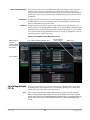
Controlling Multiple FS1-Xs. . . . . . . . . . . . . . . . . . . . . . . . . . . . . . . . . . . . . . . . . . . . . . . . . . . 88
Resetting Values To Factory Settings. . . . . . . . . . . . . . . . . . . . . . . . . . . . . . . . . . . . . . . . . . 89
Drop Down Parameter Operation. . . . . . . . . . . . . . . . . . . . . . . . . . . . . . . . . . . . . . . . . . . . . 89
Slider Operation . . . . . . . . . . . . . . . . . . . . . . . . . . . . . . . . . . . . . . . . . . . . . . . . . . . . . . . . . . . . . 89
Sub-Menus . . . . . . . . . . . . . . . . . . . . . . . . . . . . . . . . . . . . . . . . . . . . . . . . . . . . . . . . . . . . . . . . . . 89
Screen Descriptions . . . . . . . . . . . . . . . . . . . . . . . . . . . . . . . . . . . . . . . . . . . . . . . . . . . . . . . . . . . . . . 89
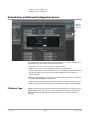
Network Pane and Network Configuration Screen . . . . . . . . . . . . . . . . . . . . . . . . . . . . . . . . . 90
IP Address Type . . . . . . . . . . . . . . . . . . . . . . . . . . . . . . . . . . . . . . . . . . . . . . . . . . . . . . . . . . . . . . 90
IP Address . . . . . . . . . . . . . . . . . . . . . . . . . . . . . . . . . . . . . . . . . . . . . . . . . . . . . . . . . . . . . . . . . . . 91
Netmask . . . . . . . . . . . . . . . . . . . . . . . . . . . . . . . . . . . . . . . . . . . . . . . . . . . . . . . . . . . . . . . . . . . . . 91
Default Gateway . . . . . . . . . . . . . . . . . . . . . . . . . . . . . . . . . . . . . . . . . . . . . . . . . . . . . . . . . . . . . 91
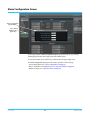
Alarm Configuration Screen . . . . . . . . . . . . . . . . . . . . . . . . . . . . . . . . . . . . . . . . . . . . . . . . . . . . . . 92
Status Screen. . . . . . . . . . . . . . . . . . . . . . . . . . . . . . . . . . . . . . . . . . . . . . . . . . . . . . . . . . . . . . . . . . . . . 93
System Screen . . . . . . . . . . . . . . . . . . . . . . . . . . . . . . . . . . . . . . . . . . . . . . . . . . . . . . . . . . . . . . . . . . . 94
Config Screen . . . . . . . . . . . . . . . . . . . . . . . . . . . . . . . . . . . . . . . . . . . . . . . . . . . . . . . . . . . . . . . . . . . . 95
System Name . . . . . . . . . . . . . . . . . . . . . . . . . . . . . . . . . . . . . . . . . . . . . . . . . . . . . . . . . . . . . . . . 95
SNMP Parameters . . . . . . . . . . . . . . . . . . . . . . . . . . . . . . . . . . . . . . . . . . . . . . . . . . . . . . . . . . . . 95
Hidden Menus . . . . . . . . . . . . . . . . . . . . . . . . . . . . . . . . . . . . . . . . . . . . . . . . . . . . . . . . . . . . . . . 96
Display Intensity . . . . . . . . . . . . . . . . . . . . . . . . . . . . . . . . . . . . . . . . . . . . . . . . . . . . . . . . . . . . . 96
UPnP Host . . . . . . . . . . . . . . . . . . . . . . . . . . . . . . . . . . . . . . . . . . . . . . . . . . . . . . . . . . . . . . . . . . . 96
UPnP Proxy . . . . . . . . . . . . . . . . . . . . . . . . . . . . . . . . . . . . . . . . . . . . . . . . . . . . . . . . . . . . . . . . . . 96
Presets Screen . . . . . . . . . . . . . . . . . . . . . . . . . . . . . . . . . . . . . . . . . . . . . . . . . . . . . . . . . . . . . . . . . . . 97
Presets Screen Controls . . . . . . . . . . . . . . . . . . . . . . . . . . . . . . . . . . . . . . . . . . . . . . . . . . . . . . 97
Factory Preset . . . . . . . . . . . . . . . . . . . . . . . . . . . . . . . . . . . . . . . . . . . . . . . . . . . . . . . . . . . 97
Recall. . . . . . . . . . . . . . . . . . . . . . . . . . . . . . . . . . . . . . . . . . . . . . . . . . . . . . . . . . . . . . . . . . . . 97
Store . . . . . . . . . . . . . . . . . . . . . . . . . . . . . . . . . . . . . . . . . . . . . . . . . . . . . . . . . . . . . . . . . . . . 97
Export . . . . . . . . . . . . . . . . . . . . . . . . . . . . . . . . . . . . . . . . . . . . . . . . . . . . . . . . . . . . . . . . . . . 98
Import. . . . . . . . . . . . . . . . . . . . . . . . . . . . . . . . . . . . . . . . . . . . . . . . . . . . . . . . . . . . . . . . . . . 98
Export Presets 1–40 (All) . . . . . . . . . . . . . . . . . . . . . . . . . . . . . . . . . . . . . . . . . . . . . . . . . 98
Import Presets 1–40 (All) . . . . . . . . . . . . . . . . . . . . . . . . . . . . . . . . . . . . . . . . . . . . . . . . . 98
Interaction of Presets and GPIs . . . . . . . . . . . . . . . . . . . . . . . . . . . . . . . . . . . . . . . . . . . . . . . 98
Video Proc Screen . . . . . . . . . . . . . . . . . . . . . . . . . . . . . . . . . . . . . . . . . . . . . . . . . . . . . . . . . . . . . . . . 98
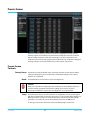
Video Output Screen . . . . . . . . . . . . . . . . . . . . . . . . . . . . . . . . . . . . . . . . . . . . . . . . . . . . . . . . . . . . 100
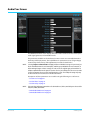
Audio Proc Screen . . . . . . . . . . . . . . . . . . . . . . . . . . . . . . . . . . . . . . . . . . . . . . . . . . . . . . . . . . . . . . . 101
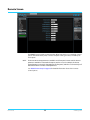
Audio Output Screen . . . . . . . . . . . . . . . . . . . . . . . . . . . . . . . . . . . . . . . . . . . . . . . . . . . . . . . . . . . . 102
Remote Screen . . . . . . . . . . . . . . . . . . . . . . . . . . . . . . . . . . . . . . . . . . . . . . . . . . . . . . . . . . . . . . . . . . 103
Firmware Screen . . . . . . . . . . . . . . . . . . . . . . . . . . . . . . . . . . . . . . . . . . . . . . . . . . . . . . . . . . . . . . . . 104
FS1-X v1.0
7
www.aja.com
Chapter 6: SNMP . . . . . . . . . . . . . . . . . . . . . . . . . . . . . . . . . . . . . . . . . . . . 105
FS1-X Simple Network Management Protocol . . . . . . . . . . . . . . . . . . . . . . . . . . . . . . . . . . . .
SNMP Configuration. . . . . . . . . . . . . . . . . . . . . . . . . . . . . . . . . . . . . . . . . . . . . . . . . . . . . . . . . . . . .
Front Panel Screens . . . . . . . . . . . . . . . . . . . . . . . . . . . . . . . . . . . . . . . . . . . . . . . . . . . . . . . . .
Front Panel Octet Value Entry Procedure . . . . . . . . . . . . . . . . . . . . . . . . . . . . . . . .
Web Browser . . . . . . . . . . . . . . . . . . . . . . . . . . . . . . . . . . . . . . . . . . . . . . . . . . . . . . . . . . . . . . .
SNMP Configuration Parameters . . . . . . . . . . . . . . . . . . . . . . . . . . . . . . . . . . . . . . . . . . . . . . . . .
4.0 SNMP Enable . . . . . . . . . . . . . . . . . . . . . . . . . . . . . . . . . . . . . . . . . . . . . . . . . . . . . . . . . . . .
4.1 SNMP Trap Destination 1. . . . . . . . . . . . . . . . . . . . . . . . . . . . . . . . . . . . . . . . . . . . . . . . .
4.2 SNMP Trap Port 1 . . . . . . . . . . . . . . . . . . . . . . . . . . . . . . . . . . . . . . . . . . . . . . . . . . . . . . . .
4.3 SNMP Trap Destination 2. . . . . . . . . . . . . . . . . . . . . . . . . . . . . . . . . . . . . . . . . . . . . . . . .
4.4 SNMP Trap Port 2 . . . . . . . . . . . . . . . . . . . . . . . . . . . . . . . . . . . . . . . . . . . . . . . . . . . . . . . .
105
105
105
106
106
107
107
107
107
107
107
Appendix A: Specifications . . . . . . . . . . . . . . . . . . . . . . . . . . . . . . . . . . 108
Video Input/Output Formats. . . . . . . . . . . . . . . . . . . . . . . . . . . . . . . . . . . . . . . . . . . . . . . . . . . . .
Video Format Conversion. . . . . . . . . . . . . . . . . . . . . . . . . . . . . . . . . . . . . . . . . . . . . . . . . . . . . . . .
Video A/D, D/A Converters. . . . . . . . . . . . . . . . . . . . . . . . . . . . . . . . . . . . . . . . . . . . . . . . . . . . . . .
Audio . . . . . . . . . . . . . . . . . . . . . . . . . . . . . . . . . . . . . . . . . . . . . . . . . . . . . . . . . . . . . . . . . . . . . . . . . . .
Interfaces . . . . . . . . . . . . . . . . . . . . . . . . . . . . . . . . . . . . . . . . . . . . . . . . . . . . . . . . . . . . . . . . . . . . . . .
Physical . . . . . . . . . . . . . . . . . . . . . . . . . . . . . . . . . . . . . . . . . . . . . . . . . . . . . . . . . . . . . . . . . . . . . . . . .
108
109
112
112
112
113
Appendix B: FS1-X Pinouts. . . . . . . . . . . . . . . . . . . . . . . . . . . . . . . . . . . 114
GPI Pinouts. . . . . . . . . . . . . . . . . . . . . . . . . . . . . . . . . . . . . . . . . . . . . . . . . . . . . . . . . . . . . . . . . . . . . .
Audio Connection Pinouts . . . . . . . . . . . . . . . . . . . . . . . . . . . . . . . . . . . . . . . . . . . . . . . . . . . . . . .
Analog Audio . . . . . . . . . . . . . . . . . . . . . . . . . . . . . . . . . . . . . . . . . . . . . . . . . . . . . . . . . . . . . . .
Digital Audio. . . . . . . . . . . . . . . . . . . . . . . . . . . . . . . . . . . . . . . . . . . . . . . . . . . . . . . . . . . . . . . .
114
115
115
115
Appendix C: Safety & Compliance . . . . . . . . . . . . . . . . . . . . . . . . . . . . 117
Federal Communications Commission (FCC) Compliance Notices . . . . . . . . . . . . . . . . .
Class B Interference Statement . . . . . . . . . . . . . . . . . . . . . . . . . . . . . . . . . . . . . . . . . . . . . .
FCC Caution . . . . . . . . . . . . . . . . . . . . . . . . . . . . . . . . . . . . . . . . . . . . . . . . . . . . . . . . . . . . . . . .
Canadian ICES Statement . . . . . . . . . . . . . . . . . . . . . . . . . . . . . . . . . . . . . . . . . . . . . . . . . . . . . . . .
European Union and European Free Trade Association (EFTA)
Regulatory Compliance. . . . . . . . . . . . . . . . . . . . . . . . . . . . . . . . . . . . . . . . . . . . . . . . . . . . . . . . . .
Declaration of Conformity . . . . . . . . . . . . . . . . . . . . . . . . . . . . . . . . . . . . . . . . . . . . . . . . . . .
Korean KCC Compliance Statement . . . . . . . . . . . . . . . . . . . . . . . . . . . . . . . . . . . . . . . . . . . . . .
Taiwan Compliance Statement . . . . . . . . . . . . . . . . . . . . . . . . . . . . . . . . . . . . . . . . . . . . . . . . . .
Translated Warning and Caution Messages. . . . . . . . . . . . . . . . . . . . . . . . . . . . . . . . . . . . . . .
Before Operation Please Read These Instructions . . . . . . . . . . . . . . . . . . . . . . . . . . . . . . . . .
117
117
117
117
118
118
119
119
119
120
Index. . . . . . . . . . . . . . . . . . . . . . . . . . . . . . . . . . . . . . . . . . . . . . . . . . . . . . . 126
FS1-X v1.0
8
www.aja.com
Notices
Trademarks
AJA®, KONA®, Ki Pro®, KUMO® and XENA® are registered trademarks of AJA Video, Inc.,
TruZoom™, TruScale™, Ki Pro Mini™, Io Express™, Io HD™, Io™ and “Work. Flow.” are
trademarks of AJA Video, Inc. AirPort, Apple, the Apple logo, AppleShare, AppleTalk,
FireWire, iPod, iPod Touch, Mac, and Macintosh are registered trademarks of Apple
Computer, Inc. Final Cut Pro, QuickTime and the QuickTime Logo are trademarks of Apple
Computer, Inc. Avid, Avid Media Composer and Avid DNxHD are trademarks of Avid
Technology, Inc. All other trademarks are the property of their respective holders.
HDMI, the HDMI logo and High-Definition Multimedia Interface are trademarks or
registered trademarks of HDMI Licensing LLC. DVI is a registered trademark of DDWG. All
other trademarks are the property of their respective holders.
Copyright
Copyright © 2014 AJA Video, Inc. All rights reserved. All information in this manual is
subject to change without notice. No part of the document may be reproduced or
transmitted in any form, or by any means, electronic or mechanical, including
photocopying or recording, without the express written permission of AJA Inc.
Contacting Support
When calling for support, have all information at hand prior to calling.
To contact AJA Video for sales or support, use any of the following methods:
Telephone:
+1.530.271.3190
FAX:
+1.530.271.3140
Web:
http://www.aja.com
Support Email:
Sales Email:
FS1-X v1.0
[email protected]
[email protected]
9
www.aja.com
Chapter 1: Introduction
Overview
Matching up and synchronizing disparate video and audio formats is a critical part of any
broadcast, mobile or post-production environment. AJA’s FS1-X is the next evolution in
frame synchronization and conversion. Within its compact 1RU chassis, FS1-X integrates
an amazing array of video and audio connectivity and processing. Featuring a flexible
architecture, FS1-X simultaneously works with 3G/HD/SD-SDI 10-bit broadcast quality
video and incorporates embedded audio, AES, MADI, and analog audio.
Utilizing AJA’s remarkable conversion algorithms, FS1-X supports up, down and crossconversion between SD and HD signals for the highest quality output possible.
Additionally, the factory-installed motion adaptive Frame Rate Converter (FRC) option
enables high quality conversions between different frame rate families for virtually
unlimited international standards support.
The growth of 5.1 and 7.1 audio has increased the number of audio channels that must
be managed in a production. The MADI standard provides a convenient way to transport
huge numbers of audio channels along a single cable, simplifying the cabling demands
for broadcasters, mobile trucks and production. FS1-X supports both fiber and coax 64
channel MADI input and output. An internal 224x224 audio matrix allows full routing of
MADI and all audio coming from SDI, fiber, AES and analog sources for an incredible
amount of audio processing capability in a single box.
FS1-X features a unique keyer configuration, allowing incoming signals to be combined
in powerful ways. A common example is sidebar keying, where incoming video is
converted from SD to HD but rather than stretching the 4:3 aspect ratio to fit in a 16:9
frame, a second signal is used to fill the sides of the 16:9 frame. This allows channel
identification or other imagery to be placed in that area rather than having black bars on
either side. The robust AFD features of FS1-X ensure that the aspect ratio of the outgoing
signal is properly identified for downstream devices.
Video Features
• The FS1-X handles a wide variety of video formats. See “Video Input/Output Formats” on
page 108 for a complete list.
• Video format converter, featuring SD/HD (up/down), 2K/HD (up/down), SD-to-SD
(aspect ratio), and HD-to-HD (720/1080 cross) conversions.
• Video proc amp and color correction.
• Dual frame synchronizers.
• User-specified custom format conversion and scaling with variable crop, size, aspect,
position, and Region of Interest parameters.
• Sidebar keying over black, matte, or the same format video.
FS1-X v1.0
10
www.aja.com
• Closed captioning support, featuring true conversion between EIA 608 and 708 (SD and
HD) CC formats.
• Active Format Description (AFD) support.
• Dual 3G/HD/SD SDI I/O with embedded audio.
• Dual 3G/HD/SD Single-Mode Optical Fiber I/O (optional).
• HDMI I/O.
• Component/Composite analog HD/SD video I/O, 12-bit.
• Looping reference input with flexible genlock.
Audio Features
• 16 channel AES/EBU digital audio I/O (2x 25pin D connector)
• 8 ch balanced analog audio I/O (2x 25pin D connector)
• 64 channel MADI digital audio I/O (2x BNC)
• 64 channel MADI Fiber digital audio I/O (2x Multi-Mode Optical Fiber)
• Flexible audio routing, from any or all inputs to any or all outputs, including embedded
audio.
Other Features
• Built-in front panel control via scrolling alphanumeric and graphical menu.
• Front panel LED status indicators for at-a-glance system monitoring.
• Linux operating system supporting full network compatibility, including Web-based
remote control over 10/100/1000 Ethernet via an internal web server.
• Two fully redundant power supplies standard.
• Five-year international warranty with unlimited technical support.
Typical Applications
The FS1-X can be used in a very wide variety of video and audio signal conversion,
adaptation, timing, and processing applications:
• Up/down/cross conversion between many SD and HD formats, including 1080p50/
59.94.
• General purpose video frame synchronization.
• Analog-to-Digital and Digital-to-Analog audio/video conversion.
• Mux or Demux two separate HD signals from one 3G SDI signal.
• Convert 3G/HD/SD video over fiber to/from SDI (BNC).
• Use the built-in video processing amplifier to adjust and/or color correct.
• HD sidebar keying (black, matte, or identical format video).
• Routing audio signals from up to 224 audio inputs to various format audio outputs, by
mapping sets of sources to outputs, with control of level and phase of individual audio
channels, and control of delay on channel pairs.
FS1-X Control
FS1-X operation can be monitored and changed in a number of ways. Feature sets in
each of the control methods vary, although the front panel and web browser interfaces
offer many of the same features.
FS1-X v1.0
11
www.aja.com
Front Panel Control
The FS1-X front panel offers the most direct control, ideal for use in machine rooms or
wherever quick changes and status checks must be made. The buttons and knobs
control menus in the display, allowing you to fully configure the system according to
your purposes. You can control inputs, outputs, processing paths, keying, and much
more.
Remote Web
Browser Control
The FS1-X internally contains an optimized web server that allows remote monitoring
and parameter setting via an Ethernet 10/100/1000 network-attached computer running
a web-browser. Networks can be closed local area networks, a straight computer-toFS1-X cable, or for greatest flexibility, exposed through a firewall to a broadband WAN.
From a network-connected computer you can communicate with one or more FS1-X
devices, even getting them to identify themselves via LEDs on the front and rear panel.
GPI Inputs and
Outputs
General Purpose Inputs and Outputs are available on the FS1-X back panel to provide
contact closure control. Using the inputs, an external contact closure activates a specified
function on the FS1-X. Using the outputs, specific FS1-X functions can produce a contact
closure to activate any desired function on external equipment. The functions to be
activated by an input or that can activate an output are set using the front panel and
browser menus.
SNMP Interface
Monitoring
SNMP offers remote network monitoring of alarm conditions.
Optional FS1-X Features
Frame Rate
Converter (FRC)
The factory installed Frame Rate Converter option enables conversions between the
three video frame rate families:
• 59.94/29.97/23.98
• 50/25
• 24
The standard FS1-X (without FRC) can also perform conversions, but only between frame
rates that are within the same frame rate family, using add/drop frames.
The FRC option provides:
• High quality motion adaptive linear frame rate conversion
• Multi field/frame 3D pixel by pixel motion adaptation
• 1080p50/59.94 support
• Format and Frame rate conversion can be combined
(for example, 625i/50 IN, 1080i/59.95 OUT)
Fiber I/O
The FS1-X supports optional AJA Optical Fiber I/O modules as follows:
• Single Input, LC connector
• Single Input SC connector
• Single Output LC connector
• Single Output SC connector
FS1-X v1.0
12
www.aja.com
• Dual Input LC connectors
• Dual Output LC connectors
FS1-X's Fiber I/O supports the 3G/HD/SD SDI protocol. Only AJA modules are supported;
use of other manufacturers' modules is not supported and may void the warranty.
Technical Description
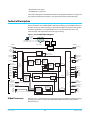
The FS1-X features an incredibly flexible architecture, offering a powerful Video Processor
for video conversion and processing, an optional Frame Rate Converter for even greater
conversion capabilities, a second Video Processor, a separate Audio Processor, and
extensive input and output video and audio signal routing.
Figure 1. FS1-X Simplified Block Diagram
Remote Web
Browser
Control
LAN or WAN
Ethernet
SNMP Control
via command line
Panel
Control
Inputs
Embedded
Web Server
Processing
Outputs
GPI Inputs
(4)
GPI Outputs
(4)
FS1-X CPU
Passive
Reference
Loops
Genlock
to Video Processor 1
and Video Processor 2
Component
YCbCr/RGB
In
Video
Composite
In
Video with
Embedded Audio
SDI In 1
Component
YCbCr/RGB
Out
VIDEO PROCESSOR 1
Optional
Frame Rate
Converter
Video
Converter
and
Framesync
Video Proc
Amp and
Color
Corrector
Video
Input
Crosspoint
Matrix
Down
Converter
Video
Sidebar
Keyer
Audio
Embedder
Video 1
SDI Out 1
Test Signal
Generator
SDI In 2
SDI Out 2
HDMI In
Video
Optional
Fiber In 1
Optional
Fiber In 2
VIDEO PROCESSOR 2
Audio
De-Embedders
SDI 1, 2
HDMI
Fiber 1, 2
Audio
Audio
Embedder
Framesync
Video 2
MADI
Fiber In
MADI
BNC In
Video Processors
FS1-X v1.0
Video
and
Audio
Output
Crosspoint
Matrix
HDMI
Out
Optional
Fiber Out 1
Optional
Fiber Out 2
AES/EBU
Digital Audio Out
16 Channels
AES/EBU
Digital Audio In
16 Channels
Analog Audio In
8 Channels
(Tascam cable)
Composite
Out
Analog Audio Out
8 Channels
(Tascam cable)
AUDIO PROCESSOR
Tone
Generator
Audio Level,
Phase, Delay
Adjustment
Audio
MADI
Fiber Out
MADI
BNC Out
Video Processor 1 performs format conversion, frame synchronization, signal processing,
and keying operations. The factory installed Frame Rate Converter option resides in
Video Processor 1.
13
www.aja.com
Video Processor 2 offers frame synchronization and the ability to feed video to the first
Video Processor for sidebar keying. Each video processor has access to any video input
and output using the Crosspoint Matrices.
Up, down, or cross conversion is done with very high quality scalers. De-interlacing is
performed with high quality motion-adaptive processing including diagonal filters. The
Processing Amplifier and Color Corrector supports video signal adjustment with
standard Proc Amp controls and RGB-style color correction.
Audio Processor
The Audio Processor accepts analog, digital, or embedded audio, and performs high
quality A/D, D/A, and sample rate conversions as required. Inputs can be selected from
Embedded (SDI, Fiber, or HDMI), MADI BNC or Fiber, AES, or Balanced Analog.
The output of the Audio Processor can be embedded in either Video Processor’s output
(SDI, Fiber, or HDMI), or sent to the MADI, AES or Balanced outputs. Full audio channel
mapping supports any mixture of inputs to outputs.
Dolby 5.1 and similar schemes of digital encoded audio can be passed unaltered,
provided the input is genlocked to the FS1-X output.
Operation Overview
About Inputs and
Outputs
In general, to use the FS1-X for video conversion, first select an Output Video Format
(with the VIDEO PROC, Output Format Menu) that is compatible with the current FS1-X
genlock source (see "About Reference and Genlock Source" below), then select an Input
port on Video Processor 1 (with the VIDEO PROC, Video 1 Input menu). The FS1-X will
automatically determine the selected input video format and convert it (if necessary) to
the selected Output Video Format. You can now route that converted video to any or all
of the FX1-X output ports, by selecting each output (with the VIDEO OUTPUT menu) and
assigning Processor 1 to that port.
About Reference
and Genlock Source
A genlock source being used by the FS1-X for reference must be compatible with the
FS1-X video output format. These signals are compatible when they are both in the same
frame rate family (59.94/29.97/23.98, or 50/25, or 24).
The FS1-X can be configured to operate with one of a variety of references, including
genlock to the signal from the Reference input connector, genlock to the current Video
Processor 1 input signal, or Free Run. Your choice of reference needs to meet your
individual facility requirements, and must be accounted for when you configure the
FS1-X video output format.
The same FS1-X reference is used by both Video Processor 1 and Video Processor 2. The
Video Processor 2 output format always matches its input format (no conversion is
performed). If you use the Video Processor 2 output you will need to make sure its output
video format (which is determined by its input format) is compatible with the currently
used FS1-X reference.
It is also recommended to use an interlaced video reference when the output signal is
interlaced, to ensure downstream equipment can process the interlaced video properly.
Progressive video output can safely use either an interlaced or progressive reference
signal.
FS1-X v1.0
14
www.aja.com
1 Channel vs.
2 Channel FS1-X
Operation
The FS1-X has two modes of operation: 1 Channel mode and 2 Channel mode.
1 Channel mode is available when the FRC option is present and enabled. In this mode,
the full range of frame rate conversions are available using Video Processor 1. Video
Processor 2 is disabled in this mode and reports no output, although a black video signal
is generated if Video Processor 2 is routed to an output. Any embedded audio routed to a
Video Processor 2 output will also be passed along with that black video signal.
2 Channel mode is available when the FRC is absent or has been disabled. In 2 Channel
mode frame rate conversions within the same frame rate family are supported on Video
Processor 1, and Video Processor 2 is available for use. For example, Video Processor 2 can
be used to pass an unprocessed alternative version of the incoming video. Select the
same input port used by Video Processor 1 on Video Processor 2 (with the VIDEO PROC,
Video 2 Input menu), and route that video to a different output port by selecting that
output (with the VIDEO OUTPUT menu) and assigning Video Processor 2 to that port.
Video Processor 2 does not perform conversion, so for most ports the Video Processor 2
output video will match its input. However, Video Processor 2 video can be routed to the
composite Video Output for downconversion. The composite Video Output port has a
separate dedicated Downconverter so it can always display SD video even if it is selected
to output a Video Processor that is configured for HD.
Sidebar Video
Keying
The FS1-X can be configured to perform sidebar keying (useful when converting
between HD and SD with different image aspect ratios). Sidebar keying black or matte is
always available. It is also possible to sidebar key a video signal from Video Processor 2
under the following conditions:
• The FRC option is disabled or not present (FS1-X is operating in 2 Channel mode).
• The Video Processor 2 video input signal format exactly matches the Video Processor 1
output format.
• The H and V Output timing settings of both Video Processor 1 and 2 are identical.
• The FS1-X reference being used is compatible with the Video Processor 2 input signal.
Retained Settings
The FS1-X stores the current value of each operational parameter in Flash memory so
that the system returns to the same state after a power cycle.
The FS1-X also stores independent values for many settings, so that if the unit is
configured for one operation, changed to a different operation, and then returned to
that prior operation, the settings for that prior operation are restored.
For example, changing the Video Input selection automatically selects new values for
Proc Amp parameters and RGB Proc Amp parameters. This is referred to as Source
Memory. Each video source remembers its own Proc Amp settings.
Similarly, changing the Output Format selection automatically selects new values for H &
V timing parameters. This is referred to as Output Timing Memory. Each Output Format
mode remembers its own H & V timing settings.
As another example, Output Format Mapping stores the Output Format selected for any
of the frame rates. That Mapped Output Format is recalled if the frame rate selection is
changed.
Presets can also be used to restore the FS1-X to a previous state. Many parameters can be
individually reset to factory values using individual menus, or the entire FS1-X can be
reset to defaults (with the PRESET, Factory Preset menu).
FS1-X v1.0
15
www.aja.com
In This Manual
Chapter 1: Introduction provides an overview and a list of box contents.
Chapter 2: Controls, Indicators, and Connections describes controls, indicators, and
connections.
Chapter 3: Installation and Configuration provides complete instructions for installing
and configuring the FS1-X.
Chapter 4: Display Menus explains how to use the FS1-X controls and display menus.
Chapter 5: Browser Control explains how to use the FS1-X remotely via a web browser
on a network-attached computer.
Chapter 6: SNMP discusses FS1-X support of SNMP.
Appendix A: Specifications presents a list of technical specifications for the product.
Appendix B: Pinouts explains the FS1-X rear panel connector pinouts.
Appendix C: Safety & Compliance provides regulatory compliance statements,
advisories and warnings.
Index
FS1-X v1.0
16
www.aja.com
Chapter 2: Controls, Indicators, and
Connections
Overview
The controls, indicators, and connectors illustrated and described in this chapter allow
you to connect, operate, and monitor the FS1-X system and to troubleshoot problems if
you encounter them. Becoming familiar with the FS1-X front and rear panels also
simplifies system installation, setup, and operation.
Front Panel Description
Figure 2. AJA FS1-X Front Panel Controls and Indicators
1
Menu Group Selection Buttons:
Press a button to select
a Menu Group in the display
2
Alphanumeric Display:
Line 1=Parameter
Line 2=Parameter value
Line 3=Status/Legend
Line 4=Status/Legend
Alphanumeric
Display
Status Indicators:
Ref, Keyer, LAN, EXT
3
4
Select knob:
Adjust knob:
Scrolls and
Changes
selects menus; selected value;
Push to undo Hold down for
changes.
default value.
Power and
Activity
Status Indicators:
Indicators:
Pwr 1
VID In 1/2
Pwr 2
UFC, Proc Amp,
ID
FRC Present,
Alarm
FRC Active
FMT ERR 1/2
The FS1-X's control system is designed to be quick and easy to use. The four-line
alphanumeric display shows menus that are numbered and grouped by function. The
menu groups are easily accessed using pushbuttons which correspond one-to-one with
the groups (one button per menu group). The menu lines, which are 23 characters wide,
display the following information:
• First line—parameter number and name.
• Second line—the editable value set for a parameter.
• Third and fourth lines—current status, labels, or prompts.
Figure 3. Four Lines of the Front Panel Display
1 Param number & name
2 Current value setting
3 Legend, info or prompt
4 Legend, info or prompt
FS1-X v1.0
17
www.aja.com
When you edit a parameter containing multiple values, such as the IP address, the value
currently being edited blinks.
Operational Summary The nine front panel pushbuttons allow you to select display menu groups. The two
knobs allow you to change menus and set parameters within the menu groups. These
functions can be summarized as follows:
• Select a menu group: Press one of the ten pushbuttons.
• Scroll through menus in a group: Turn SELECT.
• Edit a menu parameter: Stop SELECT on the menu.
• Change a parameter value: Once the parameter is selected with SELECT, turn ADJUST to
set the value. Changes apply in a few seconds.
• To edit a multiple part parameter, such as the IP address, push the ADJUST knob
momentarily (the value blinks). To save the whole parameter after editing, push
ADJUST momentarily again.
• Coarse adjust a value: Hold down the menu group button (the button turns blue) and
turn ADJUST.
• Undo a change (restore previous setting): Push SELECT momentarily.
• Reset to factory default: Hold down ADJUST for 4 seconds.
Pushbuttons
The general rules of Menu Group button operation are:
• Press one of the nine Menu Group buttons to access the associated menu group. The
SELECT and ADJUST knobs control the display menus.
• The selected Menu Group button lights and the other buttons turn off.
• Each menu group returns to the last menu changed when you select the button. After a
reboot, each group displays its first menu.
• Hold down a button (turns blue) to make coarse adjustments using the Adjust knob.
Release the button to make fine adjustments.
The following text briefly lists the functions accessed by each pushbutton:
STATUS
Displays the Status Menu Group, which shows current machine status and error
conditions:
• Video 1, Video 2, and Caption status
• Reference and Genlock status
• Output Status
• Power and Temperature status
• System Name display
• Alarms
• FRC status
• Audio Output routing
REMOTE
Displays the Remote Menu Group, which lets you select how to control the FS1-X:
• Control by local front panel, or local and remote
• Authentication
• GPI input and output behavior
CONFIG
Displays the Config Menu Group, which lets you configure the FS1-X for your
environment:
• System Name setting
FS1-X v1.0
18
www.aja.com
• IP settings, MAC address
• SNMP settings
• Alarm control
• Hidden Menus, Screen Saver, and Display intensity
• Fan speed
• System serial number and software version
• System reboot
PRESET
Displays the Reg Menu Group, which accesses the memory registers:
• Store, Recall, and edit the names of Presets
• Factory Preset (defaults)
SYSTEM
Displays the System Menu Group, which lets you change or enable FS1-X video and
audio input and system functions:
• Video input format settings, including Analog and 3G setup
• Video component output format settings
• Analog audio standard levels
• Genlock reference source selection
• Output frame rate selection
• Frame Rate Converter option enable
• NTSC standard selection
• Composite video downconvert settings (HD to SD)
• HDMI RGB Range
• AES audio input format and sample rate conversion settings
VIDEO PROC
Displays the Menu Groups that access Video Processor video input, format, and
conversion selections and adjustments:
Settings for both Video Processor 1 and 2:
• Input source selections
• Loss of input selection
• H and V timing and delay settings
• Freeze output setting
• Input scan format (pSF de-interlacer) settings
Setting for Video Processor 1 only:
• Output format and mode
• Background fill selection
• Conversion (up, down, aspect, edge, ROI, and custom settings)
• Matte adjustments
• Proc amp, color corrector, and legalizer settings
• Active Format Descriptor (AFD) settings
• Caption translation selection
• SD line 21 blanking selection
• Test pattern selection
VIDEO OUTPUT
FS1-X v1.0
Displays the Output Menu Group, which selects which Video Processor output feeds the
various FS1-X output connectors:
19
www.aja.com
• Video output selections
• SDI and Fiber 3G output configuration
AUDIO PROC
Displays the Audio Processor Menu Group, used to control the adjustable audio
parameters:
• Audio level, phase, and delay settings
• Embedded audio out settings
AUDIO OUTPUT
Displays the Audio Output Menu Group, used to control the routing of the audio sources
• Audio source selections
• Global output selection
• Output mapping controls
Control Knobs
These are the general rules of SELECT and ADJUST knob operation:
SELECT
Turning the SELECT knob performs these actions:
• Turn SELECT in either direction to scroll through the menus.
• Stop on a menu to enter that menu for editing.
• Turn SELECT within a menu to scroll through multiple parameters.
• Pause on a parameter to select it for editing. For multiple fields in a parameter, use
SELECT to move through the fields (after pressing Adjust to enter field editing mode).
• Push SELECT momentarily to undo and restore the previous setting.
ADJUST
Turning the ADJUST knob performs these actions:
• Turn ADJUST to change the values of a selected parameter.
• In most cases, leaving a value in place for a moment sets that value.
• To perform special actions, such as recalling a register, push the knob to confirm the
displayed value. Display line 4 indicates such special actions.
• Some parameters having multiple fields, such as IP Address require you to push the
ADJUST knob to select a field, and push again to save changes.
• Hold down the knob to reset a value to the factory default; for multiple field values, all
fields are reset to the default.
Table 1. SELECT and ADJUST Knob Operation Summary
Function
Knob Action
Scroll through menus.
Scroll through parameters in a multiparameter menu.
Scroll through numerals or letters in a parameter.
Turn SELECT backwards or forward.
Enter edit mode for a menu.
Enter edit mode for a parameter.
Enter edit mode for values, numerals, or letters.
Advance to the next value, numeral, or character to edit.
Turn and stop SELECT on the item to edit. (For some
multiple parameter menus, push ADJUST so that the
selected parameter blinks.)
Increment/decrement a value.
Turn ADJUST.
Coarse adjust a value.
Hold down button and turn ADJUST.
FS1-X v1.0
20
www.aja.com
Table 1. SELECT and ADJUST Knob Operation Summary (continued)
Function
Knob Action
Reset a value to the factory default value.
Set a number to the default value (typically zero).
Set a letter to a default value (typically space).
Hold down ADJUST.
Take (commit) a change to an edited parameter.
Automatic after a few seconds for most parameters. For
multiple field parameters, push ADJUST momentarily to
save.
Abandon (undo) a change before committing.
Push SELECT momentarily.
Take (commit) a special action, such as a preset recall.
Push ADJUST momentarily.
LED Indicators
Indicators on the front panel are multi-state LEDs that light when a condition is present.
They are conveniently arranged in groups to show specific subjects. For example,
indicators for the two video processors are aligned in two columns with 1 and 2 labeling
the tops of the columns.
The indicators and the conditions that cause them to light are as follows:
REMOTE
A multicolor LED that indicates the current control mode:
• Green = Local Only (front panel control only)
• Red = Remote Only (remote browser or panel control only)
• Amber = Local + Remote (front panel and remote control both enabled)
VID IN 1/2 (blue)
UFC (blue
PROC AMP (blue)
FMT ERR 1/2 (blue)
FRC PRES (blue)
FRC ACTIVE (blue)
REF (blue)
KEYER (blue)
LAN (blue)
EXT (blue flashing)
PWR 1/2 (blue)
ID (blue blinking)
FS1-X v1.0
An active video input signal is detected for Channel 1 or 2.
The Universal Format Converter has been changed from the default setting.
The Proc Amp has been changed from the default setting (it’s no longer at unity).
The selected input and output formats are incompatible for Channel 1 or Channel 2.
Frame Rate Converter option is present.
Frame Rate Converter is actively converting frame rates.
The REF connector has an external reference video source applied.
Reserved for future use.
The FS1-X is connected to an operational local area network. This indicator lights
momentarily when web browser selections are changed.
Flashes when a remote control source (remote panel or GPI) has initiated a change in the
system.
Power Supply 1 or 2 is operational and receiving power. Both PWR 1 and PWR 2 LEDs
must be lit to indicate redundant power is available.
Blinks on and off when you right-click on an FS1-X system name and choose Identify in
the web interface Network list. This action helps identify which FS1-X you’re controlling
when multiple FS1-X units are operated from a single computer. The ID LEDs on the front
and rear panels perform the exact same function. No matter which side of a rack you’re
facing, you’ll be able to see one of the LEDs.
21
www.aja.com
ALARM (red)
Incompatibility
Alarms
An alarm event has been detected. Press the STATUS button for information. The Alarm
LED may light because of a disconnected or failed power supply, other hardware failure,
video incompatibilities, or genlock loss. (Any of these conditions may be suppressed
using the Alarm Suppress parameters.)
The FS1-X produces signal incompatibility alarms for a number of reasons. The following
tables explain how to interpret the alarms.
Incompatible Video The table below shows conversions that the FS1-X cannot do and which will cause video
Formats format alarms to be generated.
Table 2. Incompatible Video Formats
Input
Incompatible Output Formats
525i59.94
1080p(&pSF)23.98
1080i59.94
1080p(&pSF)23.98
720p59.94
1080p(&pSF)23.98
1080p29.97
1080p(&pSF)23.98
1080pSF29.97
1080p(&pSF)23.98
625i60
1080p(&pSF)24
1080i60
1080p(&pSF)24
720p60
1080p(&pSF)24
1080p30
1080p(&pSF)24
Other incompatible conversion alarms are possible when the FRC is not present or
disabled (2 Channel operating mode). This is because in 2 Channel mode the FS1-X
cannot convert between frame rate families (59.94/29.97/23.98, or 50/25, or 24).
Example Reference and Video incompatibilities that the FS1-X may detect include the following examples:
Video Incompatibility
Alarms
Table 3. Video Incompatibility Examples
Video Incompatibility Detected
Alarm Status screen will show
Vid 1 Status screen will show
Genlock Source is set to “Reference”,
but no Reference signal is detected. In
this example the cable has been
disconnected.
IN1
BKGD
GEN
OUT1
IN1
BKGD
GEN
OUT1
FS1-X v1.0
SDI 1
Matte
Ref
OK
OK
No Ref
1080i59
22
SDI 1
Matte
Ref
525i59
No Input
1080i59
www.aja.com
Table 3. Video Incompatibility Examples
Video Incompatibility Detected
Alarm Status screen will show
Vid 1 Status screen will show
Reference signal format is not
compatible with selected Output
Format. In this example the reference
signal is 50 Hz but output is 59.94 Hz.
IN1
BKGD
GEN
OUT
SDI 1
Matte
Ref
OK
OK
No Ref
1080i59
IN1
BKGD
GEN
OUT1
SDI 1
Matte
Ref
Input signal is not compatible with the
selected Output format. In this
example the FRC is disabled, input is
525i59.94 and the output is 1080i50.
IN1
BKGD
GEN
OUT
SDI 1
Matte
Ref
Incompat
OK
OK
1080i50
IN1
BKGD
GEN
OUT1
SDI 1
Matte
Ref
Input and output signals are not
supported. In this example, FS1-X is in
Free Run, the input is 525i59.94 and
the output is 1080p23.98 (Web page
example shown in Figure 4.)
IN1
BKGD
GEN
OUT
SDI 1
Matte
Ref
Incompat
OK
OK
1080p23
IN1
BKGD
GEN
OUT
SDI 1
Matte
Free Run
525i59
1080i50
1080i59
525i59
1080i50
1080i50
525i59
1080i59
1080p23
Figure 4. Web page example of un-supported signals alarm.
FS1-X v1.0
23
www.aja.com
Rear Panel Description
AES/EBU Digital
Audio In/Out
Channels 1 through 16
DB-25F Connectors
AC Power
Socket #1
Autosensing
100 to 240VAC
50/60Hz
MADI Fiber In/Out
and
ID
LED MADI BNC In/Out
Serial Digital
Fiber In/Out
(3G/SD/HD)
HDMI
In/Out
10/100/1000
Analog Audio In/Out
Serial Digital
RJ45 Ethernet
Channels 1 through 8
In/Out BNC
LAN Connector
DB-25F Connectors
(3G/SD/HD)
(uses Tascam-style cable)
GPI 15-pin
DB-15F Connector
Connectors
Component
YPbPr and RGB or
Composite
In/Out BNC
AC Power
Socket #2
Autosensing
100 to 240VAC
50/60Hz
Composite External Reference
In/Out BNC I/O with looping
BNC connectors.
The rear panel connectors are summarized below and described in detail in the next
section:
P/S 1 and P/S 2
AES/EBU Digital Audio
Analog Audio Ch.1-8 In/Out
Two 3-pin grounded connectors provide AC power to the two independent power
supplies. The supplies are autosensing for 100–240 VAC, 50/60 Hz. Only one connection
is required for operation, but both connectors must be plugged into AC power for
redundant power protection.
16-Channel, 24-bit AES Input and Output on separate DB-25 connectors (Tascam pinout,
see “Audio Connection Pinouts” on page 115).
8 channel Balanced Analog Audio Input and Output on separate DB-25 connectors
(Tascam pinout, see “Audio Connection Pinouts” on page 115). Audio A/D and D/A
converters are 24 bit.
Caution!
Do not connect audio signals carrying phantom power to the FS1-X analog audio
connectors.
MADI Fiber
MADI BNC
GPI
64 channel MADI input and output, on separate Multi-Mode fiber connectors.
64 channel MADI input and output, on separate BNC connectors.
The GPI DB-15 connector provides connection to external equipment or circuits via an
isolated TTL-compatible interface. Four GPI inputs and four outputs are available. See
“GPI Pinouts” on page 114.
Using the REMOTE menu group, you can program the actions of the GPI inputs and
outputs individually. Contact closures on the inputs can trigger a wide variety of FS1-X
functions. Alarms or loss of video can trigger the GPI outputs.
10/100/1000 LAN
SDI Fiber In/Out (optional)
FS1-X v1.0
This RJ45 connector provides an Ethernet 10/100/1000 port for connection directly to a
computer or to a LAN through an Ethernet hub or switch.
Two optional Single-Mode Optical Fiber SFP modules support single- or dual-channel
Fiber Input and/or Output. 3G/HD/SD SDI protocol is supported. Only AJA Optical Fiber
SFP modules are supported—use of other manufacturer’s modules is not supported and
may void warranty.
24
www.aja.com
SDI In/Out
Digital video with embedded audio. Two SDI input and two SDI Output BNCs. 10 bit 3G/
HD/SD SDI is supported.
HDMI In/Out
HDMI In and Out is supported on HDMI connectors. Standard SD and HD video formats
are supported, including support for 8 channel embedded audio. Also supports standard
computer DVI video formats (input via a DVI to HDMI cable). HDCP (copy protected)
HDMI video is not supported.
Component In/Out YPbPr/
RGB Video
Component Analog Video is supported on 3x BNCs for Input and Output. Video A/D and
D/A converters are 12-bit and support both SD and HD. YPbPr format is supported or the
outputs can be switched to RGB.
NOTE:
Unlike the other connectors, the set of three Component input connectors and the single
Composite analog video input connector cannot be used simultaneously. You can choose
either Component or Composite input, but not both. The same source video is also sent to
both sets of analog video outputs.
Composite In/Out
Composite NTSC or PAL standard definition Input and Output. Composite Video A/D and
D/A converters are 12-bit.
Ref Loop
The Reference Loop BNCs accept an Output timing reference signal. The reference can be
SD Blackburst or HD tri-level sync. Examples of permissible reference video input signals:
• 525 Color Black
• 625 Color Black
• 1080i Tri-level Sync
• 720p Tri-level Sync
The 2 BNCs are a passive loop: one BNC is for the Input, and the remaining BNC can be
connected to another piece of equipment in the reference chain or terminated.
NOTE:
FS1-X v1.0
For proper operation the input Reference signal must be stable and properly terminated using
a 75-ohm terminator on either the unused loop connector or the last piece of downstream
equipment to which the Ref Video is connected.
25
www.aja.com
Chapter 3: Installation & Configuration
Installation Overview
The installation and set up of an FS1-X is very simple. Plug both AC supply cords into AC
mains power (separate branch circuits for redundancy), connect the LAN connector to a
LAN, WAN or local computer with a web-browser, and then connect source and
destination video and audio equipment.
NOTE:
The AJA FS1-X should be plugged into 3-wire 100-240 VAC 50/60 Hz power (autosensing)
before you make connections to other equipment. The AC cords provide a path to ground for
accidental static discharge to protect system equipment. The FS1-X has two fully
independent and redundant power supplies and will operate with one or both AC power
cords plugged into the unit. However, fault-tolerance exists only if both power supplies are
connected and plugged into separate branch circuits. Then if power is lost on a branch or one
of the supplies, the FS1-X will continue to operate on the remaining circuit and power supply.
Warning!
To meet safety regulations for leakage current and to ensure redundancy in the event
that a branch circuit breaker shuts off a branch, connect the FS1-X dual power
supplies to separate branch circuits.
Installation
Summary
All the steps of installation and configuration are documented in this chapter and are
summarized as follows:
1. Unpack the shipping box, removing the FS1-X and two power cords.
2. Install any physical options, such as fiber optic I/O modules or Dolby I/O cards.
3. Mount the physical chassis as desired: front rack, rear rack, or desk mount. If you are
mounting multiple FS1-X units, try to place them visually in the same area so you can
use an attached computer to turn on and see the ID LED of the FS1-X you’re
communicating with. For physical installation details, see “FS1-X Chassis Installation”
on page 28.
4. Connect the two FS1-X power cords to mains AC. For redundancy, use both power
supplies and connect them to separate branch circuits so that the FS1-X will continue
to operate even if a circuit breaker opens on one branch.
5. If you plan to use remote control, connect your computer to the FS1-X directly using
an Ethernet cable, or connect both the computer and the FS1-X to a local area
network through an appropriate hub or router. Also set the FS1-X IP address in the
menus, and then use a computer to test (ping) the FS1-X over the network
connection to verify communication. For details, see “Networking” on page 29.
6. Install a web browser on the computer, if not already present, for accessing the FS1-X
web pages. You can access the pages simply by entering the FS1-X IP address in the
browser address field. See “Web Browser Control” on page 33 for details.
7. Connect the FS1-X to system audio and video sources, including VTRs, monitors, DVD
players, video switchers, and audio mixers. For details, see “System Cabling” on
page 35.
8. Test the FS1-X with all of your devices to verify everything is working.
FS1-X v1.0
26
www.aja.com
Unpacking
Shipping Box
Contents
An FS1-X chassis is shipped with two AC power cords, a user manual CD, and any latebreaking news bulletins (if applicable). Chassis rackmount brackets are provided as part
of the chassis with screws.
Figure 5. Shipping Box Contents
Installation and Operation Manual
(PDF file on CD)
AC Power Cords (2)
AJA FS1-X Panel Chassis
As you unpack the shipping box, carefully examine the contents. Ensure you received
everything and that nothing was damaged during shipment. If you find any damage,
immediately notify the shipping service and supply them with a complete description of
the damage. AJA will repair or replace damaged items.
If you find shipping damage, contact your AJA dealer or distributor for details on how to
have your FS1-X repaired or replaced.
NOTE:
Save packing materials and the shipping box. If your FS1-X ever requires service or you move
your system, use the packaging materials and box for safe shipment.
Installing Optional Fiber Optic I/O Modules
The optional AJA Fiber Optic I/O modules are purchased separately from the FS1-X.
These AJA fiber modules work with the FS1-X:
• Single-channel LC connector modules
• Single-channel SC connector modules
• Dual-channel LC connector modules
FS1-X v1.0
27
www.aja.com
Caution!
Only AJA fiber optic I/O option modules may be inserted into the FS1-X Fiber slots. DO
NOT USE fiber modules from other manufacturers; they will damage the FS1-X
connectors and circuits.
Install the optional fiber I/O modules by inserting them into the rectangular holes
marked Fiber on the back panel with the electrical connectors facing downward. Press
gently but firmly until the modules seat in the inside connectors. For additional
installation and operation details, see the instructions provided with the fiber modules.
FS1-X Chassis Installation
The following information will help you install the FS1-X chassis correctly.
Physical
Requirements for
Mounting the
Chassis
You can mount the FS1-X chassis in two ways:
• Rackmounting—attach the FS1-X (rear or front mounted) to a standard 19-inch wide
equipment rack. The chassis occupies only one vertical rack unit.
• Desktop—lay it on a horizontal flat surface.
Chassis Dimensions When planning the equipment location, consider the chassis dimensions:
• Height—1 rack unit, 1.75 inches (4.5 cm)
• Depth—16 inches (40.65 cm)
• Width—17.5 inches (44.45cm)
• Weight—7.85 pounds, 3.56 kilograms
Cabling and Cooling Observe these precautions when placing your FS1-X:
Requirements • Plan adequate space for cable routing from the back of the chassis. Ensure that cable
connectors are not stressed and cables are not bent or crimped.
• When rack mounting or stacking multiple FS1-X chassis, ensure adequate airspace for
cooling around the FS1-X units. Note the location of cooling vents on all equipment
next to the FS1-X and ensure none are obstructed.
NOTE:
Power
Requirements
FS1-X units can be stacked vertically without limit as long as there is an adequate supply of
cool air around the FS1-X vents.
The FS1-X requires the following input voltage and power.
• Input Voltage—Chassis: autosensing 100VAC to 240VAC, 50/60Hz,
fully redundant with both power supplies diode isolated.
• Power Consumption—55 Watts, 60 Watts with FRC option (70 Watts maximum)
FS1-X v1.0
28
www.aja.com
Networking
You can network the FS1-X directly to a laptop or other desktop computer using a single
Ethernet cable (straight or cross-over), or connect it to a local area network (LAN). In
either case, the FS1-X connects via its 10/100/1000 Base-TX Ethernet connector. A LAN is
a shared network that includes other Ethernet devices all attached via a hub or digital
switch. LANs may be divided into zones separated by software or hardware routers.
Routers may also be used to connect the LAN to an outside wide area network (WAN)
such as the internet.
Devices on a LAN have IP addresses which may be fixed and permanent or dynamically
assigned by the network (DHCP). When attaching the FS1-X to a LAN, talk to your
network administrator to find out how they want it connected (static IP or DHCP). Your IT
department will be able to supply the information you need to install the FS1-X on a LAN.
The following illustration shows a network connection example; your installation may
differ.
Figure 6. Network Example, Two FS1-Xs on a LAN, with Laptop for Remote Control
Laptop
w/Web Browser
for FS1-X Remote
Control
10/100/1000 Base-T
Hub or Switch
10/100/1000 Base-T
LAN
WAN/ISP
Firewall
& Router
FS1-X v1.0
29
www.aja.com
FS1-X Default
Network Settings
The FS1-X ships from the factory set for DHCP networking, and can be manually reset to
the following default network settings:
IP Address
192.168.0.2
Subnet Mask
255.255.255.0
Gateway
192.168.0.1
The following topics discuss two ways to set up the FS1-X to communicate over a TCP/IP
network connection: via DHCP or via a static IP address.
Networking Using
DHCP or Default
Static IP
The FS1-X factory default configuration automatically looks for a DHCP server to issue an
IP address. If your network includes a DHCP server, plug the FS1-X into the network and
connect with the FS1-X as follows:
1. Press the CONFIG button.
2. Turn the SELECT knob to navigate to config parameter 2.2. Note on a piece of paper
the DHCP-supplied IP address shown.
3. With your laptop or desktop computer connected to the same LAN as the FS1-X and
DHCP enabled, type the IP address you noted into the browser address field and
press Enter. You should now see the FS1-X’s browser Status screen.
If the FS1-X cannot get an address from the network DHCP server, the FS1-X will
automatically use a preset factory static IP address of 192.168.0.2. You can access the
FS1-X using the default static address as follows:
1. Set your computer's IP address to whatever address you prefer.
2. Set the computer’s Subnet mask to 255.255.255.0 (most PCs default to the proper
netmask when the address is set).
3. Set the gateway address, if used, to match the FS1-X default: 192.168.0.1.
Alternatively, change the FS1-X gateway address to match your gateway:
A. Press CONFIG, turn SELECT to 2.4 Default Gateway, push and then turn ADJUST to
change the first group of digits.
B. Turn SELECT to advance to the next set of numbers, and turn ADJUST to set these
numbers.
C. Continue using SELECT and ADJUST to set the full address.
D. When finished, push ADJUST momentarily to save the address.
4. Run a browser on the computer and type “192.168.0.2” (the factory static IP address).
You should now see the FS1-X’s browser status screen.
When you can access the FS1-X screens, see “Browser Remote Control” on page 87 for
details about configuring the FS1-X using a browser.
Networking the
FS1-X Using Your
Own Static IP
If you don’t want to use DHCP or the default static IP address, you can set your own static
IP address:
1. Select the CONFIG button and use the SELECT knob to navigate to parameter 2.1 IP
CONFIG. Use the ADJUST knob to select Static.
2. Turn SELECT to navigate to parameter 2.2 IP ADDRESS. The display shows the default
static IP address: 192.168.0.2.
FS1-X v1.0
30
www.aja.com
3. Change the IP address as follows.
A. Push the ADJUST knob momentarily so that the first octet (set of numbers) blinks,
and then turn ADJUST to change the numbers.
B. Turn SELECT to advance to the next set of numbers, and turn ADJUST to set these
numbers.
C. Continue using SELECT and ADJUST to set the full address.
D. When finished, push ADJUST momentarily to save the address.
4. Turn SELECT to advance to 2.3 Subnet Mask. Use the SELECT and ADJUST knobs as in
the previous step to set the desired subnet mask.
5. Turn SELECT to advance to 2.4 Default Gateway. Use the SELECT and ADJUST knobs as
in the previous step to set the desired gateway address.
6. Run a browser on the computer and type in the IP address you set for the FS1-X. You
should now see the FS1-X’s Status screen.
When you can access the FS1-X screens, turn to “Browser Remote Control” on page 87 for
details about configuring the FS1-X using a browser.
FS1-X v1.0
31
www.aja.com
Figure 7. Setting FS1-X Static IP Address
Select the CONFIG
Menu Group button
Turn the SELECT knob to scroll
to parameter menu 2.1 IP Config.
Config
1
Parameter Menu
Current Setting
2.1 IP Config
STATIC Address
SELECT ADJUST
Change setting to
STATIC Address
by turning the
ADJUST knob.
Select the CONFIG
Menu Group button
Config
2
Parameter Menu
Current Setting
Turn the SELECT knob to scroll
to parameter menu 2.2 IP Address.
Turn SELECT again as needed to
advance through the blinking octets.
2.2 IP Address
192.168.0.2
SELECT ADJUST
Push ADJUST to
edit octets.
Turn ADJUST
to change values.
Push ADJUST to save.
Select the CONFIG
Menu Group button
Config
3
Parameter Menu
Current Setting
Turn SELECT to scroll to parameter
menu 2.3 Subnet Mask.
Turn SELECT again as needed to
advance through the blinking octets.
2.3 Subnet Mask
255.255.255.0
SELECT ADJUST
Push ADJUST to
edit octets.
Turn ADJUST
to change values.
Push ADJUST to save.
Select the CONFIG
Menu Group button
Config
4
Parameter Menu
Current Setting
Turn SELECT to scroll to parameter
menu 2.4 Default Gateway.
Turn SELECT again as needed to
advance through the blinking octets.
2.4 Default Gateway
192.168.0.1
SELECT ADJUST
Push ADJUST to
edit octets.
Turn ADJUST
to change values.
Push ADJUST to save.
Using Ping to Test
the Network
Connection
FS1-X v1.0
If you have connected the FS1-X to a computer and set up the IP address and still do not
see the FS1-X screens in your browser, you can ping the network to verify the connection.
Simply run the Ping utility from a Mac OS X or Windows PC computer attached directly or
on the same LAN as the FS1-X as described below:
32
www.aja.com
Mac Ping Procedure 1. Find the Utilities Folder inside of the Applications Folder.
2. Locate the “Terminal” utility application and double-click it.
3. On the FS1-X, select the CONFIG button and go to parameter menu 2.2 to read the IP
address.
4. At the Mac terminal prompt, enter ping and the IP address noted in step 3.
For example: ping 192.168.0.2
5. If successful, the ping utility will respond that packets were sent, received and how
long it took. For example:
64 bytes from 192.168.0.2: icmp_seq=0 ttl=64 time=0.590 ms
6. If unsuccessful, check the FS1-X network settings and resolve the problem with your
IT administrator.
Windows PC Ping 1. From the Start button, select the All Programs menu.
Procedure 2. Select Accessories/Command Prompt from the All Programs list.
3. On the FS1-X, select the CONFIG button and go to parameter menu 2.2 to read the IP
address.
4. In the PC Command Prompt utility, enter ping and the IP address noted in step 3. For
example: ping 192.168.0.2
5. If successful, the ping utility will respond that packets were sent, received and how
long it took. For example:
64 bytes from 192.168.0.2: icmp_seq=0 ttl=64 time=0.590 ms
6. If unsuccessful, check the FS1-X network settings and resolve the problem with your
IT administrator.
Web Browser Control
To control the FS1-X from a web browser on a network attached computer, enter the
FS1-X IP address as a URL in the browser. For example, if the FS1-X IP address were
“90.0.6.31”, you would then type into the web browser: http://90.0.6.31. This topic is
explained in greater detail in Chapter 5: Browser Remote Control.
NOTE:
The webUI (browser GUI) will keep up with most changes initiated at the front panel.
However, the webUI may not reconnect (displays “Disconnected”) when network changes are
initiated at the FS1-X front panel. To manually reconnect, type the new IP address into the
browser, or click the browser Refresh button. Sometimes the browser caches the old FS1-X
address. If you can't get the browser to connect, try clearing the Browser history to clear the
cache, and then enter the new address again.
Software Update Installation
Although the FS1-X comes from the factory pre-installed with software, it may not be as
up-to-date as software posted on our AJA website. This topic describes the steps
required to update the software in your AJA FS1-X.
Download the
Latest Software
Current and past releases of FS1-X software are available on the World Wide Web from
AJA's website. To get the software, point your browser to the FS1-X support page, which
will contain helpful FS1-X information and links to the updates:
http://www.aja.com/en/products/FS1-X#support
FS1-X v1.0
33
www.aja.com
Once you’re at the update page, you can select FS1-X software files to download to your
Mac or PC for upgrading your local FS1-X machine.
Unpack the
Software
FS1-X software update files are “ZIP” files that you can open with a number of standard
and third party file compression applications. The software image that you’ll install on
the FS1-X is a file with a name like FS1-X_ver_1.0.0.0.bin or similar.
NOTE:
Uploading and
Installing the
Software to the
FS1-X
Depending on your PC or Mac operating system settings, the “.bin” extension may not be
visible to you in a file directory.
Uploading and installing the software update requires a PC or Mac that can “see” the
FS1-X via its Ethernet connection. Follow this procedure to install the software:
1. Point your browser at the FS1-X's upgrade page by clicking on the Update Firmware
link at the bottom of the navigation box on the left-hand side of any FS1-X web page.
The FS1-X web pages are discussed in Chapter 5.
Figure 8. Update Firmware Browser Screen.
2. Click the Browse... button to find and select the downloaded file. For example:
FS1-X_ver_1.0.0.10.bin contained in the file downloaded from AJA.
3. Click OK when asked if you want to Upload Firmware. The file uploads to the FS1-X
and is tested for validity. Incomplete, corrupted, or non-FS1-X files are rejected. Wait
for the procedure to complete—it will take only a few minutes. Progress bars show
upload progress.
4. Click Commit Uploaded Firmware when prompted after the upload is finished.
Progress bars show progress as the file is written to flash memory.
5. Click Restart FS1-X with New Firmware to restart the FS1-X. This will take the FS1-X
offline for a minute or two. During the restart, progress is shown in the connection
area in the upper right corner of the FS1-X Status screen. After restart, the FS1-X will
be running the new software.
6. Once these steps are complete, the FS1-X will be running the software, and the
Software Version on the Status screen shows the new version number. Check that the
new software is running by bringing up the FS1-X web page again; the software
version is displayed at the top of all FS1-X web screens. If the FS1-X did not update
successfully, run through the update steps again.
NOTE:
FS1-X v1.0
The configuration of the FS1-X prior to the upgrade is preserved. The unit returns to service
exactly as it was before the upgrade.
34
www.aja.com
If there is a power outage or glitch during the software download, the FS1-X will boot the
older software version and you can restart the upgrade process. This happens because
the FS1-X has been designed with a safety feature where an internal “safe” copy of the
previous software is retained in the event the updating process fails.
System Cabling
System Video/Audio
Cable Connections
When installing your system, you’ll make video and audio input/output connections.
These connectors are explained individually in Chapter 2.
Caution!
Do not connect audio signals carrying phantom power to the FS1-X analog audio
connectors.
GPI Connections
The FS1-X has four GPI inputs and four GPI outputs. The GPI inputs and outputs are
electrically isolated from the power and ground on the FS1-X frame. Electrical isolation is
provided for up to four pieces of external equipment.
See “GPI Pinouts” on page 114 for information on how to wire the GPI connector to work
with external devices that you want to use to control the FS1-X or that you want the
FS1-X to control.
FS1-X Audio Level
Choices—Pro or
Consumer, US or
EBU
FS1-X v1.0
Since the FS1-X handles both digital and analog audio and can convert between the two,
it provides analog and digital audio level settings in the front panel menus and the
remote web browser. Standard practice typically sets the maximum audio level
approximately 20 db above the operating (alignment) level, allowing enough headroom
to handle peaks without clipping. Because different countries and equipment types use
different operating and maximum levels, the FS1-X has several audio level settings. These
settings allow you to set the relationship between the analog and digital audio levels to
accommodate the equipment and audio operating standards you use.
35
www.aja.com
The FS1-X offers four settings shown in the following table. The analog audio levels listed
in the table are defined in reference to 0 dBFS (where FS = full scale), which is the
maximum level that can be represented digitally. Note that the test method for these
levels uses a 1kHz sine wave.
Table 5. FS1-X Audio Level Settings
FS1-X Audio Setting
Meaning
+24 dBu analog = 0 dBFS
maximum audio level
SMPTE standard (US)
With digital audio at the maximum possible level (before clipping), the expected
analog audio input level is +24 dBu, and the output is scaled to this level.
Typically, the US Standard Operating Level is +4 dBu analog or -20 dBFS digital. The
FS1-X +24 dBu setting allows 20 dB of headroom (+4 to +24 dBu) per the SMPTE RP-155
standard.
+18 dBu analog = 0 dBFS
maximum audio level
EBU standard (EU)
With digital audio at the maximum possible level (before clipping), the expected
analog audio input level is +18 dBu, and the output is scaled to this level.
Typically, the EU Alignment Level is 0dBu analog or -18 dBFS digital. The FS1-X +18 dBu
setting allows 18 dB of headroom (0 to +18 dBu) per the EBU R68 standard.
+15 dBu analog = 0 dBFS
maximum audio level
German standard
With digital audio at the maximum possible level (before clipping), the expected
analog audio input level is +15 dBu, and the output is scaled to this level.
+12 dBu analog = 0 dBFS.
maximum audio level
Consumer equipment
With digital audio at the maximum level (before clipping), the analog audio input level
is +12 dBu, and the output is scaled to this level. These levels are provided for
consumer equipment that outputs lower audio levels than professional equipment.
Consumer audio units are often given in dBV, with +12.2dBu equivalent to +10dBV. The
standard operating level corresponds to -10dBV (-7.8dBu). The FS1-X +12dBu setting
provides approximately 20 dB of headroom (+10 to -10 dBV).
FS1-X v1.0
36
www.aja.com
Stand Alone Tests
The stand alone tests can be performed without a computer, using the FS1-X front panel
controls and rear connections.
1
Menu Group Selection Buttons:
Press a button to select
a Menu Group in the display
Status Indicators:
Ref, Keyer, LAN, EXT
2
3
Alphanumeric Display:
Line 1=Parameter
Line 2=Parameter value
Line 3=Status/Legend
Line 4=Status/Legend
4
Select knob:
Adjust knob:
Scrolls and
Changes
selects menus; selected value;
Push to undo Hold down for
changes.
default value.
Power and
Activity
Status Indicators:
Indicators:
Pwr 1
VID In 1/2
Pwr 2
UFC, Proc Amp,
ID
FRC Present,
Alarm
FRC Active
FMT ERR 1/2
The following procedures assume the FS1-X is at factory defaults (taken from a newly
opened box). If not set to defaults, the FS1-X may behave differently.
First Power Up
The following workflow powers up the FS1-X and demonstrates some example alarms.
Setup • Ensure the FS1-X is completely disconnected (all video, audio, network, and power
connector ports are empty).
Procedure 1. Connect both FS1-X power cords to mains AC and allow time for the unit to boot up.
Observe the front panel LEDs.
• If the FRC PRES LED lights blue, your FS1-X is equipped with the FRC option and is
able to operate in either 1 Channel or 2 Channel Mode. If this LED is off, your unit
can only operate in 2 Channel mode.
• The ALARM LED will light red, indicating an alarm condition, and the REF LED will
be off. By default the F1-X is configured to operate genlocked to an external
reference signal.
2. Press the front panel STATUS button, then turn the SELECT knob to view various
Status menus.
• The Status menus will report No Input for the Video Processor video inputs (the
ports are disconnected), and the GEN (Genlock) parameter will report Ref
(configured for external reference) but will also report No Input or No Ref.
Vid 1 Format Status screen
Vid 1 Format Alarm Status screen
IN1
BKGD
GEN
OUT1
IN1
BKGD
GEN
OUT1
SDI 1
Black
Ref
No Input
No Input
525i59
SDI 1
Black
Ref
OK
No Ref
525i59
3. Connect a 525i color black reference signal to one of the FS1-X Ref Loop BNCs.
FS1-X v1.0
37
www.aja.com
• The front panel ALARM LED will go off and the REF LED will light blue, indicating
no alarm exists and the FS1-X is genlocked to an external reference signal.
• The Status menu GEN parameters will report Ref and indicate the format of the
incoming reference signal or OK.
NOTE:
Vid 1 Format Status screen
Vid 1 Format Alarm Status screen
IN1
BKGD
GEN
OUT1
IN1
BKGD
GEN
OUT1
SDI 1
Black
Ref
No Input
525i59
525i59
SDI 1
Black
Ref
OK
OK
525i59
If you connect a 625i25 frame rate color black reference signal, the alarm condition above
persists because the default FS1-X output frame rate setting is 29.97/59.94. To clear this alarm
when using 625i25 reference, press the SYSTEM button, turn the SELECT knob to 9 Output
Frame Rates, and turn the ADJUST knob to choose 50/25.
4. Disconnect one of the power cords, leaving the other attached.
• The ALARM LED will light red, and the PWR LED of the power supply with the
removed cord will turn off.
5. Reconnect the power cable. The ALARM LED will turn off and the PWR LED will light.
This workflow confirms the FS1-X powers up successfully and reports reference and
power supply alarms.
NOTE:
Internal Test Signals
to All Outputs
FS1-X Reference, Power Supply, and Video Format alarms can be disabled, if desired,
This workflow generates bars and tone and sends them to all the FS1-X outputs. This
example uses the HDMI output connector for convenient monitoring, but any output can
be used for that purpose. In the following procedures, where the terms select and adjust
are used, turn the front panel SELECT and ADJUST knobs.
Setup • Connect the FS1-X HDMI output connector to an HDMI display equipped with audio
monitoring using a standard HDMI cable.
Procedure 1. Press the VIDEO PROC button.
• Select 3 Vid 1 Output Mode, and adjust to Test Pattern.
• Select 21 Vid 1 Test Pattern and adjust to 75% Bars.
2. Press the VIDEO OUTPUT button.
• Select 1.2 SDI2 Video Out and adjust to Vid 1.
• Select 2.2 Fiber2 Video Out and adjust to Vid 1.
• Select 3 HDMI Video Out and adjust to Vid 1.
3. Press the AUDIO OUTPUT button.
• Select 11 Global Audio Out and adjust to Sig Gen 1KHz.
You should now be able to see and hear the test signals on the HDMI display, and on
any other devices connected to the FS1-X outputs.
This workflow confirms the FS1-X generates and outputs video and audio.
FS1-X v1.0
38
www.aja.com
FS1-X Processing Examples
In the following procedures, your exact actions depend on which FS1-X interface you are
using. Where the terms MENU NAME, select and adjust are used:
• On the front panel interface, press the indicated Menu Group Selection button and
then turn the SELECT and ADJUST knobs to choose the parameter and change the
setting. The Front Panel menu numbers are included in the procedures.
• On the web browser interface, use your mouse to select the name of the Menu Screen
and then choose the parameter and setting using the drop down list or slider. Menu
numbers are not present on the FS1-X web pages.
SD to Sidebar HD
over Matte
The following workflow demonstrates converting an SD SDI input to an HD SDI output
with a matte sidebar background. If the input, reference, and output signal formats are all
in the same frame rate family, this processing can be performed with or without the FRC
option. This example uses a 525i59.94 input and generates a 1080i59.94 output.
Setup • Ensure the FS1-X is receiving a valid reference signal.
• Connect a 525i59.94 SD SDI signal to the SDI1 input on the rear of the FS1-X. Once
connected the FS1-X front panel VID IN 1 LED will light.
• Connect the FS1-X HDMI output connector to a compatible HDMI display.
• Connect the FS1-X SDI1 video output connector to a compatible monitor.
NOTE:
The FS1-X factory default setting routes the output of Video Processor 1 to the SDI1, Fiber 1,
HDMI, and Analog Video output connectors. All these outputs are active simultaneously.
Procedure 1. SYSTEM menu:
• Select 8 Genlock Source, and adjust to Reference.
• Select 9 Output Frame Rates, and adjust to 59.94/23.98.
2. VIDEO OUTPUT menu:
• Select 1.1 SDI 1 Video Out, and adjust to Video Proc 1.
• Select 3 HDMI Video Out and adjust to Video Proc 1.
3. VIDEO PROC menu:
• Select 1.1 Video Input, and adjust to SDI 1.
• Select 2 Video Output Format, and adjust to 1080i59.94.
• Select 3 Vid 1 Output Mode and adjust to Normal.
• Select 6 Background Fill and adjust to Matte.
• Select 7 Upconvert Mode and adjust to 4x3 Pillar.
You should now see the processed sidebar image on the SDI and HDMI monitors.
Main
Video
Matte
Sidebars
• Select 11.3 Matte Hue and adjust to different degree settings. You should see the
sidebar color hue change as you adjust.
FS1-X v1.0
39
www.aja.com
This workflow confirms the FS1-X upconverts incoming video with matting.
HD to Letterbox SD
over Video
The following workflow recalls the FS1-X to factory preset, downconverts a 1080i SDI
input to 525i SDI letterbox, keys the letterbox over a second 525i SDI video input, and
displays the result on the FS1-X Composite video output. This processing requires
2 Channel mode.
Setup • Connect a10801i59.94 HD SDI signal to the SDI1 input on the rear of the FS1-X. This
signal will be downconverted and letterboxed.
• Connect a 525i59.94 SD SDI signal to the SDI2 input on the rear of the FS1-X. This signal
will be the background.
• Ensure the FS1-X is receiving a valid reference signal compatible with the SDI2 input.
• Connect the FS1-X Composite video output to an analog video monitor.
Procedure 1. PRESET menu:
• Select 1.0 Factory Preset and recall that preset.
• Front panel interface: Push in the ADJUST knob momentarily.
• Web page interface: Select Factory Preset Recall.
This recall sets the following default values for this procedure:
• SYSTEM 1.1 Vid 1 Input is set to SDI 1
• SYSTEM 1.2 Vid 2 Input is set to SDI 2
• SYSTEM 3 Vid 1 Output Mode is set to Normal
• VIDEO OUTPUT 4 Analog is set to Vid 1.
2. If the FRC option is present, go to the SYSTEM menu:
• Select 10 FRC Enable and adjust to Disable (this sets 2 Channel mode). This menu is
not available on FS1-X units lacking the FRC option.
3. VIDEO PROC menu:
• Select 2 Video Output Format, and adjust to 525i59.94.
• Select 6 Background Fill, and adjust to Vid 2.
• Select 8 Downconvert Mode, and adjust to Letterbox.
NOTE:
The H and V Output Timing settings of both Video Processor 1 and 2 must also be identical.
The factory Preset recalls 0 values.
Main
Video
Letterbox
Video
This workflow confirms the FS1-X downconverts incoming video to letterbox, and can
key over another incoming video signal.
Conversion Across
Frame Rate Families
FS1-X v1.0
The following workflow converts a 1080i59.94 SDI input to 1080i50 SDI output, using the
optional FRC. This processing requires 1 Channel mode operation. In this example frame
rate conversion with and without the FRC option is demonstrated.
40
www.aja.com
Setup • Ensure the FRC is installed. The front panel FRC PRES LED must be lighted blue. The
FS1-X Status web page FRC Option setting must read Present. The web page may also
report Disabled, which is the FRC’s normal state when it is not actively converting video.
• Ensure the FS1-X is using a valid reference. For this example, if an external reference
signal is used for genlock it must be 50 Hz to match the frame rate converted output.
Alternatively the FS1-X can be set to Free Run.
• Connect a10801i59.94 HD SDI signal to the SDI1 input on the rear of the FS1-X. This
signal must be moving video (not a static test pattern) to properly demonstrate frame
rate conversion.
• Connect the FS1-X SDI1 video output connector to a compatible monitor.
Procedure 1. SYSTEM menu:
• Select 8 Genlock Source.
• If your external genlock signal is 50 Hz, adjust to Reference.
• Otherwise select Free Run.
• Select 9 Output Frame Rates, and adjust to 50/25.
• Select 10 FRC Enable and adjust to Enable (this sets 1 Channel mode). The FRC
ACTIVE LED will light blue because it is converting 59.94 Hz video to 50 Hz.
2. Observe the monitor. Motion will be completely smooth without momentary jumps
or discontinuities, and the FS1-X will not report any alarms.
To demonstrate non FRC operation and alarms, do the following:
3. SYSTEM menu:
• Select 10 FRC Enable and adjust to Disable. The FRC ACTIVE LED will go off and the
ALARM LED will light red, because this conversion requires the FRC. FS1-X status
reporting will be as shown below:
.
Vid 1 Format Status screen
Vid 1 Format Alarm Status screen
IN1
BKGD
GEN
OUT1
IN1
BKGD
GEN
OUT1
SDI 1
Black
Ref
1080i59.94
1080i50
1080i50
SDI 1
Black
Ref
incompat
OK
OK
1080i50
Figure 9. FRC Option Present and Disabled Alarm Condition
4. Observe the monitor. Motion will have momentary jumps, because the FS1-X is
converting with add/drop frames instead of using the FRC.
5. SYSTEM menu:
FS1-X v1.0
41
www.aja.com
• Select 10 FRC Enable and adjust to Enable (this restores FRC operation).
Vid 1 Format Status screen (same)
Vid 1 Format Alarm Status screen
IN1
BKGD
GEN
OUT1
IN1
BKGD
GEN
OUT1
SDI 1
Black
Ref
1080i59.94
1080i50
1080i50
SDI 1
Black
Ref
OK
OK
OK
1080i50
Figure 10. FRC Option Present and Active with No Alarm
This workflow confirms an FS1-X equipped with the FRC option can frame rate convert
between frame rate families.
FS1-X v1.0
42
www.aja.com
Chapter 4: Display Menus
Use buttons to select
a Menu Group
STATUS
CONFIG
REMOTE
PRESET
SYSTEM
VIDEO
PROC
AUDIO
PROC
VIDEO
OUTPUT
AUDIO
OUTPUT
Turn the Select knob to scroll
through parameter menus.
Push Select to undo changes.
12.0 ProcAmp
Parameter Menu
Current Setting
On
Info or Prompts
SDI 1
1080i59.94
SELECT
ADJUST
Turn Adjust to
change current setting.
Hold down Adjust to
restore default value.
Overview
The FS1-X can be controlled in two different ways: (1) direct control using the front panel
buttons, knobs, and display menus, (2) remote control using a web browser. This chapter
describes the first, using the front panel controls, which is the most direct way to
configure and use an FS1-X. The other method, using a computer, is described in the next
chapter.
In Chapter 2 we discussed the panel controls overall, so please read and understand that
material first. In this chapter we discuss each of the Parameter Menus and their use.
These are the topics covered:
• “Menu Operation Examples” on page 44
• “STATUS Menu Group” on page 47
• “REMOTE Menu Group” on page 50
• “CONFIG Menu Group” on page 52
• “PRESET Menu Group” on page 56
• “SYSTEM Menu Group” on page 57
• “VIDEO PROC Menu Group” on page 62
• “VIDEO OUTPUT Menu Group” on page 78
• “AUDIO PROC Menu Group” on page 80
• “AUDIO OUTPUT Menu Group” on page 83
Parameter Menus
The FS1-X display presents five major types of menu pages:
• Status pages—present status information that cannot be changed.
• Simple parameter menus—contain a parameter number and name on line 1 and its
current value setting on line 2. The line 2 value can be changed using SELECT and
ADJUST. Example: Output Format.
• “Take action” parameter menus—contain a parameter number and name on line 1, and
the value to “take” on line 2. A “take” prompt may appear on line 3. The line 2 value can
FS1-X v1.0
43
www.aja.com
be changed using SELECT and ADJUST, and the take or switch to the new value occurs
when you press ADJUST momentarily. Examples: Preset Save/Recall.
• Multiple field parameter menus—contain a parameter number and name on line 1 and
its current value setting on line 2, consisting of multiple letter or number fields that
must each be set individually. The line 2 fields can be changed using SELECT and
ADJUST. Example: IP Address.
• Hidden parameter menus—a “parent” menu exists that, when that parent parameter is
turned on, can display “child” menus of related parameters. When the Hidden Menus
parameter is set to Hide Inactive, these child menus are hidden when the parent
parameter is off. Some menu names contain a decimal (dot) number and zero, which
indicates there are a group of related parameters. Example: 12.0 ProcAmp is the parent
menu of the 12.1 through 12.4 child menus.
Menu Operation
Examples
The following examples demonstrate typical menu operation. After this section, each
Menu Group is described in detail.
Status Pages These steps explain how to surf the STATUS menus.
1. Press the STATUS Menu Group button.
2. Turn the SELECT knob forward and backward to display the Status pages. The display
scrolls through the pages as you turn the knob. The Status displays simply show the
status of important FS1-X operational parameters.
Press STATUS button and
turn SELECT knob to scroll
through Status pages.
Settings cannot be changed.
Current Settings
Current Settings
Current Settings
Current Settings
IN1
OUT1
IN2
OUT2
SDI1
525i59
SDI2
525i59
1080i59
1080i59
SELECT
ADJUST
Simple Menus: Config These steps explain how to surf and change simple menus, such as the Power Supply
Format Alarm Filters Alarm Filters.
1. Press the CONFIG Menu Group button.
FS1-X v1.0
44
www.aja.com
2. Turn the SELECT knob to access menu Power Supply Alarm. The default alarm setting
is Normal.
Press the
CONFIG button
Turn the SELECT knob to
scroll through parameter
menus.
CONFIG
5
PS Alarm Menu
Current Setting
Labels (none)
Power Supply Alarm
Normal
SELECT
ADJUST
Turn the ADJUST
knob to change
settings.
3. Turn the ADJUST knob one click clockwise to change the setting to Suppress, which
turns off the alarm so that it will never come on.
4. Turn the SELECT knob clockwise again to access menu Vid1 Format Alarm.
5. Now change the Vid1 setting, using the ADJUST knob.
6. Continue by turning SELECT to access the Reference Alarm setting. Change the
settings using the ADJUST knob, if you wish.
Hidden Parameter These steps explain how to surf and change hidden parameter menus, such as the Video
Menus: Video ProcAmp ProcAmp settings.
1. Press the VIDEO PROC Menu Group button.
2. Turn the SELECT knob as necessary to display menu ProcAmp.
3. Turn the ADJUST knob to change the value setting from OFF (default) to ON.
Press the
VIDEO PROC button
VIDEO
PROC
Turn SELECT knob to scroll
to menu 12.0 ProcAmp On/Off.
Use ADJUST to turn On. Turn
SELECT again to select/adjust
Gain, Black, Hue, and Sat.
12.0 ProcAmp
Parameter Menu
Current Settings
Labels
On
SDI 1
1080i59.94
SELECT
ADJUST
Change setting
by turning the
ADJUST knob.
4. Turn the SELECT knob clockwise to access menu ProcAmp Gain and set the Gain as
desired using the ADJUST knob.
5. Turn the SELECT knob one click clockwise to advance to the ProcAmp Black menu.
Turn ADJUST to set the black level.
6. Turn the SELECT knob clockwise again one click to advance to the ProcAmp Hue
menu. Turn ADJUST to set the hue.
FS1-X v1.0
45
www.aja.com
7. Turn the SELECT knob clockwise again one click to advance to the ProcAmp Sat menu.
Turn ADJUST to set the saturation.
Multiple Field These steps explain how to surf and change multiple field parameter menus, such as the
Parameters: IP Address IP Address settings, where there are multiple fields to set within the value.
1. Press the CONFIG Menu Group button. The Config menus appear.
2. Turn the SELECT knob clockwise to access the IP Config menu. Turn the ADJUST knob
to change the setting to Static Addr. This setting allows you to manually set the IP
address in the following steps.
3. Turn the SELECT knob clockwise one click to access menu IP Address. The current IP
address appears on the second line.
4. Push the ADJUST knob momentarily to highlight the first field, which is the octet
(group of numbers) to the left of the first period. The numbers blink to indicate they
are ready for editing.
5. Turn the ADJUST knob to change the blinking field value.
6. Turn the SELECT knob to highlight the next field, a group of numbers to the right of
the first period. The field will blink when they are ready for editing.
7. Turn the ADJUST knob to change the blinking field value. For coarse adjustment of
wide-ranging values, hold down CONFIG and turn ADJUST.
8. Repeat this process of selecting fields and changing them until all fields have been
changed as desired.
9. Push the ADJUST knob quickly to confirm all settings. Alternatively, you can scroll
counterclockwise back through the fields, stopping on any of them to change them.
They must be blinking before they can be changed.
Select the CONFIG
Menu Group button
CONFIG
Turn SELECT to scroll to parameter
menu 2.2 IP Address.
When editing params, turn SELECT
to advance fields.
2.2 IP Address
192. 168. 0.
Parameter Menu
Current Setting
SELECT
Push ADJUST to
edit the first field.
Turn ADJUST
to change values.
Push again to save.
Other Actions
2
ADJUST
• To begin editing the first field in the parameter, push ADJUST momentarily.
• To confirm (save) edits, push the ADJUST knob momentarily again. This saves the edits
and exits the edit mode.
• To undo edits to all of the fields before the changes are confirmed, push the SELECT
knob. This returns all fields to their previous settings.
• To reset the entire parameter to the factory default value, push in and hold down the
ADJUST knob for at least 4 seconds.
FS1-X v1.0
46
www.aja.com
Menu Parameter
Interactions
Several FS1-X menus interact with one another, such that changing a parameter value in
one menu may change the settings of another menu, change what settings are available
in other menus, or cause settings that exist in other menus to be ignored. Figure 11 shows
some of these relationships.
Figure 11. FS1-X Menu Parameter Interactions
CONFIG Menus
Hidden Menus
VIDEO PROC Menus
Hides unnecessary
sub-menus in all
other menus and
web pages.
Video Input
Proc Amp
Color Corrector
SYSTEM Menus
Output Frame Rate
Analog In Format
NTSC Standard
FRC Enable
Output Format
When Video Input is Analog,
Analog In Format settings
are used.
Active only for 59.97/23.98
Output Frame Rate
Timing & Delay
Downconvert Mode
When Auto AFD
Disabled
When Enabled
Custom Size/Pos
Disabled
Region of Interest
Cannot use Vid 2 for
Background Fill
Background Fill
VIDEO OUTPUT Menus
Video Proc 2 Outputs Black
AUDIO OUTPUT Menus
AUDIO PROC Menus
Audio Outputs
Level
All Outputs assigned
to Video Proc 2
Phase
Delay
STATUS Menu Group
The Status Menu Group contains a series of Status display pages that you can scroll using
the SELECT knob. The various Status pages are actually just displays, not menus, since
they don’t include menu numbers or editable values. The ADJUST knob doesn’t affect the
Status display pages.
When you press the STATUS button, the display shows the first menu unless there is an
active alarm. If an alarm is active, the relevant alarm status page is displayed first. If more
than one alarm is active, the highest priority alarm page is displayed first.
FS1-X v1.0
47
www.aja.com
I/O Status
This menu shows the current primary settings for Video Processors 1 and 2.
Display
Description
IN1
Sel Video
Format
OUT1
IN2
Sel Video
Sel Video
Format
OUT2
Sel Video
Vid1 Format Status
This menu shows the current primary video settings for Video Processor 1.
Display
IN1
BKGD
GEN
OUT1
Vid1 Format Alarm
Status
Description
Input Source Format
Backgd Source
Genlock SourceFormat
Format
Vid2 Format Status
Description
Input Source Status
Backgd SourceStatus
Genlock SourceStatus
Status
Vid 2 Format Alarm
Status
Description
Input Source Format
Genlock SourceFormat
Format
FS1-X v1.0
Selected Video Processor 2 video input source and format.
Selected Genlock source and format.
Selected Video Processor 2 output format.
This menu shows the Video Processor 2 alarm status. Absence of alarm shows as OK. If
selections are incompatible, the status of the affected signal shows incompat.
Display
IN2
GEN
OUT2
Selected Video Processor 1 video input source alarm status.
Selected Background video source alarm status.
Selected Genlock source alarm status.
Selected Video Processor 1 output format/alarm status.
This menu shows the current primary video settings for Video Processor 2.
Display
IN2
GEN
OUT2
Selected Video Processor 1 video input source and format.
Selected Background video source.
Selected Genlock source and format.
Selected Video Processor 1 output format.
This menu shows the Video Processor 1 alarm status. Absence of alarm shows as OK. If
selections are incompatible, the status of the affected signal shows incompat.
Display
IN1
BKGD
GEN
OUT1
Video Processor 1 selected video input and detected
format.
Video Processor 1 video output format.
Video Processor 2 selected video input and detected
format.
Video Processor 2 video output format.
Description
Input Source Status
Genlock SourceStatus
Status
Video Processor 2 video input source alarm status.
Genlock source alarm status.
Video Processor 2 output format/alarm status.
48
www.aja.com
Output Status
This menu shows the video processor selected for each of the video outputs.
Display
SDI1
SDI2
Fiber1
Fiber2
HDMI
Analog
Description
Selected Video Processor
Selected Video Processor
Selected Video Processor
Selected Video Processor
Selected Video Processor
Selected Video Processor
Power/Temp Alarm
This menu shows the power supply status of the FS1-X and the temperature status. If a
power supply is unplugged, the display top line indicates PS OFF or PS Error.
Display
Description
PS1 Alarm
PS2 Alarm
TmpAlarm
Caption Status
Status
Status
Status
Displays the state of the PS1 power supply (OK or ERROR).
Displays the state of the PS 2 power supply (OK or ERROR).
Displays a temperature alarm if the FS1-X overheats.
This menu shows what type of closed caption data is selected and whether closed
caption data is present on the selected video input.
Display
Description
VID1CC Caption Type & Presence
Video Processor 1 selected caption type (SD/HD/Invalid)
and presence (Detected/Not detected/Pass through).
Video Processor 2 selected caption type (SD/HD/Invalid)
and presence (detected/not detected/Pass through).
ViD2CC Caption Type & Presence
FRC Status
This menu shows the status of the Frame Rate Converter. factory installed option. This
menu is hidden if the FRC option is not present.
Display
FRC
Mode
IN
OUT
System Status
Description
Status
Source
Status
Status
Format
Format
Indicates if the FRC option is installed (Present or Absent).
Displays the current state of the FRC (Enabled or Disabled,
and Active or Bypass).
Displays the FRC input source and format.
Displays the FRC output signal format
This menu shows the FS1-X's System Name, IP address and mask, and version number.
Display
IP addr
IP Mask
Version
NOTE:
FS1-X v1.0
Selected Processor feeding the SDI 1 output.
Selected Processor feeding the SDI 2 output.
Selected Processor feeding the Fiber 1 output.
Selected Processor feeding the Fiber 2 output.
Selected Processor feeding the HDMI output.
Selected Processor feeding the Analog output.
Description
System Name
value
value
value
Displays the System Name as set in Config menu 1.
Shows the IP address.
Shows the IP mask.
Shows the software version number.
The IP parameters shown here on the STATUS menu group System Status menu are the actual
settings of the Ethernet interface, as read from the interface. The CONFIG menu group IP
configuration parameters show the values the FS1-X is supposed to use to configure the
interface (they are read from memory). If there is ever a discrepancy between the two, the
STATUS screen is the more correct.
49
www.aja.com
REMOTE Menu Group
The REMOTE Menu Group lets you set up how you want the FS1-X to be controlled.
Control options include the front panel, a remote computer running a browser, and GPI
inputs and outputs.
NOTE:
1 Remote Control
The Remote Menu Group parameters available on the front panel interact with the browser
parameters available on an attached computer, and vice versa. For example, the Remote
Control parameter can only be changed from the front panel, and when set to Local Only will
deactivate all browser remote control parameters.
This parameter determines whether the FS1-X panel responds to controls locally from
the front panel, from a network attached computer with a web browser, or both. The
selected mode is indicated by the color of the REMOTE LED.
Local + Remote (default)
Local Only
Remote Only
1.1 Authentication
Control the FS1-X from the front panel, a remote control panel, or
a network-attached browser. The REMOTE LED lights amber.
Control the FS1-X only from the front panel (browsers cannot
change parameters). The REMOTE LED lights green.
Control the FS1-X only from a network attached browser or
remote control panel. The REMOTE LED lights red.
This parameter enables or disables an authentication login requirement. By default this
parameter is set to Disabled.
When you select Login via the front panel parameter, you must then go to the browser
interface to perform a login each time you access the FS1-X. The browser presents the
login screen first, requiring you to log in before you can access any other browser
screens. The password is initially set to the default value, but you can change it using the
Remote browser screen.
The default password is password.
NOTE:
If authentication is used, it provides only a minimum security safeguard against
unauthorized use of the FS1-X. The authentication mechanism is simple and does not provide
robust security.
Disabled (default)
Login
2.1–4 GPI IN 1–4
Response
FS1-X v1.0
Disables the requirement for a login password. No password is
needed.
Login is required via the web browser interface before changes
can be made in FS1-X. After selecting Login, depending on the
browser a new browser window may be necessary (i.e. just a
page refresh or reload may not get rid of the login page).
The setting of this parameter determines what happens when a GPI trigger is received at
the FS1-X’s GPI Inputs (1–4). A GPI Trigger is defined as a TTL low voltage level (0 to 0.8V
with respect to its isolated ground pin). The GPI interface pinout and specifications are
50
www.aja.com
discussed in “GPI Pinouts” on page 114. Input video sources selected by GPI trigger remain
selected until the trigger is released. GPI Inputs light the front panel EXT LED when
triggered.
No Action (default)
PRESET 1–10
Vid1 Freeze
Vid1 SDI1 In
Vid1 SDI2 In
Vid1 SDI DLink
Vid1 Fiber1 In
Vid1 Fiber2 In
Vid1 Fbr DLink
Vid1 HDMI In
Vid1 Cmpst In
Vid1 Cmpnt In
Vid1 ARC Off
Vid1 ARC LTBX
Vid1 ARC H CP
Vid1 ARC PLBX
Vid1 ARC V CP
Vid1 ARC 14x9
Vid1 DC Crop
Vid1 DC ANA
Vid1 DC 14x9
Vid1 DC Auto AFD
Vid1 DC LTBX
Vid 1 DC Custom
Vid1 UC 4x3 PB
Vid1 UC 14x9 PB
Vid1 UC FLSCR
Vid1 UC LB FUL
Vid1 UC WDZM
Vid 1 UC Custom
Vid2 Freeze
Vid2 SDI1 In
Vid2 SDI2 In
Vid2 SDI DLink
Vid2 Fiber1 In
Vid2 Fiber2 In
Vid2 Fbr DLink
Vid2 HDMI In
Vid2 Cmpst In
Vid2 Cmpnt In
FS1-X v1.0
Performs no action.
Recalls the specified PRESET configuration.
Freezes the current Vid 1 video frame at its outputs. Freezing stops
when the GPI trigger is released.
Selects SDI1 as the Vid1 video input.
Selects SDI2 as the Vid1 video input.
Selects Dual-Link mode for the Vid 1 SDI input.
Selects Fiber1 as the Vid1 video input.
Selects Fiber2 as the Vid1 video input.
Selects Dual-Link mode for the Vid 1 Fiber input.
Selects HDMI In as the Vid1 video input
Selects Composite In as the Vid1 video input.
Selects Component In as the Vid1 video input.
Turns Off SD to SD aspect ratio conversion.
Converts 16:9 anamorphic video to letterbox.
Converts 16:9 anamorphic video to 4:3 standard (H crop—crops
left and right edges of video).
Converts 4:3 standard video to 16:9 anamorphic (pillarbox).
Converts letterbox video to 16:9 anamorphic (V crop).
Converts 16:9 anamorphic video to 14:9 cropped.
Downconverts HD source to cropped 4x3 picture.
Downconverts HD source to anamorphic picture.
Downconverts HD source to 14x9 picture.
Downconverts HD source automatically using the best mode for
the input video Active Format Description (AFD) code.
Downconverts HD source to letterbox picture.
Downconverts HD source to Custom size, position, and crop
parameters.
Upconverts SD source to 4x3 pillarbox.
Upconverts SD source to 14x9 pillarbox.
Upconverts SD source to full screen.
Upconverts SD source from letterbox to full.
Upconverts SD source to a wide zoom.
Upconverts SD source to Custom size, position, and crop
parameters
Freezes the current video frame at its outputs. Freezing stops
when the GPI trigger is released.
Selects SDI1 as the Vid2 video input.
Selects SDI2 as the Vid2 video input.
Selects Dual-Link mode for the SDI input.
Selects Fiber1 as the Vid2 video input.
Selects Fiber2 as the Vid2 video input.
Selects Dual-Link mode for the Vid2 Fiber input.
Selects HDMI In as the Vid2 video input
Selects Composite In as the Vid2 video input.
Selects Component In as the Vid2 video input.
51
www.aja.com
3.1–4 GPI 1–4 OUT
The setting of this parameter determines whether certain FS1-X events will generate a
GPI trigger output at GPI outputs 1, 2, 3, or 4. The GPI interface pinout is presented in “GPI
Pinouts” on page 114.
No Action (default)
Alarm
No Video 1
No Video 2
No Ref
Interaction of
Presets and GPIs
Does not trigger a GPI output regardless of event.
Generates a GPI out trigger if an internal alarm condition occurs.
Generates a GPI out trigger if no video is detected at the input.
Generates a GPI out trigger if no video is detected at the input.
Generates a GPI out trigger if no video is detected at the Ref input.
If you use a GPI input trigger to recall a preset, the recall changes the GPI IN Response
setting to whatever GPI IN Response setting the preset contains. As the following
examples explain, this feature offers both the power of serial recalls and the possibility of
triggering a recall that changes GPI IN Response to something unintended.
Example of a Serial The advantage of using GPI IN Response with presets is that you can trigger a series or
Recall even a looping series of preset recalls. For example, suppose GPI IN 1 Response in Preset 1
is set to Preset 2, and GPI IN Response in Preset 2 is set to Preset 1. Triggering the GPI will
toggle between the two presets.
Example of an Suppose you trigger GPI IN 1 while the current GPI IN 1 Response parameter is set to
Unintended Recall Preset 1. This recalls Preset 1 as expected. However, suppose Preset 1 contains a stored
GPI IN 1 Response setting of No Action. If you trigger GPI IN 1 later, expecting to recall
Preset 1 again, the FS1-X instead performs No Action. To prevent unexpected changes in
the GPI IN Response parameters, set these parameters as desired before storing presets; in
the example, set GPI IN 1 to Preset 1 before you store Preset 1.
CONFIG Menu Group
The CONFIG Menu Group includes parameters for setting up the FS1-X’s network, system
name, SNMP, alarm, and screen saver configurations.
1 System Name
This parameter defines a unique name for the FS1-X. This same name is used both when
displaying systems via the web interface and when displaying the FS1-X’s screen saver.
Variable
Set the system name, up to 20 characters. Default: aja-fs1-x
Name Entry Procedure Set the name as follows:
1. Push ADJUST momentarily to enter character editing mode.
2. Turn SELECT to advance the blinking cursor to each character.
3. Turn ADJUST to scroll through the choices for each character. These characters are
allowed: A through Z (uppercase), a through z (lowercase), numerals, hyphen (-),
period (.), and space (blank). Leave the desired character selected and advance to the
next one.
4. Push ADJUST to save and activate the name after all characters are defined.
• To abandon changes before saving, push SELECT.
• To return to the default name at any time, hold down ADJUST.
NOTE:
FS1-X v1.0
To eliminate trailing characters to shorten an existing system name, overwrite them with a
hyphen (-) or space.
52
www.aja.com
2.1 IP Config
This parameter determines the type of TCP/IP network configuration used by the FS1-X.
Consult your network administrator about how to set this value.
DHCP (default)
Static Addr
2.2 IP Address
Select automatic IP address assignment from the LAN DHCP server. If
the FS1-X cannot find a DHCP server, it fails over to the static IP
address.
Assign a static IP address manually (using the following parameter
menus).
The factory default static IP address: 192.168.0.2
This parameter determines the static IP address used by the FS1-X for TCP/IP networking.
Consult your network administrator about how to set this value.
IP Address variable
If IP Config is set to DHCP dynamic addressing (default), the IP Address is
set automatically by the network's DHCP server.
If IP Config is set to Static Addr, manually enter an IP address.
If IP Config is set to DHCP and there is a DHCP failure, the IP address is set
to the static IP address. The factory default static IP address is
192.168.0.2.
Octet Value Entry Set the octets (numbers between periods) values as follows:
Procedure 1. Push ADJUST momentarily to enter edit mode.
2. Turn SELECT to select the octet you want to edit, indicated by blinking.
3. Turn ADJUST to enter the new value.
• If you need to revert to the previous setting (undo changes), push SELECT.
4. Push ADJUST momentarily to save and activate the new setting.
• If you want to revert to the default value, hold down ADJUST for 4 seconds.
2.3 Subnet Mask
This parameter determines the subnet mask used by the FS1-X for TCP/IP networking.
Consult your network administrator about how to set this value.
Subnet Mask variable
2.4 Default Gateway
Enter a subnet mask compatible with your LAN. This is only needed
for Static IP configurations.
If 2.1 is set to DHCP, the Subnet Mask is set by the DHCP server and
cannot be changed by the user.
If 2.1 is set to Default Addr, the default Subnet Mask is 255.255.255.0
This parameter determines the gateway or router used on your LAN for TCP/IP
networking. Consult your network administrator about how to set this value.
Without a properly configured default gateway (whether you have a router/gateway or
not), the FS1-X will be unable to see other FS1-Xs on the network, although you may still
be able to control this FS1-X via a web browser. Also, without a proper gateway defined,
the discovery feature on the Network web page will fail to list other FS1-Xs on the
network.
Gateway Address variable
FS1-X v1.0
Enter the address of the gateway or router used to connect the
FS1-X to the network. Default: 192.168.0.1
53
www.aja.com
3 MAC Address
(view only)
Selecting this parameter allows you to view the MAC address. The MAC address is a
unique value associated with the FS1-X’s internal network adapter. MAC addresses are
also known as hardware addresses or physical addresses. MAC addresses uniquely
identify an Ethernet adapter on a LAN.
MAC address format: MM:MM:MM:SS:SS:SS
The value is 12-digit hexadecimal, where the first half identifies the manufacturer and the
second half identifies the unique serial number.
4 SNMP Menu
Parameters
The following parameters are used to setup the FS1-X SNMP (Simple Network
Management Protocol) feature.
• 4.0 SNMP Enable
• 4.1 SNMP Trap Destination 1
• 4.2 SNMP Trap Port 1
• 4.3 SNMP Trap Destination 2
• 4.4 SNMP Trap Port 2
In addition, the following parameters described below may affect SNMP messages:
• 5 Power Supply Alarm
• 6.1 Vid1 Format Alarm
• 6.2 Vid2 Format Alarm
• 7 Reference Alarm
Refer to "Chapter 6: SNMP on page 105" for a description of SNMP and how the FS1-X
supports it.
5 Power Supply
Alarm
This parameter controls how the FS1-X alarm responds to power supply disconnection or
failure. If the FS1-X will be connected using only one power cord and supply, you can
suppress the alarm. Changes to this setting are automatically saved.
Normal (default)
Suppress
6.1 Vid1 Format
Alarm
When set to Normal (default), an alarm is triggered whenever the selected input video
signal format of Video Proc 1 is incompatible with the selected output format (refer to the
matrix of inputs and compatibilities presented in Chapter 2). If you want the FS1-X alarm
to only trigger on hardware failures, you can suppress the Format Alarm. The front panel
Vid 1 FMT ERR LED lights when format errors are detected even if this parameter is set to
Suppress. Changes to this setting are automatically saved.
Normal (default)
Suppress
6.2 Vid2 Format
Alarm
FS1-X v1.0
Alarm triggers if either internal power supply experiences a failure or is
disconnected from mains power.
Alarm will not be triggered by a power supply failure or disconnection
from power.
Alarm triggers if the format of the selected input video signal is
incompatible with the selected output format.
Alarm will not be triggered by a format incompatibility.
This parameter operates the same as "6.1 Vid1 Format Alarm" above, but applies to the
input video signal format of Video Proc 2.
54
www.aja.com
7 Reference Alarm
This parameter controls how the FS1-X responds when one of the Video Processors has a
format that is incompatible with the Reference video signal. When set to NORMAL, the
alarm triggers if the Reference signal is not detected or is incompatible with the
processor format. If you want the FS1-X Reference alarm to trigger only on hardware
failures, you can suppress the alarm. Changes to this setting are automatically saved.
Normal (default)
Suppress
NOTE:
8 Hidden Menus
Alarm triggers if the reference signal is not detected or is
incompatible with the processor format.
Alarm will not be triggered by reference errors.
For proper operation the Input reference signal must be stable and properly terminated using
a 75-ohm terminator on either the unused loop connector or the last piece of downstream
equipment to which the Ref Video is connected.
This parameter lets you choose whether to hide or show inactive menus.
Hide Inactive (default)
Show All
9 Screen Saver
Hides menus that are not in use.
Shows all menus, even those that are not in use.
This parameter lets you choose the menu screen saver.
On (AJA Logo) (default)
System Name
10 Display Intensity
This parameter determines the brightness of the alphanumeric display and front panel
LEDs.
Variable
11 Fan Speed
AJA logo screen saver is displayed
Screen saver displays the system name.
Dim or brighten the alphanumeric display and activity indicator
LEDs in steps from 1 (dim) to 8 (brightest). Default: 6
This parameter determines the speed (and sound level) of the FS1-X's internal cooling
fans. To prevent system damage, this setting may be overridden temporarily, and the fan
can be set to a higher speed if the system detects very high internal temperatures.
Changes to this setting are automatically saved
Variable
Changes the fan speed in steps from 1 (slow) to 10 (fast).
Default is 10.
12 Serial Number
This parameter displays the FS1-X’s unique serial number.
13 Software Version
This parameter displays the FS1-X’s software version number.
14 Reboot
This parameter lets you reboot the FS1-X. Press and hold in both front panel knobs
simultaneously to reboot.
During reboot, the display shows [Rebooting], goes dark momentarily, and then shows
the percentage of progress as the system reboots. Rebooting takes a couple of minutes.
FS1-X v1.0
55
www.aja.com
PRESET Menu Group
The PRESET Menu Group provides the means of saving, editing the names of, and loading
FS1-X presets. A preset is a set of all System, Video, Audio, and most Config parameters as
they were set at the time the preset was stored.
Caution!
When you recall a Preset Configuration, the recalled preset immediately replaces the
system’s existing configuration. All previous settings are lost unless you have
previously stored them in another preset configuration or an exported file.
During recall, the display reads, Recalling until the recall is finished. On recall completion,
the displays shows the success or failure: Recalled, Failed, or Empty. A failed or empty
recall does not recall anything and leaves the FS1-X as it was. (Preset registers are empty
until you store something in them.)
During a store, the display reads Storing until the store is finished. On store completion,
the display shows Complete or Failed. A failed store does not store anything and leaves
the preset register as it was. To retry a failed store, turn SELECT to another preset number
and then back to the desired preset number.
1 Factory Preset
This parameter recalls a read-only Factory Preset.
Factory
Recall
1.1-1.40 Presets #1#40
These parameters let you recall, edit the name of, and store an FS1-X preset configuration
for the selected storage register. Forty storage registers are available.
Preset #1–#40
[Preset Name]
Recall
Edit Name
Store
Video with Audio
Routing
FS1-X v1.0
Recalls factory values for all System, Video, Audio, and most Config
parameters. Push ADJUST momentarily to perform (take) the
recall. The display reports “Loading” and “Complete” during the
recall. User preferences, network settings, and existing Presets
are not affected by recalling the Factory Preset.
Shows the currently selected preset register number. Turn SELECT
choose the desired register. Then turn ADJUST to choose Recall,
Edit Name, or Store for the selected register.
Shows the name of the selected preset register, which can be
edited.
Recalls that preset. Push ADJUST momentarily to perform (take)
the recall. The display reports “Loading” and “Complete” during
the recall.
Enables editing the name of the preset register. Push ADJUST to
enable editing (blinking character), use the SELECT and ADJUST
knobs to edit the name and then press ADJUST to save the
edited preset register name.
Stores the current set of all System, Video, Audio, and most Config
parameters to the selected preset register.
Presets can be used to coordinate audio and video routing. Store and name presets that
match the desired audio inputs to each desired video input, and use those presets to
select the video inputs, causing the configured audio to follow.
56
www.aja.com
Interaction of
Presets and GPIs
Triggering presets using GPI inputs offers considerable power but also requires some
care to avoid unexpected results. If you plan to trigger presets using GPIs, please see the
information about the “Interaction of Presets and GPIs” on page 52.
SYSTEM Menu Group
The SYSTEM Menu Group includes parameters for setting up various FS1-X system related
features (video formats, audio level standards, etc.
1 Analog In Format
This parameter configures the format of the Analog (i.e. Component or Composite) video
inputs, for SMPTE, Beta, or Composite. When SMPTE or Beta are selected, the three
Component BNC inputs will be used. When Composite is selected, the single Composite
BNC input will be used.
SMPTE YPbPr (default)
Beta YPbPr
Composite
2 Component Out
Format
This parameter configures the format of the Component video output for SMPTE, Beta, or
RGB.
SMPTE YPbPr (default)
Beta YPbPr
RGB
3 Analog Audio Std
NOTE:
Configure the Component Video Output as SMPTE YPbPr. This is
the default for HD component video.
Configure the Component Video Output as Beta YPbPr (SD).
Configure the Component Video Output as RGB.
This parameter sets the Analog Audio Input and Output levels of the FS1-X with reference
to full scale digital (0 dBFS). Selections range from consumer levels (+12 dBu) to SMPTE
professional (+24 dBu).
+24 dBu (default)
+18 dBu
+15 dBu
+12 dBu
4 SDI1 3G Detect
Configure the Component Video Input source as SMPTE YPbPr.
This is the default for HD component video.
Configure the Component Video Input source as Beta YPbPr
(standard definition).
Choose the Composite Video input connector
Select +24 dBu as the expected analog audio level.
Select +18 dBu as the expected analog audio level.
Select +15 dBu as the expected analog audio level.
Select +12 dBu as the expected analog audio level.
(Above settings correspond to maximum amplitude–0 dBFS)
See Chapter 3 FS1-X Audio Level Choices—Pro or Consumer regarding audio levels.
This parameter configures 3G operation of the SDI 1 video input.
Auto Detect (default)
Automatically detects presence of 1080p50/60 or Dual
Stream video.
Configures the SDI1 input for 1080p50/60 (single) video.
Configures SDI 1 for Dual Stream 3G video (uses SDI 1
and SDI 2 in Input Crosspoint matrix).
1080p50/60
Dual Stream
FS1-X v1.0
57
www.aja.com
In Auto Detect mode, the hardware looks for SMPTE 352 Payload ID ANC data on the
video inputs to determine whether there are two independent 1080i signals (Dual
Stream) or a single 1080p50/60 signal. If there is no SMPTE 352 data, the default is to
assume 1080p50/60 (single), but you can manually instruct the FS1-X to always assume
either 1080p50/60 or Dual Stream by selecting one of those choices.
In 1080p50/60 mode, the system always assumes that the input is a single 1080p50/60
signal (even if there is SMPTE 352 data to the contrary).
NOTE:
The 50/60 text in the menu and description above actually refers to 50/59.94 video. The FS1-X
does not support 30 or 60 frame rate video.
In Dual Stream mode, the system always assumes (even if there is SMPTE 352 data to the
contrary) that the input consists of two multiplexed independent 3G video streams. The
signals are demuxed as shown.
Figure 12. Dual Stream 3G Mode Schematic
Dual Stream 3G
SDI Video Input
SDI 1
INPUT
3G
DEMUX
SDI 1-1
SDI 1
SDI 1-2
TO INPUT
CROSSPOINT
MATRIX
SDI 2
SDI 2
INPUT
Similar processing is available for Fiber SDI Input
5 SDI2 Input Protect
Switch controlled by SDI 1 3G Detect and
SDI2 Input Protect menus
This parameter allows you to protect Input SDI 2 from being taken by a Dual Stream
selection made with SDI1 3G Detect above.
Normal (default)
Dual Stream
SDI2 cannot be used by Dual Stream 3G SDI video on SDI Input 1.
Allows SDI2 to be used by a Dual Stream 3G SDI input present on
SDI 1.
In the Normal setting (default), the SDI 2 video signal always comes from the SDI 2
physical input. Choosing Auto Detect or Dual Stream in SDI1 3G Detect does not switch
away from the physical input.
In the Dual Stream setting, the FS1-X assumes both channels of Dual Stream 3G video are
muxed onto a single wire at the SDI1 input. The SDI 2 video signal is then taken internally
from the SDI 1 Stream 2 signal instead of the SDI2 In connector.
The following table shows the selections and their results. In the table, SDI1-1 and SDI1-2
are the two muxed streams entering the SDI1 Input.
SDI-3G Detect Setting
(Dual Video signal)
Dual Stream setting, or
Auto Detect with ANC Dual Stream data
SDI2 Input Protect
Setting
Dual Stream
Normal
FS1-X v1.0
58
1 Video Input
Setting
Resulting Input to
Crosspoint Matrix
SDI1
SDI1-1
SDI2 (unused)
SDI1-2
SDI1
SDI1-1
SDI2
SDI2
www.aja.com
SDI2 Input Protect
Setting
SDI-3G Detect Setting
(Single Video signal)
1080p 50/60 setting, or
Auto Detect with ANC 1080p data, or
Auto Detect with no ANC data
Dual Stream
Normal
1 Video Input
Setting
Resulting Input to
Crosspoint Matrix
SDI1
SDI1
SDI2
SDI2
SDI1
SDI1
SDI2
SDI2
6 Fiber1 3G Detect
This parameter configures 3G operation of the Fiber 1 video input, using settings similar
to “4 SDI1 3G Detect” on page 57.
7 Fiber2 Input
Protect
This parameter allows you to protect Input Fiber 2 from being taken by a Dual Stream
selection, using settings similar to “5 SDI2 Input Protect” on page 58.
8 Genlock Source
This parameter selects the source of reference video used for genlock, either
automatically or explicitly. The same setting is applied to Video Processor 1 and Video
Processor 2
Reference (default)
Vid 1 Input
Free run
NOTE:
9 Output Frame
Rates
HDMI can be used as a reference, but HDMI is not a valid reference source when the signal on
the HDMI input originates from a VESA-format computer DVI signal.
This parameter selects the HD video frame rate associated with the video standard.
59.94/23.98 (default)
50/25
24
NOTE:
10 FRC Enable
Select 59.94/23.98 if your desired rate is either 59.94 or 23.98.
Select 50/25 if your desired rate is either 50 or 25 (PAL).
Select 24 if your desired rate is 24.
Changing the Frame Rates selection automatically selects a new value for “2 Output Format”
on page 63. Each Frame Rates selection remembers its own Output Format settings.
This parameter Enables or Disables the factory installed Frame Rate Converter (FRC)
option, if present. When present, the FRC PRES LED on the FS1-X front panel will be ON.
Enable (default)
Disable
FS1-X v1.0
Use the signal on the Ref connector as the genlock source.
Use the Vid1 input signal as the genlock source.
Free run mode (FS1-X syncs to its own timebase, not locked to an
external source).
Enables the FRC The FS1-X will operate in one channel mode,
using only Video Processor 1, and will activate the FRC when
required.
Disables the FRC. The FS1-X operates in two channel mode (using
both Video Processors 1 and 2), using add/drops for frame rate
conversion.
59
www.aja.com
In the Enable setting, when supported FRC format conversion is being performed the FRC
ACTIVE LED on the FS1-X front panel will be ON, and its status will be reported as Active
on the front panel display and web pages. If the FRC is not actively being used for
conversion, the FRC ACTIVE LED will be off, and its status will be reported as Bypass on
the front panel and web pages. The Enable setting also disables Video Processor 2, which
will report a No Output status, although a black video signal is generated if Video
Processor 2 is routed to an output. Any embedded audio routed to a Video Processor 2
output will also be passed along with that black video signal.
In the Disable setting, advanced Frame Rate Conversion is disabled (add/drop frames will
be used instead), and both Video Processor 1 and Video Processor 2 become available for
use.
NOTE:
11 NTSC Standard
This parameter menu is not available if the FRC option is not installed.
This parameter selects the NTSC video standard. This setting only applies when
parameter "9 Output Frame Rates" is “59.97/23.98”.
NTSC (default)
NTSC Japan
PAL M
Select NTSC for North America.
Select NTSC for Japan.
Select PAL-M for Brazil.
The NTSC standard applies to both the Output video standard, and the expected Input
video standard. The FS1-X does not convert NTSC to PAL-M, or vice-versa.
12 Composite
Downconv
This parameter selects the type of down conversion performed on the incoming selected
HD source input for the analog composite (NTSC or PAL) video output.
Crop (default)
Anamorphic
14x9
Auto AFD
Letterbox
Image is cropped to fit new screen size.
HD image is converted to full-screen SD with a 16x9 aspect ratio
(anamorphic).
Image is reduced slightly with aspect ratio preserved. Black is added
top and bottom, and the left and right sides are cropped.
Automatically selects the best Downconvert mode based on the
input video's Active Format Description (AFD) code. If the input
video is not carrying an AFD VANC code, the Downconverter
defaults to the mode specified in parameter menu "8 Downconvert
Mode".
Image is reduced with black top and bottom added to image area,
with the aspect ratio preserved.
NOTE:
Using the Downconverter adds a frame of video delay, making the analog Composite output
be one frame behind the other outputs.
13 HDMI RGB Range
This parameter selects the output range for HDMI YCbCr. Full allows a range of 0-255 and
SMPTE limits the range to 16 to 235 (see note for details).
NOTE:
FS1-X v1.0
YCbCr luminance (Y) channel data ranges nominally between 16 (black) and 235 (white).
Values outside of this range are typically clamped to the valid range. This may cause
confusion because JPEG JFIF YCbCr values range between 0 and 255. Mixing these values
60
www.aja.com
causes video contrast shifts. You can avoid these shifts if you maintain one range of values
throughout your system.
Full (default)
SMPTE
14.0 AES/EBU SRC
Mode
Selects an HDMI luminance output range of 0-255.
Selects an HDMI luminance output range of 16-235.
This parameter controls the mode of the audio sample rate converters for AES/EBU input
audio pairs.
Auto (default)
Manual
The system decides how to handle sample rate conversion. AES
signal pass normally through the Sample Rate Converters, unless a
non-audio flag is set in the Channel Status Word.
The FS1-X determines what to do about audio sample rate
conversion on a channel pair-by-pair basis, determined by the
following Channel Pair menu settings.
In Auto mode, normal PCM audio passes through the Sample Rate Converters and gets
converted, as appropriate. AES channels in which the non-audio flag is set in the Channel
Status Word are automatically detected and allowed to bypass the Sample Rate
Converters; the signal passes unaltered and the existing data is preserved.
In Manual mode, the sample rate converters are turned ON or bypassed manually for
each AES pair using the following Channel Pair menus. If a channel pair is set to Bypass,
the FS1-X leaves embedded audio as is, bypassing sample rate conversion. This is useful
for Dolby® 5.1 embedded audio and other applications where you do not want sample
rate conversion to occur.
14.1–14.8 AES/EBU
SRC
This group of parameters controls audio sample rate conversion on AES/EBU input audio
channel pairs 1/2, 3/4, 5/6, 7/8, 9/10, 11/12, 13/14, and 15/16. When AES/EBU SRC Mode
is set to Manual, these menus become available, allowing each channel pair to be set
manually to On or Bypass.
On (default)
Bypass
Audio sample rate conversion (SRC) is applied to the affected
channel pairs and keeps the video and audio synchronized.
Audio sample rate conversion (SRC) is NOT applied to the affected
channel pairs. The signal is passed through unaltered.
On is the default setting in which audio is rate-converted and synced with video (SRC is
applied).
Bypass is available for use when Dolby® 5.1 and similar schemes need to be preserved and
the audio data passed unaltered (no SRC is applied).
Set these parameters to Manual and Bypass only if BOTH the following items are true:
• You want to pass unaltered digital encoded audio from either an embedded or AES
Input to an embedded and/or AES Output.
• You have the embedded or AES input genlocked to the FS1-X output. In other words,
the encoded audio will not survive the frame-sync function (dropping or repeating
frames) so it needs to be set to lock to the input. You can lock to a reference only if that
reference is driving both the FS1-X and the upstream source of the embedded or AES
input to the FS1-X.
FS1-X v1.0
61
www.aja.com
VIDEO PROC Menu Group
The following descriptions explain the Video Proc Menu Groups. The Video Proc menu
displays are formatted as follows
Display
Description
MENU # TITLE
Menu number and title.
Currently selected parameter value for this menu.
PARAMETER VALUE
INPUT
FORMAT
Video Processor 1 Input
Output Format
The currently selected Input video source and output video format for Video Processor 1
is reported on the bottom line of each menu.
Video Input and
Output
These parameters perform input video source selection for the selected Video Processor
(1 or 2). Multiple input sources are available at the connectors on the FS1-X rear panel,
but the active input source routed to the selected Video Processor is the one you select
here.
1.1 Video 1 Input
SDI1 (default)
SDI2
SDI DualLink
Fiber1
Fiber2
Fiber DualLink
HDMI
Analog
Select SDI1 as the input source.
Select SDI2 as the input source.
Select SDI DualLink, linking both SDI inputs as the input source.
Select Fiber1 as the input source.
Select Fiber2 as the input source.
Select Fiber DualLink, linking both Fiber inputs as the input sources.
Select the HDMI input as the input source.
Select Analog as the input source. Component or Composite analog
video is set with “1 Analog In Format” on page 57.
Source Memory
Changing the Video Input selection automatically selects new values for Proc Amp
parameters and Color Corrector (RGB) parameters. Each video source remembers its own
Proc Amp and Color Corrector settings. This is referred to as Source Memory.
Dual Link
Dual Link referred to here is 1080p50/59.94 on two 1.5 Gb HD-SDI connections. Selecting
Dual Link as the Video Input for Video Processor 1 or 2 will allocate both SDI Inputs for
Dual Link use. Both Processors can use the Dual Link Input, or if only one Processor is
using it, the other Processor is free to select another input. The Fiber inputs operate the
same way.
1.2 Video 2 Input Same settings as above, but affects Video Processor 2.
FS1-X v1.0
62
www.aja.com
2 Output Format This parameter defines the output format of the Video Processor 1. Available choices
depend on the frame rate selection.
Follow INPUT (default)
Follow REF
525i/625i<frame rate>
720p<frame rate>
1080i<frame rate>
1080PsF<frame rate>
1080p<frame rate>
2K1080p<frame rate>
Output Format Selection
Constraint
Output Timing Memory
Output Format Mapping
Follow the format of the selected Video Processor 1 input.
Note: The Video Processor 2 output format always follows the
Video Processor 2 input format.
Follow the format of the reference input (Ref ).
Select 525i/625i SD as the output.
Select 720p HD as the output.
Select 1080i HD as the output.
Select 1080PsF HD as the output.
Select 1080p HD as the output.
Select 2K1080p HD as the output.
Available frame rates depend on System menu “9 Output Frame Rates” on page 59
parameter setting.
Changing the Output Format selection automatically selects new values for H & V timing
parameters (see “Timing and Delay” on page 63). Each Output Format mode remembers
its own H and V timing settings.
The Output Format selection is remembered for each of the frame rates. If you change
the Output Frame Rate (“9 Output Frame Rates” on page 59), the Output Format setting
associated with the newly selected frame rate is recalled.
3 Video 1 Output Mode The parameter sets the final video output of Video Processor 1 to normal video or the test
pattern generator. Alarms occur if conflicting video formats are selected.
Normal (default)
Test Pattern
NOTE:
Loss of Input
Normal video is output from the processor.
The output of the test pattern generator.
Normal output for the Video Processor 1 can be a version of its currently selected input, a
Sidebar or Letterbox display, a Freeze of last good video, or Black, depending on how the
Video 1 process or has been configured.
This parameter selects the automatic action that occurs if the video input is lost. The
Black selection (default) cuts the video to black. The Freeze selection freezes video on the
last available good frame.
4.1Video 1 Loss of
Input
Black (default)
Freeze
Switches to black if input video is lost.
Freezes on the last available good video frame if input is lost.
4.2 Video 2 Loss of Same settings as above, but affects Video Processor 2.
Input
Timing and Delay
NOTE:
FS1-X v1.0
These parameters adjust Video Processor horizontal and vertical output timing in
reference to the genlock source already selected, and permits adding up to 6 full frames
of output delay.
Unlike most knob-adjustable parameters, on the front panel menu this parameter
automatically wraps around from the maximum value to 0 (and vice versa).
63
www.aja.com
Output Timing Memory
Output Timing Ranges
Independent horizontal and vertical timing values are kept for all available output
formats.
The table below lists the output timing ranges for various video frame rates.
Table 6. Output Timing Ranges
Horizontal
Vertical
Min
Max
Min
Max
1080i50
0
2639
-562
562
1080i59.94, 1080i60
0
2199
-562
562
1080p23.98, 1080p24
0
2749
-562
562
1080p25
0
2639
-562
562
1080p29.97, 1080p30
0
2199
-562
562
1080p50
0
2639
-562
562
1080p59.94, 1080p60
0
2199
-562
562
1080psf23.98, 1080psf24
0
2749
-562
562
1080psf25
0
2639
-562
562
1080psf29.97, 1080psf30
0
2199
-562
562
2Kx1080p23.98, 2Kx1080p24
0
2749
-562
562
2Kx1080p25
0
2639
-562
562
2Kx1080p29.97, 2Kx1080p30
0
2199
-562
562
2Kx1080p50
0
2639
-562
562
2Kx1080p59.94, 2Kx1080p60
0
2199
-562
562
525i59.94, 525psf29.97
0
857
-262
262
625i50, 625psf25
0
863
-312
312
720p23.98, 720p24
0
4124
-375
375
720p25
0
3959
-375
375
720p29.97, 720p30
0
3299
-375
375
720p50
0
1979
-375
375
720p59.94, 720p60
0
1649
-375
375
Output Frame Rate
NOTE:
The table above is intended for reference only. It includes 30 and 60 frame rates that are not
supported by the FS1-X.
5.1 Video 1 Output When adjusting the horizontal timing (H), this parameter specifies a number of pixels to
Timing H offset, from zero to full line width. Adjustment range increments from 0 to the width of
the line in pixels. The maximum value varies, depending on the format already chosen.
Variable
FS1-X v1.0
Adjustment range increments from 0 to the width of the line in
pixels. The maximum varies, depending on the format chosen.
Default: 0
64
www.aja.com
5.2 Video 1 Output When adjusting the vertical timing (V), this parameter specifies a number of lines to
Timing V offset, moving the screen up to a half a frame up or down.
Variable
Adjustment range increments from half a frame up to a half a frame
down in single line increments. The maximum varies, depending
on the format already chosen.
Default: 0
5.3 Video 1 Frame This parameter adjusts Video Processor output timing.
Delay
Variable
NOTE:
Adjustment output timing from 0 to 6 frames down in one frame
increments.
Default: 0
This delay amount is in addition to the default video delay, which is nominally two frames at
low frame rates (25/30 fps) or four frames at high frame rates (50/60 fps).
5.4 Video 2 Output Same settings as above, but affects Video Processor 2.
Timing H
5.5 Video 2 Output Same settings as above, but affects Video Processor 2.
Timing V
5.6 Video 2 Frame Same settings as above, but affects Video Processor 2.
Delay
Background Fill
This parameter selects the background source used to fill any part of the processor
output raster not filled with video from the main input video. For example, when the
Video Output Mode selection is Sidebars, this parameter selects the video source for the
Sidebars.
6 Background Fill
Black (default)
Video 2
Matte
Upconvert and
Downconvert
FS1-X v1.0
Selects black as the background fill video.
Selects the output of Video Processor 2 as the background fill
video. Only available when operating in 2 Channel mode.
Selects matte as the background fill video.
These parameters select the type of upconversion the Video Processor performs on the
selected SD source input, or the type of downconversion performed on the selected HD
source input.
NOTE:
Any Custom Size/Pos values will be applied on top of these Upconvert and Downconvert
settings (except when Downconvert Mode is set to AUTO AFD).
NOTE:
When converting to or from 2K, the selections do not precisely describe the resulting picture.
For example, 4x3 pillar is not precisely 4x3, and 14x9 is not precisely 14x9. However, picture
scaling is such that the visual effect closely resembles an SD-to-HD upconvert.
65
www.aja.com
7 Upconvert Mode This parameter selects the type of upconversion performed by the Video Processor. This
parameter is in effect only when the input is SD (525i or 625i) and the selected output
format is HD (720p, 1080i, or 1080p), or when the input is HD (720p, 1080i, or 1080p) and
the output is 2K (2048 x 1080). See the following Upconvert Illustrations for examples.
4x3 Pillar (default)
14x9 Pillar
Full Screen
LB to Full
Wide Zoom
Results in 4x3 image at center screen with black sidebars.
Results in 14x9 image, zoomed slightly to fill a 14x9 image with
black sidebars.
Anamorphic full screen display.
Image is zoomed to fit the full screen (letterbox).
Using a combination of zoom and stretch, the image is sized to fit a
16x9 screen (this can introduce a small aspect ratio change).
Upconvert Illustrations
4:3 Upconverts To
These displays on 16:9
4
16
Full Screen
3
9
4:3 Pillar
LB to Full
14:9 Pillar
Wide Zoom
FS1-X v1.0
66
www.aja.com
8 Downconvert Mode This parameter selects the type of downconversion performed by the Video Processor.
This parameter is in effect only when the input is HD (720p, 1080i, or 1080p) and the
output format is SD (525i or 625i), or when the input is 2K (2048 x 1080) and the output is
HD (720p, 1080i, or 1080p). See the following Downconvert Illustrations for examples.
Crop (default)
Anamorphic
14:9
Auto AFD
Letterbox
Image is cropped to fit new screen size.
HD image is converted to full-screen SD with a 16x9 aspect ratio
(anamorphic).
Image is reduced slightly with aspect ratio preserved. Black is
added top and bottom, and the left and right sides are cropped.
Automatically selects the best Downconvert mode based on the
input video's Active Format Description (AFD) code. If the input
video is not carrying an AFD VANC code, the Downconverter
defaults to the mode specified in parameter menu “17.3
Downcvt AFD Dflt” on page 76.
Image is reduced with black top and bottom added to image area,
with the aspect ratio preserved.
Active Format Description (AFD) codes are carried in the vertical ancillary (VANC) portion
of HD SDI video signals, specified in SMPTE 2016 as follows: “AFD information is intended
to guide DTV receivers and/or intermediate professional video equipment regarding the
display of video of one aspect ratio on a display of another aspect ratio.”
In the FS1-X Downconverter, the AFD code on the video input can be used to guide the
Downconverter in choosing which mode to use to best display the important content of
the input 16:9 HD video on the 4:3 SD output. For example, if the input AFD code is 10
(Full Frame), it means that the input video has important picture information throughout
the full 16:9 frame, so the Downconverter should use Letterbox mode to be sure none of
the content is cropped off. An AFD code of 9 (Pillarbox) says that the input video only has
content within the center 4:3 area of the picture (usually because it originally came from
an Upconverted SD signal) so the Downconverter Crop mode would be the best choice.
There are 16 possible HD AFD codes, of which eight are in common use. The FS1-X does
not process or use SD AFD codes.
FS1-X AFD processing (passing, removing, and re-inserting) occurs based on the setting
of parameters “8 Downconvert Mode” on page 67, “12 Composite Downconv” on page 60,
and “AFD” on page 74.
Auto AFD mode fully defines the size, position, and aspect ratio of the output raster. Thus,
when in Auto AFD mode (Output Format set to an SD format, with an HD video input, and
Downconvert Mode set to Auto AFD), any Custom Size/Pos settings are ignored, and those
menus are hidden. Likewise, when in Auto AFD mode, any Region Of Interest settings are
ignored, and those menus are hidden.
FS1-X v1.0
67
www.aja.com
Downconvert Illustrations
16:9 Downconverts To
These displays on 4:3
16
4
Letterbox
9
3
Crop
Anamorphic
14:9
SD Aspect Ratio
This parameter selects the type of SD-to-SD Aspect Ratio Conversion (ARC) performed on
an incoming selected SD source. This parameter is in effect only when the input and
output are both SD (525i or 625i). (In Europe 16:9 anamorphic video is also known as
“wide screen” video.)
9 SD Aspect Ratio
Convert
Off (default)
Letterbox
H Crop
Pillarbox
V Crop
14:9
FS1-X v1.0
Turns aspect ratio conversion Off.
Converts 16:9 Anamorphic video to Letterbox video.
Converts 16:9 Anamorphic video to 4:3 Standard video (crops left
and right edges of video).
Converts 4:3 Standard video to 16:9 Anamorphic video.
Converts Letterbox video to 16:9 Anamorphic video.
Converts 16:9 Anamorphic video to 14:9 Cropped video.
68
www.aja.com
SD Aspect Ratio Conversion Illustrations
4:3 Converts To
These displays on 4:3
4
3
Off
(no conversion)
Letterbox
H Crop
Pillarbox
V Crop
14:9
Sidebars
The parameter adjusts the sidebar position where the center video meets the pillarbox
background video on both sides. The underlying hardware feature is the same as Custom
Right Crop and Custom Left Crop. This is effectively an extra handle on the Left Crop and
Right Crop parameters.
The Crop and Sidebar Edge controls are additive; increasing Sidebar Edge (making the
sidebars larger and the center-video smaller), equates to setting Left and Right Crop
values to smaller percentages. The Sidebar Edge can be set to 0 through +128. A value of 0
produces a 4:3 center. Positive values produce wider sidebars (and a narrower center).
10 Sidebar Edge
0 (default)
0 to +128 (Variable)
FS1-X v1.0
Defaults to 0. Select a width value from 0 through +128 to expand
or shrink the sidebars, which are filled with Background video (4
Background Fill). Selecting a larger value causes the center
picture to become narrower while the sidebars expand.
69
www.aja.com
Matte of
Background Fill
11.1 Matte Luma This parameter determines the Matte Luma level of the background fill.
50% (default)
0–100% (Variable)
Sets the matte luminance level to the default 50% value.
Sets the matte luminance level from 0–100%.
11.2 Matte Chroma This parameter determines the Matte Chroma level of the background fill.
50% (default)
0–100% (Variable)
Sets the matte chrominance level to the default 50% value.
Sets the matte chrominance level from 0–100%.
11.3 Matte Hue This parameter determines the Matte Hue of the background fill.
0 degrees (default)
Sets the matte hue to the default 0 degrees (red).
0–359 degrees (Variable) Sets the matte hue to a value between 0 and 359 degrees.
NOTE:
On the front panel, as you turn the Matte Hue ADJUST knob the values wrap from 359 back to
0 degrees.
Proc Amp Controls
(YUV)
12.0 Proc Amp (YUV) This parameter turns the Proc Amp On and Off for signals composed of YUV components.
When it is On, you can set additional parameters to control video Gain, Black Level, Hue,
and Saturation.
Off (default)
On
Source Memory
Sets the YUV Proc Amp to Off.
Sets the YUV Proc Amp to On.
Independent Proc Amp parameter values are kept for each input format.
12.1 Proc Amp Gain This parameter adjusts the video gain from 0 to 1.5 times luma in 0.01 steps
Variable
Adjusts Proc Amp Gain from zero to 1.5 in.01 steps.
Default (unity): 1.0
12.2 Proc Amp Black This parameter adjusts the video black level from -20 IRE to +20 IRE in 0.5 steps.
Variable
Adjusts Proc Amp Black level from -20 IRE to +20 IRE in 0.5 steps.
Default (unity): 0 IRE
12.3 Proc Amp Hue This parameter adjusts the video color hue through 360 degrees (color wheel) in 1
degree steps.
Variable
FS1-X v1.0
Adjusts Proc Amp Hue from -179 to +180 in steps of 1 degree.
Default (unity): 0 degrees
70
www.aja.com
12.4 Proc Amp Sat This parameter adjusts the video color saturation from black and white to 1.5 times
chroma in steps of 0.01.
Variable
Adjusts Proc Amp Saturation from 0 (black & white) to 1.5
(Chroma) in steps of 0.01.
Default: 1.0
Color Corrector
(RGB)
13.0 Color Corrector This parameter turns the RGB Color Corrector On and Off. When it is On, you can set
(RGB) additional parameters to control RGB video Gain, Black Level, and Gamma. When set to
Off, all RGB Color Corrector settings are programmed for unity (or bypass).
Off (default)
On
Source Memory
Sets the RGB Color Corrector to Off.
Sets the RGB Color Corrector to On, enabling the following Color
Corrector parameters.
Independent RGB Color Correct parameter values are kept for each input format.
13.1 Color Red Gain This parameter adjusts the RGB Red Gain.
Variable
Adjusts Red Gain from zero to 1.5 in 0.01 steps.
Default (unity): 1.0
13.2 Color Red Black This parameter adjusts the RGB Red Black level.
Level
Variable
Adjusts Red Black level from -20 IRE to +20 IRE in 0.5 steps.
Default (unity): 0 IRE
13.3 Color Red Gamma This parameter adjusts the RGB Red Gamma.
Variable
Adjusts Red Gamma level from -1.0 to +1.0 in 0.01 steps.
Default (unity): 0
13.4 -13.6 Color Green This set of parameters adjusts the Gain, Black Level, and Gamma for color Green, same as
Color Red described above.
13.7-13.9 Color Blue This set of parameters adjusts the Gain, Black Level, and Gamma for color Red Blue, same
as Color Red described above.
Custom Conversion
Settings
The custom settings determine the image size and shape for Upconvert and
Downconvert modes if you choose the Custom selection for those modes.
Custom settings are stored separately for each Conversion Mode. Values for each of the
Upconvert modes, Downconvert modes (excluding AFD), and SD Aspect Ratio modes
(excluding OFF), plus no conversion (or HD CrossConvert), are independently stored.
NOTE:
If Custom Size/Pos is On and any of the following parameter are not set to unity, the front
panel UFC LED lights.
14.0 Custom Size/Pos This parameter turns custom image settings On or Off.
FS1-X v1.0
71
www.aja.com
When Hide Inactive is on, the Custom Size/Position controls are only displayed when
Custom Size/Pos is On. When Custom Size/Pos is Off, modified parameters are skipped in
the menu system, and the UFC hardware is programmed for unity.
This menu is also not displayed when Active Format Description (AFD) is in control of the
Conversion Mode. While downconverting, with Downconvert Mode set to Auto AFD, any
values assigned for Custom Size/Pos parameters are ignored, and the menus are hidden.
Off (default)
On
Sets this parameter and related custom size/pos parameters to off.
Enables this parameter and related custom size/position
parameters.
14.1 Custom Size This parameter changes the H and V size of the output picture by the specified
percentage (%) while maintaining the current aspect ratio.
100% (default)
10% to 200%
Maintains 100% picture size for the selected format.
Enables changing the picture size.
14.2 Custom Aspect This parameter changes the H/V aspect ratio of the output picture while maintaining the
current V size (Aspect < 0) or H size (Aspect > 0).
0.000 (default)
-0.500 to +0.500
Maintains the normal 100% aspect ratio for the selected format.
Enables changing the aspect ratio.
14.3 Custom H Position This parameter changes the H position of the output picture.
0% (default)
-100% to +100%
Maintains the normal horizontal position of the selected format.
Enables changing the horizontal position.
14.4 Custom V Position This parameter changes the V position of the output picture.
0% (default)
-100% to +100%
Maintains the normal 100% vertical position of the selected format.
Enables changing the vertical position.
14.5 Custom Left Crop This parameter changes the Left picture crop position.
100% (default)
+10.0% to +100.0%
Maintains the normal left side position of the selected format.
Enables changing the left side position.
14.6 Custom Right Crop This parameter changes the Right picture crop position.
100% (default)
+10.0% to +100.0%
Maintains the normal right side position of the selected format.
Enables changing the right side position.
14.7 Custom Top Crop This parameter changes the Top picture crop position.
100% (default)
+10.0% to +100.0%
Maintains the normal top position of the selected format.
Enables changing the top position.
14.8 Custom Bottom This parameter changes the bottom picture crop position.
Crop
100% (default)
+10.0% to +100.0%
FS1-X v1.0
Maintains the normal bottom position of the selected format.
Enables changing the bottom position.
72
www.aja.com
Region of Interest
(ROI)
NOTE:
The Region of Interest parameters select a portion of the input picture that will be used for
scaling and/or positioning. The selected area can then be scaled to a standard pillarbox
or letterbox size and shape (On Square), or it can be set to a full screen input image (On
Full).
On Full may cause image distortion if it is used to expand an odd-shaped region of
interest to full screen.
The ROI Setup mode allows you to preview the edges of your selected Region Of Interest
as you set it up. After selecting the desired region using the Setup Cursor, you can take
the region to air by setting Region Of Interest to On Square or On Full.
The Setup mode is not required to operate the ROI feature. The edges of the Region Of
Interest can also be adjusted while in On Square or On Full modes
15.0 Region of Interest This parameter turns the Region of Interest settings On or Off. When enabled, the ROI Left,
Right, Top, and Bottom controls define the rectangular shape and position of the ROI.
Off (default)
Setup
On Square
On Full
Turns off the ROI feature.
Enables ROI cursor.
Enables ROI and sets video to a pillarbox or letterbox shape.
Enables ROI, and expands the ROI area to full screen.
Interactions occur between ROI settings and other parameters:
• The Region of Interest menu is not displayed when Active Format Description (AFD) is in
control of the Conversion Mode. While downconverting, with Downconvert Mode set to
Auto AFD, any values assigned for ROI parameters are ignored.
• Custom Size and Position settings work interactively with ROI, but Custom Crop settings
are disabled. Custom Size/Pos is also temporarily disabled while in the ROI Setup mode.
15.1 ROI Left This parameter sets the left boundary of the ROI.
Variable (default=100%)
Sets ROI left boundary to 10-100% of full screen in 0.1% increments.
For 1% increments, hold down the Video button.
15.2 ROI Right This parameter sets the right boundary of the ROI.
Variable (default=100%)
Sets ROI right boundary to 10-100% of full screen in 0.1%
increments. For 1% increments, hold down the Video button.
15.3 ROI Top This parameter sets the top boundary of the ROI.
Variable (default=100%)
Sets ROI top boundary to 10-100% of full screen in 0.1% increments.
For 1% increments, hold down the Video button.
15.4 ROI Bottom This parameter sets the bottom boundary of the ROI.
Variable (default=100%)
Video Legalizer
FS1-X v1.0
Sets ROI bottom boundary to 10-100% of full screen in 0.1%
increments. For 1% increments, hold down the Video button.
These parameters allow adjustment of signal levels to meet legal broadcast
requirements.
73
www.aja.com
16.0 Video Legalizer This parameter determines the Video Legalizer mode. When set to Off, the Video
Legalizer is not enabled, and the following clip controls are not active. In YUV mode, the
White Clip, Black Clip, and Chroma Clip controls are enabled and clip any luma/chroma
that exceed the set limits. In RGB mode only the White Clip and Black Clip controls are
active and limit the R, G, and B values to those settings. RGB mode requires the video to
pass through the RGB Proc Amp to be converted to and from RGB.
Off (default)
YUV
RGB
Disables the Video Legalizer.
Enables the Video Legalizer to clip YUV to legal levels.
Enables the Video Legalizer to clip RGB to legal levels.
16.1 Legalizer White When the Video Legalizer mode is YUV or RGB, this parameter limits the white level so
Clip that it does not exceed the adjusted limit. Limit can be set from +80 IRE to +120 IRE.
Variable
Adjusts white clip level from +80 IRE to +120 IRE in 0.5 steps.
Default (unity): 100 IRE
16.2 Legalizer Black When the Video Legalizer mode is YUV or RGB, this parameter limits the black level to the
Clip adjusted limit. Limit can be set from -10 IRE to +20 IRE,.
Variable
Adjusts black level limit from -10 IRE to +20 IRE in 0.5 steps.
Default (unity): 0 IRE
16.3 Legalizer Chroma When the Video Legalizer mode is YUV, this parameter limits the maximum chroma level
Clip to the adjusted limit. The limit can be set from +60% to +140%,.
Variable
Adjusts chroma clip level from +60% to +140% in 0.5 steps.
Default (unity): 100 IRE
AFD
These parameters determines if and where the Video Processor will insert a SMPTE 2016
Active Format Descriptor (AFD) packet into its output video. The inserted AFD code does
not affect the Video Processor's up/down/cross conversion, but it may affect downstream
video processing if the signal is Downconverted.
NOTE:
FS1-X v1.0
AFD codes are only inserted into HD video outputs.
74
www.aja.com
17.1 AFD Out These determines whether the Video Processor inserts an ADF packet into the output
video.
OFF (default)
The FS1-X does not insert an AFD code into the output. If the video input has a AFD
code and the FS1-X is not up/down/cross-converting it, the input AFD code will be
passed through to the output.
Auto
If the FS1-X is not Upconverting or Downconverting the input video, the input AFD
code is passed through. If there is no AFD code on the input video, a “Full Frame” (8)
code is inserted. If the FS1-X is Upconverting, the appropriate AFD code will be
chosen based on the Upconvert mode.
>16:9
The FS1-X always inserts a “Box > 16:9 (center)” AFD code (4), which indicates that the
HD image has an aspect ratio greater than 16:9 as a vertically centered letterbox
within the 16:9 frame.
Full Frame
The FS1-X always inserts a “Full Frame” AFD code (8), which indicates that the HD image
is full frame, with an aspect ratio that is 16:9.
Pillarbox
The FS1-X always inserts a “4:3 (center)” AFD code (9), which indicates that the HD
image has a 4:3 aspect ratio as a horizontally center pillarbox image within the 16:9
frame.
Letterbox
The FS1-X always inserts a “16:9 (with complete 16:9 image protected)” AFD code (10),
which indicates that the HD image is full frame, with a 16:9 aspect ratio and all image
areas are protected.
14:9
The FS1-X always inserts a “14:9 (center)” AFD code (11), which indicates that the HD
image has a 14:9 aspect ratio as a horizontally centered pillarbox within the 16:9
frame.
4:3 Alt 14:9
The FS1-X always inserts a “4:3 (with alternate 14:9 center)” AFD code (13), which
indicates that the HD image has a 4:3 aspect ratio and with an alternative 14:9
centered pillarbox image within the 16:9 frame.
16:9 Alt 14:9
The FS1-X always inserts a “16:9 (with alternative 14:9 center” AFD code (14), which
indicates that the HD image has a 16:9 aspect ratio with an alternative 14:9 center
within the 16:9 frame.
16:9 Alt 4:3
The FS1-X always inserts a “16:9 (with alternative 4:3 center)” AFD code (15), which
indicates that the HD image has a 16:9 aspect ratio with an alternative 4:3 center
within the 16:9 frame.
17.2 AFD VANC Output This parameter determines which video output lines have AFD VANC inserted (HD output
Lines only) on the Video Processor output.
10 (default)
9–42
FS1-X v1.0
Adds AFD VANC to line 10.
Select which line other than 10 will have AFD VANC added.
75
www.aja.com
17.3 Downcvt AFD Dflt This parameter selects how the Video Processor will operate when parameter 7
Downconvert Mode has been set to Auto AFD and no AFD codes are detected at the
selected input source (that is, this menu selects the default Downconversion to use when
AFD is absent). This parameter is in effect only when the input is HD (720p, 1080i, or
1080p) and the selected output format is SD (525i or 625i).
Hold Last (default)
Use the last detected AFD code and continue to use its aspect
ratio until a new AFD code is detected again in the SDI
metadata.
Crop
When AFD code is absent, switch the Downconverter mode to
Crop.
Anamorphic
When AFD code is absent, switch the Downconverter mode to
Anamorphic.
14:9
When AFD code is absent, switch the Downconverter mode to
14x9.
Letterbox
When AFD code is absent, switch the Downconverter mode to
Letterbox.
Closed Captioning
This parameter translates closed captioning from the SD CEA-608 format on line 21 to the
HD CEA-708 format and inserts it into the HD output video stream.
NOTE:
This parameter interacts with parameter 20 SD Line 21 Blanking; see the explanation for that
parameter also.
18 Caption Xlator
On (Upconverter)
When set to On and using the Upconverter, the FS1-X will
automatically translate incoming line 21 captions to CEA-708
format and insert the VANC packets into the converted HD video
stream. This is a complete translation from CEA-608 format to
CEA-708 format (including the embedded SD captions).
On (Downconverter)
When set to On and using the Downconverters, the FS1-X will
automatically intercept and reformat the SD caption data in the
incoming CEA-708 VANC packets, and output it on line 21 of the
standard definition outputs.
Off (default)
When Off, caption translation is not performed.
In standard definition video (525i59.94), closed captioning data is encoded and sent on
line 21 of both fields, using a format defined by the Consumer Electronics Association
standard, CEA-608. This is traditionally called “line 21", “SD”, or “608” captioning, and is
used for analog composite, analog component, and serial digital (SDI) video.
In high definition video, closed captioning is encoded and sent as Vertical Ancillary
(VANC) packets in SDI video, using a format defined by the Consumer Electronics
Association standard CEA-708 (there is no equivalent for analog HD video). This is
traditionally called “HD,” “DTV,” or “708” captioning. The data formatting and encoding
for 708 captions is very different from the data contained in 608 (SD) captioning,
reflecting the added features and capabilities available with the CEA-708 standard.
When the Caption Translator is on, the FS1-X Upconverter automatically translates
incoming line 21 captions to CEA-708 format and inserts the VANC packets into the
converted HD video stream. This is a complete translation from CEA-608 format to CEA708 format (including the embedded SD captions).
FS1-X v1.0
76
www.aja.com
The FS1-X Downconverters automatically intercept and reformat the SD caption data in
the incoming CEA-708 VANC packets, and output it on line 21 of the standard definition
outputs.
Input Scan and PSF
This parameter determines how the Deinterlacer handles interlaced vs. PsF inputs.
Normally, this control will only be used to indicate that a 1080PsF25 input is PsF and not
interlaced.
Auto
Progressive
Interlaced
When Auto is selected, the system will look for clues in the source's SMPTE 352 (Payload
ID) data and respond accordingly. If there is no SMPTE 352 information, the system will
assume that 23.98/24 fps sources are PsF, and 25/29.97/30 fps sources are interlaced.
When Progressive is selected, the system will assume that all sources are PsF (even if
there is SMPTE 352 data to the contrary).
When Interlaced is selected, the system will assume that all sources are interlaced (even if
there is SMPTE 352 data to the contrary)
19.1 Video 1 Input Scan
Format
Auto (default)
Deinterlacer detects input source payload ID data and sets the
processing format accordingly.
Progressive
Assumes all input sources are progressive.
Interlaced
Assumes all input sources are interlaced.
19.2 Video 2 Input Scan Same settings as above, but affects Video Processor 2.
Format
SD Line 21Closed
Caption Blanking
This parameter determines whether the FS1-X blanks line 21 closed captioning data prior
to video processing of an SD 525i video input. (Line 21 normally occurs at the top of the
raster in the overscan area of video, so the presence of captioning data or blanking does
not interfere with the visible SD or Upconverted video.)
20 SD Line 21 Blanking
Blank
Pass
Auto blank
FS1-X v1.0
In Blank mode, the FS1-X copies and remembers the contents of SD line 21 and then
blanks those lines before transformation to ensure captioning data does not get
included in the transformed video. If the output video is SD 525i, the copied caption
information gets reinserted on line 21 of the output. If the output video is Upconverted
and parameter 18 Caption Xlator is On, the copied caption gets translated into an HD
caption and inserted into the transformed output (and if the caption translator is Off, the
HD output does not contain caption data). This is the setting to use if the SD input
includes a caption and you want to retain it at the output (parameter 18 Caption Xlator
must be On), or you want to blank it at the output (18 Caption Xlator must be Off ).
In Pass mode, the FS1-X does not blank line 21 of the SD video input and passes the
unaltered video to the Video Processor for transformation. This is the setting to use if
there is no captioning data present on line 21 of a 525i video input.
In Auto Blank mode, the FS1-X automatically detects presence or absence of line 21
caption data on the SD input. If no line 21 caption is present, the FS1-X passes the video
unaltered. If line 21 data is detected, the FS1-X copies the data, blanks line 21, and
reinserts translated captioning on the transformed HD output if parameter 18 Caption
77
www.aja.com
Xlator is On. If the Caption Translator is Off, the HD output will not contain captioning.
This is the setting to use if your SD input video sometimes contains captions and other
times does not, or if you are uncertain which setting to use.I
Blank (default)
In Upconvert or SD Aspect Ratio Convert modes, this setting copies
caption data and blanks 525i input video Line 21 caption data
before conversion, and may or may not include that data (see
above).
Pass
Passes input video unaltered to the converter and to the outputs.
Auto blank
The FS1-X automatically detects caption data on SD input, passing
unaltered video if no line 21 caption is present, and reinserting
caption data if 18 Caption Xlator is On.
Test Pattern
This parameter selects the video source for the Test Pattern Generator. The pattern
generator is turned off and on using Output parameter “3 Video 1 Output Mode” on
page 63.
21 Video 1 Test Pattern
75% Bars (default)
Sets the test pattern to 75% bars.
Ramp
Sets the test pattern to ramp.
Multiburst
Sets the test pattern to a multiburst.
Flat Field
Sets the test pattern to flat field chroma.
Black
Sets the test pattern to black.
100% Bars
Sets the test pattern to 100% bars.
Freeze Output
This parameter tells the FS1-X to freeze the current video frame on all outputs. This may
be useful either for testing or in case of loss of the input source.
22.1Video 1 Freeze
Output
Off (default)
Normal operation. The FS1-X outputs video from the input.
On
The FS1-X captures and freezes the most current video frame and
displays it on the outputs as long as this parameter is set to On.
The freeze feature can be controlled not only by the front-panel and web browser
interface, but also by a GPI input. When a GPI input is causing the freeze condition, the
EXT lamp will be lit on the front-panel.
22.2 Video 2 Freeze Same settings as above, but affects Video Processor 2.
Output
VIDEO OUTPUT Menu Group
This menu group selects the Video Processor outputs that are routed to the rear panel
connectors.
FS1-X v1.0
78
www.aja.com
1.1 SDI1 Video Out
Vid 1 (default)
Vid 2
Sends the output of Video Processor 1 to the SDI1 output.
Sends the output of Video Processor 2 to the SDI1 output.
1.2 SDI2 Video Out
Vid 1
Vid 2 (default)
Sends the output of Video Processor 1 to the SDI2 output.
Sends the output of Video Processor 2 to the SDI2 output.
Vid 1 (default)
Vid 2
Sends the output of Video Processor 1 to the Fiber1 output.
Sends the output of Video Processor 2 to the Fiber1 output.
Vid 1
Vid 2 (default)
Sends the output of Video Processor 1 to the Fiber2 output.
Sends the output of Video Processor 2 to the Fiber2 output.
2.1 Fiber1 Video
Out
2.2 Fiber2 Video
Out
3 HDMI Video Out
Vid 1 (default)
Vid 2
4 Analog
Sends the output of Video Processor 1 to the HDMI output.
Sends the output of Video Processor 2 to the HDMI output.
This parameter selects the video processor output to be sent out the three Component
and the single Composite analog FS1-X outputs.
Vid 1 (default)
Vid 2
Sends the output of Video Processor 1 to the Analog video outputs.
Sends the output of Video Processor 2 to the Analog video outputs.
Different signals are sent depending on the assigned Video Processor configuration.
• If the video processor assigned is configured for SD output, SD component is sent to
the Component outputs, and SD composite is sent to the Composite output.
• If the video processor assigned is configured for HD output, HD is sent to the
Component outputs, and SD is sent to the Composite output.
• If the video processor assigned is configured for 3G output, HD is sent to the
Component outputs, and SD is sent to the Composite output.
FS1-X v1.0
79
www.aja.com
5.1 SDI1 3G Config
The SDI13G Config parameter determines how 1080p50/59.94 signals are formatted for
the SDI 1 output. The first two choices select either “Level A” or “Level B” as described in
the SMPTE 425 standard. The third selection ties SDI 1 Out and SDI 2 Out together into a
single 1.5 Gb Dual-link 1080p50/59.94 output. In this case, the SDI2 Video Out and SDI2
Audio Out selections are ignored.
3 Gb-Level A (default)
3 Gb Level-B
1.5 Gb Dual Link
5.2 SDI2 3G Config
The SDI2 3G Config parameter determines how 1080p50/59.94 signals are formatted for
the SDI 2 output. The two choices select either “Level A” or “Level B” as described in the
SMPTE 425 standard. (If the SDI1 selection is Dual Link, these SDI2 settings are ignored
because the SDI 2 output is used for dual link.)
3 Gb-Level A (default)
3 Gb-Level B
6.1 Fiber1 3G Config
Formats 3G SDI Output as Level A.
Formats 3G SDI Output as Level B.
The Fiber1 3G Config parameter determines how 1080p50/59.94 signals are formatted for
the Fiber 1 output. The first two choices select either “Level A” or “Level B” as described in
the SMPTE 425 standard. The third selection ties Fiber 1 Out and Fiber 2 Out together into
a single 1.5 Gb Dual-link 1080p50/59.94 output. In this case, the Fiber2 Video Out and
Fiber2 Audio Out selections are ignored.
3 Gb-A (default)
3 Gb-B
1.5 Gb Dual Link
6.2 Fiber2 3G Config
Formats 3G SDI Output as Level A.
Formats 3G SDI Output as Level B.
Formats SDI 1 and SDI 2 as 1.5Gb “Dual Link.”
Formats 3G Fiber 1 Output as Level A.
Formats 3G Fiber 1 Output as Level B.
Formats Fiber 1 and Fiber 2 as 1.5Gb “Dual Link.”
The Fiber2 3G Config parameter determines how 1080p50/59.94 signals are formatted for
the Fiber 2 output. The two choices select either “Level A” or “Level B” as described in the
SMPTE 425 standard. (If the Fiber1 selection is Dual Link, these Fiber2 settings are ignored
because the Fiber 2 output is used for dual link.)
3 Gb-Level A (default)
3 Gb-Level B
Formats 3G SDI Output as Level A.
Formats 3G SDI Output as Level B.
AUDIO PROC Menu Group
The following descriptions explain the Audio Proc Menu Groups, which allows you to
make adjustments to the audio inputs to the FS1-X audio processor.
The Audio Proc Menus are formatted as follows
Display
Description
MENU # TITLE
Menu number and title.
Currently selected parameter value for this menu.
Higher range parameter value, when required.
PARAMETER VALUE
PARAMETER VALUE
FS1-X v1.0
80
www.aja.com
1.0 SDI1 Level
This parameter selects the Audio Level Mode for all 16 SDI1 audio input channels. The
default Unity setting applies 0.0. db gain to all the input channels
Unity (default)
Adjust
All 16 SDI1 audio input channels are set to 0.0 dB. Individual channel
adjustment menus are hidden.
Each of the 16 SDI1 audio input channel adjusted values are applied
to the audio processor, and the individual channel adjustment
menus become available.
When Adjust mode is selected:
• After selecting an individual channel adjustment menu, the ADJUST knob changes the
value shown by 0.5 dB (up or down) for each knob detent.
• The range of adjustment is -18.0dB to +18.0dB.
• Switching from Unity to Adjust will apply the individual level values that were set in the
Adjust mode to the input for each of the channels. Switching from Adjust to Unity will
apply unity (0.0dB) to all channels.
1.1-1.16 SDI 1 Channel When Adjust is selected above, individual SDI 1 audio channel menus become available,
Levels permitting +/- 18.0 dB level adjustment to each input channel.
2.0 SDI1 Phase
This parameter selects the Audio Phase Mode for all 16 SDI1 audio input channels The
default Unity setting applies normal (non-inverted) phase to all the input channels.
Unity (default)
Adjust
All 16 SDI1 audio input channels are set to Normal phase. Individual
channel adjustment menus are hidden.
Each of the 16 SDI1 audio input Phase values (either Normal or
Invert) are applied to the audio processor, and the individual
channel adjustment menus become available.
When Adjust mode is selected:
• After selecting an individual channel adjustment menu, the ADJUST knob toggles the
Phase value shown between Normal and Invert. When Invert is selected the phase of
the audio input on that channel will be inverted.
Switching from Unity to Adjust will apply the individual Phase values that were set in the
Adjust mode to the input for each of the channels. Switching from Adjust to Unity will
apply unity (Normal) to all channels.
2.1-2.16 SDI 1 Channel When Adjust is selected above, individual SDI 1 audio channel menus become available,
Phase permitting inverting the phase of each input channel.
3.0 SDI1 Delay
This parameter selects the Audio Delay Mode for the eight SDI1 audio input channel
pairs. Delay operates on channel pairs only. Delay cannot be adjusted on any single
channel. Channel pairs are grouped as: Channel 1 and 2, Channel 3 and 4,…, Channel 15
and 16. The default Global setting applies the currently set Global delay value to all eight
input channel pairs. The factory default Global setting is 0 seconds delay, but whatever
value the user changes this setting to will be applied when Global is selected.
Global (default)
Channel Pair
FS1-X v1.0
All eight SDI1 audio input channel pairs are set to the current Global
delay value. Individual channel adjustment menus are hidden.
Each of the eight SDI1 audio input channel pairs delay values are
applied to the input of each channel pair, and the channel pair
adjustment menus become available.
81
www.aja.com
When Channel Pair mode is selected:
• Each of the individual eight SDI1 audio input channel pair delay values are applied to
the input delay of each channel pair.
• The range of delay is -128 to +12288 in units of samples where 48 samples = 1
millisecond.
Switching from Global to Channel Pair will apply the individual delay values that were set
for each individual channel pair. Switching from Channel Pair to Global will apply the
same currently set Global delay value to all the channel pairs.
3.1 SDI 1 Delay Global When Global is selected above, the individual SDI 1 audio channel pair menus are
hidden.
SDI 1 Delay Global
The ADJUST knob sets the Global delay value. Adjustment range is
-128 to +12288 in units of samples where 48 samples = 1
millisecond.
The Front Panel displays the delay in milliseconds and as fractions of
milliseconds in units of samples.
3.1-3.8 SDI 1 Channel When Channel Pair is selected above, eight individual SDI 1 audio channel pair menus
Pair Delay become available, permitting adjusting the delay of each input channel pair.
• Delay adjustment range is -128 to +12288 in units of samples where 48 samples = 1
millisecond. The Front Panel displays the delay in milliseconds and as fractions of
milliseconds in units of samples.
4.0/5.0/6.0 SDI 2
Level, Phase, Delay
See descriptions for SDI 1:
• “1.0 SDI1 Level” on page 81
• “2.0 SDI1 Phase” on page 81
• “3.0 SDI1 Delay” on page 81
7.0/8.0/9.0 Fiber1
Level, Phase, Delay
See descriptions for SDI 1:
• “1.0 SDI1 Level” on page 81
• “2.0 SDI1 Phase” on page 81
• “3.0 SDI1 Delay” on page 81
10.0/11.0/12.0
Fiber2 Level, Phase,
Delay
See descriptions for SDI 1:
• “1.0 SDI1 Level” on page 81
• “2.0 SDI1 Phase” on page 81
• “3.0 SDI1 Delay” on page 81
13.0/14.0/15.0 AES
Level, Phase, Delay
See descriptions for SDI 1:
• “1.0 SDI1 Level” on page 81
• “2.0 SDI1 Phase” on page 81
• “3.0 SDI1 Delay” on page 81
FS1-X v1.0
82
www.aja.com
16.0/17.0/18.0
MADI BNC Level,
Phase, Delay
Same controls as SDI, except can be applied to 64 individual audio inputs, or 32 channel
pairs. See descriptions for SDI 1:
• “1.0 SDI1 Level” on page 81
• “2.0 SDI1 Phase” on page 81
• “3.0 SDI1 Delay” on page 81
19.0/20.0/21.0
MADI Fiber Level,
Phase, Delay
Same controls as SDI, except can be applied to 64 individual audio inputs, or 32 channel
pairs. See descriptions for SDI 1:
• “1.0 SDI1 Level” on page 81
• “2.0 SDI1 Phase” on page 81
• “3.0 SDI1 Delay” on page 81
22.0/23.0/24.0
HDMI Level, Phase,
Delay
Same controls as SDI, except can be applied to 8 individual audio inputs, or 4 channel
pairs. See descriptions for SDI 1:
• “1.0 SDI1 Level” on page 81
• “2.0 SDI1 Phase” on page 81
• “3.0 SDI1 Delay” on page 81
25.0/26.0/27.0
Analog Level,
Phase, Delay
Same controls as SDI, except can be applied to 8 individual audio inputs, or 4 channel
pairs. See descriptions for SDI 1:
• “1.0 SDI1 Level” on page 81
• “2.0 SDI1 Phase” on page 81
• “3.0 SDI1 Delay” on page 81
34 Embedded Audio
Out
This parameter selects whether or not audio is embedded in the SDI1/SDI2/Fiber1/Fiber2
outputs.This setting affects both Video Processors 1 and 2
On
The output of the Audio Processor is embedded in the Video
Processor output.
Audio packets are embedded, but they are set for silence.
No embedded audio (HANC) is generated.
Mute
Off
AUDIO OUTPUT Menu Group
The Audio Output Menus control the FS1-X’s audio routing. Any audio input can be
routed to any output, including embedded audio. The general routing procedure using
the FS1-X front panel is to select the menu of the audio output with the Select knob, and
then select the input source you wish to route to that output with the Adjust knob.
Channel mapping allows different sources to be routed to different outputs
1.0 SDI1 Audio Out
FS1-X v1.0
This parameter selects the Audio Input Sources for the SDI1 audio output channels.
83
www.aja.com
The factory default for each output is the corresponding input: i.e. SDI1 to SDI1, SDI2 to
SDI2, etc.
SDI1
SDI2
Fiber1
Fiber2
AES/EBU
MADI BNC
MADI Fiber
HDMI
Analog
The selected source channels are routed to the corresponding
output channels. If the output has more channels than the source,
mute (silence) is routed to the higher numbered output channels.
If the output has fewer channels than the source, the sources are
routed to the lower numbered output channels.
Sig Gen 1KHz
Sig Gen 400Hz
Mute
The selected tone or mute is routed to every output channel.
Map
The currently configured mapping is applied to each output
channel. Channel mapping menus for each output become
available.
When set to SDI1, SDI2, Fiber1, Fiber2, MADI BNC, MADI Fiber, HDMI or Analog:
• The selected source channels are routed to the corresponding output channels. For
example, SDI1 input Ch n to SDI1 output Ch n, where n = 1 thru 16.
• If the destination (output) has more channels than the source, then mute (silence) is
routed to the channel outputs beyond the source channel range.
• If the destination has fewer channels than the source, then the n channels in the source
are routed to the first n channels in the destination, where n is the number of channels
in the destination.
When set to Sig Gen 1KHz, Sig Gen 400Hz or Mute:
• The selected source (tone or silence) is routed to every output channel.
When set to Map:
• The mapped source is routed to each output channel according to the last configured
mapped source for each channel in the output.
• The following channel map menus become available via the Select knob.
1.1-1.16 SDI1 Output Each listed source can be mapped to each output channel of the currently selected
Channel output menu.
SDI1 Output Ch 1
through
SDI1 Output Ch 16
FS1-X v1.0
Select the source to route to the selected output from the following:
-SDI1 Ch1 - Ch16
-SDI2 Ch1 - Ch16
-Fiber1 Ch1 - Ch16
-Fiber2 Ch1 - Ch16
-AES Ch1 - Ch16
-MADI BNC Ch1 - Ch64
-MADI Fiber Ch1 - Ch64
-HDMI Ch1 - Ch8
-Analog Ch1 - Ch8
-Mix Down Ch1 - Ch2 (1.0+)
-Sig Gen 1kHz
-Sig Gen 400Hz
-Mute
84
www.aja.com
2.0 SDI2 Audio Out
See “1.0 SDI1 Audio Out” on page 83
3.0 Fiber1 Audio
Out
See “1.0 SDI1 Audio Out” on page 83
4.0 Fiber2 Audio
Out
See “1.0 SDI1 Audio Out” on page 83
5.0 AES/EBU Audio
Out
See “1.0 SDI1 Audio Out” on page 83
6.0 MADI BNC Audio
Out
See “1.0 SDI1 Audio Out” on page 83
7.0 MADI Fiber
Audio Out
See “1.0 SDI1 Audio Out” on page 83
8.0 HDMI Audio Out
See “1.0 SDI1 Audio Out” on page 83
9.0 Analog Audio
Out
See “1.0 SDI1 Audio Out” on page 83
11 Global Output
This parameter allows routing the same source or set of sources to all the FS1-X outputs.
The rules used for Audio Out apply if the number of outputs do not match the number of
inputs.
FS1-X v1.0
Off (default)
No Global output configuration is imposed. When Off all other
AUDIO OUTPUT menus are enabled and displayed.
SDI1
SDI2
Fiber1
Fiber2
AES/EBU
MADI BNC
MADI Fiber
HDMI
Analog
The selected source channels are routed to all the FS1-X output
channels. If the output has more channels than the source, mute
(silence) is routed to the higher numbered output channels. If the
output has fewer channels than the source, the sources are routed
to the lower numbered output channels.
Sig Gen 1KHz
Sig Gen 400Hz
Mute
The selected tone or mute is routed to every FS1-X output channel.
NOTE:
When any Global Output other than Off has been selected, and Hidden Menus is set to Hide
Inactive, no other AUDIO OUTPUT menu group menus will be accessible (they are hidden).
NOTE:
No Global Map source is available.
85
www.aja.com
12 Reset Mapped
Output
FS1-X v1.0
This parameter resets the selected output map to the factory default values
Choose a Map (default)
Prompt for selecting an Output to map.
SDI1
SDI2
Fiber1
Fiber2
AES/EBU
MADI BNC
MADI Fiber
HDMI
Analog
All
After selecting an output, press ADJUST to reset that output to the
factory default (i.e. SDI1 to SDI1, SDI2 to SDI2, etc.).
All sets all outputs to their factory defaults.
86
www.aja.com
Chapter 5: Browser Remote Control
Remote FS1-X Control Via a Web Browser
The FS1-X web interface consists of a built-in optimized web server that provides control
via a web browser running on a network-attached computer. The FS1-X browser screens
are presented and described on the following pages, organized as they appear in the
browser.
Supported browsers
• Chrome (all platforms)
• Firefox (all platforms)
• Safari (OSX, Mobile)
• Internet Explorer (versions 10 and higher)
Other browsers are likely to work but are not guaranteed.
Supported RJ45 Ethernet
network connections
• Closed local area network (LAN)
• Straight computer-to-FS1-X cable connection
• Broadband wide area network (WAN) with the firewall opened for the FS1-X (not
recommended since anyone on the internet can then access the FS1-X)
Internally the FS1-X senses and adapts to either a “straight-through” CAT 5 Ethernet cable
or null-modem (crossover) cable using standard RJ45 connectors. No setup or strapping
is needed to adapt to the cable.
Browser connection
For browser access, enter the FS1-X IP address in the browser's address field.
By default, the FS1-X is set to automatically connect to your network's DHCP server to get
an IP address and other network configuration data. You will find the IP address in the
CONFIG Menu Group as follows:
1. Press the CONFIG button on the FS1-X front panel.
2. Turn the SELECT knob until you reach parameter IP Address.
3. Enter the IP address shown in the browser address field.
When the browser successfully connects to the FS1-X, the main Status screen shown on
the next page is displayed. If the browser fails to connect, make sure CONFIG settings for
IP, Subnet, and Gateway match the network setup of the browser host. You can either
make the computer match the FS1-X, or make the FS1-X match your computer.
General Web
Browser Screen
Description
The main Status screen appears below. All FS1-X screens have common elements:
Menu
Alarms
FS1-X v1.0
On the left of each screen is a navigational list of the available FS1-X screens. Click any of
these items to jump to that screen.
The lower left side of the screen shows alarms that alert you to possible problem
conditions, such as disconnected or failed power supplies and video format
incompatibilities.
87
www.aja.com
Status and Menu Display
Connection
Network
In the center of each screen you’ll find the main display showing the status and menu
selections for the screen you are viewing. The content of FS1-X web screens closely
mirrors the parameter menus displayed on the front panel. On all menus except Status, if
you hover the cursor over any parameter, the equivalent front panel parameter number
is displayed.
The right side of the screen lists FS1-X system details, including system serial number,
installed software version, and connection status. This information is useful if you ever
have to call AJA Technical Support for help.
The right side of the screen lists systems on the network. If you right-click any FS1-X
system in the list and select Identify, the ID LEDs on the unit will blink to identify it. Click
on Identify again to stop the blinking. Another way to identify systems is to notice which
FS1-X system's EXT front panel LED flashes when you change any setting from a remote
control device, such as the web browser.
Figure 13. FS1-X Web Interface, Main Status Screen
FS1-X Status and Menu Display Area
Menu of FS1-X
Screens:
Click a screen’s
name to display
that screen.
FS1-X Systems
on the network
System Info
FS1-X Alarms
Controlling Multiple
FS1-Xs
NOTE:
FS1-X v1.0
From any screen, you can see at-a-glance all of the FS1-X devices present on the same
local LAN as well as the current FS1-X you are controlling. Clicking on any of the listed
systems will bring up the Status screen of that FS1-X.
The FS1-X you control may be running a different software version, so screens may look
different. It’s a good idea to have all your FS1-X devices running the most current software
and the same version. Also, if the Default Gateway (parameter 2.4) is not configured properly,
other FS1-Xs will not be visible. If the display shows No FS1-X’s found, check the gateway
setting.
88
www.aja.com
Resetting Values To
Factory Settings
NOTE:
FS1-X web browser screens feature many user controls that can be reset to factory values
by simply “right-clicking” on the parameter label. When you right-click, the browser
displays a Reset to Factory message that will cause the parameter to be reset.
This reset procedure only works with computers that allow right-clicking. Some computers
may not permit this operation.
You can perform a global reset to factory values of all System, Video, Audio, and most
Config parameters (the same set of parameters acted on by a Preset Recall).
To perform a global reset:
1. Go to the Presets screen.
2. Click on the Recall button in the Factory Preset row.
User preferences, network settings, and existing Presets are not affected by recalling the
Factory Preset.
Drop Down
Parameter
Operation
Most FS1-X parameters available on the browser are selected from a drop-down list. The
currently active parameter is displayed. Click on the down arrow symbol next to the
parameter to display the list and select an alternative value. The FS1-X will immediately
operate with the new setting.
Slider Operation
Some screens contain slider controls for setting values. To set a value, you can click on a
slider to select it and then use the mouse to drag the slider to the position you desire. For
fine tuning, while the slider is selected (highlighted by a blue border), use the keyboard
left and right arrow keys to change the value one unit at a time. After setting a slider's
position, click on the page's background area (blue highlight turns off ) to ensure the
change is confirmed and saved.
Sub-Menus
Some parameters, when activated, open sub-menus. The sub-menus are a lighter gray
color and have a collapse/expand button on the parent selection. This lets you collapse
the sub-menus to make it easier to configure the system. The collapsed setting only stays
in effect until the user reconnects or refreshes the browser.
Screen Descriptions
Now that you have had an introduction to how the FS1-X browser works and how to
navigate the screens, each screen and its settings are described in detail. The screens are
described in the order listed on main screen (click to jump):
• “Network Pane and Network Configuration Screen” on page 90
• “Alarm Configuration Screen” on page 92
• “Status Screen” on page 93
• “System Screen” on page 94
• “Config Screen” on page 95
• “Presets Screen” on page 97
• “Video Proc Screen” on page 98
• “Video Output Screen” on page 100
• “Audio Proc Screen” on page 101
• “Audio Output Screen” on page 102
FS1-X v1.0
89
www.aja.com
• “Remote Screen” on page 103
• “Firmware Screen” on page 104
Network Pane and Network Configuration Screen
Click the
Network
gear icon
The Network pane on the right side of any screen lists the FS1-X systems that appear on
the network. This pane includes three additional controls:
• Hover the cursor over any system name to see its IP address.
• Right-click any system and select Identify to blink the system ID LEDs.
• Click the gear-shaped icon in the Network pane (or select Network from the Menu list on
the left side of the screen) to open the Network Configuration screen listing FS1-X
network settings.
The Network Configuration screen allows you to view and change your FS1-X's network
settings and then click Apply to activate them.
See “Networking” on page 29 for detailed setup instructions for connecting the FS1-X to a
network. Consult your network administrator about how to configure network settings.
IP Address Type
FS1-X v1.0
IP Address Type determines the type of TCP/IP network configuration used by the FS1-X.
DHCP enables the FS1-X to connect to the network DHCP server, which assigns the IP
Address, Netmask, and Gateway automatically. Static lets you set these parameters
manually.
90
www.aja.com
NOTE:
If the IP Address Type is DHCP, the IP Address, Netmask, and Default Gateway are gray,
indicating they are set automatically and cannot be changed unless IP Address Type is first set
to Static. Changes are saved and activated upon confirmation using the Apply button.
DHCP (default)
Static Addr
IP Address
IP Address determines the static IP address used by the FS1-X for TCP/IP networking.
(Networking is discussed in Chapter 3, Network Connection.) Consult your network
administrator about how to set this value.
Variable
Netmask
If IP Address Type is set to DHCP, the IP address is set automatically by
the network DHCP server and cannot be entered here.
If IP Address Type is set to Static, enter an IP address compatible with
your LAN here. Also enter a netmask and default gateway address
in the following two parameters. Click Apply when you are ready to
apply all three entries to change the FS1-X's network addressing.
If IP Address Type is set to DHCP and there is a DHCP failure, the IP
address is set to the static IP address. The default static IP address
is 192.168.0.2
Netmask determines the subnet mask used by the FS1-X for TCP/IP networking.
Variable
Default Gateway
Select automatic IP address assignment from the LAN DHCP server. If
the FS1-X cannot find a DHCP server, it fails over to the static IP
address.
Assign a static IP address manually (using parameters 2.2, 2.3, and
2.4). The factory default static IP address: 192.168.0.2
Enter a subnet mask compatible with your LAN. This is only needed
for Static IP configurations. The factory default Subnet Mask is
255.255.255.0
If IP Address Type is set to DHCP, the Subnet Mask is set by the DHCP
server and cannot be changed by the user.
Default Gateway determines the gateway or router used on your LAN for TCP/IP
networking.
Without a properly configured default gateway (whether you have a router/gateway or
not), the FS1-X will be unable to see other FS1-Xs on the network, although you may still
be able to control this FS1-X via a web browser. Also, without a proper gateway defined,
the discovery feature on the Network web page will not work correctly and list other
FS1-Xs on the network.
Variable
FS1-X v1.0
Enter a default gateway or router address. This is only needed for
Static IP configurations. The factory Default Gateway is 192.168.0.1.
If IP Address Type is set to DHCP, the Default Gateway is set by the
DHCP server and cannot be changed by the user.
91
www.aja.com
Alarm Configuration Screen
Alarm Configuration
popup display
FS1-X Alarms
display button
(gear icon)
You can pop open the Alarm Configuration display at any time and on any screen by
clicking the gear button in the upper part of the Alarms panel.
To close the window, press the ESC key, or click the X in the upper right corner.
The Alarm Configuration display provides control over these alarm settings:
• Power Supply Alarm (see “5 Power Supply Alarm” on page 54)
• Video 1 and Video 2 Format Alarm (see “6.1 Vid1 Format Alarm” on page 54)
• Reference Alarm (see “7 Reference Alarm” on page 55)
FS1-X v1.0
92
www.aja.com
Status Screen
The Status screen displays overall FS1-X operational status. You can right-click most
video values to change them, allowing you to edit many parameters in one place.
Parameters with format incompatibilities or other alarms are highlighted in red.
Video 1
INPUT
OUTPUT
Caption Translator
Proc Amp
Color Corrector
UFC Custom
Background
Video 2
INPUT Shows the input source and format for Video Processor 2.
OUTPUT Shows the output video selection and format for Video Proc 2.
Caption Translator Shows the captioning selection and signal presence.
Video Output
FS1-X v1.0
SDI 1
SDI 2
Fiber 1
Fiber 2
HDMI
Composite/Component
Shows the input source and format for Video Processor 1.
Shows the output video selection and format for Video Proc 1.
Shows the caption selection and caption signal presence.
Shows whether the Proc Amp is On or Off.
Shows whether the Color Corrector (RGB) is On or Off.
Shows whether Custom conversion, AFD, and ROI are On or Off.
Shows the source and format of Background video.
Shows which processor is feeding the SDI 1 output.
Shows which processor is feeding the SDI 2 output.
Shows which processor is feeding the Fiber 1 output.
Shows which processor is feeding the Fiber 2 output.
Shows which processor is feeding the HDMI output.
Shows which processor is feeding the Composite or Component
output. Only one output can be active a time.
93
www.aja.com
Genlock-FRC
Genlock Source Shows the source of the genlock reference, and its format.
FRC Option Shows the presence and operating status of the FRC option.
Global Audio Output Right-clicking on the Global Audio Out parameter lets you select
a global output. That same audio will be sent to all the FS1-X
audio outputs. When set to Off, the other Audio Outputs
display their selected value, otherwise only the Global Audio
Output setting is displayed.
Audio Output
SDI 1 Each of these settings, when visible, reports the audio that is
currently being routed to that audio output. Mute and Sig Gen
SDI 2
is reported when all of that port’s outputs have that setting.
Fiber 1
Map is reported when the port’s outputs are mapped.
Fiber 2
HDMI
MADI
MADI Fiber
AES
Analog
System Screen
The SYSTEM web interface screen includes parameters for setting up various FS1-X
system related features (video formats, audio level standards, etc.).
The System screen parameters are identical to those available on the FS1-X front panel.
These include:
• “1 Analog In Format” on page 57
• “2 Component Out Format” on page 57
• “3 Analog Audio Std” on page 57
• “4 SDI1 3G Detect” on page 57
• “5 SDI2 Input Protect” on page 58
FS1-X v1.0
94
www.aja.com
• “6 Fiber1 3G Detect” on page 59
• “7 Fiber2 Input Protect” on page 59
• “8 Genlock Source” on page 59
• “9 Output Frame Rates” on page 59
• “10 FRC Enable” on page 59
• “11 NTSC Standard” on page 60
• “12 Composite Downconv” on page 60
• “13 HDMI RGB Range” on page 60
• “14.0 AES/EBU SRC Mode” on page 61
Config Screen
The Config screen includes functions to name the FS1-X, configure SNMP, hide or show
unused menus, change the front panel display brightness and FS1-X fan speed, and
configure UPnP.
System Name
The System Name parameter sets the name of the FS1-X system. To change the System
Name, click on and drag the cursor across the displayed name, and type in a new name.
Variable
SNMP Parameters
Highlight the existing name and type in a new name, up to 20
characters. Allowed characters are A-Z, a-z, numerals, hyphen,
and period.
The following parameters are used to setup the FS1-X SNMP (Simple Network
Management Protocol) feature.
• SNMP Enable
• SNMP Trap Dest 1
FS1-X v1.0
95
www.aja.com
• SNMP Trap Port 1
• SNMP Trap Dest 2
• SNMP Trap Port 2
In addition, the following alarms may affect SNMP messages:
• Power Supply Alarm
• Video1 Format Alarm
• Video 2 Format Alarm
• Reference Alarm
Refer to "Chapter 6: SNMP on page 105" for a description of SNMP and how the FS1-X
supports it.
Hidden Menus
This selection lets you choose whether to hide or show inactive menus.
Hide Inactive (default)
Show All
Display Intensity
Display Intensity determines alphanumeric display and front panel LED brightness.
Variable
UPnP Host
Hides menus that are not in use.
Shows all menus, even those that are not in use.
Use the slider to dim or brighten the alphanumeric display and
activity indicator LEDs in steps from 1 (dim) to 8 (brightest).
Default is 6
UPnP Host enables the FS1-X to be discovered by a Windows network.
Enable (default)
Disable
Enables the FS1-X to be discovered by a Windows network.
Disables Windows network discovery of the FS1-X.
When this parameter is enabled, you can view the FS1-X on a Windows Network by
clicking these selections in Windows 7: Start > Computer > Network (in left pane). Any
FS1-Xs on the network will be listed under Other Devices below Computers and Media
Devices. If your system does not have network discovery enabled, you may need to
enable it following the Windows help instructions to make network devices visible in the
Windows Network window.
UPnP Proxy
UPnP Proxy enables the FS1-X to serve as a proxy for other AJA devices, allowing them to
be discovered on a Windows network through the FS1-X. When enabled, the FS1-X acts
as a proxy for all the AJA devices that it is able to connect to that have not already been
discovered on the network. The devices will be listed in the FS1-X Network window. Once
the devices appear on the network, they can connect directly to other devices and
computers without involving the FS1-X.
Enable (default)
Enables the FS1-X to connect other AJA devices to the
network.
Disables the FS1-X from serving as a proxy for AJA
devices.
Disable
FS1-X v1.0
96
www.aja.com
Presets Screen
The Presets screen allows you to save FS1-X Preset Configurations into 40 separate
memory registers and recall the presets whenever needed. This screen also includes
Export and Import functions that allow exporting one or all FS1-X presets to your
computer as files and importing exported preset files from your computer. A displayed
message indicates successful or failed saves, recalls, exports, and imports.
Presets Screen
Controls
Factory Preset Factory Preset recalls all editable video and audio parameters to their factory default
settings. Individual presets, user preferences, and Network settings, such as the IP
Address, are not affected.
Recall The Recall buttons recall saved FS1-X preset configurations.
Caution!
When you recall a Preset Configuration, the recalled preset immediately replaces the
system’s existing configuration. All previous settings are lost unless you have
previously stored them in another preset configuration or an exported file.
Store The Store buttons let you save the current FS1-X configuration into the preset register
with the associated name and number. A preset is a set of all System, Video, Audio, and
Output parameters as they were set at the time the preset was stored. Only editable
parameters are saved in the presets. Non-editable parameters are not saved.
To change a preset name, click in the name's text field and type a new name.
FS1-X v1.0
97
www.aja.com
Export The Export buttons save the associated preset contents to a file on your computer. The
file gets exported to the default download location specified in your browser options.
The file name is the same as the preset name with the suffix.presets. If you export
multiple files for the same preset, a number gets appended to ensure a unique file name.
The file size is small, usually less than 100 kilobytes.
Import The Import buttons let you browse for and import a preset file on your computer into the
preset register associated with the selected button. A dialog box warns you that the
operation will overwrite the current preset contents with the file contents.
Export Presets 1–40 Export All lets you save the contents of all presets to a file on your computer.
(All) The file gets exported to the default download location specified in your browser options
with the name all.presets. If you export multiple files, a number gets appended to ensure
a unique file name.
Import Presets 1–40 Import All lets you browse for and import a previously exported all.presets file from your
(All) computer. A dialog box warns you that the operation will overwrite all 40 current preset
contents with the contents stored in the file.
Interaction of
Presets and GPIs
Triggering presets using GPI inputs offers considerable power but also requires some
care to avoid unexpected results. If you plan to trigger presets using GPIs, please see the
information about the “Interaction of Presets and GPIs” on page 52.
Video Proc Screen
The Video Proc screen selects the video sources that are routed to Video Processor 1 and
Video Processor 2, and controls the FS1-X’s video signal processing.
FS1-X v1.0
98
www.aja.com
The parameters available on the Video Proc browser screens are essentially identical to
the front panel display menus. The only difference is parameters are set using webpage
controls (drop down menus, slider adjustments) instead of control knobs.
Complete descriptions of these parameters are accessible using the following cross
references:
• “1.1 Video 1 Input” on page 62
• “1.2 Video 2 Input” on page 62
• “2 Output Format” on page 63
• “3 Video 1 Output Mode” on page 63
• “Loss of Input” on page 63
• “Timing and Delay” on page 63
• “6 Background Fill” on page 65
• “7 Upconvert Mode” on page 66
• “8 Downconvert Mode” on page 67
• “9 SD Aspect Ratio Convert” on page 68
• “10 Sidebar Edge” on page 69
• “Matte of Background Fill” on page 70
• “Proc Amp Controls (YUV)” on page 70
• “Color Corrector (RGB)” on page 71
• “Custom Conversion Settings” on page 71
• “Region of Interest (ROI)” on page 73
• “Video Legalizer” on page 73
• “AFD” on page 74
• “18 Caption Xlator” on page 76
• “Input Scan and PSF” on page 77
• “20 SD Line 21 Blanking” on page 77
• “21 Video 1 Test Pattern” on page 78
• “Freeze Output” on page 78
FS1-X v1.0
99
www.aja.com
Video Output Screen
The Video Output screen selects the Video Processor outputs that are routed to the rear
panel connectors.
The parameters available on the Video Output browser screen are identical to the front
panel display menus. Complete descriptions of these parameters are accessible using the
following cross references:
• “1.1 SDI1 Video Out” on page 79
• “1.2 SDI2 Video Out” on page 79
• “2.1 Fiber1 Video Out” on page 79
• “2.2 Fiber2 Video Out” on page 79
• “3 HDMI Video Out” on page 79
• “4 Analog” on page 79
• “5.1 SDI1 3G Config” on page 80
• “5.2 SDI2 3G Config” on page 80
• “6.1 Fiber1 3G Config” on page 80
• “6.2 Fiber2 3G Config” on page 80
FS1-X v1.0
100
www.aja.com
Audio Proc Screen
The Audio Proc browser screen displays the audio control selections for the audio inputs,
audio signal generator, and embedded audio.
The parameters available on the Audio Proc browser screens are essentially identical to
the front panel display menus. The only difference is parameters are set using webpage
controls (drop down menus, slider adjustments) instead of control knobs.
NOTE:
Selecting Adjust or Channel Pairs will apply whatever individual settings were previously set
for the individual channels or channel pairs, and brings up individual sub-menu controls, to
allow making changes to those settings. The sub-menus are a lighter gray color and have a
collapse/expand button on the parent selection. This lets you collapse the sub-menus to make
it easier to navigate the menu while configuring the system. The collapsed setting only stays
in effect until the user reconnects or refreshes the browser.
Descriptions of these parameters are accessible using the following cross references:
• “1.0 SDI1 Level” on page 81
• “2.0 SDI1 Phase” on page 81
• “3.0 SDI1 Delay” on page 81
NOTE:
The same basic adjustment procedures for SDI Audio Level, Phase, and Delay are also used for
Fiber, AES, MADI, and HDMI.
• “34 Embedded Audio Out” on page 83
• “34 Embedded Audio Out” on page 83
FS1-X v1.0
101
www.aja.com
Audio Output Screen
The Audio Output browser screen displays the controls used for audio routing. Any audio
input can be routed to any output, including embedded audio.
The parameters available on the Audio Proc browser screens are essentially identical to
the front panel display menus. The only difference is parameters are set using webpage
controls (drop down menus) instead of control knobs.
NOTE:
On the web browser, Selecting Map for any Output will apply whatever individual mappings
were previously set for that item, and brings up individual sub-menu controls, to allow
making changes to those settings. The sub-menus are a lighter gray color and have a
collapse/expand button on the parent selection. This lets you collapse the sub-menus to make
it easier to navigate the menu while configuring the system. The collapsed setting only stays
in effect until the user reconnects or refreshes the browser.
Descriptions of these parameters are accessible using the following cross references:
• “1.0 SDI1 Audio Out” on page 83
NOTE:
The same basic adjustment procedures for SDI Audio Out are also used for Fiber, AES, MADI,
and HDMI audio routing.
• “11 Global Output” on page 85
• “12 Reset Mapped Output” on page 86
FS1-X v1.0
102
www.aja.com
Remote Screen
The REMOTE screen contains parameters that affect how the FS1-X is controlled. Control
options include the front panel, a remote computer running a browser, and GPI inputs
and outputs.
NOTE:
The Remote Menu Group parameters available on the front panel interact with the browser
parameters available on an attached computer, and vice versa. For example, the Remote
Control parameter can only be changed from the front panel, and when set to Local Only will
deactivate all browser remote control parameters.
See “REMOTE Menu Group” on page 50 for detailed information about FS1-X remote
control options.
FS1-X v1.0
103
www.aja.com
Firmware Screen
The Update Firmware screen allows you to download and install a firmware update from
AJA.
First visit the AJA website (aja.com) to locate and download the updated software. The
following page provides FS1-X support information and will include links to locations
where you can download updates:
http://www.aja.com/en/products/FS1-X/#support
After downloading the software update to your local drive, use the Browse button to
locate the local software copy. Follow the prompts to load the new firmware into the
FS1-X. See “Software Update Installation” on page 33 for more information.
FS1-X v1.0
104
www.aja.com
Chapter 6: SNMP
FS1-X Simple Network Management Protocol
SNMP is defined as a “simple network management protocol” and was specified as a
component of the internet protocol suite by the Internet Engineering Task Force (IETF).
The FS1-X can act as a network element that issues SNMP trap messages signaling a
detected alarm condition or other system condition. A device’s trap messages are
defined in an MIB (Management Information Base) file. The trap messages are sent to a
server-based external NMS destination. For example, the FS1-X could send a trap
message if one of its redundant power supplies becomes unplugged. A client software
agent that communicates with the NMS might then get a message telling the operator
what has happened.
The FS1-X must be configured for SNMP messaging. By default SNMP is disabled on the
FS1-X. Besides activating SNMP, trap destinations must also be defined with fixed IP
addresses.
When SNMP is enabled, one or more of these alarms may be sent by the FS1-X to the
client network management system (NMS) as a trap message:
• FS1-XPowerSupplyAlarm (PS1 Alarm)
• FS1-X PowerSupply2Alarm (PS2 Alarm)
• FS1-XReferenceAlarm (Ref Video Alarm)
• FS1-XVid1ReferenceAlarm (Vid1 Ref Video Alarm)
• FS1-XVid2ReferenceAlarm (Vid2 Ref Video Alarm)
• FS1-XVid1FormatAlarm (Vid1 Format Alarm)
• FS1-XVid1BackgroundAlarm (Vid1 Background Format Alarm)
• FS1-XVid2FormatAlarm (Vid2 Format Alarm)
• FS1-XVid2BackgroundAlarm (Vid2 Background Format Alarm)
• FS1-XOverTemperatureAlarm (FS1-X Over Temperature Alarm)
SNMP Configuration
FS1-X SNMP configuration can be accomplished using the front panel or with the web
browser computer interface (if Remote Control is enabled).
Front Panel Screens
The FS1-X front panel screens for SNMP are accessible through the CONFIG button. The
direct SNMP configuration screens are:
• 4.0 SNMP Enable
• 4.1 SNMP Trap Destination 1
• 4.2 SNMP Trap Port 1
• 4.3 SNMP Trap Destination 2
• 4.4 SNMP Trap Port 2
These SNMP direct configuration parameters are described later in this chapter.
FS1-X v1.0
105
www.aja.com
In addition, the following front panel CONFIG screens can affect SNMP alarm messaging:
• 5.0 Power Supply Alarm (see page 54).
• 6.1 & 6.2 Video Format Alarm (see page 54).
• 7 Reference Alarm (see page 55).
Front Panel Octet Value Set the octets (numbers between periods) values as follows:
Entry Procedure 1. Push ADJUST momentarily to enter edit mode.
2. Turn SELECT to select the octet you want to edit, indicated by blinking.
3. Turn ADJUST to enter the new value.
• If you need to revert to the previous setting (undo changes), push SELECT.
4. Push ADJUST momentarily to save and activate the new setting.
• If you want to revert to the default value, hold down ADJUST for 4 seconds.
Web Browser
SNMP direct configuration settings are available on the Config screen of the web browser
interface.
Figure 14. Web Browser Config Screen SNMP Parameters
Clicking on the Alarms gear icon opens a window that permits setting alarm messaging.
Figure 15. Web Browser Alarm Configuration Window
FS1-X v1.0
106
www.aja.com
SNMP Configuration Parameters
4.0 SNMP Enable
The SNMP Enable parameter Enables or Disables SNMP messaging between the FS1-X
and an external client.
Disabled (default)
Enable 1
Enable Both
When set to Disabled, the FS1-X will not issue SNMP trap messages.
When set to Enable 1, the FS1-X issues SNMP trap messages to Trap
Destination 1 (parameter 4.1) and as defined in the MIB.
When set to Enable Both, the FS1-X issues SNMP trap messages to
Trap Destination 1 and 2 (parameters 4.1 and 4.3) and as defined in
the MIB.
When Enabled, menus described below are available for configuration.
4.1 SNMP Trap
Destination 1
This parameter determines the SNMP Trap Destination IP address where trap messages
issued by the FS1-X will be sent.
IP Address
4.2 SNMP Trap
Port 1
Set the desired IP address where traps will be sent (usually a client
on your LAN). Default: 192.168.0.3
This parameter determines the SNMP Trap Port 1 used for sending destination #1 trap
messages. UDP Port 162 is the default used for SNMP trap messages. However, if this port
is being used by another protocol or service, you can change the setting by modifying
this parameter.
Variable
NOTE:
Select a UDP port for sending FS1-X trap messages. Default: 162
The SNMP Trap Port number does not blink when changed (as does the Trap Destination IP
address); if you change the port number and exit the parameter, the port changes
immediately to the new value.
4.3 SNMP Trap
Destination 2
This parameter determines the secondary SNMP Trap Destination IP address where trap
messages issued by the FS1-X will be sent (if desired). This parameter is similar to "4.1
SNMP Trap Destination 1" above.The default is 192.168.0.3.
4.4 SNMP Trap
Port 2
This parameter determines the SNMP Trap Port used for sending destination #2 trap
messages, similar to "4.2 SNMP Trap Port 1" above. Default is 162.
FS1-X v1.0
107
www.aja.com
Appendix A: Specifications
Video Input/Output Formats
The FS1-X supports a wide variety of video formats and connectors, as listed below.
Format Exceptions
The following formats are not supported:
• 720p/23.98/24/25/29.97
• All 30/60 frame rates
• 4:4:4 YCbCr, RGB, or XYZ inputs
• 4:2:2 YCbCr 12-bit inputs
SDI and Fiber
The FS1-X has two standard SDI video inputs and outputs, and two optional Fiber video
inputs and outputs.
All SDI video inputs and outputs, including Fiber, are YCbCr 4:2:2 pixel format.
SD-SDI, 270Mb
(SMPTE 259-C)
HD-SDI, 1.4835 Gb
(SMPTE 292)
• 525i/59.94
• 625i/50
• 720p/59.94
• 1080i/59.94
• 1080PsF/23.98, 1080PsF/29.97
• 1080p/23.98, 1080p/29.97
• 2Kx1080p/23.98, 2Kx1080p/29.97
HD-SDI, 1.485 Gb
(SMPTE 292)
• 720p/50
• 1080PsF/24, 1080PsF/25
• 1080p/24, 1080p/25
• 2Kx1080p/24, 2Kx1080p/25
Dual-link HD-SDI, 2x
1.4835Gb (SMPTE 372)
Dual-link HD-SDI, 2x
1.485Gb (SMPTE 372)
3G-SDI Level A 2.967 (2.97/
1.001) Gb (SMPTE 425-A)
3G-SDI Level A 2.97 Gb
(SMPTE 425-A)
• 1080p/59.94
• 2Kx1080p/59.94
• 1080p/50
• 2Kx1080p/50
• 1080p/59.94 (SMPTE 274)
• 2Kx1080p/59.94
• 1080p/50 (SMPTE 274)
• 2Kx1080p/50
3G-SDI Level B 2.967 (2.97/
1.001) Gb (SMPTE 425-B /
SMPTE 372)
• 1080p/59.94 (SMPTE 274)
2.97 Gb 3G-SDI Level B
(SMPTE 425-B / SMPTE 372)
• 1080p/50 (SMPTE 274)
FS1-X v1.0
• 2Kx1080p/59.94
• 2Kx1080p/50
108
www.aja.com
HDMI
The HDMI input only accepts SMPTE video formats, and accepts embedded audio. Video
input formats are RGB or YCbCr 4:2:2 pixel format for consumer video scan formats.
Computer scan rates are not supported.
• 525i/59.94. 525p/59.94
• 625i/50, 625p/50
• 720p/50/59.94
• 1080i/50/59.94
• 1080p/23.98/24/25/29.97/50/59.94
Component HD/SD
Analog
The Component Analog Input accepts YCbCr 4:2:2 pixel format, configurable to SMPTE or
Betacam levels. If the composite input is used, the component input is not available.
• 525i/59.94
• 625i/50
• 720p/50/59.94
• 1080i/59.94
• 1080PsF/23.98/24/25/29.97
• 1080p/23.98/24/25/29.97
Composite SD
Analog
The FS1-X composite analog video input/output formats are listed below. If the
component inputs are used, the composite input is not available.
• 525i/59.94 (switchable to NTSC 7.5 IRE or 0 IRE setup)
• 625i/50
Reference
• 525i/59.94, 625i/50 analog composite
• 720p/50/59.94 tri-level sync
• 1080i/50/59.94 tri-level sync
• 1080p50 tri-level sync
• Genlock available to the current Video Processor 1 Input
• Free run
Video Format Conversion
Standard FS1-X Conversions
The standard FS1-X can convert almost any input format to nearly any output format, as
long as the frame rates are of the same frame rate family. The three families are:
• 59.94/29.97/23.98
• 50/25
• 24
NOTE:
FS1-X v1.0
See “Conversion Exceptions” on page 111.
109
www.aja.com
FRC FS1-X Enabled
Conversion
When the factory installed Frame Rate Converter (FRC) option is present and active,
conversions between different frame rate families are supported. An appropriate genlock
reference format will be required.
Table 7. Supported Conversions, FRC Enabled
FS1-X v1.0
Input Format
Output Format
Genlock Source Formats Supported
525i/59.94
625i/50
1080i/50
625i/50, 1080i/50
525i/59.94
720p/50
1080p/25/50
625i/50, 1080i/50, 720p/50
525i/59.94
1080PsF/25
625i/50, 1080i/50
525i/59.94
2K1080p/25/50
625i/50, 1080i/50, 720p/50
625i/50
525i/59.94
1080i/59.94
525i/59.94, 1080i/59.94
625i/50
720p/59.94
525i/59.94, 1080i/59.94, 720p/59.94
625i/50
1080PsF/29.97
525i/59.94, 1080i/59.94
625i/50
1080p/29.97/59.94
525i/59.94, 1080i/59.94, 720p/59.94
1080PsF/29.97
2K1080p/29.97/59.94
1080i/50
525i/59.94
1080i/59.94
1080PsF/29.97
1080i/50
720p/59.94
525i/59.94, 1080i/59.94, 720p/59.94
1080p/29.97/59.94
2K1080p/29.97/59.94
1080i/59.94
625i/50
1080i/50
1080PsF/25
625i/50, 1080i/50
1080i/59.94
720p/50
1080p/25/50
2K1080p/25/50
625i/50, 1080i/50, 720p/50
720p/50
1080p/29.97/59.94
525i/59.94, 1080i/59.94, 720p/59.94
1080PsF/29.97
2K1080p/29.97/59.94
720p/50
525i/59.94
1080i/59.94
1080PsF/29.97
525i/59.94, 1080i/59.94
720p/59.94
625i/50, 1080i/50,
1080PsF/25
625i/50, 1080i/50
720p/59.94
720p/50
1080p/25/50
2K1080p25/50
625i/50, 1080i/50, 720p/50
1080p/50
525i/59.94
1080i/59.94
1080PsF/29.97
525i/59.94, 1080i/59.94
1080p50
1080p/29.97/59.94
525i/59.94, 1080i/59.94, 720p/59.94
1080PsF/29.97
2K1080p/29.97/59.94
110
525i/59.94, 1080i/59.94
www.aja.com
Table 7. Supported Conversions, FRC Enabled (continued)
Conversion Exceptions
Input Format
Output Format
Genlock Source Formats Supported
1080p/59.94
625i/50
1080i/50
1080PsF/25
625i/50, 1080i/50
1080p/59.94
720p/50
1080p/25/50
2K1080p/25/50
625i/50, 1080i/50, 720p/50
1080PsF/24
625i/50
1080i/50
1080PsF/25
625i/50,1080i/50
1080PsF/24
720p/50
1080p/25/50
2K1080p/25/50
625i/50, 1080i/50, 720p/50
1080PsF/24
525i/59.94
1080i/59.94
1080PsF/29.97
525i/59.94, 1080i/59.94
1080PsF/24
720p/59.94
525i/59.94, 1080i/59.94, 720p/59.94
1080p/29.97/59.94
2K1080p/29.97/59.94
1080PsF/23.98
625i/50
1080i/50
1080PsF/25
625i/50, 1080i/50
1080PsF/23.98
720p/50
1080p/25/50
2K1080p/25/50
625i/50, 1080i/50, 720p/50
1080PsF/23.98
525i/59.94
1080i/59.94
1080PsF/29.97
525i/59.94, 1080i/59.94
1080PsF/23.98
720p/59.94
525i/59.94, 1080i/59.94, 720p/59.94
1080p/29.97/59.94
2K1080p/29.97/59.94
Selecting the following format and frame rate conversions will cause a Video Format
alarm.
Table 8. Non-Supported Conversions
FS1-X v1.0
Input Format
Output Format
525i/59.94
1080p(PsF)23.98
1080i/59.94
1080p(PsF)23.98
720p/29.97/59.94
1080p(PsF)23.98
1080p(PsF)29.97
1080p(PsF)23.98
625i/50
1080p(PsF)24
1080i/60
1080p(PsF)24
720p/30/60
1080p(PsF)24
1080p/30
1080p(PsF)24
111
www.aja.com
Video Format Alarms
When incompatible I/O formats are detected, an alarm can be triggered with these
results:
• Lights the relevant alarm LED on the front panel (FMT ERROR, 1 or 2).
• Displays an alarm in the browser user interface.
• Influences selection of the first-displayed status screen.
• Generates an SNMP trap (if configured).
• Triggers a GPI Output (if configured).
Video A/D, D/A Converters
• 12 bits
• 2x oversampled (HD)
• 4x oversampled (SD)
Audio
Inputs and Outputs
The FS1-X can accept and route any audio inputs to any audio output.
• 8-channel balanced analog I/O, DB-25F 25-pin connector (Tascam pinout)
• 16-channel AES/EBU I/O (BNC), DB-25F 25-pin connector
• 16-channel SDI/HD-SDI embedded BNC (2)
• 16-channel SDI/HD-SDI embedded Fiber (2)
• 64-channels MADI digital audio. BNC
• 64-channels MADI digital audio. Fiber
Analog Audio Levels
Audio Adjustments
Analog audio input and output levels, as referenced to full scale digital, can be set to:
• +12dBu (consumer), +15dBu, +18dBu, +24dBu (professional)
Individual audio channels (or channel pairs) can adjusted for:
• Level: +/- 18 db
• Phase: Normal or Reverse
• Delay: -128 to +12288 samples (-2.7 ms to +256 ms)
Interfaces
LAN
• 10/100/1000 automatic configuration
• Automatic cable crossover (auto MDI-X)
• Embedded web server
• SNMP
GPI
FS1-X v1.0
• DB-15F: single connector provides four inputs and four outputs. See Appendix B for a
connector pinout and GPI specifications.
112
www.aja.com
Physical
Dimensions
• Width: 17.5 inches (44.45cm); 19 inches (48.26 cm) including rack ears
• Depth: 16 inches (40.65 cm), including knobs and connectors that extend beyond the
frame
• Height: 1RU, 1.75 inches (4.44cm)
Weight
Temperature
• 7.85 pounds, 3.56 kilograms
• Operating temperature range: 0–40 degrees C
• Cooled via two internal fans and side vents.
Power
• Voltage: 100-240 VAC
• Power Consumption: 55 Watts, 60 Watts with FRC option (70 Watts maximum)
• Two independent power supplies, fully redundant, diode isolated.
FS1-X v1.0
113
www.aja.com
Appendix B: FS1-X Pinouts
GPI Pinouts
GPI GND 1
GPI GND 3
GPI In 3
GPI Out 2
GPI In 2
GPI Out 1
GPI In 1
GPI In 4
Ground
GPI GND 2
Figure 16. GPI DE-15F Connector Pinout
5
GPI Out 3
GPI Out 4
NC
GPI GND 4
1
6
11
10
15
Ground
Pin
1
2
3
4
5
6
7
8
Function
Ground
GPI In 1
GPI In 2
GPI In 3
GPI GND 1
GPI GND 2
GPI In 4
GPI Out 1
Pin
9
10
11
12
13
14
15
Function
GPI Out 2
GPI GND 3
GPI GND 4
GPI Out 3
GPI Out 4
NC
Ground
The GPI inputs and outputs are electrically isolated from power and ground on the FS1-X
frame. There are four inputs and four outputs. Electrical isolation is provided for up to
four pieces of external equipment.
The following guidelines apply to the four GPI inputs and outputs:
• GPI In 1 and GPI Out 1 share a common isolated ground on pin 5 (GPI GND 1),
• GPI In 2 and GPI Out 2 share a common isolated ground on pin 6(GPI GND 2).
• GPI In 3 and GPI Out 3 share a common isolated ground on pin 10(GPI GND 3).
• GPI In 4 and GPI Out 4 share a common isolated ground on pin 11 (GPI GND 4).
• Pins 1 and 15, local chassis ground, may only be used as references when isolation is
not required.
• All four GPI inputs are internally pulled high through a 10K ohm resistor to an isolated
+5V supply, so that a relay contact closure or any device sinking at least 0.4 mA to
ground will register a logic low.
• All four GPI outputs are +5V TTL compatible, sourcing up to 6mA and sinking up to
4mA each.
• GPI Inputs light the front panel EXT LED when triggered.
The following illustration shows typical external wiring to the GPI connector. The GPI
inputs require some kind of contact closure between the input pin and the input ground
pin to register the logic low that triggers the GPI input.
You can connect the outputs to TTL buffers that communicate the GPI output logic levels
to other devices. For example, you could use an opto-isolator controlling a relay to
activate other equipment as shown below.
FS1-X v1.0
114
www.aja.com
Figure 17. Typical GPI Input and Output Connections
GPI
In 1
GPI
GND 1
5
+V
1
6
11
10
15
GPI GND 4
Optical Relay (SSR)
xmit+
To Tally Lamp etc.
GPI Out 4
xmit-
Audio Connection Pinouts
Analog Audio
Figure 18. Analog Audio Connector Pinout
Analog
Audio
Balanced
G = Ground
G-+ G-+ G-+ G-+ G-+ G-+ G-+ G-+
-/+ = Balanced Pair
The two DB25 connectors on the FS1-X rear panel support a TASCAM-style cable snake
for balanced 8-channel analog audio. The pinout is the same for both input and output
connectors, each following the TASCAM DB-25 standard shown in the drawing above.
The top connector is for analog audio inputs 1-8, and the bottom connector is for analog
audio outputs 1-8
Digital Audio
Figure 19. Digital Audio Connector Pinout
3/4
5/6
7/8 9/10 11/12 13/14 15/16
1/2
AES
Channels G - + G - + G - + G - + G - + G - + G - + G - +
110 Ohm Balanced
G = Ground
To MUX into unbalanced AES BNC connections, use Balun 75 ohm adapter.
FS1-X v1.0
115
www.aja.com
The same pinout scheme as above is used for the AES/EBU digital audio connections,
except each channel handles a pair of digital audio signals (16 total per connector). The
top connector is for digital audio input channels 1-16, and the bottom connector is for
digital audio output channels 1-16.
FS1-X v1.0
116
www.aja.com
Appendix C: Safety & Compliance
Federal Communications Commission (FCC) Compliance Notices
Class B Interference
Statement
This equipment has been tested and found to comply with the limits for a Class B digital
device, pursuant to Part 15, Subpart B of the FCC Rules. These limits are designed to
provide reasonable protection against harmful interference in a residential installation.
This equipment generates, uses, and can radiate radio frequency energy and, if not
installed and used in accordance with the instructions, may cause harmful interference to
radio communications. However, there is no guarantee that interference will not occur in
a particular installation. If this equipment does cause harmful interference to radio or
television reception, which can be determined by turning the equipment off and on, the
user is encouraged to try to correct the interference by one or more of the following
measures:
• Reorient or relocate the receiving antenna.
• Increase the separation between the equipment and receiver.
• Connect the equipment into an outlet on a circuit different from that to which the
receiver is connected.
• Consult the dealer or an experienced radio/TV technician for help.
FCC Caution
This device complies with Part 15 of the FCC Rules. Operation is subject to the following
two conditions: (1) This device may not cause harmful interference, and (2) this device
must accept any interference received, including interference that may cause undesired
operation.
Canadian ICES Statement
Canadian Department of Communications Radio Interference Regulations
This digital apparatus does not exceed the Class B limits for radio-noise emissions from a
digital apparatus as set out in the Radio Interference Regulations of the Canadian
Department of Communications. This Class B digital apparatus complies with Canadian
ICES-003.
Règlement sur le brouillage radioélectrique du ministère des Communications
Cet appareil numérique respecte les limites de bruits radioélectriques visant les appareils
numériques de classe B prescrites dans le Règlement sur le brouillage radioélectrique du
ministère des Communications du Canada. Cet appareil numérique de la Classe B est
conforme à la norme NMB-003 du Canada.
FS1-X v1.0
117
www.aja.com
European Union and European Free Trade Association (EFTA)
Regulatory Compliance
This equipment may be operated in the countries that comprise the member countries
of the European Union and the European Free Trade Association. These countries, listed
in the following paragraph, are referred to as The European Community throughout this
document:
AUSTRIA, BELGIUM, BULGARIA, CYPRUS, CZECH REPUBLIC, DENMARK, ESTONIA,
FINLAND, FRANCE, GERMANY, GREECE, HUNGARY, IRELAND, ITALY, LATVIA, LITHUANIA,
LUXEMBOURG, MALTA, NETHERLANDS, POLAND, PORTUGAL, ROMANIA, SLOVAKIA,
SLOVENIA, SPAIN, SWEDEN, UNITED KINGDOM, ICELAND, LICHTENSTEIN, NORWAY,
SWITZERLAND
Declaration of
Conformity
Marking by this symbol indicates compliance with the Essential Requirements of the EMC
Directive of the European Union 2004/108/EC.
This equipment meets the following conformance standards:
Safety:
CB- IEC 60065: 2001 + A1: 2005 + A2: 2010
NRTL - UL 60065:2003 R9.12, CSA C22.2 NO. 60065: 2003 +A1: 06 +A2:12
GS - EN 60065: 2002 + A1: 2006 + A11: 2008 + A2: 2010 + A12: 2011
Additional licenses issued for specific countries available on request.
Emissions:
EN 55103-1: 2009
EN 61000-3-2: 2009-04, EN 61000-3-3: 2008-06
Immunity:
EN 55103-2: 2009
EN 61000-4-2: 2008-12, EN 61000-4-3: 2010-04, EN 61000-4-4: 2011-03, EN 61000-4-5:
2005-11, EN 61000-4-6: 2008-10, EN 61000-4-11: 2004-03
The product is also licensed for additional country specific standards as required for
the International Marketplace.
Warning!
This is a Class B product. In a domestic environment, this product may cause radio
interference, in which case, the user may be required to take appropriate measures.
Achtung! Dieses ist ein Gerät der Funkstörgrenzwertklasse B. In Wohnbereichen
können bei Betrieb dieses Gerätes Rundfunkstörungen auftreten, in welchen Fällen
der Benutzer für entsprechende Gegenmaßnahmen verantwortlich ist.
Attention! Ceci est un produit de Classe B. Dans un environnement domestique, ce
produit risque de créer des interférences radioélectriques, il appartiendra alors à
l?utilisateur de prendre les mesures spécifiques appropriées.
FS1-X v1.0
118
www.aja.com
Korean KCC Compliance Statement
Taiwan Compliance Statement
This is a Class A product based on the standard of the Bureau of Standards, Metrology
and Inspection (BSMI) CNS 13438, Class A.
Translated Warning and Caution Messages
The following caution statements, warning conventions, and warning messages apply to
this product and manual.
Warning Symbol
FS1-X v1.0
Hazard Warning
119
Caution Symbol
www.aja.com
Before Operation Please Read These Instructions
Warning!
Read and follow all warning notices and instructions marked on the product or
included in the documentation.
Avertissement ! Lisez et conformez-vous à tous les avis et instructions
d'avertissement indiqués sur le produit ou dans la documentation.
Warnung! Lesen und befolgen Sie die Warnhinweise und Anweisungen, die auf dem
Produkt angebracht oder in der Dokumentation enthalten sind.
¡Advertencia! Lea y siga todas las instrucciones y advertencias marcadas en el
producto o incluidas en la documentación.
Aviso! Leia e siga todos os avisos e instruções assinalados no produto ou incluídos na
documentação.
Avviso! Leggere e seguire tutti gli avvisi e le istruzioni presenti sul prodotto o inclusi
nella documentazione.
Warning!
Do not use this device near water and clean only with a dry cloth.
Avertissement! N'utilisez pas cet appareil près de l'eau et nettoyez-le seulement avec
un tissu sec..
Warnung! Das Gerät nicht in der Nähe von Wasser verwenden und nur mit einem
trockenen Tuch säubern.
¡Advertencia! No utilice este dispositivo cerca del agua y límpielo solamente con un
paño seco.
Aviso! Não utilize este dispositivo perto da água e limpe-o somente com um pano
seco.
Avviso! Non utilizzare questo dispositivo vicino all'acqua e pulirlo soltanto con un
panno asciutto.
Warning!
Do not block any ventilation openings. Install in accordance with the manufacturer's
instructions.
Avertissement ! Ne bloquez aucune ouverture de ventilation. Suivez les instructions
du fabricant lors de l'installation.
Warnung! Die Lüftungsöffnungen dürfen nicht blockiert werden. Nur gemäß den
Anweisungen des Herstellers installieren.
¡Advertencia! No bloquee ninguna de las aberturas de la ventilación. Instale de
acuerdo con las instrucciones del fabricante.
Aviso! Não obstrua nenhuma das aberturas de ventilação. Instale de acordo com as
instruções do fabricante.
Avviso! Non ostruire le aperture di ventilazione. Installare in conformità con le
istruzioni del fornitore.
FS1-X v1.0
120
www.aja.com
Warning!
Do not install near any heat sources such as radiators, heat registers, stoves, or other
apparatus (including amplifiers) that produce heat.
Avertissement ! N'installez pas l'appareil près d'une source de chaleur telle que des
radiateurs, des bouches d'air de chauffage, des fourneaux ou d'autres appareils
(amplificateurs compris) qui produisent de la chaleur.
Warnung! Nicht in der Nähe von Wärmequellen wie Heizkörpern, Heizregistern, Öfen
oder anderen Wärme erzeugenden Geräten (einschließlich Verstärkern) aufstellen.
¡Advertencia! No instale cerca de fuentes de calor tales como radiadores, registros de
calor, estufas u otros aparatos (incluidos amplificadores) que generan calor.
Aviso! Não instale perto de nenhuma fonte de calor tal como radiadores, saídas de
calor, fogões ou outros aparelhos (incluindo amplificadores) que produzam calor.
Avviso! Non installare vicino a fonti di calore come termosifoni, diffusori di aria calda,
stufe o altri apparecchi (amplificatori compresi) che emettono calore.
Warning!
Refer all servicing to qualified service personnel. Servicing is required when the
device has been damaged in any way, such as power-supply cord or plug is damaged,
liquid has been spilled or objects have fallen into the device, the device has been
exposed to rain or moisture, does not operate normally, or has been dropped.
Avertissement ! Référez-vous au personnel de service qualifié pour tout entretien.
L'entretien est exigé quand l'appareil a été endommagé de quelque manière que ce
soit, par exemple lorsque le cordon d'alimentation ou la prise sont endommagés, que
du liquide a été versé ou des objets sont tombés dans l'appareil, que l'appareil a été
exposé à la pluie ou à l'humidité, ne fonctionne pas normalement ou est tombé.
Warnung! Das Gerät sollte nur von qualifizierten Fachkräften gewartet werden. Eine
Wartung ist fällig, wenn das Gerät in irgendeiner Weise beschädigt wurde, wie bei
beschädigtem Netzkabel oder Netzstecker, falls Flüssigkeiten oder Objekte in das
Gerät gelangen, das Gerät Regen oder Feuchtigkeit ausgesetzt wurde, nicht
ordnungsgemäß funktioniert oder fallen gelassen wurde.
¡Advertencia! Consulte al personal calificado por cuestiones de reparación. El servicio
de reparación se requiere cuando el dispositivo ha recibido cualquier tipo de daño,
por ejemplo cable o espigas dañadas, se ha derramado líquido o se han caído objetos
dentro del dispositivo, el dispositivo ha sido expuesto a la lluvia o humedad, o no
funciona de modo normal, o se ha caído.
Aviso! Remeta todos os serviços de manutenção para o pessoal de assistência
qualificado. A prestação de serviços de manutenção é exigida quando o dispositivo
foi danificado mediante qualquer forma, como um cabo de alimentação ou ficha que
se encontra danificado/a, quando foi derramado líquido ou caíram objectos sobre o
dispositivo, quando o dispositivo foi exposto à chuva ou à humidade, quando não
funciona normalmente ou quando foi deixado cair.
Avviso! Fare riferimento al personale qualificato per tutti gli interventi di assistenza.
L'assistenza è necessaria quando il dispositivo è stato danneggiato in qualche modo,
ad esempio se il cavo di alimentazione o la spina sono danneggiati, è stato rovesciato
del liquido è stato rovesciato o qualche oggetto è caduto nel dispositivo, il dispositivo
è stato esposto a pioggia o umidità, non funziona correttamente o è caduto.
FS1-X v1.0
121
www.aja.com
Warning!
Disconnect the external AC power supply line cord(s) from the mains power before
moving the unit.
Avertissement! Retirez le ou les cordons d’alimentation en CA de la source
d’alimentation principale lorsque vous déplacez l’appareil.
Warnung! Trennen Sie die Wechselstrom-Versorgungskabel vom Netzstrom, bevor
Sie das Gerät verschieben.
¡Advertencia! Cuando mueva la unidad desenchufe de la red eléctrica el/los cable(s)
de la fuente de alimentación CA tipo brick.
Advertência! Remova os cabos CA de alimentação brick da rede elétrica ao mover a
unidade.
Avvertenza! Scollegare il cavo dell’alimentatore quando si sposta l’unità.
Hazard Warning!
High Voltage. This situation or condition can cause injury due to electric shock.
Avertissement! Tension élevée. Cette situation ou condition peut causer des
blessures dues à un choc électrique.
Warnung! Hochspannung. Diese Situation oder Bedingung kann zu Verletzungen
durch Stromschlag führen.
¡Advertencia! Alto voltaje . Esta situación o condición puede causar lesiones debidas
a una descarga eléctrica.
Aviso! Alta Tensão . Esta situação ou condição pode causar danos devido a choques
elétricos.
Avviso! Alta tensione. Questa situazione o condizione può causare lesioni a causa di
scosse elettriche.
Warning!
Only use attachments and accessories specified and/or sold by the manufacturer.
Avertissement! Utilisez seulement les attaches et accessoires spécifiés et/ou vendus
par le fabricant.
Warnung! Verwenden Sie nur Zusatzgeräte und Zubehör angegeben und / oder
verkauft wurde durch den Hersteller.
¡Advertencia! Utilice solamente los accesorios y conexiones especificados y/o
vendidos por el fabricante.
Aviso! Utilize apenas equipamentos/acessórios especificados e/ou vendidos pelo
fabricante.
Avviso! Utilizzare soltanto i collegamenti e gli accessori specificati e/o venduti dal
produttore.
FS1-X v1.0
122
www.aja.com
Warning!
Do not defeat the safety purpose of the polarized or grounding-type plug. A polarized
plug has two blades with one wider than the other. A grounding type plug has two
blades and a third grounding prong. The wide blade or the third prong are provided
for your safety. If the provided plug does not fit into your outlet, consult an electrician
for replacement of the obsolete outlet.
Avertissement! La sécurité de la prise polarisée ou de la prise de type mise à la terre
ne doit en aucun cas être empêchée de fonctionner. Une prise polarisée a deux
broches, l'une étant plus large que l'autre. Une prise de type mise à la terre a deux
broches et une troisième broche pour la mise à la terre. La broche large ou la
troisième broche sont fournies pour votre sécurité. Si la prise fournie ne s'insère pas
dans votre prise femelle, consultez un électricien pour le remplacement de la prise
femelle obsolète.
Warnung! Der Sicherheitszweck des gepolten bzw. Schukosteckers ist zu
berücksichtigen. Ein gepolter Stecker verfügt über zwei Pole, von denen einer breiter
als der andere ist. Ein Schukostecker verfügt neben den zwei Polen noch über einen
dritten Pol zur Erdung. Der breite Pol bzw. der Erdungspol dienen der Sicherheit.
Wenn der zur Verfügung gestellte Stecker nicht in Ihren Anschluss passt, konsultieren
Sie einen Elektriker, um den veralteten Anschluss zu ersetzen.
¡Advertencia! No eche por tierra la finalidad del tipo de enchufe polarizado con
conexión a tierra. Un enchufe polarizado tiene dos espigas, una más ancha que la
otra. Un enchufe con conexión a tierra tiene dos espigas iguales y una tercera espiga
que sirve para la conexión a tierra. La expiga ancha, o la tercera espiga, sirven para su
seguridad. Si el enchufe suministrado no encaja en el tomacorriente, consulte con un
electricista para reemplazar el tomacorriente obsoleto.
Aviso! Não anule a finalidade da segurança da ficha polarizada ou do tipo ligação
terra. Uma ficha polarizada tem duas lâminas sendo uma mais larga do que a outra.
Uma ficha do tipo de ligação à terra tem duas lâminas e um terceiro terminal de
ligação à terra. A lâmina larga ou o terceiro terminal são fornecidos para sua
segurança. Se a ficha fornecida não couber na sua tomada, consulte um electricista
para a substituição da tomada obsoleta.
Avviso! Non compromettere la sicurezza della spina polarizzata o con messa a terra.
Una spina polarizzata ha due spinotti, di cui uno più largo. Una spina con messa a
terra ha due spinotti e un terzo polo per la messa a terra. Lo spinotto largo o il terzo
polo sono forniti per motivi di sicurezza. Se la spina fornita non si inserisce nella presa
di corrente, contattare un elettricista per la sostituzione della presa obsoleta.
FS1-X v1.0
123
www.aja.com
Warning!
Since the Mains plug is used as the disconnection for the device, it must remain
readily accessible and operable.
Avertissement! Puisque la prise principale est utilisée pour débrancher l'appareil, elle
doit rester aisément accessible et fonctionnelle.
Warnung! Da der Netzstecker als Trennvorrichtung dient, muss er stets zugänglich
und funktionsfähig sein.
¡Advertencia! Puesto que el enchufe de la red eléctrica se utiliza como dispositivo de
desconexión, debe seguir siendo fácilmente accesible y operable.
Aviso! Dado que a ficha principal é utilizada como a desconexão para o dispositivo,
esta deve manter-se prontamente acessível e funcional.
Avviso! Poiché il cavo di alimentazione viene usato come dispositivo di sconnessione,
deve rimane prontamente accessibile e operabile.
Warning!
Protect the power cord from being walked on or pinched particularly at plugs,
convenience receptacles, and the point where they exit from the device.
Avertissement! Protégez le cordon d'alimentation pour que l'on ne marche pas
dessus ou qu'on le pince, en particulier au niveau des prises mâles, des réceptacles de
convenance, et à l'endroit où il sort de l'appareil.
Warnung! Vermeiden Sie, dass auf das Netzkabel getreten oder das Kabel geknickt
wird, insbesondere an den Steckern, den Steckdosen und am Kabelausgang am
Gerät.
¡Advertencia! Proteja el cable de energía para que no se le pise ni apriete, en especial
cerca del enchufe, los receptáculos de conveniencia y el punto del que salen del
equipo.
Aviso! Proteja o cabo de alimentação de ser pisado ou de ser comprimido
particularmente nas fichas, em tomadas de parede de conveniência e no ponto de
onde sai do dispositivo.
Avviso! Proteggere il cavo di alimentazione in modo che nessuno ci cammini sopra e
che non venga schiacciato soprattutto in corrispondenza delle spine e del punto in
cui esce dal dispositivo.
Warning!
Unplug this device during lightning storms or when unused for long periods of time.
Avertissement! Débranchez cet appareil pendant les orages avec éclairsou s'il est
inutilisé pendant de longues périodes.
Warnung! Das Gerät ist bei Gewitterstürmen oder wenn es über lange Zeiträume
ungenutzt bleibt vom Netz zu trennen.
¡Advertencia! Desenchufe este dispositivo durante tormentas eléctricas o cuando no
se lo utilice por largos periodos del tiempo.
Aviso! Desconecte este dispositivo da tomada durante trovoadas ou quando não é
utilizado durante longos períodos de tempo.
Avviso! Utilizzare soltanto i collegamenti e gli accessori specificati e/o venduti dal
produttore, quali il treppiedi e l'esoscheletro.
FS1-X v1.0
124
www.aja.com
Warning!
Do not open the chassis. There are no user-serviceable parts inside. Opening the
chassis will void the warranty unless performed by an AJA service center or licensed
facility.
Avertissement! Ne pas ouvrir le châssis. Aucun élément à l’intérieur du châssis ne
peut être réparé par l’utilisateur. La garantie sera annulée si le châssis est ouvert par
toute autre personne qu’un technicien d’un centre de service ou d’un établissement
agréé AJA.
Warnung! Öffnen Sie das Gehäuse nicht. Keine der Geräteteile können vom Benutzer
gewartet werden. Durch das Öffnen des Gehäuses wird die Garantie hinfällig, es sei
denn, solche Wartungsarbeiten werden in einem AJA-Service-Center oder einem
lizenzierten Betrieb vorgenommen.
¡Advertencia! No abra el chasis. El interior no contiene piezas reparables por el
usuario. El abrir el chasis anulará la garantía a menos que se lo haga en un centro de
servicio AJA o en un local autorizado.
Advertência! Não abra o chassi. Não há internamente nenhuma peça que permita
manutenção pelo usuário. Abrir o chassi anula a garantia, a menos que a abertura
seja realizada por uma central de serviços da AJA ou por um local autorizado.
Avvertenza! Non aprire lo chassis. All’interno non ci sono parti riparabili dall’utente.
L’apertura dello chassis invaliderà la garanzia se non viene effettuata da un centro
ufficiale o autorizzato AJA.
Warning!
To meet safety regulations for leakage current, connect the dual power supplies to
separate branch circuits.
¡Advertencia! Para cumplir con las normas de seguridad para la corriente de fuga,
conecte las dos fuentes de alimentación para circuitos derivados diferentes.
Attention! Pour répondre aux mesures de sécurité concernant le courant de fuite,
raccorder les sources d'alimentation doubles à des circuits de dérivation distincts.
Warnung! Zur Erfüllung der Sicherheitsbestimmungen bezüglich Reststrom
schließen Sie bitte die zwei Netzteile an unterschiedlichen Abzweigleitungen an.
Cuidado! Para atender aos regulamentos de segurança para correntes de fuga,
conecte as fontes duplas a circuitos elétricos separados.
Attenzione! Per soddisfare le norme di sicurezza sulla corrente di perdita, collegare i
doppi alimentatori a circuiti derivati separati.
FS1-X v1.0
125
www.aja.com
Index
Numerics
1 Channel Operating Mode 15
10/100/1000 Base-TX Ethernet Connector 29
10/100/1000 LAN Connector 24
2 Channel Operating Mode 15
3G Video
Fiber1 3G Detect Menu 59
Fiber2 Input Protect Menu 59
SDI1 3G Detect Menu 57
SDI2 Input Protect Menu 58
75-Ohm Terminator 25
A
AC Power
Connection 26
Specifications 113
Voltage 28
Warnings 28
Address, IP 46
Adjust and Select Knobs 20
AES/EBU Audio
AES/EBU SRC Mode 61
AES/EBU SRCs 61
AES/EBU Digital Audio Connectors 24
AFD
AFD Out Menu 75
AFD VANC Output Lines Menu 75
AJA Technical Support 88
ALARM LED 22
Alarms
Power Supply 54
Reference 55
Vid1 Format 54
Vid2 Format 54
Video Format 112
Video Incompatibility 22
Alarms Configuration browser screen 92
Alphanumeric Display 17
Analog Audio
Analog Audio Std Menu 57
Analog Audio Connectors 24
Analog Audio Pinouts 115
Analog In Format Menu 57
Analog Video 57
Applications, Typical 11
Audio
Audio Proc 1 and Audio Proc 2 Menu
Groups 101
Connections (pinout) 115
FS1-X v1.0
126
Features 11
Global Output Menu 85
Inputs and Outputs, Specifications 112
Level Choices 35
Phantom Power 35
Reset Mapped Output Menu 86
Audio and Video Routing
Using Presets 56
Audio Connectors
Analog 24
Digital 24
Audio Output
Audio Output Menu Group 20
Video Output Button 20
Audio Output browser screen 102
Audio Proc
Audio Proc Button 20
Audio Proc Menu Group 20
Audio Proc browser screen 101
Audio Processor
Technical Description 14
Audio Processor Block Diagram 13
Authentication 50
B
Background Fill Menu 65
Block Diagram
System 13
Browser
Connecting to 87
Supported 87
Browser Control 33, 87
Multiple FS1-Xs 88
via Ethernet 12
Browser Screens
Alarms Configuration 92
Audio Output 102
Audio Proc 101
Config 95
Firmware 104
General Description 87
Network 90, 94
Presets 97
Remote 103
Status 93
Video Output 100
Video Proc 98
Buttons 17, 18
Audio Output 20
www.aja.com
Audio Proc 20
Config 18, 52
Menu Group 18
Preset 19, 56
Remote 18, 50
Status 18, 47
System 19
Video Output 19
Video Proc 19, 62
Bypass Channel
Video Processor 2 15
Custom Bottom Crop Menu 72
Custom H Position Menu 72
Custom Left Crop Menu 72
Custom Right Crop Menu 72
Custom Size Menu 72
Custom Size/Pos Menu 71
Custom V Position Menu 72
D
C
Caption Status 49
Chassis, Mounting 28
Closed Captioning Translator Menu 76
Color Corrector (RGB) 71
Color Red Gain 71
Compliance Statements 117
Component In/Out Connectors 25
Component Video
Component Out Format Menu 57
Component Out Menu 79
Component Video Input Specifications
109
Composite In/Out Connectors 25
Composite Video
Composite Downconv Crop Menu 60
Computer Formats
Genlock Source Menu 59
Config browser screen 95
Display Intensity 96
Hidden Menus 96
Config Button 18
Config Menu Group 18, 52
Connection Status 88
Connectors
GPI pinouts 114
Summary Descriptions 24
Control
Browser 12, 33, 87
Features 11
Front Panel 12
Overview 11
SNMP 12
Control Buttons, Knobs, and Display 17
Conversion
Procedure 14
Conversion Exceptions 108
Conversions, Disallowed List 22
Cooling Requirements 28
Custom
Custom Aspect Menu 72
FS1-X v1.0
127
Default Gateway
Menu 53
Depth 28
Description, Technical 13
Digital Audio Pinouts 115
Dimensions, Chassis 28
Display
Alphanumeric 17
Description 17
Display Intensity 96
Display Intensity Menu 55
Menus 43
Downconversion
Downconvert AFD Default Menu 76
Downconvert Mode Menu 67
Download Software 33
Drop Down Parameter Operation
Browser Screens 89
Dual Stream mode 58
E
Embedded Audio Out Menu 83
Equipment, Mounting 28
Ethernet Connections
Supported 87
Ethernet Connector 29
Ethernet Specifications 112
Export
Presets browser screen 98
Export All 98
Export All Presets
Presets browser screen 98
EXT LED 21
F
Factory Preset
Presets browser screen 97
Factory Preset Menu 56
Factory Settings, Resetting To 89
Fan Speed Setting 55
Features
Audio 11
Control 11
Video 10
Fiber
www.aja.com
Fiber I/O Installation 27
Fiber1 1080p50/60 Config Menu 80
Fiber1 Video Out Menu 79
Fiber2 1080p Config Menu 80
Fiber2 Video Out Menu 79
Fiber I/O
Features 12
Firmware browser screen 104
Formats
Component Video Inputs 109
FMT ERR 1/2 LEDs 21
HDMI Input 109
Incompatible Video List 22
Video 109
Video Inputs 108
Frame Rate Converter
Features 12
Frame Rate Menu 59
Frame, Mounting 28
FRC Active
FRC ACTIVE LED 21
FRC Enable Menu 59
FRC Presence
FRC PRES LED 21
FRC Status 49
Front Panel Control 12
Operational Summary 18
Front Panel Description 17
G
I
I/O Status 48
ID LED 21
Import
Presets browser screen 98
Import All 98
Import All Presets
Presets browser screen 98
Incompatible Video Formats 22
Inputs and Outputs
Selection and Format 14
Installation
Fiber I/O Options 27
Overview 26
Summary 26
Unpacking 27
IP
IP Address 87
IP Address Menu 53
IP Config Menu 53
IP Address 46, 91
Default 30
IP Config 90
K
Gateway Address
Default 30
Genlock
Genlock Source Menu 59
Genlock Source
Overview 14
Global Output Menu 85
GPI In/Out Connectors 24
GPI Inputs and Outputs 12
GPIs
GPI 1–4 OUT Menu 52
GPI Connections 35
GPI Connections (pinout) 114
GPI I/O Specifications 112
GPI IN 1–4 Response Menu 50
GPI Typical Connections 114
Interactions with Presets 52
Knobs 17
L
LAN 29
LAN Connection Diagram 29
LAN LED 21
LAN Specifications 112
LED Indicators 21
Legalizer Black Clip Menu 74
Legalizer Chroma Clip Menu 74
Legalizer White Clip Menu 74
Loss of Input Menu 63
M
H
HDMI
HDMI RGB Range 60
HDMI Video Input Specifications 109
HDMI Video Out Menu 79
FS1-X v1.0
HDMI In/Out Connectors 25
Height 28
Hidden Menus 55
Hidden Parameter Menus 45
Host, UPnP 96
128
MAC Address Menu 54
MADI BNC Connectors 24
MADI Fiber Connectors 24
Manual, Contents Summary 16
Matte Chroma Menu 70
Matte Hue Menu 70
Matte Luma Menu 70
Menu Group Buttons 18
Menu Groups
www.aja.com
Audio Output 20
Audio Proc 20
Audio Proc 1 and Audio Proc 2 101
Config 18, 52
Output 78
Preset 19, 56
Remote 18, 50
Status 18, 47
System 19
Video Output 19
Video Proc 19, 62
Menu Operation Examples 44
Menu Page Types 43
Menu Parameter Interactions 47
Menus
AES/EBU SRC 61
AES/EBU SRC Mode 61
AFD Out 75
AFD VANC Output Lines 75
Analog Audio Std 57
Analog In Format 57
Background Fill 65
Caption Status 49
Closed Captioning Translator 76
Color Corrector (RGB) 71
Color Green Gain 71
Color Red Black Level 71
Color Red Gamma 71
Component Out 79
Component Out Format 57
Composite Downconv Crop 60
Custom Aspect 72
Custom Bottom Crop 72
Custom H Position 72
Custom Left Crop 72
Custom Right Crop 72
Custom Size 72
Custom Size/Pos 71
Custom V Position 72
Default Gateway 53, 91
Display Intensity 55
Downconvert AFD Default 76
Downconvert Mode 67
Embedded Audio Out 83
Factory Preset 56
Fiber1 1080p50/60 Config 80
Fiber1 Video Out 79
Fiber1-3G Detect 59
Fiber2 1080p Config 80
Fiber2 Input Protect 59
Fiber2 Video Out 79
Frame Delay 65
Frame Rate 59
FS1-X v1.0
129
FRC Enable 59
FRC Status 49
Genlock Source 59
Global Output 85
GPI IN 1–4 Response 50
GPI OUT 1–4 52
HDMI RGB Range 60
HDMI Video Out 79
Hidden 55, 96
I/O Status 48
IP Address 53
IP Config 53
Legalizer Black Clip 74
Legalizer Chroma Clip 74
Legalizer White Clip 74
Loss of Input 63
MAC Address 54
Matte Chroma 70
Matte Hue 70
Matte Luma 70
NTSC Standard 60
Output Format 63
Output Status 49
Output Timing H 64
Output Timing V 65
Power Supply Alarm 54
Power/Temp Alarm Status 49
Presets 1–40 56
Proc Amp (YUV) 70
Proc Amp Black 70
Proc Amp Gain 70
Proc Amp Hue 70
Proc Amp Sat 71
Reboot 55
Reference Alarm 55
Region of Interest 73
Remote Control 50
Reset Mapped Output 86
Scan Format 77
Screen Saver 55
SD Aspect Ratio Convert 68
SD Line 21 Blanking 77
SDI Output Channel 84
SDI1 1080p Config 80
SDI1 Audio Out 83
SDI1 Channel Pair Delay 82
SDI1 Delay 81
SDI1 Delay Global 82
SDI1 Level 81
SDI1 Phase 81
SDI1 Video Output 79
SDI1-3G Detect 57
SDI2 1080p Config 80
www.aja.com
SDI2 Input Protect 58
SDI2 Video Out 79
Serial Number 55
Sidebar Edge 69
SNMP Enable 107
SNMP Trap Destination 1 107
SNMP Trap Destination 2 107
SNMP Trap Port 1 107
SNMP Trap Port 2 107
Software Version 55
Subnet Mask 53
System Name 52
System Status 49
Test Pattern Video 78
Upconvert Mode 66
Vid 1 Format Alarm Status 48
Vid 2 Format Alarm Status 48
Vid 2 Format Status 48
Vid1 Format Alarm 54
Vid1 Format Status 48
Vid2 Format Alarm 54
Video 1 Freeze Output 78
Video 1 Input Scan 77
Video 1 Test Pattern 78
Video 2 Freeze Output 78
Video 2 Input 62
Video 2 Input Scan 77
Video Input 62
Video Legalizer 74
Video Output Mode 63
Menus, Parameter 43
Multilevel Menus
Vid1 ProcAmp 45
Multiple Field Parameter Menus
IP Address 46
Multiple FS1-Xs
Control with Browser 88
Network screen 94
Networking
Default Static IP Procedure 30
HDCP Procedure 30
User Static IP Procedure 30
NTSC 25, 60
NTSC Standard Menu 60
NTSC Japan 60
O
Octet Value Entry Procedure 53
Operation Examples 44
Operation Overview 14
Operational Summary 18
Output
Frame Delay Menu 65
Output Format Menu 63
Output Menu Group 78
Output Status 49
Output Timing H Menu 64
Output Timing V Menu 65
Output Timing Memory 15
Output Timing Ranges 64
Outputs and Inputs
Selection and Format 14
Overview 10
System Block Diagram 13
Overview, Installation 26
P
PAL 25
PAL-M 60
Panel
Description, Front 17
illustrations 17
Rear, Description 24
Parameter
Menu Interactions 47
Parameter Menus 43
Phantom Power 35
Physical Specifications 113
Ping Test, Network 32
Pinouts
Analog Audio 115
Audio 115
Digital Audio 115
GPI 114
Power
Connection 26
Power Supply Alarm Menu 54
PWR 1/2 LEDs 21
Requirements and Warnings 28
Specifications 113
N
Name Entry Procedure 52
Network
Connection Diagram 29
Default Gateway 91
Default Gateway Address 30
Default IP Address 30
Default Subnet Mask 30
IP Address 91
IP Config 90
Ping Test 32
Subnet Mask 91
UPnP Host 96
UPnP Proxy 96
Network browser screen 90
FS1-X v1.0
130
www.aja.com
S
Power Connectors 24
Power/Temp Alarm Status 49
Preset Button 19
Preset Menu Group 19, 56
Presets
Interactions with GPIs 52
Presets 1–40 Menu 56
Routing Audio with Video 56
Presets browser screen 97
Proc Amp
Proc Amp Black Menu 70
Proc Amp Gain Menu 70
Proc Amp Hue Menu 70
PROC AMP LED 21
Proc Amp Menu (YUV) 70
Proc Amp Sat Menu 71
Proxy, UPnP 96
Pushbuttons 18
PWR 1/2 LEDs 21
R
Rear Panel Description 24
Reboot Menu 55
Recall
Presets browser screen 97
Recall (91.1) 97
Redundant Power Supplies 26
Ref Loop Connectors 25
Reference
Overview 14
Ref Connector 21
Ref LED 21
Reference Alarm Menu 55
Termination 25
Video Reference Specifications 109
Region of Interest 73
Region of Interest Menu 73
Remote browser screen 103
Remote Button 18
Remote Control Menu 50
Remote LED 21
Remote Menu Group 18, 50
Reset Mapped Output Menu 86
Resetting to Factory Setting
Browser Screens 89
Retained Settings 15
RGB
Color Green Gain Menu 71
Color Red Black Level Menu 71
Color Red Gamma Menu 71
RGB Color Corrector Menu 71
FS1-X v1.0
131
Safety Statements 117
Save (92.1) 97
Scan Format Menu 77
Screen Description
Browser 87
Screen Saver Menu 55
SD Aspect Ratio Convert Menu 68
SD Line 21 Blanking Menu 77
SDI
SDI video 24
SDI1 1080p Config Menu 80
SDI1 Video Output Menu 79
SDI2 1080p Config Menu 80
SDI2 Video Out Menu 79
SDI In/Out Connectors 25
SDI1 Audio Out Menu 83
SDI1 Delay Global Menu 82
SDI1 Delay Menu 81
SDI1 Level Menu 81
SDI1 Output Channel Menu 84
SDI1 Phase Menu 81
SDI1Channel Pair Delay Menu 82
Select and Adjust Knobs 20
Serial Number 88
Serial Number Menu 55
Settings
Retained 15
Shipping Box Contents 27
Sidebar Edge Menu 69
Sidebar Video Keying
Overview 15
Simple Menus (Config Format Alarm Filters) 44
Slider Operation
Browser Screens 89
SNMP
SNMP Alarm Traps 105
SNMP Enable Menu 107
SNMP Interface 12
SNMP Trap Dest 1 & Dest 2 105
SNMP Trap Destination 1 Menu 107
SNMP Trap Destination 2 Menu 107
SNMP Trap Port 1 Menu 107
SNMP Trap Port 2 Menu 107
SNMP, FS1-X Implementation 105
Software
Download 33
Software Update Procedure 33
Software Version 88
Software Version Menu 55
Source Memory 15
Specifications
Appendix A 109
www.aja.com
Audio I/O 112
Component Analog I/O 109
Conversion Exceptions 108
HDMI I/O 109
Physical 113
Power 113
Reference video 109
Video Formats 109
Video Input/Output 108
Status
Caption Status 49
FRC Status 49
I/O 48
Output Status 49
Power/Temp Alarm Status 49
Status Button 18, 47
Status Menu Group 18, 47
STATUS Menus 44
System Status 49
Vid 1 Format Alarm Status 48
Vid 2 Format Alarm Status 48
Vid 2 Format Status 48
Vid1 Format 48
Status browser screen 93
Store
Presets browser screen 97
Subnet Mask 91
Default 30
Subnet Mask Menu 53
Summary, Installation 26
Support, AJA Technical 88
System
Block Diagram 13
System Button 19
System Menu Group 19
System Name Menu 52
System Cable Connections 35
System Status 49
UPnP Host 96
UPnP Proxy 96
V
T
TASCAM-style Connector Pinout 115
Technical Description 13
Technical Support, AJA 88
Test Pattern Video Menu 78
Timing
Ranges 64
Typical Applications 11
U
UFC LED 21
Unpacking 27
Upconvert Mode Menu 66
Update Software 33
FS1-X v1.0
132
Vid1 Format Alarm Status 48
Vid1 Format Status 48
Vid2 Format Alarm Status 48
Vid2 Format Status 48
Video
A/D, D/A Specifications 112
Component Input Specifications 109
Features 10
HDMI Input Specifications 109
Incompatible Formats 22
VID IN 1/2 LEDs 21
Vid1 Format Alarm Menu 54
Vid2 Format Alarm Menu 54
Video Format Specifications 109
Video Incompatibility Alarms 22
Video Input Format Specifications 108
Video Input Menu 62
Video Legalizer Menu 74
Video Output Mode Menu 63
Video Proc Menu Groups 62
Video 1 & 2 browser screens
Color Red Gain 71
Video 1 Freeze Output Menu 78
Video 1 Input Scan Format Menu 77
Video 1 Output Mode Menu
Menus
Video 1 Output Mode 63
Video 1 Test Pattern Menu 78
Video 2 Freeze Output Menu 78
Video 2 Input Menu 62
Video 2 Input Scan Format Menu 77
Video Conversion Procedure 14
Video Format Alarms 112
Video Output
Video Output Button 19
Video Output Menu Group 19
Video Output browser screen 100
Video Proc
Video Proc Button 19
Video Proc Menu Group 19
Video Proc browser screen 98
Video Processor
Technical Description 13
Video Processor 2
Bypass Channel 15
Video Processor Block Diagram 13
Video with Audio Routing
Using Presets 56
Voltage, AC 28
www.aja.com
W
Warnings
AC Leakage Current 26
AC Power 28
Installation 26
Safety 117
Web Browser Control 33, 87
Width 28
FS1-X v1.0
133
www.aja.com