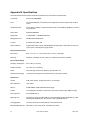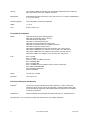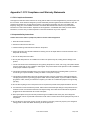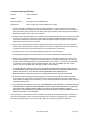
1
1.3.1 LEDs
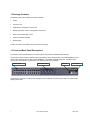
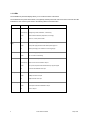
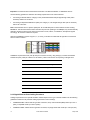
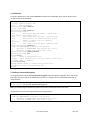
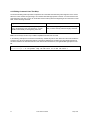
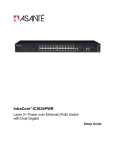
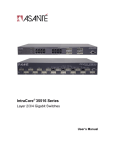
The IC36240 front panel LED display allows you to monitor the status of the switch.
The IC36240 has one power LED indicator, one (optional) external power LED and one fan LED. There are also LED
indicators for each of the 24 ports. Refer to the following table for LED information.
LED
System
Color
Green
Description
Power is on and the system is operating normally.
Green Flashing Flashing during self-test, initialization, or downloading.
External Power
Supply
Fan
Port Status
Amber
Detects hardware malfunction (temperature, fan or voltage).
Off
Power is off, or main power has failed.
Green
External power supply is installed and ready to provide power.
Amber
Internal power supply has failed and the external power supply is on.
Off
External power supply is not installed or is not working properly.
Green
Fans are working properly.
Amber
One or more fan is malfunctioning.
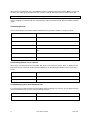
Green
An RJ-45 or SFP link is present; the port is enabled.
Green Flashing Frames are received or transmitted on the port.
Link/Speed
Duplex/Activity
8
Amber
Link is present; the port has been disabled manually or by spanning tree.
Off
No link has been established on the port.
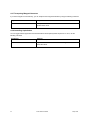
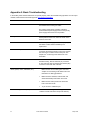
Green
1000Mbps connection on the port.
Amber
100Mbps connection on the port.
Off
10Mbps connection on the port.
Green
A full-duplex link has been established on the port.
Amber
A half-duplex link has been established on the port.
Off
No link on the port.
Asante IntraCore IC36240
Setup Guide