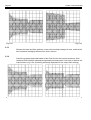
1
CX335 Technical Manual
1
Page 3
"... where angels fear to tread."
OK. It's 6.30pm, and the unit has just been delivered, and the Club opens tonight! Rather
than read the whole manual you can take this short-cut route, but be it on your own head.
Connect the unit into the signal path directly after the system mixing desk or DJ console,
and just before any amplifiers or cross-over.
If your system runs balanced then used balanced XLR leads, with the standard
configuration of:
Pin 2 hot (positive phase); Pin 3 cold (negative phase); Pin 1 ground (screen).
If you are configured 'unbalanced' then we suggest that for all XLR plugs and sockets
connected into the CX335 each Pin 3 should be shorted to Pin 1. Do this, even if you are
in a hurry.
If you are running a mono system you will have to connect input signal to both channels
using some form of 'Y' lead to be able to make any sense of the front panel meter scales
and control graticules.
We have carefully optimised the front panel by removing most of the controls and made
the circuitry 'Programme Dependant'. This wonderful phrase denotes some clever
electronics which are described later in the manual. To simplify setting up the front panel
controls the possible permutations of switches and controls can be grouped into four
'categories', each 'category' having different audio results. The settings for the front panel
can be grouped into the four following 'categories':
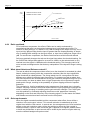
Soft Knee, Fast Time Constants - Ultra transparent Control of Sound Pressure Level
(SPL) and speaker protection.
Hard Knee, Fast Time Constants - Transparent and precise control of signal level and
speaker protection.
Soft Knee, Slow Time Constants - Very transparent control of SPL with more peaks
allowed through unprocessed.
Hard Knee, Slow Time Constants - The least transparent mode of operation to reduce
high level signals but with more peaks passed unprocessed.
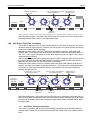
Soft Knee, Fast Time Constants
This is the recommended mode of operation, yielding the most musical results with the
least perceptible manipulation of the audio signal!
0dB
RELEASE
KNEE
HARD
3
2
-15
5
+10
SLOW
-10
-20
THRESHOLD
MAKE EQUAL TO
BYPASS LEVEL
ROTATE UNTIL LED FLASHES
AT DESIRED PEAK OUTPUT
ROTATE UNTIL -15 TO -10dB
BELOW SIGNAL INPUT
10
5
1.5
1.2
RATIO
COMPRESSING
BELOW 10:1
-2
-4
0
15
6
3
20 0
10
8
1.01
20
26
-6
PEAK
4
4
8
8
12 dB 12
GAIN
BYPASS
LIMITING
ABOVE 20:1
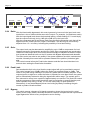
Do not depress the Hard or Slow switches. Set the Threshold to somewhere between
10dB and 15dB LOWER than your average input level and set the Ratio control
somewhere between 5:1 and 10:1, if you require compression of the audio signal, but
20:1 or higher if you require compression and limiting.