1
Installation Instructions for the Following Wilson Electronics Signal Boosters
Direct Connect 800/1900 MHz Smart Technology™ Signal Booster with GPS
Amplification – Model # 2B1401 Part #811200, 811201, 811206, 811207 & 811209
Contains 1575 MHz bypass to allow for GPS reception.
FCC ID: PWO2B1401SA IC: 4726A-2B1401SA
The term “IC” before the radio certification number signifies that Industry Canada technical
specifications were met.
Options and Accessories
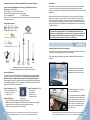
800 MHz Yagi Cellular Antenna (301111)
Lightning Surge
Protector 50 Ohm (859902)
1900 MHz Yagi PCS Antenna (301124)
How it Works
Wilson Electronics Signal Boosters are small, portable, bi-directional devices that deliver
service levels consistent with what would be expected in areas of high cell network
coverage. They amplify a weak or shadowed signal in mobile, M2M, marine and in-building
applications.
When using a Wilson Electronics Signal Booster in conjunction with Wilson Electronics
antennas, the Outside Antenna will collect the cell tower signal and send it through the
cable to the Signal Booster adapter. Cell phones and cellular data cards (laptops) then
communicate with the improved signal. When a cell phone or cellular data card transmits,
the signal is amplified by the Signal Booster and transmitted back to the cell tower through
the Outside Antenna.
In addition to dual-band cellular signal amplification, this Signal Booster
incorporates GPS signal amplification. The amplified GPS signal enhances the
performance of any GPS applications which your phone may support, including the
E-911 emergency location feature if your phone is so equipped. In emergencies,
E-911 enabled phones provide caller location to 911 call centers.
In-Vehicle
800 MHz Yagi Cellular Antenna (301129)
Installing a Wilson Electronics Outside Antenna
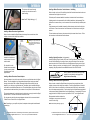
To receive the best cell signal, select a location in the center of the vehicle’s roof at least 12
inches away from any other antennas and free of obstructions.
12v DC
Hardwire
Power Supply
(859905)
Mini
Magnet
(301126)
Magnet
Mount
(301125)
Trucker
Mount
(301101)
Marine
Antenna
(301130)
NMO
Mount
(301104)
Follow the specific antenna installation instructions included with the Outside Antenna (sold
separately).
Appearance of device and accessories may vary.
To purchase call Wilson Electronics Sales Team 800-204-4104
Optional MagnetMount Antenna
Shown
Before Getting Started
The Outside Antenna must be installed
vertically. Signal performance will be
degraded if the antenna is not vertical.
This guide will help you properly install Wilson Electronics Direct Connect Signal Boosters
in both in-vehicle and in-building applications. It is important to read through all of the
installation steps for your particular application prior to installing any equipment.
Read through the instructions, visualize where all the equipment will need to be installed and
do a soft installation before mounting any equipment. Contact Wilson Electronics Technical
Support at 866-294-1660 with any questions.
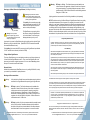
Inside This Package (811201)
• Direct Connect Signal Booster
• DC plug-in power supply
• 6 ‘ extension cable
Direct Connect
Signal Booster
Inside This Package (811200)
• Direct Connect
Signal Booster
• AC power supply
• 6” extension cable
Additional Equipment
• Outside Antenna for in-vehicle or in-building use (required)
Note: specifically tuned iDEN antennas available, Signal Booster will not work with iDen
• Cell phone or data card-specific external antenna adapter (required)
• AC/DC power supply (required for in-building use)
1
Contact Wilson Electronics’s Technical Support Team with any questions at 866-294-1660
Or email: [email protected] Hours: 7am to 6 pm mountain standard time.
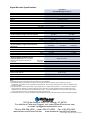
Carefully
Pull Down
Door Seal
Run Cable
Under
Seal
The antenna cable may run through the
door to the Signal Booster.
For a more professional looking installation,
run the antenna cable under the door seal.
Carefully pull down the door seal. Run the
cable through the seal and push the seal
back into place. This prevents constant
wear and tear on the cable as the door
opens and closes.
Contact Wilson Electronics’s Technical Support Team with any questions at 866-294-1660
Or email: [email protected] Hours: 7am to 6 pm mountain standard time.
2