1
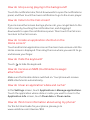
Sharing your phone’s data connection as
a portable Wi-Fi hotspot
By setting your phone as a Wi-Fi hotspot you can wirelessly connect
nearby PCs, laptops or other Wi-Fi devices to the internet, using your
phone's data connection. However, you need to make sure that you
are on a phone tariff that supports data sharing.
> Settings.
1
Touch
2
3
Touch Wireless & networks > Tethering & portable hotspot.
Select the Portable Wi-Fi hotspot check box to share your data
connection.
Turn the camera on
•
•
Touch
> Camera to open the camera. The camera opens in
landscape mode, ready to take a picture or record a video.
Touch
to close the camera application.
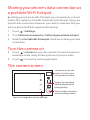
The camera screen
Thumbnail of the last
photo. Touch to view
your photos or videos.
Drag up for recording
videos, drag down for
taking photos.
Touch to take a photo or
start recording a video.
Touch to change the camera settings.