1
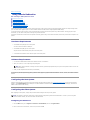
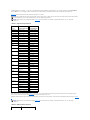
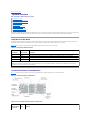
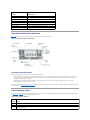
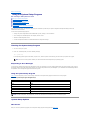
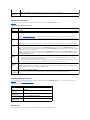
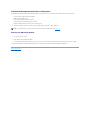
 Figure 3-1. Main System Setup Program Screen
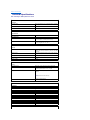
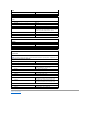
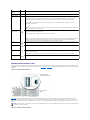
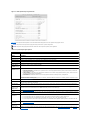
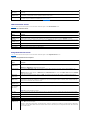
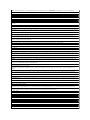
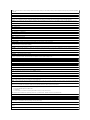
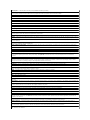
Table 3-2 lists the options and descriptions for the information fields that appear on the main System Setup program screen.
NOTE: The options for the System Setup program change based on the system configuration.
NOTE: The System Setup program defaults are listed under their respective options, where applicable.
Table 3-2. System Setup Program Options Option
Description
System Time
Resets the time on the system's internal clock.
System Date
Resets the date on the system's internal calendar.
Diskette Drive A:
Displays a screen that allows you to select the type of diskette drive for your system.
System Memory
Displays the amount of system memory. This option does not have user-selectable settings.
Video Memory
Displays the amount of video memory. This option does not have user-selectable settings.
System Memory
Testing
(Enabled default)
Determines if memory is being tested during POST.
Redundant Memory Displays Disabled if none of the requirements for the other option settings are met. The following options are available as follows:
(Disabled default)
l
l
l
Spare Bank Enabled is selectable if your system has one or more fully populated memory risers, and the memory modules are
identical within each riser.
Mirror Enabled is selectable if your configuration contains an even number of fully populated memory risers, and the risers of a
pair have matching memory configurations.
RAID Enabled is selectable if all four risers are fully populated and have matching memory configurations.
For more information on memory configurations, see "Memory Module Installation Guidelines" in "Installing System Components" in the
Installation and Troubleshooting Guide.
CPU Information
See "CPU Information Screen."
Boot Sequence
Determines the order in which the system searches for boot devices during system startup. Available options can include the diskette
drive, CD drive, hard drives, and network.
Hard-Disk Drive
Sequence
Determines the order in which the system searches the hard drives during system startup. The selections depend on the hard drives
installed in your system.
USB Flash Drive
Emulation Type
(Auto default)
Determines the emulation type for a USB flash drive. Hard disk allows the USB flash drive to act as a hard drive. Floppy allows the USB
flash drive to act as a removal diskette drive. Auto automatically chooses an emulation type.
Integrated Devices
See "Integrated Devices Screen."
PCI IRQ
Assignment
Displays a screen to change the IRQ assigned to each of the integrated devices on the PCI bus, and any installed expansion cards that
require an IRQ.
PCI Slot
Information
Displays the following information for each PCI-X and PCIe bus slot:
l
l
l
For occupied PCI-X slots, the operating frequency, the mode of the slot (PCI or PCI-X), and the device type
For occupied PCIe slots, the bandwidth, the link width of the slot (x1, x4, or x8), and the device type
For unoccupied slots, the maximum operating frequency or bandwidth and the capable operating mode or link width of the slot
Console
Redirection
See "Console Redirection Screen."
Embedded Server
Management
Enables you to customize the front-panel ESM LCD messages or choose the default message setting.
System Security
Displays a screen to configure the system password and setup password features. See "Using the System Password" and "Using the
Setup Password" for more information.