1
Operation
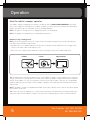
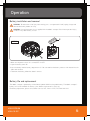
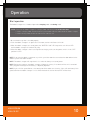
Installing the dusting sheet for use in dusting mode
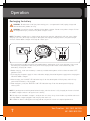
WARNING: to reduce the risk of injury from moving parts – turn power off (0=off) and unplug charger
before installation and removal/replacement.
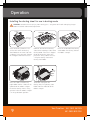
Stoppers
Fold back
4
Recess for
the stopper
Dusting sheet
Place the dusting sheet on a flat
surface then centre the dusting
sheet holder on the sheet (side with
4 stoppers facing upwards). Remove
the 4 stoppers from their recesses.
Press 6
3
Press
5 Press
2 Press
1
Fold back
Fold back the hem of the dusting
sheet on the two longest sides to the
dusting holder. Place the 4 stoppers
on top of the dusting sheet, then
press them firmly into the recesses
- fixing the dusting sheet to the
dusting sheet holder.
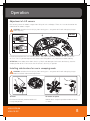
Place this underside of the dusting
sheet holder with dusting sheet on
the robotic sweeper.
2 Lift up
1
Push to
the left
Press the 2 bolts of the dusting
paper holder into the 2 holes on the
underside of the robotic sweeper.
Ensure the dusting sheet is facing
upwards (when the robotic sweeper
is in the upside down position).
9
To remove and replace the
dusting sheet, lift up dusting sheet
holder from the underside of the
robotic sweeper.
Vax Careline: AU: 1300 361 505
NZ: 0800 800 900
vax
vax