1
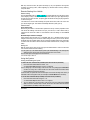
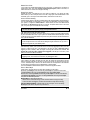
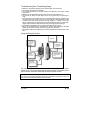
a. Press the
button to increase the value or
to activate or deactivate a function or to toggle
through the melodies.
c. To save modifications, do not touch any
buttons for approx 5 to 10 seconds.
There will be a beep and the display will
return to the time.
b. Press the
to decrease the value or to
activate or deactivate a function or to toggle
through the melodies.
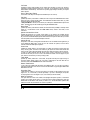
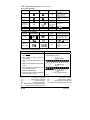
Cold Weather Mode
Function
Button pressed
Icon
until beep
To enter cold
weather mode
To exit cold
weather mode
Sound
1 Beep
for 3sec
1 Beep
until beep
1 Beep
for 3sec
none
Instructions /description
Press
until beep and then
press and hold for 3
seconds.
Press
until beep and then
press and hold for 3
seconds.
none
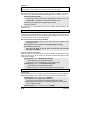
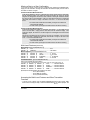
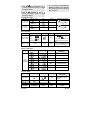
Home ValetTM
FUNCTION
BY PRESSING
ICON
NONE
INSTRUCTIONS / DESCRIPTION
; within 5 seconds,
press +
:
The remote control will display the
Press
or
Step 1 :
TO ENTER HOME
VALET ™ MODE Step 2 :
+
simultaneously within 5 sec.
TO EXIT HOME
VALET ™ MODE
BUZZER
1 BEEP
NONE
NONE
or
icon and you will hear 1 beep.
Insert the key in the ignition switch
and turn it to the IGNITION ON / RUN
position. The icon will disappear.
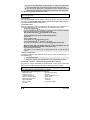
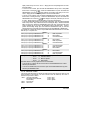
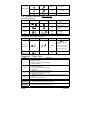
Parking Count Down
FUNCTION
BUZZER
INSTRUCTIONS /
DESCRIPTION
Melody
10 MIN COUNT DOWN
2 times
Melody
20 MIN COUNT DOWN
+ 3 times
Melody
30 MIN COUNT DOWN
+ 4 times
Melody
60 MIN COUNT DOWN
+ 5 times
Melody
90 MIN COUNT DOWN
+ 6 times
Melody
120 MIN COUNT DOWN
+ 7 times
Melody
PARKING COUNT DOWN OFF
BY PRESSING
ICON
+ 1 time
+
FOR
PARKING
COUNTDOWN:
Safe Start Mode
FUNCTION
START ON SAFE
START MODE
BY PRESSING
X2
STOP ON SAFE
START MODE
ICON
+
None
BUZZER
Melody
INSTRUCTIONS /
DESCRIPTION
Press the button for 1 second
(melody) then press again for
1 second.
Melody
*Runtime (Cannot be programmed. Serves as indication only.)
FUNCTION
User Guide
BY PRESSING
ICON
GAS
DIESEL
P. 13