1
With many advanced functions, this product will satisfy any one your expectations from high-end
commodity and security systems, without neglecting any standard feature commonly offered by
entry-level starters.
Remote-Starting Your Vehicle
Remote-starting
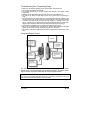
Press the START/STOP button for approx. 1 second. The parking lights will come ON and the remote
control will play a melody to inform you that the System has received your signal. Approximately 5
seconds later, the engine will start. The parking lights will remain ON during the pre-programmed
run time of the engine.
If the vehicle does not start at the first attempt, the system will shut down, wait a few seconds and
try to start the engine again. There will be 3 start attempts before the system gives up.
Vehicle Presets
Heater & Heated Seat
When leaving the vehicle it is recommended to preset the accessory controls in preparation for the
next remote start. Settings for the blower motor (fan), front and rear, as well as heated seats (if
equipped) should not be left on HIGH. It is recommended to leave the settings on LOW or MEDIUM
instead.
Windshield Wipers & Radio & Headlights
Certain vehicles require the radio and / or windshield wiper and / or headlight circuits to become
energized while running under remote start. When leaving the vehicle you must ensure that the
windshield wiper and headlight switches are OFF. Leaving the headlight switch ON on certain types
of vehicles could cause them to remain ON even after remote starter shut down, resulting in a dead
battery.
Driving Off
With the vehicle running under remote control, press the UNLOCK button to disarm and unlock the
doors. Enter the vehicle and do the following:
Turn the ignition key to the IGNITION ON (RUN) position. (Do not turn the key to the CRANK position
while the engine is running. This would cause the starter motor to re-engage.)
Press the brake pedal to disengage the remote starter unit.
You are now ready to drive off.
Using the System
Arming and Disarming the System
To disarm the alarm and Starter Kill (if installed) and unlock the doors (if installed):
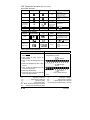
1. Press and hold the UNLOCK button for approx. 1 sec.
You will hear two chirps if the Siren or Horn is so configured.
The icon will light up on the LCD display of the remote control. The parking lights will flash twice
and the L.E.D. will go out to confirm that the doors have been unlocked and that the Starter
Kill (if installed) and the alarm are disarmed.
In Passive Mode, the System will rearm automatically 30 seconds after unlocking unless the key is
meanwhile inserted in the ignition switch (see description of Passive Mode later in this Guide).
To arm the alarm and Starter Kill (if installed) and lock the doors (if installed):
1. Press and hold the LOCK button for approx. 1 sec.
You will hear one chirp if the Siren or Horn is so configured.
2. The icon will light up on the LCD display of the remote control. The parking lights will flash
once and the L.E.D. will flash slowly to confirm that the doors have been locked and that the
Starter Kill feature (if installed) and the alarm are armed.
User Guide
P. 3